
Yes! You can use AI to fill out Fidelity Charitable Letter of Authorization
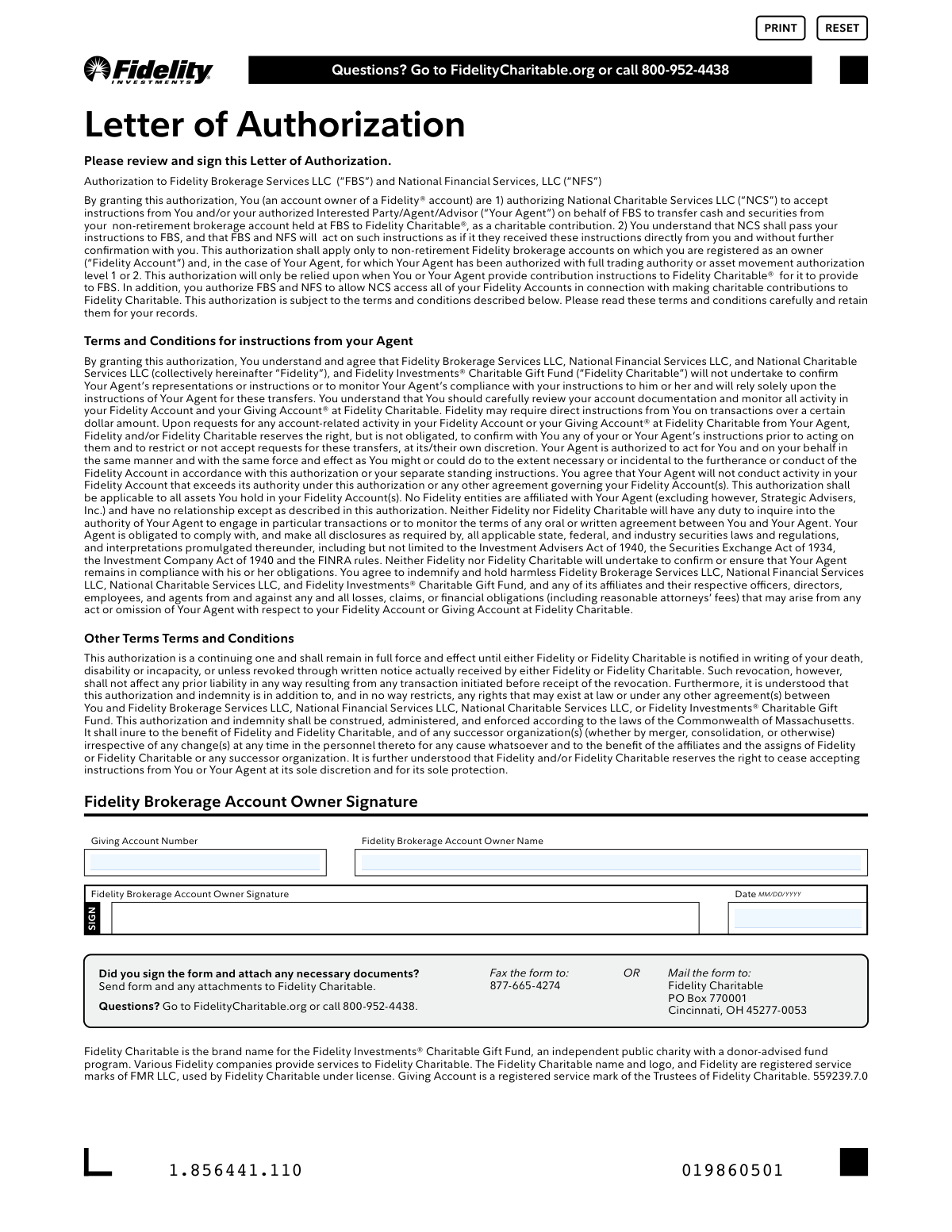
Don't type 5 fields by hand. Tell our AI about yourself, or upload a document you already have, and it fills every field in seconds. You check it, then download, print or sign.
The AI does the filling. You just check it.
No typing into boxes, nothing to install.
What this form asks for
The AI fills all of it, from your answers or your documents.
The AI checks your answers before you download
15 checks built for this form, so a wrong date or a missing answer is caught before anyone else sees it.
Validates that the Giving Account Number field is not left blank before submission. The Giving Account Number is essential for Fidelity Charitable to correctly associate the authorization with the donor's specific Giving Account. Without this number, the authorization cannot be processed and contributions cannot be directed to the correct account.
Ensures the Giving Account Number conforms to the expected Fidelity Charitable account number format, typically a numeric sequence of a specific length (e.g., 9–12 digits). Alphanumeric characters, special symbols, or incorrect digit counts should trigger a validation error. An incorrectly formatted account number could result in the authorization being linked to the wrong account or rejected entirely.
Validates that the Date field is not left blank, as the date of signing is a legally required element of the Letter of Authorization. The date establishes when the authorization became effective and is critical for determining the timeline of any transactions or revocations. A missing date renders the authorization legally incomplete and may cause it to be rejected by Fidelity Charitable.
Ensures the date entered in the Date field strictly follows the MM/DD/YYYY format as indicated on the form. Entries such as single-digit months or days without leading zeros, two-digit years, or non-numeric separators should be flagged as invalid. Incorrect date formatting can cause processing errors and may make it difficult to establish the legal effective date of the authorization.
Verifies that the date entered is a valid calendar date — for example, that the month value is between 01 and 12, the day value is appropriate for the given month (including leap year logic for February), and the year is not in the future or unreasonably far in the past. An illogical date such as 02/30/2024 or a future date would indicate a data entry error and could invalidate the authorization.
Checks that the signing date provided is not a date in the future, as a Letter of Authorization must be signed on or before the date of submission. A future date would suggest the form has not yet been legitimately executed and could raise legal and compliance concerns. The system should flag any date beyond the current calendar date as invalid.
And 9 more checks
- Account Owner Name Presence Check
- Account Owner Name Contains Full Name (First and Last)
- Account Owner Name Character Validity Check
- Account Owner Name Does Not Contain Account Numbers or Codes
- Giving Account Number Does Not Match Account Owner Name Field
- Signature Field Completion Check
- No Fields Contain Placeholder or Default Text
- Date Is Not Older Than a Reasonable Threshold
- All Required Fields Completed Before Submission
Let AI fill out your Fidelity Charitable LOA
No typing. Every field filled in seconds, checked, ready to sign.
How to Fill Out Fidelity Charitable LOA Online for Free in 2026
What the AI walks you through.
- Navigate to Instafill.ai and upload the Fidelity Charitable Letter of Authorization PDF or select it from the available form library.
- Enter your Giving Account Number in the designated field to link the authorization to your Fidelity Charitable Giving Account.
- Provide your Fidelity Brokerage Account Owner Name in the appropriate field as it appears on your account.
- Carefully review the terms and conditions outlined in the Letter of Authorization, including the Agent authorization terms and indemnification clauses.
- Enter the current date in MM/DD/YYYY format in the Date field.
- Sign the form in the Fidelity Brokerage Account Owner Signature field to authorize the transfer of assets.
- Submit the completed form by faxing it to 877-665-4274 or mailing it to Fidelity Charitable, PO Box 770001, Cincinnati, OH 45277-0053.
Common Mistakes in Completing Fidelity Charitable LOA
The ones the AI is built to catch.
Leaving the Giving Account Number blank or entering it incorrectly
Signing with an illegible or informal signature
Entering the date in the wrong format
Entering a name that does not match the account registration
Attempting to authorize a retirement account instead of a non-retirement account
Failing to read and understand the Agent authorization terms before signing
Not retaining a copy of the signed form for personal records
Sending the form to the wrong fax number or mailing address
Submitting the form without any required supporting documents
Misunderstanding the continuing nature of the authorization and not revoking it when needed
Using the Print or Reset buttons incorrectly before saving the completed form
Entering the wrong account owner name when multiple Fidelity accounts exist
Frequently Asked Questions About Fidelity Charitable LOA
Is it really free for 7 days?
Can I fill other forms too?
How do I cancel?
How does the AI fill out Fidelity Charitable LOA?
What happens to my information?
How complex is Fidelity Charitable LOA to fill out?
What is the Fidelity Charitable Letter of Authorization and what is it used for?
Who needs to fill out this Letter of Authorization?
What information is required to complete this form?
Can this authorization be used for retirement accounts?
What authority does my Agent (financial advisor) have under this authorization?
Will Fidelity monitor my Agent's activity or confirm their instructions?
How long does this authorization remain in effect?
How do I revoke this Letter of Authorization?
How do I submit the completed Letter of Authorization?
Where can I get help if I have questions about this form?
Can I use AI tools like Instafill.ai to help fill out this form?
How can I fill out this form online using Instafill.ai?
What if the PDF version of this form is not fillable?
Am I liable for my Agent's actions under this authorization?
Which laws govern this Letter of Authorization?
Get your Fidelity Charitable LOA filled out by AI
$0 today. Cancel before Nov 1 and you pay nothing.
Other forms like this one
authorization forms: Form I-765, Application for Employment Authorization, Form CMS-588, EFT Authorization Agreement, Form 8821, Tax Information Authorization, Form 8879, IRS e-file Signature Authorization, Form SSA-827, Authorization to Disclose Information, Form I-905, Application for Authorization to Issue Certification for Health Care Workers, Form G-1650, Authorization for ACH Transactions, Arizona Form 285, General Disclosure/Representation Authorization Form, Arizona Form 285-I, Individual Income Tax Disclosure/Representation Authorization Form, The Department of Medical Assistance Services Applied Behavior Analysis Preservice Service Authorization Request Form (Effective Dates of Service 09/01/2025 and after), Form CH-006: PA-BH-Res-PCS, Oregon Behavioral Health Support Program Plan of Care Authorization (Plan of Care Request for Behavioral Health Residential or Personal Care Services), Continental American Insurance Company (CAIC) / Aflac Group Critical Illness Claim Form (with Attending Physician’s Statement, HIPAA Authorization to Obtain Information, and Electronic Funds Transaction Authorization), HIPAA Authorization Form, Authorization for the Release of Protected Health Information, Form G-1450, Authorization for Credit Card Transactions, Prior Authorization (PA) Request Form – Adult Palliative Care (Alameda Alliance for Health), Alameda Alliance for Health Prior Authorization (PA) Request Form – Adult Palliative Care, Manulife Group Benefits Drug Prior Authorization Form – Mounjaro (Tirzepatide) (GL5197E), Manulife Group Benefits Drug Prior Authorization Form (Ozempic/Semaglutide) – GL5197E, Out-of-Network Pre-Authorization and Exception Request Form, Form SSA-827 (06-2024), Authorization to Disclose Information to the Social Security Administration (SSA)
charitable forms: Contribute to a Charitable Gift Account, Form 8283, Noncash Charitable Contributions, Form 501A, Fantasy Contest Operator Personal Information Form (Commonwealth of Virginia, VDACS Office of Charitable & Regulatory Programs), Fidelity Charitable 144/145 Contribution Form, Transfer of Assets Out - Partial Account or Charitable Gift Transfers, Schwab Charitable Fund Transfer of Assets, Charles Schwab Charitable Gift Donation - Letter Of Authorization for DTC Transfer, Sample IRA Distribution Letter for a Qualified Charitable Distribution (QCD), Charles Schwab Charitable Gift Transfer Letter of Authorization, Make a contribution - Vanguard Charitable, IRA Distribution to Charitable Beneficiary, IRA Distribution to Charitable Beneficiary, Fidelity Charitable Contribution Form, Fidelity Charitable Irrevocable Contribution Form and Letter of Instruction, Request for a Qualified Charitable Distribution (QCD) from a Brokerage Individual Retirement Account (IRA), Request for qualified charitable distribution from individual retirement account, Request for a Charitable Distribution from an Individual Retirement Account (IRA), Merrill Lynch One-Time Qualified Charitable Distribution, Individual Retirement Account (IRA) — Qualified Charitable Distribution Form, Fidelity Charitable Investment Advisor Program Application
Fidelity forms: Fidelity Funds Account Transfer of Assets Form, Fidelity Stock Plan Services (SPS) Transfer Request Form, How to Transfer Assets from Morgan Stanley to Fidelity Investments (Fidelity Stock Plan Services Guide), Fidelity Investments Transfer/Rollover/Exchange Form, Fidelity Investments Standing Transfer Instructions Form, Fidelity Charitable 144/145 Contribution Form, One-Time Withdrawal – IRA, Fidelity Investments, Fidelity Investments Transfer/Rollover Form, Fidelity Advisor 403(b) Distribution Request Form, Fidelity Advisor IRA Distribution Request for Automatic Rollover Accounts, Special Tax Notice: Your Rollover Options - Fidelity Investments, Fidelity Advisor Trading Authorization and Indemnification, Fidelity Investment-Only (Non-Prototype) Retirement Account Application, Fidelity NetBenefits Send a Document Form, Fidelity NetBenefits Auditor's Guide: An Overview of Fidelity's 2024 Plan Year Reporting Package, Fidelity NetBenefits Distribution - Recurring Payments, Fidelity Investments® Beneficiary Distribution Form, Fidelity Investments Distribution Form, Fidelity One-Time Withdrawal Form — Nonretirement, Fidelity Investments Withdrawal — One-Time
Fidelity Charitable forms: Fidelity Charitable 144/145 Contribution Form, Fidelity Charitable Contribution Form, Fidelity Charitable Irrevocable Contribution Form and Letter of Instruction, Fidelity Charitable Investment Advisor Program Application, Irrevocable Contribution Form and Letter of Instruction
Let AI fill out your Fidelity Charitable LOA
Your trial starts once a card is added. You pay nothing before Nov 1.
Our AI already knows this form, all 5 fields of it. Skip the typing: tell it about yourself, or upload what you have, and it fills the whole form in seconds.
- AI fills every field on the form, checkboxes included
- No typing into boxes: answer a few questions, or upload a document you already have, an old copy of this form, a photo of a document
- The AI checks the answers; you review and change anything before you download
- Download the finished PDF, print it, or sign it online
- Encrypted, and never used to train AI
Cancel before Nov 1 and you pay nothing.
A card is needed to start the trial. Cancel in two clicks from your account.
Terms · Privacy