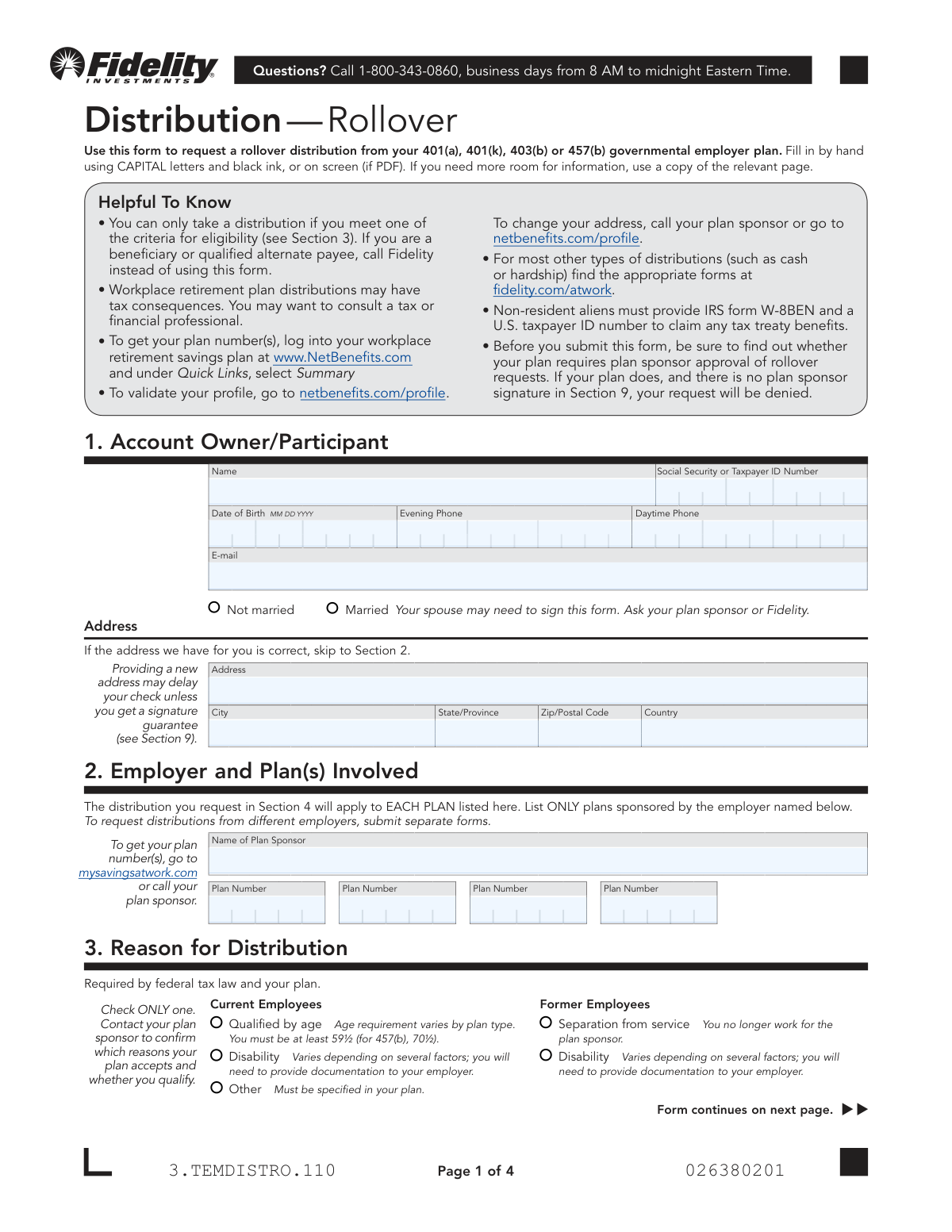
Yes! You can use AI to fill out Fidelity Distribution—Rollover Request Form
This form is used by an account owner to request a rollover of funds from their Fidelity-managed workplace retirement plan, such as a 401(k) or 403(b), to another eligible retirement account like an IRA or a new employer's plan. It allows the participant to specify the amount, asset types, and destination for the rollover, while also addressing tax withholding and delivery options. Today, this form can be filled out quickly and accurately using AI-powered services like Instafill.ai, which can also convert non-fillable PDF versions into interactive fillable forms.
Our AI automatically handles information lookup, data retrieval, formatting, and form filling.
It takes less than a minute to fill out 3.TEMDISTRO.110 using our AI form filling.
Securely upload your data. Information is encrypted in transit and deleted immediately after the form is filled out.
Form specifications
| Form name: | Fidelity Distribution—Rollover Request Form |
| Number of pages: | 4 |
| Language: | English |
Instafill Demo: How to fill out PDF forms in seconds with AI
How to Fill Out 3.TEMDISTRO.110 Online for Free in 2026
Are you looking to fill out a 3.TEMDISTRO.110 form online quickly and accurately? Instafill.ai offers the #1 AI-powered PDF filling software of 2026, allowing you to complete your 3.TEMDISTRO.110 form in just 37 seconds or less.
Follow these steps to fill out your 3.TEMDISTRO.110 form online using Instafill.ai:
- 1 Navigate to Instafill.ai and upload or select the Fidelity Distribution—Rollover Request Form.
- 2 Provide your personal information in Section 1, including your name, Social Security Number, date of birth, and contact details.
- 3 Enter your employer and plan information in Section 2, listing the plan sponsor and all relevant plan numbers.
- 4 In Section 3, select your reason for the distribution, such as separation from service or reaching a qualifying age.
- 5 Complete Section 4 to specify the rollover details, indicating whether you are moving all or some assets and defining the destination accounts for pre-tax and Roth funds.
- 6 Indicate your tax withholding preferences in Section 5 and choose a check delivery method in Section 6.
- 7 Review all entered information for accuracy, then provide your digital signature in Section 8. If required, obtain spousal consent (Section 7) or plan sponsor approval (Section 9) before submitting.
Our AI-powered system ensures each field is filled out correctly, reducing errors and saving you time.
Why Choose Instafill.ai for Your Fillable 3.TEMDISTRO.110 Form?
Speed
Complete your 3.TEMDISTRO.110 in as little as 37 seconds.
Up-to-Date
Always use the latest 2026 3.TEMDISTRO.110 form version.
Cost-effective
No need to hire expensive lawyers.
Accuracy
Our AI performs 10 compliance checks to ensure your form is error-free.
Security
Your personal information is protected with bank-level encryption.
Frequently Asked Questions About Form 3.TEMDISTRO.110
This form is used to request a rollover distribution from your 401(a), 401(k), 403(b), or 457(b) governmental employer plan into another retirement account, such as an IRA or a new employer's plan.
This form should not be used by beneficiaries or qualified alternate payees. If you are in one of those categories, you should call Fidelity directly at 1-800-343-0860 for instructions.
You can find your plan number by logging into your account at NetBenefits.com and looking under the 'Quick Links' section. Alternatively, you can contact your plan sponsor for this information.
In Section 3, you must select a valid reason for distribution, such as separation from service or reaching age 59½. You should contact your plan sponsor to confirm which reasons your plan accepts and whether you qualify.
A direct rollover to another qualified retirement account is typically not a taxable event. However, any amount paid directly to you by check is subject to a mandatory 20% federal tax withholding.
If spousal consent is required, your spouse must sign Section 7 in the presence of a notary public or a plan representative. A signature guarantee is not the same as a notary seal and cannot be substituted.
Some plans require approval from the plan sponsor in Section 9, even if you are no longer an employee. You must check with your plan sponsor or Fidelity to determine if this signature is required for your request.
A signature guarantee is needed if your distribution is over $100,000, is not going to a Fidelity account, and your plan does not require a plan sponsor signature. You can obtain one from most banks or financial institutions.
You can submit the entire form digitally using the NetBenefits® Mobile App. Alternatively, you can mail the completed form to the Fidelity P.O. Box or overnight address listed in the instructions.
If you are receiving a check, allow 7 business days for standard mail delivery after your request is approved. You can also pay a $25 fee for 2-day UPS delivery.
Yes, services like Instafill.ai use AI to help you accurately auto-fill form fields, which can save time and reduce the chance of errors.
You can use a service like Instafill.ai to fill out the form on your computer. Simply upload the PDF, and the tool will make the fields interactive so you can type in your information before printing.
If you have a non-fillable or 'flat' PDF, you can upload it to Instafill.ai. The service can convert the document into an interactive, fillable form that you can complete online.
These are different types of contributions in your retirement account with different tax treatments. The form specifies where each type can be rolled over; for example, Roth assets can only be rolled into a Roth IRA or another employer's Roth plan.
Compliance 3.TEMDISTRO.110
Validation Checks by Instafill.ai
1
Validates Social Security Number Format
This check ensures that the Social Security or Taxpayer ID Number in Section 1 is a valid 9-digit number. This is critical for identity verification and for correct tax reporting to the IRS. If the number is missing, incomplete, or in an incorrect format, the distribution request cannot be processed and will be rejected.
2
Ensures Date of Birth is a Valid and Plausible Date
This validation confirms that the Date of Birth in Section 1 is in a valid MM DD YYYY format and represents a logical date (e.g., not in the future). This date is essential for determining eligibility for certain distribution reasons, such as being 'Qualified by age' (59½ or older). An invalid or illogical date will prevent eligibility verification and cause the form to be rejected.
3
Exclusive Marital Status Selection
This check verifies that the participant has selected one and only one option in the marital status portion of Section 1 ('Married' or 'Not married'). This information is crucial because it determines if spousal consent is potentially required in Section 7. Failure to select exactly one option creates ambiguity and will halt the processing of the form until clarified.
4
Requires at Least One Plan Number
This validation ensures that at least one Plan Number field is filled out in Section 2, in addition to the Plan Sponsor Name. A distribution cannot be processed without knowing which specific plan(s) to pull the funds from. If no plan number is provided, the request is incomplete and will be denied.
5
Single Reason for Distribution Selection
This check confirms that only one box is checked in Section 3, 'Reason for Distribution,' as explicitly instructed on the form. Federal tax law and plan rules require a single, specific reason to determine eligibility and proper tax treatment. Selecting multiple or no reasons will result in the rejection of the request due to non-compliance.
6
Age-Based Distribution Eligibility Check
This is a logical cross-check between Section 1 and Section 3. If the participant selects 'Qualified by age' as the reason for distribution, this validation verifies that their Date of Birth from Section 1 confirms they meet the minimum age requirement (e.g., 59½). This check prevents distributions to individuals who do not meet the specific age criteria for this reason. If the age requirement is not met, the request will be denied.
7
Mutually Exclusive Rollover Amount Selection
This validation ensures that the user has provided instructions in either the 'Move ALL Plan Assets' section OR the 'Move SOME Plan Assets' section in Section 4, but not both. Providing conflicting instructions in both sections makes the request ambiguous and impossible to execute accurately. The form will be returned for clarification if both sections are completed.
8
Prohibits Invalid Roth Rollover Destination
This check enforces the rule that Roth assets cannot be rolled into a standard 'Rollover IRA'. If the user indicates a rollover of Roth assets in Section 4, this validation ensures the selected destination is a 'Roth IRA' or an 'Employer-sponsored plan'. This is critical to prevent an invalid transaction with significant tax implications, and a failure will cause the request to be rejected.
9
State-Specific Minimum Withholding Amount
This validation applies if the participant is a resident of NY, NM, NJ, ND, PA, or RI and opts to withhold a specific dollar amount for state taxes in Section 5. The check ensures the entered amount is $10 or greater, as specified by the form's instructions. Entering an amount less than the minimum will result in the withholding being rejected or defaulted to zero.
10
Conditional Spousal Consent Completion
This check is triggered if the participant is marked as 'Married' in Section 1 and the specific plan requires spousal consent. It verifies that Section 7, 'Spouse’s Consent,' is fully and correctly completed, including the spouse's signature, date, and a valid notarization or plan representative witness. Missing or incomplete spousal consent, when required, legally invalidates the distribution request, leading to its denial.
11
Participant Signature and Date Presence
This is a fundamental check to ensure the account owner has signed and dated the form in Section 8. The signature legally authorizes Fidelity to act on the instructions and certifies the provided information is correct. A missing signature or date renders the form invalid and it will be immediately rejected.
12
Separation Date Chronological Validation
This validation checks that the 'Separation Date' in Section 9, if provided, is on or after the 'Participant's Date of Hire'. A separation date that occurs before the hire date is a logical impossibility and indicates a data entry error. This check ensures the integrity of the employment data used to verify eligibility for former employees, and a failure would require correction before processing.
13
Partial Rollover Percentage Range
This check validates that if a user opts to rollover a percentage of assets in Section 4, the entered value is a valid number between 0 and 100. This ensures the instruction is clear and mathematically possible to execute. An invalid character or a number outside this range would make the request ambiguous and lead to rejection.
14
Completeness of New Address Information
This validation is triggered if the user provides any information in the new address fields in Section 1. It ensures that all related fields (Address, City, State/Province, Zip/Postal Code, Country) are completed. An incomplete address will prevent the successful delivery of checks or correspondence, so the form will be held until a full, valid address is provided.
Common Mistakes in Completing 3.TEMDISTRO.110
Forgetting to sign the form in Section 8 is a frequent error that invalidates the entire request. Additionally, if married, failing to obtain a spouse's notarized signature in Section 7 when required by the plan will lead to rejection. Similarly, neglecting to get a plan sponsor's approval signature in Section 9, if mandated by the plan, will result in an automatic denial of the distribution.
This form may require two different types of signature verifications that are not interchangeable. A notary seal is needed for the spousal consent in Section 7, while a Medallion Signature Guarantee may be required in Section 8 for the participant, especially for large distributions. Submitting a notarization when a signature guarantee is needed, or vice-versa, will cause the form to be rejected and require resubmission.
Section 4 is complex and prone to errors, such as selecting an invalid destination like rolling Roth assets into a traditional Rollover IRA. People also frequently forget to provide the full name of the receiving investment provider or the destination account number. These omissions or errors make it impossible for Fidelity to process the transfer, leading to delays and rejection of the request.
In Section 3, applicants often select a reason for distribution, such as 'Separation from service' or 'Qualified by age', without first confirming their eligibility with their plan sponsor. Each plan has specific rules, and selecting a reason for which you do not qualify will cause your request to be denied. It is crucial to verify your status and the plan's accepted reasons before submitting the form.
The instructions in Section 2 clearly state that this form should only be used for plans sponsored by a single employer. A common mistake is to list plan numbers from different employers in an attempt to consolidate requests. This will lead to processing errors or outright rejection, as a separate form is required for each employer.
Applicants sometimes guess, leave blank, or write down incorrect plan numbers in Section 2. Without the correct plan number(s), Fidelity cannot identify the specific account(s) from which to process the distribution. This fundamental error will halt the request until the correct information is provided, causing significant delays.
In Section 4, applicants may mistakenly provide instructions in both the 'Move ALL Plan Assets' and 'Move SOME Plan Assets' subsections. This creates conflicting and ambiguous directions for how the funds should be handled. To avoid rejection, you must choose only one path and fill out the corresponding fields completely and accurately.
Tax withholding rules in Section 5 are complex and vary by state, a detail many people overlook. For example, residents of states like NY or PA must specify a dollar amount for withholding, and simply checking a box for the 'applicable rate' will result in no state tax being withheld. This can lead to an unexpected tax bill and potential underpayment penalties at the end of the year.
The form warns in Section 1 that providing a new address may delay the check unless a signature guarantee is obtained. Many people miss this note, update their address, and fail to get the guarantee, resulting in processing delays. To prevent this, either ensure your address is correct on file before starting or be prepared to get a signature guarantee if you update it on the form.
This form is specifically for rollover distributions from certain employer plans. Beneficiaries, qualified alternate payees, or those requesting other distribution types like cash or hardship withdrawals often use this form by mistake. Using the incorrect form for your situation will result in an automatic denial, wasting time and effort. AI-powered tools like Instafill.ai can help ensure you are using the correct form for your specific needs.
The instructions specify filling out the form by hand with black ink and in capital letters. Submitting a form with illegible handwriting, or using a different color ink like blue, can cause scanning errors or lead to rejection by the processing department. To avoid this, type directly into the PDF if possible, or write very clearly. Tools like Instafill.ai can convert flat PDFs into fillable versions and populate them with clean, typed text to prevent this issue.
Saved over 80 hours a year
“I was never sure if my IRS forms like W-9 were filled correctly. Now, I can complete the forms accurately without any external help.”
Kevin Martin Green
Your data stays secure with advanced protection from Instafill and our subprocessors

Robust compliance program
Transparent business model
You’re not the product. You always know where your data is and what it is processed for.
ISO 27001, HIPAA, and GDPR
Our subprocesses adhere to multiple compliance standards, including but not limited to ISO 27001, HIPAA, and GDPR.
Security & privacy by design
We consider security and privacy from the initial design phase of any new service or functionality. It’s not an afterthought, it’s built-in, including support for two-factor authentication (2FA) to further protect your account.
Fill out 3.TEMDISTRO.110 with Instafill.ai
Worried about filling PDFs wrong? Instafill securely fills fidelity-distributionrollover-request-form forms, ensuring each field is accurate.