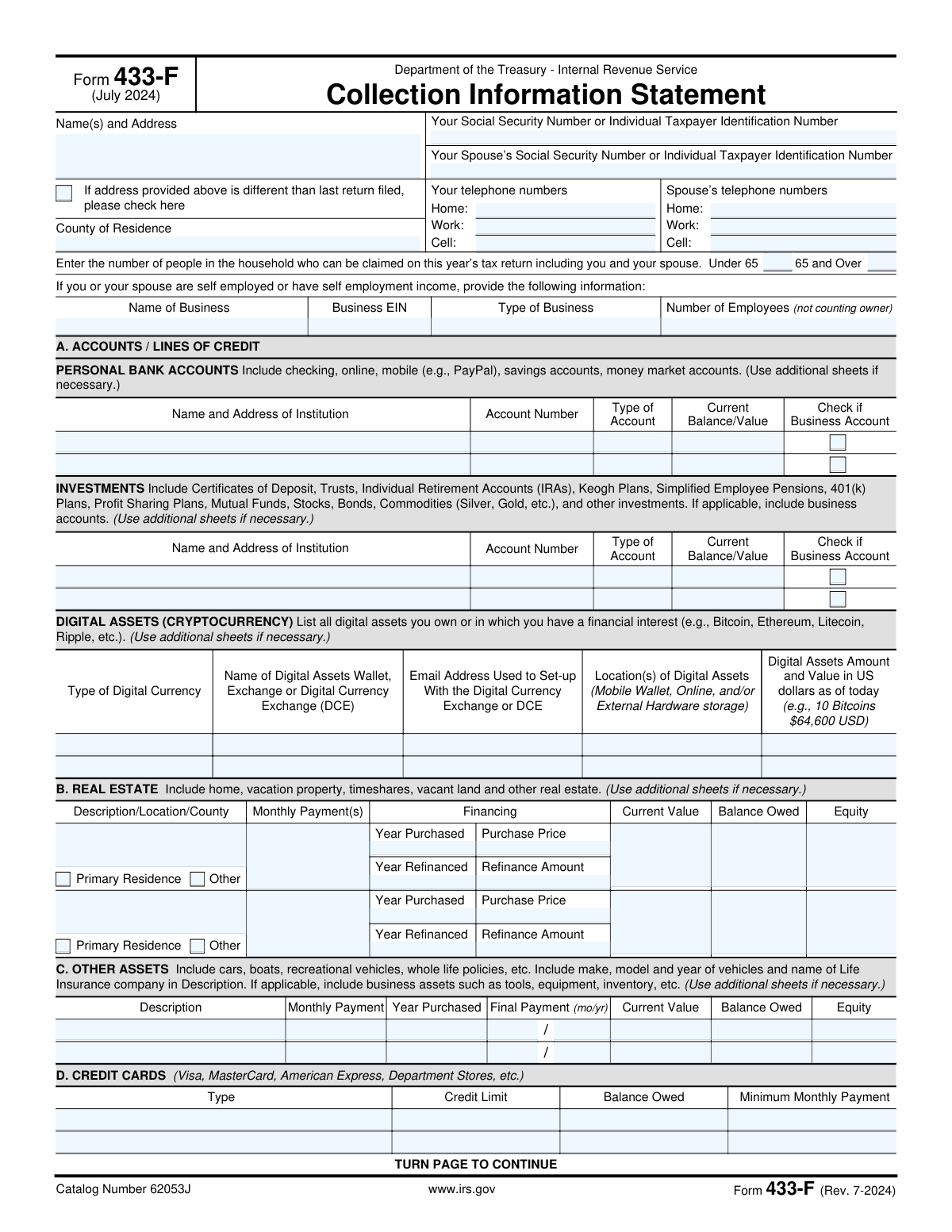
Yes! You can use AI to fill out Form 433-F (Rev. 7-2024), Collection Information Statement

Form 433-F is an Internal Revenue Service Collection Information Statement that summarizes a taxpayer’s current financial situation, including bank accounts, investments, real estate, other assets, credit cards, employment, non-wage income, and necessary living expenses. The IRS uses this information to evaluate collection alternatives and determine an appropriate way for a wage earner or self-employed individual to satisfy an outstanding tax liability (often alongside requests such as an installment agreement). Because the form requires detailed, consistent financial figures and may be reviewed against supporting documentation, accuracy and completeness are important. Today, this form can be filled out quickly and accurately using AI-powered services like Instafill.ai, which can also convert non-fillable PDF versions into interactive fillable forms.
Our AI automatically handles information lookup, data retrieval, formatting, and form filling.
It takes less than a minute to fill out Form 433-F using our AI form filling.
Securely upload your data. Information is encrypted in transit and deleted immediately after the form is filled out.

Form specifications

Form name: Form 433-F (Rev. 7-2024), Collection Information Statement
Number of pages: 2
Filled form examples: Form Form 433-F Examples
Language: English
Categories: financial forms, PA state forms
main-image

Instafill Demo: filling out a legal form in seconds

How to Fill Out Form 433-F Online for Free in 2026

Are you looking to fill out a FORM 433-F form online quickly and accurately? Instafill.ai offers the #1 AI-powered PDF filling software of 2026, allowing you to complete your FORM 433-F form in just 37 seconds or less.
Follow these steps to fill out your FORM 433-F form online using Instafill.ai:
  1. 1 Go to Instafill.ai and upload the Form 433-F PDF (Rev. 7-2024) or select it from the form library.
  2. 2 Enter or import your identity and contact details (names, mailing address, county of residence, SSN/ITIN, phone numbers, and household counts).
  3. 3 Provide self-employment details if applicable (business name, EIN, type of business, and number of employees).
  4. 4 Add your asset and liability information: bank accounts/lines of credit, investments, real estate, other assets (vehicles, life insurance, equipment), credit cards, and any digital assets (cryptocurrency).
  5. 5 Complete business information if applicable (accounts receivable and credit card/merchant account details, including any digital asset exchange/wallet information used for payments).
  6. 6 Enter income and expense details (employment/pay frequency and pay amounts, non-wage household income, and monthly necessary living expenses using IRS standards where required).
  7. 7 Review the AI-filled entries for completeness and consistency, attach or organize supporting documents as needed, then e-sign (and spouse sign if applicable) and download/submit the completed form per IRS instructions.

Our AI-powered system ensures each field is filled out correctly, reducing errors and saving you time.

Why Choose Instafill.ai for Your Fillable Form 433-F Form?

Speed

Complete your Form 433-F in as little as 37 seconds.

Up-to-Date

Always use the latest 2026 Form 433-F form version.

Cost-effective

No need to hire expensive lawyers.

Accuracy

Our AI performs 10 compliance checks to ensure your form is error-free.

Security

Your personal information is protected with bank-level encryption.

Frequently Asked Questions About Form Form 433-F

Form 433-F (Collection Information Statement) is used by the IRS to collect current financial information to determine how you can pay an outstanding tax liability. It helps the IRS evaluate payment options such as an installment agreement or other collection alternatives.

You generally complete Form 433-F if the IRS requests it as part of a collections review and you have an unpaid tax balance. Wage earners and self-employed individuals may both be asked to submit it.

If you are requesting an installment agreement, the instructions say you should also submit Form 9465 (Installment Agreement Request) along with Form 433-F. The IRS also notes that a larger down payment may streamline the process and reduce penalties and interest over time.

Be prepared to support the income, assets, and expenses you list with items like pay stubs, bank and investment statements, loan statements, and bills for recurring expenses. If you claim self-employment income, attach Schedule C or a current-year profit and loss statement (and Schedule E for rental income, if applicable).

Enter your current mailing address and check the box that says the address is different than the last return filed. This helps the IRS update your contact information for the case.

Enter the number of people in your household who can be claimed on this year’s tax return, including you and your spouse. Split the total into two groups: those under 65 and those 65 or older.

Yes—Section A instructions say to list all accounts even if they currently have no balance. Include checking, savings, online/mobile accounts (such as PayPal), and money market accounts, and mark whether any are business accounts.

List all real estate you own or are purchasing (including your home), along with monthly payment, current value, and balance owed. Equity is generally calculated as current market value minus the amount owed on that property.

Use Section C (Other Assets) for cars, boats, RVs, and whole life insurance policies (which have cash value). If a vehicle is leased, the instructions say to write “lease” in the “year purchased” column.

Yes—Section D instructs you to list all credit cards and lines of credit even if there is no balance owed. Include the credit limit, balance owed, and minimum monthly payment.

Yes—the form includes a Digital Assets (Cryptocurrency) section where you list digital assets you own or have a financial interest in. Provide the type of currency, wallet/exchange, email used to set it up, storage location, and the amount and USD value as of today.

Not necessarily—the instructions state that if you attach a copy of a current pay stub, you do not need to complete Section F (Employment Information). Make sure the pay stub clearly shows gross pay and withholdings.

Report monthly net amounts (after ordinary and necessary expenses and taxes). For self-employment, the IRS asks you to attach Schedule C or a current-year profit and loss statement; for rental income, it should relate to Schedule E and you should not include depreciation (a non-cash expense).

Convert them to monthly amounts using the form’s instructions: quarterly Ă· 3, weekly × 4.3, biweekly × 2.17, and semimonthly × 2. Then enter the monthly figure in the appropriate expense line.

Yes—AI tools can help organize your financial information and auto-fill fields to reduce errors and save time; services like Instafill.ai use AI to auto-fill form fields accurately. If your PDF is flat/non-fillable, Instafill.ai can convert it into an interactive fillable form, then you can upload the form, map or confirm fields, review for accuracy, and export the completed PDF for submission.

Compliance Form 433-F
Validation Checks by Instafill.ai

1
Primary taxpayer SSN/ITIN format and validity
Validates that the Primary Taxpayer SSN/ITIN is present and matches an acceptable pattern (SSN: 9 digits, typically ###-##-####; ITIN: 9 digits starting with 9 and valid ITIN ranges). This is critical because the IRS uses this identifier to associate the financial statement with the correct taxpayer account. If validation fails, the submission should be rejected or routed to manual review and the user prompted to correct the identifier.
2
Spouse SSN/ITIN conditional requirement and format
Checks that the Spouse SSN/ITIN is either blank (if not applicable) or, if provided, conforms to SSN/ITIN formatting rules and is not identical to the primary taxpayer’s number. This prevents misidentification and duplicate-person errors in joint household reporting. If the spouse identifier is invalid or duplicates the primary, the system should block submission and request correction.
3
Mailing address completeness and USPS-style constraints
Ensures the Name(s) and Mailing Address includes required components (name, street address, city, state, ZIP) and that state is a valid US state/territory code and ZIP is 5-digit or ZIP+4. A complete, standardized address is necessary for IRS correspondence and case processing. If incomplete or malformed, the system should flag missing components and prevent final submission until corrected.
4
Address change checkbox consistency
Validates that the 'address different than last return filed' checkbox is explicitly set (checked/unchecked) and, if checked, the address fields are fully populated (no partial address). This reduces ambiguity about whether the IRS should update contact information and helps avoid misdirected notices. If the checkbox is checked but the address is incomplete, the system should fail validation and require a complete address.
5
County of residence required and character validation
Checks that County of Residence is provided and contains only reasonable characters (letters, spaces, hyphens) and is not purely numeric. County is used for jurisdictional and case routing purposes and should be human-readable. If missing or invalid, the submission should be blocked and the user prompted to enter a valid county name.
6
Telephone number format and minimum contact method
Validates that any provided phone numbers (home/work/cell) follow a valid US phone format (10 digits with optional country code, parentheses, hyphens) and that at least one primary taxpayer phone number is provided. Reliable contact information is essential for follow-up during collection casework. If all primary phone fields are blank or any provided number is malformed, the system should require correction before acceptance.
7
Spouse phone numbers conditional on spouse SSN/ITIN
Ensures spouse phone fields are only populated when a Spouse SSN/ITIN is provided, and that any spouse phone numbers entered meet the same formatting rules as the primary taxpayer’s. This prevents associating spouse contact details when no spouse is declared on the form. If spouse phones are present without a spouse identifier (or are malformed), the system should flag the inconsistency and require either adding spouse SSN/ITIN or removing spouse phone entries.
8
Household counts are non-negative integers and logically plausible
Validates that 'Under 65' and '65 and Over' household counts are present, are whole numbers (no decimals), and are not negative, and that the combined total is at least 1 (the taxpayer). Household size drives IRS allowable standards and affects expense reasonableness. If counts are missing, negative, non-integer, or total to 0, the system should block submission and request corrected counts.
9
Self-employment business section completeness when business fields are used
If any self-employment fields are entered (Name of Business, EIN, Type of Business, Employees), this check requires the minimum set to be complete: business name and type must be present, and number of employees must be provided as an integer (0 allowed). Partial business information can misstate income sources and hinder verification. If triggered and incomplete, the system should fail validation and prompt for the missing business details.
10
Business EIN format validation
Validates that Business EIN, if provided, matches the EIN format (9 digits, commonly displayed as ##-#######) and is not the same as the SSN/ITIN fields. Correct EIN formatting is necessary for matching business records and avoiding identity confusion. If invalid, the system should reject the EIN entry and require correction or removal.
11
Financial account rows require paired fields and masked account number rules
For each Personal Bank Account/Investment row, if any of Institution/Account Number/Type/Balance is provided, the check requires Institution Name and Address, Account Type, and Current Balance/Value to be present, and enforces an account number policy (e.g., allow last 4 digits or full number depending on system rules; disallow illegal characters). This prevents unusable partial asset disclosures and reduces data-entry errors. If the row is partially filled or account number contains invalid characters/length, the system should flag the row and require completion or clearing.
12
Currency fields must be numeric, non-negative, and within reasonable bounds
Validates that all money fields (balances, values, payments, income, expenses, credit limits, amounts owed) are numeric, allow up to two decimals, and are not negative; optionally enforce an upper bound to catch obvious keystroke errors (e.g., $999,999,999). Accurate numeric formatting is essential for downstream calculations and IRS financial analysis. If a value is non-numeric, negative, or wildly out of range, the system should block submission and highlight the offending field(s).
13
Equity calculation consistency for real estate and other assets
Checks that Equity equals Current Value minus Balance Owed for each Real Estate and Other Asset entry (allowing a small tolerance for rounding), and that equity is not negative unless explicitly allowed/flagged (e.g., underwater property). This ensures internal consistency and prevents misreporting of net asset value. If equity does not reconcile, the system should either auto-calculate equity and override the entered value or require the user to correct the numbers.
14
Real estate selection logic and required fields when property is indicated
Validates that for each property entry, at least one of 'Primary Residence' or 'Other' is selected (not both unless the form design explicitly allows it), and when selected, requires Description/Location/County, Year Purchased, Purchase Price, Current Value, Balance Owed, and Monthly Payment(s). Real estate is a major factor in collection decisions and must be fully described to be evaluated. If selection is inconsistent or required fields are missing, the system should fail validation for that property row.
15
Year and final payment date validations (assets and real estate)
Ensures year fields (Year Purchased, Year Refinanced, Final Payment Year) are 4-digit years within a plausible range (e.g., 1900 through current year+50), and that Final Payment Month is 1–12 (or a valid month name) and forms a valid month/year combination. Date plausibility prevents impossible timelines (e.g., refinance before purchase) and supports payment horizon analysis. If invalid, the system should flag the specific date field and require correction.
16
Signature presence and signature date validity
Validates that the primary taxpayer signature is present and that the signature date is provided in a valid date format and is not in the future; if a spouse SSN/ITIN is provided, spouse signature should be required (or explicitly waived by business rules). The perjury statement requires proper attestation to be legally effective. If signatures/dates are missing or invalid, the system should prevent submission and prompt for completion.

Common Mistakes in Completing Form 433-F

Not checking the “address different than last return filed” box when it applies

People often enter a new mailing address but forget to check the box indicating it differs from the last filed return, especially when they’re focused on the financial sections. This can cause IRS notices or follow-up requests to be sent to the wrong address, delaying case processing and increasing the chance of missed deadlines. Always compare the address you’re entering to your most recently filed return and check the box if it changed. AI-powered tools like Instafill.ai can flag address mismatches and prompt you to confirm the checkbox.

SSN/ITIN mix-ups and spouse fields filled incorrectly

A very common error is transposing digits, entering a spouse SSN in the primary taxpayer field, or filling spouse phone numbers even though no spouse SSN/ITIN is provided. These mistakes happen because the form collects multiple identifiers close together and people copy from memory instead of official documents. The consequence is identity/record-matching problems and IRS requests for clarification, which can stall collection alternatives. Use Social Security cards/ITIN letters to copy exactly, and only complete spouse phone fields if the spouse SSN/ITIN is included; Instafill.ai can validate identifier formats and enforce conditional spouse-field rules.

Incorrect household count (under 65 vs 65 and over) or counting non-qualifying people

Filers frequently misunderstand the instruction to count only people who can be claimed on this year’s tax return (including the taxpayer/spouse), and they may place everyone in one age bucket or double-count. This happens when people treat it like “who lives with me” rather than “who is claimable,” and they overlook the under/over 65 split. Incorrect household size can affect allowable expense standards and the IRS’s ability-to-pay analysis, potentially leading to a higher proposed payment. Verify claimability and ages for the current tax year and split counts correctly; Instafill.ai can help by prompting for dependent eligibility and age categorization.

Leaving out accounts with zero balances or omitting online/mobile wallets

Many people list only their main checking account and forget savings, secondary accounts, or online/mobile accounts (e.g., PayPal) because they assume “no balance” or “not a bank” means it doesn’t count. The instructions explicitly say to list all accounts even if they currently have no balance, and to include online/mobile accounts. Omissions can be viewed as incomplete disclosure and may trigger additional documentation requests or credibility issues. Gather recent statements for every institution and list each account; Instafill.ai can compile and format account lists and remind you to include zero-balance and online wallet accounts.

Confusing ‘accounts/lines of credit’ with loans and misreporting debt in the wrong section

People sometimes enter bank loans in Section A (Accounts/Lines of Credit) even though the instructions say not to, or they fail to list credit cards/lines of credit in Section D. This happens because “line of credit” sounds like a loan and the form separates assets (accounts) from liabilities (credit cards). Misclassification can distort the IRS’s financial picture and lead to follow-up questions or recalculation of ability to pay. Put deposit accounts in Section A, investments in the Investments section, and credit cards/lines of credit in Section D; Instafill.ai can guide correct categorization and prevent placing items in the wrong section.

Real estate entries missing county/location details or incorrect equity calculations

A frequent issue is listing a property but not providing the full description/location/county, or entering equity that doesn’t equal current value minus balance owed. This often happens when people estimate quickly, forget that the form asks for county, or confuse purchase price with current value. Incorrect or incomplete real estate data can cause the IRS to question valuations and request appraisals, mortgage statements, or additional proof, slowing resolution. Use a recent mortgage statement for balance owed and a reasonable market estimate for current value, then compute equity consistently; Instafill.ai can auto-calculate equity and prompt for missing county/location fields.

Vehicle/other asset details incomplete (make/model/year, lease notation, final payment date)

Filers often write “car” without make/model/year, forget to mark a vehicle as a lease (the instructions say to write “lease” in the year purchased column), or leave the final payment month/year blank. These omissions happen because people don’t have loan/lease paperwork handy and underestimate how specific the IRS expects asset identification to be. Missing details can lead to requests for loan statements, registration info, or clarification, delaying the case. Pull information from registration, insurance, and loan/lease statements and complete the payment timeline; Instafill.ai can standardize asset descriptions and ensure required date fields are completed.

Not listing all credit cards/lines of credit or entering the wrong payment amount

People commonly omit store cards or cards with zero balances, or they enter the amount they choose to pay instead of the required minimum monthly payment. This happens because they focus on “what I owe” and forget the form asks for credit limit, balance owed, and minimum payment for each card, even if the balance is zero. Incomplete liabilities can make the financial statement appear inconsistent with credit reports and can trigger additional verification. List every card/line of credit and use the statement’s minimum payment figure; Instafill.ai can help by validating numeric fields and prompting for missing cards and minimum-payment amounts.

Digital assets (cryptocurrency) omitted or valued incorrectly

A growing mistake is leaving the digital assets section blank because filers think small holdings “don’t matter,” or they provide coin amounts without a USD value “as of today,” or omit the exchange/wallet and setup email. This happens due to uncertainty about reporting requirements and difficulty valuing assets at a point in time. Omissions can be treated as incomplete disclosure and may lead to follow-up questions or requests for exchange statements. List each asset type, where it’s held, the associated email, storage location, and both quantity and current USD value; Instafill.ai can help format entries and ensure the required components (amount + USD value + platform details) are present.

Employment income reported in the wrong time period (monthly vs per pay period) or pay frequency not checked

In Section F, filers often enter monthly income in the “gross per pay period” box, forget to check weekly/biweekly/semi-monthly/monthly, or mix up gross pay with net pay. This happens because people think in monthly budgets while the form requests per-pay-period figures unless you attach a pay stub. The result is inconsistent income calculations and potential over/understatement of ability to pay, leading to delays or an unaffordable proposed payment. Use a current pay stub and copy gross and tax withholdings per pay period, or attach the stub and skip the section as allowed; Instafill.ai can normalize pay frequency and prevent period mismatches.

Net self-employment/rental income entered as gross, or losses entered as negative numbers

For Section G, people frequently report gross receipts instead of net income after ordinary and necessary expenses (and they sometimes include depreciation for rentals), or they enter a negative number when the instructions say to enter “0” if it’s a loss. This happens because “income” is interpreted as top-line revenue and because tax return concepts (like depreciation) get mixed into cash-flow reporting. Misreporting can materially change the IRS’s ability-to-pay analysis and trigger requests for Schedule C/Schedule E or a current-year profit and loss statement. Calculate true monthly net cash income, exclude depreciation for rentals, attach the requested P&L/Schedule C when applicable, and enter 0 for losses; Instafill.ai can prompt for net-vs-gross and enforce the “0 if loss” rule.

Monthly necessary living expenses not converted to monthly amounts or double-counted across sections

A common error is listing expenses in their original billing frequency (weekly, quarterly, annual) without converting to monthly using the form’s conversion rules, or double-counting housing costs (e.g., putting mortgage in Rent even though mortgage belongs in Real Estate Section B). This happens because people pull numbers from bills without standardizing time periods and because the form splits housing between Section B and Section H. The consequence is inflated or inconsistent expenses that may be disallowed or require substantiation, delaying approval of an installment agreement or other resolution. Convert all expenses to monthly (weekly × 4.3, biweekly × 2.17, quarterly Ă· 3) and ensure mortgage is in Section B while Rent is only for renters; Instafill.ai can automatically convert frequencies, prevent double-counting, and validate totals.
Saved over 80 hours a year

“I was never sure if my IRS forms like W-9 were filled correctly. Now, I can complete the forms accurately without any external help.”

Kevin Martin Green

Your data stays secure with advanced protection from Instafill and our subprocessors

Robust compliance program

Transparent business model

You’re not the product. You always know where your data is and what it is processed for.

ISO 27001, HIPAA, and GDPR

Our subprocesses adhere to multiple compliance standards, including but not limited to ISO 27001, HIPAA, and GDPR.

Security & privacy by design

We consider security and privacy from the initial design phase of any new service or functionality. It’s not an afterthought, it’s built-in, including support for two-factor authentication (2FA) to further protect your account.

Fill out Form 433-F with Instafill.ai

Worried about filling PDFs wrong? Instafill securely fills form-433-f-rev-7-2024-collection-information-statement forms, ensuring each field is accurate.