Yes! You can use AI to fill out Form DD 638-28, Beneficiary Change

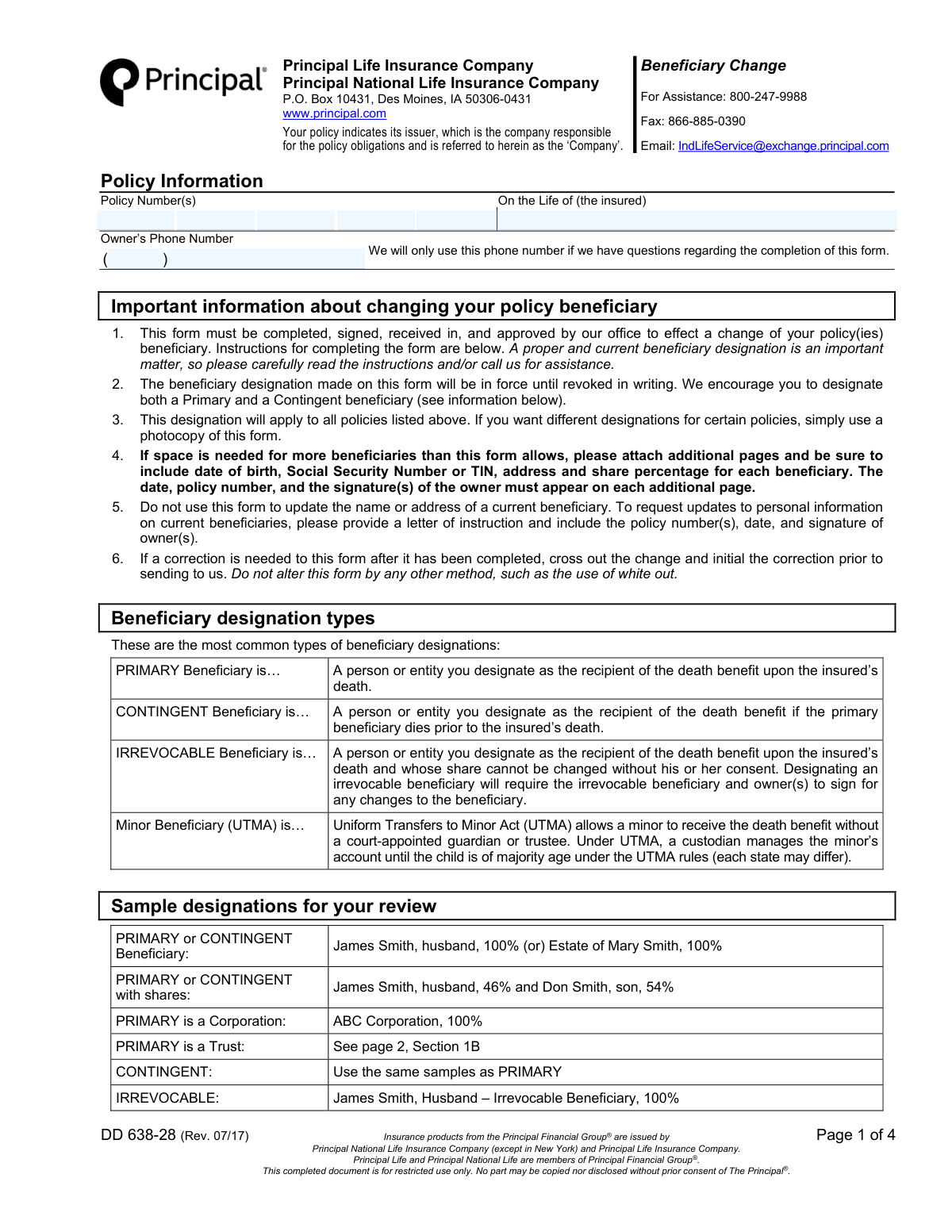
The Principal Beneficiary Change Form (DD 638-28) is a legal document used by policy owners to designate or change the person(s), trust, or entity that will receive the policy's death benefit. Keeping this information current is crucial to ensure your assets are distributed according to your wishes. This form allows for the designation of primary, contingent, and even irrevocable beneficiaries. Today, this form can be filled out quickly and accurately using AI-powered services like Instafill.ai, which can also convert non-fillable PDF versions into interactive fillable forms.
Our AI automatically handles information lookup, data retrieval, formatting, and form filling.
It takes less than a minute to fill out DD 638-28 using our AI form filling.
Securely upload your data. Information is encrypted in transit and deleted immediately after the form is filled out.

Form specifications

Form name: Form DD 638-28, Beneficiary Change
Number of pages: 1
Language: English
main-image

Instafill Demo: How to fill out PDF forms in seconds with AI

How to Fill Out DD 638-28 Online for Free in 2026

Are you looking to fill out a DD 638-28 form online quickly and accurately? Instafill.ai offers the #1 AI-powered PDF filling software of 2026, allowing you to complete your DD 638-28 form in just 37 seconds or less.
Follow these steps to fill out your DD 638-28 form online using Instafill.ai:
  1. 1 Navigate to Instafill.ai and upload the Beneficiary Change form, or select it from their library of official documents.
  2. 2 Provide your policy number(s) and the full name of the insured person in the 'Policy Information' section.
  3. 3 In Section 1, enter the full details for each primary beneficiary, including their name, address, relationship, date of birth, SSN/TIN, and the percentage share they will receive.
  4. 4 Complete Section 2 to designate contingent beneficiaries, who will receive the benefit if the primary beneficiaries are unable to.
  5. 5 If your policy includes a Spouse or Child Term Rider, complete Section 3 to designate beneficiaries for those specific riders.
  6. 6 Review all information for accuracy, then proceed to Section 4 to provide your digital signature, date, and email address. The AI will guide you on whether joint owner or witness signatures are required.

Our AI-powered system ensures each field is filled out correctly, reducing errors and saving you time.

Why Choose Instafill.ai for Your Fillable DD 638-28 Form?

Speed

Complete your DD 638-28 in as little as 37 seconds.

Up-to-Date

Always use the latest 2026 DD 638-28 form version.

Cost-effective

No need to hire expensive lawyers.

Accuracy

Our AI performs 10 compliance checks to ensure your form is error-free.

Security

Your personal information is protected with bank-level encryption.

Frequently Asked Questions About Form DD 638-28

This form is used by a life insurance policy owner to change, add, or remove beneficiaries for their policy with Principal Financial Group. This change revokes any previous beneficiary designations on file.

A Primary beneficiary is the first person or entity in line to receive the death benefit. A Contingent beneficiary will only receive the benefit if all Primary beneficiaries have passed away before the insured.

You must provide the beneficiary's full name, address, relationship to the insured, date of birth, and Social Security Number or TIN. You also need to assign a percentage share, ensuring the total for all primary beneficiaries is 100%.

You can submit the completed and signed form via fax to 866-885-0390 or by email to [email protected]. The change is not official until the form is received and approved by the company.

If you need more space, you can attach additional pages with all the required beneficiary information. The policy owner must sign, date, and write the policy number on each attached page.

To make a correction, cross out the incorrect information and write your initials next to the change. Do not use correction fluid or tape, as this may cause the form to be rejected.

No, this form is only for changing who the beneficiary is. To update personal information like the name or address of an existing beneficiary, you must submit a separate, signed letter of instruction.

If you list multiple beneficiaries in a category (e.g., Primary) without assigning shares, the proceeds will be divided equally among them. If one of them is deceased, their share will go to the other listed survivors in that category.

An Irrevocable Beneficiary is a designation that cannot be changed without that person's consent. If you are changing a policy with an existing Irrevocable Beneficiary, they must sign this form to approve the change.

You can name a minor under the Uniform Transfers to Minors Act (UTMA) by also designating a custodian to manage the funds. The form includes a section to name a custodian who will oversee the assets until the minor reaches the legal age of majority.

Yes, you can list multiple policy numbers at the top of the form, and the new beneficiary designation will apply to all of them. If you want different beneficiaries for different policies, you must use a separate form for each.

Yes, services like Instafill.ai use AI to accurately auto-fill form fields, which can save you time and help prevent errors. The AI can extract information from your records and place it in the correct fields on the form.

You can use a service like Instafill.ai to complete the form digitally. Simply upload the PDF to their platform, and you can type directly into the fields, add your e-signature, and then download the completed document for submission.

If your PDF is a non-fillable or 'flat' image, you can use a tool like Instafill.ai to make it interactive. Upload the file, and the service will automatically convert it into a fillable form that you can complete on your computer or mobile device.

Compliance DD 638-28
Validation Checks by Instafill.ai

1
Primary Beneficiary Share Percentage Total
This check validates that the sum of all share percentages listed for primary beneficiaries in Section 1A equals exactly 100%. This is crucial to ensure the death benefit is fully and correctly allocated according to the owner's wishes. If the shares do not total 100%, the form will be rejected and returned for correction, delaying the beneficiary change.
2
Contingent Beneficiary Share Percentage Total
This validation ensures that the sum of all share percentages for contingent beneficiaries in Section 2A equals exactly 100%. This is important so that if all primary beneficiaries predecease the insured, the benefit is distributed completely and as intended among the secondary recipients. A mismatch will cause the form to be rejected.
3
SSN and TIN Format Validation
Verifies that all Social Security Number (SSN) and Taxpayer Identification Number (TIN) fields are entered in a valid format, such as 9 digits with or without hyphens. Correct identification numbers are essential for locating beneficiaries and for tax reporting purposes at the time of a claim. An invalid format will prevent processing and require correction.
4
Mandatory Owner Signature and Date
Confirms that the owner of the policy has signed and dated the form in Section 4. The owner's signature is a legal requirement to authorize the change of beneficiary, making it one of the most critical fields on the form. A missing signature or date will render the entire form invalid and unprocessed.
5
Mutually Exclusive Primary Beneficiary Type
Ensures that the user has designated beneficiaries in either Section 1A (Persons/Corporations) or Section 1B (Trust), but not both. The policy can only have one type of primary beneficiary designation. Submitting both creates ambiguity and will result in the form being returned for clarification.
6
Date of Birth and Trust Date Validity
Checks that all 'Date of Birth' and 'Date of Trust Agreement' fields contain valid, logical dates that are in the past. This prevents data entry errors like future dates or impossible dates, such as February 30th. Accurate dates are vital for identifying individuals and validating trust documents.
7
Conditional Irrevocable Beneficiary Signature
This check is triggered if any beneficiary is designated as 'Irrevocable'. It verifies that the signature and signature date for that specific irrevocable beneficiary are present in Section 4. Without the irrevocable beneficiary's consent and signature, any change to their share is legally invalid and cannot be processed.
8
Policy Number Presence
Validates that at least one policy number has been entered in the 'Policy Information' section at the top of the form. The policy number is the primary identifier for the account being modified. Without it, the company cannot locate the correct policy, and no changes can be made.
9
Beneficiary Uniqueness Across Tiers
Scans the primary (Section 1) and contingent (Section 2) beneficiary lists to ensure the same person or entity is not listed in both. A beneficiary should be either primary or contingent, not both, to avoid logical conflicts and payment complications during a claim. Duplicate entries will require clarification from the owner.
10
Completeness of Personal Trust Information
If a 'Personal Trust' is selected as a beneficiary in Section 1B or 2B, this validation confirms that the Trustee Name, Trust Name, Date of Trust Agreement, and Trustee Address fields are all filled. Incomplete trust information will prevent the company from properly identifying and contacting the trust at claim time, leading to form rejection.
11
Completeness of Individual Beneficiary Row
For any beneficiary row in Section 1A or 2A where a name is entered, this check ensures all other required fields in that row (Address, Relationship, DOB for persons, SSN/TIN, Share %) are also completed. Partial entries are ambiguous and prevent proper processing. This rule ensures that every listed beneficiary has a complete and actionable record.
12
Mutually Exclusive Ownership Signature Sections
Verifies that signatures are provided in either Section 4A for individual owners or Section 4B for corporate/trust owners, but not in both. This check ensures the correct legal entity is authorizing the change, preventing confusion about the policy's ownership structure. An incorrect or dual submission will require correction.

Common Mistakes in Completing DD 638-28

Incorrect Share Percentage Calculation

Policy owners frequently make mathematical errors, causing the beneficiary share percentages in a section to not total exactly 100%. The form explicitly states that using monetary amounts or percentages that do not sum to 100% will cause the form to be rejected and returned. To avoid this, carefully calculate and verify that the percentages for all primary beneficiaries add up to 100%, and do the same for contingent beneficiaries. AI-powered tools like Instafill.ai can help prevent this by automatically validating that the shares sum correctly.

Incomplete Beneficiary Identification Details

People often omit crucial beneficiary details like the full legal name, date of birth, or Social Security Number (SSN), often because they don't have the information readily available. While the form might be processed, missing data can cause significant delays and complications for your beneficiaries when they file a claim, as the company will have difficulty locating and verifying them. Always gather and enter the complete, accurate information for each beneficiary to ensure a smooth claims process.

Forgetting Critical Signatures

A form is invalid without the proper signatures, and this is one of the most common reasons for rejection. Owners may forget to sign, fail to obtain a required joint owner's signature, or neglect to get the signature of a previously designated irrevocable beneficiary, whose consent is required. This oversight halts the beneficiary change process until a correctly signed form is received. Always review Section 4 carefully to identify every required signatory and ensure all signatures are present before submission.

Improper Designation of a Minor Beneficiary

Naming a minor directly as a beneficiary without appointing a custodian under the Uniform Transfers to Minors Act (UTMA) is a frequent and serious error. This can lead to legal complications and require court intervention to appoint a guardian to manage the funds, causing significant delays and expenses. To prevent this, use the specific UTMA designation checkbox and fields on the form to name a custodian who will manage the proceeds for the minor until they reach the age of majority.

Confusing Primary and Contingent Beneficiaries

Policy owners sometimes misunderstand the distinction between primary and contingent beneficiaries, either listing the same individuals in both sections or failing to name a contingent beneficiary at all. A primary beneficiary is first in line to receive proceeds, while a contingent beneficiary only receives them if all primary beneficiaries are deceased. Failing to name a contingent beneficiary can result in the proceeds going to the insured's estate, which may not align with their wishes and can lead to probate delays.

Incorrectly Designating a Trust Beneficiary

When naming a trust, people often mistakenly enter its name in the section for individual beneficiaries (e.g., Section 1A) instead of the dedicated trust section (Section 1B). They may also fail to provide the full trust name, trustee(s) name, and the date the trust was established. This error leads to rejection because the insurance company requires specific information to correctly process a claim involving a trust. Always use Section 1B or 2B for trusts and fill in all required details accurately.

Using the Form for an Invalid Purpose

The form instructions explicitly state not to use it for updating the name or address of a current beneficiary, yet people often attempt to do so. This form is solely for changing who the beneficiaries are or their share percentages. Submitting the form for an address update will result in it being ignored for that purpose, and the change will not be made. For such updates, a separate letter of instruction is required as stated in point #5.

Making Improper Corrections with White-Out

When a mistake is made on a paper form, the impulse is often to use correction fluid (white-out). However, the form's instructions specifically prohibit this and require any changes to be made by crossing out the incorrect information and initialing the correction. Using unapproved correction methods can raise questions about the form's authenticity and lead to its rejection. Since this is a non-fillable PDF, using a tool like Instafill.ai to convert it to a fillable version can prevent handwriting errors in the first place.

Failing to List All Applicable Policy Numbers

The form allows a beneficiary change to apply to multiple policies at once, but this only works if all relevant policy numbers are listed at the top of the form. Owners with several policies often forget to list all of them, meaning the beneficiary change is only applied to the policies that were listed. To ensure your intended changes cover all desired policies, carefully gather and list every single policy number in the designated space on each page.

Missing Witness Signature for Massachusetts Policies

A small but critical detail in Section 4 is the requirement for a witness signature on life insurance policies issued in the State of Massachusetts. This is a state-specific rule that is very easy to overlook if the policy owner is not paying close attention to the fine print. Failure to provide a witness signature for an applicable policy will invalidate the form and cause it to be returned for correction, delaying the entire process.
Saved over 80 hours a year

“I was never sure if my IRS forms like W-9 were filled correctly. Now, I can complete the forms accurately without any external help.”

Kevin Martin Green

Your data stays secure with advanced protection from Instafill and our subprocessors

Robust compliance program

Transparent business model

You’re not the product. You always know where your data is and what it is processed for.

ISO 27001, HIPAA, and GDPR

Our subprocesses adhere to multiple compliance standards, including but not limited to ISO 27001, HIPAA, and GDPR.

Security & privacy by design

We consider security and privacy from the initial design phase of any new service or functionality. It’s not an afterthought, it’s built-in, including support for two-factor authentication (2FA) to further protect your account.

Fill out DD 638-28 with Instafill.ai

Worried about filling PDFs wrong? Instafill securely fills form-dd-638-28-beneficiary-change forms, ensuring each field is accurate.