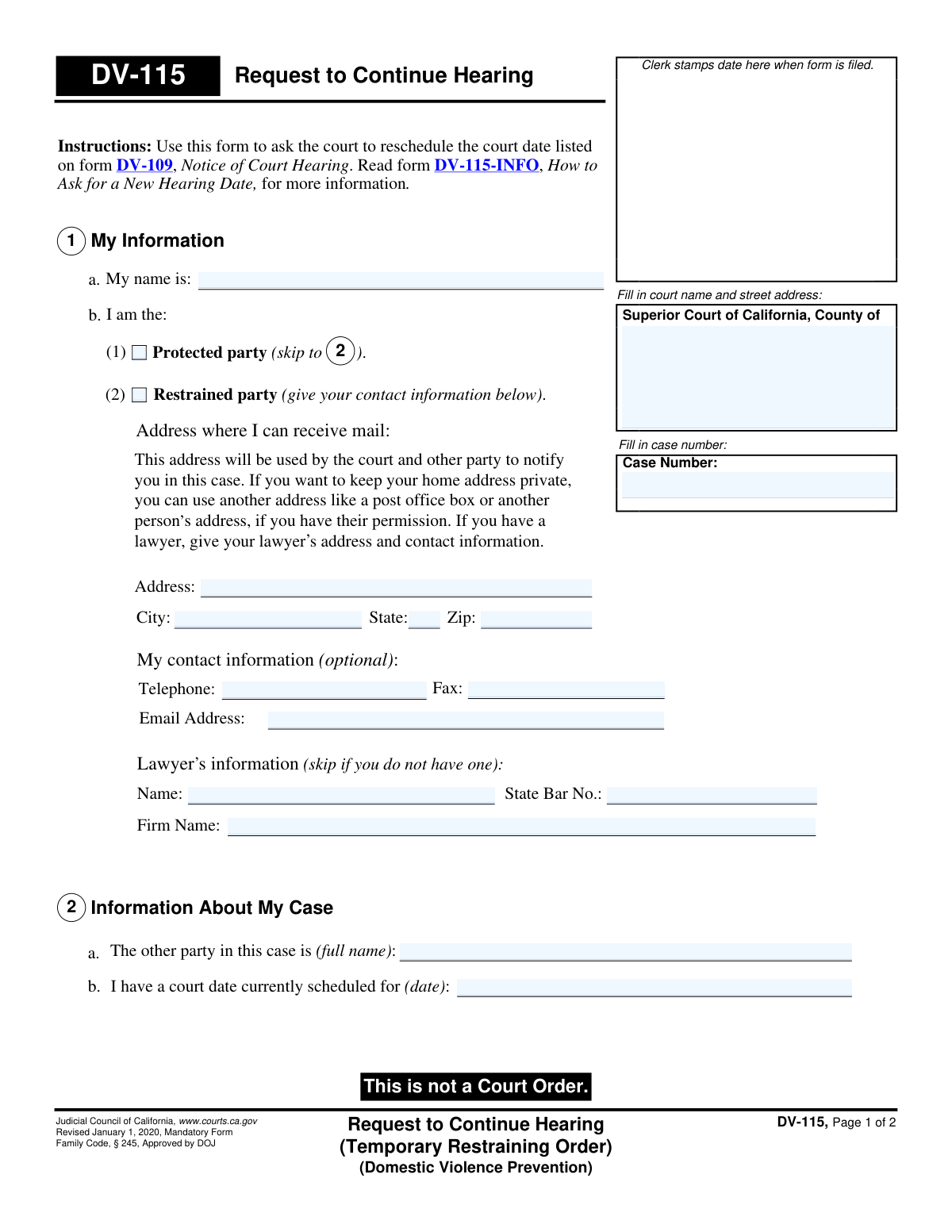
Yes! You can use AI to fill out Form DV-115, Request to Continue Hearing (Temporary Restraining Order) (Domestic Violence Prevention)
Form DV-115, Request to Continue Hearing, is a legal document used within the California court system for domestic violence prevention cases. It allows either the protected or restrained party to formally ask the court to reschedule an upcoming hearing related to a Temporary Restraining Order (TRO). This is crucial for ensuring all parties have adequate time to prepare or for service of process to be completed. Today, this form can be filled out quickly and accurately using AI-powered services like Instafill.ai, which can also convert non-fillable PDF versions into interactive fillable forms.
DV-115 is part of the
California court forms, domestic violence forms and restraining order forms categories on Instafill.
Our AI automatically handles information lookup, data retrieval, formatting, and form filling.
It takes less than a minute to fill out DV-115 using our AI form filling.
Securely upload your data. Information is encrypted in transit and deleted immediately after the form is filled out.
Form specifications
| Form name: | Form DV-115, Request to Continue Hearing (Temporary Restraining Order) (Domestic Violence Prevention) |
| Number of fields: | 34 |
| Number of pages: | 1 |
| Language: | English |
Instafill Demo: How to fill out PDF forms in seconds with AI
How to Fill Out DV-115 Online for Free in 2026
Are you looking to fill out a DV-115 form online quickly and accurately? Instafill.ai offers the #1 AI-powered PDF filling software of 2026, allowing you to complete your DV-115 form in just 37 seconds or less.
Follow these steps to fill out your DV-115 form online using Instafill.ai:
- 1 Navigate to Instafill.ai and upload your version of Form DV-115 or select it from their library of official documents.
- 2 Provide the court information and the specific case number associated with your restraining order case.
- 3 Identify your role in the case (restrained or protected party) and enter your personal and, if applicable, lawyer's contact information.
- 4 Indicate the current hearing date you wish to change and state whether a Temporary Restraining Order is currently in effect.
- 5 Select the reason for your request to continue the hearing, such as needing more time to serve the other party or other specific circumstances.
- 6 Review all the information auto-filled by the AI to ensure accuracy and completeness.
- 7 Sign and date the form electronically, then download the completed document to file with the appropriate court clerk.
Our AI-powered system ensures each field is filled out correctly, reducing errors and saving you time.
Why Choose Instafill.ai for Your Fillable DV-115 Form?
Speed
Complete your DV-115 in as little as 37 seconds.
Up-to-Date
Always use the latest 2026 DV-115 form version.
Cost-effective
No need to hire expensive lawyers.
Accuracy
Our AI performs 10 compliance checks to ensure your form is error-free.
Security
Your personal information is protected with bank-level encryption.
Frequently Asked Questions About Form DV-115
Form DV-115, 'Request to Continue Hearing,' is used to formally ask a California court to reschedule your court date for a domestic violence temporary restraining order hearing.
Either the person seeking protection (the 'protected party') or the person the order is against (the 'restrained party') can file this form to request a new hearing date.
If the court grants your request and a TRO is already in place, it will remain in effect until the end of the new court date, unless the judge orders otherwise.
Yes, as the restrained party, you generally have the right to one continuance (rescheduling) to get time to respond to the petition. You can indicate this is your first request in Section 4 of the form.
Yes, if you are the 'protected party' and need more time to properly serve the other party with the court documents, you can use this form to request a new hearing date.
No, you do not have to use your home address. You can use a P.O. Box or another person's address (with their permission) as your mailing address to keep your location private.
You must file the completed form with the court clerk at the Superior Court courthouse where your case is being heard. Be sure to fill in the court's name and address at the top of the form.
No, this form is only a request. A judge must review and approve your request to officially reschedule the hearing; it is not guaranteed.
You will need the case number, the current hearing date, the full names of both parties, and a reason for the rescheduling request.
In Section 3, you can check the box that says 'I don't know.' It is also helpful to attach a copy of any orders you have received.
Yes, services like Instafill.ai use AI to accurately auto-fill form fields, which can save you time and help reduce errors when entering case information.
You can use a service like Instafill.ai to fill out the form on your computer. Simply upload the DV-115 PDF, and the platform will make it interactive so you can type your information directly into the fields.
If you have a non-fillable or 'flat' PDF, you can upload it to Instafill.ai. The service's AI can convert it into an interactive, fillable form that you can complete online and then print.
Compliance DV-115
Validation Checks by Instafill.ai
1
Case Number Presence and Format
This check ensures the 'Case Number' field is filled on page 1. The case number is the primary identifier for the legal proceeding, and without it, the clerk cannot file the document or associate it with the correct case. If the case number is missing or in an invalid format, the form will be rejected by the court clerk.
2
Case Number Consistency Across Pages
Validates that the Case Number entered on page 1 is identical to the Case Number entered on page 2. This consistency is crucial to ensure the entire document is correctly associated with the same case file. A mismatch could lead to page 2 being lost or misfiled, rendering the request incomplete and legally void.
3
Exclusive Party Identification
Ensures that the user selects exactly one checkbox in Section 2a, identifying as either the 'Restrained party' or the 'Protected party'. The user cannot be both, and must identify their role for the request to be processed correctly. Failure to select one and only one option makes the filer's identity ambiguous and will halt processing.
4
Filer Name Completeness
Verifies that the full name of the person filing the request is entered in Section 2b ('My name is'). This is a mandatory field for legal identification and to confirm who is making the request. An empty name field would make the document legally invalid and cause immediate rejection.
5
Current Hearing Date Validity
Checks that the 'court date currently scheduled for' field contains a valid, properly formatted date. This date is the subject of the request, so it must be present and logically sound. The validation should also flag if the date is in the past, as one cannot reschedule a hearing that has already occurred.
6
Reason for Continuance Requirement
Confirms that at least one of the checkboxes in Section 4 ('Why does your court date need to be rescheduled?') is selected. The court requires a justification for any continuance request. Submitting the form without a reason will result in the request being denied or returned for completion.
7
Conditional 'Other Reason' Explanation
This validation checks that if the 'Other reason' checkbox is selected in Section 4, the corresponding text area is not empty. The court needs a specific, written explanation for any reason not covered by the standard options. An empty explanation for 'Other' will be treated as an incomplete reason and may lead to denial.
8
TRO Status Selection Requirement
Ensures that one of the three options in Section 3 ('Is a Temporary Restraining Order in effect?') is selected. This information is critical because it determines whether the protections of a TRO will be extended to the new hearing date. The court must know the status of the TRO to issue a correct order.
9
Signature Date Presence and Format
Validates that the 'Date' field in the signature block is filled with a valid date. The signature date legally attests to when the filer declared the information to be true and correct. An absent or invalid date can call the validity of the entire declaration into question.
10
Printed Name for Signature Requirement
Verifies that the 'Type or print your name' field is completed alongside the signature. This field ensures the identity of the signatory is legible, as a handwritten signature may be difficult to read. It is a standard requirement for legal documents to prevent ambiguity and confirm identity.
11
Logical Date Check: Signature vs. Hearing
Compares the signature date with the current hearing date. The signature date must be on or before the current hearing date. This logical check prevents the absurdity of signing a request to postpone a hearing that has already taken place, which would invalidate the request.
12
State Bar Number Format
If a lawyer's State Bar Number is entered, this validation confirms it contains only numbers, matching the standard format. This ensures data quality and proper identification of the legal counsel on record. Incorrectly formatted bar numbers can cause delays or issues when court staff look up attorney information.
13
Email Format Validation
If an email address is provided in the contact information, this check ensures it follows a standard format (e.g., [email protected]). While optional, providing an invalid email address can lead to missed notifications from the court or opposing party. This validation helps ensure any provided contact method is usable.
Common Mistakes in Completing DV-115
In Section 2a, individuals under stress may confuse legal terminology and check the wrong box, misidentifying their role. The 'protected party' is the one seeking protection, while the 'restrained party' is the person the order is against. This fundamental error can cause the court to misinterpret the entire request, leading to its denial or other unintended legal consequences.
Filers often remember to enter the case number on the first page but forget to repeat it at the top of page 2. If the pages are separated during court processing, the second page becomes unidentifiable, invalidating the entire document. This simple oversight can lead to the form being rejected by the clerk, causing the request to be missed. Always double-check that the case number is present and correct on all pages.
When filling out contact information in Section 2b, a person might automatically list their private home address. Because this address can be used by the opposing party for legal service, this can compromise the filer's safety and privacy. To avoid this, use a secure alternative like a P.O. Box or, with permission, the address of a trusted person, as the form explicitly allows.
An unsigned or undated form is legally invalid and will be rejected by the court clerk. This common mistake, often made in haste, has serious consequences, as it will prevent the judge from considering the continuance request, meaning the hearing will proceed as scheduled. Before filing, always perform a final review of the signature block on page 2 to ensure it is properly signed and dated.
If the reason for the request doesn't fit the standard checkboxes in Section 4, filers must provide a written explanation. Often, these explanations are too brief, such as 'scheduling conflict.' A judge requires 'good cause' to grant a continuance, so a vague reason is likely to be denied. The explanation should be clear, detailed, and compelling to justify rescheduling the hearing.
Filers may be unsure if a Temporary Restraining Order (TRO) is active and check 'No' or 'I don't know' when one is, in fact, in effect. This is a critical error, as the continuance directly impacts the TRO's expiration date. To avoid confusion and legal complications, review your copy of Form DV-110 (Temporary Restraining Order) to confirm its status and attach a copy to this request as instructed.
People often leave the court name and address fields at the top of page 1 blank, assuming the clerk will add it. However, it is the filer's responsibility to provide the complete and correct information for the specific Superior Court handling the case. Incomplete details can cause the form to be rejected or misfiled, leading to critical delays. This information can be found on any prior document from the court regarding your case.
Section 1 requires the date of the hearing that needs to be rescheduled. Filers sometimes leave this blank, or mistakenly enter the date they are filling out the form. Without the correct hearing date, the court does not know which event to postpone, making the request ambiguous and likely to be denied. Always refer to your 'Notice of Court Hearing' (Form DV-109) to find and enter the correct date.
Typographical errors in the names of the filer or the other party in Section 2 can create significant clerical problems. Court systems rely on exact name matching to link documents to cases and individuals, so a misspelling can delay processing or cause the form to be misfiled. To prevent this, carefully copy the names exactly as they appear on other official court documents. AI-powered form-filling tools like Instafill.ai can help ensure consistency and accuracy.
When a Temporary Restraining Order is in effect, Section 3 explicitly requests that a copy be attached to the form. Filers often overlook this instruction, submitting the request without the required supporting document. This omission can slow down the judge's review process or lead them to deny the request for being incomplete. Always remember to make a copy of your TRO (Form DV-110) and include it with your filing.
Saved over 80 hours a year
“I was never sure if my IRS forms like W-9 were filled correctly. Now, I can complete the forms accurately without any external help.”
Kevin Martin Green
Your data stays secure with advanced protection from Instafill and our subprocessors

Robust compliance program
Transparent business model
You’re not the product. You always know where your data is and what it is processed for.
ISO 27001, HIPAA, and GDPR
Our subprocesses adhere to multiple compliance standards, including but not limited to ISO 27001, HIPAA, and GDPR.
Security & privacy by design
We consider security and privacy from the initial design phase of any new service or functionality. It’s not an afterthought, it’s built-in, including support for two-factor authentication (2FA) to further protect your account.
Fill out DV-115 with Instafill.ai
Worried about filling PDFs wrong? Instafill securely fills form-dv-115-request-to-continue-hearing-temporary-restraining-order-domestic-violence-prevention forms, ensuring each field is accurate.