Yes! You can use AI to fill out Form F10110, Cash Withdrawal From Your Keogh Plans
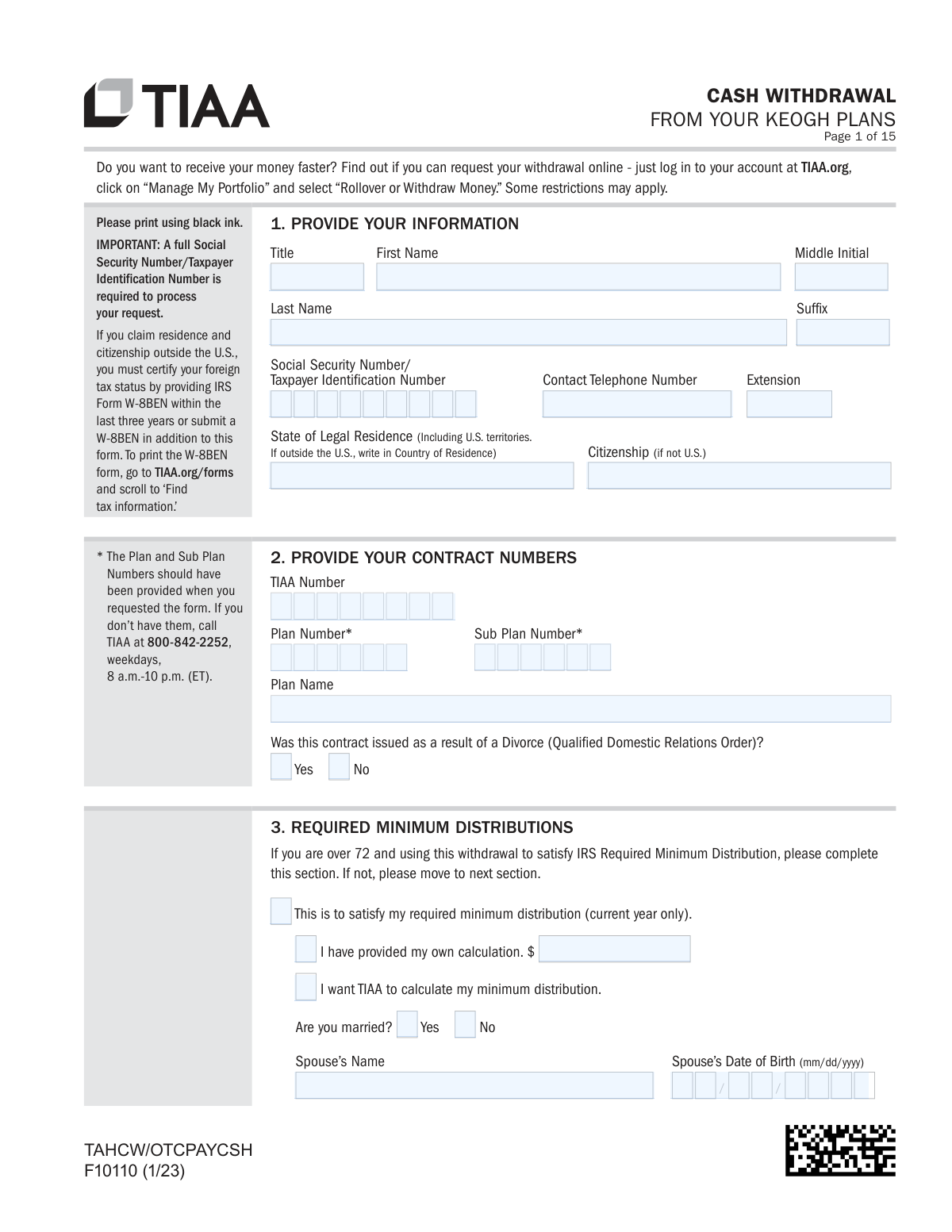
Form F10110 is a document provided by TIAA for participants in Keogh retirement plans to request a distribution of their funds. It allows individuals to specify the withdrawal amount, choose between a lump sum, partial withdrawal, or systematic payments, and direct the funds to a bank account, another TIAA account, or a different investment company. Completing this form correctly is crucial for accessing retirement savings and ensuring proper tax withholding. Today, this form can be filled out quickly and accurately using AI-powered services like Instafill.ai, which can also convert non-fillable PDF versions into interactive fillable forms.
Rather not fill this in by hand? Instafill is an online form filler that completes PDF forms automatically — upload the blank form, answer a few questions, and the AI fills every field.
Form specifications
| Form name: | Form F10110, Cash Withdrawal From Your Keogh Plans |
| Number of pages: | 1 |
| Language: | English |
Our AI automatically handles information lookup, data retrieval, formatting, and form filling.
It takes less than a minute to fill out F10110 using our AI form filling.
Securely upload your data. Information is encrypted in transit and deleted immediately after the form is filled out.
Instafill Demo: How to fill out PDF forms in seconds with AI
How to Fill Out F10110 Online for Free in 2026
Are you looking to fill out a F10110 form online quickly and accurately? Instafill.ai offers the #1 AI-powered PDF filling software of 2026, allowing you to complete your F10110 form in just 37 seconds or less.
Follow these steps to fill out your F10110 form online using Instafill.ai:
- 1 Navigate to Instafill.ai and upload or select the TIAA Form F10110.
- 2 Provide your personal details in Section 1, including your name, Social Security Number, and contact information.
- 3 Enter your TIAA contract and plan numbers in Section 2.
- 4 Select your withdrawal type in Section 4, choosing between a full withdrawal, a partial amount, or systematic payments, and specify the investment sources in Section 5 if applicable.
- 5 Indicate where to send the funds in Section 7, such as direct deposit, rollover, or check, and complete the relevant payment instruction sections (8, 10, or 11).
- 6 Complete the appropriate tax withholding sections (12, 13, or 14) based on your withdrawal type.
- 7 Sign and date the form in Section 15, obtain any necessary spousal or plan representative signatures, and submit all pages to TIAA as instructed.
Our AI-powered system ensures each field is filled out correctly, reducing errors and saving you time.
Why Choose Instafill.ai for Your Fillable F10110 Form?
Speed
Complete your F10110 in as little as 37 seconds.
Up-to-Date
Always use the latest 2026 F10110 form version.
Cost-effective
No need to hire expensive lawyers.
Accuracy
Our AI performs 10 compliance checks to ensure your form is error-free.
Security
Your personal information is protected with bank-level encryption.
Frequently Asked Questions About F10110
This form is used to request a cash withdrawal from your TIAA Keogh retirement plan. You can use it to withdraw your entire balance, a partial amount, or to set up a series of recurring systematic withdrawals.
Yes, TIAA encourages you to check if you can request your withdrawal online first by logging into your TIAA.org account. This form should be used if an online withdrawal is not available for your specific situation.
You will need your Social Security Number, TIAA contract and plan numbers, and bank account information if you are requesting a direct deposit. If you don't have your plan numbers, you must call TIAA at 800-842-2252 to obtain them.
Yes, if your plan is subject to ERISA, your spouse must complete and sign the 'Spouse's Waiver of Survivor Benefits' in Section 17. This signature must be witnessed by a Notary Public or an authorized Plan Representative.
To use direct deposit, your bank account must be verified with TIAA, which can be done online at TIAA.org or by phone. Once verified, you can select this option in Section 7 and provide your account details in Section 8.
For security, TIAA cannot mail a check to an address that was changed within the last 14 days. If you recently updated your address, you should call TIAA to discuss your options or wait 14 days before submitting the form.
Withdrawals are generally taxable income unless rolled over to another tax-deferred account. TIAA is required to withhold a default rate of 20% for federal taxes on most withdrawals, but you can elect a different rate by completing the Substitute Form W-4R.
You can submit the form digitally, upload it using the TIAA mobile app or TIAA.org website, or send it via fax or mail. The specific addresses and fax numbers are listed on the last page of the form.
TIAA will process your request and send the withdrawal amount after receiving your completed forms in good order. Your account is valued on the business day the form is received, so processing and payment timing can vary.
Yes, but there are specific requirements, and your employer must certify the hardship in Section 19. Note that hardship withdrawals from a money purchase Keogh plan are not allowed by the IRS.
A rollover eligible withdrawal can be moved to another tax-deferred account, and has a default 20% tax withholding. Non-rollover eligible withdrawals, like hardship distributions or RMDs, cannot be rolled over and have a default 10% tax withholding.
Yes, services like Instafill.ai use AI to help you accurately auto-fill form fields, which saves time and helps prevent common errors. This ensures your form is completed correctly before you submit it.
You can use a service like Instafill.ai to complete the form digitally. Simply upload the PDF, and the AI-powered tool will make it an interactive, fillable form that you can type directly into.
If you have a non-fillable or 'flat' PDF, you can use a tool like Instafill.ai to instantly convert it into an interactive, fillable form. This allows you to easily complete it on your computer without needing to print and write by hand.
Compliance F10110
Validation Checks by Instafill.ai
1
Ensures Social Security Number is Complete and Valid
This check verifies that the Social Security Number/Taxpayer Identification Number field in Section 1 is not empty and follows the standard 9-digit format (XXX-XX-XXXX). This number is essential for identity verification and mandatory for IRS tax reporting on the distribution. If the SSN is missing or invalid, the form cannot be processed and will be rejected.
2
Validates Exclusive Selection of Withdrawal Amount Option
Section 4 requires the user to check only one of three options: Option 1 (entire amount), Option 2 (partial amount), or Option 3 (systematic withdrawal). This validation ensures that one and only one of these options is selected. Selecting multiple options creates ambiguity and would prevent the system from knowing how to process the withdrawal, leading to processing delays or rejection.
3
Verifies Conditional Section Completion Based on Withdrawal Option
This check ensures that if a user selects a withdrawal option in Section 4, the corresponding detailed section is also completed. For example, if Option 2 (Withdraw a portion) is selected, Section 5 must be filled out. If Option 3 (Systematic Withdrawal) is selected, Section 6 must be completed. Failure to complete the required subsequent section makes the request incomplete and un-processable.
4
Confirms Future Processing Date is a Valid Future Date
In Section 4, a user can specify a future date to process the withdrawal. This validation checks that if a date is entered, it is in a valid 'mm/dd/yyyy' format and is a date in the future, not in the past or the current day. This prevents processing errors and ensures the request is handled on the date intended by the participant.
5
Validates Specific Investment Withdrawal Instructions
In Section 5, when withdrawing from specific investments, a user must indicate either a dollar amount OR a percentage for each fund, but not both. This check verifies that for each populated row, only one of the two fields is filled. This prevents conflicting instructions and ensures the withdrawal is calculated correctly according to the user's intent.
6
Checks for Logical Systematic Withdrawal Start and Stop Dates
For systematic withdrawals in Section 6, a start date is required and a stop date is optional. This validation confirms the 'Start Date' is a valid date and, if a 'Stop Date' is provided, it must be a valid date that occurs after the 'Start Date'. An illogical date sequence would make the payment schedule impossible to execute, so the form would be returned for correction.
7
Ensures Payment Destination and Instructions are Complete
Section 7 requires the user to choose one payment destination (Direct Deposit, Rollover, Check). This check verifies that a choice is made and that the corresponding follow-up section (e.g., Section 8 for Direct Deposit, Section 10 for TIAA Rollover) is completed. Without a clear and complete destination, funds cannot be disbursed, and the request will be placed on hold.
8
Verifies Foreign Status Documentation Requirement
The form states that if a participant claims residence and citizenship outside the U.S. (Section 1), they must provide or have a recent IRS Form W-8BEN on file. This validation cross-references the citizenship field with the presence of a valid W-8BEN. This is critical for compliance with federal tax withholding laws for non-U.S. persons.
9
Confirms Participant Authorization Signature and Date
Section 15 requires the participant's signature and the date of signature. This is the legal authorization for TIAA to execute the transaction. This check ensures that the signature and a valid date are present. A missing signature or date renders the entire form invalid and legally non-binding.
10
Validates Spousal Waiver Signature Date Consistency
The spouse's signature date in Section 17 must be on or after the participant's signature date in Section 15. This validation compares the two dates to ensure the spouse consented to the withdrawal on or after the participant formally requested it. A spousal signature dated before the participant's signature invalidates the waiver, as they cannot consent to an action not yet taken, and will cause the form to be rejected.
11
Enforces Spousal Consent for Married Participants
If the participant is married (indicated in Section 3 or from account records), Section 17, 'Spouse's Waiver of Survivor Benefits,' must be fully completed, including the spouse's signature and a notary or plan representative certification. This is a legal requirement under ERISA to protect spousal rights to survivor benefits. An incomplete or missing waiver for a married participant will halt the withdrawal process.
12
Requires Complete Certification for Hardship Withdrawals
If a withdrawal is requested due to hardship, Section 19 must be fully completed by both the participant and their employer's plan representative. This includes the representative's signature, date, and the specific 'Amount Approved for Hardship'. This validation ensures the withdrawal complies with IRS regulations and plan rules, preventing non-compliant distributions.
13
Checks for W-4R Withholding Rate Compliance
If the user submits the substitute W-4R form to specify a tax withholding rate for an eligible rollover distribution, the rate entered in Line 2 must be 20% or greater. This check enforces IRS rules which mandate a minimum 20% withholding on such distributions unless they are directly rolled over. Entering a rate below 20% is not permissible and would require correction.
14
Verifies Unmarried Status Certification
If the participant is unmarried, they must complete Section 16 to certify this status, which bypasses the spousal waiver requirement. This check ensures that if Section 17 (Spouse's Waiver) is blank, Section 16 is properly signed and dated. If the participant is unmarried and still employed, the Plan Representative's signature is also required, and this check would verify its presence.
Common Mistakes in Completing F10110
Applicants often forget to enter their Plan and Sub Plan numbers in Section 2, assuming TIAA can look them up. These numbers are typically provided when the form is first requested and are essential for identifying the correct account for the withdrawal. Submitting the form without this information will cause it to be rejected as not 'in good order,' leading to significant processing delays until the applicant provides the missing details.
A frequent error is entering new bank account details in Section 8 and expecting an immediate direct deposit. The form clearly states that bank accounts must be verified *prior* to the request (as per Section 9), a process that can take several business days. If the account isn't verified, TIAA will default to mailing a check, delaying access to funds and potentially sending it to an old address.
The Spousal Waiver in Section 17 is a common point of failure, often due to an incomplete notary section or incorrect signing order. Married applicants must sign Section 15 *before* their spouse signs the waiver, and the signature must be witnessed by a Notary Public or Plan Representative who completes all required fields. An improperly executed waiver makes the form legally invalid and is a primary cause for rejection and lengthy delays.
Many withdrawal types, such as for hardship (Section 19), disability (Section 18), or separation from service (Section 21), require certification from an employer's plan representative. Applicants often overlook this and submit the form without the necessary signature, believing it's not their responsibility. This results in an incomplete application that cannot be processed until the applicant obtains the signature and resubmits the form.
In Section 5, applicants may create ambiguity by selecting multiple withdrawal methods, such as entering a proportional dollar amount *and* specifying percentages from individual funds. The form requires choosing only one method for partial withdrawals. This conflicting information forces TIAA to halt processing and contact the applicant for clarification, delaying the transaction.
The tax withholding sections (12, 13, 14) are complex and often misunderstood, especially regarding the attached W-4R form. Applicants may want a custom withholding rate but fail to complete and attach the Substitute Form W-4R, causing the default rate (e.g., 20% for eligible rollovers) to be applied. This can result in an unexpected tax liability or a smaller net payment than anticipated. AI-powered tools like Instafill.ai can help guide users through these complex tax choices to prevent errors.
A simple but frequent mistake is filling out the wrong marital status section. Unmarried applicants may forget to complete and sign Section 16, while married applicants might mistakenly check a box in that section instead of having their spouse complete Section 17. This oversight renders the authorization incomplete and requires the form to be returned for correction, delaying the withdrawal.
When completing Section 11 for an external rollover, individuals often provide incomplete or inaccurate details for the receiving investment company. Common errors include a missing zip code, an incorrect account number, or an incomplete company name. This can cause the rollover check to be issued incorrectly, leading to rejection by the receiving firm and significant delays in transferring the funds.
The form instructions specify that all numbered pages must be returned, even those left blank. Many people only submit the pages they wrote on, assuming the rest are unnecessary. This results in an incomplete submission that is not 'in good order' and will be delayed until the full document is received by TIAA.
The form repeatedly warns that for security reasons, a check cannot be mailed to an address that has been changed within the last 14 days. Individuals who recently moved and updated their address often miss this detail and select the 'Mail a check' option, only to have their request stalled. To avoid this, one should wait 14 days after an address change or opt for direct deposit to a verified account. Since this form is a non-fillable PDF, tools like Instafill.ai can convert it into a smart, fillable version and use validated address data to prevent such issues.
Saved over 80 hours a year
“I was never sure if my IRS forms like W-9 were filled correctly. Now, I can complete the forms accurately without any external help.”
Kevin Martin Green
Your data stays secure with advanced protection from Instafill and our subprocessors




Robust compliance program
Transparent business model
You’re not the product. You always know where your data is and what it is processed for.
ISO 27001, HIPAA, and GDPR
Our subprocesses adhere to multiple compliance standards, including but not limited to ISO 27001, HIPAA, and GDPR.
Security & privacy by design
We consider security and privacy from the initial design phase of any new service or functionality. It’s not an afterthought, it’s built-in, including support for two-factor authentication (2FA) to further protect your account.
Fill out F10110 with Instafill.ai
Worried about filling PDFs wrong? Instafill securely fills form-f10110-cash-withdrawal-from-your-keogh-plans forms, ensuring each field is accurate.
