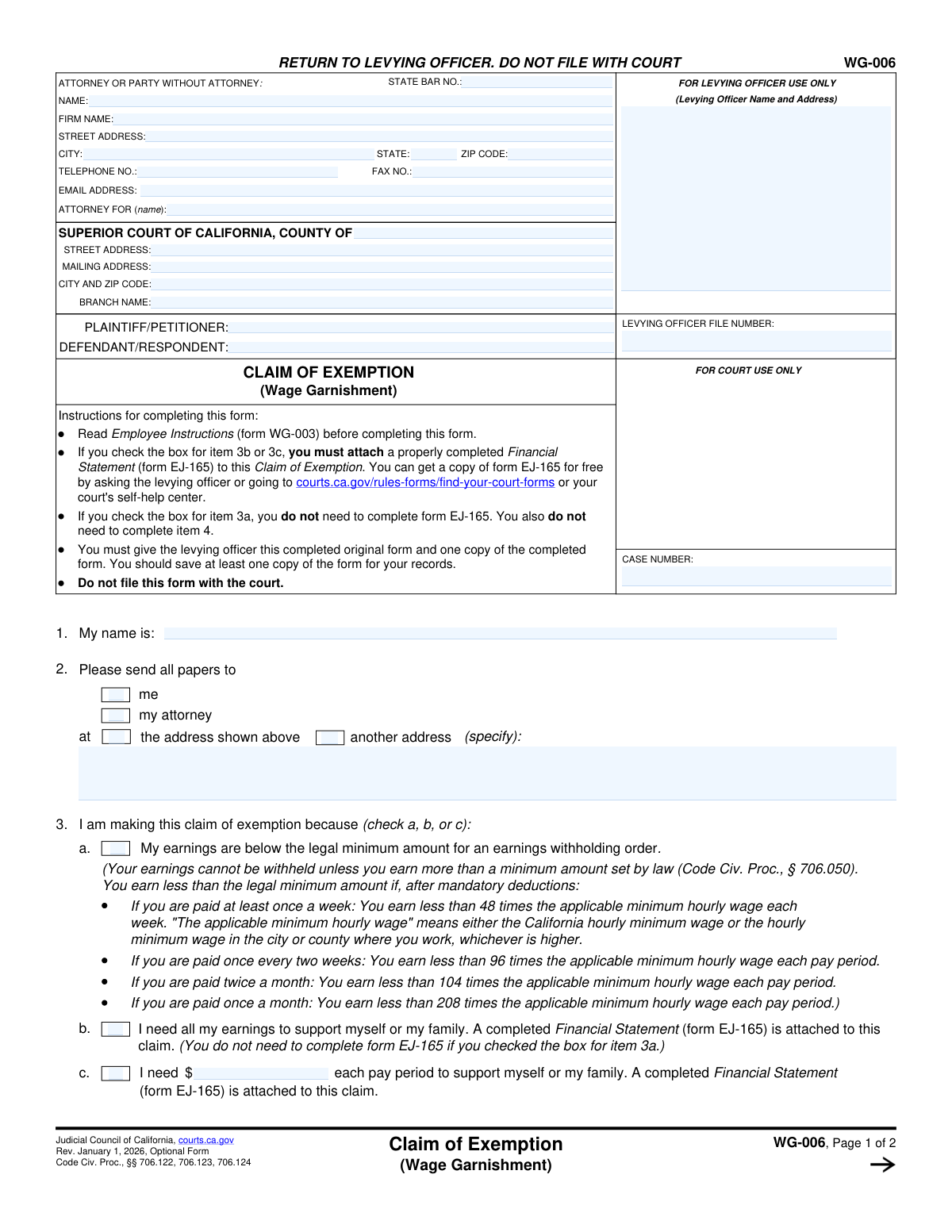
Yes! You can use AI to fill out Form WG-006, Claim of Exemption (Wage Garnishment)
Form WG-006, Claim of Exemption (Wage Garnishment), is a California judicial form used by an individual to formally request that their wages be protected from being taken by a creditor. It's a critical document for debtors to assert their legal right to keep earnings necessary for their support, based on statutory minimums or proven financial need. Today, this form can be filled out quickly and accurately using AI-powered services like Instafill.ai, which can also convert non-fillable PDF versions into interactive fillable forms.
Our AI automatically handles information lookup, data retrieval, formatting, and form filling.
It takes less than a minute to fill out WG-006 using our AI form filling.
Securely upload your data. Information is encrypted in transit and deleted immediately after the form is filled out.
Form specifications
| Form name: | Form WG-006, Claim of Exemption (Wage Garnishment) |
| Number of fields: | 49 |
| Number of pages: | 1 |
| Language: | English |
Instafill Demo: How to fill out PDF forms in seconds with AI
How to Fill Out WG-006 Online for Free in 2026
Are you looking to fill out a WG-006 form online quickly and accurately? Instafill.ai offers the #1 AI-powered PDF filling software of 2026, allowing you to complete your WG-006 form in just 37 seconds or less.
Follow these steps to fill out your WG-006 form online using Instafill.ai:
- 1 Navigate to Instafill.ai and upload your Form WG-006, or select it from their library of templates.
- 2 Provide your personal details, attorney information (if applicable), and the court case information as it appears on the wage garnishment order.
- 3 In section 3, check the box that applies to your situation: either your earnings are below the legal minimum, or you need all or part of your earnings for support.
- 4 If you claimed you need your earnings for support (options 3b or 3c), you must also complete and attach a Financial Statement (Form EJ-165), which Instafill.ai can also help you prepare.
- 5 Indicate your pay frequency (e.g., weekly, monthly) and, if applicable, state the amount you are willing to have withheld per pay period.
- 6 Carefully review all the information for accuracy, then electronically sign and date the form under penalty of perjury.
- 7 Download the completed original and one copy. Submit both to the levying officer (e.g., the sheriff's department) listed on your garnishment notice, not the court.
Our AI-powered system ensures each field is filled out correctly, reducing errors and saving you time.
Why Choose Instafill.ai for Your Fillable WG-006 Form?
Speed
Complete your WG-006 in as little as 37 seconds.
Up-to-Date
Always use the latest 2026 WG-006 form version.
Cost-effective
No need to hire expensive lawyers.
Accuracy
Our AI performs 10 compliance checks to ensure your form is error-free.
Security
Your personal information is protected with bank-level encryption.
Frequently Asked Questions About Form WG-006
This form is used to tell a levying officer (like a sheriff) that you believe some or all of your wages should be protected from garnishment. You can use it to claim that your earnings are below the legal minimum for garnishment or that you need the money for basic necessities.
You should fill out this form if you have received a wage garnishment order and believe your earnings are exempt from being taken to pay a court judgment.
You must return the completed original form and one copy to the levying officer whose name and address are on the wage garnishment order. Do not file this form with the court.
Check 3a if your earnings are below the legal minimum for garnishment. Check 3b if you need all of your earnings to support yourself or your family. Check 3c if you need a specific portion of your earnings for support.
You only need to attach a completed Financial Statement (EJ-165) if you check box 3b or 3c on this form. It is not required if you are only claiming exemption under 3a because your earnings are below the legal minimum.
You can get a free copy of form EJ-165 from the levying officer, your court's self-help center, or the official California Courts website.
This means your earnings after mandatory deductions are less than a specific amount set by law, which is based on the state or local minimum wage and how often you are paid. The form provides formulas to help you determine if you qualify.
You must submit the original completed form and one copy to the levying officer. It is also recommended that you keep at least one copy for your personal records.
The form instructions recommend that you first read the Employee Instructions (form WG-003) to understand the wage garnishment process and your rights.
Yes, services like Instafill.ai use AI to help you accurately auto-fill form fields from your saved information, which can save time and reduce errors.
You can use a service like Instafill.ai to upload the PDF, fill it out electronically on your computer, and then print the completed form for submission to the levying officer.
Services like Instafill.ai can convert flat, non-fillable PDFs into interactive forms that you can type into directly, making them easier to complete.
The levying officer will send your claim to the judgment creditor, who can either accept it or oppose it. If they oppose it, a court hearing may be scheduled to decide on your claim.
No, you do not need to complete item 4 if you checked box 3a. For 3b or 3c, you can use item 4 to propose an amount you are willing to have withheld, which may help resolve the claim without a court hearing.
Compliance WG-006
Validation Checks by Instafill.ai
1
Ensures Exemption Reason is Mutually Exclusive
This check verifies that the filer has selected exactly one reason for the claim of exemption in item 3 (either 3a, 3b, or 3c). Selecting more than one or none at all makes the basis for the claim ambiguous and legally invalid. A failure will require the user to correct their selection before the form can be submitted, ensuring the claim is processed on a clear legal ground.
2
Validates Conditional Financial Statement Requirement
This validation confirms that if the filer checks box 3b ('I need all my earnings...') or 3c ('I need $...'), a Financial Statement (form EJ-165) is indicated as attached. This statement is legally required to substantiate claims of financial hardship. If the form is missing, the submission is incomplete and the claim of exemption will likely be rejected by the levying officer.
3
Verifies Conditional Disablement of Withholding Offer
This check ensures that if the filer claims their earnings are below the legal minimum (box 3a), then item 4 (regarding the amount to be withheld) is left blank as instructed. Filling out item 4 in this case would create a logical contradiction in the claim. The system should prevent or flag entries in item 4 if 3a is selected to avoid confusion and potential rejection.
4
Validates Conditional Exemption Amount in Item 3c
When the filer checks box 3c, claiming they need a specific dollar amount to support their family, this validation ensures a valid, positive numerical value is entered in the corresponding field. This amount is the core of the claim and must be a clear figure for the court to evaluate against the attached financial statement. A missing or invalid amount makes the claim incomplete.
5
Ensures Withholding Offer is Made if Required
This check verifies that if exemption reason 3b or 3c is selected, the filer must complete item 4 by choosing either 'None' or specifying an amount to be withheld. This section represents the debtor's offer to the creditor. Failure to complete this section when required makes the claim form incomplete and may lead to its rejection.
6
Validates Conditional Withholding Amount in Item 4b
If the filer selects option 4b, offering to have a specific amount withheld, this check ensures that a valid, positive numerical value is entered. An empty or non-numeric entry would make the offer invalid and prevent the judgment creditor from being able to accept it. This validation ensures the offer is clear and actionable.
7
Ensures Required Pay Frequency Selection
This validation confirms that the filer has selected one of the pay frequency options in item 5 (e.g., weekly, monthly, etc.). This information is essential for the levying officer to correctly calculate the amount of earnings that can be legally garnished based on the pay period. An incomplete selection would halt the processing of the exemption claim.
8
Validates 'Other' Pay Frequency Specification
If the filer selects 'other' for their pay frequency in item 5, this check ensures that the corresponding text field is filled with a description of the pay schedule. This detail is necessary for the levying officer to understand the pay cycle and apply the correct garnishment formula. A blank specification makes the 'other' selection meaningless and the form incomplete.
9
Validates Signature Date Format and Plausibility
This check verifies that the date field in the signature block contains a valid date in a standard format (e.g., MM/DD/YYYY) and is not a date in the future. An invalid or future date can call the authenticity and timing of the declaration into question. This ensures the perjury statement is properly dated as of the time of signing.
10
Confirms Presence of Printed Name for Signature
This validation ensures that the 'TYPE OR PRINT NAME' field is completed in the signature section. This printed name identifies the signatory, which is crucial for legal documents declared under penalty of perjury. A missing printed name makes the signature difficult to attribute and can invalidate the document.
11
Cross-Page Header Consistency Check
This check compares the 'LEVYING OFFICER FILE NO.' and 'COURT CASE NO.' fields on page 2 with the corresponding fields on page 1. It ensures that the identifying numbers are consistent across the entire document, which is critical for correct filing and association with the proper case. Mismatched numbers could lead to the document being misfiled or rejected.
12
Ensures Filer's Name is Provided
This validation confirms that the filer's name in item 1 is not empty. This is the primary identification of the person making the claim of exemption. A missing name makes the entire form invalid as it's not clear who is making the claim.
13
Validates Email Address Format
If an email address is provided in the 'ATTORNEY OR PARTY WITHOUT ATTORNEY' section, this check ensures it conforms to a standard email format (e.g., [email protected]). An invalid format can lead to failed communications and missed notifications regarding the case. This helps ensure all parties can be reached electronically.
14
Ensures Case Number is Provided
This check verifies that the 'CASE NUMBER' field in the header is not empty. The case number is the primary identifier for the legal proceeding and is essential for the levying officer and the court to associate this claim with the correct lawsuit. A missing case number will result in the form being returned as it cannot be processed.
Common Mistakes in Completing WG-006
The form explicitly states 'RETURN TO LEVYING OFFICER. DO NOT FILE WITH COURT,' yet many people send it to the court clerk because it is a court-branded form. This critical error means the claim will not be processed within the legal deadline, resulting in the exemption being waived and wages continuing to be garnished. To avoid this, filers must carefully read the instructions and submit the form directly to the levying officer (usually the Sheriff's Department) whose address is on the wage garnishment notice.
When claiming that you need all or a portion of your earnings for basic necessities (options 3b or 3c), you must attach a completed Financial Statement (form EJ-165). Filers often overlook this requirement, assuming the claim form itself is sufficient. Without the attached EJ-165, the claim is incomplete and will be automatically denied, allowing the garnishment to continue at the maximum rate. Always download and complete form EJ-165 if you check box 3b or 3c and attach it to your Claim of Exemption.
The Case Number and Levying Officer File Number are essential for identifying the specific legal action your claim applies to. People often forget to copy these numbers from the original wage garnishment documents they received. An incomplete or incorrect number means the levying officer cannot match your claim to your case, leading to rejection or significant delays. To prevent this, meticulously copy both numbers onto the top of page 1 and page 2 of the form.
A common error is selecting conflicting options, such as checking box 3b ('I need all my earnings...') and then offering to have an amount withheld in item 4b. This logical contradiction weakens the claim and signals to the creditor that the filer may not actually need all their earnings, making an opposition more likely. To make the strongest case, ensure your selections are consistent; if you check 3b, you should almost always check 'None' in item 4a.
The top of page 2 requires re-entering the 'SHORT TITLE,' 'LEVYING OFFICER FILE NO.,' and 'COURT CASE NO.' Many filers overlook this, assuming page 1 is enough. If the pages become separated during processing, the second page is useless and the entire claim could be deemed incomplete. Always fill out the header on every page of a legal form to ensure all parts remain associated with your case. AI-powered tools like Instafill.ai can automatically populate repeated information across pages to prevent this error.
An unsigned Claim of Exemption is legally invalid and will be rejected outright. This simple oversight happens frequently when people are stressed and rushing to complete the paperwork. A missing date can also create ambiguity about whether the form was filed within the strict legal deadlines, potentially jeopardizing the claim. Always double-check that you have signed and dated the form under penalty of perjury before submitting it.
Option 3a seems simple, but it relies on a complex calculation involving the 'applicable minimum hourly wage,' which could be the state, city, or county minimum wage. Filers may misunderstand this calculation or use the wrong minimum wage, leading them to incorrectly claim this exemption. If the creditor challenges it and proves the calculation was wrong, the claim will be denied. Before checking 3a, carefully review your pay stubs and the specific minimum wage laws for your employer's location.
The instructions require the filer to submit the completed original form and one copy to the levying officer, while also keeping a copy for their own records. People often just send the one original document they filled out. This can slow down the process, as the levying officer needs a copy to serve on the creditor. To ensure smooth processing, make two copies after signing the original: send one copy with the original to the levying officer and keep the other for your files.
Item 2 asks where legal notices should be sent. A filer might check 'another address' but forget to write the new address in the space provided, or they may provide an outdated address. This is a critical mistake, as it means they will not receive the creditor's opposition to their claim or the notice of the court hearing. Always ensure the address provided is current and complete to avoid missing crucial legal deadlines. AI-powered form filling tools like Instafill.ai can help prevent this by validating address formats.
The form requires the filer to choose only one basis for their claim in item 3 (a, b, or c). In a panic, some individuals check multiple boxes, thinking it will strengthen their claim. However, this makes the claim ambiguous and procedurally incorrect, which can be grounds for rejection. You must choose the single best argument for your situation and check only that box. If the form is a non-fillable PDF, tools like Instafill.ai can convert it to a fillable version with features that can prevent selecting multiple mutually exclusive options.
Saved over 80 hours a year
“I was never sure if my IRS forms like W-9 were filled correctly. Now, I can complete the forms accurately without any external help.”
Kevin Martin Green
Your data stays secure with advanced protection from Instafill and our subprocessors

Robust compliance program
Transparent business model
You’re not the product. You always know where your data is and what it is processed for.
ISO 27001, HIPAA, and GDPR
Our subprocesses adhere to multiple compliance standards, including but not limited to ISO 27001, HIPAA, and GDPR.
Security & privacy by design
We consider security and privacy from the initial design phase of any new service or functionality. It’s not an afterthought, it’s built-in, including support for two-factor authentication (2FA) to further protect your account.
Fill out WG-006 with Instafill.ai
Worried about filling PDFs wrong? Instafill securely fills form-wg-006-claim-of-exemption-wage-garnishment forms, ensuring each field is accurate.