Yes! You can use AI to fill out Mutual Withdrawal of Complaint and Counterclaim and Consent for Entry of Judgment

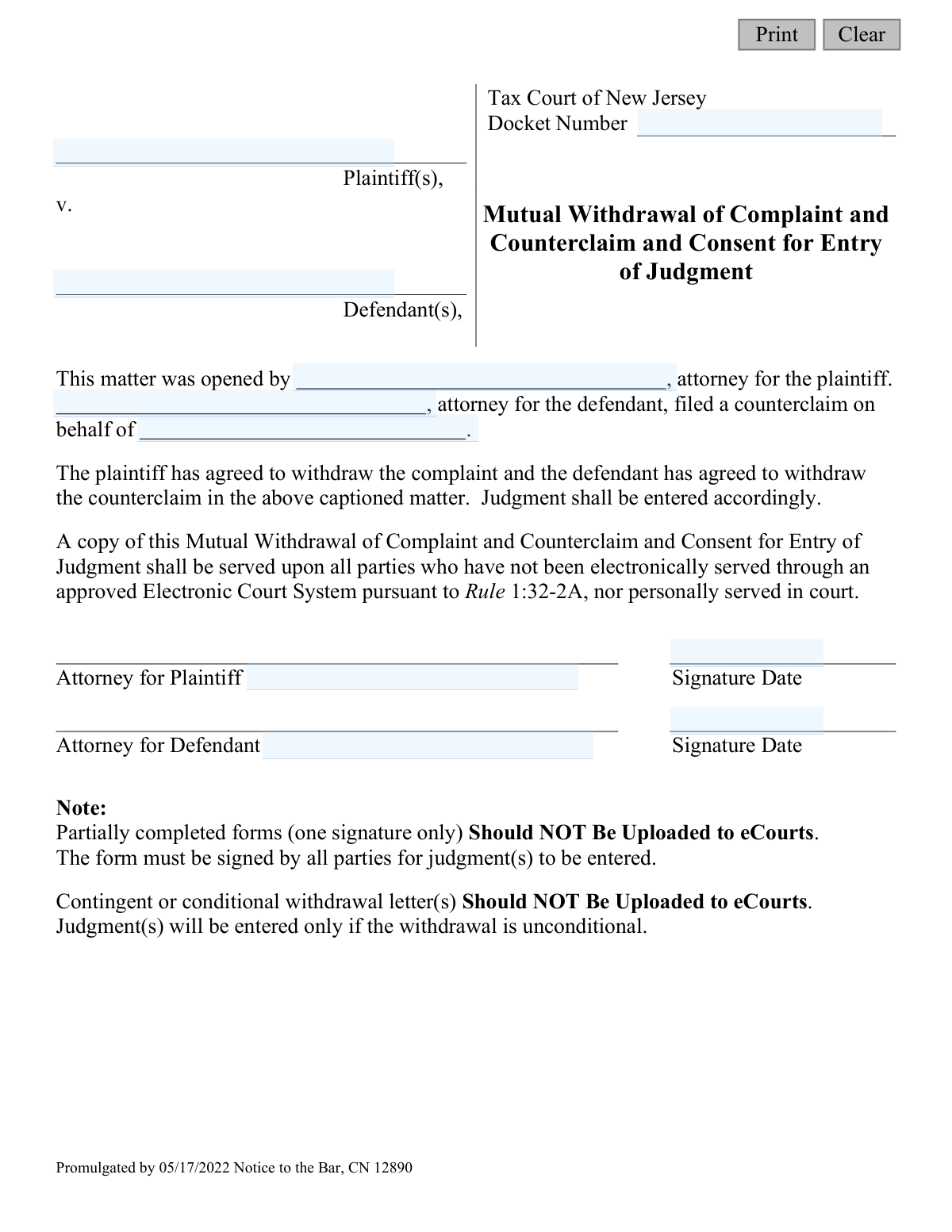
The Mutual Withdrawal of Complaint and Counterclaim and Consent for Entry of Judgment is a legal document filed in the Tax Court of New Jersey. It is used when both the plaintiff and the defendant in a case mutually agree to withdraw their respective complaint and counterclaim, allowing the court to enter a final judgment based on this agreement. Today, this form can be filled out quickly and accurately using AI-powered services like Instafill.ai, which can also convert non-fillable PDF versions into interactive fillable forms.
CN 12890 is part of the court claim forms and New Jersey forms categories on Instafill.
Our AI automatically handles information lookup, data retrieval, formatting, and form filling.
It takes less than a minute to fill out CN 12890 using our AI form filling.
Securely upload your data. Information is encrypted in transit and deleted immediately after the form is filled out.

Form specifications

Form name: Mutual Withdrawal of Complaint and Counterclaim and Consent for Entry of Judgment
Number of fields: 12
Number of pages: 1
Language: English
main-image

Instafill Demo: How to fill out PDF forms in seconds with AI

How to Fill Out CN 12890 Online for Free in 2026

Are you looking to fill out a CN 12890 form online quickly and accurately? Instafill.ai offers the #1 AI-powered PDF filling software of 2026, allowing you to complete your CN 12890 form in just 37 seconds or less.
Follow these steps to fill out your CN 12890 form online using Instafill.ai:
  1. 1 Navigate to Instafill.ai and upload or select the 'Mutual Withdrawal of Complaint and Counterclaim' form.
  2. 2 Provide the case information, including the Docket Number, plaintiff's name, and defendant's name.
  3. 3 Enter the names of the attorneys representing both the plaintiff and the defendant in the designated fields.
  4. 4 Review all the information auto-filled by the AI to ensure accuracy and completeness of all case details.
  5. 5 Securely add the digital signatures of the attorneys for both the plaintiff and the defendant, along with the date.
  6. 6 Download the completed and co-signed document, ready for filing with the Tax Court of New Jersey's eCourts system.

Our AI-powered system ensures each field is filled out correctly, reducing errors and saving you time.

Why Choose Instafill.ai for Your Fillable CN 12890 Form?

Speed

Complete your CN 12890 in as little as 37 seconds.

Up-to-Date

Always use the latest 2026 CN 12890 form version.

Cost-effective

No need to hire expensive lawyers.

Accuracy

Our AI performs 10 compliance checks to ensure your form is error-free.

Security

Your personal information is protected with bank-level encryption.

Frequently Asked Questions About Form CN 12890

This form is used in the New Jersey Tax Court when both the plaintiff and the defendant agree to drop their legal claims against each other. Filing this form allows the court to enter a judgment officially closing the case based on this mutual agreement.

This form must be completed and signed by the attorneys for both the plaintiff and the defendant. It signifies a mutual agreement between both parties to withdraw their respective complaint and counterclaim.

You will need the court case's Docket Number, the full names of the plaintiff(s) and defendant(s), and the names of the attorneys representing each party. Both attorneys must also sign and date the form.

You must not upload a partially signed form to the eCourts system. The form explicitly states that it must be signed by the attorneys for both parties before it can be submitted for a judgment to be entered.

An unconditional withdrawal means the agreement to drop the complaint and counterclaim is final and not dependent on any other events or conditions. The court will not accept withdrawals that are contingent on future actions.

Once fully signed by both parties' attorneys, the completed form should be uploaded to the New Jersey eCourts system. Do not upload partially signed or conditional withdrawal forms.

After the fully executed form is submitted and processed, the court will enter a judgment reflecting the mutual withdrawal of the complaint and counterclaim. This officially closes the case as per the parties' agreement.

No, this specific form is for a 'mutual' withdrawal, meaning both parties are dropping their claims. If only one party is withdrawing their claim, you would need to use a different procedure or form.

The Docket Number is the unique identifier assigned to your case by the Tax Court of New Jersey. You can find this number on any previous correspondence or legal documents related to your case.

Yes, the form states that a copy must be served upon all parties who were not served electronically through the eCourts system or in person at court. This ensures everyone has a record of the mutual withdrawal.

Yes, AI-powered services like Instafill.ai can help you accurately auto-fill form fields, saving you time and reducing the risk of errors. This is especially useful for repetitive information like names and docket numbers.

Simply upload the PDF of the form to the Instafill.ai platform. Its AI will identify the fields, allowing you to type your information directly into the corresponding sections before you download the completed document.

Services like Instafill.ai can solve this by converting flat, non-fillable PDFs into interactive, fillable forms. Just upload your file, and the platform will make it easy to type your information directly onto the form.

Compliance CN 12890
Validation Checks by Instafill.ai

1
Docket Number Presence
Ensures the 'Docket Number' field is not empty. The docket number is a critical unique identifier for the case in the court system. If this field is left blank, the submission cannot be processed or linked to the correct court file, leading to rejection.
2
Docket Number Format
Validates that the 'Docket Number' follows the expected format for the Tax Court of New Jersey, such as NNNNNN-YYYY. This prevents data entry errors and ensures the number corresponds to a valid case structure. An incorrectly formatted number could cause the document to be misfiled or rejected by the eCourts system.
3
Plaintiff and Defendant Name Completeness
Verifies that both the 'Plaintiff(s)' name (`plaName`) and 'Defendant(s)' name (`defName`) fields are filled out. These fields are essential for identifying the primary parties involved in the legal matter. A submission without this information is incomplete and legally insufficient.
4
Attorney Name Completeness
Checks that the names of the attorneys for both the plaintiff (`plaAtty`) and the defendant (`defAtty`) are provided. Legal representation is a key component of the filing, and their identities must be recorded. Failure to provide both attorney names would render the mutual agreement invalid and incomplete.
5
Plaintiff's Attorney Consistency Check
Confirms that the name entered in the 'attorney for the plaintiff' field (`plaAtty`) is identical to the name entered as the attorney who opened the matter (`claimName`). This logical check ensures consistency and confirms the identity of the plaintiff's legal representative. A mismatch would indicate a data entry error or a potential discrepancy in representation that needs correction.
6
Defendant Identity Consistency Check
Validates that the defendant's name on whose behalf the counterclaim was filed (`plaDef`) matches the name entered in the main 'Defendant(s)' field (`defName`). This ensures there is no ambiguity about which party's counterclaim is being withdrawn. If the names do not match, the form is logically inconsistent and must be corrected.
7
Mutual Signature Date Presence
Enforces the rule that if one signature date (`sigDt1` or `sigDt2`) is present, the other must also be present. The form explicitly states that partially completed forms with only one signature should not be uploaded. This check ensures the mutual nature of the agreement is reflected by the presence of both dates before submission.
8
Signature Date Format Validation
Ensures that both signature date fields (`sigDt1` and `sigDt2`) are entered in a valid date format (e.g., MM/DD/YYYY). This prevents ambiguous or invalid date entries from being submitted. An invalid format would cause processing errors and require manual correction.
9
Signature Date Chronology
Verifies that both signature dates (`sigDt1` and `sigDt2`) are not in the future. The date of signing must be on or before the date of submission. This check prevents clerical errors and ensures the document reflects a past or present action, which is critical for its legal validity.
10
Name Field Character Validation
Scans all name-related fields (`plaName`, `defName`, `plaAtty`, `defAtty`, `claimName`, `plaDef`) to ensure they do not contain invalid characters like numbers or excessive symbols. This maintains data integrity and ensures the names are legally formatted. An invalid character could cause rejection by the electronic filing system or issues with record-keeping.
11
Minimum Name Field Length
Checks that all name fields have a minimum length (e.g., more than one character) to prevent accidental or invalid submissions like a single initial. This is a basic data quality check to ensure that a seemingly complete name has been entered. Submissions with single-character names are likely erroneous and should be flagged for review.

Common Mistakes in Completing CN 12890

Entering an Incorrect or Incomplete Docket Number

The docket number is the unique case identifier, and a single typo can cause the document to be rejected or misfiled, leading to significant delays. This often happens due to manual data entry errors. To avoid this, meticulously double-check the number against official court correspondence. AI-powered form-filling tools like Instafill.ai can help prevent this by storing and accurately auto-filling case information.

Submitting a Partially Signed Form

The form explicitly states it must be signed by attorneys for both parties before submission, as it is a 'mutual' withdrawal. This mistake often happens when one party tries to expedite the process, but it results in immediate rejection by the eCourts system. Always coordinate to obtain all required signatures on a single, final document before uploading.

Attempting a Conditional Withdrawal

This form is for an unconditional withdrawal only, as noted in the instructions. Filers sometimes add notes, attach letters, or write in conditions for the withdrawal, all of which will cause the court to reject the filing. The agreement must be final and without any attached strings to be accepted by the court for judgment.

Mismatching Plaintiff or Defendant Names

Party names must match the official court record exactly, including all corporate designators like 'LLC' or 'Inc.' and correct spellings. Using abbreviations, nicknames, or omitting parts of a name can lead to the form's rejection and create ambiguity about the agreement's validity. Carefully transcribe names from the original complaint or docket sheet to ensure accuracy.

Confusing Attorney and Client Information

The form has specific fields for the attorney's name and the client's (plaintiff/defendant) name. A common error is to enter the client's name in the field designated for the attorney, or vice-versa. This creates confusion and can lead to rejection, requiring correction and refiling of the document.

Omitting or Using Invalid Signature Dates

Each signature must be accompanied by a date to be considered validly executed. Forgetting to date the signature, using a future date, or having wildly different dates from each party can invalidate the document. This oversight suggests the agreement was not properly finalized and will likely cause the court clerk to reject the filing.

Unilateral Filing of a Mutual Agreement

This is a 'Mutual Withdrawal,' meaning it is a joint action. A frequent procedural error occurs when one party's attorney completes and signs their portion and uploads it, expecting the other party to do the same separately. The court requires a single, fully executed document, and partial or separate filings will be rejected.

Using an Obsolete Version of the Form

Courts periodically update their forms, as indicated by the 'Promulgated by 05/17/2022' date on this document. Using an older version may result in rejection because it might lack new required fields or legal language. Always ensure you are using the most current version available from the New Jersey Courts website before filling it out.

Neglecting Service on Non-Electronic Parties

The form contains a clause requiring the filer to serve a copy on any party not served through the electronic court system. Overlooking this step can lead to procedural challenges and potential legal issues, as it may violate the due process rights of other involved parties. It is crucial to verify the service method for every party in the case and document compliance.

Submitting Illegible Handwritten Information

If the form is printed and filled out by hand, poor handwriting for names, docket numbers, or dates can make the document impossible for the court to process accurately, leading to rejection. To prevent this, it is best to use the fillable PDF version. If the form is only available as a flat PDF, an AI-powered tool like Instafill.ai can convert it into a fillable version, ensuring all information is clear and legible.
Saved over 80 hours a year

“I was never sure if my IRS forms like W-9 were filled correctly. Now, I can complete the forms accurately without any external help.”

Kevin Martin Green

Your data stays secure with advanced protection from Instafill and our subprocessors

Robust compliance program

Transparent business model

You’re not the product. You always know where your data is and what it is processed for.

ISO 27001, HIPAA, and GDPR

Our subprocesses adhere to multiple compliance standards, including but not limited to ISO 27001, HIPAA, and GDPR.

Security & privacy by design

We consider security and privacy from the initial design phase of any new service or functionality. It’s not an afterthought, it’s built-in, including support for two-factor authentication (2FA) to further protect your account.

Fill out CN 12890 with Instafill.ai

Worried about filling PDFs wrong? Instafill securely fills mutual-withdrawal-of-complaint-and-counterclaim-and-consent-for-entry-of-judgment forms, ensuring each field is accurate.

Related forms by category

court claim forms Form SC-100, Plaintiff's Claim and ORDER to Go to Small Claims Court, Judicial Council of California Form SC-105, Request for Court Order and Answer (Small Claims), SC-120, Defendant’s Claim and ORDER to Go to Small Claims Court (Small Claims), SC-105, Request for Court Order and Answer (Small Claims), Judicial Council of California Form SC-120, Defendant’s Claim and ORDER to Go to Small Claims Court (Small Claims), Form SC-100, Plaintiff’s Claim and ORDER to Go to Small Claims Court, Certificate of Service (Civil Court Claim), Form N161, Appellant’s notice (All appeals except small claims track appeals and appeals to the Family Division of the High Court), Plaintiff's Claim and ORDER to Go to Small Claims Court (SC-100), Form N161, Appellant's Notice (All appeals except small claims track appeals and appeals to the Family Division of the High Court), Form SC-100A, Other Plaintiffs or Defendants (Attachment to Plaintiff's Claim and ORDER to Go to Small Claims Court), Form N461: Claim for judicial review, Statement of Small Claim and Notice, Trial Court of Massachusetts, State of Michigan, Form MC 25, Notice of Intent to Escheat Unclaimed Personal Property, Form MC 35, Complaint, Claim and Delivery, Form MC 36, Motion for Possession Pending Judgment, Claim and Delivery, Order of Possession Pending Judgment, Claim and Delivery, Form MC 38, Bond, Claim and Delivery, Form MC 39, Judgment, Claim and Delivery, Form MC 55, Claim of Appeal · + 60 more →
New Jersey forms State of New Jersey Alternate Benefit Program Withdrawal Request Acknowledgement Receipt, Horizon Blue Cross Blue Shield of New Jersey Applied Behavior Analysis Supplemental Information Form, State of New Jersey Application for Employment (Form DPF-663), New Jersey Judiciary Plea Form (Plea 01), Supplemental Plea Form for Certain Sexual Offenses: Megan’s Law/Parole Supervision for Life/Community Supervision for Life (Plea 05), Financial Questionnaire to Establish Indigency, New Jersey Judiciary Resource Family Information Form, Foreclosure Case Information Statement (FCIS) - Appendix XII-B2, New Jersey Judiciary Records Request Form, Superior Court of New Jersey, Application for Appeal and Order, FL Certification of Requested Background Checks for Kinship Legal Guardianship, Certification of Caregiver as to Knowledge of Identity and/or Location of Parents, FL Order Judgment for Kinship Legal Guardianship, New Jersey Judiciary Certification of Repair and Plea of Guilty, Uniform Summary Support Order (USSO), New Jersey Judiciary Volunteer Application (CN 10293), Application to Take the New Jersey Court Interpreter Oral Examination, New Jersey Judiciary Attorney Fee Arbitration Request, Order to Show Cause with Temporary Restraints Pursuant to Rule 4:52, Tax Court of New Jersey, State Tax Complaint · + 271 more →