Yes! You can use AI to fill out Occupational Therapy (OT) Services Initial Assessment Report

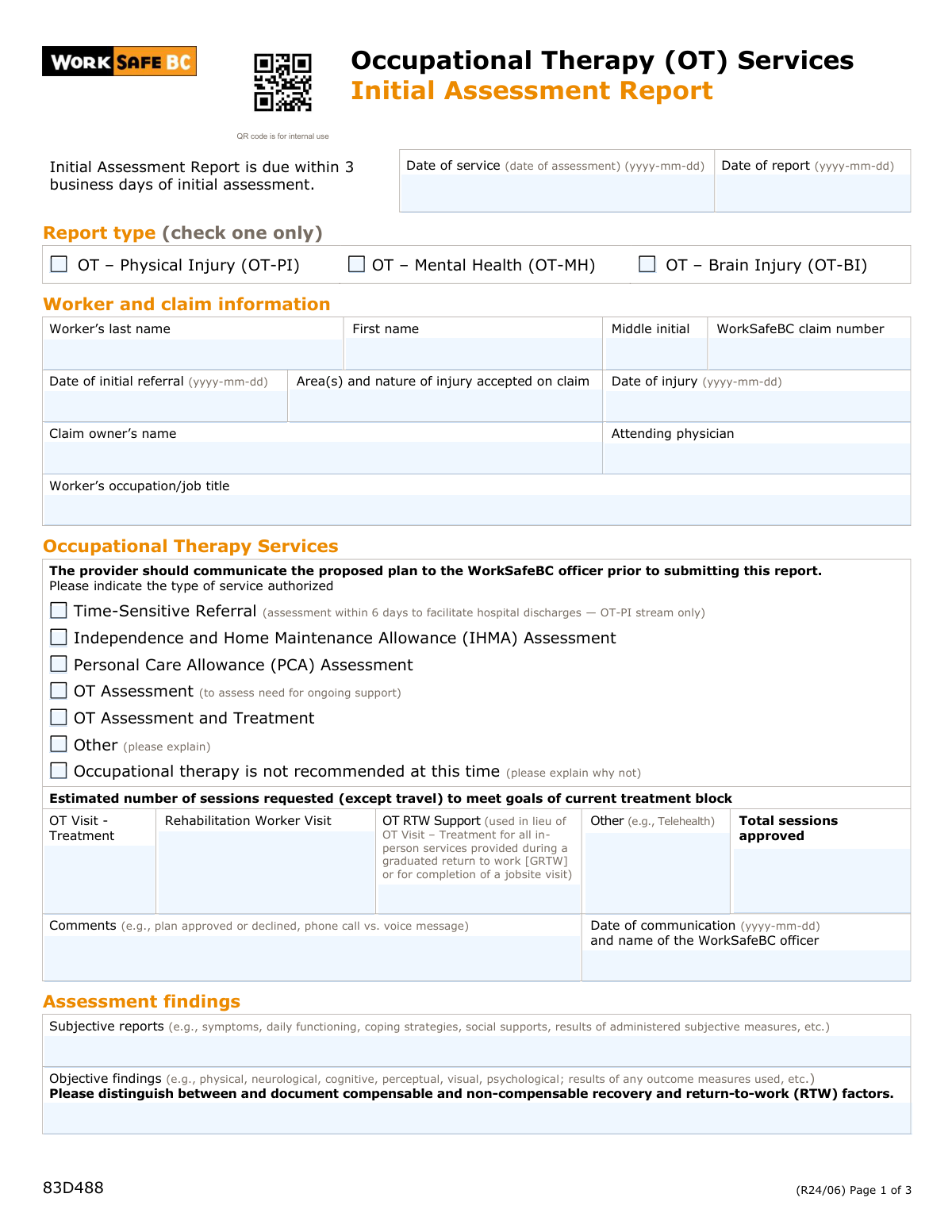
Form 83D488 is an Initial Assessment Report for Occupational Therapy (OT) Services provided under a WorkSafeBC claim. It is used by occupational therapists to document a worker's subjective and objective findings, functional status, and vocational status following an injury. This report is crucial for establishing a baseline, outlining a treatment plan, and justifying the need for OT services to support the worker's recovery and return to work. Today, this form can be filled out quickly and accurately using AI-powered services like Instafill.ai, which can also convert non-fillable PDF versions into interactive fillable forms.
Our AI automatically handles information lookup, data retrieval, formatting, and form filling.
It takes less than a minute to fill out 83D488 using our AI form filling.
Securely upload your data. Information is encrypted in transit and deleted immediately after the form is filled out.

Form specifications

Form name: Occupational Therapy (OT) Services Initial Assessment Report
Number of pages: 3
Language: English
main-image

Instafill Demo: How to fill out PDF forms in seconds with AI

How to Fill Out 83D488 Online for Free in 2026

Are you looking to fill out a 83D488 form online quickly and accurately? Instafill.ai offers the #1 AI-powered PDF filling software of 2026, allowing you to complete your 83D488 form in just 37 seconds or less.
Follow these steps to fill out your 83D488 form online using Instafill.ai:
  1. 1 Navigate to Instafill.ai and upload or select the Occupational Therapy (OT) Services Initial Assessment Report.
  2. 2 Use the AI assistant to accurately input worker and claim information, including name, WorkSafeBC claim number, and injury details.
  3. 3 Document the assessment findings by entering subjective reports and objective clinical observations, distinguishing between compensable and non-compensable factors.
  4. 4 Complete the functional status sections by checking the applicable activities of daily living (basic and instrumental) and providing comments on pre-injury versus current function.
  5. 5 Outline the OT plan, including the number of sessions requested, SMART goals for the treatment block, and any recommendations for adaptive equipment or home modifications.
  6. 6 Enter the provider's information, including name, company details, and payee number, then electronically sign and date the declaration.
  7. 7 Review all the information populated by the AI for accuracy and completeness before submitting the report to WorkSafeBC.

Our AI-powered system ensures each field is filled out correctly, reducing errors and saving you time.

Why Choose Instafill.ai for Your Fillable 83D488 Form?

Speed

Complete your 83D488 in as little as 37 seconds.

Up-to-Date

Always use the latest 2026 83D488 form version.

Cost-effective

No need to hire expensive lawyers.

Accuracy

Our AI performs 10 compliance checks to ensure your form is error-free.

Security

Your personal information is protected with bank-level encryption.

Frequently Asked Questions About Form 83D488

This form is used by an Occupational Therapist to report the findings of an initial assessment for a worker with a WorkSafeBC claim. It details the worker's functional status, recovery factors, and the proposed treatment plan and goals.

A registered Occupational Therapist who has performed an initial assessment on a worker with an active WorkSafeBC claim is responsible for completing this report.

The Initial Assessment Report must be completed and submitted to WorkSafeBC within three business days of the initial assessment (date of service).

Yes, the form requires the provider to communicate the proposed treatment plan and any equipment recommendations to the WorkSafeBC officer prior to submitting the report. You must document this communication on the form.

This section requires your comprehensive clinical analysis of the assessment findings. You should clearly describe the recovery and return-to-work (RTW) factors, distinguishing between compensable and non-compensable issues, and provide relevant RTW considerations.

SMART goals are Specific, Measurable, Attainable, Realistic, and Timely. You must use this framework to set clear, functional goals for the worker that are related to their compensable injury.

If OT is not recommended, check the appropriate box under the 'Occupational Therapy Services' section and provide a brief explanation for your decision. This should still be communicated to the WorkSafeBC officer.

'OT Visit – Treatment' covers general therapy sessions. 'OT RTW Support' is specifically for in-person services provided during a graduated return to work (GRTW) or for completing a job site visit.

You must detail the recommended equipment or modifications and discuss them with the WorkSafeBC officer first. For rentals, you must note the expected duration, follow-up plan, and provide a comparison purchase price where indicated.

Use the checklists on page 2 to indicate the worker's status for Basic and Instrumental Activities of Daily Living. You must also add comments comparing their current function to their pre-injury function for any applicable areas.

Yes, services like Instafill.ai use AI to accurately auto-fill form fields like worker details and provider information from your records. This saves time and helps you focus on the clinical assessment portions of the report.

You can use a service like Instafill.ai to complete this form digitally. Simply upload the PDF, and the platform will make it interactive, allowing you to easily type in information and use AI to auto-fill repetitive fields.

If you have a non-fillable or 'flat' PDF, you can upload it to a platform like Instafill.ai. It will automatically convert the document into an interactive, fillable form that you can complete, save, and print.

Compliance 83D488
Validation Checks by Instafill.ai

1
Report and Assessment Date Logic
This validation ensures the 'Date of report' is on or after the 'Date of service (date of assessment)'. A report cannot be dated before the assessment it describes. This check prevents chronological errors and ensures the report reflects the findings from the specified assessment date. If validation fails, the user will be prompted to correct one or both dates.
2
Report Submission Timeliness
This check verifies that the 'Date of report' is within 3 business days of the 'Date of service'. The form explicitly states this requirement. This is important for timely claim processing and intervention. If the report is submitted late, this validation would flag it, potentially as a warning, to ensure compliance with service level agreements.
3
Injury and Service Date Chronology
This validation confirms the logical sequence of key dates: 'Date of injury' must be on or before the 'Date of initial referral', which must be on or before the 'Date of service'. This ensures a logical timeline for the claim events. An illogical sequence could indicate a data entry error that needs correction to maintain the integrity of the claim record.
4
Exclusive Report Type Selection
This check ensures that exactly one 'Report type' (OT-PI, OT-MH, or OT-BI) is selected. The form specifies 'check one only'. This is critical for correctly categorizing the report, routing it to the appropriate internal teams, and applying the correct billing codes. A failure would require the user to select a single, valid option before submission.
5
Conditional Time-Sensitive Referral
This validation enforces the rule that the 'Time-Sensitive Referral' checkbox can only be selected if the 'Report type' is 'OT – Physical Injury (OT-PI)'. The form explicitly states this is for the 'OT-PI stream only'. This prevents misclassification of services and ensures specialized, time-sensitive workflows are triggered only for eligible claims.
6
Session Count Consistency
This check verifies that the sum of the individual estimated sessions ('OT Visit', 'Rehabilitation Worker Visit', 'OT RTW Support', 'Other') equals the number entered in 'Total sessions approved'. This acts as a calculation check to prevent mathematical errors and ensure the requested sessions align with the total approved amount. A discrepancy would require the user to correct the session counts before proceeding.
7
Mandatory Explanation for Conditional Selections
This validation ensures that if the 'Other (please explain)' or 'Occupational therapy is not recommended at this time' checkbox is selected, the corresponding text field is not empty. This is crucial for providing context and justification for non-standard or negative recommendations. Without this explanation, the report is incomplete and cannot be properly evaluated by the claim owner.
8
Worker Information Consistency Across Pages
This check ensures that the 'Worker’s last name', 'First name', and 'WorkSafeBC claim number' are identical in the header of all three pages. This is vital for document integrity, especially if pages are separated or scanned individually. Inconsistent information can lead to misfiling or confusion, so this check ensures the entire document is correctly associated with one worker and claim.
9
Conditional Comments for Activities of Daily Living
This validation ensures that for each 'Activities of Daily Living' section (Mobility, Self-care, Instrumental), if any checkbox is checked, the corresponding 'Comments' field must be filled out. Checking a box indicates a functional issue, and the comments are required to explain the pre-injury vs. current function. Without the comment, the checked box lacks the necessary clinical context for assessment.
10
Mutually Exclusive Vocational Status
This check ensures that the 'Job attached' and 'Not job attached' checkboxes are mutually exclusive; only one can be selected at a time. A worker cannot be both attached and unattached to a job. This validation prevents contradictory information regarding the worker's employment status, which is a critical factor in return-to-work planning.
11
Conditional Employer Contact Date Field
This validation enforces the logic that the 'Date of anticipated employer contact' field is only available and required if the 'Employer contacted' checkbox is *not* checked. This ensures that a future contact date is only provided when contact has not yet been made. It prevents redundant or contradictory data entry regarding employer communication.
12
Treatment and Discharge Date Logic
This check ensures the 'Proposed discharge date' is on or after the 'End date of requested treatment block'. Both dates must also be in the future and occur after the 'Date of report'. This enforces a logical timeline for the proposed treatment plan and prevents impossible date sequences, ensuring the plan is forward-looking and coherent.
13
Completeness of Provider Information
This validation verifies that all fields in the 'Provider’s information' section (Name, Company, Payee number, Phone, and full address) are completed. This information is essential for identifying the provider, processing payments, and future communication. An incomplete block would halt administrative processes and require manual follow-up.
14
Mandatory Assessment Findings
This check ensures the 'Subjective reports' and 'Objective findings' text areas are not empty. These sections contain the core clinical information of the assessment and are the primary justification for the entire report and treatment plan. Submitting a report without these findings would render it useless for clinical or administrative review.

Common Mistakes in Completing 83D488

Incorrect or Inconsistent Date Formatting

Providers often enter dates in a format like MM/DD/YYYY instead of the required YYYY-MM-DD format, or the 'Date of service' and 'Date of report' are illogical. This inconsistency causes data entry errors and processing delays for the report and subsequent authorizations. To avoid this, carefully check the required format for each date field; AI-powered tools like Instafill.ai can automatically validate and format dates correctly to prevent these errors.

Inconsistent Worker or Claim Information Across Pages

The worker's name and WorkSafeBC claim number are repeated on all three pages, but providers sometimes make typos or enter slightly different information on subsequent pages. This can cause pages to be misfiled or the report to be linked to the wrong claim, significantly delaying the review process. Always double-check that this critical information is identical on all pages before submission.

Vague Description of Accepted Injury

The 'Area(s) and nature of injury accepted on claim' field is often filled with general symptoms rather than the specific diagnosis approved by WorkSafeBC. This mismatch can lead to the report being questioned or rejected if the assessed issues do not clearly align with the compensable condition. To prevent this, refer directly to the referral documentation and copy the exact 'accepted' injury and diagnosis.

Failing to Document Prior Communication with Officer

The form explicitly states that the proposed plan and equipment recommendations must be communicated to the WorkSafeBC officer before submission. Providers often forget this step or fail to document the date and officer's name, which can result in the treatment plan being rejected and payment being delayed. Always contact the officer before finalizing the report and immediately document the communication details in the designated field.

Writing Vague, Non-SMART Treatment Goals

The form requires SMART (Specific, Measurable, Attainable, Realistic, Timely) goals, but providers often write generic objectives like 'Improve daily function.' Vague goals make it impossible for WorkSafeBC to assess progress or justify the requested treatment, leading to requests for clarification or denial of further sessions. A proper goal should be specific, such as 'Worker will be able to independently lift 15 lbs from floor to waist height within 4 weeks.'

Omitting Comparative Functional Status Comments

In the Activities of Daily Living (ADL) sections, a common error is to only check the boxes indicating a deficit without filling in the mandatory 'Comments' field comparing pre-injury versus current function. This omission removes the essential context needed to justify OT intervention, as it fails to demonstrate a functional loss from the worker's baseline. Always provide a brief but clear comparison in the comments for every checked section.

Mixing Subjective and Objective Findings

Providers sometimes blend the worker's self-reported symptoms (subjective) with clinical observations and measurements (objective) in the assessment findings sections. This makes it difficult for the claim owner to distinguish between what the worker feels and what the therapist has objectively measured, potentially weakening the report's clinical justification. Strictly separate patient quotes into the 'Subjective' box and measurable data like range of motion or test scores into the 'Objective' box.

Forgetting the Signature or Date

An unsigned or undated form is not a valid legal document and is a surprisingly common oversight, especially when rushing to meet the 3-day submission deadline. This simple error will always result in the form being returned for completion, halting all progress on the file, including treatment authorization and provider payment. Always perform a final check for a signature and date before submitting the document.

Recommending Equipment Without Prior Approval

The form states that recommendations for adaptive equipment must be discussed with the WorkSafeBC officer before submission. Including unapproved equipment recommendations often results in the request being denied and requires a revised report. This delays the worker's access to necessary aids and creates avoidable administrative work for the provider.

Failing to Distinguish Compensable vs. Non-Compensable Factors

The 'Objective findings' section explicitly asks the provider to distinguish between compensable and non-compensable recovery factors. Failing to make this distinction can confuse the scope of the claim and may lead to the denial of services aimed at non-work-related issues. Providers must clearly analyze and document which findings are a direct result of the accepted injury versus those arising from other conditions.
Saved over 80 hours a year

“I was never sure if my IRS forms like W-9 were filled correctly. Now, I can complete the forms accurately without any external help.”

Kevin Martin Green

Your data stays secure with advanced protection from Instafill and our subprocessors

Robust compliance program

Transparent business model

You’re not the product. You always know where your data is and what it is processed for.

ISO 27001, HIPAA, and GDPR

Our subprocesses adhere to multiple compliance standards, including but not limited to ISO 27001, HIPAA, and GDPR.

Security & privacy by design

We consider security and privacy from the initial design phase of any new service or functionality. It’s not an afterthought, it’s built-in, including support for two-factor authentication (2FA) to further protect your account.

Fill out 83D488 with Instafill.ai

Worried about filling PDFs wrong? Instafill securely fills occupational-therapy-ot-services-initial-assessment-report forms, ensuring each field is accurate.