Yes! You can use AI to fill out Principal Group Disability Insurance Options (Forms GC 3000-2, GC 4000-2, GP53705-05)
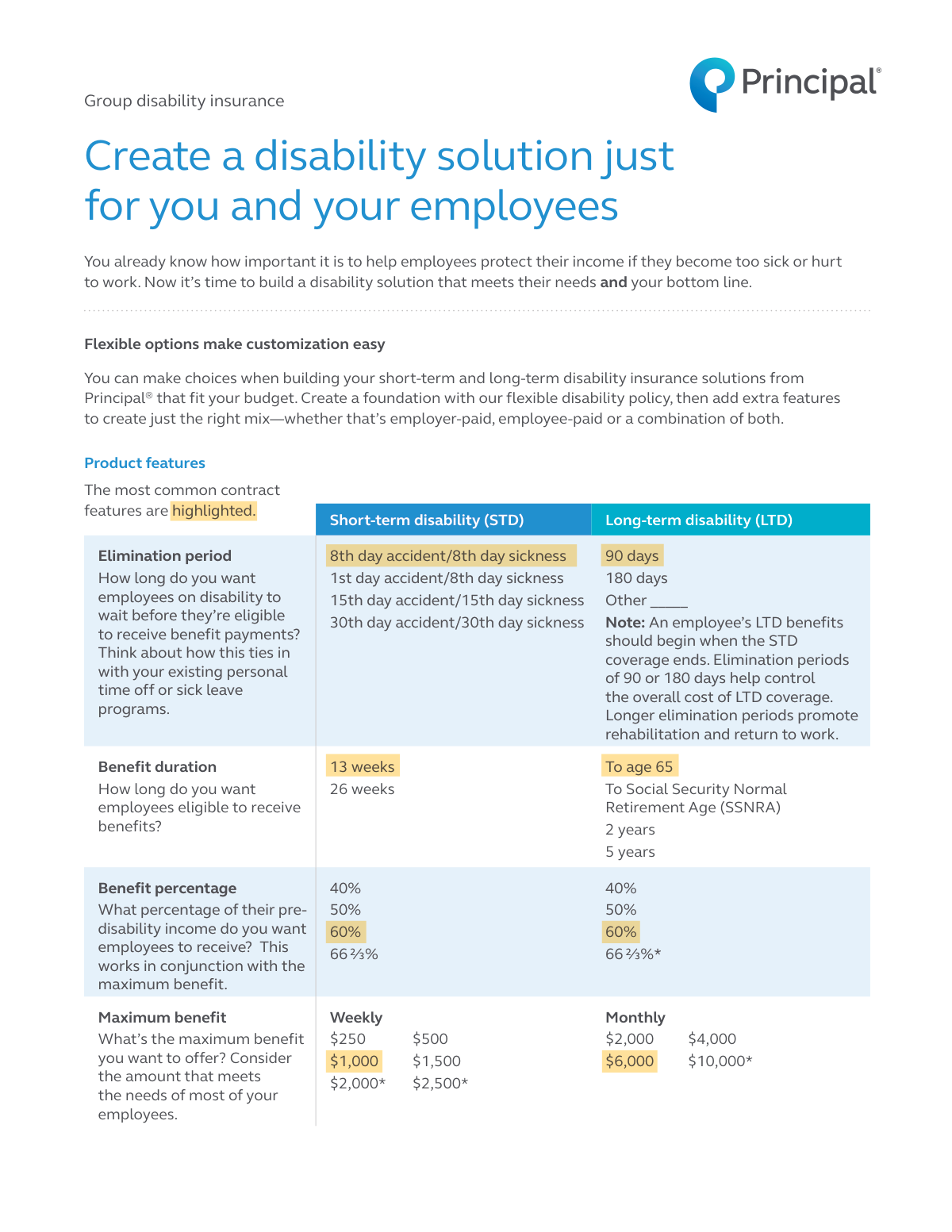
This document is a selection guide for employers to build a customized group disability insurance plan from Principal®. It outlines various choices for short-term (STD) and long-term (LTD) disability coverage, including elimination periods, benefit percentages, and optional add-ons, allowing companies to create a benefits package that fits their budget. Today, this form can be filled out quickly and accurately using AI-powered services like Instafill.ai, which can also convert non-fillable PDF versions into interactive fillable forms.
GP53705-05 is part of the
insurance forms, disability forms, disability insurance forms, Principal forms and group insurance forms categories on Instafill.
Rather not fill this in by hand? Instafill is an online form filler that completes PDF forms automatically — upload the blank form, answer a few questions, and the AI fills every field.
Form specifications
| Form name: | Principal Group Disability Insurance Options (Forms GC 3000-2, GC 4000-2, GP53705-05) |
| Number of pages: | 1 |
| Language: | English |
Our AI automatically handles information lookup, data retrieval, formatting, and form filling.
It takes less than a minute to fill out GP53705-05 using our AI form filling.
Securely upload your data. Information is encrypted in transit and deleted immediately after the form is filled out.
Instafill Demo: How to fill out PDF forms in seconds with AI
How to Fill Out GP53705-05 Online for Free in 2026
Are you looking to fill out a GP53705-05 form online quickly and accurately? Instafill.ai offers the #1 AI-powered PDF filling software of 2026, allowing you to complete your GP53705-05 form in just 37 seconds or less.
Follow these steps to fill out your GP53705-05 form online using Instafill.ai:
- 1 Navigate to Instafill.ai and upload or select the Principal Group Disability Insurance Options form.
- 2 Review the available options for Short-Term Disability (STD) and Long-Term Disability (LTD) coverage presented in the document.
- 3 Select the desired Elimination Period, Benefit Duration, and Benefit Percentage for both STD and LTD plans based on your company's needs.
- 4 Choose the Maximum Benefit amounts for weekly (STD) and monthly (LTD) payouts that align with your budget and employee compensation.
- 5 Evaluate and select any additional standard or optional benefits, such as Rehabilitation Incentives, Cost-of-Living Adjustments (COLA), or an Employee Assistance Program (EAP).
- 6 After making all selections, review the choices for accuracy and completeness before finalizing the plan design.
- 7 Download, print, or share the completed form with your Principal representative to implement the chosen disability insurance solution.
Our AI-powered system ensures each field is filled out correctly, reducing errors and saving you time.
Why Choose Instafill.ai for Your Fillable GP53705-05 Form?
Speed
Complete your GP53705-05 in as little as 37 seconds.
Up-to-Date
Always use the latest 2026 GP53705-05 form version.
Cost-effective
No need to hire expensive lawyers.
Accuracy
Our AI performs 10 compliance checks to ensure your form is error-free.
Security
Your personal information is protected with bank-level encryption.
Frequently Asked Questions About GP53705-05
This document is a guide for employers to design a customized group short-term (STD) and long-term (LTD) disability insurance plan for their employees. It is not an application form but rather a tool to help you choose the features for your company's policy.
This guide is intended for employers, business owners, or benefits administrators who are responsible for creating and selecting a group disability insurance solution that fits their employees' needs and the company's budget.
The elimination period is the waiting time an employee must be disabled before they can start receiving benefit payments. You should choose a period that aligns with your company's existing sick leave or paid time off programs.
STD provides income replacement for a shorter duration, typically up to 26 weeks, for temporary illnesses or injuries. LTD offers coverage for longer periods, often for several years or until retirement age, and usually begins after STD benefits end.
The benefit percentage is the portion of an employee's pre-disability income they will receive while on disability. You can choose from options like 50%, 60%, or 66 ⅔%, balancing comprehensive coverage for employees with the overall cost to your business.
Incremental benefits allow employees to purchase a specific dollar amount of coverage they can afford, rather than a set percentage of their income. This offers more flexibility for employees to choose a plan that fits their personal budget.
Yes, the 'Conversion Privilege' option allows eligible employees who leave the company to convert their group long-term disability coverage into a personal policy without having to prove good health.
The EAP is a standard benefit that provides employees with confidential resources for life's challenges, such as 24/7 phone consultations with mental health professionals, financial consultation, and legal services.
This is the period during which an employee is considered disabled if they cannot perform the duties of their specific job. After this period, the definition of disability may change to being unable to perform any occupation for which they are qualified.
After using this guide to decide on your preferred features, you should contact your Principal® representative. They will provide specific cost and coverage details and help you finalize the insurance contract for your company.
Yes, services like Instafill.ai use AI to help you accurately auto-fill enrollment and other related forms. This can save significant time and help prevent common errors during the application process.
You can use a service like Instafill.ai to complete your forms digitally. Simply upload the form to their platform, and the AI will help you fill in the required fields quickly and easily.
If you have a flat, non-fillable PDF, you can use a tool like Instafill.ai to make it interactive. The service converts the document into a fillable form, allowing you to type your information directly into the fields online.
The COLA is an optional benefit that helps protect a disabled employee's income from inflation by increasing their benefit payments yearly. You can choose the percentage increase and the duration for which the adjustment applies.
The Survivor Benefit is a standard feature of the LTD policy that pays a lump sum to the survivors of an employee who dies while receiving disability benefits. This provides additional financial security for the employee's family.
Compliance GP53705-05
Validation Checks by Instafill.ai
1
Ensures LTD Elimination Period aligns with STD Benefit Duration
This check validates that the selected Long-Term Disability (LTD) elimination period logically follows the end of the Short-Term Disability (STD) benefit duration. For example, a 26-week (approx. 180 days) STD duration should be paired with a 180-day LTD elimination period to ensure continuous coverage for the employee. A mismatch could create a gap where the employee receives no benefits, so validation failure should trigger an error requiring the user to adjust one of the periods.
2
Validates selections restricted to Employer-Paid plans
Several benefit options, such as a 66 ⅔% LTD benefit percentage or a $10,000 monthly maximum, are marked as available for 'Employer-paid disability only'. This check ensures that if any of these restricted options are selected, the plan's funding model is indeed 'Employer-Paid'. If the plan is employee-paid or contributory, selecting these options will result in an error, preventing the creation of a non-compliant plan.
3
Verifies ADL Income Replacement Percentage exceeds Base Benefit Percentage
The Activities of Daily Living (ADL) benefit percentage is calculated by subtracting the elected base benefit percentage from the ADL income replacement percentage. This validation ensures the selected ADL income replacement percentage (e.g., 80%) is strictly greater than the base LTD benefit percentage (e.g., 60%). If the ADL percentage is not higher, the benefit would be zero or negative, so the system will flag this as a logical error.
4
Requires a valid entry for 'Other' LTD Elimination Period
If the user selects the 'Other' option for the LTD elimination period, this check ensures the corresponding text field is not empty and contains a valid, positive integer representing a number of days. This is crucial for defining a key policy term that impacts when benefits begin. Failure to provide a valid number will result in a validation error, prompting the user to enter the required information.
5
Ensures LTD Own Occupation Period does not exceed Benefit Duration
This validation checks that the selected 'Own Occupation Period' for LTD is not longer than the total 'Benefit Duration' for the policy. It is logically impossible for the own occupation period, which is a component of the benefit period, to last longer than the entire benefit payment window. If a user selects a 5-year own occupation period with a 2-year benefit duration, the system will raise an error to correct the illogical configuration.
6
Confirms Group Size meets minimum for Medical Premium Supplement
The form specifies that the Medical Premium Supplement benefit requires a 'Minimum of 20 employees or COBRA eligible'. This check validates the employer's group size against this requirement before allowing the benefit to be added to the plan. If the group size is below the threshold, the option will be disabled or an error will be shown, preventing the selection of an unavailable feature.
7
Validates Medical Premium Supplement options against state regulations
Certain monthly payment and duration options for the Medical Premium Supplement are noted as 'Not available in all states'. This validation cross-references the employer's state of business with a ruleset of available options for that specific jurisdiction. If a selected option is not permitted in that state, the system will block the submission and require the user to choose a compliant alternative.
8
Ensures full configuration for Cost-of-Living Adjustment (COLA) benefit
If the employer chooses to include the Cost-of-Living Adjustment (COLA) benefit, they must define all its parameters. This check verifies that both a COLA increase rule (e.g., 3%, CPI) and a benefit duration (e.g., 5 years, 10 years) have been selected. An incomplete selection would leave the benefit undefined, so the system will prompt the user to complete the configuration if either part is missing.
9
Ensures full configuration for Return-to-Work Childcare Benefit
When the 'Return-to-work Childcare Benefit' is added to the plan, it requires two parameters to be functional: a reimbursement percentage and a maximum monthly benefit. This validation ensures that if the benefit is selected, both of these related fields are also filled out. A failure would result in an error message asking the user to specify both the percentage and the maximum dollar amount.
10
Verifies all required Short-Term Disability (STD) fields are selected
This check ensures that a selection has been made for every core component of the STD plan, including the Elimination Period, Benefit Duration, Benefit Percentage, and Maximum Weekly Benefit. These fields are fundamental to defining the insurance product and cannot be left blank. If any of these required fields are missing a selection, the form submission will be blocked until all choices are made.
11
Verifies all required Long-Term Disability (LTD) fields are selected
Similar to the STD check, this validation confirms that a selection has been made for all essential LTD plan components: Elimination Period, Benefit Duration, Benefit Percentage, and Maximum Monthly Benefit. A complete configuration is necessary to generate a valid policy and quote. The system will prevent submission and highlight any missing selections to the user.
12
Validates incremental benefit amounts are in correct steps
The form specifies that employee-chosen incremental benefits must follow set increments ($50 for STD, $100 or $250 for LTD). This check would apply during employee enrollment, validating that the chosen amount is a valid multiple within the specified range. For example, an STD choice of $275 would be invalid, while $250 or $300 would be valid, ensuring adherence to the product's structural rules.
Common Mistakes in Completing GP53705-05
This mistake occurs when the chosen Short-Term Disability (STD) benefit duration does not align with the Long-Term Disability (LTD) elimination period. For example, selecting a 13-week STD benefit but a 180-day LTD elimination period leaves the employee without income for approximately three months. This gap can cause severe financial hardship for an employee transitioning from a short-term to a long-term disability. To avoid this, ensure the LTD elimination period is equal to the STD benefit duration.
Employers sometimes select a high benefit percentage (e.g., 60%) but pair it with a low maximum weekly or monthly benefit amount. This effectively negates the high percentage for any employee earning above a certain threshold, leading to confusion and disappointment at the time of a claim. It is crucial to analyze your employee census and model how the maximum cap will affect employees at different salary levels to ensure the coverage is adequate and transparent.
Choosing a short 'Own Occupation' period (e.g., 2 years) is a common cost-saving measure that can have harsh consequences for employees in specialized roles. After this period ends, an employee is only considered disabled if they cannot perform 'any' occupation, even one outside their field and at a much lower salary. For professional groups, selecting a longer period or 'End of benefit duration' provides far greater protection and aligns better with an employee's career and earnings history.
The form marks several enhanced options, such as a 66 ⅔% benefit percentage, with an asterisk indicating they are for 'Employer-paid disability only'. A common error is selecting these features when designing a voluntary (employee-paid) or contributory plan. This results in an invalid plan design that the insurance carrier will reject, causing delays and requiring the entire selection process to be repeated.
This document is a non-fillable PDF, which often leads to submissions being filled out by hand with illegible writing or edited with tools that misalign the text. These formatting issues can cause the insurance representative to misinterpret the selections, resulting in an incorrect policy being quoted or issued. AI-powered tools like Instafill.ai can convert this type of flat PDF into a cleanly fillable version, ensuring all entries are legible, accurate, and correctly placed.
Employers frequently miss the fine print associated with additional benefits, such as the Medical Premium Supplement. Footnotes indicate that some options are 'Not available in all states' or require a 'Minimum of 20 employees'. Selecting a benefit for which the group is ineligible leads to disappointment and forces a revision of the benefits package after it has already been decided upon or even communicated to employees.
The Activities of Daily Living (ADL) benefit is not a simple selection; it requires a calculation. Employers often mistakenly assume the chosen percentage (e.g., 90%) is the additional benefit amount. In reality, it is the target income replacement level, and the actual ADL benefit is this target minus the base benefit percentage. This misunderstanding leads to miscommunicating the value of this catastrophic coverage to employees.
When offering incremental benefits that employees choose themselves, employers may fail to properly communicate the rule that the selected amount cannot exceed 60% of pre-disability income. This oversight causes employees to select coverage amounts they are not eligible for, leading to enrollment errors, payroll deduction problems, and confusion during open enrollment. Clear communication and validation checks are essential to prevent this.
To reduce premium costs, an employer might select a low, fixed COLA percentage like 1% or 2%. While this saves money upfront, it provides minimal protection against inflation for an employee on long-term disability. Over many years, the employee's fixed benefit payment will lose significant purchasing power, undermining the goal of long-term income security. It is important to balance premium cost with the real-world financial protection the benefit provides.
The form provides an 'Other' field for the LTD elimination period, which can be a pitfall if not used carefully. An employer might write in a non-standard duration like '75 days' without realizing it creates administrative complexity and misaligns with the end of a 13-week STD policy. Any custom period must be carefully calculated to ensure a seamless transition from other leave policies and prevent unintended coverage gaps.
The plan automatically includes a 'Core' EAP, and employers may not take the time to evaluate the 'Enhanced' or 'Premier' tiers. This is a missed opportunity, as the upgraded tiers offer critical resources like legal and financial consultations that address common sources of employee stress. By defaulting to the basic option, a company may fail to provide comprehensive support that could improve employee well-being and productivity.
Saved over 80 hours a year
“I was never sure if my IRS forms like W-9 were filled correctly. Now, I can complete the forms accurately without any external help.”
Kevin Martin Green
Your data stays secure with advanced protection from Instafill and our subprocessors




Robust compliance program
Transparent business model
You’re not the product. You always know where your data is and what it is processed for.
ISO 27001, HIPAA, and GDPR
Our subprocesses adhere to multiple compliance standards, including but not limited to ISO 27001, HIPAA, and GDPR.
Security & privacy by design
We consider security and privacy from the initial design phase of any new service or functionality. It’s not an afterthought, it’s built-in, including support for two-factor authentication (2FA) to further protect your account.
Fill out GP53705-05 with Instafill.ai
Worried about filling PDFs wrong? Instafill securely fills principal-group-disability-insurance-options-forms-gc-3000-2-gc-4000-2-gp53705-05 forms, ensuring each field is accurate.
