Yes! You can use AI to fill out Request for Hardship Withdrawal
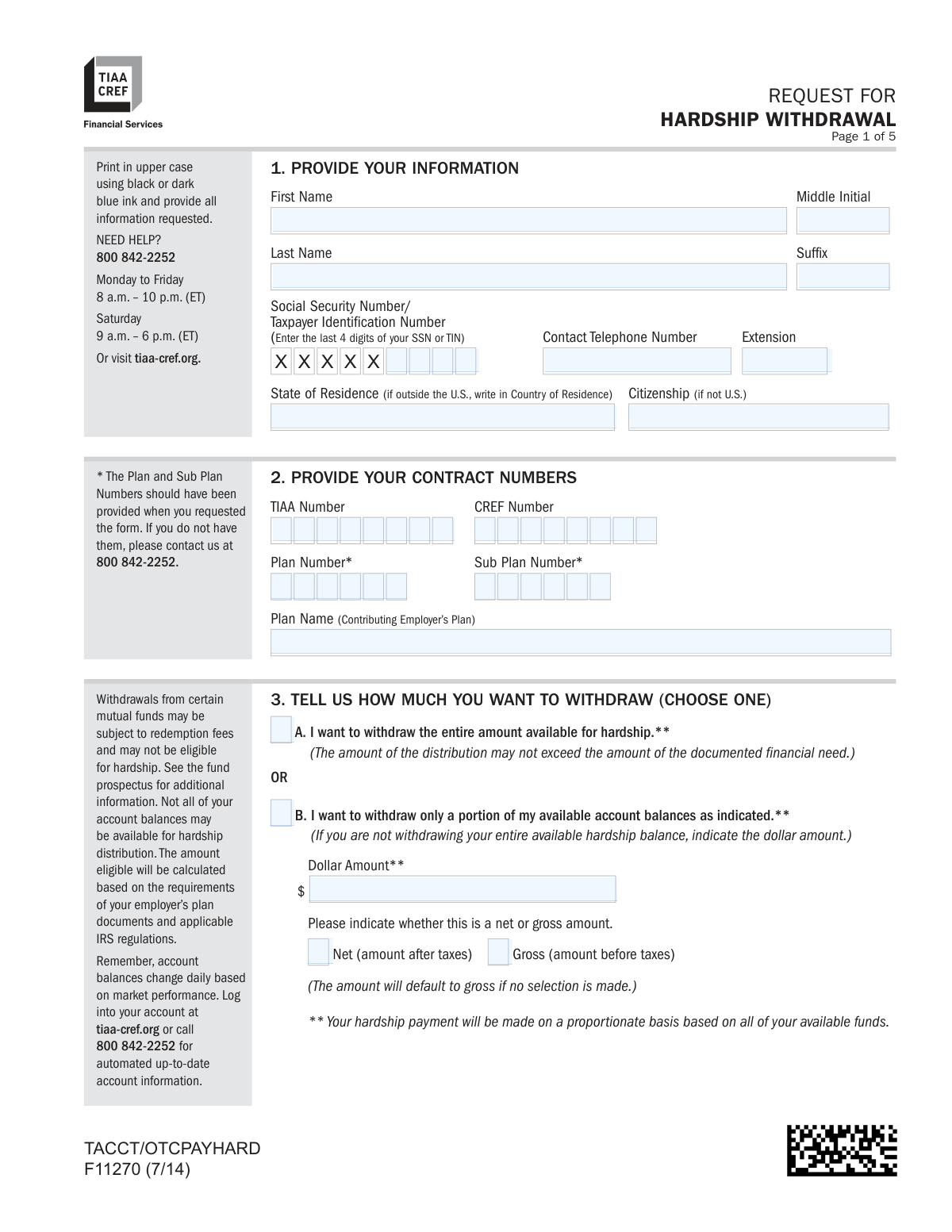
Form F11270 is a TIAA-CREF document that allows account holders to request a distribution from their retirement plan due to an immediate and heavy financial need, as defined by the IRS. It is crucial for individuals facing specific emergencies, such as medical expenses, preventing foreclosure, or paying for tuition, to access their savings. Completing this form requires careful attention to detail and submission of supporting documentation to ensure compliance and avoid delays. Today, this form can be filled out quickly and accurately using AI-powered services like Instafill.ai, which can also convert non-fillable PDF versions into interactive fillable forms.
F11270 is part of the
withdrawal forms, hardship withdrawal forms, hardship forms and withdrawal request forms categories on Instafill.
Rather not fill this in by hand? Instafill is an online form filler that completes PDF forms automatically — upload the blank form, answer a few questions, and the AI fills every field.
Form specifications
| Form name: | Request for Hardship Withdrawal |
| Number of pages: | 1 |
| Language: | English |
Our AI automatically handles information lookup, data retrieval, formatting, and form filling.
It takes less than a minute to fill out F11270 using our AI form filling.
Securely upload your data. Information is encrypted in transit and deleted immediately after the form is filled out.
Instafill Demo: How to fill out PDF forms in seconds with AI
How to Fill Out F11270 Online for Free in 2026
Are you looking to fill out a F11270 form online quickly and accurately? Instafill.ai offers the #1 AI-powered PDF filling software of 2026, allowing you to complete your F11270 form in just 37 seconds or less.
Follow these steps to fill out your F11270 form online using Instafill.ai:
- 1 Navigate to Instafill.ai and upload or select the Request for Hardship Withdrawal form.
- 2 Use the AI assistant to accurately fill in your personal information, including your name, Social Security Number, and contact details in Section 1.
- 3 Provide your TIAA-CREF contract numbers, plan numbers, and employer plan name in Section 2.
- 4 In Section 3, specify the amount you wish to withdraw, either the entire available amount or a specific dollar amount (net or gross).
- 5 Complete Section 5 by certifying the reason for your hardship, attaching all required supporting documentation, and indicating your federal tax withholding preference.
- 6 Provide your payment instructions in Section 4, choosing between direct deposit or a mailed check.
- 7 Carefully review all entered information, read the authorization statements, and then electronically sign and date the form before submitting it to TIAA-CREF per the instructions.
Our AI-powered system ensures each field is filled out correctly, reducing errors and saving you time.
Why Choose Instafill.ai for Your Fillable F11270 Form?
Speed
Complete your F11270 in as little as 37 seconds.
Up-to-Date
Always use the latest 2026 F11270 form version.
Cost-effective
No need to hire expensive lawyers.
Accuracy
Our AI performs 10 compliance checks to ensure your form is error-free.
Security
Your personal information is protected with bank-level encryption.
Frequently Asked Questions About F11270
This form is used to request a withdrawal from your TIAA-CREF retirement account due to an immediate and heavy financial need, as defined by the IRS and your employer's plan.
TIAA-CREF account holders who are experiencing a qualifying financial hardship and need to access funds from their retirement plan must complete this form. Before requesting a hardship withdrawal, you must have already taken any available loans or other cash distributions from your employer's plans.
Qualifying reasons include expenses for purchasing a principal residence, preventing eviction or foreclosure, repairing damage to your principal residence, certain medical expenses, tuition and educational fees, and burial or funeral expenses.
You must provide specific supporting documents based on your reason for withdrawal, such as a purchase contract, eviction notice, medical bills, or tuition statements. All documentation must be recent and show an unpaid, outstanding expense.
You can request the entire available amount or a specific dollar amount, but the withdrawal cannot exceed the amount of your documented financial need. If your request exceeds the documented need, only the amount of the documented need will be paid.
Hardship withdrawals are subject to income tax, and a default federal tax of 10% will be withheld unless you specify otherwise. These withdrawals are not eligible to be rolled over and may be subject to an additional 10% early distribution penalty if you are under age 59½.
You can choose direct deposit, which typically arrives within two business days after approval, or a paper check mailed to your address, which can take 8-10 business days. If you provide new bank information, you must mail the original form and a voided check or bank letter.
These numbers should have been provided when you requested the form. If you do not have them, you must call TIAA-CREF at 800-842-2252 for assistance.
You can mail the form to the P.O. Box listed for standard mail or the physical address for overnight delivery. You may be able to fax the form if the withdrawal is under $50,000 and going to a bank account already on file.
If you do not make a selection for federal tax withholding, TIAA-CREF will automatically apply the default rate of 10% to your withdrawal.
Yes, certain expenses can be for your spouse or dependent, such as medical, tuition, or funeral costs. You must provide proof of the relationship, like a marriage license or tax forms, along with the other required documentation.
Yes, services like Instafill.ai use AI to accurately auto-fill form fields, which can help you complete the form quickly and reduce errors. This ensures all required information is provided, which helps avoid processing delays.
You can use a service like Instafill.ai to easily fill out the form online. Simply upload the PDF, and the platform will allow you to type directly into the fields and complete your application digitally.
If you have a non-fillable 'flat' PDF, you can use a tool like Instafill.ai to convert it into an interactive, fillable form. This allows you to easily type your information, sign electronically, and prepare the document for submission.
Compliance F11270
Validation Checks by Instafill.ai
1
Validates Social Security Number/TIN Format
This check ensures that the 'Social Security Number/Taxpayer Identification Number' field in Section 1 contains exactly four numeric digits. This is crucial for correctly identifying the participant's account and for tax reporting purposes. A failure in this validation would prevent the system from matching the request to the correct account, leading to rejection of the form.
2
Ensures Exclusive and Complete Withdrawal Amount Selection
This validation confirms that in Section 3, the user has selected either 'A. withdraw the entire amount' OR 'B. withdraw only a portion', but not both. If option B is selected, it further validates that the 'Dollar Amount' field is filled with a positive numerical value. This prevents ambiguity in the withdrawal instruction and ensures a specific amount is processed if a partial withdrawal is intended.
3
Verifies Hardship Reason Selection and Documentation Attachment
This check ensures that at least one reason for the hardship withdrawal is selected in Section 5. It then cross-references the selection to confirm that the required supporting documentation (e.g., purchase contract, eviction notice, medical bills) has been attached to the submission. Failure to provide a reason or the corresponding proof will result in an immediate rejection of the request as the financial need cannot be substantiated.
4
Validates Consistency Between Requested Amount and Documented Need
This is a logical check that compares the withdrawal amount requested in Section 3 with the financial need demonstrated in the supporting documents for Section 5. The form explicitly states the withdrawal may not exceed the documented need. If the requested amount is greater, the validation should flag the discrepancy, and the system should default to paying only the documented amount, preventing overpayment.
5
Confirms Proof of Relationship for Spouse/Dependent Hardships
If the user indicates in Section 5 that the hardship expense was incurred by their spouse or dependent, this validation checks for the attachment of required proof of relationship documents, such as a marriage license or tax forms. This is an IRS requirement to justify using retirement funds for someone other than the account holder. Without this proof, the request for a spouse/dependent hardship will be denied.
6
Ensures a Single Payment Method is Selected
This check verifies that in Section 4, the user has selected exactly one payment instruction option (e.g., Direct Deposit on file, New Checking Account, Mail a check). Ambiguous or missing selections can lead to payment delays or errors. If no selection is made, the system should apply the form's default rule, which is to mail a check to the address on file.
7
Validates Documentation for New Bank Accounts
If the user selects 'Direct Deposit to my new Checking Account' or 'new Savings Account' in Section 4, this validation confirms that an original voided check or a compliant bank letter is included with the form. This is a critical security measure to prevent fraud and ensure funds are deposited into the correct account. Submissions lacking this documentation for new accounts will have the payment defaulted to a mailed check.
8
Verifies Presence of Signature and Valid Date
This check confirms that the 'Your Signature' field is signed and that a complete, valid date in mm/dd/yyyy format is provided in Section 5. The signature and date are legally required to authorize the withdrawal and certify the information provided. An unsigned or undated form is not in 'good order' and cannot be processed, leading to rejection and requiring the user to resubmit.
9
Validates Plan and Contract Number Completeness
This check ensures that the TIAA/CREF contract numbers, Plan Number, and Sub Plan Number fields in Section 2 are all populated. These numbers are essential for identifying the specific retirement accounts and plans from which the funds will be withdrawn. Missing or incorrect numbers would make it impossible to locate the funds, causing the request to be delayed or rejected until the correct information is provided.
10
Checks for Valid State of Residence for Tax Withholding
This validation ensures the 'State of Residence' field in Section 1 contains a valid U.S. state or a country name. This information is critical because the form specifies that certain states have mandatory state tax withholding requirements. An invalid or missing state could lead to incorrect tax calculations and potential tax liabilities for the participant.
11
Validates Federal Tax Withholding Percentage
If the user selects 'Yes' for federal income tax withholding in Section 5, this check validates that the percentage field contains a valid numerical value (e.g., between 0 and 100). This ensures that the user's tax preference is captured correctly. An invalid entry would cause the system to use the 10% default, which may not align with the user's financial planning.
12
Verifies Eligibility for Fax Submission
This validation applies if the form is received via fax and checks for two conditions: the withdrawal amount is less than $50,000, and the payment instruction is for a direct deposit to a bank account already on file. The form explicitly states these are the only conditions under which a fax is acceptable. If a faxed form does not meet these criteria, it must be rejected and the user instructed to mail the original documents.
13
Checks for Recent Address Change on Mailed Payments
If the user selects 'Mail a check to my current address on file' in Section 4, this validation cross-references the account history to ensure the mailing address has not been changed within the last 14 days. This is a security protocol to prevent fraud by ensuring a check is not sent to a newly changed, potentially unauthorized address. If a recent change is detected, the request is paused, and the user must be contacted to discuss other options.
Common Mistakes in Completing F11270
Applicants often fail to provide the specific documentation required for their hardship reason, such as submitting an estimated tuition cost instead of an actual bill, or a medical bill that has already been paid. Because each hardship category has very strict proof requirements, any deviation will lead to the request being rejected and returned. To avoid this, carefully review the list of acceptable documents for your specific situation and ensure they are current and show an outstanding balance.
A person needing a precise amount of cash (e.g., $5,000 for a rent payment) might enter that value but forget to select the 'Net' option in Section 3. The form defaults to a 'Gross' withdrawal, meaning taxes will be withheld, and the applicant will receive less than the $5,000 they needed. To prevent a shortfall, always select 'Net' if you need to receive a specific dollar amount after taxes have been deducted.
Applicants frequently leave the Plan Number, Sub-Plan Number, or TIAA/CREF contract numbers blank in Section 2, often because they misplaced the information provided when they first requested the form. These numbers are essential for locating the correct account, and their absence will halt the application process until the applicant calls TIAA-CREF to retrieve them. It is crucial to have this information ready before starting the form to prevent significant delays.
When the hardship expense is for a spouse, dependent, or parent, the form requires documentation proving the relationship (e.g., a marriage license, birth certificate, or tax form showing dependents). This requirement is often overlooked, leading to an incomplete application that cannot be processed. To avoid delays, ensure you include proof of relationship along with the financial documentation for any hardship claim involving a family member.
To set up a new direct deposit, applicants sometimes mail a deposit slip or a 'starter check,' both of which are explicitly listed as unacceptable in Section 4. This error forces TIAA-CREF to default to mailing a physical check, which can delay receipt of funds by up to 10 business days. To ensure a fast direct deposit, you must provide either an original voided check (not a starter check) or a formal letter from your bank with all the required details.
In the stress of a financial hardship, it is very common for applicants to forget to sign and date the final authorization on page 5. An unsigned form is legally invalid and will be immediately rejected, forcing the entire process to start over. This simple mistake can cause a critical delay when funds are needed urgently, so it's vital to double-check for a signature and date before sending.
Applicants may see a large 'amount available for hardship' and request the full sum in Section 3, even if their supporting documents (e.g., repair bills) total a smaller amount. The rules state the withdrawal cannot exceed the documented financial need, so this discrepancy will cause the payment to be adjusted down or delayed while TIAA-CREF seeks clarification. To ensure smooth processing, the dollar amount requested should not be more than the total of the unpaid bills you are submitting as proof.
The form states it can only be faxed if the withdrawal is under $50,000 AND payment is going to a bank account already on file. People often miss these conditions and attempt to fax forms for larger amounts or with new banking information. Such faxes will be rejected, requiring the applicant to mail the original documents and restarting the processing clock. Always mail the original form if your request involves a new bank account or exceeds $50,000.
By signing the form, applicants certify they have already exhausted all other available loan and non-hardship distribution options from all of their employer's plans. Many people are unaware of this prerequisite and apply for the hardship withdrawal first. This can lead to the request being denied and is a false certification, which has serious implications. Before applying, contact your benefits office to confirm and take any available plan loans first.
The form notes that for security, a check cannot be mailed to an address that has been changed within the last 14 days. An applicant who recently moved and updated their address may have their payment delayed. This security measure can be a major obstacle for someone who needs funds quickly after a move. It is best to confirm your address on file is correct and stable before submitting the request, or opt for direct deposit to an established bank account.
Saved over 80 hours a year
“I was never sure if my IRS forms like W-9 were filled correctly. Now, I can complete the forms accurately without any external help.”
Kevin Martin Green
Your data stays secure with advanced protection from Instafill and our subprocessors




Robust compliance program
Transparent business model
You’re not the product. You always know where your data is and what it is processed for.
ISO 27001, HIPAA, and GDPR
Our subprocesses adhere to multiple compliance standards, including but not limited to ISO 27001, HIPAA, and GDPR.
Security & privacy by design
We consider security and privacy from the initial design phase of any new service or functionality. It’s not an afterthought, it’s built-in, including support for two-factor authentication (2FA) to further protect your account.
Fill out F11270 with Instafill.ai
Worried about filling PDFs wrong? Instafill securely fills request-for-hardship-withdrawal forms, ensuring each field is accurate.
