Yes! You can use AI to fill out Request for Madison County Public Records

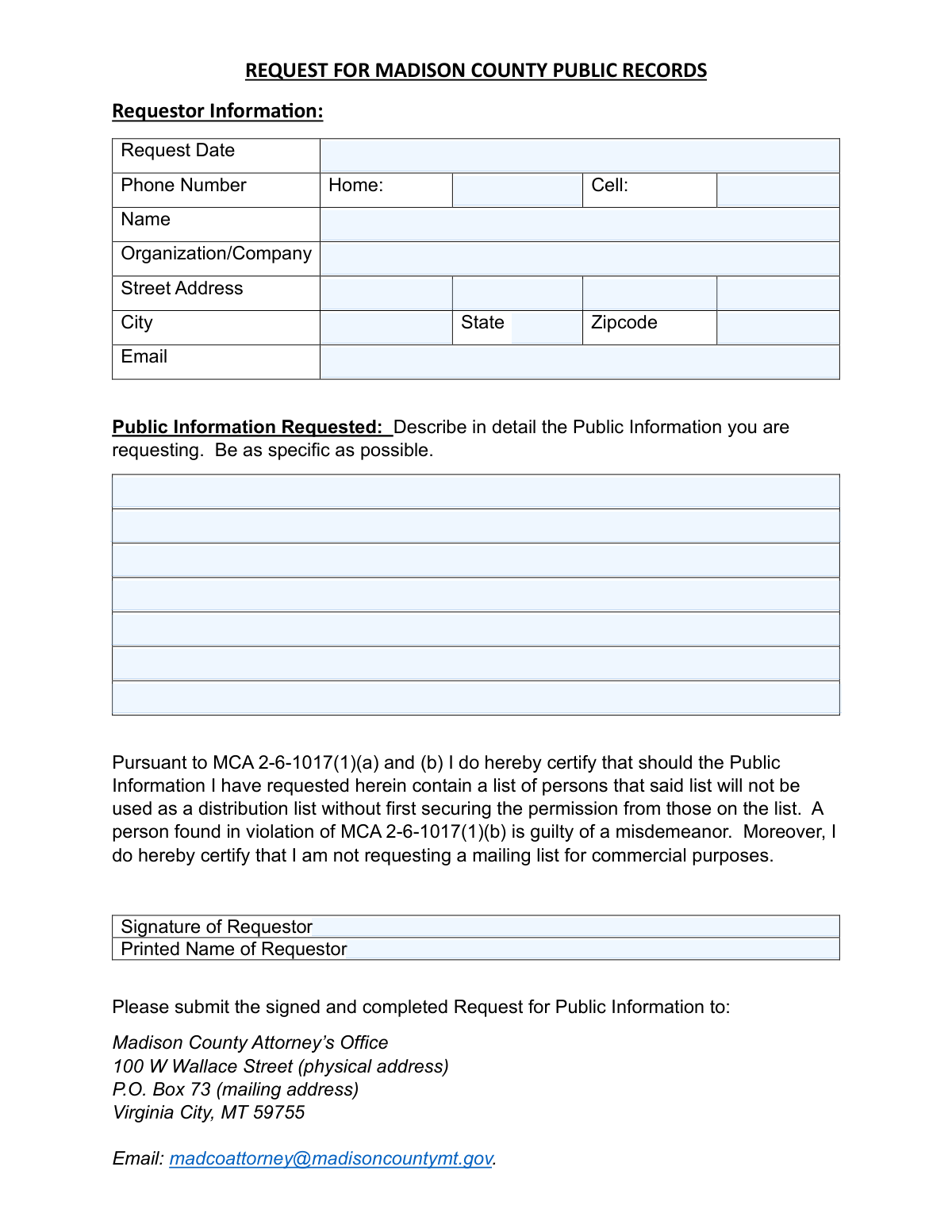
The Request for Madison County Public Records form is a legal document used by individuals or organizations to request access to public information held by Madison County, Montana, as permitted by the Montana constitution and state statutes. This form ensures the request is properly documented and reviewed by the County Attorney's Office, outlining any potential fees and requiring the requestor to certify the intended use of the information. Today, this form can be filled out quickly and accurately using AI-powered services like Instafill.ai, which can also convert non-fillable PDF versions into interactive fillable forms.
Our AI automatically handles information lookup, data retrieval, formatting, and form filling.
It takes less than a minute to fill out Madison County Public Records Request using our AI form filling.
Securely upload your data. Information is encrypted in transit and deleted immediately after the form is filled out.

Form specifications

Form name: Request for Madison County Public Records
Number of pages: 2
Filled form examples: Form Madison County Public Records Request Examples
Language: English
main-image

Instafill Demo: How to fill out PDF forms in seconds with AI

How to Fill Out Madison County Public Records Request Online for Free in 2026

Are you looking to fill out a MADISON COUNTY PUBLIC RECORDS REQUEST form online quickly and accurately? Instafill.ai offers the #1 AI-powered PDF filling software of 2026, allowing you to complete your MADISON COUNTY PUBLIC RECORDS REQUEST form in just 37 seconds or less.
Follow these steps to fill out your MADISON COUNTY PUBLIC RECORDS REQUEST form online using Instafill.ai:
  1. 1 Navigate to Instafill.ai and upload or select the 'Request for Madison County Public Records' form.
  2. 2 Enter your personal contact details, including your full name, address, phone numbers, and email.
  3. 3 If the request is on behalf of an entity, provide the organization or company name.
  4. 4 In the 'Public Information Requested' section, provide a detailed and specific description of the records you are seeking.
  5. 5 Carefully read the certification regarding the use of mailing lists and commercial purposes.
  6. 6 Electronically sign and type your printed name to certify the request and acknowledge the legal statements.
  7. 7 Review all the information for accuracy, then download the completed form to submit to the Madison County Attorney's Office as instructed.

Our AI-powered system ensures each field is filled out correctly, reducing errors and saving you time.

Why Choose Instafill.ai for Your Fillable Madison County Public Records Request Form?

Speed

Complete your Madison County Public Records Request in as little as 37 seconds.

Up-to-Date

Always use the latest 2026 Madison County Public Records Request form version.

Cost-effective

No need to hire expensive lawyers.

Accuracy

Our AI performs 10 compliance checks to ensure your form is error-free.

Security

Your personal information is protected with bank-level encryption.

Frequently Asked Questions About Form Madison County Public Records Request

This form is used to formally request access to public records and information held by Madison County, in accordance with Montana state law.

According to Montana law, 'every person' has the right to request and examine public information, so any individual or organization can fill out and submit this form.

Yes, Madison County charges a fee to cover the costs of fulfilling the request. The fee is $0.50 for the first page and $0.25 for each additional page, and you must pay the estimated cost before the county gathers the information.

No, the statutory charge of $0.50 for the first page and $0.25 for each subsequent page applies regardless of whether the information is provided in a hard copy or electronic format.

You can submit the signed form to the Madison County Attorney’s Office via mail (P.O. Box 73, Virginia City, MT 59755), in person (100 W Wallace Street, Virginia City, MT 59755), or by email to [email protected].

The county will respond within a reasonable period. If the information cannot be readily gathered, they will provide you with an estimate of the time it will take to fulfill your request.

You should be as specific as possible in the 'Public Information Requested' section. Including details like relevant dates, names, and document types will help the county locate the correct records more efficiently.

Madison County may withhold certain information, such as details that jeopardize public safety or Confidential Criminal Justice Information. All requests are reviewed by the County Attorney's Office to determine what can be released.

By signing, you certify that if the records contain a list of people, you will not use it as a distribution or mailing list without first getting permission from those on the list. Violating this is a misdemeanor.

Madison County is not required to alter or customize public information. If they agree to customize a response, the costs of this customization may be included in the fees charged.

Yes, services like Instafill.ai use AI to help you accurately auto-fill form fields, which can save you time and reduce errors.

Simply upload the form to the Instafill.ai platform. The AI will identify the fields, and you can provide your information once to have it automatically and accurately filled into the correct places on the form.

You can use a service like Instafill.ai, which can convert flat, non-fillable PDFs into interactive, fillable forms. This allows you to easily type your information directly onto the document before printing or submitting it.

Compliance Madison County Public Records Request
Validation Checks by Instafill.ai

1
Requestor Name Completeness
This check verifies that the 'Requestor Name' field is not empty and contains both a first and last name. It is essential for identifying the individual making the request for legal and communication purposes. If this field is left blank, the form submission will be rejected as the request cannot be attributed to a specific person.
2
Printed Name and Requestor Name Consistency
This validation compares the 'Printed Name of Requestor' field against the 'Requestor Name' field to ensure they match. This serves as a confirmation of the signatory's identity and their intent to certify the request's statements. A mismatch could indicate an error or that the form was signed by someone other than the official requestor, leading to a request for correction.
3
Request Description Completeness
This check ensures that the 'Public Information Requested — Details' text area is not empty and contains a substantive description. A request cannot be fulfilled without a clear understanding of what information is being sought. If the description is missing, the submission will be invalid as the county staff will have no basis for a search.
4
Request Date Validity
This validation confirms that the 'Request Date' field contains a valid date in a recognized format (e.g., MM/DD/YYYY) and that the date is not in the future. Accurate dating is crucial for tracking response times and establishing a clear timeline for the request as mandated by law. An invalid or future date will trigger an error and require the user to correct it before submission.
5
Email Address Format Validation
This check verifies that the value entered in the 'Email Address' field conforms to the standard email address format (e.g., '[email protected]'). Since email is a primary method for correspondence, fee estimates, and electronic document delivery, a valid address is critical. An invalid format will prevent submission and prompt the user to enter a correctly formatted email address.
6
At Least One Contact Method Provided
This validation ensures that the requestor has provided at least one valid method of contact, checking that either the 'Home Phone', 'Cell Phone', or 'Email Address' field is filled. This is vital for the county to communicate with the requestor regarding clarifications, fees, or the availability of records. If no contact information is provided, the form cannot be submitted.
7
Phone Number Format
This check validates that any number entered into the 'Home Phone' or 'Cell Phone' fields follows a standard 10-digit phone number format. This ensures that the provided contact numbers are usable and correctly formatted for dialing. If a number is entered in an incorrect format, the user will be prompted to correct it to ensure the county can successfully make contact.
8
Full Address Completeness
This validation verifies that the 'Street Address', 'City', 'State', and 'Zip Code' fields are all filled out. A complete mailing address is required for sending physical copies of documents or official correspondence via postal mail. Failure to provide a complete address will result in a validation error, preventing submission until all required address fields are completed.
9
State Abbreviation Validation
This check ensures that the 'State' field contains a valid, two-letter US state or territory postal abbreviation. Using a standardized abbreviation prevents ambiguity and reduces the risk of mail being misdirected or returned. An entry that does not match a valid two-letter code will be flagged as an error.
10
Zip Code Format Validation
This validation verifies that the 'Zip Code' field contains a string that is either a 5-digit or 9-digit (ZIP+4) numerical format. An accurate ZIP code is essential for timely and successful mail delivery. An incorrectly formatted entry will cause a validation failure, requiring the user to correct the ZIP code before the form can be processed.
11
Signature Presence Verification
This check ensures that the 'Signature of Requestor' field has been completed, whether through a digital signature, a typed name, or a checkbox. The signature is a legal requirement, certifying that the requestor agrees to the terms outlined in the form, particularly regarding the use of distribution lists. A missing signature will block the submission, as the request is not legally certified without it.
12
Request Description Minimum Length
This validation checks that the 'Public Information Requested — Details' field contains a description of at least a minimum length (e.g., 15 characters). This helps prevent submissions with vague or insufficient information like 'records' or 'info', which are impossible to act upon. If the description is too short, the user will be prompted to provide a more specific and detailed request.

Common Mistakes in Completing Madison County Public Records Request

Providing a Vague or Overly Broad Information Request

Requestors often use general terms like 'all documents related to...' without specifying dates, parties, or document types. This happens due to uncertainty about what records exist. Such requests are often delayed or rejected because they are too burdensome to fulfill, and the county will likely respond with a high fee estimate and a request for clarification, prolonging the entire process. To avoid this, be as specific as possible by including date ranges, names of individuals or departments, project names, and types of records (e.g., 'emails', 'contracts', 'meeting minutes').

Forgetting to Sign the Certification

The form requires a signature to certify that any lists of persons will not be used for distribution and that the request is not for commercial purposes. People often overlook the signature line, especially when filling out a form quickly. An unsigned form is considered incomplete and will be rejected by the County Attorney's Office, requiring the requestor to resubmit it and causing significant delays. Always double-check that you have physically or digitally signed the form before submission.

Entering an Invalid or Incomplete Email Address

Simple typos like '[email protected]' instead of '[email protected]' are extremely common but have major consequences. Since the county uses email to provide fee estimates, ask clarifying questions, and deliver electronic documents, an incorrect email address means the requestor will never receive these communications. This can lead to the request being closed due to non-response. Carefully proofread your email address before submitting the form to ensure all correspondence is received.

Ignoring the Upfront Fee Requirement

The form clearly states that fees for staff time and copying ($0.50 for the first page, $0.25 for each additional) must be paid *before* the county begins gathering the information. Many requestors miss this detail and are surprised when they receive an invoice that must be paid to proceed. This misunderstanding can lead to abandoned requests or delays while the requestor disputes the charges or arranges payment. Be prepared to pay the estimated fee promptly to avoid stalling your request.

Requesting Explicitly Confidential Information

The form's preamble specifies that 'Confidential Criminal Justice Information' (e.g., criminal investigative or intelligence information) is not public. Requestors who do not read this section may ask for records that the county is legally prohibited from releasing. This results in a partial or full denial of the request, wasting time for both the requestor and the county staff. Carefully read the introductory text to understand the limitations on public information before crafting your request.

Mismatched Printed and Signed Names

A requestor might enter their name in the 'Requestor Name' field at the top but have a different printed name in the signature block at the bottom, or the signature itself may be illegible and not match. This creates ambiguity about who is legally certifying the request. This can lead to the county seeking clarification, which delays processing. Ensure the 'Requestor Name' and the 'Printed Name of Requestor' fields are identical and that the signature corresponds to that name.

Submitting an Incomplete Mailing Address

Errors such as omitting a street suffix (St, Ave), apartment number, or providing an incorrect ZIP code are frequent. If the county needs to mail physical documents or an invoice, an incomplete address will result in returned mail and significant delays. The request may be closed if the county cannot successfully contact you. AI-powered tools like Instafill.ai can help prevent this by auto-completing and validating address components based on official postal data.

Leaving Both Phone Number Fields Blank

While email is a primary contact method, phone numbers serve as a crucial backup if emails bounce or a quick clarification is needed. Some people skip these fields, viewing them as optional. If the provided email is incorrect, having no phone number on file gives the county no alternative way to make contact, likely resulting in the request being closed. Always provide at least one valid phone number.

Improperly Signing a Digital Submission

When submitting the form via email, some users simply type their name in a cursive font on the signature line. Depending on the county's policy, this may not be considered a valid signature, potentially leading to rejection. To avoid this, use a proper digital signature tool or print the form, sign it with a pen, and scan it before emailing. If the form is a non-fillable PDF, a tool like Instafill.ai can convert it into a fillable version that supports secure digital signatures.

Using an Abbreviation for an Organization Name

When making a request on behalf of a company or media outlet, people may use a common acronym or abbreviation instead of the full legal name. This can create ambiguity for record-keeping and verification purposes. For clarity and to ensure the request is processed correctly under the proper entity, always write out the full, official name of the organization or company as requested on the form.
Saved over 80 hours a year

“I was never sure if my IRS forms like W-9 were filled correctly. Now, I can complete the forms accurately without any external help.”

Kevin Martin Green

Your data stays secure with advanced protection from Instafill and our subprocessors

Robust compliance program

Transparent business model

You’re not the product. You always know where your data is and what it is processed for.

ISO 27001, HIPAA, and GDPR

Our subprocesses adhere to multiple compliance standards, including but not limited to ISO 27001, HIPAA, and GDPR.

Security & privacy by design

We consider security and privacy from the initial design phase of any new service or functionality. It’s not an afterthought, it’s built-in, including support for two-factor authentication (2FA) to further protect your account.

Fill out Madison County Public Records Request with Instafill.ai

Worried about filling PDFs wrong? Instafill securely fills request-for-madison-county-public-records forms, ensuring each field is accurate.