Yes! You can use AI to fill out Seller's Disclosure of Property Condition
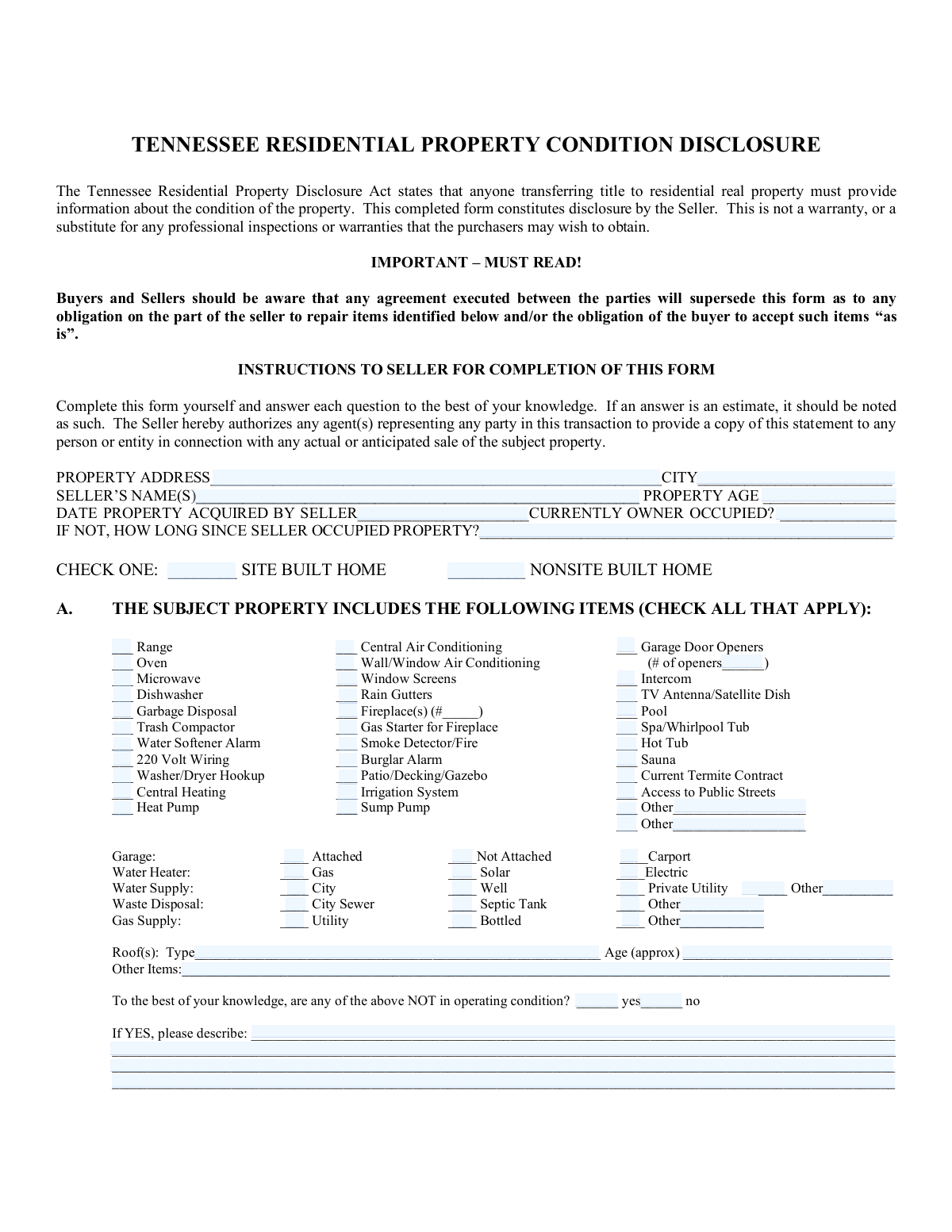
The Seller's Disclosure of Property Condition is a legal document used in real estate transactions where the seller provides detailed information about the property's features and known defects. It is crucial for informing buyers about the state of the property and protecting sellers by documenting what has been disclosed, helping to prevent future legal disputes. Today, this comprehensive form can be filled out quickly and accurately using AI-powered services like Instafill.ai, which can also convert non-fillable PDF versions into interactive fillable forms.
Our AI automatically handles information lookup, data retrieval, formatting, and form filling.
It takes less than a minute to fill out Seller's Disclosure using our AI form filling.
Securely upload your data. Information is encrypted in transit and deleted immediately after the form is filled out.
Form specifications
| Form name: | Seller's Disclosure of Property Condition |
| Number of fields: | 220 |
| Number of pages: | 3 |
| Language: | English |
| Categories: | disclosure forms, property forms |
Instafill Demo: How to fill out PDF forms in seconds with AI
How to Fill Out Seller's Disclosure Online for Free in 2026
Are you looking to fill out a SELLER'S DISCLOSURE form online quickly and accurately? Instafill.ai offers the #1 AI-powered PDF filling software of 2026, allowing you to complete your SELLER'S DISCLOSURE form in just 37 seconds or less.
Follow these steps to fill out your SELLER'S DISCLOSURE form online using Instafill.ai:
- 1 Navigate to Instafill.ai and upload your Seller's Disclosure form or select it from the template library.
- 2 Allow the AI to scan the document and pre-fill basic information like the seller's name and property address from your profile.
- 3 Go through the 'Included Items' section, checking the boxes for all appliances, systems, and features that are part of the sale.
- 4 Carefully complete the property condition section by answering 'Yes,' 'No,' or 'Unknown' regarding your awareness of any defects for each listed component.
- 5 For any items where you marked 'Yes' to a defect, provide a clear and honest explanation in the designated text fields.
- 6 Review all sections for accuracy and completeness, then electronically sign and date the form in the seller's signature area.
- 7 Download the completed disclosure to share with your real estate agent and the prospective buyer for their review and acknowledgment.
Our AI-powered system ensures each field is filled out correctly, reducing errors and saving you time.
Why Choose Instafill.ai for Your Fillable Seller's Disclosure Form?
Speed
Complete your Seller's Disclosure in as little as 37 seconds.
Up-to-Date
Always use the latest 2026 Seller's Disclosure form version.
Cost-effective
No need to hire expensive lawyers.
Accuracy
Our AI performs 10 compliance checks to ensure your form is error-free.
Security
Your personal information is protected with bank-level encryption.
Frequently Asked Questions About Form Seller's Disclosure
This form is a Seller's Disclosure Notice, designed for property sellers to provide potential buyers with information about the property's features, condition, and any known issues.
The legal owner(s) of the property, referred to as the Seller(s), must complete and sign this form. The Buyer(s) will also sign to acknowledge receipt of the disclosure.
Selecting 'No' means you are stating that you are not aware of any defects. Selecting 'Unknown' means you do not have knowledge about the condition of that item, which is an acceptable answer if you are genuinely unsure.
If you are aware of a defect and check 'Yes', you must provide a clear explanation of the issue in the 'Defect Explanation' section of the form.
You can use the 'Other Included Item' fields to manually list any additional items that are part of the property sale but are not pre-listed on the form.
Indicate that the property is not owner-occupied. For questions about the condition of specific systems or structures, 'Unknown' is the appropriate response if you lack firsthand knowledge.
If the property is governed by an HOA, you must provide the HOA's name, address, the amount for monthly dues, and disclose any known special assessments.
The form includes a checkbox for 'Unknown Survey Date'. You should check this box if you do not have information on when the most recent survey was conducted.
This question asks you to confirm whether any of the items you've marked as included with the property (like appliances or systems) are not in working order. You must answer 'Yes' or 'No' to this summary question.
A leased system is any equipment that is part of the property but not owned outright, such as leased solar panels, a rented water softener, or a security system under a contract.
Yes, services like Instafill.ai use AI to auto-fill form fields accurately and save time, which is especially helpful for lengthy forms like this one.
You can use a service like Instafill.ai to upload the form, which will make it interactive and fillable online. Their AI-powered tools can then help you complete the fields quickly and efficiently.
If you have a non-fillable PDF, you can use a platform like Instafill.ai. It can convert flat PDFs into interactive, fillable forms that you can easily complete and sign online.
Compliance Seller's Disclosure
Validation Checks by Instafill.ai
1
Date Acquired Must Be in the Past
This validation ensures that the 'Date Property Acquired' is a valid date that occurred before the current submission date. It is impossible for a property to be acquired in the future, so this check prevents logical impossibilities and simple data entry errors. If a future date is entered, the system will reject the input and prompt the user for a valid past date.
2
Roof Age Cannot Exceed Property Age
This check performs a logical comparison between 'Property Age' and 'Roof Age'. The age of the roof cannot be greater than the age of the property itself. This validation is important for catching data entry mistakes and ensuring the physical plausibility of the information provided. An error will be triggered if Roof Age > Property Age, requiring the user to correct the values.
3
Conditional Seller Occupancy Duration
This validation enforces that the 'Time Since Seller Occupied Property' field is only filled out if the 'Currently Owner Occupied' field is marked 'No'. This prevents the collection of contradictory or irrelevant information. If 'Currently Owner Occupied' is 'Yes', this dependent field should be disabled or hidden to guide the user correctly.
4
Conditional Garage Opener Count
This check ensures that the 'Number of Openers' field is required and contains a number greater than zero only if the 'Garage Door Openers' checkbox is selected. This rule maintains data integrity by linking the existence of openers to their quantity. If the checkbox is unchecked, the number field should be disabled; if checked, the number field becomes mandatory.
5
Mutually Exclusive Home Type Selection
This validation ensures that a user can only select one option between 'Site Built Home' and 'Non-Site Built Home'. A property cannot be both types simultaneously, so this check is crucial for accurate property classification. The system should use radio buttons or a similar control to enforce this, and an error should be raised if a submission contains both values.
6
Required Defect Explanation
This validation mandates that if any of the condition questions (e.g., 'Interior Walls - Yes', 'Floors - Yes') are answered with 'Yes', then the 'Defect Explanation' text area must be filled. This is critical for ensuring that a declaration of a defect is accompanied by a necessary description for the buyer. The form submission will be blocked until an explanation is provided for any marked defects.
7
Mutually Exclusive Condition Status
For each item in the property condition section (e.g., 'Ceilings', 'Floors', 'Roof'), this check verifies that only one of 'Yes', 'No', or 'Unknown' is selected. This prevents contradictory or ambiguous answers regarding the state of a single feature. If a user attempts to select more than one, the system should either default to the newest selection or flag an error.
8
Gas Starter Requires Fireplace
This check enforces a logical dependency, ensuring that if 'Gas Starter for Fireplace' is checked, the 'Fireplace(s)' checkbox must also be checked. A gas starter is a component of a fireplace and cannot exist independently. If this rule is violated, the user will be prompted to either add the fireplace or remove the gas starter.
9
Conditional HOA Information Requirement
This validation ensures that if the user indicates 'HOA Yes', then the 'HOA Name', 'HOA Address', and 'Monthly Dues' fields become mandatory. This is essential for capturing complete and actionable information about the Homeowner's Association when its existence is confirmed. If 'HOA Yes' is not selected, these fields should remain optional or disabled.
10
Conditional EIFS Inspection Details
This check validates that the EIFS moisture inspection questions are only enabled and can be answered if 'EIFS Present - Yes' is selected. It is irrelevant and confusing to ask about an EIFS inspection if the material is not on the property. This rule ensures data relevance and improves the user experience by hiding unnecessary questions.
11
Signature Date Chronology
This validation verifies that the 'First Buyer Signature Date' is on or after the 'First Seller Signature Date'. This check enforces a logical sequence of events, as a buyer's acknowledgment cannot predate the seller's disclosure. If the buyer's date is earlier than the seller's, the system will display an error and require correction.
12
Conditional HVAC Explanation Requirement
This rule ensures the 'Explanation of HVAC System' field is required if the user selects 'No' for 'Heating and Air Conditioning Supply Status'. This explanation is critical for a potential buyer to understand limitations or variations in the property's climate control. The form will be considered incomplete without this explanation if 'No' is the selected answer.
13
Mutually Exclusive Garage Type
This validation ensures that for the 'Garage Type' category, only one of 'Attached', 'Not Attached', or 'Carport' can be selected. A property's primary parking structure is typically one of these types, and selecting more than one would be contradictory. Using radio buttons is the ideal implementation to enforce this rule at the user interface level.
14
Completeness of Property Address
This check verifies that the 'Property Street Address' and 'Property City' fields are not left blank. The physical address is the primary identifier for the real property and is fundamental to the entire form. A submission without a complete address is invalid and must be blocked until the information is provided.
Common Mistakes in Completing Seller's Disclosure
This form contains many fields that only need to be filled if a specific answer is given previously, such as providing HOA details only if 'HOA Yes' is checked. Sellers often check the primary box (e.g., 'Yes') but forget to provide the required follow-up information, like the 'HOA Name' or 'Monthly Dues'. This leads to an incomplete disclosure, causing delays as the buyer's agent has to request the missing details. To avoid this, carefully review each answer and see if it triggers a requirement for another field; AI-powered tools like Instafill.ai can automatically highlight or require these dependent fields, preventing submission with missing data.
When a seller marks 'Yes' to a defect in a system like 'Plumbing' or 'Roof', they are required to provide an explanation in the 'Defects Explanation' section. A common mistake is to either forget to add the explanation entirely or to provide a vague, unhelpful one like 'leaks'. This lack of detail creates uncertainty and can lead to further negotiations, extended inspection periods, or even legal disputes post-sale. Always provide a clear, specific description of the issue, when it was identified, and any repairs made.
The form has numerous sections requiring a 'Yes', 'No', or 'Unknown' response for the condition of various property features. People frequently make mistakes by leaving a row entirely blank, or worse, checking multiple boxes for the same item (e.g., both 'Yes' and 'No' for 'Floors Condition'). This invalidates the response and can be interpreted as an attempt to obscure information, potentially increasing legal liability. It is crucial to select one, and only one, option for each item listed.
Several sections, such as 'Included Property Items' and 'Gas Supply Type', have an 'Other' checkbox accompanied by a text field for specification. A frequent error is checking the 'Other' box but failing to write in what the other item or type is. This renders the selection meaningless and requires follow-up communication to clarify. To prevent this, always complete the associated description field immediately after checking 'Other'.
The form asks for 'Property Age' and 'Roof Age' specifically in years, not as a date of construction. Sellers often mistakenly enter a year (e.g., '1998') or a full date instead of the calculated age (e.g., '26 years'). This forces the reader to do calculations and introduces ambiguity. Always calculate the age in years from the construction/installation date to the present day and enter that number.
The 'Seller's Name(s)' and signature fields require full legal names as they appear on the property's title. Using nicknames, initials, or omitting the name of a co-owner is a critical error. This can cause significant delays and legal issues during the title search and closing process, as the names on the disclosure must match the deed. Always use the full, legal names of all individuals on the title.
The extensive checklist of included items (e.g., 'Microwave', 'Window Screens', 'Rain Gutters') is prone to human error where sellers scan too quickly and miss an item or check something that isn't actually included. This can lead to serious disputes at closing when a buyer expects an appliance or feature that the seller intended to keep. To avoid this, slowly and deliberately review each item on the list, considering exactly what will be left at the property. AI form-fillers like Instafill.ai can help by presenting these checklists in a clear, manageable way.
A user might state the property is not owner-occupied but then leave the 'Time Since Seller Occupied Property' field blank, creating a contradiction. Another example is checking 'No' for 'Garage Door Openers' but then entering '2' in the 'Number of Openers' field. These inconsistencies create confusion and undermine the credibility of the disclosure, prompting further scrutiny. Reviewing the entire form before signing can help catch these logical errors.
While 'Unknown' is a valid option, some sellers use it for nearly every condition question to avoid perceived liability. While appropriate for genuinely unknown information (e.g., on a recently inherited property), overuse can be a major red flag for buyers, suggesting the seller is either uninformed or hiding issues. This can lead to a less favorable offer or the buyer walking away. Sellers should answer 'Yes' or 'No' to the best of their knowledge and only use 'Unknown' when the information is truly unavailable.
Often, these disclosure forms are provided as flat, non-fillable PDFs, forcing the user to print, fill by hand, and scan, which can lead to illegible handwriting and missed fields. This manual process is inefficient and error-prone. A common mistake is not realizing that tools like Instafill.ai can convert these non-fillable PDFs into interactive, fillable forms. Using such a tool makes the process faster, ensures legibility, and enables features like conditional logic validation to prevent many of the other mistakes on this list.
Saved over 80 hours a year
“I was never sure if my IRS forms like W-9 were filled correctly. Now, I can complete the forms accurately without any external help.”
Kevin Martin Green
Your data stays secure with advanced protection from Instafill and our subprocessors

Robust compliance program
Transparent business model
You’re not the product. You always know where your data is and what it is processed for.
ISO 27001, HIPAA, and GDPR
Our subprocesses adhere to multiple compliance standards, including but not limited to ISO 27001, HIPAA, and GDPR.
Security & privacy by design
We consider security and privacy from the initial design phase of any new service or functionality. It’s not an afterthought, it’s built-in, including support for two-factor authentication (2FA) to further protect your account.
Fill out Seller's Disclosure with Instafill.ai
Worried about filling PDFs wrong? Instafill securely fills sellers-disclosure-of-property-condition forms, ensuring each field is accurate.