Yes! You can use AI to fill out TIAA-CREF Form F1387, Designation of Beneficiary
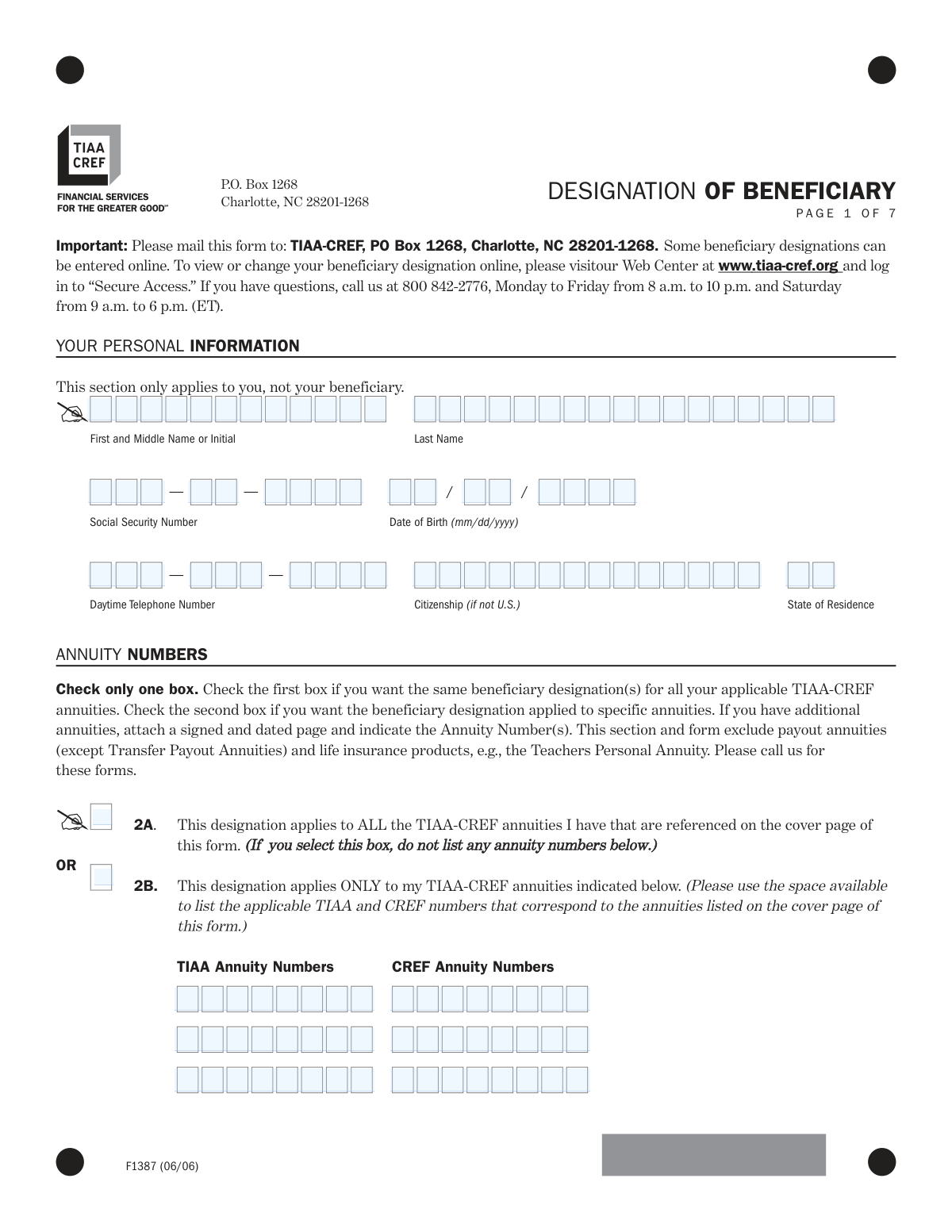
Form F1387, Designation of Beneficiary, is a legal document provided by TIAA-CREF for annuity holders to specify who will receive their death benefits. Properly completing this form is crucial to ensure your assets are distributed according to your wishes, avoiding potential legal complications or delays for your heirs. Today, this form can be filled out quickly and accurately using AI-powered services like Instafill.ai, which can also convert non-fillable PDF versions into interactive fillable forms.
F1387 is part of the
beneficiary forms, beneficiary designation forms, TIAA forms, retirement account forms, TIAA-CREF forms and financial planning forms categories on Instafill.
Rather not fill this in by hand? Instafill is an online form filler that completes PDF forms automatically — upload the blank form, answer a few questions, and the AI fills every field.
Form specifications
| Form name: | TIAA-CREF Form F1387, Designation of Beneficiary |
| Number of pages: | 1 |
| Language: | English |
Our AI automatically handles information lookup, data retrieval, formatting, and form filling.
It takes less than a minute to fill out F1387 using our AI form filling.
Securely upload your data. Information is encrypted in transit and deleted immediately after the form is filled out.
Instafill Demo: How to fill out PDF forms in seconds with AI
How to Fill Out F1387 Online for Free in 2026
Are you looking to fill out a F1387 form online quickly and accurately? Instafill.ai offers the #1 AI-powered PDF filling software of 2026, allowing you to complete your F1387 form in just 37 seconds or less.
Follow these steps to fill out your F1387 form online using Instafill.ai:
- 1 Navigate to Instafill.ai and upload or select the TIAA-CREF Designation of Beneficiary form (F1387).
- 2 Use the AI assistant to accurately fill in your personal information, including your full name, Social Security Number, and date of birth.
- 3 Indicate whether the designation applies to all your TIAA-CREF annuities or specify the particular annuity numbers.
- 4 Provide the full details for your primary beneficiaries (Class I), such as their names, relationships, SSNs, and the percentage of benefits each should receive.
- 5 Enter the information for your contingent beneficiaries (Class II), who will receive benefits if no primary beneficiaries are living at the time of your death.
- 6 Address the spousal rights section by indicating your marital status and obtaining a spousal waiver if you are naming someone other than your spouse as the primary beneficiary for more than 50% of the benefits.
- 7 Carefully review all the information populated by the AI, electronically sign and date the form, and then submit it to TIAA-CREF as instructed.
Our AI-powered system ensures each field is filled out correctly, reducing errors and saving you time.
Why Choose Instafill.ai for Your Fillable F1387 Form?
Speed
Complete your F1387 in as little as 37 seconds.
Up-to-Date
Always use the latest 2026 F1387 form version.
Cost-effective
No need to hire expensive lawyers.
Accuracy
Our AI performs 10 compliance checks to ensure your form is error-free.
Security
Your personal information is protected with bank-level encryption.
Frequently Asked Questions About F1387
This form is used to officially name the person(s) or entity that will receive the death benefits from your TIAA-CREF annuity contracts if you pass away before you begin receiving retirement income.
Any individual holding an eligible TIAA-CREF annuity (such as a 403(b), IRA, or SRA) should complete this form to establish or update their beneficiary choices, ensuring their assets are distributed according to their wishes.
A Primary beneficiary is the first in line to receive the benefits upon your death. A Contingent beneficiary will only receive the benefits if all of the primary beneficiaries have passed away before you.
You will need each beneficiary's full name, Social Security Number, relationship to you, and date of birth. If you are naming a trust or organization, you will need its name and Taxpayer ID Number.
If your plan is covered by federal law (ERISA), your spouse is entitled to at least 50% of the benefit. To designate more than 50% to someone else, your spouse must sign the 'Spouse's Waiver' section of this form, which must be notarized or witnessed by a plan representative.
If you are not married, you can simply check the 'Unmarried Determination' box on page 6 of the form. This exempts you from the spousal consent requirements.
Typically, that beneficiary's share is divided equally among the other living beneficiaries in the same class. You can also elect to have the deceased beneficiary's share pass to their children by completing the 'Payment to children of a deceased child/beneficiary' section.
Mail the signed and completed form to TIAA-CREF, PO Box 1268, Charlotte, NC 28201-1268. Note that some beneficiary changes can also be made online via your TIAA-CREF secure account.
If you want this designation to apply to all your eligible TIAA-CREF annuities, check the 'ALL' box in Section 2. If you want it to apply only to specific contracts, check the second box and list the individual annuity numbers.
Your new designation is effective from the date you sign the form, as long as it is deemed complete and acceptable by TIAA-CREF. It supersedes all previous designations for the specified annuities.
Yes, services like Instafill.ai use AI to accurately auto-fill form fields, which can save you time and help prevent errors. These tools can pull your information and place it in the correct fields on the form.
You can upload the Designation of Beneficiary PDF to the Instafill.ai platform. The service will make the form interactive and guide you through filling out the fields before you print it for signing.
If your PDF is a 'flat' or non-fillable image, you can use a tool like Instafill.ai. It can convert the document into an interactive, fillable form that you can easily complete on your computer.
Compliance F1387
Validation Checks by Instafill.ai
1
Participant Social Security Number Format
This check verifies that the Social Security Number in the 'YOUR PERSONAL INFORMATION' section is present and follows the standard 9-digit format (XXX-XX-XXXX or XXXXXXXXX). This number is a critical unique identifier for the annuity owner, essential for correct record-keeping and tax reporting. If the SSN is missing or invalid, the form cannot be processed, as the owner's account cannot be reliably identified.
2
Annuity Selection Exclusivity
Validates that only one of the two checkboxes in the 'ANNUITY NUMBERS' section is selected. The user must choose either to apply the designation to ALL annuities (Box 2A) or ONLY to specific annuities (Box 2B), but not both. Selecting both creates ambiguity, preventing the system from knowing which annuities the designation should apply to, which would halt processing until clarification is received.
3
Conditional Annuity Number Requirement
This check ensures that if Box 2B ('This designation applies ONLY to my TIAA-CREF annuities indicated below') is selected, at least one TIAA or CREF annuity number is entered in the corresponding fields. Without specific annuity numbers, the designation has no target and cannot be applied. A failure of this check would require the form to be returned for completion.
4
Primary Beneficiary Completeness
Ensures that at least one Primary Beneficiary (Class I) is listed with a complete name. The entire purpose of the form is to designate a beneficiary, so failing to name one makes the form invalid. If no primary beneficiary is named, the designation cannot be recorded, and the form would be rejected.
5
Primary Beneficiary Percentage Summation
This validation confirms that if any percentage is specified for a Primary Beneficiary (Class I), the sum of all specified percentages for that class equals exactly 100%. This is crucial for ensuring the death benefit is distributed according to the owner's exact wishes without ambiguity. If the percentages do not sum to 100%, the distribution is legally unclear, and the form must be rejected for correction.
6
Contingent Beneficiary Percentage Summation
This validation confirms that if any percentage is specified for a Contingent Beneficiary (Class II), the sum of all specified percentages for that class equals exactly 100%. Similar to the primary check, this ensures clear instructions for benefit distribution if no primary beneficiaries are living at the time of payment. An incorrect sum would lead to processing delays and potential legal disputes.
7
Beneficiary Date of Birth Validity
Verifies that the Date of Birth for each individual beneficiary is a valid date in MM/DD/YYYY format. This information is important for identification purposes and may be necessary for determining eligibility for certain payout options. An invalid or missing date of birth can complicate the claims process for the beneficiary in the future.
8
Deceased Child Provision Prerequisite
Checks that if Section A ('Payment to children of a deceased child of mine') is selected, at least one of the named beneficiaries has 'Child' listed in their relationship field. The form explicitly forbids selecting this option otherwise. This prevents illogical designations and ensures the provision is applied correctly, avoiding confusion and potential mispayment of benefits.
9
Participant Signature and Date Requirement
Confirms that the 'Your Signature' and 'Today’s Date' fields in the 'YOUR AGREEMENT' section are both completed. The signature provides legal authorization for the change, and the date establishes the effective date of the designation. A missing signature or date renders the entire document legally invalid and unenforceable.
10
Marital Status Section Exclusivity
Ensures that information is provided in exactly one of the three sections on page 6: 'EXEMPTION FROM SPOUSAL RIGHTS', 'UNMARRIED DETERMINATION', or 'SPOUSE’S WAIVER'. These sections are mutually exclusive and determine how spousal rights under ERISA are handled. Completing none or more than one creates a logical conflict that must be resolved before the designation can be accepted.
11
Spousal Waiver Trigger Logic
This is a complex logical check that verifies if the Spousal Waiver section is completed when required. The waiver is mandatory if the participant is married, is not exempt from spousal rights, and names a primary beneficiary other than their spouse for more than 50% of the benefits. Failure to obtain a required waiver would violate federal law (ERISA) and invalidate the non-spouse beneficiary designation.
12
Spousal Waiver Signature Date Consistency
Validates that the 'Today's Date' next to the spouse's signature is the same as, or later than, the 'Today's Date' next to the participant's signature. This is a legal requirement to ensure the spouse is consenting to a designation that has already been finalized by the participant. A spouse's signature dated before the participant's would imply consent to an unknown or incomplete designation, making the waiver invalid.
13
Spousal Waiver Witness Requirement
Verifies that if the 'SPOUSE’S WAIVER' section is signed by the spouse, it is also properly witnessed by either an 'Employer’s Plan Representative' OR a 'Notary Public'. The witness signature authenticates the spouse's consent, which is a strict legal requirement for waiving survivor benefits. An unwitnessed waiver is invalid, and the beneficiary designation would not be processed as requested.
Common Mistakes in Completing F1387
Users often specify percentages for primary or contingent beneficiaries that do not add up to exactly 100%. This error, or leaving percentages blank when an unequal split is desired, will cause the form to be rejected. This delays the update and leaves the old, potentially outdated, beneficiary designation in effect. To avoid this, ensure the percentages for each beneficiary class (Class I and Class II) sum precisely to 100%. AI-powered tools like Instafill.ai can prevent this by automatically calculating the total and flagging any discrepancies.
A frequent oversight is failing to provide a beneficiary's full legal name, Social Security Number (SSN), and date of birth. This information is critical for the institution to locate and verify the beneficiary without ambiguity. Incomplete data can lead to significant delays in paying out benefits, requiring the executor to track down missing information during a difficult time. Always gather and enter all required details for each person or entity named.
Married account holders often name a non-spouse (like a child or trust) as the primary beneficiary for more than 50% of the funds without getting their spouse's consent. Federal law (ERISA) requires a signed and notarized Spousal Waiver for this. Without a valid waiver, the designation is legally overridden, and the spouse will automatically receive their statutory share, which may contradict the account holder's wishes. This is a critical legal step that cannot be skipped.
Even when a Spousal Waiver is attempted, it is often invalid due to simple errors. Common mistakes include the spouse's signature not being witnessed by a plan representative or a notary public, or the date of the spouse's signature being earlier than the account holder's signature. An improperly executed waiver is legally ineffective. To avoid this, ensure the waiver is signed, dated on or after the participant's signature date, and properly notarized or witnessed as instructed on the form.
The form requires a clear choice between applying the designation to ALL annuities or ONLY specific ones. Users create ambiguity by checking the box for 'specific annuities' but then forgetting to list the numbers, or by checking both boxes. This forces the processor to guess the user's intent, often leading to rejection of the form. To prevent this, make a definitive choice: either select 'ALL' and leave the number fields blank, or select 'ONLY' and meticulously list all intended annuity numbers.
One of the most basic yet common errors is submitting the form without the account holder's signature and date in the 'Your Agreement' section. An unsigned or undated form is legally invalid and will not be processed by the financial institution. This means the intended beneficiary changes will not take effect, leaving the prior designation in place. Always perform a final check to ensure you have signed and dated the form.
The 'Payment to children of a deceased child/beneficiary' section is complex and frequently misinterpreted. Users may not understand the significant difference between passing assets to the children of *any* deceased beneficiary versus only to the children of their own deceased *child*. This mistake can drastically alter the distribution of assets, potentially disinheriting intended heirs. Carefully read the provided examples to understand the consequences before making a selection. Intelligent form fillers can provide extra context to clarify these legal terms.
Naming a minor as a direct beneficiary can create legal complications, as minors cannot legally control financial assets. This often requires a court to appoint a guardian to manage the funds, a costly and time-consuming process. The proper method is to name a trusted adult 'as custodian for [Minor's Name] under the [State] Uniform Transfers to Minors Act (UTMA)' or to designate a trust for the minor's benefit. This ensures the funds are managed correctly until the child reaches adulthood.
When designating a trust as a beneficiary, users often provide only the name of the trust. The form requires the trust's Taxpayer Identification Number (TIN) and the date the trust was established. Omitting these details forces the institution to request full trust documents for verification, significantly delaying the payment of benefits. To ensure a smooth process, provide all requested information for the trust in the designated fields.
Since this form is a non-fillable PDF, it must be printed, filled out by hand, and then mailed or scanned. Handwritten entries are often illegible, and poor-quality scans can render names, dates, and numbers unreadable, leading to rejection. To avoid this, write clearly in block letters. Alternatively, a service like Instafill.ai can convert the flat PDF into a digitally fillable version, ensuring all entries are perfectly legible and properly formatted before printing for signature.
Saved over 80 hours a year
“I was never sure if my IRS forms like W-9 were filled correctly. Now, I can complete the forms accurately without any external help.”
Kevin Martin Green
Your data stays secure with advanced protection from Instafill and our subprocessors




Robust compliance program
Transparent business model
You’re not the product. You always know where your data is and what it is processed for.
ISO 27001, HIPAA, and GDPR
Our subprocesses adhere to multiple compliance standards, including but not limited to ISO 27001, HIPAA, and GDPR.
Security & privacy by design
We consider security and privacy from the initial design phase of any new service or functionality. It’s not an afterthought, it’s built-in, including support for two-factor authentication (2FA) to further protect your account.
Fill out F1387 with Instafill.ai
Worried about filling PDFs wrong? Instafill securely fills tiaa-cref-form-f1387-designation-of-beneficiary forms, ensuring each field is accurate.
