Yes! You can use AI to fill out TIAA-CREF Rollover from your Retirement Investments
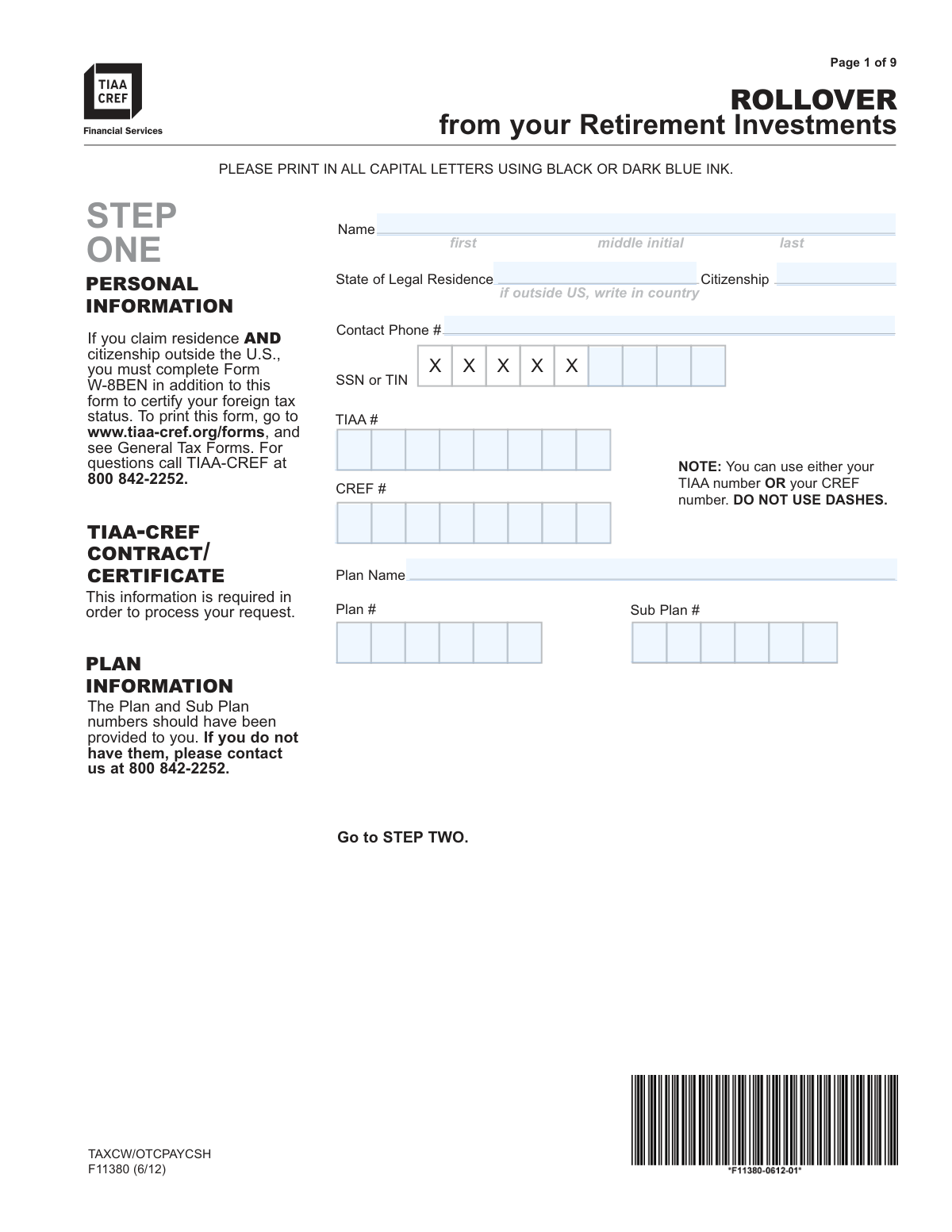
Form F11380, Rollover from your Retirement Investments, is a TIAA-CREF document used by account holders to transfer funds from their existing retirement plan to another qualified retirement account, such as an IRA or another employer's plan. This process is crucial for consolidating retirement assets, changing investment providers, or managing funds after leaving a job. Today, this form can be filled out quickly and accurately using AI-powered services like Instafill.ai, which can also convert non-fillable PDF versions into interactive fillable forms.
Our AI automatically handles information lookup, data retrieval, formatting, and form filling.
It takes less than a minute to fill out F11380 using our AI form filling.
Securely upload your data. Information is encrypted in transit and deleted immediately after the form is filled out.
Form specifications
| Form name: | TIAA-CREF Rollover from your Retirement Investments |
| Number of pages: | 1 |
| Language: | English |
Instafill Demo: How to fill out PDF forms in seconds with AI
How to Fill Out F11380 Online for Free in 2026
Are you looking to fill out a F11380 form online quickly and accurately? Instafill.ai offers the #1 AI-powered PDF filling software of 2026, allowing you to complete your F11380 form in just 37 seconds or less.
Follow these steps to fill out your F11380 form online using Instafill.ai:
- 1 Navigate to Instafill.ai and upload or select the TIAA-CREF Rollover from your Retirement Investments form (F11380).
- 2 Use the AI assistant to accurately fill in your Personal and Plan Information (Step One), including your name, SSN/TIN, and contract numbers.
- 3 Specify the rollover amount and destination. Indicate whether you're rolling over the entire amount or a portion, and provide details for an internal TIAA-CREF rollover or an external one to another investment company (Steps Two, Three, Four, Six, Seven).
- 4 Complete the Roth IRA Rollover section (Step Eight) if applicable, specifying your federal tax withholding preferences.
- 5 Electronically sign the form (Step Nine) and complete the Spousal Waiver section (Step Ten) if required. The AI service can guide you on whether a notarized spousal signature is necessary based on your marital status and plan type.
- 6 Provide the necessary information for the Employer's Plan Representative Signature (Step Eleven) if your plan requires employer authorization for the withdrawal.
- 7 Review all the information for accuracy, then download the completed form and submit it to TIAA-CREF via standard mail, overnight mail, or fax as instructed in Step Twelve.
Our AI-powered system ensures each field is filled out correctly, reducing errors and saving you time.
Why Choose Instafill.ai for Your Fillable F11380 Form?
Speed
Complete your F11380 in as little as 37 seconds.
Up-to-Date
Always use the latest 2026 F11380 form version.
Cost-effective
No need to hire expensive lawyers.
Accuracy
Our AI performs 10 compliance checks to ensure your form is error-free.
Security
Your personal information is protected with bank-level encryption.
Frequently Asked Questions About Form F11380
This form is used to request a rollover of funds from your TIAA-CREF retirement investments to another eligible retirement account, such as an IRA or another employer's plan.
No, this form is not for TIAA Traditional Account rollovers, which have different rules. You must call TIAA-CREF at 800 842-2252 to get the correct forms and discuss your options.
You will need your personal details, Social Security Number (SSN), TIAA/CREF contract number, and your Plan and Sub Plan numbers. If you are a non-U.S. citizen, you may also need to complete Form W-8BEN.
The form states that these numbers should have been provided to you. If you cannot find them, you must contact TIAA-CREF at 800 842-2252 for assistance.
No, you have options. In Step 2, you can choose to roll over the entire available amount, or you can specify a partial rollover by indicating a specific dollar amount or percentage from each fund in Step 3.
If your plan is subject to ERISA, your spouse must complete the Spousal Waiver in Step 10. Their signature must be witnessed and signed by either a Notary Public or your employer's Plan Representative.
If you are unmarried, you only need to complete Part A of Step 10, 'Unmarried Determination.' Depending on your employment status, you may also need a signature from your Plan Representative.
TIAA-CREF will mail a check directly to the financial institution you designate on the form. Electronic Fund Transfers are not available for direct rollovers.
You can mail the form via standard or overnight mail to the TIAA-CREF addresses in Charlotte, NC listed in Step 12. If your rollover is less than $50,000, you also have the option to fax it.
Your signature is valid for 365 days. However, please note that if a spousal waiver is required, the notarization for that section is only valid for 180 days.
Yes, rolling over pre-tax funds to a Roth IRA is generally a taxable event. Step 8 of the form allows you to specify how much, if any, you would like withheld for federal taxes.
If you are paying off a loan, which is considered a taxable event, you must first complete a cash withdrawal form before filling out this rollover form.
Yes, services like Instafill.ai use AI to accurately auto-fill form fields with your information, which can save you time and help prevent common errors.
You can use a service like Instafill.ai to complete the form online. Simply upload the PDF, and the platform will make it fillable, allowing you to type your information directly into the fields and securely save your progress.
If you have a non-fillable or 'flat' PDF, you can use a tool like Instafill.ai. It can convert the document into an interactive, fillable form that you can easily complete on your computer.
Compliance F11380
Validation Checks by Instafill.ai
1
SSN or TIN Format Validation
This check verifies that the Social Security Number or Taxpayer Identification Number provided in Step One is in a valid 9-digit format (XXX-XX-XXXX or XXXXXXXXX). This is critical for correct tax reporting and uniquely identifying the participant's account. If the format is invalid, the form cannot be processed and will be rejected, causing delays for the participant.
2
TIAA or CREF Account Number Presence
Validates that at least one account number, either the TIAA# or the CREF#, is provided in Step One. The form notes that one of these is required to identify the source account for the rollover. A failure to provide a valid account number makes it impossible to locate the participant's funds, halting the entire rollover process until the information is corrected.
3
Mutually Exclusive Rollover Amount Selection
Ensures that in Step Two, the participant has selected exactly one option for the rollover amount (Option 1: Entire amount, Option 2: Partial amount, or Option 3: Systematic Withdrawal). Selecting none or more than one of these options creates ambiguity about the participant's intent. The form must be returned for clarification if this rule is violated.
4
Partial Rollover Specification Logic
If 'Option 2: Roll over only a portion' is selected in Step Two, this check confirms that for each fund listed in Step Three, either a dollar amount OR a percentage is entered, but not both. It also validates that the entries are whole numbers as specified. This prevents calculation errors and ensures the partial rollover is executed precisely as requested.
5
Conditional Path for Internal vs. External Rollover
Verifies that the participant has followed the correct path based on their selection in Step Two. If an internal rollover is chosen, Step Six (A TIAA-CREF Account) must be completed. If a rollover to another company is chosen, Step Seven (Another Investment Company) must be completed. Completing the wrong section or neither will result in a processing delay as the destination of the funds is unclear.
6
External Rollover Destination Completeness
When a rollover to another investment company is indicated, this check ensures all fields in Step Seven are complete, including the company name, full address, phone number, and the participant's account number at that institution. Missing information would prevent TIAA-CREF from sending the rollover check to the correct destination, leading to significant delays or lost funds.
7
Participant Signature and Date Validity
Confirms that the participant has signed and dated the form in Step Nine. The signature is valid for 365 days, so the date provided must be within this window relative to the processing date. An unsigned form or a form with an expired signature is not legally actionable and will be immediately rejected.
8
Spousal Waiver Section Selection
For plans subject to ERISA, this validates that in Step Ten, either Part A (Unmarried) or Part B (Married) is completed, but not both. This is a crucial legal requirement to determine if spousal consent is necessary for the distribution. An error here could have legal and financial consequences, so the form would be returned for correction.
9
Spouse Signature Date Consistency
If the spouse completes Part B of Step Ten, this check verifies that the date of the spouse's signature is on or after the date of the participant's signature in Step Nine. The law requires the participant to make their election before the spouse consents to it. A spouse signature dated before the participant's invalidates the waiver.
10
Spousal Waiver Witness Validation
When Part B (Spouse's Waiver) is completed, this check ensures the spouse's signature was properly witnessed by either a Notary Public or a Plan Representative. It verifies that all required fields in the corresponding witness section are filled out. An unwitnessed or improperly witnessed spousal waiver is invalid, and the rollover cannot proceed.
11
Future Rollover Date vs. Spousal Waiver Expiration
This is a critical cross-field validation. If a future rollover date is specified in Step Two, this check ensures that the date is not more than 180 days after the spousal waiver notarization/certification date from Step Ten. This prevents processing a transaction with an expired spousal consent, which would be a compliance violation.
12
Conditional Employer Authorization Requirement
Verifies that if certain conditions in Step Eleven are met (e.g., 'in-service withdrawal' is 'YES' or vesting is not 0%), the 'Employer's Plan Representative Signature' section is completed. This authorization is required by some plans for certain types of withdrawals. Failure to obtain a required signature will stop the request from being processed.
13
Termination Date Requirement for Separated Employees
If the participant indicates they have been terminated from employment in Step Eleven, this check ensures the 'Date of Separation of Service' field is filled with a valid date. This date is often essential for determining eligibility for a distribution. An omission will require follow-up with the employer, delaying the request.
Common Mistakes in Completing F11380
This section is frequently filled out incorrectly due to its complexity. Common errors include unmarried individuals filling out Part B (for married individuals), married individuals failing to get their spouse's signature, or the spouse's signature not being properly witnessed by a Notary Public or Plan Representative. A mistake here will lead to immediate rejection of the form, as spousal consent is a legal requirement for ERISA plans. To avoid this, carefully read the instructions to determine if you should complete Part A (Unmarried) or Part B (Married) and ensure any required signatures are witnessed and dated correctly within the 180-day validity period.
Applicants often overlook the requirement for their employer's Plan Representative to sign off on the withdrawal, especially if they have been terminated, are disabled, or are requesting an in-service withdrawal. People assume their signature is sufficient, but TIAA-CREF cannot process the request without this authorization as it verifies eligibility under the plan's rules. This omission is a primary cause of processing delays. Before submitting, confirm if your situation requires employer approval and contact your benefits office to have Step 11 completed.
When rolling funds into a Roth IRA, pre-tax amounts become taxable. Applicants often skip the tax withholding section, not realizing the consequences. If no selection is made, the form defaults to a 20% federal tax withholding, which can be a significant and unexpected reduction in the rollover amount. To avoid this, carefully consider your tax situation and explicitly select 'NO' or specify a 'YES' amount or percentage for federal tax withholding in Step 8.
In the section for specifying rollover amounts from existing funds, people often enter both a dollar amount and a percentage for the same fund, or use non-whole numbers. The form requires choosing either a whole dollar amount OR a whole number percentage, not both. This ambiguity forces the processing agent to guess the applicant's intent, leading to delays while they contact you for clarification. To prevent this, decide on one format for each fund and ensure all entries are whole numbers.
Applicants sometimes leave the Plan and Sub Plan number fields blank, assuming their name and SSN are enough to identify the account. However, these numbers are crucial for TIAA-CREF to locate the specific retirement plan account from which funds are being rolled over. Without this information, the request cannot be processed and will be delayed until you call to provide the missing details. Always locate these numbers from a previous statement or by calling TIAA-CREF before filling out the form.
The form's instructions explicitly state that there are different rules and separate forms for rolling over from a TIAA Traditional Account. Despite multiple warnings, individuals still attempt to use this form for that purpose, leading to an automatic rejection. This happens because they don't read the important information box on the first page. To avoid this, if any portion of your rollover involves a TIAA Traditional Account, you must call the provided 800 number to get the correct forms and instructions first.
When rolling over to another investment company, applicants may provide an incomplete address, a missing account number, or an incorrect company name. Since a physical check is mailed, any error in this information can result in the check being lost, delayed, or sent to the wrong destination. To ensure a smooth transfer, contact the receiving institution beforehand to confirm their exact mailing address for rollover checks and your full account number, then double-check your entries in Step 7.
It is a simple but surprisingly common mistake to forget to sign and date the form in Step 9. An unsigned application is legally invalid and will be returned immediately, halting the entire rollover process. This often happens when people are focused on the more complex financial details and notarization requirements. Always perform a final check to ensure your signature and the current date are present before submission. AI-powered tools like Instafill.ai can help by highlighting required signature fields to prevent such oversights.
The form specifies that rollovers of $50,000 or more must be sent via mail with original documents, while smaller amounts can be faxed. Applicants with large rollovers may fax the form for speed, not realizing this violates the submission rules. This results in the request being held or rejected until the original documents are mailed, causing significant delays. Always check your total rollover amount and use the correct submission method—fax or mail—as instructed in Step 12.
The form requires additional documentation in certain situations, such as proof of disability (Step 11) or a Form W-8BEN for non-U.S. residents (Step 1). Applicants often forget to include these necessary attachments with their submission. This creates an incomplete package, and TIAA-CREF will pause the request and contact you for the missing documents, delaying the rollover. Before mailing, use the checklist in Step 12 and review your answers to ensure all required supporting paperwork is included in the package. If the form is a non-fillable PDF, a tool like Instafill.ai can convert it to a fillable version, making it easier to manage and attach digital documents.
Saved over 80 hours a year
“I was never sure if my IRS forms like W-9 were filled correctly. Now, I can complete the forms accurately without any external help.”
Kevin Martin Green
Your data stays secure with advanced protection from Instafill and our subprocessors

Robust compliance program
Transparent business model
You’re not the product. You always know where your data is and what it is processed for.
ISO 27001, HIPAA, and GDPR
Our subprocesses adhere to multiple compliance standards, including but not limited to ISO 27001, HIPAA, and GDPR.
Security & privacy by design
We consider security and privacy from the initial design phase of any new service or functionality. It’s not an afterthought, it’s built-in, including support for two-factor authentication (2FA) to further protect your account.
Fill out F11380 with Instafill.ai
Worried about filling PDFs wrong? Instafill securely fills tiaa-cref-rollover-from-your-retirement-investments forms, ensuring each field is accurate.