Yes! You can use AI to fill out TIAA Life Insurance Beneficiary Designation Form
This form is a legal document for policy owners of Teachers Insurance and Annuity Association (TIAA) and TIAA-CREF Life Insurance Company to designate primary and contingent beneficiaries for their life insurance policies. Properly completing this form ensures that the policy's death benefit is distributed according to the owner's wishes, preventing potential legal complications or delays for their loved ones. Today, this form can be filled out quickly and accurately using AI-powered services like Instafill.ai, which can also convert non-fillable PDF versions into interactive fillable forms.
POS_F1008Life.2 is part of the
insurance forms, beneficiary forms, life insurance forms, beneficiary designation forms, TIAA forms, insurance designation forms and insurance beneficiary forms categories on Instafill.
Rather not fill this in by hand? Instafill is an online form filler that completes PDF forms automatically — upload the blank form, answer a few questions, and the AI fills every field.
Form specifications
| Form name: | TIAA Life Insurance Beneficiary Designation Form |
| Number of pages: | 1 |
| Language: | English |
Our AI automatically handles information lookup, data retrieval, formatting, and form filling.
It takes less than a minute to fill out POS_F1008Life.2 using our AI form filling.
Securely upload your data. Information is encrypted in transit and deleted immediately after the form is filled out.
Instafill Demo: How to fill out PDF forms in seconds with AI
How to Fill Out POS_F1008Life.2 Online for Free in 2026
Are you looking to fill out a POS_F1008LIFE.2 form online quickly and accurately? Instafill.ai offers the #1 AI-powered PDF filling software of 2026, allowing you to complete your POS_F1008LIFE.2 form in just 37 seconds or less.
Follow these steps to fill out your POS_F1008LIFE.2 form online using Instafill.ai:
- 1 Navigate to Instafill.ai and upload or select the TIAA Life Insurance Beneficiary Designation Form.
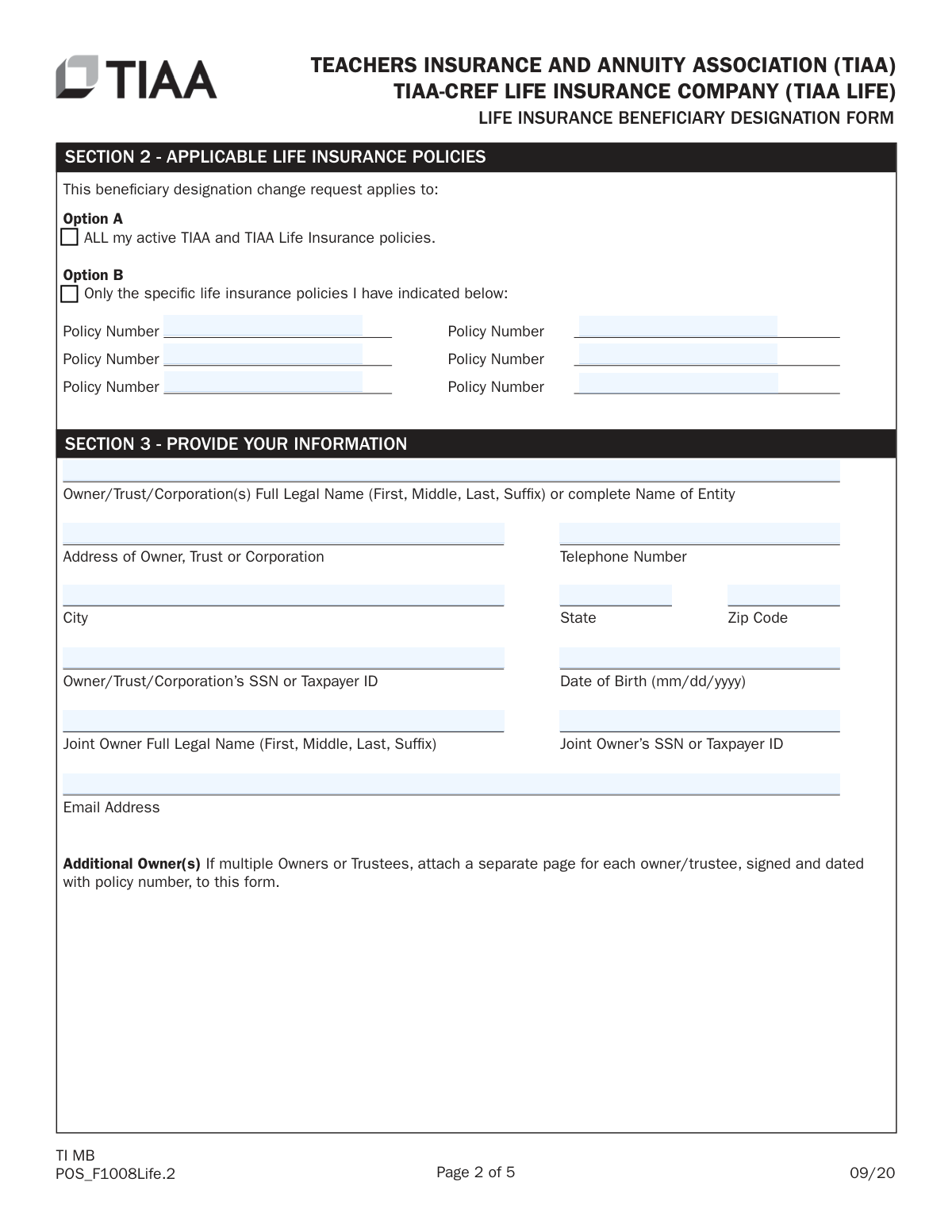
- 2 In Section 2, specify whether the designation applies to all your TIAA policies or list specific policy numbers.
- 3 Provide your information as the policy owner in Section 3, including your full name, address, and SSN or Taxpayer ID.
- 4 In Section 4, name your primary and contingent beneficiaries, providing their full legal names, relationship, date of birth, SSN, and the percentage of benefits for each.
- 5 Complete Section 5 with the full contact information (address, phone, email) for each beneficiary you listed.
- 6 Carefully review all sections, then follow the instructions in Section 6 to sign and date the form. If you live in a community property state or have an irrevocable beneficiary, ensure you obtain the required spousal consent or notarized signatures.
- 7 Download the completed form and mail the original signed document to the TIAA address provided, as electronic submissions or faxes are not accepted.
Our AI-powered system ensures each field is filled out correctly, reducing errors and saving you time.
Why Choose Instafill.ai for Your Fillable POS_F1008Life.2 Form?
Speed
Complete your POS_F1008Life.2 in as little as 37 seconds.
Up-to-Date
Always use the latest 2026 POS_F1008Life.2 form version.
Cost-effective
No need to hire expensive lawyers.
Accuracy
Our AI performs 10 compliance checks to ensure your form is error-free.
Security
Your personal information is protected with bank-level encryption.
Frequently Asked Questions About POS_F1008Life.2
This form is used to designate or change the beneficiaries for a TIAA or TIAA-CREF life insurance policy. The policy owner must complete and sign this form to specify who should receive the policy's death benefit.
A Primary Beneficiary is the first in line to receive the policy benefits when the insured dies. A Contingent Beneficiary only receives the benefits if all primary beneficiaries have passed away before the insured.
Selecting 'Y' for Per Stirpes means that if a beneficiary dies before the insured, their designated share will be paid to their living children. If you select 'N', that share would instead be divided among the other living beneficiaries in the same class.
You must mail the original, signed form to the TIAA administrative office address provided in Section 8. Please note that faxed or copied forms will not be accepted for processing.
To change a beneficiary when an irrevocable beneficiary is listed, that irrevocable beneficiary must consent to the change. They are required to sign page 4 of the form in the presence of a Notary Public.
Yes, if you live in a community property state and do not designate your spouse as the primary beneficiary for at least 50% of the death benefit, your spouse must sign the consent waiver in Section 7. This signature must also be notarized.
For each beneficiary, you must provide their full legal name, relationship to you, date of birth, Social Security number (if available), and their full address and contact information in Section 5. You must also specify the percentage of benefits they should receive.
You can either list each child individually by name or use the class designation 'My Children' in Section 4. Using the class designation automatically includes all your current and future children, including those legally adopted.
The policy owner(s) must sign in Section 6. Notarized signatures are also required from any consenting irrevocable beneficiaries, collateral assignees, or your spouse if the community property rules apply.
To check the status of your request or ask other questions about the form, you can call TIAA at 1-877-694-0305 during their business hours, Monday through Friday, 8 a.m. to 6 p.m. (ET).
Yes, you can name an individual, an institution, a trust, or an estate as a beneficiary. The form provides illustrative examples for how to correctly list these different types of beneficiaries.
Yes, services like Instafill.ai use AI to help you accurately auto-fill form fields, which can save time and reduce errors. This is particularly helpful for ensuring all required information is entered correctly before printing.
You can use a service like Instafill.ai to complete the form digitally. Simply upload the PDF to their platform, and their AI will guide you in filling out the fields before you print the document for the required original signatures.
If you have a non-fillable or 'flat' PDF, you can use a tool like Instafill.ai to convert it into an interactive, fillable form. This allows you to type your information directly into the fields for a clean, legible document.
Compliance POS_F1008Life.2
Validation Checks by Instafill.ai
1
Primary and Contingent Beneficiary Percentage Summation
This check verifies that the percentage allocations for all beneficiaries within the Primary (Class I) group sum to exactly 100%. It performs the same validation for the Contingent (Class II) beneficiaries if any are listed. This is critical to ensure the entire death benefit is distributed according to the policy owner's wishes without ambiguity. A failure will cause the form to be rejected for correction, as an incomplete or incorrect allocation is legally invalid.
2
Conditional Policy Number Entry
This validation ensures that if the user selects 'Option B' in Section 2 to apply the designation to specific policies, at least one policy number field is filled out. Conversely, if 'Option A' (ALL policies) is selected, these fields should be empty. This prevents ambiguity about which policies the new beneficiary designation applies to. If Option B is checked but no numbers are provided, the request cannot be processed.
3
Owner and Joint Owner Signature Verification
This check confirms that the signature of the primary policy owner is present in Section 6A. Additionally, if a Joint Owner is listed in Section 3, their signature is also mandatory in Section 6A. Missing signatures are the most common reason for rejection, as they are required to legally authorize the change in beneficiaries.
4
SSN and TIN Format Validation
This validation ensures that all Social Security Number (SSN) and Taxpayer Identification Number (TIN) fields for the owner, joint owner, and all beneficiaries adhere to the standard formats (XXX-XX-XXXX for SSN and XX-XXXXXXX for TIN). Correct identification numbers are essential for tax reporting and for accurately identifying beneficiaries upon the insured's death. An invalid format will halt processing until corrected.
5
Date of Birth Validity and Format
This check validates that all date of birth fields are entered in the correct 'mm/dd/yyyy' format and represent a logical, past date. It ensures the date is not in the future and that the individual's age is plausible for their role (e.g., an adult owner). This data is crucial for uniquely identifying beneficiaries and can be important for age-related settlement options.
6
Beneficiary Full Legal Name Requirement
This validation ensures that beneficiary names are entered as full legal names (e.g., 'Martha B. Doe') rather than informal or descriptive names (e.g., 'Mrs. John Doe'), as instructed on the form. Using legal names prevents legal challenges and delays in paying out benefits. The system should flag entries that appear to be titles or incomplete names.
7
Community Property Spousal Consent Logic
This is a conditional check that activates if the owner's address (Section 3) is in a community property state (e.g., CA, TX, WA). If the owner's spouse is not designated as the primary beneficiary for at least 50% of the proceeds, the system verifies that the spouse's notarized signature is present in Section 7. Failure to provide this consent when required can invalidate the beneficiary designation under state law.
8
Irrevocable Beneficiary Change Consent
This validation cross-references the policy number(s) with existing TIAA records to determine if there is a current irrevocable beneficiary. If an irrevocable beneficiary exists and is being changed or removed, this check ensures their signed and notarized consent is provided in Section 6. Without this consent, the change is legally impermissible and the form will be rejected.
9
Beneficiary Detail Cross-Reference
This check ensures that for every individual beneficiary named in the designation table (Section 4), there is a corresponding and complete contact information entry in Section 5 (Name, Address, Phone, Email). This consistency is vital for TIAA to be able to locate and contact beneficiaries when the policy becomes payable. Mismatches or missing information will cause processing delays.
10
My Children' Class Designation Rule
If the term 'My Children' is used as a beneficiary designation in Section 4, this validation confirms that Section 5 contains a list of the names and addresses of all current living children. This is required by the form's instructions to properly identify all members of the class. If 'My Children' is used but no children are listed in Section 5, the form is incomplete.
11
Per Stirpes Indicator Format
This validation ensures that the 'Per Stirpes' field for each beneficiary in Section 4 contains only a 'Y' (Yes) or 'N' (No). Any other value or a blank entry would create ambiguity in how to distribute a deceased beneficiary's share. This check enforces a clear instruction for the distribution of assets to the next generation.
12
Primary Beneficiary Designation Completeness
This check verifies that at least one Primary Beneficiary (Class I) is designated on the form. A policy cannot have its beneficiary designation updated to have no primary beneficiary. This ensures there is a clear, immediate recipient for the policy proceeds upon the insured's death, preventing the funds from defaulting to the owner's estate unnecessarily.
13
Email Address Syntax Validation
This check confirms that all email address fields provided for the owner and beneficiaries in Section 3 and Section 5 follow the standard '[email protected]' syntax. While not always mandatory, a valid email is crucial for modern communication regarding the policy and claims. An invalid format would render the contact information useless for electronic communication.
14
Notary Section Completion for Required Signatures
This validation triggers if a signature requires notarization (e.g., spousal consent, irrevocable beneficiary, collateral assignee). It verifies that the corresponding notary public certification block is fully completed, including the state, county, date, signer's name, notary signature, and commission expiration date. An incomplete or missing notarization invalidates the required consent, leading to form rejection.
Common Mistakes in Completing POS_F1008Life.2
This form requires signatures from all policy owners, and in specific cases, from irrevocable beneficiaries, collateral assignees, or a spouse. People often overlook the need for a joint owner's signature or fail to obtain consent from an irrevocable beneficiary, which is mandatory for any changes. A missing signature is one of the most common reasons for immediate rejection, causing significant processing delays. To avoid this, carefully review Sections 6 and 7 to identify every party that must sign the form.
The form explicitly states that signatures from a spouse (in community property states), Power of Attorney, Collateral Assignee, or Irrevocable Beneficiary must be notarized. Fillers often miss this requirement, submitting a signed but unnotarized form, which is considered incomplete. This will lead to the form being returned and require the entire signing process to be repeated. Always check Sections 6C and 7 to see if your situation requires a notary public's certification.
In Section 4, the percentage shares for all Primary Beneficiaries must total exactly 100%, and the same applies to Contingent Beneficiaries. People frequently make simple math errors or, when dividing among an odd number of beneficiaries, use rounding that doesn't add up to 100%. An incorrect total will halt the processing of your request until a corrected form is submitted. Double-check your math, ensuring the sum for each beneficiary class is precisely 100%.
Policy owners residing in community property states (like AZ, CA, TX, WA) who name someone other than their spouse as the primary beneficiary for 50% or more of the proceeds must obtain a notarized signature from their spouse. This is a legal requirement that is easily missed if the instructions in Section 7 are not read carefully. Failure to provide this consent can invalidate the beneficiary designation and lead to legal complications upon the policy owner's death. Always review and comply with Section 7 if you live in one of the listed states.
The form requires the full legal name for every beneficiary (e.g., 'Martha B. Doe,' not 'Mrs. John Doe' or 'Marty'). Using nicknames or incomplete names can create significant ambiguity and delays in verifying the beneficiary's identity when it's time to pay out the policy. To prevent future issues for your heirs, always use the complete legal name as it appears on official documents like a birth certificate or driver's license. AI-powered form fillers like Instafill.ai can help by saving and auto-populating full legal names to ensure consistency.
In Section 2, if you select 'Option B' to apply the beneficiary change to only specific policies, you must list each policy number in the spaces provided. It's a common oversight to check the box for Option B but then forget to write in the corresponding policy numbers. This makes the form ambiguous, and the company cannot process the request, as they don't know which policies to update. Ensure you list all intended policy numbers if you are not applying the change to all of your policies.
The form asks for beneficiary details in Section 4 (Name, DOB, SSN, %) and then again in Section 5 (Name, Address, Phone, Email). People sometimes forget to fill out Section 5 entirely, or the information provided doesn't match what was entered in Section 4. This missing or conflicting data requires clarification and delays processing. It is crucial to complete both sections fully and ensure the beneficiary's name is spelled identically in both places.
The 'Per Stirpes' option (Y/N) is a critical legal term that many people don't fully understand, leading them to either ignore it or make an incorrect choice. Selecting 'Y' means a deceased beneficiary's share will pass to their children, while 'N' means it will be re-distributed among the other living beneficiaries in the same class. An incorrect selection can lead to the proceeds not being distributed according to your true wishes. Carefully read the definition on page 1 before making your selection for each beneficiary.
The instructions explicitly state 'PLEASE DO NOT FAX YOUR REQUEST' and require the original signed document to be mailed. Despite this clear warning, people may attempt to fax or email a scanned copy for convenience, which will be rejected. This mistake wastes time and requires the user to then mail the original form anyway. Always mail the complete, original signed form to the address provided in Section 8. Since this is a non-fillable PDF, a tool like Instafill.ai can convert it into a fillable version for clean, typed entries before printing for signature.
When using the class designation 'My Children' in Section 4, the form requires you to list the full name and address of all living children in Section 5. Policy owners may write 'My Children' but then forget to provide the individual details of each child. Without this list, TIAA cannot identify the specific beneficiaries, rendering the designation incomplete and causing delays in processing the form and future claims.
Saved over 80 hours a year
“I was never sure if my IRS forms like W-9 were filled correctly. Now, I can complete the forms accurately without any external help.”
Kevin Martin Green
Your data stays secure with advanced protection from Instafill and our subprocessors




Robust compliance program
Transparent business model
You’re not the product. You always know where your data is and what it is processed for.
ISO 27001, HIPAA, and GDPR
Our subprocesses adhere to multiple compliance standards, including but not limited to ISO 27001, HIPAA, and GDPR.
Security & privacy by design
We consider security and privacy from the initial design phase of any new service or functionality. It’s not an afterthought, it’s built-in, including support for two-factor authentication (2FA) to further protect your account.
Fill out POS_F1008Life.2 with Instafill.ai
Worried about filling PDFs wrong? Instafill securely fills tiaa-life-insurance-beneficiary-designation-form forms, ensuring each field is accurate.
