Yes! You can use AI to fill out Ankle Conditions Disability Benefits Questionnaire (DBQ)
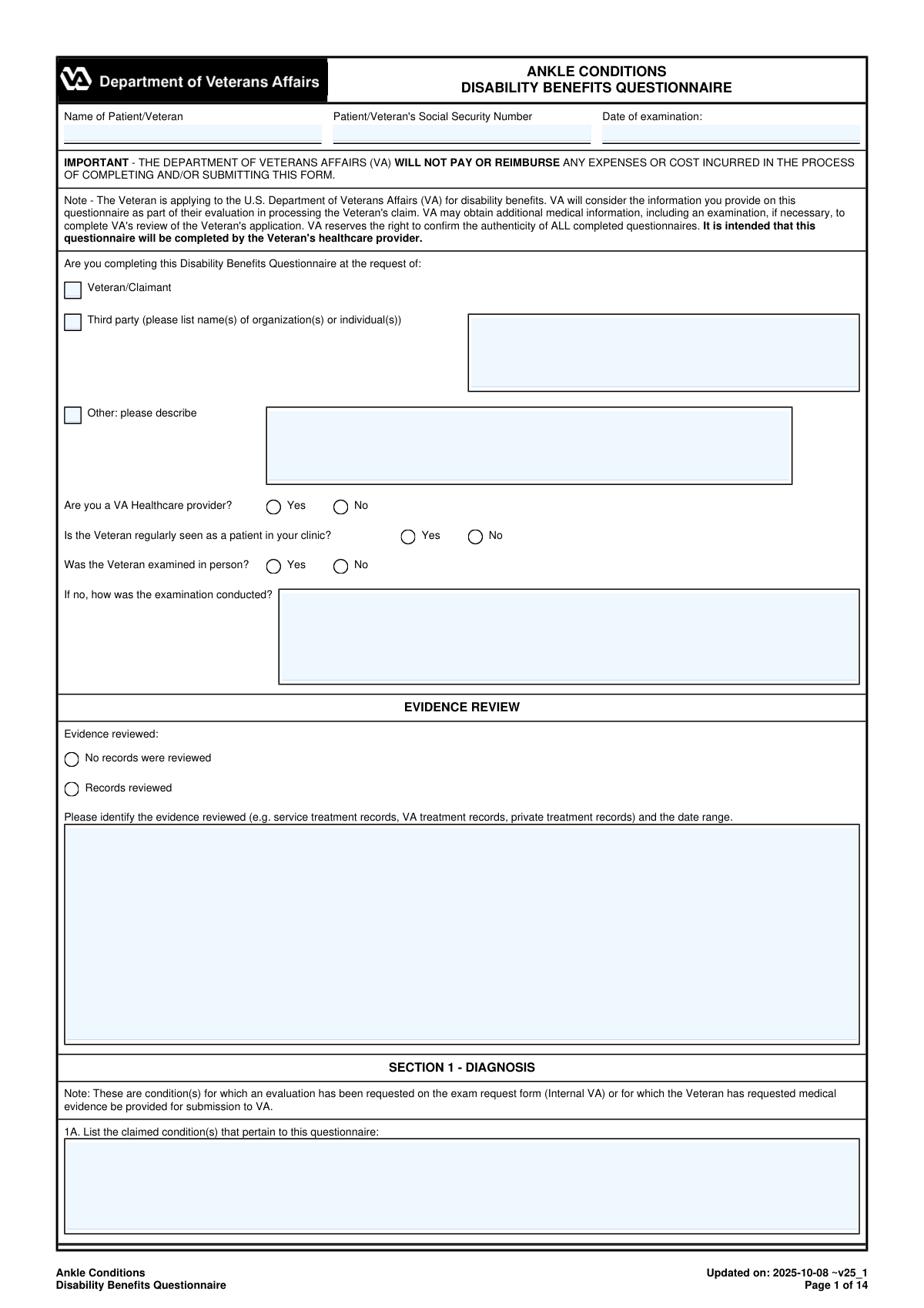
The Ankle Conditions Disability Benefits Questionnaire (DBQ) is a U.S. Department of Veterans Affairs medical evaluation form completed by a qualified healthcare provider to support a Veteranâs claim for service-connected disability benefits related to ankle conditions. It captures standardized clinical information such as diagnoses (with ICD codes), laterality, flare-ups, instability testing, range-of-motion measurements (active/passive, weight-bearing/nonweight-bearing), imaging results, assistive device use, and occupational functional impact. VA uses the completed DBQ as evidence to help determine the presence, severity, and functional limitations of ankle-related disabilities and to assign an appropriate disability rating. Today, this form can be filled out quickly and accurately using AI-powered services like Instafill.ai, which can also convert non-fillable PDF versions into interactive fillable forms.
Our AI automatically handles information lookup, data retrieval, formatting, and form filling.
It takes less than a minute to fill out VA DBQ (Ankle Conditions) using our AI form filling.
Securely upload your data. Information is encrypted in transit and deleted immediately after the form is filled out.
Form specifications
| Form name: | Ankle Conditions Disability Benefits Questionnaire (DBQ) |
| Number of pages: | 14 |
| Filled form examples: | Form VA DBQ (Ankle Conditions) Examples |
| Language: | English |
| Categories: | disability forms |
Instafill Demo: filling out a legal form in seconds
How to Fill Out VA DBQ (Ankle Conditions) Online for Free in 2026
Are you looking to fill out a VA DBQ (ANKLE CONDITIONS) form online quickly and accurately? Instafill.ai offers the #1 AI-powered PDF filling software of 2026, allowing you to complete your VA DBQ (ANKLE CONDITIONS) form in just 37 seconds or less.
Follow these steps to fill out your VA DBQ (ANKLE CONDITIONS) form online using Instafill.ai:
- 1 Go to Instafill.ai and upload the Ankle Conditions Disability Benefits Questionnaire (DBQ) PDF (or select it from the form library).
- 2 Enter the Patient/Veteran identifying information (name, Social Security number, and date of examination) and confirm who requested the DBQ and whether the examiner is a VA provider.
- 3 Use the AI-guided prompts to complete the Evidence Review and Diagnosis section, selecting applicable ankle diagnoses, laterality (right/left/both), ICD codes, and diagnosis dates, and adding any “Other” diagnoses as needed.
- 4 Fill in the Medical History section with onset/course, flare-up details, functional loss, and instability history using structured fields and narrative text where required.
- 5 Complete the Range of Motion and Functional Limitation sections for each ankle (active/passive ROM, pain indicators, repetitive-use testing, repeated use over time estimates, and flare-up estimates), including required explanations when testing is not performed.
- 6 Finish remaining clinical sections (muscle atrophy, ankylosis, joint stability tests, additional conditions, surgeries, scars/other findings, assistive devices, diagnostic testing, and functional impact), then add any clarifying remarks.
- 7 Review for completeness and consistency, then have the examiner complete certification details (signature, credentials, specialty, NPI, license/state, contact information, date signed) and download/export the finalized form for submission with the VA claim.
Our AI-powered system ensures each field is filled out correctly, reducing errors and saving you time.
Why Choose Instafill.ai for Your Fillable VA DBQ (Ankle Conditions) Form?
Speed
Complete your VA DBQ (Ankle Conditions) in as little as 37 seconds.
Up-to-Date
Always use the latest 2026 VA DBQ (Ankle Conditions) form version.
Cost-effective
No need to hire expensive lawyers.
Accuracy
Our AI performs 10 compliance checks to ensure your form is error-free.
Security
Your personal information is protected with bank-level encryption.
Frequently Asked Questions About Form VA DBQ (Ankle Conditions)
This DBQ provides medical evidence about a Veteranâs ankle condition(s) for the VA to consider when evaluating a disability benefits claim. It documents diagnoses, history, range of motion, functional loss, testing, and occupational impact.
The form is intended to be completed by the Veteranâs healthcare provider (examiner/clinician). The Veteran can help by providing symptom history (flare-ups, functional loss, instability), but the medical findings and certification must come from the examiner.
No. The form states that the VA will not pay or reimburse any expenses or costs incurred to complete and/or submit the DBQ.
You must include the Patient/Veteranâs full name, Social Security Number, and the date of examination. Missing identifiers can delay matching the DBQ to the correct VA claim.
This tells the VA who asked for the DBQ to be completed (the Veteran, an organization/individual third party, or another requester). If you select âThird partyâ or âOther,â you should list the requesterâs name(s) or describe who it is.
Records review is not always required, but the examiner must indicate whether records were reviewed. If reviewed, list what was reviewed (e.g., service treatment records, VA records, private records) and the date range.
The examiner can check the box stating the Veteran does not have a current diagnosis associated with the claimed condition(s). The form instructs the examiner to explain the findings and reasons in the Remarks section.
For each selected diagnosis, the examiner should mark the side affected (Right, Left, or Both), enter the ICD code if known, and provide the date of diagnosis (which may be approximate or based on record review/history). If there are additional ankle diagnoses not listed, they can be added in the 'Other' fields or Section 1C.
Section 2 asks for onset and course of the condition, plus the Veteranâs own description of flare-ups (frequency, duration, triggers, relief, severity) and functional loss after repeated use. If instability is reported, document the Veteranâs description in their own words.
The form requests active and passive ROM for plantar flexion (reference 45°) and dorsiflexion (reference 20°), for each ankle. The examiner must also note where pain occurs and whether pain contributes to functional loss, including weight-bearing vs. nonweight-bearing when possible.
If testing is âUnable to testâ or âNot indicated,â the examiner must explain why (for example, severe pain or risk of injury). For stability tests (Anterior Drawer/Talar Tilt), if unable to test, the form also asks whether instability is suspected and to describe it.
The DBQ asks for observed repetitive-use results (after at least three repetitions) and also estimates for repeated use over time and flare-ups based on procurable evidence, including the Veteranâs statements and medical records. If an estimate cannot be provided, the examiner must explain why it is not feasible in this specific case.
The DBQ notes that degenerative or post-traumatic arthritis must be confirmed by imaging studies. If arthritis has already been documented in the past, additional imaging is not required by VA even if the condition has worsened, but the examiner should still summarize relevant test types, dates, and results if performed or reviewed.
Section 13 documents how the diagnosed ankle condition(s) affect the Veteranâs ability to perform occupational tasks (e.g., standing, walking, lifting, sitting). The form instructs the examiner to describe impact from the ankle diagnoses only, without considering age or other unrelated conditions.
YesâAI tools can help organize information and auto-fill form fields to save time, as long as the clinician reviews everything for accuracy and signs the certification. With Instafill.ai, you typically upload the PDF, map or confirm the fields, let the AI populate items from provided information/records, then review, edit, and export the completed form for signature and submission.
Yes. If the DBQ PDF is âflatâ (non-fillable), Instafill.ai can convert it into an interactive fillable form so the fields can be completed digitally, then you can download the completed version for printing/signing or electronic handling as allowed.
Compliance VA DBQ (Ankle Conditions)
Validation Checks by Instafill.ai
1
Validates Patient/Veteran Full Name is present and plausibly formatted
Checks that the Patient/Veteran Name field is not blank and contains a plausible full name (e.g., at least first and last name, not only initials or a single character). This is important for identity matching to the Veteranâs claim file and to prevent mis-association of medical evidence. If validation fails, the submission should be blocked and the user prompted to enter the Veteranâs full legal name as it appears in VA records.
2
Validates Social Security Number (SSN) format and disallows invalid patterns
Ensures the SSN is exactly 9 digits (optionally allowing hyphens in the standard XXX-XX-XXXX format) and rejects known invalid patterns (all zeros in any group, 000/00/0000, 123456789, etc.). Correct SSN formatting is critical for accurate claim linkage and to reduce downstream manual correction. If validation fails, the form should not be accepted and the user should be asked to correct the SSN.
3
Validates Date of Examination is a real date and not in the future
Checks that Date of Examination is provided, follows an accepted date format (e.g., YYYY-MM-DD or MM/DD/YYYY), and represents a valid calendar date. It should also not be later than the current date to prevent erroneous or fraudulent entries. If validation fails, the system should require correction before submission.
4
Validates Questionnaire Requester selection is exactly one and required details are provided
Ensures exactly one requester type is selected: Veteran/Claimant, Third Party, or Other (mutually exclusive). If Third Party is selected, Third Party Requester Name(s) must be populated; if Other is selected, Other Requester Description must be populated. If validation fails, the submission should be blocked and the user prompted to resolve the missing/contradictory requester information.
5
Validates In-Person Examination logic and requires method when not in person
If 'Was the Veteran examined in person?' is marked No, the 'Examination Conducted Method' field must be completed (e.g., telehealth, records review, phone interview) and should not be generic (like 'N/A'). This is important because VA adjudication may weigh findings differently depending on exam modality. If validation fails, require a specific method description before allowing submission.
6
Validates Evidence Review completeness and prevents contradictory selections
Ensures the Evidence Review section is internally consistent: 'No records were reviewed' cannot be selected at the same time as 'Records reviewed.' If 'Records reviewed' is selected, the Evidence Reviewed Description must include at least one record type and a date range (start/end or approximate). If validation fails, the system should prompt the examiner to correct the selection and/or provide the missing evidence details.
7
Validates Claimed Condition(s) field is completed when diagnoses are being evaluated
Checks that 'Claimed Conditions 1' is not blank, since the DBQ is intended to address claimed conditions and link findings to the claim request. This helps ensure the questionnaire is responsive to the Veteranâs claim and reduces ambiguity in adjudication. If validation fails, require entry of the claimed ankle condition(s) before submission.
8
Validates Diagnosis selection consistency (No Current Diagnosis vs. selected diagnoses)
If 'The Veteran does not have a current diagnosis...' is checked, no specific diagnosis checkboxes should be selected, and the Remarks section should include an explanation. Conversely, if any diagnosis is selected, the 'No Current Diagnosis' option must be unchecked. If validation fails, block submission and require the user to resolve the contradiction and/or add the required remarks.
9
Validates each selected diagnosis has side affected, ICD code, and diagnosis date
For every checked diagnosis (including 'Other diagnosis #1-#3'), requires at least one side (Right/Left/Both) and enforces that the corresponding ICD code and diagnosis date fields are completed for the affected side(s). This is important for accurate rating, laterality determination, and medical record coding. If validation fails, the system should highlight the incomplete diagnosis row(s) and require completion.
10
Validates diagnosis dates are valid and logically consistent with exam date
Ensures each diagnosis date is a valid date and is not after the Date of Examination (unless explicitly allowed by business rules, e.g., same-day diagnosis). This prevents timeline errors that can undermine credibility and complicate adjudication. If validation fails, require correction or an explanatory remark if the system allows exceptions.
11
Validates flare-up narrative is provided when flare-ups are reported
If the Veteran reports flare-ups (Yes), the Flare-ups Description must be completed and should address key elements (frequency, duration, precipitating/alleviating factors, severity/functional impact). This information is essential for estimating functional loss during flare-ups per VA requirements. If validation fails, prompt for the missing narrative before submission.
12
Validates functional loss and instability narratives are provided when indicated
If functional loss is marked Yes, the Functional Loss Description must be completed; if instability history is marked Yes, the Ankle Instability Description must be completed. These narratives support the medical rationale and help VA interpret severity beyond numeric ROM values. If validation fails, require the corresponding narrative text.
13
Validates ROM numeric fields are within plausible clinical bounds and are numeric
Checks that all ROM degree entries (active, passive, repetitive-use, repeated-use-over-time estimates, flare-up estimates) are numeric and within plausible bounds (e.g., not negative, not unrealistically high such as >90 for ankle plantar flexion unless explicitly justified). This prevents data entry errors (like swapped units or typos) that could materially affect ratings. If validation fails, require correction or a justification in comments/remarks if out-of-range values are permitted.
14
Validates ROM testing status requires explanation when 'Unable to test' or 'Not indicated' or testing cannot be performed
If any ROM section is marked 'Unable to test' or 'Not indicated,' or if 'Can testing be performed?' is No, an explanation field must be completed with a medically meaningful reason (e.g., severe pain, risk of injury, contraindication). VA requires documentation when standard testing is not performed. If validation fails, block submission until an adequate explanation is provided.
15
Validates pain/functional loss checkbox logic and requires comments when pain causes functional loss
Ensures that within the 'evidence of pain' section, mutually exclusive outcomes are not both selected (e.g., 'Causes functional loss' and 'Does not result in/cause functional loss' simultaneously). If 'Causes functional loss' is checked, the Comments field must describe how pain limits function. If validation fails, require the user to correct the checkbox selections and/or add the required comment.
16
Validates Examiner certification block completeness and identifier formats (NPI, phone/fax, license/state, signature/date)
Requires completion of Examinerâs signature, printed name/title, specialty, date signed, contact number(s), NPI, medical license number and state, and address. Validates NPI as a 10-digit numeric identifier (with checksum if implemented) and phone/fax as valid phone formats. If validation fails, the form should be rejected because VA may not accept an unsigned or insufficiently identified medical opinion.
Common Mistakes in Completing VA DBQ (Ankle Conditions)
People often transpose digits in the Social Security Number, omit a middle name/suffix, or use a nickname that doesnât match VA records. This can cause the DBQ to be misfiled, delayed, or rejected because the VA cannot confidently match the form to the correct Veteran. Always copy the Veteranâs legal name exactly as it appears in VA/ID records and double-check SSN digits before submission. AI-powered tools like Instafill.ai can help by validating SSN formatting and flagging mismatches against previously used identifiers.
A very common issue is leaving dates blank, using non-standard formats (e.g., âlast springâ), or mixing formats across the form. Missing dates weaken the timeline of the condition and can trigger VA follow-up requests or reduce the evidentiary value of the DBQ. Use a clear date format consistently (typically MM/DD/YYYY) and provide approximate dates when exact dates are unknown (noting âapprox.â). Instafill.ai can standardize date formats and prompt for required date fields when a related checkbox is selected.
Clinicians sometimes check multiple requester options or select âThird party/Otherâ but forget to list the organization/individual name(s) or description. This creates an incomplete administrative record and can raise authenticity questions or require resubmission. Select only the single option that applies and complete the associated name/description field when required. Instafill.ai can enforce conditional logic so the âThird Party Requester Name(s)â or âOther Requester Descriptionâ canât be left blank when those options are chosen.
Itâs common to mark âWas the Veteran examined in person? Noâ but leave the âIf no, how was the examination conducted?â field empty, or to mark âYesâ while describing a telehealth-only encounter. Inconsistencies can reduce credibility and may lead the VA to request a new exam. Ensure the exam type matches the narrative (in-person vs telehealth vs records review) and document the method clearly when not in person. Instafill.ai can flag contradictory selections and require the exam-method explanation when âNoâ is selected.
Many submissions check âRecords reviewedâ but fail to identify which records (service treatment records, VA records, private records) and the date range reviewed. Without specifics, the VA may discount the opinion/assessment because itâs unclear what information informed the findings. List each record source and the relevant date span (e.g., âVA treatment records 2018â2025; private ortho notes 2022â). Instafill.ai can prompt for record categories and date ranges and format them consistently.
A frequent mistake is checking âThe Veteran does not have a current diagnosisâŠâ while also checking one or more diagnoses, or listing diagnoses in âOtherâ fields. This internal contradiction can confuse raters and may lead to clarification requests or an unfavorable interpretation. Only select âNo current diagnosisâ if truly no diagnosis applies, and then explain in Remarks; otherwise, select the appropriate diagnosis(es) and complete side/ICD/date fields. Instafill.ai can prevent mutually exclusive selections and highlight missing required subfields for chosen diagnoses.
People often select a diagnosis but forget to mark the side affected, or they mark âBothâ in one place and only document ROM/pain findings for one ankle. This can result in incomplete evaluation for one extremity and may affect the rating outcome. For every diagnosis, clearly indicate Right/Left/Both and ensure ROM, pain, stability, and functional impact sections are completed for the same side(s). Instafill.ai can cross-check side selections and prompt completion of the corresponding right/left subsections.
Range of motion fields require degrees, but entries sometimes include words (âlimitedâ), percentages, or values that exceed normal endpoints (e.g., dorsiflexion > 20° without explanation). Incorrect units or implausible values can undermine the medical accuracy and trigger VA questions. Enter numeric degree values and, if values are outside typical norms for non-ankle reasons, use the provided explanation field to justify. Instafill.ai can validate numeric-only degree inputs and flag out-of-range values for review.
The DBQ specifically asks examiners to address pain on active and passive motion and on weight-bearing and nonweight-bearing, but many forms only document one of these or leave the pain checkboxes blank while noting pain in comments. Missing these elements can make the exam appear noncompliant with VA expectations and may lead to a new exam request. Use the pain evidence checkboxes and add comments describing whether pain causes functional loss when applicable. Instafill.ai can guide completion by ensuring each required pain context is addressed or an explanation is provided.
A very common deficiency is leaving the repeated-use-over-time and flare-up ROM estimate fields blank, or stating itâs not feasible without citing specific evidence and reasoning. The VA often expects an estimate based on procurable information (Veteran statements, records, clinical judgment), and inadequate rationale can reduce the probative value of the DBQ. Provide estimated degrees when possible and, if not feasible, document a detailed, case-specific explanation and cite the evidence considered. Instafill.ai can prompt for the required narrative and ensure the âPlease cite and discuss evidenceâ fields are completed when estimates are not provided.
People often check an assistive device (brace/cane/walker) but forget to mark frequency (occasional/regular/constant) or fail to specify which condition and which side the device is for in 10B. This can lead to an unclear functional picture and may reduce the weight of the reported limitations. Always select frequency for each device and explicitly link it to the ankle condition and side (e.g., âRight ankle instabilityâbrace, regular useâ). Instafill.ai can enforce frequency selection and require the condition/side mapping when any device is checked.
Saved over 80 hours a year
âI was never sure if my IRS forms like W-9 were filled correctly. Now, I can complete the forms accurately without any external help.â
Kevin Martin Green
Your data stays secure with advanced protection from Instafill and our subprocessors

Robust compliance program
Transparent business model
Youâre not the product. You always know where your data is and what it is processed for.
ISO 27001, HIPAA, and GDPR
Our subprocesses adhere to multiple compliance standards, including but not limited to ISO 27001, HIPAA, and GDPR.
Security & privacy by design
We consider security and privacy from the initial design phase of any new service or functionality. Itâs not an afterthought, itâs built-in, including support for two-factor authentication (2FA) to further protect your account.
Fill out VA DBQ (Ankle Conditions) with Instafill.ai
Worried about filling PDFs wrong? Instafill securely fills ankle-conditions-disability-benefits-questionnaire-dbq forms, ensuring each field is accurate.



