Yes! You can use AI to fill out Caterpillar 3500 - C280 Marine Propulsion Start-up & Commissioning Checklist
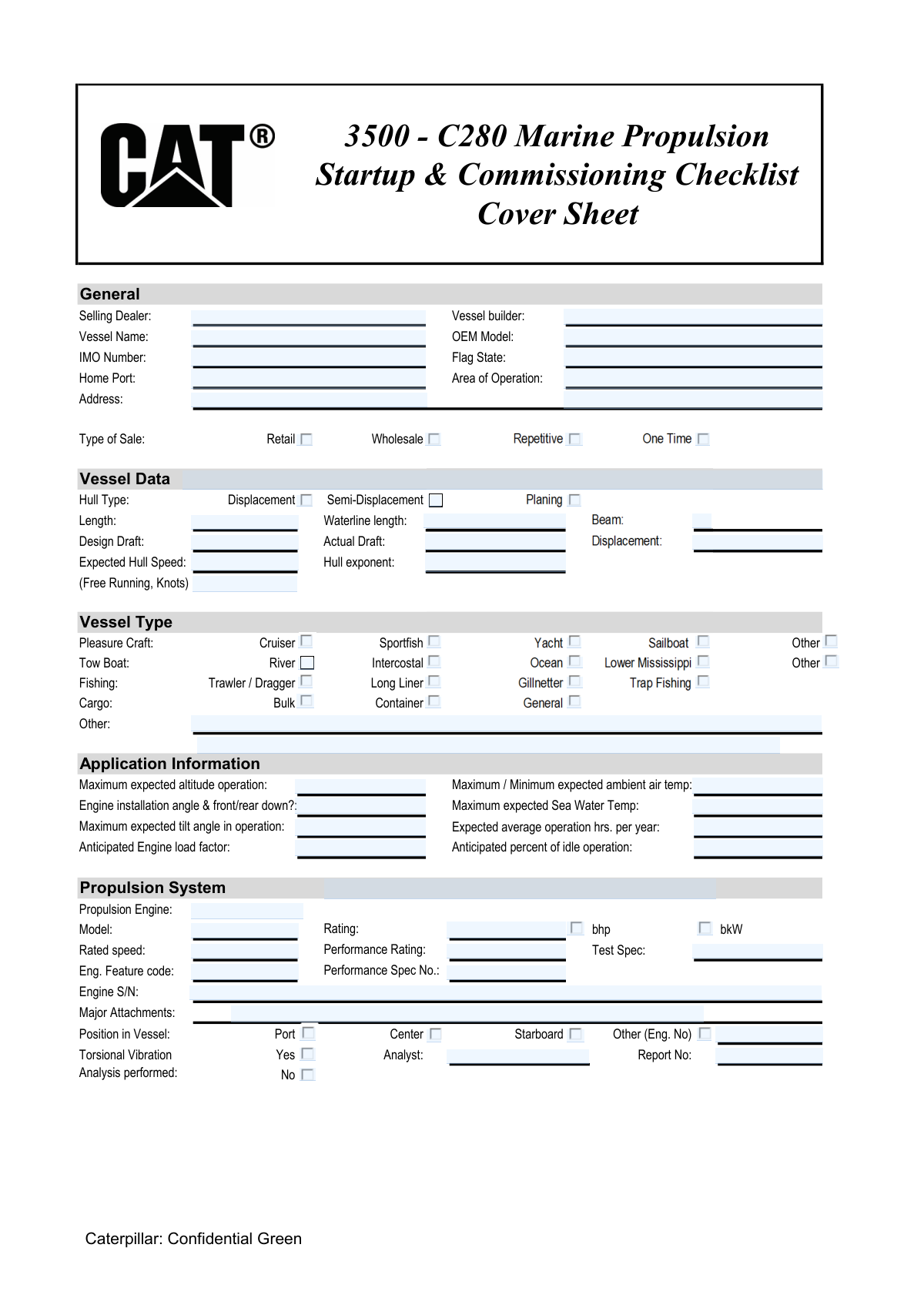
The Caterpillar 3500 - C280 Marine Propulsion Start-up & Commissioning Checklist is a vital technical document for marine service engineers to systematically verify the installation and readiness of new propulsion systems. Following this checklist ensures all components, from the fuel system to engine controls, meet Caterpillar's specifications, which is crucial for safety, performance, and warranty validation. Today, this extensive checklist can be filled out quickly and accurately using AI-powered services like Instafill.ai, which can also convert non-fillable PDF versions into interactive fillable forms.
Our AI automatically handles information lookup, data retrieval, formatting, and form filling.
It takes less than a minute to fill out Caterpillar 3500 - C280 Checklist using our AI form filling.
Securely upload your data. Information is encrypted in transit and deleted immediately after the form is filled out.
Form specifications
| Form name: | Caterpillar 3500 - C280 Marine Propulsion Start-up & Commissioning Checklist |
| Number of pages: | 18 |
| Language: | English |
Instafill Demo: How to fill out PDF forms in seconds with AI
How to Fill Out Caterpillar 3500 - C280 Checklist Online for Free in 2026
Are you looking to fill out a CATERPILLAR 3500 - C280 CHECKLIST form online quickly and accurately? Instafill.ai offers the #1 AI-powered PDF filling software of 2026, allowing you to complete your CATERPILLAR 3500 - C280 CHECKLIST form in just 37 seconds or less.
Follow these steps to fill out your CATERPILLAR 3500 - C280 CHECKLIST form online using Instafill.ai:
- 1 Navigate to Instafill.ai and upload or select the Caterpillar 3500 - C280 Commissioning Checklist.
- 2 Use the AI assistant to automatically identify and label all checklist items, data fields, and signature blocks.
- 3 Systematically go through each section (e.g., Pre Start-up, Start-up), entering vessel data, system specifications, and checking off 'Yes/No/N/A' boxes for each inspection point.
- 4 Input specific measurements and readings as required, such as vibration levels, crankshaft deflection, and fluid pressures, into the corresponding fields.
- 5 Attach supplementary documents like Torsional Vibration Analysis (TVA) reports, alignment records, and photos directly within the digital form.
- 6 Review all entered information for accuracy and completeness, then have the Service Engineer and Customer Representative apply their digital signatures to finalize the document.
- 7 Securely save, download, or share the completed and signed commissioning checklist for official records and warranty purposes.
Our AI-powered system ensures each field is filled out correctly, reducing errors and saving you time.
Why Choose Instafill.ai for Your Fillable Caterpillar 3500 - C280 Checklist Form?
Speed
Complete your Caterpillar 3500 - C280 Checklist in as little as 37 seconds.
Up-to-Date
Always use the latest 2026 Caterpillar 3500 - C280 Checklist form version.
Cost-effective
No need to hire expensive lawyers.
Accuracy
Our AI performs 10 compliance checks to ensure your form is error-free.
Security
Your personal information is protected with bank-level encryption.
Frequently Asked Questions About Form Caterpillar 3500 - C280 Checklist
This form is a comprehensive checklist for service engineers to systematically inspect, test, and document the installation and initial operation of a Caterpillar 3500 or C280 series marine propulsion engine, ensuring it meets all specifications before being put into service.
A qualified Service Engineer is responsible for conducting the checks and filling out the form. A Customer Representative must also sign the form to signify acceptance of the tests and the engine's condition.
This section requires detailed specifications about the vessel itself, including its name, IMO number, builder, dimensions (length, beam, draft), hull type, and displacement. This data helps contextualize the engine's performance.
The Pre Start-up Check is a critical section that involves detailed visual and functional inspections of all major systems before the engine is started. This includes safety equipment, fuel and lube systems, cooling, intake/exhaust, and electrical systems.
This section is to test and confirm that all critical engine safety alarms and automatic shutdown features are working correctly. This includes verifying alarms for low oil pressure, high water temperature, overspeed, and emergency stops.
Yes, the 'Attachments' section on page 6 indicates that you may need to attach several documents, such as the Torsional Vibration Analysis (TVA), alignment records, ventilation strategy, and the CAMPAR sea trial report.
Cold crankshaft deflection is measured before the engine is run to check the initial alignment of the crankshaft. Hot deflection is measured after the engine has reached full operating temperature to see how thermal expansion affects the alignment.
The sea trial involves operating the vessel on the water to test the engine's performance under actual load conditions. Data is collected at various RPMs and then loaded into Caterpillar's CAMPAR software to generate a detailed performance report.
You should try to obtain all required data from the vessel builder, naval architect, or original equipment manufacturer (OEM) documentation. If a field is truly not applicable to your specific installation, you may mark it 'N/A'.
Yes, services like Instafill.ai use AI to auto-fill form fields accurately by pulling data from your existing vessel and engine documents, which can save a significant amount of time and reduce errors.
You can upload the form to a service like Instafill.ai, which will make it an interactive online document. The platform can help pre-fill known information, allowing you to easily complete the remaining checks and measurements directly on your device.
If your PDF is a flat, non-fillable file, you can use a tool like Instafill.ai to convert it into an interactive, fillable form. This allows you to type directly into the fields instead of printing and filling it out by hand.
This section is for vessels equipped with emissions control technology, such as a Selective Catalytic Reduction (SCR) system. It requires checks on the Diesel Exhaust Fluid (DEF) tank, dosing cabinet, and related components to ensure they are installed and functioning correctly.
Compliance Caterpillar 3500 - C280 Checklist
Validation Checks by Instafill.ai
1
Validates IMO Number Format
Checks if the 'IMO Number' field contains exactly 7 digits. The International Maritime Organization (IMO) number is a unique global identifier for vessels. Ensuring the correct format is crucial for accurate vessel identification and regulatory compliance. If the format is incorrect, the form submission should be rejected with an error message prompting the user to enter a valid 7-digit number.
2
Ensures Engine Serial Number is Provided
Verifies that the 'Engine S/N' field is not empty. The engine serial number is a critical unique identifier for tracking the specific unit's history, warranty, and maintenance records. Without this number, the commissioning report is incomplete and cannot be properly associated with the physical asset, leading to potential issues with service and support.
3
Requires Torsional Vibration Analysis Details if Performed
This check ensures that if 'Torsional Vibration Analysis performed' is marked as 'Yes', then the 'Analyst' and 'Report No.' fields must be filled. This information is essential for documenting the analysis and providing a reference for future engineering reviews or troubleshooting. Failure to provide these details makes the 'Yes' selection meaningless and leaves a critical documentation gap.
4
Ensures Single Power Unit Selection (bhp or bkW)
Validates that for the 'Engine Rating', either the 'bhp' or 'bkW' checkbox is selected, but not both. Power ratings must be specified in a single, unambiguous unit to avoid confusion in performance documentation and calculations. If both or neither are selected, the user should be prompted to choose exactly one unit for the power rating.
5
Validates Logical Range for Ambient Air Temperature
Checks the 'Maximum / Minimum expected ambient air temp' field to ensure that the entered maximum temperature is greater than or equal to the minimum temperature. This prevents illogical data entry that would be invalid for environmental condition reporting. An invalid range could lead to incorrect engine performance expectations and configuration settings.
6
Requires Description for 'Other' Vessel Type
This validation ensures that if the 'Other (Pleasure Craft)' checkbox is selected under 'Vessel Type', the corresponding free-text field ('Vessel Type - Other (Line 1)') is not empty. This is important for capturing specific vessel types not covered by the standard options, ensuring data completeness for application analysis. An empty description field would result in lost information about the vessel's application.
7
Requires Heater Details if a Starting Aid is Selected
Verifies that if any of the starting aid checkboxes ('JW Heater', 'Inlet Air Heater', 'Lube Oil Heater') are selected, then the corresponding details ('Heater Manufacturer', 'Type/Model', 'Power', 'Voltage') are provided. These details are necessary for maintenance, troubleshooting, and verifying the system configuration. Missing this information creates an incomplete record of the engine's auxiliary systems.
8
Validates 'Anticipated percent of idle operation' is within a valid range
This check ensures that the value entered for 'Anticipated percent of idle operation' is a number between 0 and 100. This percentage is a key input for load factor calculations and maintenance scheduling. An out-of-range value is nonsensical and would corrupt performance analysis and service interval predictions.
9
Ensures All Date Fields are Valid and Not in the Future
This validation applies to all date fields on the form, such as those for signatures. It checks that the entry is a valid date format (e.g., MM/DD/YYYY) and that the date is not in the future. This ensures the integrity and chronological accuracy of the commissioning record. A future date would indicate a data entry error and invalidate the timestamp of the event.
10
Requires Displacement and Hull Speed for Displacement Hulls
This check ensures that if 'Hull Type - Displacement' is selected, the 'Displacement' and 'Expected Hull Speed' fields are filled out. These parameters are fundamental to performance calculations and sea trial analysis for displacement hulls. Omitting this data for the specified hull type would render the performance section incomplete and hinder proper analysis.
11
Validates Fuel Line Dimensions are Positive Numbers
This check verifies that the 'Fuel supply line inside diameter', 'length', 'Fuel return line inside diameter', and 'length' fields contain only positive numeric values. These dimensions are critical for calculating fuel flow dynamics and ensuring the system meets engine specifications. Non-numeric or negative values are physically impossible and would indicate a data entry error.
12
Ensures Signature Presence for Customer Acceptance
Verifies that the 'Customer Rep. Signature' and 'Service Engineer Signature' fields in the 'Customer Acceptance' section are not empty upon final submission. These signatures are procedurally required to confirm that the commissioning has been completed and accepted by both parties. A missing signature invalidates the acceptance and indicates the process is not formally complete.
13
Ensures Only One Coolant Type is Selected
Validates that only one option among 'ELC', 'Conventional Glycol', 'SCA/Water', and 'Other' is selected for the 'Type of Coolant'. The engine's cooling system is designed for a specific coolant chemistry, and documenting the correct one is vital for maintenance. Selecting multiple types is ambiguous and indicates a data entry error that must be corrected.
14
Requires Engine Number if 'Other' Position is Selected
This validation ensures that if 'Position in Vessel - Other (Eng. No)' is checked, the corresponding text field for the engine number/description is filled. This is crucial for correctly identifying the engine's location when it's not in a standard port, center, or starboard position. An empty field would lead to ambiguity in multi-engine installations.
Common Mistakes in Completing Caterpillar 3500 - C280 Checklist
Technicians may accidentally transpose digits or misread the serial number from the data plate, especially in poorly lit engine rooms. An incorrect serial number for the engine (Engine S/N) or aftertreatment system (CEM Serial Number) can lead to major issues with warranty claims, ordering incorrect replacement parts, and tracking service history. To prevent this, always double-check the number against the physical component before final entry.
Fields for temperature, pressure, and dimensions often require units (e.g., `[ ltr / US Gal]`, `[ kPa / in H2O]`). Users frequently enter a numeric value but forget to specify the unit, making the data meaningless and potentially leading to incorrect performance analysis or safety risks. Always explicitly state the unit of measure, and use AI-powered form filling tools like Instafill.ai to help validate that both a value and a unit have been entered correctly.
Instead of providing the exact specification like 'CAT DEO-ULS/ API CJ 4' for oil or 'ELC 50% Concentration' for coolant, users often write generic terms like 'Cat Oil.' This ambiguity makes it impossible to verify if the correct fluids were used, which is critical for engine longevity and warranty compliance. Always record the full, precise fluid specification as recommended by the manufacturer in the 'Notes' or designated fields.
Technical measurements like 'Crankshaft Deflection' or 'Laser Alignment Results' are often left blank because the tasks are complex or the technician forgets to record the values immediately. Missing this data creates an incomplete commissioning record, preventing the establishment of a vital baseline for future maintenance and troubleshooting. This can be avoided by following the checklist sequentially and recording all measurements as they are taken.
The form requires several attachments, such as the Torsional Vibration Analysis (TVA), Alignment Record, and CAMPAR Report. Engineers often complete the checklist but forget to gather and include these separate documents, resulting in an incomplete submission that delays approval. Using a tool like Instafill.ai, which can convert a flat PDF like this into a fillable version, can provide prompts or fields to upload these required attachments directly, ensuring they are not forgotten.
When filling out 'Engine installation angle,' a user might just write '5' without specifying 'front up' or 'front down.' This ambiguity makes the data useless, as the engine's tilt is a critical parameter affecting lubrication and performance. Always provide both the angle in degrees and the direction of the tilt to ensure the record is clear and accurate.
A service engineer might rush through the pre-start checklist and mark 'Yes' for items like 'Emergency stop functional' without performing a physical verification. This 'pencil-whipping' creates a false record of safety and operational readiness, which can lead to catastrophic equipment failure, serious injury, and significant liability. Each item must be individually and thoroughly checked before the form is marked.
After a lengthy commissioning process, it is common for either the Service Engineer or the Customer Representative to forget to sign and date the acceptance sections. An unsigned form is not an official record and fails to legally document the completion of work and customer acceptance. Making this the final verification step before submission can prevent this oversight.
Information like 'Vessel Name,' 'IMO Number,' and 'Flag State' may be entered with typos or inconsistencies compared to official records. For example, using a nickname for the vessel or transposing digits in the IMO number can cause issues with regulatory tracking and service history. This data should be copied exactly from the vessel's official registration documents to ensure accuracy.
The form contains fields that should only be filled out if a specific condition is met, such as providing a 'Report Number' only if 'Torsional Vibration Analysis performed' is 'Yes.' Users often ignore these instructions, creating confusing and contradictory data. AI-powered tools like Instafill.ai can help prevent such errors by dynamically showing or hiding fields based on user input, ensuring a cleaner and more accurate submission.
Saved over 80 hours a year
“I was never sure if my IRS forms like W-9 were filled correctly. Now, I can complete the forms accurately without any external help.”
Kevin Martin Green
Your data stays secure with advanced protection from Instafill and our subprocessors
Robust compliance program
Transparent business model
You’re not the product. You always know where your data is and what it is processed for.
ISO 27001, HIPAA, and GDPR
Our subprocesses adhere to multiple compliance standards, including but not limited to ISO 27001, HIPAA, and GDPR.
Security & privacy by design
We consider security and privacy from the initial design phase of any new service or functionality. It’s not an afterthought, it’s built-in, including support for two-factor authentication (2FA) to further protect your account.
Fill out Caterpillar 3500 - C280 Checklist with Instafill.ai
Worried about filling PDFs wrong? Instafill securely fills caterpillar-3500-c280-marine-propulsion-start-up-commissioning-checklist forms, ensuring each field is accurate.