Yes! You can use AI to fill out Distribution Request Form
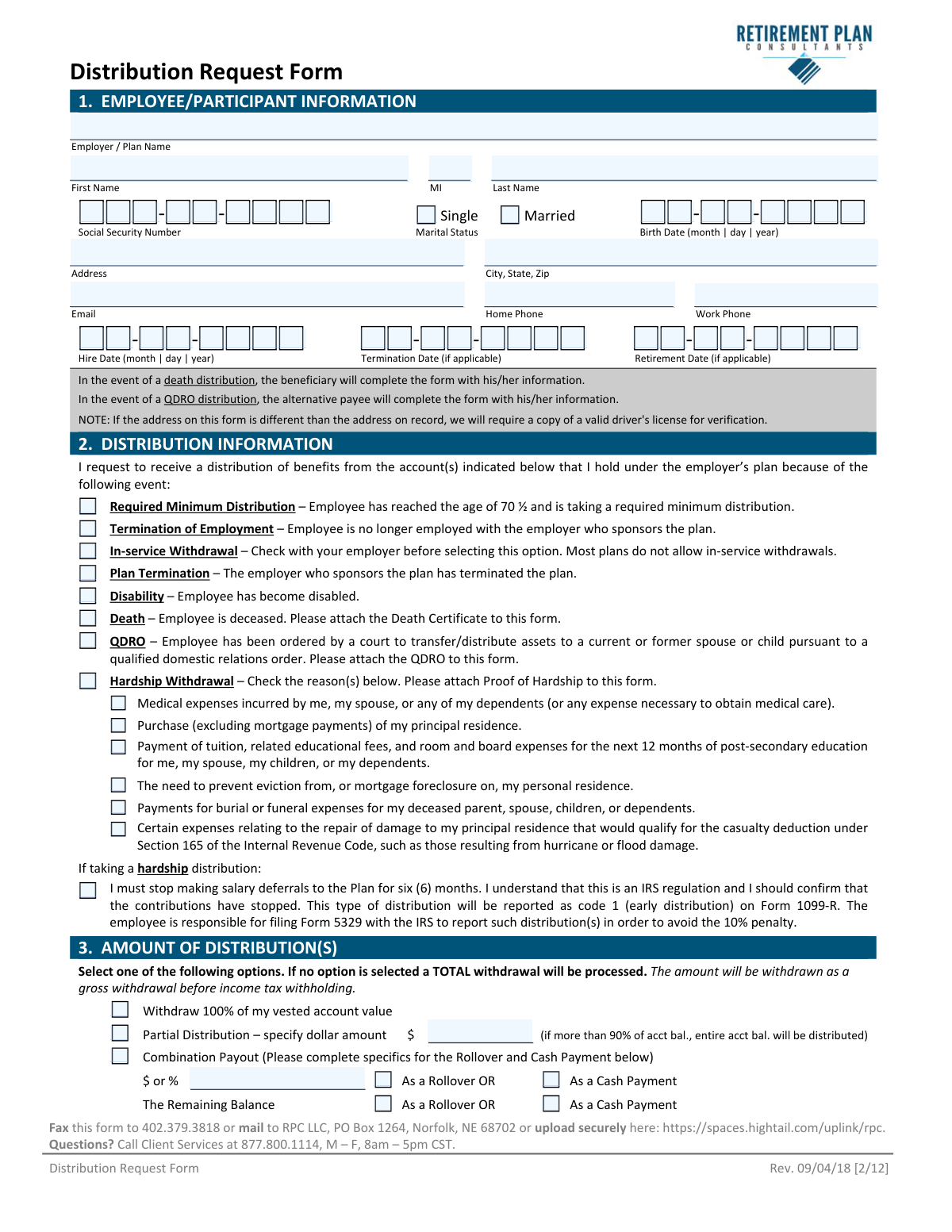
The Distribution Request Form is a document used by retirement plan participants to formally request a withdrawal of funds from their account. It is crucial for managing retirement assets, allowing for rollovers to other accounts, or taking cash payments due to events like termination of employment, disability, or financial hardship. Today, this form can be filled out quickly and accurately using AI-powered services like Instafill.ai, which can also convert non-fillable PDF versions into interactive fillable forms.
Distribution Request Form is part of the
financial forms, withdrawal forms, retirement account forms, distribution forms and distribution request forms categories on Instafill.
Rather not fill this in by hand? Instafill is an online form filler that completes PDF forms automatically — upload the blank form, answer a few questions, and the AI fills every field.
Form specifications
| Form name: | Distribution Request Form |
| Number of pages: | 1 |
| Language: | English |
Our AI automatically handles information lookup, data retrieval, formatting, and form filling.
It takes less than a minute to fill out Distribution Request Form using our AI form filling.
Securely upload your data. Information is encrypted in transit and deleted immediately after the form is filled out.
Instafill Demo: How to fill out PDF forms in seconds with AI
How to Fill Out Distribution Request Form Online for Free in 2026
Are you looking to fill out a DISTRIBUTION REQUEST FORM form online quickly and accurately? Instafill.ai offers the #1 AI-powered PDF filling software of 2026, allowing you to complete your DISTRIBUTION REQUEST FORM form in just 37 seconds or less.
Follow these steps to fill out your DISTRIBUTION REQUEST FORM form online using Instafill.ai:
- 1 Navigate to Instafill.ai and upload the Distribution Request Form or select it from the template library.
- 2 Provide your personal details in Section 1, including your name, Social Security Number, address, and employment dates.
- 3 In Section 2, indicate the reason for your distribution, such as termination of employment, hardship, or a required minimum distribution.
- 4 Specify the amount you wish to withdraw in Section 3, choosing between a full, partial, or combination payout.
- 5 Complete Section 4 with your payment instructions, providing details for a direct rollover to another institution or your bank account information for a cash payment.
- 6 Make your federal and state income tax withholding elections in Section 6.
- 7 Review all the information pre-filled by the AI, electronically sign the form in Section 8, and download the completed document for submission to your Plan Administrator.
Our AI-powered system ensures each field is filled out correctly, reducing errors and saving you time.
Why Choose Instafill.ai for Your Fillable Distribution Request Form Form?
Speed
Complete your Distribution Request Form in as little as 37 seconds.
Up-to-Date
Always use the latest 2026 Distribution Request Form form version.
Cost-effective
No need to hire expensive lawyers.
Accuracy
Our AI performs 10 compliance checks to ensure your form is error-free.
Security
Your personal information is protected with bank-level encryption.
Frequently Asked Questions About Distribution Request Form
This form is used to request a withdrawal of funds from your employer-sponsored retirement account. You can use it whether you are rolling over the funds to another account or taking a direct cash payment.
The processing timeline varies. After your Plan Administrator approves the request, it may take 3-5 business days for an ACH payment or up to 14 business days for a check to be sent.
You can fax the form to 402.379.3818, mail it to RPC LLC, PO Box 1264, Norfolk, NE 68702, or upload it securely using the Hightail link provided on the form.
Your employer's Plan Sponsor, Plan Trustee, or another authorized signer must complete and sign Sections 10, 11, and 12. You are responsible for contacting them to obtain the required signature after you have filled out your portion.
For a hardship withdrawal, you must select the reason on the form and attach supporting documentation as 'Proof of Hardship.' The form does not specify the exact documents, so you should provide invoices, bills, or letters that prove your stated need.
If you take a cash payment and do not make a selection, a default amount will be withheld. For most distributions, a mandatory 20% will be withheld for federal taxes, and the mandatory state income tax will be withheld if applicable.
You have a right to a 30-day period to consider your withdrawal options after receiving the Special Tax Notice. You can waive this period by checking the box in Section 5 to have your distribution processed immediately after approval.
Spousal consent may be required if your plan is subject to Qualified Joint and Survivor Annuity (QJSA) rules and you are married. If applicable, your spouse must sign Section 9 in the presence of a notary.
According to Section 3, if you request a partial distribution that is more than 90% of your account balance, the entire account balance will be distributed to you.
No, the form explicitly states in Section 4 that wire instructions are not an acceptable form of payment. You can choose to receive a check or have the funds deposited directly into your account via ACH.
Yes, services like Instafill.ai use AI to accurately auto-fill form fields, which can save you time and help prevent errors. This is especially useful for filling in your personal information and other repetitive data.
Simply upload the Distribution Request Form PDF to the Instafill.ai platform. The AI will identify the fields, allowing you to fill them out interactively online before downloading or printing the completed document.
If you have a non-fillable or 'flat' PDF, you can use a service like Instafill.ai. It can convert the non-fillable PDF into an interactive, fillable form for you to complete easily on your computer.
Compliance Distribution Request Form
Validation Checks by Instafill.ai
1
Social Security Number Format
This check verifies that the Social Security Number provided in Section 1 is present and follows the valid 9-digit format (XXX-XX-XXXX or XXXXXXXXX). This is crucial for correct tax reporting and participant identification. A failure to provide a valid SSN will prevent the processing of the distribution request due to IRS regulations and inability to verify the participant's identity.
2
Distribution Reason and Termination Date Consistency
This validation ensures that if 'Termination of Employment' is selected as the distribution reason in Section 2, then the 'Termination Date' field in Section 1 must be completed. This logical link is essential for verifying eligibility for a termination-based withdrawal. If the date is missing, the form will be considered incomplete and returned to the applicant for correction.
3
Required Minimum Distribution (RMD) Age Verification
This check cross-references the 'Birth Date' in Section 1 with the selection of 'Required Minimum Distribution' in Section 2. It confirms that the participant has reached the required age of 70.5 years to be eligible for an RMD. This prevents incorrect distribution types and ensures compliance with IRS regulations, avoiding potential penalties for the participant and the plan.
4
Hardship Withdrawal and Withholding Logic
This validation checks the relationship between the distribution reason in Section 2 and the tax withholding election in Section 6. If 'Hardship Withdrawal' is selected, the system allows for a federal withholding election of less than 20% or an election of no withholding. For other distribution types, it enforces the mandatory 20% minimum withholding, ensuring tax compliance and preventing invalid withholding elections.
5
Direct Deposit Information Completeness
This check is triggered if 'Deposit Directly into my account' is selected in Section 4C. It verifies that the Bank Name, Bank Routing / ABA#, Account Number, and account type (Checking or Savings) are all provided. Missing any of this information makes the direct deposit impossible to process, which would cause payment delays and require manual intervention.
6
Bank Routing Number Validity
This validation specifically targets the 'Bank Routing / ABA#' field in Section 4C for direct deposits. It ensures the number is exactly 9 digits long and is a numerically valid entry. This is a critical check to prevent payment rejections and lost funds, as an incorrect routing number will cause the ACH transfer to fail.
7
Combination Payout Specification
If 'Combination Payout' is selected in Section 3, this check ensures the subsequent fields are properly completed. It verifies that a dollar amount or percentage is specified for the first portion and that payment methods ('As a Rollover' or 'As a Cash Payment') are selected for both parts of the distribution. Ambiguity in this section would make it impossible to determine the participant's intent, halting the request.
8
Spousal Consent for QJSA Waiver
This check activates if the participant's marital status in Section 1 is 'Married' and they have signed the QJSA waiver in Section 9. It verifies that the 'Spousal Consent' portion is also signed, dated, and notarized. This is a legal requirement to protect spousal rights under ERISA, and failure to obtain a valid, notarized consent will prevent the distribution from being processed in any form other than a QJSA.
9
Notary and Spousal Signature Date Match
For the QJSA waiver in Section 9, this validation confirms that the date of the spouse's signature is identical to the date of the notary's signature. This is a strict requirement for a valid notarization, proving the spouse signed in the presence of the notary. A mismatch in dates invalidates the spousal consent and will cause the form to be rejected.
10
Employment Date Logical Consistency
This check validates the date fields in Section 1 to ensure they are logical. It confirms that the 'Termination Date' or 'Retirement Date', if provided, occurs on or after the 'Hire Date'. This simple chronological check prevents data entry errors that could impact vesting calculations and eligibility for distribution.
11
Rollover Information Completeness
When a rollover is requested in Section 3 or 4, this validation ensures the corresponding rollover information section (4A or 4B) is complete. It checks for the presence of the receiving institution's name ('Make Check Payable To'), address, and the participant's account number. Without this information, the rollover check cannot be issued correctly, leading to significant delays and potential tax consequences for the participant.
12
Mutually Exclusive Distribution Amount Selection
This validation ensures that in Section 3, only one of the primary distribution amount options ('Withdraw 100%', 'Partial Distribution', or 'Combination Payout') is selected. Selecting multiple options creates ambiguity about the participant's intent. If the check fails, the form is rejected to force the participant to make a clear and single choice.
Common Mistakes in Completing Distribution Request Form
Participants often enter incorrect or incomplete information in Section 4 for rollovers or direct deposits, such as a transposed account number or an invalid bank routing number. This happens due to simple data entry mistakes on these critical fields. The consequence is severe: failed transactions, lost funds, and significant delays, potentially incurring check reissue fees as noted on the form. To avoid this, double-check all account and routing numbers with your financial institution; AI-powered tools like Instafill.ai can help by validating routing numbers and ensuring formats are correct before submission.
When requesting a distribution for Hardship, Death, or a QDRO in Section 2, participants frequently forget to attach the required proof. For example, a hardship withdrawal requires 'Proof of Hardship,' and a death distribution needs a Death Certificate. Submitting the form without these documents will halt the process until they are provided, significantly delaying access to funds. Always review the requirements for your chosen distribution reason and gather all necessary paperwork before submitting the form.
For plans requiring spousal consent, married participants often fail to properly complete Section 9. Common errors include a missing spousal signature, no notary seal, or a notary date that does not match the spouse's signature date. An improper waiver invalidates the distribution request, forcing the participant to restart the entire process from the beginning. To prevent this, ensure your spouse signs in the presence of a notary and that all dates on the document match perfectly.
Participants sometimes mistakenly fill out Sections 10, 11, and 12, which are explicitly reserved for the Plan Administrator, Sponsor, or TPA. This often happens when they try to complete the entire form at once without understanding the required workflow. This error can lead to the form being rejected and returned, as the administrator's approval and vesting information is required for processing. Participants should only complete Sections 1-9 and then forward the form to their Plan Administrator for completion.
In Section 3, participants fail to clearly specify how much money to distribute, especially when choosing a 'Combination Payout.' They might check the box but forget to enter the dollar or percentage amounts for the rollover and cash portions. The form defaults to a 100% withdrawal if no option is selected, which could trigger an unintended full liquidation and a major tax liability. Carefully specify all amounts and double-check your math to ensure your instructions are unambiguous.
Participants who need their funds processed quickly often overlook the checkbox in Section 5 to waive the mandatory 30-day waiting period. This is an easy-to-miss detail that results in an automatic, and often frustrating, one-month delay before the distribution is even processed. If you want your request handled as soon as it's approved, you must explicitly check the box to waive this period.
The form notes in Section 1 that if the address provided is different from the one on record, a copy of a valid driver's license is required for verification. Participants often update their address on the form but fail to see this note and don't include the required ID. This security measure prevents fraud but will cause the processing to be paused until the identity verification is complete. If your address has changed, be sure to include a copy of your driver's license with your submission.
Participants who are still employed may select 'In-service Withdrawal' in Section 2 without confirming their eligibility. The form explicitly warns that most plans do not allow this and advises checking with the employer first. Submitting a request for an option your plan doesn't offer leads to an immediate rejection and wasted time. Always confirm your plan's specific rules with your employer or plan administrator before selecting a distribution reason.
A note in Section 1 specifies that for death or QDRO distributions, the beneficiary or alternate payee must complete the form with *their own* personal information. A common error is for the person assisting the beneficiary to fill it out using the deceased participant's details. This causes identity-mismatch errors and requires the form to be corrected and resubmitted. The person receiving the funds should always be the one whose information is entered in the participant section.
This form is a flat, non-fillable PDF, forcing users to print it and fill it out by hand. This often leads to illegible handwriting for critical fields like Social Security and bank account numbers, causing data entry errors by the processor. These errors can result in failed transactions or security holds. To avoid this, use a tool like Instafill.ai which can convert the non-fillable PDF into an interactive, fillable form, ensuring all entries are typed and perfectly legible.
Saved over 80 hours a year
“I was never sure if my IRS forms like W-9 were filled correctly. Now, I can complete the forms accurately without any external help.”
Kevin Martin Green
Your data stays secure with advanced protection from Instafill and our subprocessors




Robust compliance program
Transparent business model
You’re not the product. You always know where your data is and what it is processed for.
ISO 27001, HIPAA, and GDPR
Our subprocesses adhere to multiple compliance standards, including but not limited to ISO 27001, HIPAA, and GDPR.
Security & privacy by design
We consider security and privacy from the initial design phase of any new service or functionality. It’s not an afterthought, it’s built-in, including support for two-factor authentication (2FA) to further protect your account.
Fill out Distribution Request Form with Instafill.ai
Worried about filling PDFs wrong? Instafill securely fills distribution-request-form forms, ensuring each field is accurate.
