
Yes! You can use AI to fill out Equitable Hardship Withdrawal Request (Form E13770)
Don't type 57 fields by hand. Tell our AI about yourself, or upload a document you already have, and it fills every field in seconds. You check it, then download, print or sign.
The AI does the filling. You just check it.
No typing into boxes, nothing to install.
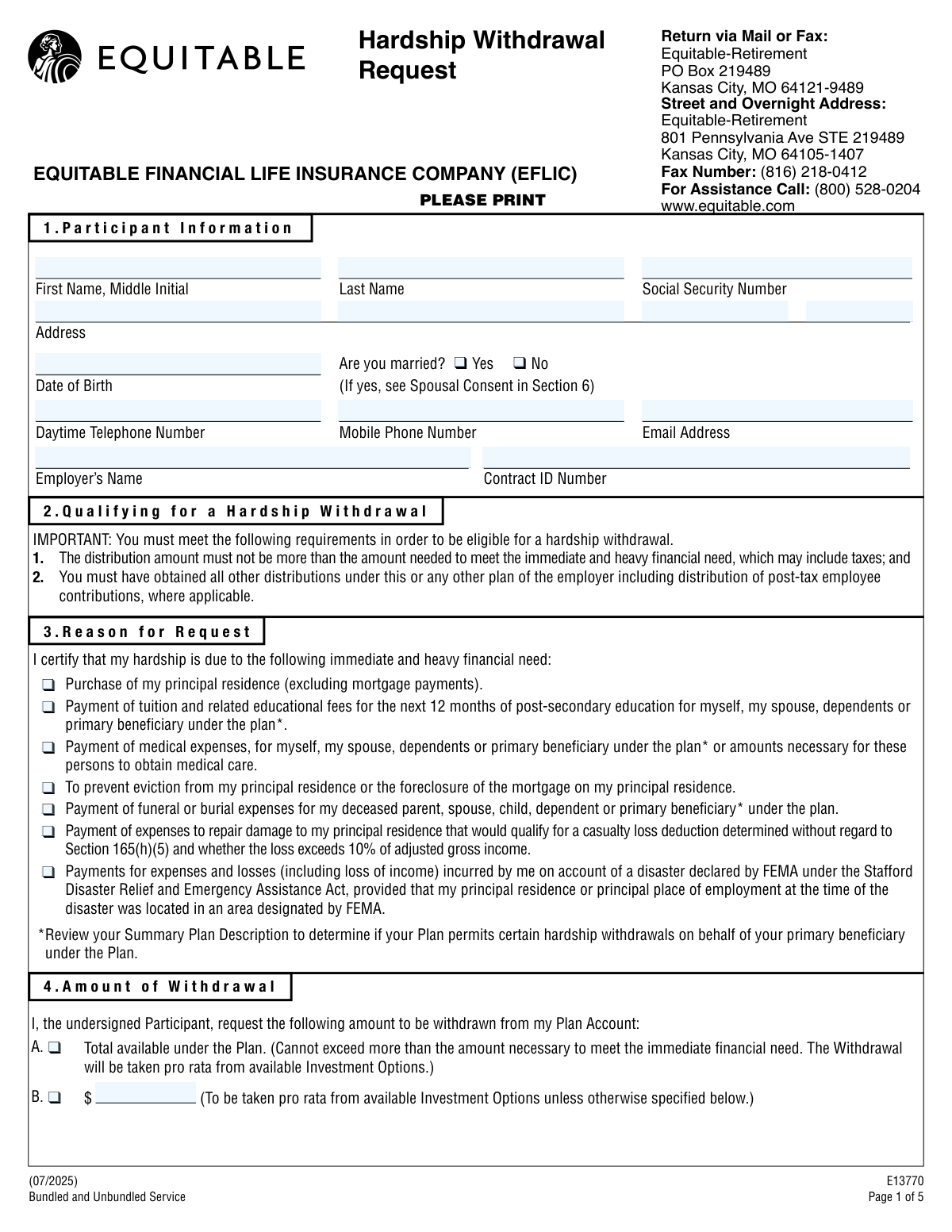
What this form asks for
The AI fills all of it, from your answers or your documents.
The AI checks your answers before you download
14 checks built for this form, so a wrong date or a missing answer is caught before anyone else sees it.
This check ensures the Social Security Number in Section 1 is provided and follows the valid 9-digit format (XXX-XX-XXXX or XXXXXXXXX). This is critical for correct taxpayer identification, processing the withdrawal, and reporting to the IRS. A failure in this validation would prevent the request from being processed due to inability to verify the participant's identity.
Validates that the Date of Birth in Section 1 is a complete and logical date (e.g., MM/DD/YYYY). This is used to verify the participant's identity against plan records and ensure they meet any age-related eligibility requirements. An invalid or missing date of birth will halt processing until corrected.
Verifies that exactly one checkbox is selected in Section 3, 'Reason for Request'. Selecting multiple reasons or no reason creates ambiguity and may not comply with plan rules for documenting a specific financial need. If this check fails, the form must be returned to the participant for clarification.
Ensures that in Section 4, 'Amount of Withdrawal', the participant has selected either the 'Total available' checkbox OR entered a specific dollar amount, but not both. This prevents ambiguity in the withdrawal instruction and ensures the correct amount is disbursed. A failure would require clarification before the withdrawal can be processed.
If a specific dollar amount is entered in Section 4, this check validates that the value is a positive number. This prevents data entry errors, such as text or negative numbers, from being submitted. An invalid format would cause the request to be rejected.
Confirms that only one delivery option (First Class Mail, Express Delivery, or Direct Deposit) is selected in Section 5. The form explicitly requests only one option be chosen to avoid confusion and errors in payment delivery. If multiple or no options are selected, the form defaults to First Class Mail, but it's better to flag for confirmation.
And 8 more checks
- Direct Deposit Completeness and Attachment
- Bank Routing Number Validity
- Single Federal Withholding Election
- Conditional W-4R Form Attachment
- Participant Signature and Date Presence
- Spousal Consent Requirement Logic
- Spousal and Witness Signature Date Consistency
- Plan Administrator Signature Presence
Let AI fill out your E13770
No typing. Every field filled in seconds, checked, ready to sign.
How to Fill Out E13770 Online for Free in 2026
What the AI walks you through.
- Navigate to Instafill.ai and upload the Hardship Withdrawal Request form, or select it from the platform's template library.
- Use the AI assistant to fill in your personal details in Section 1, such as your name, Social Security Number, address, and employer information.
- In Section 3, select the checkbox that corresponds to your specific reason for the hardship withdrawal.
- Specify the amount you wish to withdraw in Section 4 and choose your preferred payment delivery method (e.g., direct deposit, mail) in Section 5.
- Complete the Federal and State Tax Withholding elections in Section 6 to instruct Equitable on how to handle taxes for your distribution.
- Review all sections for accuracy, then electronically sign and date the form in Section 7. Ensure the Spousal Consent (Section 8) and Plan Administrator signature sections are completed if required.
- Download the finalized document and submit it to Equitable according to the mail or fax instructions provided on the form.
Common Mistakes in Completing E13770
The ones the AI is built to catch.
Forgetting to Attach a Voided Check for Direct Deposit
Entering Incorrect Bank Account or Routing Numbers
Incomplete or Missing Spousal Consent
Ignoring the Tax Withholding Election
Missing Participant Signature or Date
Failing to Answer the 'Are you married?' Question
Submitting Illegible Handwriting
Ambiguous Withdrawal Amount Request
Missing Plan Administrator Signature
Selecting the W-4R Option Without Attaching the Form
Frequently Asked Questions About E13770
Is it really free for 7 days?
Can I fill other forms too?
How do I cancel?
How does the AI fill out E13770?
What happens to my information?
How complex is E13770 to fill out?
What is the purpose of the Hardship Withdrawal Request form?
Who is eligible to apply for a hardship withdrawal?
What are considered valid reasons for a hardship withdrawal?
How much money can I withdraw?
Do I need my spouse's signature to submit this form?
Are there any fees for taking a hardship withdrawal?
How will I receive my money and how long will it take?
What documents do I need to provide for a direct deposit?
Will taxes be taken out of my withdrawal?
Where do I send the completed form?
Who needs to sign this form?
Can an AI tool help me fill out this form?
How can I fill out this form online?
The PDF I have is not fillable. What can I do?
Get your E13770 filled out by AI
$0 today. Cancel before Nov 1 and you pay nothing.
Other forms like this one
withdrawal forms: Empower Disability Withdrawal Request Form, One-Time Withdrawal – IRA, Fidelity Investments, One-Time Withdrawal — Defined Contribution Retirement Plan, Fidelity One-Time Withdrawal Form — Nonretirement, One-Time Withdrawal – Investment-Only (Non-Prototype) Retirement Account, Fidelity Investments Withdrawal — One-Time, Automatic Withdrawals—Defined Contribution Retirement Plan, Fidelity Investments Withdrawals—529 College Savings Plan, Fidelity Growth and Guaranteed Income Partial Withdrawal/Full Surrender Form, Fidelity Automatic Withdrawals — Nonretirement, Fidelity Investments Earnings Automatic Withdrawal Plan — IRA, The Vanguard 529 College Savings Plan: Withdrawal Request Form, Vanguard Personal Investor Withdrawal form, Empower Retirement Plan Withdrawal Request Form, Hardship Withdrawal Request - Empower, Hardship Withdrawal Request 401(a) Plan, Separation from Employment Withdrawal Form, MassMutual Application for Hardship Withdrawal, Beneficiary Account Withdrawal Request Governmental 457(b) Plan, Separation from Employment Withdrawal Form for East Bay Regional Park District 457(b) Deferred Compensation Plan
hardship withdrawal forms: Hardship Withdrawal Request - Empower, Hardship Withdrawal Request 401(a) Plan, MassMutual Application for Hardship Withdrawal, Streamlined Hardship Withdrawal Service Letter of Instruction, Form 2938, Hardship Withdrawal Request, TIAA Form F11270, Request for Hardship Withdrawal, Request for Hardship Withdrawal
hardship forms: Explanation of Hardship and Supporting Documentation, Form 1127, Application for Extension of Time for Payment of Tax Due to Undue Hardship, Vanguard Super Apply for a financial hardship payment, Hardship Withdrawal Request - Empower, Empower Hardship Distribution Request Form, Hardship Withdrawal Request 401(a) Plan, MassMutual Application for Hardship Withdrawal, Streamlined Hardship Withdrawal Service Letter of Instruction, Form 2938, Hardship Withdrawal Request, TIAA Form F11270, Request for Hardship Withdrawal, Request for Hardship Withdrawal
withdrawal request forms: Merrill Lynch 529 College Savings Plan Withdrawal Request Form, The Vanguard 529 College Savings Plan: Withdrawal Request Form, Empower Retirement Plan Withdrawal Request Form, Hardship Withdrawal Request - Empower, Hardship Withdrawal Request 401(a) Plan, Empower Disability Withdrawal Request Form, Beneficiary Account Withdrawal Request Governmental 457(b) Plan, In-Service Withdrawal Request 401(a) Plan, In-Service Withdrawal Request, City of Toledo Savings and Protection Plan, Form 2938, Hardship Withdrawal Request, Form #170, Voluntary Account Withdrawal Request Form, Excess Withdrawal Request and Form W-4R, Withholding Certificate for Nonperiodic Payments and Eligible Rollover Distributions, TIAA Form F11270, Request for Hardship Withdrawal, State of New Jersey Alternate Benefit Program Withdrawal Request Acknowledgement Receipt, Request for Hardship Withdrawal, Voya Form 83516, Withdrawal Request 401 Corporate ERISA, Tomorrow's Scholar® Withdrawal Request Form, Merrill Lynch Client Select Series Withdrawal Request Form, RL360 Withdrawal Request, NextGen 529 Client Direct Series Withdrawal Request Form
Let AI fill out your E13770
Your trial starts once a card is added. You pay nothing before Nov 1.
Our AI already knows this form, all 57 fields of it. Skip the typing: tell it about yourself, or upload what you have, and it fills the whole form in seconds.
- AI fills every field on all 6 pages, tables and checkboxes included
- No typing into boxes: answer a few questions, or upload a document you already have, an old copy of this form, a photo of a document
- The AI checks the answers; you review and change anything before you download
- Download the finished PDF, print it, or sign it online
- Encrypted, and never used to train AI
Cancel before Nov 1 and you pay nothing.
A card is needed to start the trial. Cancel in two clicks from your account.
Terms · Privacy