Yes! You can use AI to fill out Fidelity Automatic Withdrawals — RMD/Life Expectancy

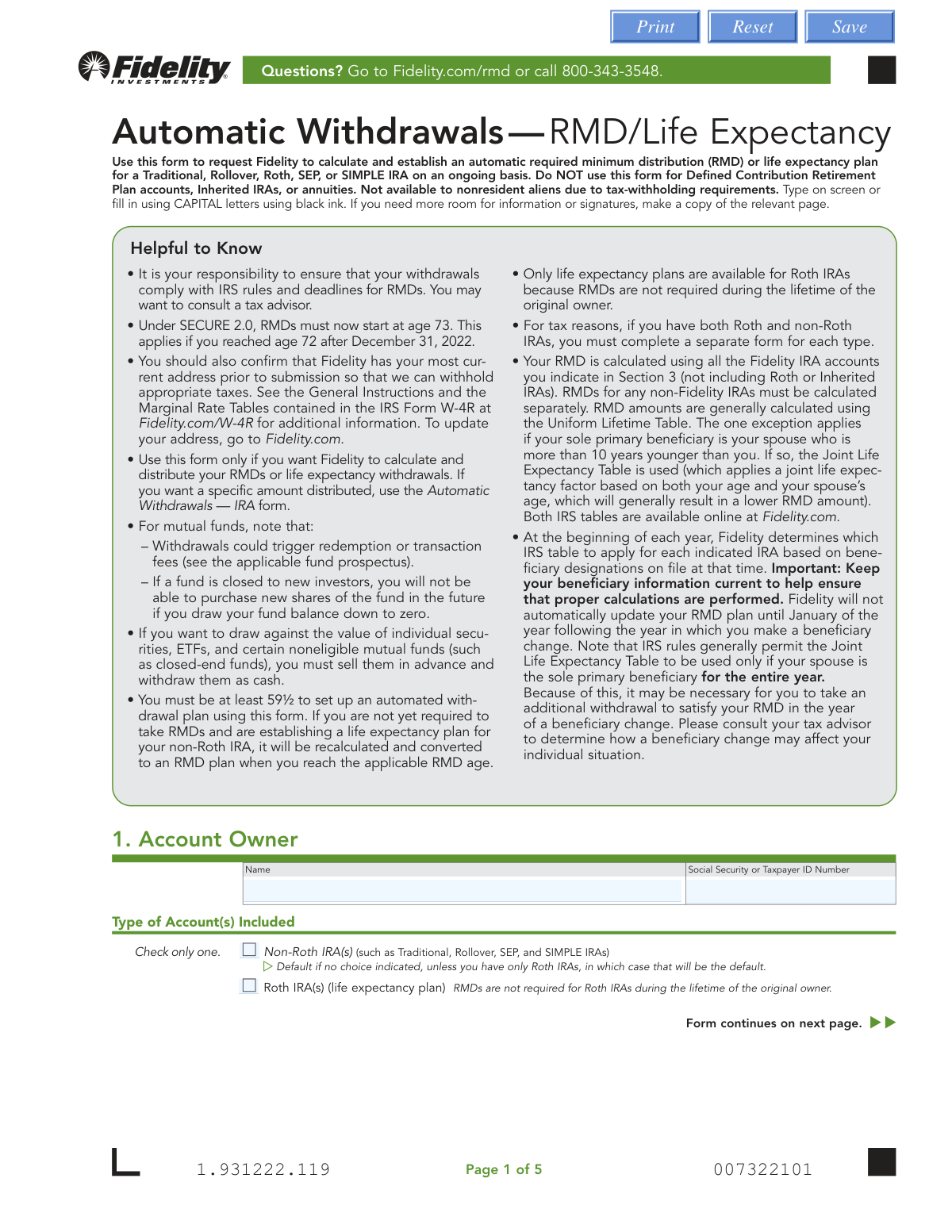
This Fidelity form allows IRA owners to set up ongoing, automatic withdrawals based on Required Minimum Distribution (RMD) or life expectancy calculations. It is used for Traditional, Rollover, Roth, SEP, or SIMPLE IRAs, simplifying the process of complying with IRS withdrawal rules. Today, this form can be filled out quickly and accurately using AI-powered services like Instafill.ai, which can also convert non-fillable PDF versions into interactive fillable forms.
Our AI automatically handles information lookup, data retrieval, formatting, and form filling.
It takes less than a minute to fill out Fidelity Automatic Withdrawals — RMD/Life Expectancy using our AI form filling.
Securely upload your data. Information is encrypted in transit and deleted immediately after the form is filled out.

Form specifications

Form name: Fidelity Automatic Withdrawals — RMD/Life Expectancy
Number of pages: 1
Language: English
Categories: withdrawal forms, Fidelity forms
main-image

Instafill Demo: How to fill out PDF forms in seconds with AI

How to Fill Out Fidelity Automatic Withdrawals — RMD/Life Expectancy Online for Free in 2026

Are you looking to fill out a FIDELITY AUTOMATIC WITHDRAWALS — RMD/LIFE EXPECTANCY form online quickly and accurately? Instafill.ai offers the #1 AI-powered PDF filling software of 2026, allowing you to complete your FIDELITY AUTOMATIC WITHDRAWALS — RMD/LIFE EXPECTANCY form in just 37 seconds or less.
Follow these steps to fill out your FIDELITY AUTOMATIC WITHDRAWALS — RMD/LIFE EXPECTANCY form online using Instafill.ai:
  1. 1 Navigate to Instafill.ai and upload or select the Fidelity Automatic Withdrawals — RMD/Life Expectancy form.
  2. 2 Provide your personal details in Section 1, including your name, Social Security Number, and the type of IRA account.
  3. 3 In Sections 2 and 3, specify if you are establishing, changing, or deleting a plan, and identify which Fidelity IRA accounts should be used for the distribution calculation.
  4. 4 Define your distribution schedule (annually, quarterly, monthly) and start date in Section 4, and detail how the distributions will be funded in Section 5.
  5. 5 Select your preferred distribution method (direct deposit, EFT, or check) in Section 6 and specify your federal and state tax withholding preferences in Section 7.
  6. 6 Carefully review all the information you've entered, then electronically sign and date the form in Section 8 to authorize the withdrawal plan.

Our AI-powered system ensures each field is filled out correctly, reducing errors and saving you time.

Why Choose Instafill.ai for Your Fillable Fidelity Automatic Withdrawals — RMD/Life Expectancy Form?

Speed

Complete your Fidelity Automatic Withdrawals — RMD/Life Expectancy in as little as 37 seconds.

Up-to-Date

Always use the latest 2026 Fidelity Automatic Withdrawals — RMD/Life Expectancy form version.

Cost-effective

No need to hire expensive lawyers.

Accuracy

Our AI performs 10 compliance checks to ensure your form is error-free.

Security

Your personal information is protected with bank-level encryption.

Frequently Asked Questions About Form Fidelity Automatic Withdrawals — RMD/Life Expectancy

This form is used to request that Fidelity automatically calculate and distribute your Required Minimum Distributions (RMDs) or life expectancy withdrawals from your IRA on an ongoing basis.

You should use this form if you are an IRA owner, at least 59½ years old, and want Fidelity to calculate and automate your withdrawals from a Traditional, Rollover, Roth, SEP, or SIMPLE IRA. It should not be used for Inherited IRAs, annuities, or by nonresident aliens.

Use this form if you want Fidelity to calculate the distribution amount for you based on IRS rules. If you prefer to withdraw a specific, fixed dollar amount on a schedule, you should use the 'Automatic Withdrawals — IRA' form instead.

Yes, but only to establish a life expectancy withdrawal plan, as RMDs are not required for the original owner of a Roth IRA. You must complete a separate form for your Roth IRA accounts than for your non-Roth IRAs.

Section 3 is used to tell Fidelity which accounts to include when calculating your total distribution amount. Section 5 specifies which account(s) the money should actually be withdrawn from to fund that distribution.

To establish a new Electronic Funds Transfer (EFT), you must attach a voided check, deposit slip, or a bank statement with the preprinted account number and all owner names.

A Medallion signature guarantee is needed if you are directing funds to a bank account not in your name, sending money to a Fidelity account you don't own, or if a single payment amount is over $100,000.

For non-Roth IRAs, Fidelity automatically withholds 10% for federal income tax by default. You can use Section 7 to elect a different percentage or choose not to have taxes withheld.

Yes, the form allows you to defer your very first RMD until April 1 of the year following the year you reach RMD age (currently 73). You can make this election in Section 4.

After signing the form, you must mail the entire document and any attachments to the Fidelity Investments address provided in Section 8. Separate addresses are listed for regular and overnight mail.

Yes, services like Instafill.ai use AI to accurately auto-fill form fields, which can save you time and help prevent common errors.

You can use a service like Instafill.ai to complete the form digitally. Simply upload the PDF, and the tool will enable you to type your information directly into the fields before printing for signature.

If you have a non-fillable or 'flat' PDF, you can use a tool like Instafill.ai. It can convert the document into an interactive, fillable form so you can easily type in your information.

Due to the SECURE 2.0 Act, the age to begin taking RMDs was raised to 73 for individuals who turned 72 after December 31, 2022. The form reflects this current IRS regulation.

Compliance Fidelity Automatic Withdrawals — RMD/Life Expectancy
Validation Checks by Instafill.ai

1
SSN/TIN Format Validation
Checks that the Social Security or Taxpayer ID Number in Section 1 is a 9-digit number, potentially formatted with hyphens (XXX-XX-XXXX or XX-XXXXXXX). This is critical for uniquely identifying the account owner for all transactions and for mandatory IRS tax reporting. If the format is invalid, the form cannot be processed, leading to delays and potential compliance issues.
2
Exclusive Account Type Selection
Verifies that in Section 1, only one checkbox is selected for the account type, either 'Non-Roth IRA(s)' or 'Roth IRA(s)'. The form explicitly states 'Check only one' because tax rules and distribution calculations differ significantly between Roth and non-Roth accounts. A failure in this check would create ambiguity and prevent the system from applying the correct processing rules.
3
Request Type Conditional Logic
Enforces the workflow based on the 'Request Type' selected in Section 2. If 'DELETE' is chosen, it verifies that an account number is provided and that the user is directed to skip to the signature section. This prevents extraneous or conflicting data from being submitted for a simple deletion request. If the validation fails, it indicates the user has not followed the form's skip logic correctly.
4
Conditional Account Number Presence
Checks that if the user selects an option that requires specific accounts, at least one account number is provided. This applies to Section 3 ('ONLY the following Fidelity IRA(s)') and Section 5 ('Distribute proportionally ONLY from...' or 'Fixed-Percentage Distributions'). Without an account number, the instruction is ambiguous and cannot be executed, so the form would be rejected as incomplete.
5
Deferred RMD Date Consistency
Performs a logical check on the 'First-Year RMD' section (Section 4). If deferring 'THIS year's RMD' is chosen, the date must be on or before April 1 of the next calendar year. If deferring 'LAST year's RMD,' the date must be on or before April 1 of the current calendar year. This validation enforces strict IRS deadlines for RMDs to prevent penalties for the account owner.
6
Ongoing vs. Deferred Start Date Logic
Cross-references dates within Section 4. If a 'First-Year RMD' deferral date is provided, this check ensures the 'Start Date' for 'Ongoing RMDs' is set to a date that occurs after the deferred RMD date. This prevents logical conflicts in scheduling and ensures the deferred first payment is handled correctly before the regular payment schedule begins. An error here could cause incorrect or duplicate payments.
7
Roth IRA and RMD Section Incompatibility
Verifies that if 'Roth IRA(s)' is selected in Section 1, the optional 'First-Year RMD' section (Section 4) is left blank. The form states this section is 'Not applicable to Roth IRA life expectancy distributions' because RMDs are not required for original owners of Roth IRAs. This check prevents users from providing contradictory instructions that cannot be legally or logically executed.
8
Fixed-Percentage Distribution Sum
Validates that the sum of all percentages entered in the 'Fixed-Percentage Distributions' table in Section 5 equals exactly 100.0%. This ensures that the full distribution amount is allocated across the specified funds without any portion being unallocated or over-allocated. If the total is not 100%, the instruction is incomplete and could lead to incorrect liquidation of assets.
9
ABA Routing Number Structure
Validates that the 'Bank Routing/ABA Number' provided in Section 6 for EFT is a valid 9-digit number. This check often includes a checksum algorithm to verify the number's authenticity and reduce the likelihood of typos. An invalid routing number will cause the electronic funds transfer to fail, resulting in the distribution being sent as a paper check, delaying the client's access to funds.
10
Total Tax Withholding Cap
Calculates the sum of the Federal and State tax withholding percentages specified in Section 7. This check ensures the combined total does not exceed 99%. This is a system and regulatory constraint to ensure that some portion of the distribution remains for the recipient. If the sum exceeds 99%, the request is invalid and must be corrected by the user.
11
Tax Withholding Percentage Format
Ensures that if a percentage is entered for Federal or State tax withholding in Section 7, it is a whole number without decimals or other symbols. The form specifies this format requirement to prevent processing errors. An invalid format like '10.5%' or '$50' would be rejected, as the system is designed to handle only integer percentages for withholding calculations.
12
Signature and Date Completion
Confirms that the 'OWNER SIGNATURE' and 'DATE' fields in Section 8 are both completed. The signature legally authorizes Fidelity to act on the instructions, and the date establishes when the authorization was given. An unsigned or undated form is legally invalid and cannot be processed, requiring the form to be returned to the client for completion.
13
Medallion Guarantee Requirement Flag
Analyzes selections in Section 6 to determine if a Medallion signature guarantee is required. The system flags the submission for manual review or rejection if the guarantee is missing when a 3rd party EFT is requested, the distribution is directed to a Fidelity account with no common owner, or a per-payment amount exceeds $100,000. This is a critical risk-mitigation step to prevent unauthorized high-value transfers.
14
Account Owner Age Verification
Validates that the account owner is at least 59½ years old, as stated in the form's instructions for setting up an automated withdrawal plan using this form. This check would require querying an external system for the owner's date of birth using their SSN. This is crucial for preventing early withdrawals that may be subject to a 10% penalty, protecting both the client and Fidelity from executing a potentially undesirable transaction.

Common Mistakes in Completing Fidelity Automatic Withdrawals — RMD/Life Expectancy

Using the Wrong Form for Fixed-Amount Withdrawals

This form is for when you want Fidelity to calculate your Required Minimum Distribution (RMD) amount. People often mistakenly use it when they want to withdraw a specific dollar amount, like $1,000 per month. This results in an incorrect withdrawal plan based on Fidelity's calculation rather than the user's desired fixed amount, requiring the process to be restarted with the correct 'Automatic Withdrawals — IRA' form.

Incorrectly Listing Accounts for RMD Calculation

Users often confuse Section 3 (accounts for calculation) with Section 5 (accounts for funding) and only list the single account they want money withdrawn from. The IRS requires the RMD to be calculated based on the total value of all your traditional IRAs, so this error leads to an under-calculation and insufficient distribution. This can result in a significant IRS penalty for failing to take the full RMD.

Mixing Roth and Non-Roth IRAs on a Single Form

The form explicitly states that Roth and non-Roth IRAs must be handled on separate forms due to major differences in tax rules and RMD requirements. Applicants frequently try to include all their IRAs on one form for convenience, but this will cause the submission to be rejected. This error halts the entire process and requires the user to fill out and submit two separate forms, causing significant delays.

Confusing a Medallion Signature Guarantee with a Notary Stamp

For certain transactions like third-party transfers or withdrawals over $100,000, a Medallion signature guarantee is mandatory. Many people are unfamiliar with this and obtain a more common notary stamp instead, which is not a valid substitute for guaranteeing the transaction. The form will be rejected, and the request will not be processed until the correct Medallion guarantee is provided by a qualified financial institution.

Forgetting to Attach Bank Documentation for New EFTs

When establishing a new Electronic Funds Transfer (EFT) in Section 6, providing a voided check or bank statement is required to verify the account details. This is one of the most common reasons for processing delays, as Fidelity cannot set up the transfer without this proof. If the documentation is missing, Fidelity will default to mailing a physical check to the address on record, delaying access to funds.

Making Arithmetic Errors in Fixed-Percentage Instructions

In Section 5, when specifying withdrawals from multiple funds by percentage, the total must add up to exactly 100%. Simple math errors are frequent, causing the entire funding instruction to be invalid and the form to be rejected. To avoid this, double-check your math before submitting. AI-powered tools like Instafill.ai can automatically validate these fields to ensure they sum correctly, preventing rejection.

Using an Invalid Format for Tax Withholding Percentages

Section 7 requires tax withholding rates to be entered as whole numbers only, with no decimals or dollar signs. Applicants often enter invalid formats like '12.5%' or '$200,' which the system cannot process. This error typically results in the default 10% federal withholding being applied, which may not align with the applicant's tax strategy. Using a smart form-filling tool can prevent this by ensuring data is entered in the correct format.

Creating Conflicting First-Year RMD Deferral Dates

The option to defer a first-year RMD until April 1 of the next year is a source of confusion. Users may select the deferral option in Section 4 but then set an 'Ongoing RMD' start date that falls before that deferred date, creating a conflicting instruction. This ambiguity forces Fidelity to contact the client for clarification, delaying the implementation of the entire withdrawal plan.

Using the Form for Ineligible Account Types

The form is specifically for Traditional, Rollover, Roth, SEP, and SIMPLE IRAs, and explicitly excludes Inherited IRAs and annuities. Account holders frequently attempt to use this form for an Inherited IRA, which has completely different distribution rules and requires a separate form. This fundamental error leads to immediate rejection and requires the user to restart the process with the correct paperwork, potentially risking a missed RMD deadline.

Submitting an Incomplete Form Packet

The instructions clearly state to send the 'ENTIRE form,' but people often mail only the pages they filled out, assuming the rest are just instructions. Financial institutions require the full document, including all disclosures and signature pages, for legal and compliance purposes. Submitting an incomplete packet will result in the request being returned, delaying the setup of your distributions.

Over-filling a 'Change' Request

When selecting 'CHANGE an existing automatic withdrawal plan' in Section 2, the instructions specify to provide ONLY the information that is changing. However, many users refill the entire form out of habit, which can create ambiguity or cause unintended modifications to their existing plan. This forces a manual review and a likely follow-up call from Fidelity to confirm the user's intent, delaying the update.

Illegible Handwriting on a Printed Form

This form is a non-fillable PDF, often leading people to print it and fill it out by hand. Illegible handwriting, especially for critical information like account numbers, names, or percentages, is a primary cause of data entry errors and processing rejections. To prevent this, it's best to type directly on the screen. Tools like Instafill.ai can convert flat PDFs into digitally fillable forms, ensuring all entries are clear and accurate.
Saved over 80 hours a year

“I was never sure if my IRS forms like W-9 were filled correctly. Now, I can complete the forms accurately without any external help.”

Kevin Martin Green

Your data stays secure with advanced protection from Instafill and our subprocessors

Robust compliance program

Transparent business model

You’re not the product. You always know where your data is and what it is processed for.

ISO 27001, HIPAA, and GDPR

Our subprocesses adhere to multiple compliance standards, including but not limited to ISO 27001, HIPAA, and GDPR.

Security & privacy by design

We consider security and privacy from the initial design phase of any new service or functionality. It’s not an afterthought, it’s built-in, including support for two-factor authentication (2FA) to further protect your account.

Fill out Fidelity Automatic Withdrawals — RMD/Life Expectancy with Instafill.ai

Worried about filling PDFs wrong? Instafill securely fills fidelity-automatic-withdrawals-rmdlife-expectancy forms, ensuring each field is accurate.