Yes! You can use AI to fill out Fidelity Charitable Investment Advisor Program Application

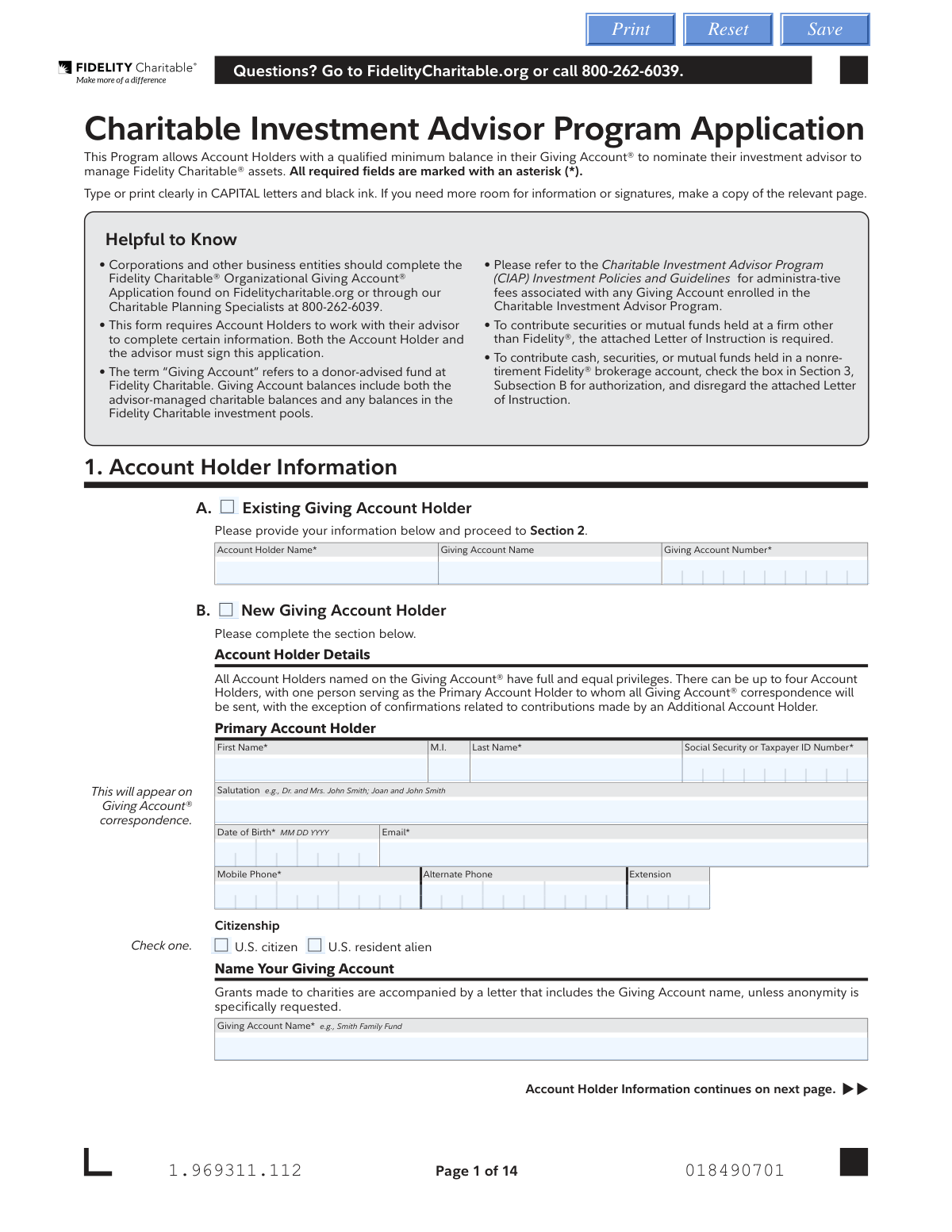
This application is for enrolling in the Fidelity Charitable Investment Advisor Program (CIAP), which allows donors with a qualified Giving Account® to have their personal investment advisor manage the charitable assets. It requires detailed information about the account holder, the nominated advisor, and the contribution being made. Today, this form can be filled out quickly and accurately using AI-powered services like Instafill.ai, which can also convert non-fillable PDF versions into interactive fillable forms.
Our AI automatically handles information lookup, data retrieval, formatting, and form filling.
It takes less than a minute to fill out CIAP Application using our AI form filling.
Securely upload your data. Information is encrypted in transit and deleted immediately after the form is filled out.

Form specifications

Form name: Fidelity Charitable Investment Advisor Program Application
Number of pages: 1
Language: English
Categories: investment forms, charitable forms, Fidelity forms, Fidelity Charitable forms
main-image

Instafill Demo: How to fill out PDF forms in seconds with AI

How to Fill Out CIAP Application Online for Free in 2026

Are you looking to fill out a CIAP APPLICATION form online quickly and accurately? Instafill.ai offers the #1 AI-powered PDF filling software of 2026, allowing you to complete your CIAP APPLICATION form in just 37 seconds or less.
Follow these steps to fill out your CIAP APPLICATION form online using Instafill.ai:
  1. 1 Navigate to Instafill.ai and upload the Charitable Investment Advisor Program Application PDF.
  2. 2 Use the AI tool to automatically fill in Account Holder Information (Section 1), including personal details, Giving Account name, and successor elections.
  3. 3 Provide the Nominated Advisor Firm Information (Section 2), detailing the firm, representatives, and the investment advisory fee schedule.
  4. 4 Specify the details of your Irrevocable Contribution (Section 3), indicating the assets you are contributing, such as cash, securities, or mutual funds.
  5. 5 Complete the authorization for Fidelity Brokerage Customers if applicable (Section 4).
  6. 6 Review all sections carefully, then provide the required digital or physical signatures for all Account Holders and the Investment Advisor (Section 5).
  7. 7 Download the completed application and submit it along with any required attachments via mail or fax as instructed on the form.

Our AI-powered system ensures each field is filled out correctly, reducing errors and saving you time.

Why Choose Instafill.ai for Your Fillable CIAP Application Form?

Speed

Complete your CIAP Application in as little as 37 seconds.

Up-to-Date

Always use the latest 2026 CIAP Application form version.

Cost-effective

No need to hire expensive lawyers.

Accuracy

Our AI performs 10 compliance checks to ensure your form is error-free.

Security

Your personal information is protected with bank-level encryption.

Frequently Asked Questions About Form CIAP Application

This form allows you to enroll in a program where your personal investment advisor can manage the assets within your Fidelity Charitable Giving Account®, provided you meet the program's minimum balance requirements.

Both the Giving Account Holder(s) and the nominated Investment Advisor must complete their respective sections and sign the form. You will need to work with your advisor to fill out information about their firm and fees in Section 2.

Yes, the program requires a qualified minimum balance in your Giving Account®. The form specifies a $100,000 minimum for the Endowed Giving Program, but you should contact Fidelity Charitable directly for the specific minimum for the CIAP itself.

No. If you are an existing Account Holder, you only need to provide your name and account number in Section 1A and then proceed to the other relevant sections. You do not need to re-enter all your personal details.

You must complete the 'Letter of Instruction' on page 13 of the application. This letter authorizes your current brokerage firm to transfer the assets to Fidelity Charitable, and it must be mailed to Fidelity Charitable.

The investment advisory fees are set by your nominated advisor's firm, not by Fidelity Charitable. You must work with your advisor to accurately complete this section, which is separate from Fidelity Charitable's own administrative fees.

This section allows you to designate who will take over your Giving Account (an individual successor) or which charities will receive the remaining funds (a charitable organization successor) after your death. You must allocate 100% of the account balance between your chosen successors.

No, the form explicitly states that any contribution, once accepted by the Trustees, is an irrevocable and non-refundable gift to Fidelity Charitable.

You can submit the form and any required attachments via regular mail, overnight mail, or fax. The specific addresses and fax number are listed on page 11 of the application.

No, this application is for individuals. Corporations and other business entities must use the 'Fidelity Charitable® Organizational Giving Account® Application,' which is available on the Fidelity Charitable website.

By default, your advisor can view account history, make contributions, and manage successor elections. You can choose to limit their access to only the advisor-managed portion of the assets by checking the box in Section 2B.

Yes, services like Instafill.ai use AI to accurately auto-fill form fields, which can save you time and reduce errors. This is especially helpful for long forms with repetitive information like names and addresses.

Simply upload the PDF to the Instafill.ai platform. The AI will identify the fields, and you can then provide your information once to have it automatically populated throughout the document, which you can then download and print for submission.

Yes, Instafill.ai can convert flat, non-fillable PDFs into interactive, fillable forms. This allows you to easily type your information online before printing, ensuring a clean and legible application.

Compliance CIAP Application
Validation Checks by Instafill.ai

1
Validates Social Security or Taxpayer ID Number Format
This check ensures that all Social Security Numbers (SSN) or Taxpayer ID Numbers (TIN) entered for Account Holders and Individual Successors follow the standard 9-digit format, with or without hyphens (e.g., XXXXXXXXX or XXX-XX-XXXX). This is crucial for tax reporting and identity verification. If the format is incorrect, the system should reject the entry and prompt the user to correct it to prevent processing delays and legal compliance issues.
2
Ensures Successor Allocation Totals 100%
This validation verifies that the sum of the percentages allocated to all Individual Successors and Charitable Organization Successors equals exactly 100%. This is a critical logical check to ensure the entire account balance is designated upon the death of the last account holder, preventing ambiguity and potential legal disputes. If the total is not 100%, the form submission will be blocked with an error message instructing the user to adjust the percentages.
3
Prohibits P.O. Box for Legal/Residential Address
This check confirms that the 'Legal/Residential Address' provided for all Account Holders and Individual Successors is a physical address and not a P.O. Box, mail drop, or c/o address, as explicitly stated on the form. This is a requirement for identity verification under anti-money laundering (AML) regulations. A submission with a non-compliant address will fail, requiring the user to provide a valid physical street address.
4
Conditional Requirement for New vs. Existing Account Holders
This check enforces conditional logic based on whether the applicant is a new or existing account holder. If 'Existing Giving Account Holder' is selected, the 'Giving Account Number' field is mandatory. If 'New Giving Account Holder' is selected, all required fields in the 'Primary Account Holder Details' subsection (e.g., Name, SSN, DOB, Address) become mandatory. This prevents incomplete applications and ensures the correct data is captured for the user's status.
5
Validates Date of Birth Format and Plausibility
This check ensures that all Date of Birth fields are entered in the specified MM DD YYYY format and represent a valid, plausible date in the past. It prevents data entry errors like invalid months or days and flags dates that are in the future or unreasonably far in the past. Correct birth dates are essential for identity verification and compliance, and failure will result in an error message requiring correction.
6
Enforces Completeness of Investment Fee Schedule
This validation activates if the advisor selects 'Blended Fee Schedule' or 'Flat Fee Schedule' in Section 2, Part C. It checks that at least one tier, including both an 'Amount' and 'Basis Points', has been entered in the corresponding table. This ensures that the fee structure is clearly defined and can be calculated correctly. An incomplete schedule would result in a validation error, preventing submission until the fee details are provided.
7
Mandatory Signature and Date Fields
This check verifies that the signature and date fields for the Primary Account Holder and the Investment Advisor in Section 5 are completed. These signatures are legally binding acknowledgements of the form's terms and conditions. An application missing any of these required signatures or dates is considered incomplete and invalid, and the system will prevent submission until they are provided.
8
Conditional Mailing Address Requirement
This validation rule applies to the Mailing Address sections for all account holders. If the 'Same as legal/residential address' checkbox is NOT checked, all fields within the 'Mailing Address' block (Address, City, State, ZIP) become mandatory. This ensures that a valid mailing address is on file if it differs from the legal address, which is critical for all correspondence. Failure to provide the address will block form submission.
9
Validates Federal Tax ID Number Format for Organizations
This check ensures that the 'Federal Taxpayer ID Number' for any 'Charitable Organization Successor' is entered in the correct XX-XXXXXXX format. A valid Tax ID is essential for verifying the organization's IRS-qualified status and for processing future grant distributions correctly. An incorrectly formatted ID will trigger an error, prompting the user to correct the number before the application can proceed.
10
Conditional Requirement for 'Other' Specification Fields
This check applies to the 'Investment Advisory Fees' section. If the user selects the 'Other' radio button for either 'Frequency' or 'Balance', the adjacent 'Specify' text field becomes a required field. This ensures that custom billing arrangements are explicitly defined and not left ambiguous. The form cannot be submitted until the user provides a description in the 'Specify' field.
11
Validates Contribution Details Based on Type
This is a conditional check for Section 3, 'Irrevocable Contribution'. The system validates that the required fields for the selected contribution type are filled. For example, if 'Cash held at Fidelity' is chosen, 'Cash Transfer Amount' and 'Fidelity Account Number' must be provided. If 'Check' is chosen, 'Check Amount' is required. This ensures that the contribution can be processed successfully without needing to follow up for missing information.
12
Validates Advisor Representative Birthday Format
This check ensures the 'Birthday' field for each Nominated Advisor Representative in Section 2 is entered in the required MMDD format. This information is used for identity verification and system access controls for the advisor. An incorrect format will cause a validation failure, requiring the user to correct the entry to proceed, ensuring data integrity for advisor profiles.
13
Conditional Signature for Additional Account Holders
This validation checks if any 'Additional Account Holder' has been added in Section 1, Section 5, or Section 6. If an additional holder is present, the system verifies that their corresponding signature and date fields are completed. This is crucial as all account holders must agree to the terms, and missing a signature would render the application legally incomplete. The submission will be blocked until all listed account holders have signed.

Common Mistakes in Completing CIAP Application

Incorrect Successor Allocation Total

Applicants often miscalculate or forget to ensure that the successor allocation percentages sum to exactly 100%. This mistake occurs in Section 1 when designating how the account balance should be distributed after the account holder's death. An incorrect total will cause the application to be rejected, delaying the account setup until a corrected form is submitted. To avoid this, carefully add the percentages assigned to all Individual and Charitable Organization Successors to confirm they equal 100%.

Missing Signatures from All Required Parties

This application requires signatures from all Account Holders and the nominated Investment Advisor in Section 5, but it is often submitted with one or more signatures missing. This happens because the form requires coordination between the client and their advisor, and one party may forget to sign before it's sent. An incomplete application is invalid and cannot be processed, halting the entire account setup. Ensure all parties have signed in the correct places before mailing or faxing the form.

Using a P.O. Box for the Legal/Residential Address

Applicants frequently enter a P.O. Box or mail drop for their Legal/Residential Address in Section 1, despite an explicit instruction not to. This is done for convenience, but federal regulations require a physical address for identity verification. Using a non-physical address will lead to the application's rejection and require resubmission with a valid street address. Always provide your physical residential address, and use the separate 'Mailing Address' section if you wish to receive mail elsewhere.

Incorrectly Filling Out the Investment Advisory Fee Schedule

The fee schedule in Section 2 is complex, with options for Blended or Flat fees that require filling out a detailed table. Advisors or their staff often select a fee type but fail to complete the corresponding table, or they fill in the table with ambiguous information. This leads to delays and potential billing disputes down the line. To prevent this, the advisor must clearly select the fee type, frequency, and billing style, and meticulously complete the corresponding rate table with exact basis points and asset tiers.

Failing to Complete the Letter of Instruction for Outside Assets

When contributing securities from a firm other than Fidelity, applicants check the box in Section 3 but forget to complete the separate 'Letter of Instruction' at the end of the application packet. This letter is a required legal document that authorizes the asset transfer from the other institution. Forgetting to complete and submit this letter as instructed will prevent the contribution from being made, leaving the account unfunded. Always check if this letter is required for your contribution type and ensure it is filled out and signed by all account owners.

Omitting Required Advisor 'G Numbers'

In Section 2, the form requires 'G Numbers' if the advisor's firm works with Fidelity Clearing & Custody Solutions®. Advisors unfamiliar with the form or in a hurry often overlook this field. The absence of these required identifier numbers prevents Fidelity Charitable from properly linking the advisor to the account, which will delay or block the advisor's nomination. The advisor must provide this information if applicable to ensure a smooth setup process.

Confusing Existing vs. New Account Holder Sections

Applicants sometimes get confused between Section 1A for 'Existing Giving Account Holders' and Section 1B for 'New Giving Account Holders'. An existing holder might unnecessarily fill out all the new account details, or a new applicant might only provide their name and an account number (which they don't have yet). This error leads to processing delays while Fidelity Charitable clarifies the applicant's status. Carefully read the section headings to ensure you are completing the correct part of the form for your situation.

Providing Only a Dollar Amount for Security Contributions

In Section 3, when contributing securities, applicants sometimes write in an 'Approximate Dollar Amount' but leave the required 'Number of Shares' field blank. The form clearly states that trades are transacted in shares, and the dollar amount is only an estimate. This omission makes the instruction non-actionable, as the transfer agent cannot execute a trade for an approximate dollar value. To avoid this, always specify the exact number of shares you wish to contribute.

Misunderstanding the Dividend and Capital Gain Election

The election in Section 2, Part D for handling dividends and capital gains has different default settings for mutual funds versus equities, which can be confusing. An applicant might check a box without fully understanding the implication, leading to an investment strategy that doesn't match their intent (e.g., accidentally having all dividends paid out as cash instead of being reinvested). Carefully review each option to ensure your selection aligns with your advisor's management strategy for the account. AI-powered tools like Instafill.ai can help clarify these choices and prevent such errors.

Submitting an Unsigned or Incomplete Form

Given the form's length and complexity, it's common for applicants to miss filling out a required field (marked with an asterisk) or forget to sign the document in Section 5. This is especially true for paper forms that lack digital validation. An incomplete or unsigned application is invalid and will be returned, causing significant delays. To avoid this, review every page before submission, or use a tool like Instafill.ai, which can convert this PDF into a smart, fillable form that validates data and flags missing required fields and signatures before you submit.
Saved over 80 hours a year

“I was never sure if my IRS forms like W-9 were filled correctly. Now, I can complete the forms accurately without any external help.”

Kevin Martin Green

Your data stays secure with advanced protection from Instafill and our subprocessors

Robust compliance program

Transparent business model

You’re not the product. You always know where your data is and what it is processed for.

ISO 27001, HIPAA, and GDPR

Our subprocesses adhere to multiple compliance standards, including but not limited to ISO 27001, HIPAA, and GDPR.

Security & privacy by design

We consider security and privacy from the initial design phase of any new service or functionality. It’s not an afterthought, it’s built-in, including support for two-factor authentication (2FA) to further protect your account.

Fill out CIAP Application with Instafill.ai

Worried about filling PDFs wrong? Instafill securely fills fidelity-charitable-investment-advisor-program-application forms, ensuring each field is accurate.