Yes! You can use AI to fill out Fidelity Charitable Irrevocable Contribution Form and Letter of Instruction

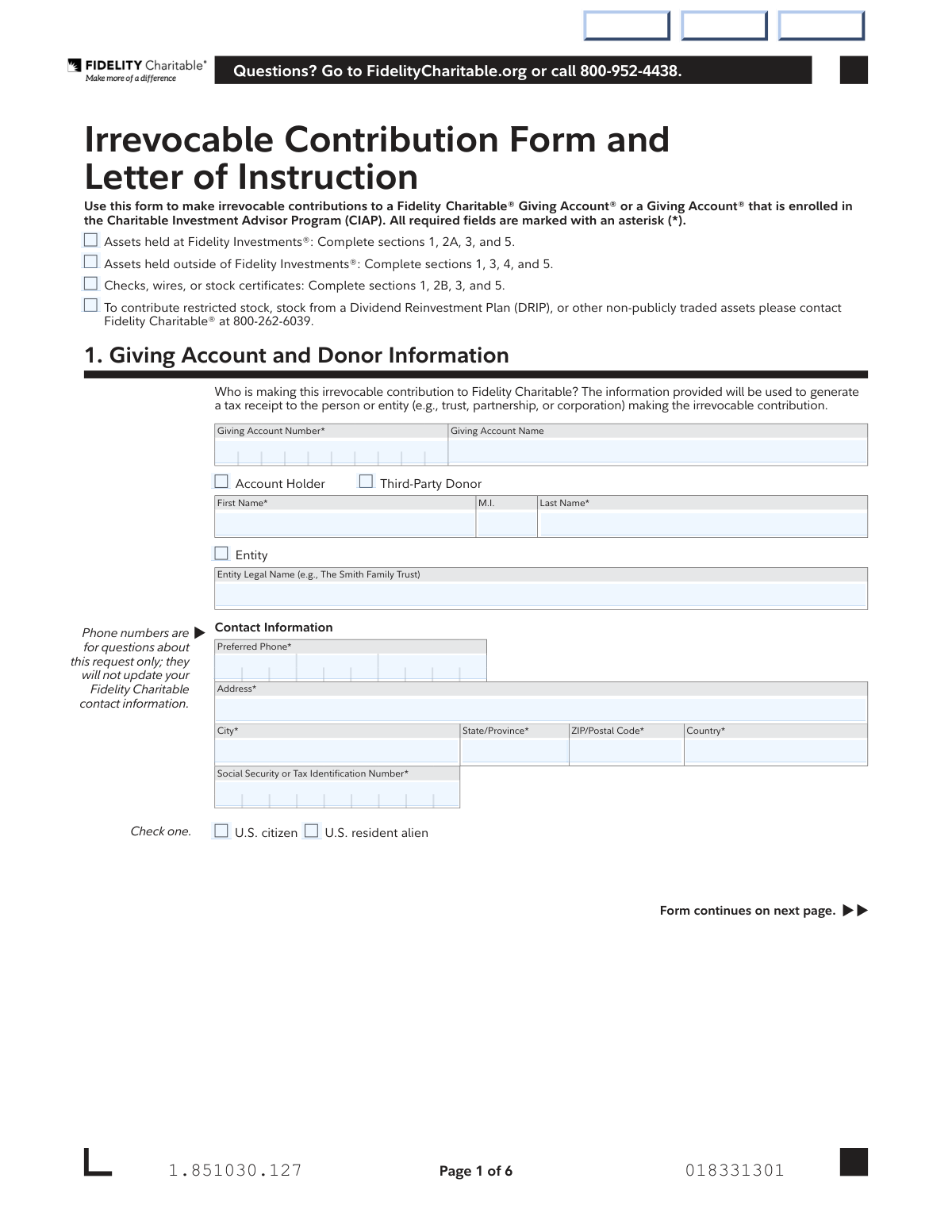
The Fidelity Charitable Irrevocable Contribution Form and Letter of Instruction is an official document that allows donors to transfer assets—such as cash, stocks, mutual funds, securities, or stock certificates—into a Fidelity Charitable Giving Account or a Giving Account enrolled in the Charitable Investment Advisor Program (CIAP). Once accepted by the Trustees, contributions are irrevocable and not refundable, making accurate completion of this form critically important for donors seeking charitable tax deductions. The form also allows donors to specify investment pool allocations for their contributed assets. Today, this form can be filled out quickly and accurately using AI-powered services like Instafill.ai, which can also convert non-fillable PDF versions into interactive fillable forms.
Our AI automatically handles information lookup, data retrieval, formatting, and form filling.
It takes less than a minute to fill out Fidelity Charitable Irrevocable Contribution Form using our AI form filling.
Securely upload your data. Information is encrypted in transit and deleted immediately after the form is filled out.

Form specifications

Form name: Fidelity Charitable Irrevocable Contribution Form and Letter of Instruction
Number of pages: 1
Filled form examples: Form Fidelity Charitable Irrevocable Contribution Form Examples
Language: English
main-image

Instafill Demo: filling out a legal form in seconds

How to Fill Out Fidelity Charitable Irrevocable Contribution Form Online for Free in 2026

Are you looking to fill out a FIDELITY CHARITABLE IRREVOCABLE CONTRIBUTION FORM form online quickly and accurately? Instafill.ai offers the #1 AI-powered PDF filling software of 2026, allowing you to complete your FIDELITY CHARITABLE IRREVOCABLE CONTRIBUTION FORM form in just 37 seconds or less.
Follow these steps to fill out your FIDELITY CHARITABLE IRREVOCABLE CONTRIBUTION FORM form online using Instafill.ai:
  1. 1 Navigate to Instafill.ai, upload the Fidelity Charitable Irrevocable Contribution Form PDF, or select it from the available form library to begin filling it out online.
  2. 2 Complete Section 1 by entering your Giving Account number, account name, donor information (name or entity name), contact details, address, and Social Security or Tax Identification Number.
  3. 3 Complete the applicable Section 2 subsection: enter cash transfer or Fidelity account details for assets held at Fidelity (Section 2A), or provide check/wire amounts, bank name, or stock certificate details for assets held outside Fidelity (Section 2B).
  4. 4 Complete Section 3 to specify your investment selection, either designating a managed account number for CIAP accounts or recommending an investment pool allocation (ensuring all percentages total 100%).
  5. 5 If contributing securities or mutual funds held at a financial institution other than Fidelity, complete Section 4 (Letter of Instruction) by providing the delivering firm's details, account number, asset descriptions, number of shares, and choosing whether you or Fidelity Charitable will initiate the transfer.
  6. 6 Review all entered information for accuracy, then complete Section 5 by printing your name and signing the form, with an additional signatory if dual signatures are required.
  7. 7 Submit the completed form by mailing it to Fidelity Charitable's address (regular or overnight mail) or faxing it to 877-665-4274, following any additional delivery instructions for assets held outside Fidelity.

Our AI-powered system ensures each field is filled out correctly, reducing errors and saving you time.

Why Choose Instafill.ai for Your Fillable Fidelity Charitable Irrevocable Contribution Form Form?

Speed

Complete your Fidelity Charitable Irrevocable Contribution Form in as little as 37 seconds.

Up-to-Date

Always use the latest 2026 Fidelity Charitable Irrevocable Contribution Form form version.

Cost-effective

No need to hire expensive lawyers.

Accuracy

Our AI performs 10 compliance checks to ensure your form is error-free.

Security

Your personal information is protected with bank-level encryption.

Frequently Asked Questions About Form Fidelity Charitable Irrevocable Contribution Form

This form is used to make irrevocable contributions to a Fidelity Charitable® Giving Account® or a Giving Account enrolled in the Charitable Investment Advisor Program (CIAP). It allows you to contribute assets such as cash, stocks, mutual funds, or stock certificates held either at Fidelity Investments or at another financial institution.

An irrevocable contribution means that once the Trustees of Fidelity Charitable accept your contribution, it cannot be returned or refunded under any circumstances. You are permanently transferring ownership of the assets to Fidelity Charitable, so be certain before submitting this form.

The sections you complete depend on where your assets are held: for assets at Fidelity Investments, complete sections 1, 2A, 3, and 5; for assets held outside Fidelity, complete sections 1, 3, 4, and 5; for checks, wires, or stock certificates, complete sections 1, 2B, 3, and 5. All required fields are marked with an asterisk (*).

No, Fidelity Charitable cannot process irrevocable contribution requests directly from Fidelity IRA accounts. Instead, log in to Fidelity.com and request a one-time distribution from your IRA to a nonretirement Fidelity account or via EFT to your personal bank account, and once the distribution settles, log in to FidelityCharitable.org to process the contribution.

Fidelity Charitable does not accept currency or certain cash-like monetary instruments, including cashier's checks, treasurer's checks, bank checks, official checks, bank drafts, traveler's checks, or money orders. For restricted stock, DRIP stock, or other non-publicly traded assets, you must contact Fidelity Charitable directly at 800-262-6039.

You have two options: Option 1 allows you to initiate the transfer yourself by contacting your financial institution and delivering assets to DTC 0226 Acct Z97000442, then mailing or faxing the completed form to Fidelity Charitable. Option 2 authorizes Fidelity Charitable to initiate the transfer on your behalf — you complete the form, include a copy of your most recent account statement, and mail or fax it to Fidelity Charitable. Note that mutual fund transfers must use Option 2 and take approximately three to six weeks.

You can mail the form to Fidelity Charitable at PO Box 770001, Cincinnati, OH 45277-0001 (regular mail) or 100 Crosby Parkway KC1D-FCS, Covington, KY 41015-4325 (overnight mail). You can also fax it to 877-665-4274. If the delivering broker requires an original signature, you must mail the form — original signatures cannot be accepted via fax.

Wire transfers should be sent to JPMorgan Chase Bank, ABA: 021000021, for credit to NFS 066196-221, FBO: Fidelity Charitable Z97000442, with your CGF# and Account Name in the memo. Note that Fidelity Charitable will not initiate wire transfers on your behalf, and the wire will be rejected if the account name and number are not provided, which may incur a bank fee.

In Section 3, you can recommend how to allocate your contribution among investment pools, including the Charitable Legacy Pool, Asset Allocation Pools (ranging from 20% to 85% equity), Sustainable and Impact Investing Pools, or Single Asset Class Pools. If you don't make a selection, your contribution will be allocated to match your current Giving Account pool allocation, or to the Asset Allocation 20% Equity Pool if your account is unfunded. The combined total of all pool selections must equal 100%.

You must provide your Giving Account number and name, your first and last name (or entity legal name if applicable), preferred phone number, address, and Social Security or Tax Identification Number. You must also indicate whether you are a U.S. citizen or U.S. resident alien. This information is used to generate your tax receipt.

When contributing stock certificates held in your personal possession, you must obtain a Medallion Signature Guarantee stamp on each certificate, endorse the certificate by writing 'National Financial Services LLC' between the words 'appoint' and 'attorney,' and date and sign the certificate exactly as your name appears on the front. Mail the certificate along with the completed form via registered mail.

By signing the form, you acknowledge that you did not receive goods or services in exchange for your contribution, which is a requirement for a charitable tax deduction. If you are a third-party contributor (not the Giving Account owner), you may still be eligible for a tax deduction, but you will not obtain any Giving Account advisory privileges.

Yes, AI-powered services like Instafill.ai can help you accurately auto-fill the fields on this form, saving you time and reducing the risk of errors. If you have a flat, non-fillable PDF version of this form, Instafill.ai can also convert it into an interactive fillable form so you can complete it digitally.

To fill out this form online, visit Instafill.ai and upload the Irrevocable Contribution Form PDF. The AI will guide you through each required field, auto-fill information where possible, and help ensure all sections are completed correctly before you download, print, and submit the form to Fidelity Charitable.

For general questions about the form or your Giving Account, visit FidelityCharitable.org or call 800-952-4438. For questions about contributing restricted stock, DRIP stock, or non-publicly traded assets, call Fidelity Charitable at 800-262-6039.

Compliance Fidelity Charitable Irrevocable Contribution Form
Validation Checks by Instafill.ai

1
Giving Account Number Format and Presence Validation
Verifies that the Giving Account Number field is populated and conforms to the expected Fidelity Charitable account number format. This field is required for all submission types and is used to route the irrevocable contribution to the correct Giving Account. If this field is missing or incorrectly formatted, the contribution cannot be processed and may be rejected or misapplied.
2
Donor Identity Type Selection Consistency
Ensures that exactly one donor identity type is selected — either 'Account Holder,' 'Third-Party Donor,' or 'Entity' — and that the corresponding name fields are populated appropriately. If 'Account Holder' or 'Third-Party Donor' is selected, First Name and Last Name must be provided; if 'Entity' is selected, the Entity Legal Name field must be filled in. Mismatches between the selected type and populated fields will result in an incomplete tax receipt and potential IRS reporting errors.
3
Social Security or Tax Identification Number Format Validation
Validates that the SSN or TIN field is populated and follows the correct format — either a 9-digit SSN formatted as XXX-XX-XXXX or a 9-digit EIN formatted as XX-XXXXXXX. This number is required for generating an accurate tax receipt and for compliance with anti-money laundering regulations. An incorrectly formatted or missing SSN/TIN will prevent proper tax documentation and may trigger regulatory review.
4
Citizenship Status Selection Requirement
Confirms that the donor has selected either 'U.S. citizen' or 'U.S. resident alien' as their citizenship status, as this field is required for tax and compliance purposes. Fidelity Charitable must identify the tax status of contributors to comply with IRS reporting obligations. Failure to select a citizenship status may result in the form being returned as incomplete or incorrect tax withholding being applied.
5
Contribution Section Completeness Based on Asset Type
Verifies that the correct sections of the form are completed based on the type of contribution being made: Section 2A for assets held at Fidelity, Section 2B for assets held outside Fidelity or physical certificates, and Section 4 for assets at other financial institutions. At least one contribution section must be fully completed with all required fields, and sections irrelevant to the selected asset type should not contain conflicting data. Incomplete or mismatched section completion will prevent processing of the irrevocable contribution.
6
Cash Transfer Amount Positive Value Validation
Ensures that any cash transfer amount entered in Section 2A (Cash Transfer Amount) or Section 2B (Check Amount or Wire Amount) is a positive numeric value greater than zero and does not contain non-numeric characters. Zero or negative values are not valid contribution amounts and would indicate a data entry error. If an invalid amount is submitted, the contribution cannot be processed and the form will be returned to the donor.
7
Stock and Securities Share Count Whole Number Validation
Validates that the Number of Shares fields for all securities contributions (Sections 2A, 2B, and 4) contain positive whole numbers, since Fidelity Charitable processes all trades in whole shares and rounds down any partial shares unless the entire position is being contributed. Decimal or zero values in share count fields may result in unexpected rounding behavior or rejection of the contribution. This check ensures donors are aware of and have accounted for the whole-share processing rule.
8
Lot Acquisition Date Format Validation
Checks that any optionally provided Lot Acquisition Date fields across Sections 2A, 2B, and 4 are entered in the correct MM DD YYYY format and represent a valid calendar date that is not in the future. Incorrect date formats or future dates for acquisition would indicate a data entry error and could affect the accuracy of tax lot identification used for capital gains reporting. Invalid dates in these fields may cause the contribution to be processed using the account's default disposal method rather than the specified tax lot.
9
Investment Pool Allocation Total Equals 100 Percent
Verifies that when investment pool allocations are specified in Section 3B, the sum of all entered pool percentages across all selected options (Options 1 through 4) equals exactly 100%. Partial or over-allocated totals are invalid and will prevent the contribution from being properly invested according to the donor's instructions. If the total does not equal 100%, the contribution may default to the current pool allocation or the Asset Allocation 20% Equity Pool for unfunded accounts.
10
Investment Selection Mutual Exclusivity Between Managed Account and Pool Selection
Ensures that if a CIAP Managed Account Number is provided in Section 3A, the donor has not also selected investment pool allocations in Section 3B, as these two options are mutually exclusive for CIAP account holders. Simultaneously selecting both a managed account and investment pools creates an ambiguous instruction that cannot be executed. If both are populated, the form should be flagged for clarification before processing.
11
Section 4 Delivering Firm Information Completeness
When Section 4 is completed for assets held at an outside financial institution, validates that all required fields are present: Fidelity Charitable Giving Account Number, Delivering Firm Name, Account Number at Delivering Firm, and at least one security with a Description of Assets and Number of Shares. Missing delivering firm details will prevent Fidelity Charitable from initiating or tracking the transfer. Incomplete transfer instructions may result in assets being rejected or delayed at the delivering institution.
12
Wire Transfer Bank Name Requirement When Wire Amount Is Provided
Confirms that when a Wire Amount is entered in Section 2B, the Bank Name field is also populated, as both fields are required together to process an incoming wire contribution. A wire amount without a corresponding bank name creates an incomplete instruction that cannot be verified against incoming wire transactions. Additionally, this check should confirm the donor understands that Fidelity Charitable will not initiate the wire and that the memo must include the Giving Account number and name.
13
Signature Date Format and Logical Date Validation
Validates that the signature date fields in Section 5 are populated in the required MM DD YYYY format and represent a valid, non-future date that is not earlier than a reasonable submission window (e.g., not more than 90 days prior to submission). An undated or incorrectly dated signature may render the authorization legally insufficient or cause the form to be rejected. If dual signatures are required, both date fields must be present and valid.
14
Preferred Phone Number Format Validation
Ensures that all phone number fields — including the donor's Preferred Phone in Section 1 and the Advisor/Broker Preferred Phone in Section 4 — are populated where required and follow a valid North American or international phone number format. Phone numbers are used solely for questions about the specific request and must be reachable for follow-up on processing issues. An improperly formatted or missing phone number may delay resolution of any questions that arise during processing.
15
Address Completeness Validation for Donor and Delivering Firm
Verifies that all address-related fields — Address, City, State/Province, ZIP/Postal Code, and Country — are fully populated for both the donor in Section 1 and the delivering firm in Section 4 when applicable. Incomplete address information can prevent proper identification of the donor for tax receipt generation and anti-money laundering compliance purposes. Missing ZIP or Country fields are particularly critical as they affect both mailing of tax documentation and regulatory reporting.
16
Prohibited Instrument Type Check for Check Contributions
Validates that the contribution method selected does not involve prohibited cash-like instruments such as cashier's checks, treasurer's checks, bank checks, official checks, bank drafts, traveler's checks, or money orders, as Fidelity Charitable explicitly cannot accept these instruments. This check should flag any indication in the form or accompanying notes that a prohibited instrument type is being submitted. Submitting a prohibited instrument will result in the contribution being rejected and potentially returned, which may delay the donor's intended charitable giving.

Common Mistakes in Completing Fidelity Charitable Irrevocable Contribution Form

Attempting to contribute from a Fidelity IRA account

Many donors mistakenly try to use this form to contribute directly from a Fidelity IRA account, not realizing the form explicitly states this is not possible. The form will be rejected, causing delays in the charitable contribution. Instead, donors must first log in to Fidelity.com, request a one-time distribution from the IRA to a nonretirement Fidelity account or personal bank account, wait for the distribution to settle, and then log in to FidelityCharitable.org to process the contribution.

Completing the wrong sections of the form

The form has different required sections depending on where the assets are held (Fidelity vs. outside Fidelity) and the type of asset (cash, securities, checks, wires, stock certificates). Donors frequently complete irrelevant sections or skip required ones, leading to incomplete or invalid submissions. Carefully read the instructions at the top of the form: assets at Fidelity require sections 1, 2A, 3, and 5; assets outside Fidelity require sections 1, 3, 4, and 5; checks/wires/stock certificates require sections 1, 2B, 3, and 5. Tools like Instafill.ai can help guide users through only the relevant sections based on their asset type.

Investment pool percentages not totaling 100%

When selecting investment pools in Section 3B, donors often allocate percentages across multiple pools that do not add up to exactly 100%, either leaving the total short or exceeding it. This causes the form to be rejected or processed incorrectly. Donors must ensure that all selected pool percentages, whether from one option or a combination of Options 1–4, sum to exactly 100% before submitting. AI-powered tools like Instafill.ai can automatically validate that pool allocations total 100% before submission.

Entering partial shares instead of whole shares for securities

Donors sometimes enter fractional share amounts when contributing stocks, securities, or mutual funds from a Fidelity account, not realizing that all trades are transacted in whole shares only. Fidelity Charitable will round down to the next whole number unless the entire position is being contributed, which may result in a smaller contribution than intended. Always enter whole share numbers, and if contributing an entire position, clearly indicate that to avoid unintended rounding.

Using prohibited payment instruments instead of personal checks

Donors frequently attempt to contribute using cashier's checks, bank checks, money orders, traveler's checks, or other cash-like monetary instruments, not realizing these are explicitly prohibited by Fidelity Charitable. These instruments will be rejected, causing delays and potential return fees. Only personal checks made payable to 'Fidelity Charitable' with the Giving Account number or name in the memo section are acceptable for check contributions.

Omitting the Giving Account number or name in wire/check memo

When submitting a check or wire transfer, donors often forget to reference their Giving Account number or name in the memo section of the check or wire instructions. For wires specifically, the form warns that the wire will be rejected if the necessary account name and account numbers are not provided, which may also incur a fee from the donor's bank. Always include the CGF# and Account Name in the memo field for both checks and wire transfers.

Selecting Option 1 instead of Option 2 for mutual fund transfers from outside Fidelity

In Section 4, donors transferring mutual funds held at another financial institution sometimes select Option 1 (self-initiated transfer) instead of the required Option 2. The form explicitly states that Fidelity Charitable must initiate the transfer of mutual funds on the donor's behalf, and this process takes approximately three to six weeks. Choosing Option 1 for mutual funds will result in a failed or delayed transfer; always select Option 2 for mutual fund transfers from outside Fidelity.

Incorrectly endorsing stock certificates

When contributing physical stock certificates, donors frequently make errors in the endorsement process, such as writing the wrong name, signing in the wrong place, or failing to obtain a Medallion Signature Guarantee stamp. The form requires writing 'National Financial Services LLC' between the words 'appoint' and 'attorney,' signing exactly as the name appears on the front of the certificate, and obtaining a Medallion Signature Guarantee. Any deviation can result in the certificate being rejected, and the contribution must be mailed via registered mail.

Providing a phone number expecting it to update contact information

Donors sometimes enter their phone number in Section 1 believing it will update their Fidelity Charitable contact information on file. The form clearly states that phone numbers provided are for questions about this specific request only and will not update Fidelity Charitable contact information. If a donor needs to update their contact details, they must do so separately through their Fidelity Charitable account settings.

Failing to include a recent account statement for outside-Fidelity transfers using Option 2

When using Option 2 in Section 4 to authorize Fidelity Charitable to initiate a transfer from an outside financial institution, donors often forget to include a copy of the most recent account statement from the delivering firm. Without this statement, Fidelity Charitable cannot verify the account details and initiate the transfer, causing significant delays. Always attach the most recent account statement when selecting Option 2 for outside-Fidelity asset transfers.

Submitting a faxed form when an original signature is required

Some delivering brokers require an original signature on the form, but donors may still choose to fax the completed form to Fidelity Charitable. The form explicitly states that original signatures cannot be accepted via fax, and submitting by fax in these cases will result in the form being rejected. If the delivering broker requires an original signature, the form must be mailed to Fidelity Charitable at the appropriate address (regular or overnight mail).

Misidentifying the donor type or omitting Social Security/Tax ID number

Donors sometimes fail to correctly select whether they are an Account Holder or a Third-Party Donor, or they leave the Social Security or Tax Identification Number field blank. This information is critical because it is used to generate the tax receipt and to comply with anti-money laundering regulations. Third-party donors should also be aware that while they may be eligible for a tax deduction, they will not obtain any Giving Account advisory privileges. Instafill.ai can help ensure all required identification fields are completed accurately before submission.
Saved over 80 hours a year

“I was never sure if my IRS forms like W-9 were filled correctly. Now, I can complete the forms accurately without any external help.”

Kevin Martin Green

Your data stays secure with advanced protection from Instafill and our subprocessors

Robust compliance program

Transparent business model

You’re not the product. You always know where your data is and what it is processed for.

ISO 27001, HIPAA, and GDPR

Our subprocesses adhere to multiple compliance standards, including but not limited to ISO 27001, HIPAA, and GDPR.

Security & privacy by design

We consider security and privacy from the initial design phase of any new service or functionality. It’s not an afterthought, it’s built-in, including support for two-factor authentication (2FA) to further protect your account.

Fill out Fidelity Charitable Irrevocable Contribution Form with Instafill.ai

Worried about filling PDFs wrong? Instafill securely fills fidelity-charitable-irrevocable-contribution-form-and-letter-of-instruction forms, ensuring each field is accurate.