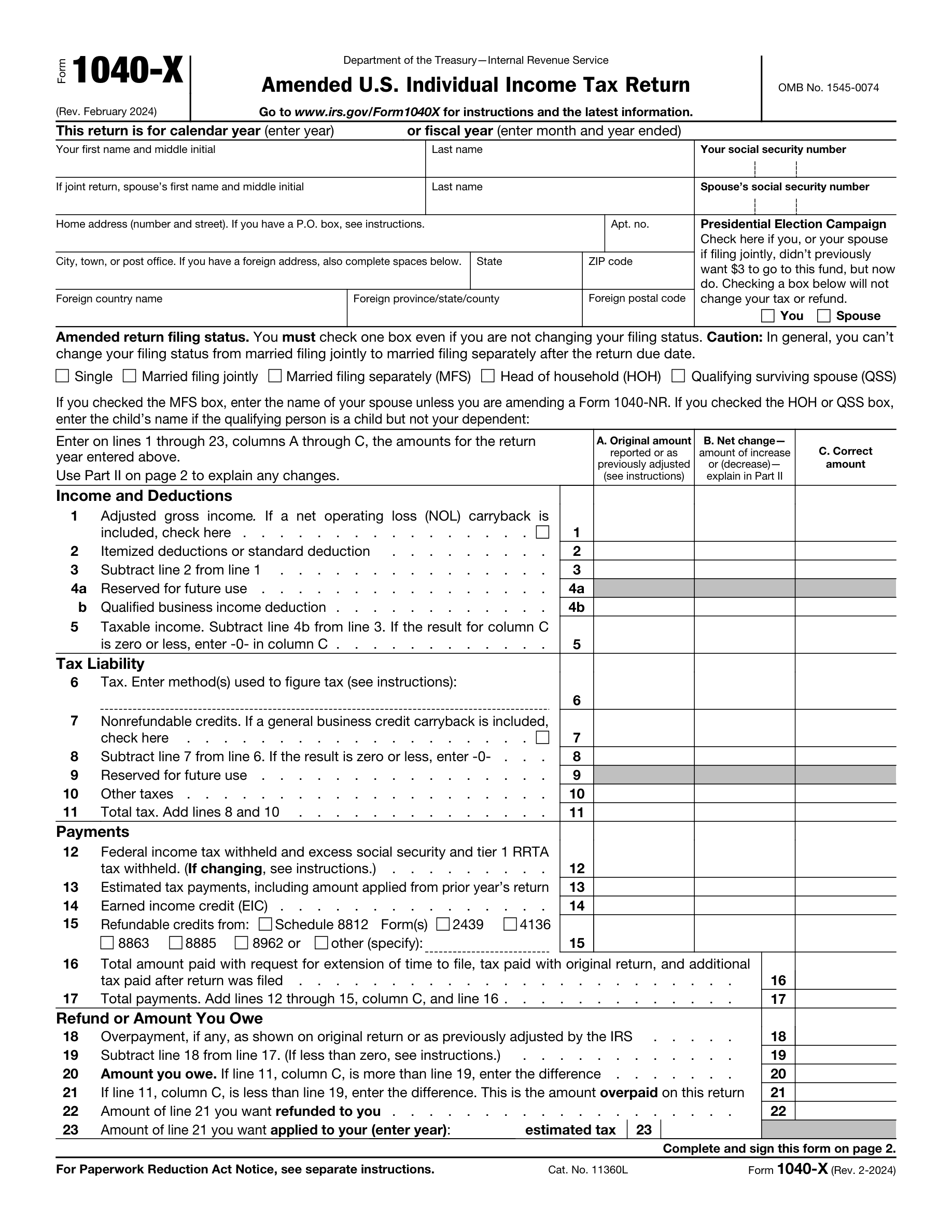
Filing an Amended U.S. Individual Income Tax Return with the incorrect form version for the tax year can lead to processing delays and potential errors in the amendment. Taxpayers should ensure they are using the correct version of the form that corresponds to the tax year they are amending. The IRS updates tax forms annually, so it is crucial to download the form from the IRS website or obtain it through a professional tax preparer for the specific year being amended. Always double-check the form's year in the top right corner before beginning the amendment process.
The Social Security Number (SSN) is a critical identifier on tax forms, and omitting it or using an incorrect SSN can result in the rejection of the amended return. Taxpayers must carefully enter their SSN and, if applicable, their spouse's SSN in the designated fields. It is advisable to double-check the numbers against the Social Security card to prevent transposition errors. If a taxpayer has recently changed their SSN, they should ensure that the new number is used on the form. Keeping personal information secure but accessible when preparing tax documents can help avoid this mistake.
When amending a joint tax return, it is essential to include the spouse's information. Neglecting to provide complete and accurate details for both spouses can lead to processing issues and may affect the accuracy of the amended return. Taxpayers should review the original joint return to ensure that all information matches and is up to date. If there have been changes to the spouse's information since the original filing, such as a name change or a new SSN, these changes must be reflected on the amended return. Both spouses are also required to sign the amended return before submission.
Providing an incorrect or incomplete address on the Amended U.S. Individual Income Tax Return can cause significant delays in processing and may result in the taxpayer not receiving important correspondence from the IRS. Taxpayers should verify their address details carefully, including apartment or suite numbers, city, state, and ZIP code. For those with a foreign address, it is important to follow the IRS guidelines for entering the address in the format required. Reviewing and updating personal information before filing can prevent this common error. Using a current utility bill or official document as a reference can help ensure accuracy.
The Presidential Election Campaign box is an often-overlooked section of the tax return, but it is important to indicate your preference regarding this campaign fund. Failing to check the box does not increase tax liability or reduce the refund amount; it simply directs $3 of your tax payment to the Presidential Election Campaign Fund. Taxpayers should take a moment to consider their preference and check the box if they choose to contribute. This decision will not affect the taxpayer's refund or balance due. Reading all sections of the tax form carefully can ensure that no parts are inadvertently skipped.
Taxpayers often select an incorrect filing status when amending their tax returns. This can lead to discrepancies in tax calculations and liabilities. To avoid this mistake, carefully review the filing status that was used on the original tax return and ensure that any changes to the filing status for the amended return are permitted under IRS rules. Consult the IRS instructions for the form or a tax professional if there is any uncertainty about which status to select.
Once the due date for filing a tax return has passed, taxpayers are generally not allowed to change their filing status from 'married filing jointly' to 'married filing separately' for that year. It is crucial to make the correct filing status decision before the deadline. If considering amending to a separate filing status, be aware of the deadline and consult the IRS guidelines or a tax advisor to understand the implications and rules regarding such a change.
When completing an amended return, it is essential to accurately report the original amounts from the initial filing, as well as the net changes and corrected amounts. Errors in these figures can result in processing delays or incorrect tax assessments. Double-check all entries against the original tax return and any supporting documentation. If adjustments are made, clearly explain the reason for each change and how the corrected amount was determined.
Calculating tax liability or credits incorrectly on an amended return can lead to either an overpayment or underpayment of taxes. Use the appropriate tax tables, schedules, and instructions to ensure accurate calculations. Consider using tax preparation software or consulting with a tax professional to help with complex calculations. Always review the entire amended return before submission to catch any potential errors in the calculations.
Taxpayers sometimes inaccurately report the amount of federal income tax withheld or estimated tax payments on their amended returns. This can affect the refund or balance due. To prevent this, verify the amounts with your W-2, 1099, or other tax documents that show federal tax withholding. For estimated payments, refer to bank statements or check copies. Keep a detailed record of all tax payments made throughout the year to ensure accurate reporting on the amended return.
Miscalculations of refunds or amounts owed can occur when taxpayers amend their returns, leading to incorrect payment or refund claims. To avoid this, double-check all the changes that affect your tax calculations, including income adjustments, credits, and deductions. Use tax software or consult with a tax professional if necessary to ensure accuracy. Review the IRS instructions for the specific lines that are being amended to understand how the changes impact your tax liability.
Failing to update dependent information can result in the rejection of exemptions and credits that are tied to dependents. Ensure that all dependent information is current and accurate, including names, Social Security numbers, and their relationship to you. If there have been any changes, such as a dependent no longer qualifying due to age or income, update this information accordingly. Cross-reference with the original tax return to confirm that all changes are consistent and justified.
Providing an incomplete or unclear explanation of the changes made on an amended return can lead to processing delays or questions from the IRS. It is important to clearly explain the reason for each amendment in the designated area of the form. Be specific and concise, and attach any supporting documents or schedules that are necessary to substantiate the changes. Review the explanation before submitting to ensure it is understandable and complete.
An unsigned amended return is like an unsigned check – it's not valid. The IRS requires a signature to process the form. Before submitting the amended return, verify that you have signed and dated it. If filing jointly, both spouses must sign. Keep a copy of the signed form for your records. Check the final review before mailing to ensure that this crucial step is not overlooked.
When filing a joint amended return, it is mandatory for both spouses to sign the form. Neglecting to have both signatures can result in the return being considered invalid. Ensure that both parties review the amendments and understand the changes before signing. Set a reminder or a checklist for both spouses to sign if the tax return is not being filed immediately after completion. Verify that both signatures are present before sending the form to the IRS.
Taxpayers often overlook the fields for occupation and phone number on the Amended U.S. Individual Income Tax Return form. It is crucial to provide complete personal information, as it can be used for identification purposes and to facilitate communication with the IRS. To avoid this mistake, review the form carefully before submission and ensure that all personal details, including occupation and phone number, are filled in accurately. Double-checking the form against previous tax returns can help ensure consistency and completeness of information.
An Identity Protection Personal Identification Number (IP PIN) is provided by the IRS to protect taxpayers against tax-related identity theft. If you have been issued an IP PIN, it must be included on your tax return. Neglecting to include the IP PIN can lead to processing delays and may trigger additional security checks. Taxpayers should keep their IP PIN confidential and ensure it is entered correctly on the tax form. If you have an IP PIN, always remember to include it on your amended return to avoid complications with the IRS.
When a paid preparer completes the Amended U.S. Individual Income Tax Return, they must provide all required information, including their Preparer Tax Identification Number (PTIN), name, and address. Incomplete preparer information can lead to processing delays and potential penalties for the preparer. Taxpayers should verify that their preparer has completed all necessary fields before the form is submitted. It is the taxpayer's responsibility to ensure that the tax preparer they choose is compliant with IRS requirements.
Self-employed tax preparers must check the box indicating their self-employed status on the tax return they prepare. This is a commonly missed step that can affect the accuracy of the return. To prevent this oversight, self-employed preparers should have a checklist of all required actions when completing a client's return. Taxpayers should confirm that their preparer has checked this box if applicable, as it is part of the preparer's due diligence and affects the return's validity.
When amending a tax return, it is essential to attach any new or revised forms and schedules that support the changes made. Failure to attach these documents can result in the IRS being unable to process the amendment, leading to delays or the amendment being considered incomplete. Taxpayers should carefully review their amended return to ensure that all necessary documentation is attached before mailing it to the IRS. Using a checklist of changes made and corresponding forms needed can help ensure that nothing is overlooked.
Filing an Amended U.S. Individual Income Tax Return requires careful attention to detail. Taxpayers often submit the form with errors in entries and calculations, which can lead to processing delays or incorrect tax assessments. To avoid this, double-check all information for accuracy before submission. Ensure that all numerical entries are correct and that the calculations comply with the current tax laws and regulations. It is advisable to use tax software or consult tax tables to verify figures.
Many taxpayers forget to retain a copy of their Amended U.S. Individual Income Tax Return and any supporting documents. This oversight can create complications if questions arise later or if the IRS requests additional information. To prevent this, make a complete copy of the amended return and all attachments for your records before mailing. Store these copies in a safe and accessible place. Keeping a digital copy as a backup is also a prudent practice.
The IRS has specific addresses for mailing amended returns, which vary depending on the taxpayer's location and whether a payment is included. Sending the form to the incorrect address can result in delays or misplacement of the return. To ensure proper delivery, verify the correct mailing address for your situation on the IRS website or in the form's instructions. Additionally, consider using certified mail or another tracking service to confirm receipt by the IRS.
Amending a tax return can be complex, and errors can have significant consequences. Taxpayers often attempt to complete the form without seeking help when they are uncertain about the process. To avoid mistakes, consult a tax professional if you have doubts about how to properly amend your return. A qualified tax advisor can provide guidance on the amendment process and help ensure that the return complies with tax laws. This can be especially important for complex tax situations or when multiple years are involved.