Yes! You can use AI to fill out Form 2106, Employee Business Expenses

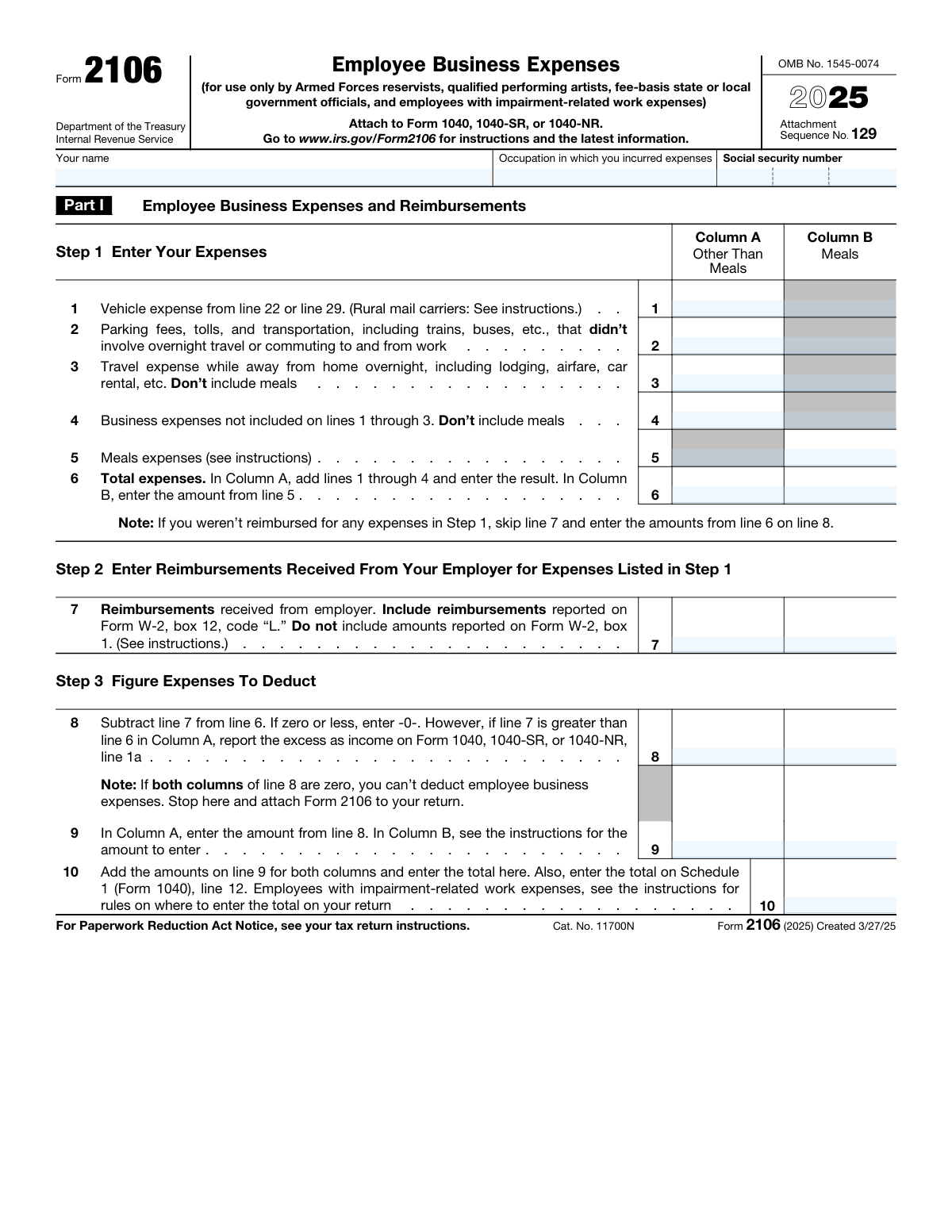
IRS Form 2106, Employee Business Expenses, is a tax form used to calculate and claim deductions for ordinary and necessary business expenses incurred as an employee, available only to specific eligible groups including Armed Forces reservists, qualified performing artists, fee-basis state or local government officials, and employees with impairment-related work expenses. The form covers vehicle expenses, travel, meals, and other business costs, and the resulting deduction is reported on Schedule 1 (Form 1040). It is attached to Form 1040, 1040-SR, or 1040-NR when filing your federal income tax return. Today, Form 2106 can be filled out quickly and accurately using AI-powered services like Instafill.ai, which can also convert non-fillable PDF versions into interactive fillable forms.
Our AI automatically handles information lookup, data retrieval, formatting, and form filling.
It takes less than a minute to fill out Form 2106 using our AI form filling.
Securely upload your data. Information is encrypted in transit and deleted immediately after the form is filled out.

Form specifications

Form name: Form 2106, Employee Business Expenses
Number of pages: 2
Language: English
main-image

Instafill Demo: filling out a legal form in seconds

How to Fill Out Form 2106 Online for Free in 2026

Are you looking to fill out a FORM 2106 form online quickly and accurately? Instafill.ai offers the #1 AI-powered PDF filling software of 2026, allowing you to complete your FORM 2106 form in just 37 seconds or less.
Follow these steps to fill out your FORM 2106 form online using Instafill.ai:
  1. 1 Navigate to Instafill.ai and search for or upload IRS Form 2106 to begin filling it out online with AI-powered assistance.
  2. 2 Enter your personal information in Part I, including your full name, occupation in which you incurred expenses, and Social Security Number.
  3. 3 Complete Step 1 by entering all employee business expenses in the appropriate columns—Column A for expenses other than meals and Column B for meal expenses—covering vehicle expenses, parking fees, travel, and other business costs on lines 1 through 6.
  4. 4 Complete Step 2 by entering any reimbursements received from your employer on line 7, then complete Step 3 by calculating the net deductible expenses on lines 8 through 10.
  5. 5 If claiming vehicle expenses, complete Part II, Section A by entering general vehicle information such as dates placed in service, total miles driven, business miles, commuting miles, and answering the yes/no questions about vehicle availability and supporting evidence.
  6. 6 If using the standard mileage rate, complete Section B (line 22); if using actual expenses, complete Section C and, if applicable, Section D for vehicle depreciation, entering all relevant cost, percentage, and depreciation figures.
  7. 7 Review all entries for accuracy, then attach the completed Form 2106 to your Form 1040, 1040-SR, or 1040-NR and transfer the total from line 10 to Schedule 1 (Form 1040), line 12.

Our AI-powered system ensures each field is filled out correctly, reducing errors and saving you time.

Why Choose Instafill.ai for Your Fillable Form 2106 Form?

Speed

Complete your Form 2106 in as little as 37 seconds.

Up-to-Date

Always use the latest 2026 Form 2106 form version.

Cost-effective

No need to hire expensive lawyers.

Accuracy

Our AI performs 10 compliance checks to ensure your form is error-free.

Security

Your personal information is protected with bank-level encryption.

Frequently Asked Questions About Form Form 2106

Form 2106 is only available to four specific groups: Armed Forces reservists, qualified performing artists, fee-basis state or local government officials, and employees with impairment-related work expenses. Most other employees cannot deduct unreimbursed employee business expenses under current tax law.

Form 2106 is used to calculate and report employee business expenses that may be deductible on your federal tax return. It covers expenses such as vehicle costs, travel, meals, parking, tolls, and other business-related costs incurred in your occupation.

You must attach Form 2106 to your Form 1040, 1040-SR, or 1040-NR. The total deductible amount from Line 10 is entered on Schedule 1 (Form 1040), Line 12. Employees with impairment-related work expenses should check the instructions for special rules on where to enter the total.

You can report vehicle expenses, parking fees, tolls, local transportation, overnight travel costs (lodging, airfare, car rental), meal expenses, and other business expenses not covered by the previous categories. Meals are tracked separately in Column B, while all other expenses go in Column A.

Enter any reimbursements received from your employer in Step 2 (Line 7), including amounts reported on Form W-2, Box 12, Code 'L.' Do not include amounts already reported in Box 1 of your W-2. If your reimbursement exceeds your expenses in Column A, you must report the excess as income on your tax return.

For 2025, the standard mileage rate is 70 cents (0.70) per business mile. To calculate your vehicle expense using this method, multiply your total business miles (Line 13) by 0.70 and enter the result on Line 22, then carry that amount to Line 1.

You can choose either the standard mileage rate (Section B) or actual expenses (Section C), but you must follow the IRS instructions to determine which method you qualify for. Generally, if you used the actual expense method in a prior year for the same vehicle, you may be required to continue using it.

The IRS requires you to have evidence supporting your vehicle deduction, and questions 20 and 21 on the form ask whether you have written evidence such as a mileage log, receipts, or other records. Written documentation is strongly recommended, as it provides the strongest support in case of an audit.

The inclusion amount is an IRS-required adjustment that reduces your deductible vehicle rental expense if you lease a luxury vehicle. The amount is determined using IRS tables in the Form 2106 instructions and is subtracted from your total rental cost on Line 24a to arrive at the deductible amount on Line 24c.

Yes, if you own your vehicle and are using the actual expense method (Section C), you can claim depreciation in Section D. You will need to enter the vehicle's cost or other basis, select a depreciation method and percentage, and apply any applicable IRS limits on luxury vehicle depreciation.

If both Column A and Column B of Line 8 are zero, you cannot deduct any employee business expenses. You should stop completing the form but still attach Form 2106 to your tax return as required.

No, commuting miles between your home and regular workplace are not deductible and must be tracked separately on Lines 15 and 16. Only business miles driven for work purposes (not commuting) can be included in your deduction calculation.

Yes, AI-powered services like Instafill.ai can help you accurately auto-fill Form 2106 by guiding you through each field and performing calculations automatically. This saves time and reduces the risk of errors, especially for complex sections like vehicle depreciation and actual expense calculations.

You can visit Instafill.ai, upload your Form 2106, and use the AI-assisted tool to fill in each field accurately based on your information. The platform walks you through every section—from employee expenses and reimbursements to vehicle mileage and depreciation—making the process fast and straightforward.

If you have a flat, non-fillable PDF version of Form 2106, Instafill.ai can convert it into an interactive fillable form so you can complete it digitally. This eliminates the need to print and handwrite your information, making submission easier and more accurate.

Compliance Form 2106
Validation Checks by Instafill.ai

1
Ensures the Social Security Number is in a valid format
Validates that the three SSN fields together form a complete 9-digit Social Security Number in the standard XXX-XX-XXXX format, with the first group containing exactly 3 digits, the middle group exactly 2 digits, and the last group exactly 4 digits. The area number (first group) must not be 000, 666, or in the range 900–999, and the group and serial numbers must not be all zeros. An invalid or incomplete SSN will prevent the IRS from properly identifying the taxpayer and processing the return.
2
Ensures the Taxpayer Name is present and not left blank
Validates that the 'Your name' field is populated with a non-empty string representing the taxpayer's full legal name as it appears on their tax return. The name should include at least a first and last name and should not consist solely of whitespace or special characters. A missing or invalid name makes it impossible for the IRS to associate the form with the correct taxpayer account.
3
Ensures the Occupation field is completed and descriptive
Validates that the 'Occupation in which you incurred expenses' field is filled in with a meaningful job title or occupational description and is not left blank or filled with placeholder text. The occupation must correspond to one of the eligible categories for Form 2106 (Armed Forces reservist, qualified performing artist, fee-basis state or local government official, or employee with impairment-related work expenses). Leaving this field blank or entering a non-qualifying occupation could result in the deduction being disallowed upon IRS review.
4
Ensures Line 6 Column A equals the sum of Lines 1 through 4 in Column A
Validates that the value entered on Line 6, Column A (Total expenses, Other Than Meals) is mathematically equal to the sum of Lines 1, 2, 3, and 4 in Column A. This arithmetic check ensures the taxpayer has correctly totaled all non-meal business expenses before proceeding to the reimbursement and deduction steps. A discrepancy between the entered total and the computed sum indicates a data entry error that would cause downstream calculations on Lines 8, 9, and 10 to be incorrect.
5
Ensures Line 6 Column B equals the amount from Line 5 Column B
Validates that the value entered on Line 6, Column B (Total expenses, Meals) matches exactly the amount entered on Line 5, Column B, as required by the form instructions. Column B of Line 6 is not a sum of multiple lines but a direct carry-forward of the meals expense amount. Any deviation between these two fields indicates a transcription error that would distort the meals expense deduction calculation.
6
Ensures Line 8 correctly reflects the subtraction of Line 7 from Line 6 in both columns
Validates that Line 8 in each column equals Line 6 minus Line 7 for that column, and that if the result is zero or negative, the field contains zero (not a negative number). Additionally, if Line 7 Column A exceeds Line 6 Column A, the form should flag that the excess must be reported as income on Form 1040/1040-SR/1040-NR Line 1a. Failure to correctly compute Line 8 will result in an overstated or understated deduction and potential underreporting of income.
7
Ensures Line 10 equals the sum of Line 9 Column A and Line 9 Column B
Validates that the total entered on Line 10 is exactly equal to the sum of the amounts on Line 9, Column A and Line 9, Column B. Line 10 represents the total employee business expense deduction carried to Schedule 1 (Form 1040), Line 12, so any arithmetic error here directly affects the taxpayer's adjusted gross income. If both columns of Line 9 are zero, the form should indicate that no deduction is available and the taxpayer should stop and attach the form without entering a Line 10 amount.
8
Ensures Vehicle miles on Lines 12, 13, 16, and 17 are internally consistent
Validates that for each vehicle, the sum of business miles (Line 13) and commuting miles (Line 16) does not exceed total miles driven (Line 12), and that the other miles on Line 17 equal Line 12 minus the sum of Lines 13 and 16. All mileage fields must contain non-negative whole numbers, and Line 13 and Line 16 individually must each be less than or equal to Line 12. Inconsistent mileage figures would produce an incorrect business-use percentage on Line 14 and invalidate the vehicle expense deduction.
9
Ensures the Vehicle Business-Use Percentage on Line 14 is correctly calculated
Validates that the percentage entered on Line 14 for each vehicle equals Line 13 (business miles) divided by Line 12 (total miles), expressed as a percentage rounded appropriately, and falls between 0% and 100% inclusive. The business-use percentage is a critical multiplier used in Lines 27, 32, and 37 to determine the deductible portion of actual expenses and depreciation. An incorrect percentage will cascade errors through all subsequent actual-expense and depreciation calculations in Sections C and D.
10
Ensures the Vehicle Placed-in-Service Date is a valid calendar date not later than December 31, 2025
Validates that the month, day, and year fields for each vehicle's placed-in-service date (Line 11) together form a valid calendar date, with the month between 01 and 12, the day appropriate for the given month and year, and the year not later than 2025 (the tax year of the form). The placed-in-service date determines eligibility for depreciation and special allowances, so a date in a future year or an impossible date (e.g., February 30) would render the depreciation calculations invalid. If Vehicle 2 information is entered, its placed-in-service date must also be fully and validly completed.
11
Ensures Question 21 (Written Evidence) is answered only when Question 20 (Evidence) is answered Yes
Validates that Line 21 ('If Yes, is the evidence written?') is answered only when Line 20 ('Do you have evidence to support your deduction?') is answered Yes, and that Line 21 is left blank or unanswered when Line 20 is answered No. This conditional dependency reflects the form's own instructions and ensures logical consistency in the evidence attestation section. Answering Line 21 when Line 20 is No, or failing to answer Line 21 when Line 20 is Yes, creates an inconsistency that may trigger IRS scrutiny of the vehicle expense deduction.
12
Ensures Line 22 (Standard Mileage Rate) is correctly computed as Line 13 multiplied by $0.70
Validates that the amount entered on Line 22 equals the business miles on Line 13 multiplied by the 2025 standard mileage rate of $0.70 per mile, and that this amount is also carried forward to Line 1. The standard mileage rate is set by the IRS for the applicable tax year, and any deviation from the correct rate or arithmetic error will result in an incorrect vehicle expense deduction. This check also confirms that a taxpayer completing Section B has not simultaneously completed Section C for the same vehicle, as only one method may be used.
13
Ensures Line 24c equals Line 24a minus Line 24b for each vehicle
Validates that the value on Line 24c for each vehicle is exactly equal to Line 24a (vehicle rentals) minus Line 24b (inclusion amount), and that the result is not negative. The inclusion amount is required by the IRS to prevent taxpayers from claiming excessive deductions on luxury leased vehicles, and the subtraction must be performed correctly before the result is carried into the Line 26 total. A negative result or arithmetic error on Line 24c would overstate or understate the deductible rental expense.
14
Ensures Line 26 equals the sum of Lines 23, 24c, and 25 for each vehicle
Validates that Line 26 for each vehicle equals the arithmetic sum of Line 23 (gasoline, oil, repairs, insurance), Line 24c (net vehicle rentals), and Line 25 (employer-provided vehicle value) for that vehicle. This total represents the gross actual vehicle expenses before applying the business-use percentage, and an incorrect total will cause Line 27 and ultimately Line 29 to be wrong. All component lines must contain non-negative values, and any blank component line should be treated as zero in the summation.
15
Ensures Line 38 (Allowable Depreciation) is the smaller of Line 35 or Line 37, or equals Line 35 if Lines 36 and 37 are skipped
Validates that Line 38 for each vehicle contains the lesser of the amounts on Line 35 (total of Section 179/special allowance and computed depreciation) and Line 37 (applicable limit adjusted for business use), unless Lines 36 and 37 were intentionally skipped, in which case Line 38 must equal Line 35. This cap ensures compliance with IRS luxury automobile depreciation limits and prevents taxpayers from claiming depreciation in excess of the statutory ceiling. The Line 38 amount must also match the depreciation amount entered on Line 28 in Section C for the same vehicle.
16
Ensures that Section B (Standard Mileage) and Section C (Actual Expenses) are not both completed for the same vehicle
Validates that for each vehicle, the taxpayer has completed either Section B (Standard Mileage Rate) or Section C (Actual Expenses), but not both, as the IRS requires the use of only one method per vehicle per tax year. If Line 22 contains a value for a vehicle, Lines 23 through 29 for that same vehicle should be blank, and vice versa. Completing both sections for the same vehicle would result in a double-counted or ambiguous vehicle expense on Line 1 and could trigger an IRS examination.

Common Mistakes in Completing Form 2106

Filing Form 2106 when not eligible to do so

Many employees mistakenly believe Form 2106 is available to all workers, but since the Tax Cuts and Jobs Act of 2017, it is only available to Armed Forces reservists, qualified performing artists, fee-basis state or local government officials, and employees with impairment-related work expenses. Filing this form when you don't belong to one of these categories will result in the IRS disallowing the deduction and potentially triggering an audit. Before completing the form, confirm your eligibility by reviewing the IRS instructions. Tools like Instafill.ai can help flag eligibility issues before submission.

Including meals expenses in Column A instead of Column B

A very common error is entering meal expenses in Column A (Other Than Meals) rather than Column B (Meals), or mixing the two columns throughout the form. Meals are subject to a separate deductibility limitation and must be tracked separately in Column B. Entering meals in the wrong column causes incorrect totals on lines 6, 8, 9, and 10, and can result in an overstated or understated deduction. Always read each line's column instructions carefully, and note that line 5 is exclusively for meals in Column B. AI-powered tools like Instafill.ai can automatically route expense amounts to the correct column.

Incorrectly handling employer reimbursements on line 7

Taxpayers frequently either omit reimbursements entirely or include amounts reported in Form W-2 box 1 (which should not be included on line 7). Line 7 should only include reimbursements reported under Form W-2 box 12, code 'L,' and other accountable-plan reimbursements not already included in wages. Failing to report reimbursements correctly inflates the deductible expense amount and can lead to IRS penalties. If line 7 exceeds line 6 in Column A, the excess must be reported as income on Form 1040 line 1a—a step many filers miss entirely.

Claiming commuting miles as business miles on lines 12–13

One of the most frequent vehicle-related errors is counting miles driven between home and a regular workplace as business miles on line 13. Commuting miles are explicitly non-deductible and must be reported separately on line 16. Inflating business miles overstates the business-use percentage on line 14, which in turn inflates the standard mileage deduction on line 22 or the actual expense deduction on line 27. Taxpayers should maintain a detailed mileage log distinguishing business, commuting, and personal miles throughout the year.

Mixing standard mileage rate and actual expense methods incorrectly

Some filers attempt to complete both Section B (Standard Mileage Rate) and Section C (Actual Expenses) for the same vehicle, or switch methods without understanding the restrictions. The IRS requires you to choose one method per vehicle, and if you used actual expenses in a prior year for a vehicle, you generally cannot switch to the standard mileage rate. Completing both sections for the same vehicle and carrying both amounts to line 1 will result in a double-counted deduction. Read the Part II instructions carefully to determine which section applies to each vehicle before filling out the form.

Failing to calculate the business-use percentage correctly on line 14

Line 14 requires dividing business miles (line 13) by total miles (line 12) to arrive at the business-use percentage, but many filers enter an estimated or rounded figure rather than the precise calculated result. An incorrect percentage cascades through lines 27, 32, and 37, distorting the actual expense deduction and depreciation calculations. For example, entering 75% instead of a calculated 68.4% can significantly overstate the deduction. Always perform the division precisely and express the result as a percentage rounded to two decimal places. Instafill.ai can automatically compute this percentage from the miles entered.

Omitting or incorrectly entering the vehicle's date placed in service on line 11

Taxpayers sometimes leave line 11 blank or enter the purchase date rather than the date the vehicle was first used for business purposes. The date placed in service determines which depreciation rules and limits apply, including whether a mid-year or mid-quarter convention is required. Using the wrong date can result in applying incorrect depreciation percentages in Section D and claiming an improper deduction. The date should reflect when the vehicle was actually first used for business, not necessarily when it was bought or registered.

Ignoring the luxury vehicle depreciation limits on lines 36–38

Many filers who own higher-value vehicles skip lines 36 and 37 entirely, failing to apply the IRS annual depreciation caps for passenger automobiles. The IRS sets dollar limits on how much depreciation can be claimed each year for vehicles, and exceeding these limits is a common audit trigger. Line 38 requires entering the smaller of line 35 or line 37 (the limit adjusted for business use), not simply the calculated depreciation from line 35. Always check the current-year IRS Publication 946 or Form 2106 instructions for the applicable dollar limits before completing Section D.

Failing to report excess reimbursements as income

When employer reimbursements on line 7 exceed the expenses on line 6 in Column A, the excess must be reported as additional income on Form 1040 line 1a. Many filers simply enter -0- on line 8 and stop there, not realizing they must also report the excess amount as taxable income. This omission can result in underreported income, leading to IRS notices, back taxes, and potential penalties. The instructions for line 8 explicitly state this requirement, so it is important to read them carefully before completing the subtraction.

Entering the wrong occupation or leaving it blank

The 'Occupation in which you incurred expenses' field is sometimes left blank or filled with a vague description like 'employee' or 'worker.' The IRS uses this field to verify that the expenses claimed are ordinary and necessary for the stated occupation, and a vague or missing entry can raise questions during review. For example, a performing artist should write 'actor' or 'musician,' not just 'entertainer.' Be specific and consistent with the occupation listed on your W-2 or other tax documents.

Including personal or commuting transportation costs on line 2

Line 2 is intended for parking fees, tolls, and local transportation that did not involve overnight travel or commuting to and from work. Taxpayers frequently include daily commuting costs such as subway passes or parking at their regular workplace, which are explicitly excluded. Including non-qualifying transportation expenses inflates the deduction and can result in disallowance upon IRS review. Only transportation costs incurred for business purposes—such as traveling between two work locations or to a client site—should be entered on line 2.

Failing to attach Form 2106 to the tax return or transfer line 10 correctly

After completing Form 2106, the total on line 10 must be transferred to Schedule 1 (Form 1040), line 12, and the form must be physically attached to the return. Employees with impairment-related work expenses have different reporting rules and must follow the specific instructions for where to enter the total. Many filers complete the form but forget to attach it or enter the total on the wrong line of Schedule 1, causing the deduction to be missed entirely. Always verify the transfer step and attachment requirement before filing. Instafill.ai can help ensure the correct amounts flow to the right lines automatically.
Saved over 80 hours a year

“I was never sure if my IRS forms like W-9 were filled correctly. Now, I can complete the forms accurately without any external help.”

Kevin Martin Green

Your data stays secure with advanced protection from Instafill and our subprocessors

Robust compliance program

Transparent business model

You’re not the product. You always know where your data is and what it is processed for.

ISO 27001, HIPAA, and GDPR

Our subprocesses adhere to multiple compliance standards, including but not limited to ISO 27001, HIPAA, and GDPR.

Security & privacy by design

We consider security and privacy from the initial design phase of any new service or functionality. It’s not an afterthought, it’s built-in, including support for two-factor authentication (2FA) to further protect your account.

Fill out Form 2106 with Instafill.ai

Worried about filling PDFs wrong? Instafill securely fills form-2106-employee-business-expenses forms, ensuring each field is accurate.



