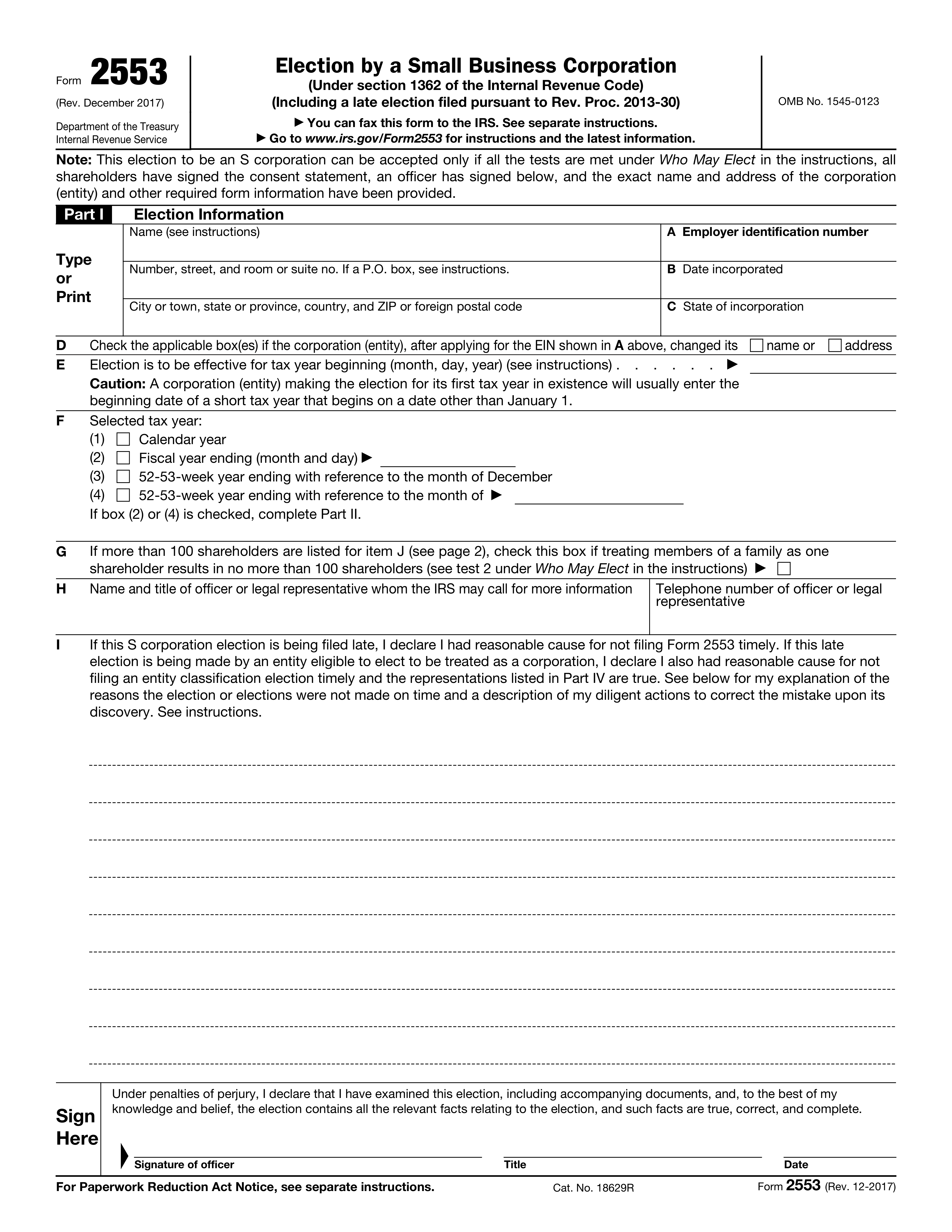
Yes! You can use AI to fill out Form 2553 (Rev. December 2017), Election by a Small Business Corporation
Form 2553 is the official IRS election a corporation (or eligible entity electing corporate treatment) files to be taxed as an S corporation, allowing income, deductions, and credits to generally pass through to shareholders. The form captures the entityâs identifying information, the intended effective date and tax year, and requires signed shareholder consents to make the election valid. It also includes sections to request or justify a fiscal tax year, make a QSST election when a trust is a shareholder, and provide representations for relief when the S election (and sometimes the entity classification election) is filed late. Filing it correctly and on time is important because S status affects how the business and its owners are taxed and whether the election will be accepted by the IRS.
Our AI automatically handles information lookup, data retrieval, formatting, and form filling.
It takes less than a minute to fill out Form 2553 using our AI form filling.
Securely upload your data. Information is encrypted in transit and deleted immediately after the form is filled out.
Form specifications
| Form name: | Form 2553 (Rev. December 2017), Election by a Small Business Corporation |
| Number of pages: | 4 |
| Filled form examples: | Form Form 2553 Examples |
| Language: | English |
| Categories: | business forms, small business forms |
Instafill Demo: filling out a legal form in seconds
How to Fill Out Form 2553 Online for Free in 2026
Are you looking to fill out a FORM 2553 form online quickly and accurately? Instafill.ai offers the #1 AI-powered PDF filling software of 2026, allowing you to complete your FORM 2553 form in just 37 seconds or less.
Follow these steps to fill out your FORM 2553 form online using Instafill.ai:
- 1 Confirm eligibility to elect S corporation status (e.g., qualifying entity, eligible shareholders, and shareholder limit) and gather required details: legal name, address, EIN, incorporation date/state, ownership records, and shareholder tax year information.
- 2 Complete Part I (Election Information): enter the corporation’s name/address, EIN, incorporation details, any name/address changes, the requested effective date (line E), and select the tax year (line F); provide an officer/legal representative contact (line H).
- 3 If the election is late, complete the late-election declaration in Part I and add a clear reasonable-cause explanation describing why it was late and the actions taken to correct it (per the instructions).
- 4 Complete the shareholder consent table in Part I (page 2): list each shareholder (or former shareholder required to consent), ownership/shares and acquisition dates, SSN/EIN, tax year end, and obtain each shareholder’s signature and date.
- 5 If a fiscal year is selected (Part I, box (2) or (4)), complete Part II by indicating whether the corporation is adopting/retaining/changing the year (item O) and then completing the applicable request path (automatic approval in item P, business purpose request in item Q, and/or section 444 election in item R, including attaching Form 8716 if required).
- 6 If a trust shareholder needs to qualify as a QSST and the stock was transferred on or before the S election date, complete Part III with trust/beneficiary information and obtain the income beneficiary (or authorized person) signature and date; if applicable, complete Part IV representations for late corporate classification election relief.
- 7 Review for completeness (exact legal name/address, correct effective date, all required signatures), have an authorized officer sign and date the form, then submit to the IRS (fax or mail as permitted) and retain copies and supporting attachments for your records.
Our AI-powered system ensures each field is filled out correctly, reducing errors and saving you time.
Why Choose Instafill.ai for Your Fillable Form 2553 Form?
Speed
Complete your Form 2553 in as little as 37 seconds.
Up-to-Date
Always use the latest 2026 Form 2553 form version.
Cost-effective
No need to hire expensive lawyers.
Accuracy
Our AI performs 10 compliance checks to ensure your form is error-free.
Security
Your personal information is protected with bank-level encryption.
Frequently Asked Questions About Form Form 2553
Form 2553 is used by an eligible corporation (or eligible entity electing to be treated as a corporation) to elect to be taxed as an S corporation under Internal Revenue Code section 1362.
A small business corporation (or eligible entity) files Form 2553 if it wants S corporation tax treatment and meets the IRS eligibility tests described in the instructions under âWho May Elect.â
Yes. The IRS can accept the election only if the corporation meets the eligibility tests, all shareholders sign the consent statement, an officer signs the form, and the corporationâs exact name/address and other required information are complete and accurate.
Yes. Each shareholder (or former shareholder who must consent) listed in Part I, item J must sign the Shareholderâs Consent Statement in item K; without all required consents, the election is not valid.
Youâll need the corporationâs legal name and address, EIN, date and state of incorporation, the requested effective date of the S election (line E), the selected tax year (line F), and a contact person the IRS can call (line H).
Enter the date the S corporation election should start for the tax year beginning (month/day/year). If itâs the corporationâs first tax year, this may be a short tax year that begins on a date other than January 1 (as noted in the formâs caution).
Line F is where you choose a calendar year, fiscal year, or 52â53-week year. If you check box (2) fiscal year or box (4) 52â53-week year (not tied to December), you must complete Part II to support the fiscal-year selection.
Check the applicable box on line D to indicate a name and/or address change after applying for the EIN shown on line A, and make sure the form reflects the current, exact name and address.
In item J, list each shareholderâs name and address; in item L, provide shares owned or percentage of ownership and the date(s) acquired; in item M, provide the shareholderâs SSN or EIN; and in item N, provide the shareholderâs tax year end (month and day).
Use additional copies of page 2. The form notes you can attach extra copies to provide enough rows for all required shareholder consents and information.
If the corporation has more than 100 shareholders, you may be able to treat certain family members as one shareholder to meet the 100-shareholder limit. If that treatment brings the count to 100 or fewer, check the box on line G (see the instructions referenced on the form).
Yes. If filing late, you must complete the late-election declaration in Part I and provide an explanation of reasonable cause and the actions taken to correct the issue, as described on the form and in the instructions (including Rev. Proc. 2013-30).
Part III is used to make a Qualified Subchapter S Trust (QSST) election so a trust can be a qualifying S corporation shareholder. It can be included with Form 2553 only if the stock was transferred to the trust on or before the date the corporation makes its S election; otherwise, the QSST election must be filed separately.
Part IV is for situations where the entity also needed a timely entity classification election (often Form 8832) to be treated as a corporation effective the same date as the intended S election. If that classification election was late too, the entity must make the listed representations to request relief along with the late S election.
The form states you can fax Form 2553 to the IRS; the correct fax number and submission details are provided in the separate instructions. You can also find instructions and updates at www.irs.gov/Form2553.
Compliance Form 2553
Validation Checks by Instafill.ai
1
Corporation Legal Name and Address Completeness
Validates that the corporationâs full legal name and complete mailing address (street/suite or PO box per instructions, city, state/province, ZIP/foreign postal code, and country if applicable) are provided in Part I. This is essential for IRS identity matching and correspondence delivery. If any required address component is missing or the name field is blank/obviously truncated, the submission should be rejected or routed for correction.
2
Employer Identification Number (EIN) Format and Presence
Checks that the EIN in Part I, item A is present and matches the standard EIN format (9 digits, typically displayed as NN-NNNNNNN). The EIN is the primary identifier used to associate the election with the correct entity. If the EIN is missing or malformed, the form should fail validation because IRS processing and matching will likely be impossible.
3
Incorporation Date Validity and Logical Consistency
Ensures the date incorporated (Part I, item B) is a valid calendar date and is not in the future. It also checks that the S-election effective date (item E) is not earlier than the incorporation date for a newly formed corporation, since an entity generally cannot elect S status before it exists. If the dates are invalid or inconsistent, the submission should be flagged for correction because the effective election period may be legally impossible.
4
State of Incorporation Required and Standardized
Validates that the state of incorporation (Part I, item C) is provided and matches an allowed jurisdiction value (e.g., US state/territory abbreviations or recognized foreign jurisdiction if applicable). This supports eligibility and proper IRS record matching. If missing or not a recognized value, the form should be rejected or sent to manual review.
5
Name/Address Change Indicator Consistency (Item D)
If the corporation indicates it changed its name and/or address after applying for the EIN (Part I, item D), the system should require updated name/address fields to be populated and internally consistent. This prevents mismatches between EIN assignment records and the election submission. If item D is checked but the updated information is not provided (or appears unchanged), validation should fail or require an explanation/attachment per business rules.
6
S Election Effective Date (Item E) Format and Tax-Year Alignment
Checks that the effective date in Part I, item E is a valid date and aligns with the selected tax year type in item F (e.g., calendar year elections should generally begin on January 1 unless a short year is indicated). This is important because the effective date drives which tax year the S election applies to and whether the election is timely. If the date is missing, invalid, or incompatible with the selected tax year, the submission should be flagged for correction.
7
Selected Tax Year (Item F) Single-Selection and Required Details
Validates that exactly one tax year option is selected in Part I, item F (calendar, fiscal, 52-53-week with December reference, or 52-53-week with another month reference). If fiscal year ending is selected, the month/day must be provided and must be a valid month/day combination; if 52-53-week with reference month is selected, the reference month must be specified. If multiple boxes are checked or required details are missing, the form should fail validation.
8
Part II Required When Fiscal/Non-Calendar Year Selected
If item F indicates a fiscal year (box 2) or a 52-53-week year with a non-December reference month (box 4), validates that Part II is completed as instructed (item O and at least one of P, Q, or R). This ensures the corporation has provided the required basis/representation for adopting or changing to a non-calendar tax year. If Part II is missing or incomplete when required, the submission should be rejected as noncompliant.
9
Officer/Legal Representative Contact Information Completeness
Checks that Part I, item H includes the name and title of the officer or legal representative and a valid telephone number. The phone number should be validated for allowable characters and length (e.g., 10 digits for US numbers, or E.164-style for international if permitted). If contact details are missing or the phone number is clearly invalid, the submission should be flagged because IRS follow-up may be impossible.
10
Late Election Declaration and Explanation Required (Item I)
If the filer indicates the S election is being filed late (Part I, item I), validates that a reasonable-cause explanation is provided in the designated area/attachment and is non-empty. This is required for relief under the referenced procedures and supports IRS determination of whether late-election relief applies. If marked late without an explanation, validation should fail or require completion before submission.
11
Officer Signature, Title, and Signature Date Present and Valid
Validates that the 'Sign Here' section includes an officerâs signature, the officerâs title, and a signature date that is a valid date. The signature date should not be in the future and should be on/after the latest shareholder consent signature date to avoid sequencing issues. If any element is missing or the date is invalid, the election is not properly executed and should be rejected.
12
Shareholder List Completeness (Part I, Item J) and Minimum One Shareholder
Ensures at least one shareholder entry is provided in the shareholder table and that each row includes the shareholderâs name and address. This is critical because S elections require shareholder consents and the IRS must be able to identify each consenting shareholder. If no shareholders are listed or required identity/address fields are missing, the submission should fail validation.
13
Shareholder Consent Signatures and Dates for Each Listed Shareholder
Validates that each shareholder listed in item J has a corresponding consent signature and signature date in the consent area (item K / signature columns). S corporation status requires unanimous shareholder consent, so missing consents invalidate the election. If any listed shareholder lacks a signature or date, the form should be rejected or returned for completion.
14
Shareholder TIN (SSN/EIN) Format Validation (Item M)
Checks that each shareholder provides a valid taxpayer identification number in item M, either SSN (9 digits) or EIN (9 digits), and that the value is not obviously invalid (e.g., all zeros). Correct TINs are necessary for IRS matching and for validating shareholder eligibility and reporting consistency. If a TIN is missing or malformed for any shareholder, the submission should be flagged for correction.
15
Ownership Information Validation and Consistency (Item L)
Validates that each shareholderâs ownership is provided as either number of shares or percentage, and that the value is positive and within reasonable bounds. If percentages are used, the system should check that the total across all shareholders is approximately 100% (allowing a small tolerance for rounding) and that no individual percentage exceeds 100%. If ownership data is missing or totals are inconsistent, the submission should be flagged because it can indicate incomplete shareholder information or an invalid cap table.
16
Shareholder Tax Year End (Item N) Month/Day Validity and Ownership Tax Year Test Support
Ensures each shareholderâs tax year end (month and day) is a valid month/day combination and is present where required by the formâs table. This information is particularly important if the corporation is requesting/using an ownership tax year in Part II (item P2), which depends on shareholders holding more than half the shares having the same tax year. If month/day values are invalid or missing, the submission should be flagged because Part II representations may not be supportable.
Common Mistakes in Completing Form 2553
People often enter a trade name/DBA or an abbreviated name instead of the exact legal corporate name as shown on the EIN assignment (CP 575) or IRS records. This mismatch can cause processing delays, IRS correspondence, or rejection because the IRS canât reliably match the election to the entity. Use the exact legal name and address on file with the IRS, and if the name changed after applying for the EIN, check the name-change box in item D and ensure the change was properly filed with the state/IRS as applicable.
A common error is transposing digits, using an ownerâs SSN, or submitting Form 2553 before the corporation has a valid EIN. The IRS may be unable to process the election or may associate it with the wrong entity, creating significant delays. Verify the EIN directly from the IRS EIN confirmation notice and enter it exactly in item A before filing.
Filers frequently enter the incorporation date, the filing date, or a tax year end date instead of the beginning date of the tax year the S election should start. This can result in the election being effective later than intended (or treated as late), which may force the entity into C-corporation taxation for part of the year. Enter the correct tax-year beginning date (month/day/year) and pay special attention to the âshort tax yearâ caution for first-year corporations.
Many check a fiscal year or 52-53-week year without realizing that checking box (2) or (4) requires completing Part II and often attaching additional statements. If Part II is missing or incomplete, the IRS may not accept the requested tax year, which can jeopardize acceptance of the S election or force a calendar year. Only select a non-calendar year if you can meet the requirements, and complete Part II (including the correct subsection P/Q/R) with all required attachments.
If the corporation changed its name or address after applying for the EIN, filers often forget to indicate this in item D. This can cause IRS matching issues and delays because the IRS may still have the old information tied to the EIN. Check the applicable box(es) in item D and ensure the IRS and state records are updated consistently.
A frequent rejection trigger is an unsigned form, a missing title, or an undated officer signature. Without a valid signature under penalties of perjury, the IRS will not treat the election as properly made. Ensure an authorized corporate officer (or legal representative, if applicable) signs, prints/enters their title, and dates the form before submission.
Filers often omit a shareholder, provide only partial addresses, leave out SSNs/EINs, or fail to include acquisition dates and ownership information. Any missing required shareholder consent can invalidate the election because all shareholders (and certain former shareholders, when applicable) must consent. List every required consenting shareholder with complete name/address, taxpayer ID, ownership/shares, acquisition date(s), tax year end, and obtain each signature and date.
People commonly mix ânumber of sharesâ and âpercentage of ownershipâ across shareholders, enter rounded percentages that donât total 100%, or forget to reflect multiple classes/series correctly. Inconsistencies can prompt IRS questions and may signal an ineligible second class of stock or inaccurate ownership records. Use one consistent method (shares or percentages), ensure totals reconcile, and match the corporationâs cap table/stock ledger exactly.
When filing late, many check/complete the late-election declaration but provide a vague explanation (or none) and fail to describe diligent actions taken once the error was discovered. The IRS may deny late-election relief, leaving the entity taxed as a C corporation for the period at issue. Provide a clear timeline, specific reason(s) for the late filing, what steps were taken to correct it promptly, and ensure the entity/shareholders reported consistently with S status for affected years as required.
For a natural business year request, filers often forget the required gross receipts statement by month for the most recent 47 months, or they submit incomplete/incorrect schedules. For a business-purpose fiscal year request, they may omit the narrative facts, gross receipts support, or ignore user-fee requirements described in the instructions. Review the specific attachment requirements for the box you check (P1, P2, or Q1) and include complete supporting documentation to avoid denial of the requested tax year.
Trust-related ownership is frequently mishandled: filers may complete Part III even though the stock was transferred after the S election date (which requires a separate QSST filing), or they omit the income beneficiaryâs signature and identifying information. An invalid or missing QSST election can make the trust a non-qualifying shareholder, potentially terminating or preventing S status. Confirm the transfer date relative to the S election date, complete all trust/beneficiary fields, and obtain the correct signature (income beneficiary or qualified representative) or file the QSST election separately when required.
Saved over 80 hours a year
âI was never sure if my IRS forms like W-9 were filled correctly. Now, I can complete the forms accurately without any external help.â
Kevin Martin Green
Your data stays secure with advanced protection from Instafill and our subprocessors
Robust compliance program
Transparent business model
Youâre not the product. You always know where your data is and what it is processed for.
ISO 27001, HIPAA, and GDPR
Our subprocesses adhere to multiple compliance standards, including but not limited to ISO 27001, HIPAA, and GDPR.
Security & privacy by design
We consider security and privacy from the initial design phase of any new service or functionality. Itâs not an afterthought, itâs built-in, including support for two-factor authentication (2FA) to further protect your account.
Fill out Form 2553 with Instafill.ai
Worried about filling PDFs wrong? Instafill securely fills form-2553-rev-december-2017-election-by-a-small-bu forms, ensuring each field is accurate.