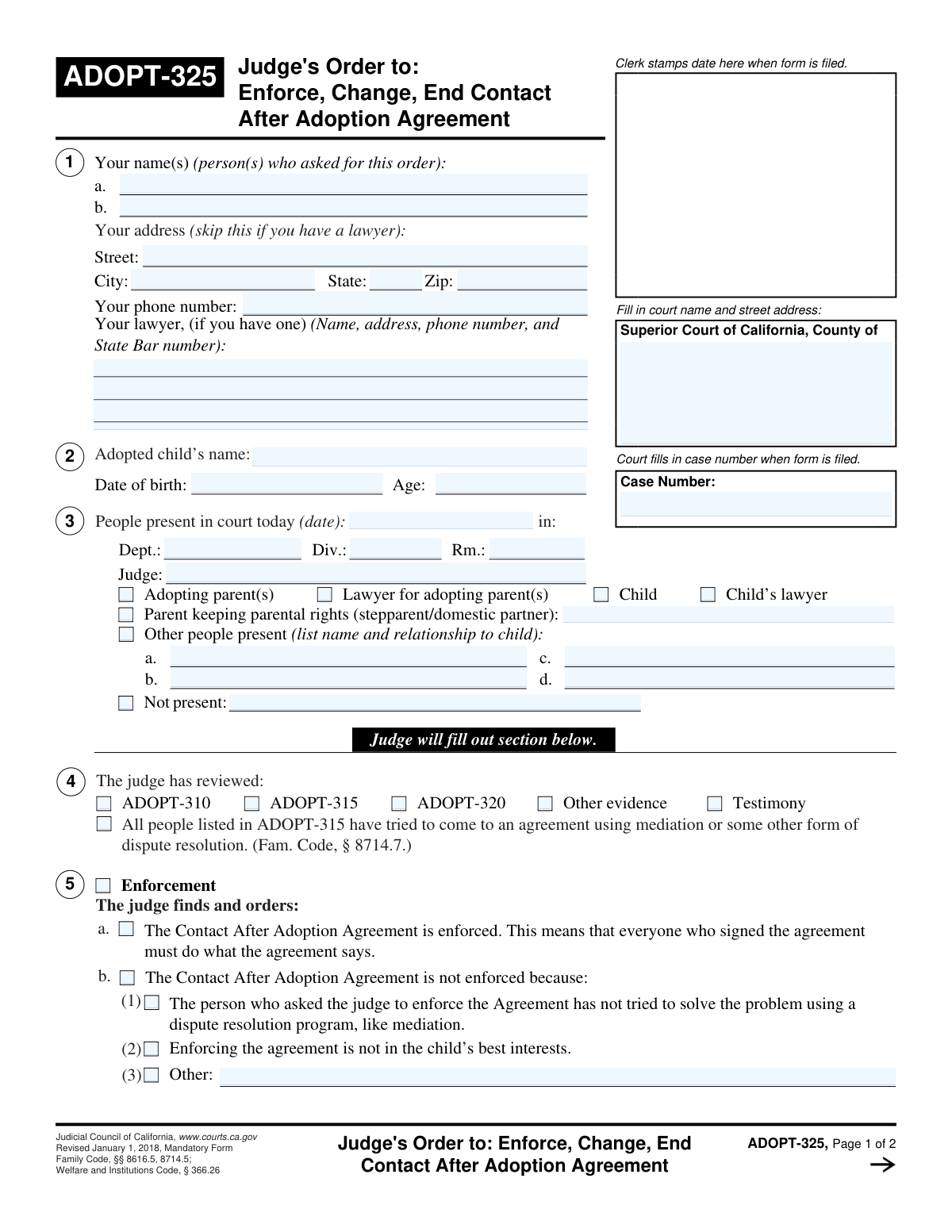
Yes! You can use AI to fill out Form ADOPT-320, Order on Request to Enforce, Change, or End Contact After Adoption Agreement

Form ADOPT-320, Order on Request to Enforce, Change, or End Contact After Adoption Agreement, is a crucial legal document used in California courts. It is the official order issued by a judge that finalizes their ruling on a request concerning a post-adoption contact agreement, detailing whether the agreement is enforced, changed, or terminated. This order is vital as it provides a legally binding resolution to disputes, ensuring clarity for the adoptive parents, birth relatives, and the child. Today, this form can be filled out quickly and accurately using AI-powered services like Instafill.ai, which can also convert non-fillable PDF versions into interactive fillable forms.
Our AI automatically handles information lookup, data retrieval, formatting, and form filling.
It takes less than a minute to fill out ADOPT-320 using our AI form filling.
Securely upload your data. Information is encrypted in transit and deleted immediately after the form is filled out.

Form specifications

Form name: Form ADOPT-320, Order on Request to Enforce, Change, or End Contact After Adoption Agreement
Number of fields: 92
Number of pages: 2
Language: English
Categories: adoption forms
main-image

Instafill Demo: How to fill out PDF forms in seconds with AI

How to Fill Out ADOPT-320 Online for Free in 2026

Are you looking to fill out a ADOPT-320 form online quickly and accurately? Instafill.ai offers the #1 AI-powered PDF filling software of 2026, allowing you to complete your ADOPT-320 form in just 37 seconds or less.
Follow these steps to fill out your ADOPT-320 form online using Instafill.ai:
  1. 1 Navigate to Instafill.ai and upload your ADOPT-320 form or select it from their library of official documents.
  2. 2 Enter the court and case information, including the court's address, case number, and petitioner details, into the designated fields.
  3. 3 Provide the adopted child's information and the specific details of the court hearing, such as the date, department, and presiding judge's name.
  4. 4 Use the AI-powered checkboxes to indicate who was present at the hearing and what evidence or forms (like ADOPT-310 and ADOPT-315) the judge reviewed.
  5. 5 Clearly document the judge's findings and orders by selecting the appropriate options for whether the agreement is enforced, changed, or ended, and specifying the reasons for the decision.
  6. 6 If the judge requires more time or a further evaluation, fill out the corresponding sections detailing the next steps, costs, and deadlines for the report or next court date.
  7. 7 Once all sections are completed, review the entire form for accuracy, enter the date of the order, and then save or print the document for the judge's signature and official filing.

Our AI-powered system ensures each field is filled out correctly, reducing errors and saving you time.

Why Choose Instafill.ai for Your Fillable ADOPT-320 Form?

Speed

Complete your ADOPT-320 in as little as 37 seconds.

Up-to-Date

Always use the latest 2026 ADOPT-320 form version.

Cost-effective

No need to hire expensive lawyers.

Accuracy

Our AI performs 10 compliance checks to ensure your form is error-free.

Security

Your personal information is protected with bank-level encryption.

Frequently Asked Questions About Form ADOPT-320

This form is a judicial order that documents a judge's decision regarding a 'Contact After Adoption Agreement'. It specifies whether the agreement will be enforced, changed, or terminated after a court hearing.

This is an official court order, so it is completed and signed by the judge or judicial officer presiding over the case. The parties involved, such as the petitioners, will receive a copy of the completed order.

If you are representing yourself, you should provide your personal address and phone number in the 'Petitioner's Address' and 'Petitioner's Phone Number' sections. The 'Petitioner's Lawyer Information' section should be left blank.

A Contact After Adoption Agreement is a voluntary, written agreement between adoptive parents and a child's birth relatives. It outlines the terms for future contact, such as visits, phone calls, or sharing information.

This means the judge needs more information to make a decision and has ordered a professional assessment of the situation. The order will specify who conducts the study, who pays for it, and when the report is due.

A judge may decide not to enforce the agreement if they find it is not in the child's best interests or if the person requesting enforcement did not first try to resolve the issue through mediation.

These are related court forms that are part of the legal process. For example, ADOPT-315 is the 'Request to: Enforce, Change, End Contact After Adoption Agreement,' which a petitioner files to initiate the court action.

If the judge needs more time, they may check the box 'The judge needs more time to make a decision' and may schedule a future court date for the final ruling.

No, because this is a judicial order completed by the court. However, services like Instafill.ai can help you accurately auto-fill the initial request forms you must file with the court, such as the ADOPT-315.

You can upload your adoption-related forms to Instafill.ai, and its AI will automatically detect the fields. You can then quickly fill in your information, save your progress, and download the completed document for filing.

You can use a service like Instafill.ai to solve this problem. It can convert flat, non-fillable PDFs into interactive forms that you can easily complete and save online.

You will need the official case number assigned to your legal proceeding and the full name and street address of the court where the case is being heard.

This indicates the judge has found that the person who filed the request made a good-faith effort to solve the disagreement through mediation before coming to court, which is often a required step.

Once signed by the judge, the order becomes legally binding. All parties involved must comply with the judge's decision as stated in the form.

Compliance ADOPT-320
Validation Checks by Instafill.ai

1
Petitioner Contact Information Exclusivity
This check ensures that either the petitioner's personal address and phone number fields are filled, or the 'Petitioner's Lawyer Information' field is filled, but not both. This is important for maintaining a single, clear point of contact as specified by the form's instructions. If validation fails, the user will be prompted to choose one set of contact details to provide, preventing redundant or conflicting information.
2
Child's Age and Date of Birth Consistency
This validation cross-references the 'Adopted Child's Date of Birth' with the 'Adopted Child's Age'. The system calculates the age based on the date of birth and flags any discrepancy with the entered age. This prevents simple data entry errors and ensures the child's records are accurate for legal purposes. A mismatch would require the user to correct either the age or the date of birth.
3
Hearing Date Plausibility
This check verifies that the 'Hearing Date' is a valid date and falls within a reasonable timeframe (e.g., not more than 5 years in the past or future). This is crucial for preventing typographical errors that could lead to incorrect case scheduling or records. If an implausible date is entered, the system will reject it and ask the user to provide a valid hearing date.
4
Conditional 'Other People Present' Fields
This validation ensures that if the 'Other people present' checkbox is checked, at least one of the 'Other Person Present A/B/C/D' fields is filled out. Conversely, it ensures these name fields are disabled or cleared if the checkbox is unchecked. This maintains the integrity of the court record by ensuring that if additional attendees are noted, they are properly identified. Failure would prompt the user to either provide a name or uncheck the box.
5
Mutually Exclusive Enforcement Findings
This check confirms that the user cannot select both 'Agreement is enforced' and 'Agreement is not enforced' simultaneously. These two findings are logically contradictory and selecting both would make the order legally ambiguous. This validation is critical for ensuring the judge's order is clear and executable. If a user tries to select both, the system will force a choice of one or the other.
6
Dependent Non-Enforcement Reasons
This validation ensures that if the 'Agreement is not enforced' checkbox is selected, at least one of the subsequent reason checkboxes ('No dispute resolution attempt', 'Not in child's best interests', 'Other reason not enforced') must also be selected. A finding of non-enforcement requires a legal basis. Failure to provide a reason would result in an incomplete and invalid order, so the system will prompt the user to select a reason.
7
Required 'Other Reason' Text for Non-Enforcement
This check verifies that if the 'Other reason not enforced' checkbox is selected, the corresponding 'Other Reason for Non-Enforcement' text field is not left empty. The checkbox indicates a specific reason will be provided, and leaving the text field blank would render the finding incomplete. This ensures that all judicial findings are fully documented. If the text field is empty, a validation error will require the user to enter the reason.
8
Conditional Approval Details Logic
This validation ensures that if 'Judge Approves Request' is checked, at least one of the action checkboxes ('Change' or 'End') and at least one of the reason checkboxes ('All People Involved Agreed', 'In Best Interests of Child', etc.) is also selected. An approval must specify what is being approved and why. An incomplete selection would result in an ambiguous order, so the system will require the user to complete the section before proceeding.
9
Future Date for Court Return
This check validates that the 'Court Return Date' is a valid date format and is set for a date in the future, after the 'Signature Date'. Scheduling a court appearance for a past date is a logical impossibility and a common data entry error. This ensures accurate scheduling and prevents confusion for the parties involved. An invalid date would trigger an error message requiring correction.
10
Zip Code Format Validation
This validation checks that the 'Zip Code' field for the petitioner's address contains a valid 5-digit or 9-digit (ZIP+4) US postal code format. Correct formatting is essential for ensuring legal notices and other mailings are deliverable. An incorrectly formatted zip code would be flagged, and the user would be prompted to enter a valid code.
11
Case Number Completeness
This check ensures the 'Case Number' field is not empty, as it is a critical and mandatory identifier for the legal proceeding. Without a case number, the form cannot be correctly filed or associated with the proper court record. If this field is left blank, the system will prevent submission and display an error message indicating it is a required field.
12
AM/PM Time Exclusivity
This validation verifies that for the 'Court Return Time', only one of the 'a.m.' or 'p.m.' checkboxes is selected. Selecting both or neither would create ambiguity in the scheduled court time. This check is important for ensuring all parties know the correct time to appear in court. The system should enforce this by using radio buttons or a similar single-choice control.
13
Conditional 'Parent Keeping Rights' Name
This check ensures the 'Parent Keeping Parental Rights Name' field is only filled if the corresponding 'Parent keeping parental rights (stepparent/domestic partner)' checkbox is checked. This prevents extraneous data from being entered and ensures the record of who was present is accurate. If the name is entered without the box being checked, the system will prompt the user to either check the box or clear the name field.
14
Mutually Exclusive Approval Status
This validation ensures that the 'Judge Approves Request' and 'Judge Does Not Approve Request' checkboxes are mutually exclusive. A judge cannot simultaneously approve and deny the same request. This check is fundamental to the logical integrity of the final order. If a user attempts to select both, the system will require them to choose only one option.

Common Mistakes in Completing ADOPT-320

Conflicting Petitioner Contact Information

Users often fill out both the petitioner's personal address and the petitioner's lawyer's information. The form explicitly states to provide the petitioner's personal address and phone number only if they are not represented by a lawyer. This error can cause confusion for the court clerk and opposing parties regarding who the official point of contact is, potentially delaying important legal notices. To avoid this, carefully read the instructions and fill in only one section: either your personal contact details or your lawyer's, but never both.

Incomplete Court and Case Identifiers

People frequently enter an abbreviated court name or an incomplete case number, omitting prefixes, suffixes, or leading zeros. This happens when rushing or working from memory. An incorrect case identifier can lead to the document being rejected by the clerk or misfiled, causing significant delays in the legal process. Always copy the full court name and exact case number from official court documents to ensure accuracy. AI-powered tools like Instafill.ai can help by auto-populating and validating this information from previous documents in the case.

Ignoring Conditional Field Logic

Many fields on this form are conditional and should only be filled if a specific checkbox is selected first (e.g., providing a reason for non-enforcement only after checking 'Agreement is not enforced'). Users often fill in the detail fields without checking the parent box, or vice-versa. This makes the form logically inconsistent and can invalidate the entry. To prevent this, complete the form step-by-step, ensuring that for every detail you provide, the corresponding primary checkbox is also marked.

Filling Out Sections Reserved for the Judge

Petitioners or their lawyers sometimes mistakenly complete sections intended for the judicial officer, such as the 'Judge's Review Checklist' or 'Judge's Findings and Orders'. This occurs from a misunderstanding of the form's structure. Filling these sections is inappropriate and will require a new, clean form to be submitted, wasting time and effort. Petitioners should only fill out the initial information sections and leave all sections related to judicial findings, orders, and review blank.

Inconsistent Age and Date of Birth

A common data entry error is providing the child's age without verifying it against the entered Date of Birth, leading to a discrepancy. This can happen due to a simple miscalculation or using an outdated age. While a minor error, it can raise questions about the accuracy of the information provided. Always calculate the child's current age based on their date of birth and the date the form is being filled out to ensure consistency.

Vague 'Other' Explanations

When a user checks an 'Other' box, they often fail to provide a sufficiently detailed explanation in the corresponding text field. For example, under 'Other Reason for Non-Enforcement,' a user might just write 'disagreement' without context. This ambiguity forces the court to guess the intended meaning and may lead to the order being rejected or misinterpreted. If you select 'Other,' always provide a clear, concise, and complete explanation as required.

Forgetting to Specify the Type of Order

When filling out the 'Approval of Request Details' section, users may check 'Judge Approves Request' but forget to specify if the approval is to 'Change' or 'End' the agreement. This omission makes the order unclear and unenforceable. It is crucial to check the primary approval box and then the specific action (Change or End) that the judge is approving to create a legally sound document.

Incomplete 'People Present in Court' Section

Users often forget to check the boxes for all individuals who are present at the hearing, or they check 'Parent keeping parental rights' but neglect to write the person's full name in the designated field. This section creates an official record of attendance, and omissions can be problematic later. Before the hearing, confirm who will be present and carefully check all applicable boxes and fill in all required names. Using a tool like Instafill.ai can help ensure all dependent fields are prompted and completed.

Missing Specific Hearing Location Details

While the hearing date might be entered correctly, people often omit the Department, Division, or Room Number. This information is vital for locating the correct courtroom on the day of the hearing. Leaving these fields blank can cause confusion and delays for the parties involved. Always refer to the official court notice to get the complete and accurate location details for the hearing.

Incorrectly Using 'Not Present' Fields

There is often confusion in the 'People Not Present' section, where a user might check the 'Not present' box but forget to enter the 'Number of People Not Present', or vice versa. Both fields are required to be filled together for the entry to be valid. This mistake can lead to an incomplete record of who was accounted for. To avoid this, if you check the 'Not present' box, ensure you also enter the corresponding number in the next field.

Failing to Specify Reasons for a Judicial Decision

In sections detailing a judge's decision, such as 'Non-Approval of Request Details,' the form requires checking a specific reason (e.g., 'Not In Child's Best Interest'). A common mistake is to only check the main 'Judge Does Not Approve Request' box without selecting at least one of the subsequent reasons. This leaves the basis for the judge's decision undocumented on the form, making the order incomplete. It is essential to mark the specific finding that supports the overall judicial order.
Saved over 80 hours a year

“I was never sure if my IRS forms like W-9 were filled correctly. Now, I can complete the forms accurately without any external help.”

Kevin Martin Green

Your data stays secure with advanced protection from Instafill and our subprocessors

Robust compliance program

Transparent business model

You’re not the product. You always know where your data is and what it is processed for.

ISO 27001, HIPAA, and GDPR

Our subprocesses adhere to multiple compliance standards, including but not limited to ISO 27001, HIPAA, and GDPR.

Security & privacy by design

We consider security and privacy from the initial design phase of any new service or functionality. It’s not an afterthought, it’s built-in, including support for two-factor authentication (2FA) to further protect your account.

Fill out ADOPT-320 with Instafill.ai

Worried about filling PDFs wrong? Instafill securely fills form-adopt-320-order-on-request-to-enforce-change-or-end-contact-after-adoption-agreement forms, ensuring each field is accurate.