
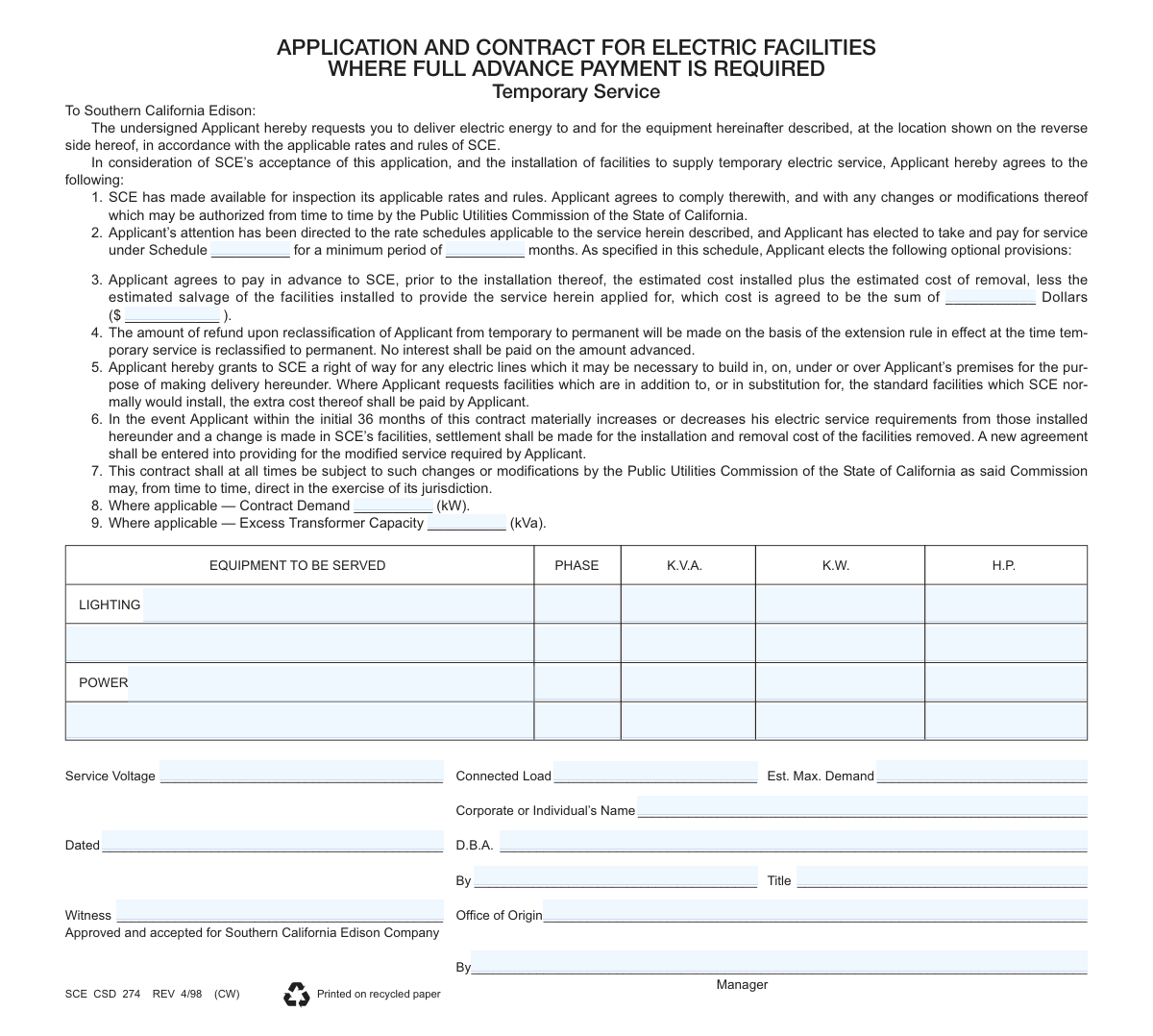
Yes! You can use AI to fill out SCE CSD 274, Application and Contract for Electric Facilities Where Full Advance Payment is Required (Temporary Service)
Don't type 157 fields by hand. Tell our AI about yourself, or upload a document you already have, and it fills every field in seconds. You check it, then download, print or sign.
The AI does the filling. You just check it.
No typing into boxes, nothing to install.
What this form asks for
The AI fills all of it, from your answers or your documents.
The AI checks your answers before you download
14 checks built for this form, so a wrong date or a missing answer is caught before anyone else sees it.
This validation compares the 'Advance Payment Amount (words)' field with the 'Advance Payment Amount ($)' field. It ensures the textual representation of the dollar amount matches the numerical value, preventing discrepancies and potential billing disputes. If the values do not match, the form submission should be flagged for manual review to clarify the applicant's intended payment.
This check verifies that all date fields, such as 'Dated', 'Date Wanted', and 'Order Taken — Date', are entered in a valid and consistent format (e.g., MM/DD/YYYY). This is crucial for accurate record-keeping, scheduling service activation, and establishing contract timelines. An invalid format would prevent the system from correctly processing the date, leading to scheduling errors or contract invalidity.
This rule checks that if the 'Other' checkbox is selected in the 'FORM OF BUSINESS ORGANIZATION' section, the corresponding text field for specifying the business type is not empty. This is important for legal and credit purposes to correctly identify the applicant's business structure. Failure to provide this detail would result in an incomplete application and require follow-up before the contract can be processed.
This validation ensures that the 'Estimated Maximum Demand (kW)' is not greater than the 'Connected Load (kW)'. The total connected load represents the theoretical maximum, while the estimated demand is the expected peak usage, which should logically be less than or equal to the total. This check prevents data entry errors and helps ensure the electrical system is designed and provisioned correctly; an illogical entry would trigger a warning for review.
This validation ensures that the core components of the service address, including 'Service Address Street', 'Service Address Post Office/City', and 'Service Address ZIP / Postal Code', are all provided. This information is absolutely critical for locating the premises where electric service is to be installed and delivered. If any part of the service address is missing, the application cannot be processed, as SCE would be unable to identify the physical location for the work order.
This rule validates that technical details like 'Phase', 'K.V.A.', 'K.W.', and 'H.P.' for an equipment line are only entered if the corresponding 'Equipment to be served' description field is also filled. This prevents orphaned data and ensures that every set of technical specifications is associated with a described piece of equipment. If technical details are present without a description, the form should be flagged for clarification to ensure load calculations are accurate.
And 8 more checks
- ZIP Code Format Validation
- Numeric-Only Field Validation
- Required Officer Information for Corporations/Partnerships
- Rate Schedule Code Validity
- Signature and Title Completeness
- Applicant Name Consistency Across Sections
- Business Telephone Number Format
- Applicant vs. Property Owner Verification
Let AI fill out your SCE CSD 274
No typing. Every field filled in seconds, checked, ready to sign.
How to Fill Out SCE CSD 274 Online for Free in 2026
What the AI walks you through.
- Navigate to Instafill.ai and upload or select the SCE CSD 274 form.
- Provide applicant details, including the corporate or individual name, DBA, and business organization type.
- Specify the service requirements, including the rate schedule, minimum service period, and advance payment amount.
- Detail the equipment to be served by listing lighting and power loads with their phase, K.V.A., K.W., and H.P. ratings.
- Enter the service address, credit information, and details of any previous Edison service.
- Review all entered information for accuracy before the applicant or an authorized representative signs and dates the contract.
- Submit the completed and signed form to Southern California Edison as required for approval and processing.
Common Mistakes in Completing SCE CSD 274
The ones the AI is built to catch.
Mismatching Advance Payment Amounts
Providing Inaccurate or Incomplete Equipment Load Data
Confusing Legal Entity Name with 'Doing Business As' (DBA) Name
Completing Fields Reserved for Internal Utility Use
Omitting the Signer's Official Title
Entering Incorrect Address Information
Submitting an Illegible, Hand-Written Form
Failing to Specify the Form of Business Organization
Using Vague Descriptions for Equipment to be Served
Frequently Asked Questions About SCE CSD 274
Is it really free for 7 days?
Can I fill other forms too?
How do I cancel?
How does the AI fill out SCE CSD 274?
What happens to my information?
How complex is SCE CSD 274 to fill out?
What is the purpose of this SCE form?
Who needs to fill out this form?
What costs am I paying for with the 'full advance payment'?
What happens if my temporary service needs to become permanent?
What information is needed for the 'EQUIPMENT TO BE SERVED' section?
What is a 'Rate Schedule' and how do I choose one?
What if my electricity needs change after the service is installed?
Where do I submit the completed application?
What is the difference between 'Connected Load' and 'Estimated Maximum Demand'?
Can I use an AI tool to help fill out this form?
How can I fill out this SCE form online?
The PDF of this form I have is not fillable. What should I do?
Why do I need to provide details for partners or corporate officers?
How long will it take to get service after I submit the form?
Get your SCE CSD 274 filled out by AI
$0 today. Cancel before Nov 4 and you pay nothing.
Other forms like this one
SCE forms: Form 1099-MISC, Miscellaneous Information, application-and-contract-for-electric-facilities-w, Form 1099-MISC, Miscellaneous Information, Child and Adolescent Needs and Strengths Summary
electric service forms: application-and-contract-for-electric-facilities-w
payment forms: Form 5405, Repayment of First-Time Homebuyer Credit, Form 1127, Application for Extension of Time for Payment of Tax Due to Undue Hardship, Form 1099-G, Certain Government Payments, Form 1099-K, Payment Card and Third Party Network Transactions, Form 1099-Q, Payments From Qualified Education Programs, Form SSA-8, Application for Lump-Sum Death Payment, Form 1845-0163, Borrower Defense to Repayment Application, application-and-contract-for-electric-facilities-w, Carer Payment and Carer Allowance – Medical Report (SA431) for a child under 16 years, Income-Driven Repayment (IDR) Plan Request (PAYE, IBR, and ICR) — William D. Ford Federal Direct Loan (Direct Loan) Program and Federal Family Education Loan (FFEL) Programs (OMB No. 1845-0102), Fidelity NetBenefits Distribution - Recurring Payments, Electronic Dividend and Interest Payment Authorization Form, Vanguard Super Apply for a financial hardship payment, Special Tax Notice Regarding Plan Payments, Empower Loan Payment Change Request Form, Empower Retirement Payment Request Form, Empower 401(k) Loan Prepayment Request Form, Special Tax Notice Regarding Plan Payments, Transamerica Automatic Payment Authorization, Excess Withdrawal Request and Form W-4R, Withholding Certificate for Nonperiodic Payments and Eligible Rollover Distributions
contract forms: Memorandum of Contract, Form WH-347, Payroll for Contractors, Form 0896A, Report of Subcontracts to Small and Veteran-Owned Business, Form 1449, Solicitation/Contract/Order for Commercial Products and Services, application-and-contract-for-electric-facilities-w, Texas Real Estate Commission (TREC) One to Four Family Residential Contract (Resale) (TREC No. 20-18), DBPR CILB 6-B, Application for Certified Building Contractor Who is Qualifying a Business, State of Hawaii Department of Commerce and Consumer Affairs (DCCA) Contractors License Board – Application for Contractor's License (Sole Proprietor) (CT-36) with supporting forms (Experience Certificate CT-03, Contractors Financial Statement CT-02, and Chronological History of Projects/Project List), NJ Department of Labor & Workforce Development Form MW-562, Payroll Certification for Public Works Projects (Contractor and Subcontractor’s Weekly and Final Certification), DBPR CILB 6-A, Application for Certified General Contractor Who is Qualifying a Business, Proposal Form 3, Attestation Regarding County Contract, TIAA Trust, N.A. Private Asset Management, Request for a Direct Transfer From IRA Contracts, Contrato de Trabajo en Prácticas (Código 420), Professional Practice Employment Contract, State of California Department of Transportation Darfur Contracting Act Certification, Form DOT ADM-0077, State of California Department of Transportation, Contract Requirements, State of California Department of Transportation Subcontractor List, DCMA Guidebook for Government Contract Property Administration, Official Form 106G, Schedule G: Executory Contracts and Unexpired Leases, Form ADR-106, Petition to Confirm, Correct, or Vacate Contractual Arbitration Award, Newly Contracted Provider Training Attestation Form
Let AI fill out your SCE CSD 274
Your trial starts once a card is added. You pay nothing before Nov 4.
Our AI already knows this form, all 157 fields of it. Skip the typing: tell it about yourself, or upload what you have, and it fills the whole form in seconds.
- AI fills every field on both pages, tables and checkboxes included
- No typing into boxes: answer a few questions, or upload a document you already have, an old copy of this form, a photo of a document
- The AI checks the answers; you review and change anything before you download
- Download the finished PDF, print it, or sign it online
- Encrypted, and never used to train AI
Cancel before Nov 4 and you pay nothing.
A card is needed to start the trial. Cancel in two clicks from your account.
Terms · Privacy