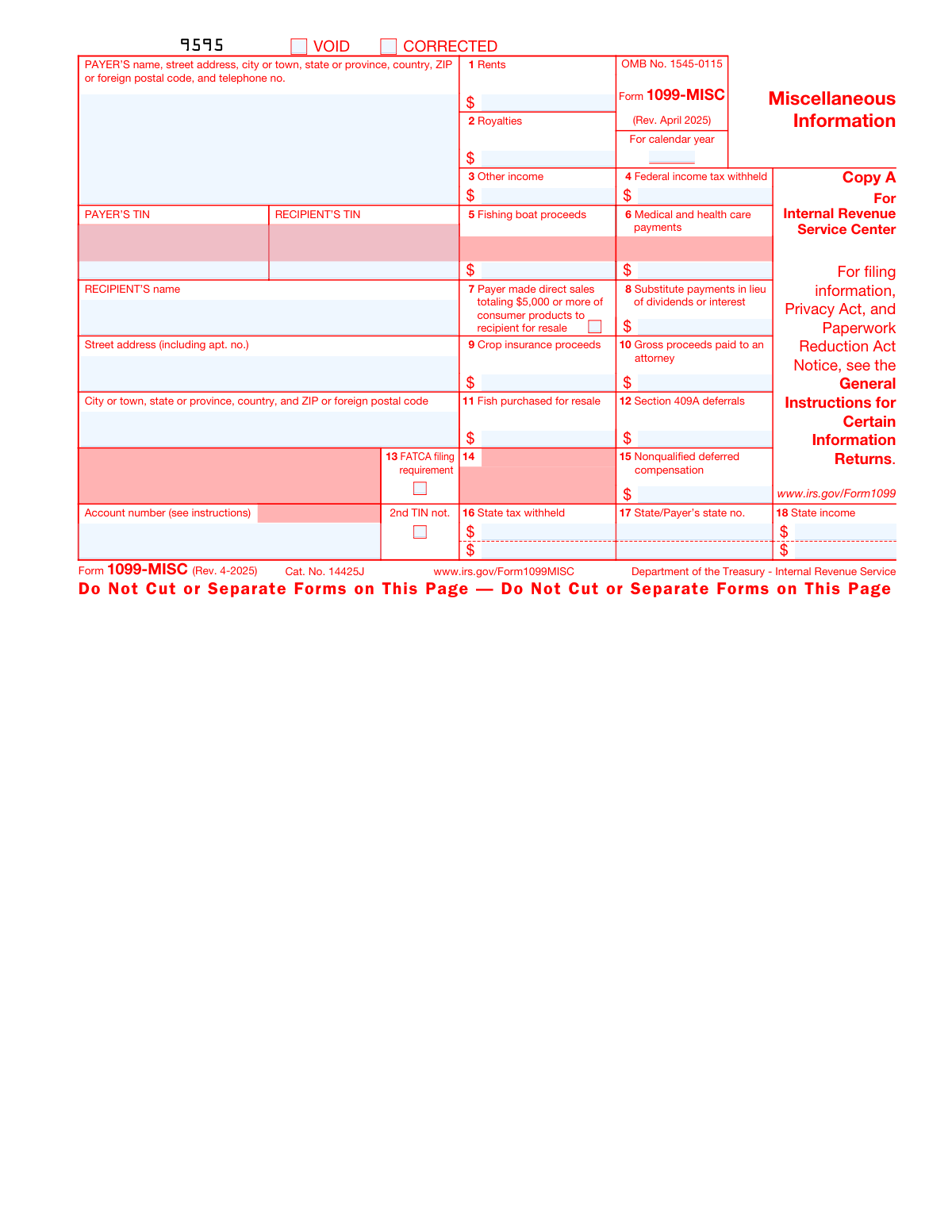
Yes! You can use AI to fill out Form 1099-MISC, Miscellaneous Information
IRS Form 1099-MISC is an information return used to report miscellaneous payments, such as rents, royalties, and other income paid to a non-employee. Payers must issue this form to recipients and file a copy with the IRS, making it a critical document for tax compliance and income reporting. Today, this form can be filled out quickly and accurately using AI-powered services like Instafill.ai, which can also convert non-fillable PDF versions into interactive fillable forms.
Our AI automatically handles information lookup, data retrieval, formatting, and form filling.
It takes less than a minute to fill out 1099-MISC using our AI form filling.
Securely upload your data. Information is encrypted in transit and deleted immediately after the form is filled out.
Form specifications
| Form name: | Form 1099-MISC, Miscellaneous Information |
| Number of fields: | 119 |
| Number of pages: | 6 |
| Language: | English |
| Categories: | SCE forms, 1099 forms |
Instafill Demo: How to fill out PDF forms in seconds with AI
How to Fill Out 1099-MISC Online for Free in 2026
Are you looking to fill out a 1099-MISC form online quickly and accurately? Instafill.ai offers the #1 AI-powered PDF filling software of 2026, allowing you to complete your 1099-MISC form in just 37 seconds or less.
Follow these steps to fill out your 1099-MISC form online using Instafill.ai:
- 1 Navigate to Instafill.ai and upload your Form 1099-MISC or select it from the template library.
- 2 Use the AI assistant to accurately enter the Payer's information, including name, address, and Taxpayer Identification Number (TIN).
- 3 Provide the Recipient's full name, address, and TIN in the designated fields.
- 4 Input the specific payment amounts into the correct boxes, such as Box 1 for Rents or Box 3 for Other Income, following the AI's guidance.
- 5 Enter any federal or state income tax that was withheld from the payments.
- 6 Review all entered information for accuracy, using the AI-powered validation to check for common errors before finalizing.
- 7 Download the completed Form 1099-MISC to print for mailing or prepare for electronic filing as required.
Our AI-powered system ensures each field is filled out correctly, reducing errors and saving you time.
Why Choose Instafill.ai for Your Fillable 1099-MISC Form?
Speed
Complete your 1099-MISC in as little as 37 seconds.
Up-to-Date
Always use the latest 2026 1099-MISC form version.
Cost-effective
No need to hire expensive lawyers.
Accuracy
Our AI performs 10 compliance checks to ensure your form is error-free.
Security
Your personal information is protected with bank-level encryption.
Frequently Asked Questions About Form 1099-MISC
Form 1099-MISC, Miscellaneous Information, is used to report certain types of payments made in the course of a trade or business. This includes payments for rents, royalties, medical and health care, crop insurance proceeds, and gross proceeds paid to an attorney.
A business or individual (payer) who has made reportable miscellaneous payments of at least $600 to a person or company (recipient) during the calendar year must file this form. This typically applies to payments made to non-employees.
No, the Copy A available for download online is for informational purposes only and is not scannable. Filing a non-scannable Copy A may result in a penalty, so you must order official forms from the IRS or e-file.
Copy A is sent to the IRS, Copy B is sent to the recipient for their tax records, and Copy 1 is sent to the recipient's State Tax Department when required. You can print and send Copy B from a downloaded PDF, but Copy A has special printing requirements.
If you are the recipient, you should contact the payer who issued the form and request that they issue a corrected Form 1099-MISC. If you cannot get it corrected, you should attach an explanation to your tax return.
You may be required to e-file if you are filing 10 or more information returns in total. The IRS strongly encourages e-filing even if you have fewer than 10 returns to file.
Box 3 is for miscellaneous income that doesn't fit into other specific categories, such as prizes, awards, taxable damages, or payments to a beneficiary of a deceased employee. If it is business income, it should be reported on Schedule C or F.
This box shows gross proceeds paid to an attorney in connection with legal services. The recipient should only report the taxable portion of these proceeds as income on their tax return.
These boxes are used to report any state income tax that was withheld from the payments. The form allows for reporting information for up to two different states, including the amount withheld, the payer's state ID number, and the total state income.
The 'CORRECTED' box should be checked if you are filing this form to fix an error on a Form 1099-MISC that was previously filed for the same recipient and tax year. You will need to provide the corrected information.
Yes, services like Instafill.ai use AI to accurately auto-fill form fields from your data, which can save significant time and reduce errors. This is especially helpful when preparing multiple forms for different recipients.
You can use a service like Instafill.ai to fill out your Form 1099-MISC online. Simply upload the form, and the platform will make it interactive, allowing you to fill, sign, and download it easily.
If you have a non-fillable or 'flat' PDF, you can use a tool like Instafill.ai to convert it into an interactive, fillable form. This allows you to easily type your information into the correct fields without having to print and fill by hand.
Compliance 1099-MISC
Validation Checks by Instafill.ai
1
Payer's TIN Format Validation
Checks if the Payer's TIN is a 9-digit number, formatted as an Employer Identification Number (XX-XXXXXXX). This is critical for the IRS to correctly identify the paying entity and link the form to the payer's account. A failure in this validation would lead to the form being rejected or processed incorrectly, potentially resulting in penalties.
2
Recipient's TIN Format Validation
Verifies that the Recipient's TIN is a valid 9-digit number in either Social Security Number (XXX-XX-XXXX) or Employer Identification Number (XX-XXXXXXX) format. This is the most critical piece of information for associating the reported income with the correct taxpayer. An invalid TIN will cause the filing to be rejected by the IRS and may lead to penalty notices.
3
Payer Information Completeness
Ensures that the Payer's name, TIN, full street address, city, state, and ZIP code are all present. Complete and accurate payer information is required by the IRS for processing and is necessary for the recipient to identify the source of their income. Incomplete information can lead to filing rejections or delays.
4
Recipient Information Completeness
Confirms that the Recipient's name, TIN, and full mailing address are all filled out. This information is essential for delivering the form to the recipient and for the IRS to match the reported income to the correct individual or business entity. Missing recipient details will render the form invalid for tax reporting purposes.
5
Calendar Year Validity
Validates that the 'For calendar year' field contains a valid, 4-digit year (e.g., 2025) that is relevant to the current filing period. This check prevents errors from typos or submitting a form for a nonsensical year (e.g., 1950 or 3000). An invalid year would cause immediate rejection by the IRS.
6
Income or Payment Presence
Verifies that the form reports at least one type of payment, either by having a value greater than zero in one of the monetary boxes (1-6, 8-12, 15) or by having Box 7 checked. A Form 1099-MISC must report an actual transaction to be valid. Submitting a form with no payment information serves no purpose and will be considered a filing error.
7
Federal Withholding Consistency
Checks that if 'Federal income tax withheld' (Box 4) contains an amount greater than zero, then the total income reported across all relevant boxes is also greater than zero. It is logically impossible to withhold tax from a payment of zero. This validation prevents filing a contradictory form that would be flagged for review or rejected by the IRS.
8
State Information Integrity
Ensures that if an amount is entered for 'State tax withheld' (Box 16) or 'State income' (Box 18), the corresponding 'State/Payer’s state no.' (Box 17) field is also filled for that row. State tax agencies require all three pieces of information to correctly process state-level income reporting. Incomplete state data can result in filing errors and compliance issues at the state level.
9
Mutually Exclusive VOID and CORRECTED Flags
Validates that the 'VOID' and 'CORRECTED' checkboxes are not selected at the same time. A form's intent must be clear; it is either being voided or it is correcting a prior submission, but it cannot be both. Selecting both options creates an ambiguity that prevents proper processing and indicates a user error.
10
Monetary Field Numeric Format
Confirms that all fields intended for dollar amounts (e.g., Boxes 1, 2, 4, 16, 18) contain only valid, non-negative numeric characters. This check prevents data corruption from accidental text entry like 'N/A' or 'one thousand'. Failure to provide clean numeric data will cause calculation errors and lead to rejection of the electronic file.
11
Federal Withholding Plausibility
Compares the amount in 'Federal income tax withheld' (Box 4) against the sum of all income boxes. It flags the entry for review if the withheld amount is greater than the total reported income. While not strictly impossible, this scenario is highly unusual and often indicates a significant data entry error that needs correction before filing.
12
ZIP Code Format Validation
Checks that the ZIP codes for both the Payer and Recipient are in a valid US format (either 5 digits like '12345' or 9 digits like '12345-6789'). A valid ZIP code is crucial for mail delivery of the recipient's copy and for the IRS to validate the address information. An invalid format can lead to returned mail and data rejection.
Common Mistakes in Completing 1099-MISC
A critical error is printing and filing the informational Copy A downloaded from the IRS website. This version is not scannable and will be rejected, potentially leading to penalties. This happens because filers are trying to be compliant but are unaware of the specific scannability requirement for official IRS processing. To avoid this, filers must use the official red-ink, scannable Copy A forms ordered from the IRS or e-file, which is the recommended method.
Entering an incorrect Taxpayer Identification Number (TIN) or a recipient name that doesn't match the TIN on file with the IRS is a frequent mistake. This can be due to a simple typo or using a DBA/trade name instead of the legal name associated with the EIN or SSN. This error will cause the filing to be rejected, can trigger backup withholding requirements, and may result in penalties for the payer. Always verify the recipient's information using a Form W-9 before issuing a 1099.
Payers often misclassify income, for example, reporting payments for rent (Box 1) or royalties (Box 2) in the 'Other income' (Box 3) field. This mistake happens due to a misunderstanding of the specific definitions for each box. This can cause significant problems for the recipient, as different types of income are reported on different schedules of their tax return, potentially leading to incorrect tax calculations or audit flags. Carefully read the box descriptions to ensure each payment is categorized correctly.
A major error is reporting nonemployee compensation (payments to independent contractors for services) on Form 1099-MISC. Since 2020, this income must be reported on Form 1099-NEC. This mistake persists due to filers being accustomed to the old format where this income was reported in Box 7 of the 1099-MISC. Using the wrong form will lead to processing errors and requires filing a corrected return on the proper form, creating significant administrative burden.
Leaving out details like an apartment number, suite, or entering an incorrect ZIP code for either the payer or recipient is a common oversight. This can result in the form being undeliverable to the recipient, causing the payer to fail the requirement to furnish a copy by the deadline. It can also cause issues with state filings if the address is used to determine tax jurisdiction. Always use the full, validated mailing address, including any secondary unit designators.
Filers may incorrectly check the 'CORRECTED' box on an original filing or, more commonly, forget to check it when submitting a revised form. This creates confusion in the IRS database, as they may process the correction as a duplicate or ignore the original, leading to incorrect income totals for the recipient. The 'CORRECTED' box should only be checked when you are fixing information on a previously accepted return for the same payee and tax year.
The state reporting section (Boxes 16-18) is frequently filled out incorrectly or incompletely. Common errors include entering state tax withheld (Box 16) but omitting the corresponding state income (Box 18) or the Payer's State ID number (Box 17). This incomplete data can cause the state tax agency to reject the filing or create a mismatch with the recipient's state tax return. Ensure all three fields for a given state are completed if any state information is required.
When filling out paper forms, filers sometimes include dollar signs ($) or commas (,) in the monetary fields, which can interfere with the IRS's scanning technology. When e-filing, they might enter values with more than two decimal places. These formatting errors can cause the form to be misread or rejected. Monetary amounts should be entered using only numbers and a decimal point (e.g., '1234.56'), with no other symbols.
When a payment is made to an attorney in connection with legal services (e.g., a settlement), the entire gross amount must be reported in Box 10, not just the portion that is the attorney's fee. Payers often mistakenly report only the attorney's share, which is incorrect. This can lead to underreporting of income and scrutiny from the IRS. The full amount paid must be reported, and the recipient is responsible for allocating the taxable and non-taxable portions on their own return.
The IRS instructions warn that Copy A must be scannable. Filers who download the PDF and fill it out by hand risk submitting a form with illegible handwriting that cannot be processed correctly. Even typing onto a 'flat' PDF may not produce a machine-readable result. This can lead to processing delays and penalties. To avoid this, use official software or services that generate compliant, scannable forms. AI-powered tools like Instafill.ai can convert non-fillable PDFs into fillable versions and ensure data is entered in the correct format for compliance.
Saved over 80 hours a year
“I was never sure if my IRS forms like W-9 were filled correctly. Now, I can complete the forms accurately without any external help.”
Kevin Martin Green
Your data stays secure with advanced protection from Instafill and our subprocessors

Robust compliance program
Transparent business model
You’re not the product. You always know where your data is and what it is processed for.
ISO 27001, HIPAA, and GDPR
Our subprocesses adhere to multiple compliance standards, including but not limited to ISO 27001, HIPAA, and GDPR.
Security & privacy by design
We consider security and privacy from the initial design phase of any new service or functionality. It’s not an afterthought, it’s built-in, including support for two-factor authentication (2FA) to further protect your account.
Fill out 1099-MISC with Instafill.ai
Worried about filling PDFs wrong? Instafill securely fills form-1099-misc-miscellaneous-information forms, ensuring each field is accurate.