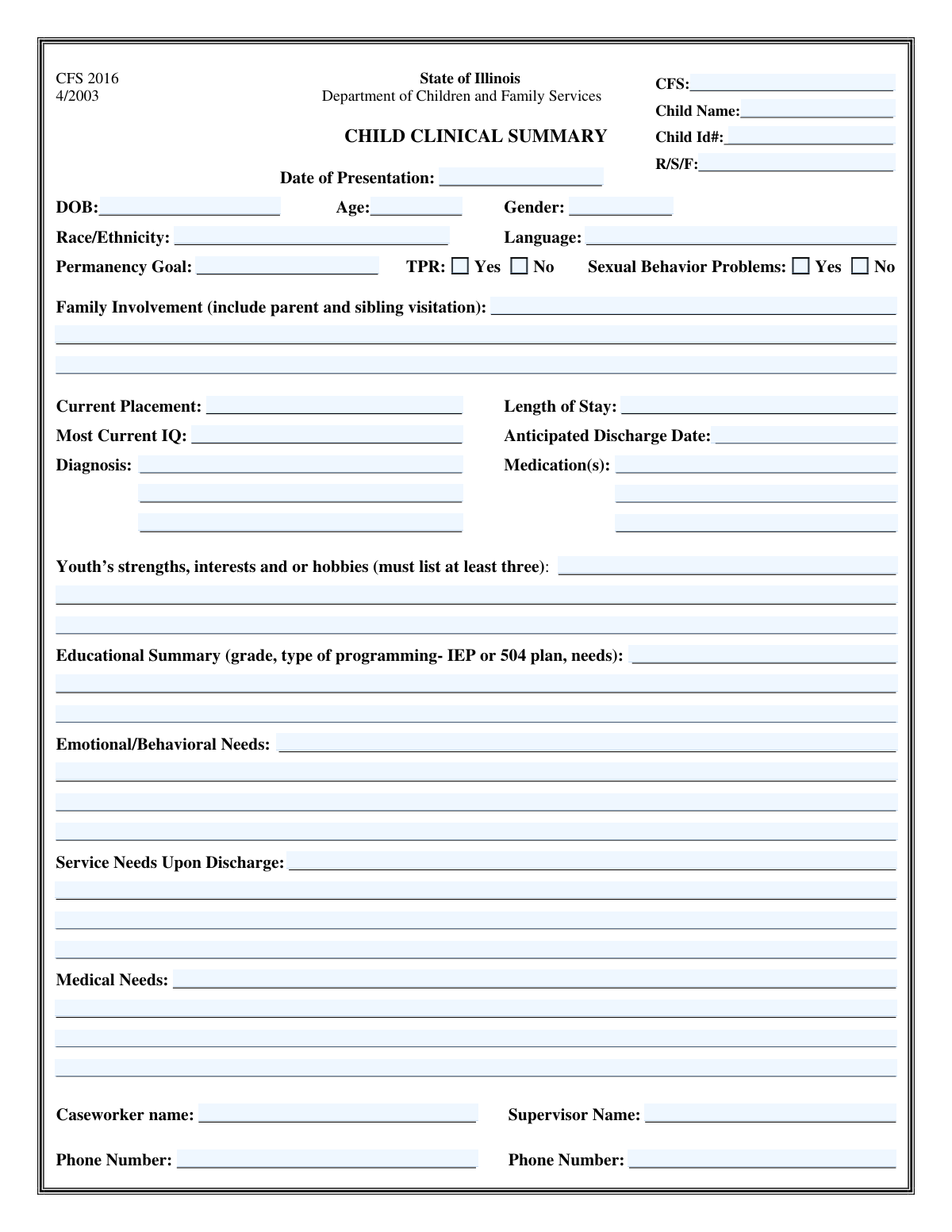
Yes! You can use AI to fill out Child and Adolescent Needs and Strengths Summary
The Child and Adolescent Needs and Strengths (CANS) Summary is a crucial document within child and family services that provides a holistic overview of a child's situation. It captures everything from basic identification and clinical diagnoses to emotional needs, strengths, and future service requirements, ensuring informed decision-making for the child's care and permanency planning. Today, this detailed form can be filled out quickly and accurately using AI-powered services like Instafill.ai, which can also convert non-fillable PDF versions into interactive fillable forms.
Our AI automatically handles information lookup, data retrieval, formatting, and form filling.
It takes less than a minute to fill out CANS Summary using our AI form filling.
Securely upload your data. Information is encrypted in transit and deleted immediately after the form is filled out.
Form specifications
| Form name: | Child and Adolescent Needs and Strengths Summary |
| Number of fields: | 56 |
| Number of pages: | 1 |
| Filled form examples: | Form CANS Summary Examples |
| Language: | English |
Instafill Demo: How to fill out PDF forms in seconds with AI
How to Fill Out CANS Summary Online for Free in 2026
Are you looking to fill out a CANS SUMMARY form online quickly and accurately? Instafill.ai offers the #1 AI-powered PDF filling software of 2026, allowing you to complete your CANS SUMMARY form in just 37 seconds or less.
Follow these steps to fill out your CANS SUMMARY form online using Instafill.ai:
- 1 Navigate to Instafill.ai and upload or select the Child and Adolescent Needs and Strengths Summary form.
- 2 Use the AI assistant to populate the 'Child Identification' and 'Child Details' sections with information from your case files.
- 3 Enter the child's clinical information, including current placement, diagnoses, medications, and permanency goal status.
- 4 Fill in the narrative sections describing the youth's strengths, educational summary, emotional/behavioral needs, medical needs, and family involvement.
- 5 Detail the 'Service Needs Upon Discharge' to create a clear plan for the child's transition and future care.
- 6 Input the names and contact information for the responsible caseworker and their supervisor.
- 7 Review the entire form for accuracy and completeness, make any necessary corrections, and then securely save, download, or share the completed document.
Our AI-powered system ensures each field is filled out correctly, reducing errors and saving you time.
Why Choose Instafill.ai for Your Fillable CANS Summary Form?
Speed
Complete your CANS Summary in as little as 37 seconds.
Up-to-Date
Always use the latest 2026 CANS Summary form version.
Cost-effective
No need to hire expensive lawyers.
Accuracy
Our AI performs 10 compliance checks to ensure your form is error-free.
Security
Your personal information is protected with bank-level encryption.
Frequently Asked Questions About Form CANS Summary
This form is used to create a comprehensive profile of a child within the Child and Family Services (CFS) system. It gathers critical information about the child's identity, clinical status, needs, and permanency plan to support case management and service planning.
This form is typically completed by the assigned caseworker or a related child welfare professional who has direct knowledge of the child's case. The supervisor's information is also required for oversight and contact purposes.
The 'CFS Number' is likely the overall case file number for the family or situation, while the 'Child ID Number' is a unique identifier assigned specifically to the individual child. Ensure you enter both correctly to avoid any data mix-ups.
While not explicitly defined, 'R/S/F' likely refers to a specific code system used by your agency for Race, Sex, and Foster/Residential status. Please consult your agency's internal guidelines or your supervisor for the correct code to enter in this field.
TPR stands for Termination of Parental Rights. You should check 'Yes' if a court has legally and permanently terminated the rights of the child's parents, and 'No' if parental rights are still intact.
This field should state the primary long-term goal for the child's living situation, as determined by the case plan. Examples include 'Reunification with parent(s),' 'Adoption,' 'Guardianship with a relative,' or 'Another Planned Permanent Living Arrangement (APPLA).'
If a recent IQ score is unavailable, you can note 'N/A' or 'Not Available' in the field. It is best to also indicate if testing is planned or provide the date of the last known assessment, if applicable.
The form provides space for the top three entries; list the most critical or primary diagnoses and medications first. If additional space is needed, you may need to attach a separate addendum, so check with your supervisor for the correct procedure.
Provide a concise yet thorough summary that gives a clear picture of the situation. Include key details such as visitation schedules for family involvement, and specific behaviors, triggers, and successful intervention strategies for emotional needs.
Submission procedures vary by agency, but this form is typically uploaded to the child's electronic case file or submitted to a supervisor for review and approval. Please refer to your agency's specific protocol for filing case documents.
Yes, services like Instafill.ai use AI to help you fill out forms faster and more accurately. AI can auto-fill repetitive information from your records, suggest standardized entries, and help ensure all required fields are completed.
Simply upload the form to the Instafill.ai platform. The AI will analyze the document and create an interactive version where you can easily type in your information, check boxes, and add your signature before downloading or printing.
If you have a flat, non-fillable PDF, you can use a service like Instafill.ai. It automatically converts non-fillable PDFs into interactive, fillable forms, allowing you to complete them digitally without needing to print and write by hand.
Compliance CANS Summary
Validation Checks by Instafill.ai
1
Age Calculation Consistency
This validation cross-references the child's 'Date of Birth', the 'Date of Presentation', and the entered 'Age'. It calculates the age based on the two dates and flags a discrepancy if it does not match the manually entered age. This prevents data entry errors that could impact eligibility for age-specific services and ensures the child's record is chronologically accurate.
2
Logical Date Sequence for Presentation and Discharge
This check ensures the 'Anticipated Discharge Date' is chronologically after the 'Date of Presentation'. A discharge date cannot precede the date the child was presented for services. This validation is crucial for maintaining logical consistency in the child's timeline and for accurate planning of services and placement.
3
Date of Birth Precedes Presentation Date
This validation confirms that the child's 'Date of Birth' is a date that occurs before the 'Date of Presentation'. It is a fundamental logical check to prevent impossible scenarios, such as a presentation date that is before the child was born. Failure ensures that basic data entry mistakes are caught, maintaining the integrity of the child's core demographic information.
4
Exclusive Selection for TPR Status
This check validates that for the 'TPR' (Termination of Parental Rights) status, only one option ('Yes' or 'No') is selected. A child cannot simultaneously have their parental rights terminated and not terminated. This ensures the data is unambiguous and legally sound, which is critical for permanency planning and legal proceedings.
5
Caseworker Phone Number Format
This validation ensures the 'Caseworker Phone Number' is entered in a recognizable and valid format, such as a 10-digit number (e.g., XXX-XXX-XXXX or XXXXXXXXXX). This is important for ensuring that caseworkers can be contacted reliably in case of emergencies or for case collaboration. An invalid format would render the contact information useless and could delay critical communications.
6
Required Fields Completeness Check
This check verifies that all mandatory fields, such as 'Child Name', 'Date of Birth', 'CFS Number', and 'Caseworker Name', are not empty. Missing critical information can render the entire form submission incomplete and unusable for official records or service planning. This validation forces the user to provide essential data before the form can be processed.
7
Valid IQ Score Range
This validation ensures that the value entered for 'Most Current IQ' is a number that falls within a clinically plausible range (e.g., 40 to 200). This prevents typographical errors, such as entering a phone number or a date, into the IQ field. Maintaining accurate clinical data is essential for appropriate educational and therapeutic planning.
8
CFS Number Format Validation
This check verifies that the 'CFS Number' conforms to the expected format, which might be a specific combination of letters and numbers or a fixed length. This ensures the identifier is valid and can be used to correctly link the form to the child's master file in the Child and Family Services system. An incorrect CFS number could lead to the record being lost or misfiled.
9
Diagnosis Field Dependency
This validation rule ensures that if 'Diagnosis 2' or 'Diagnosis 3' contains data, then 'Diagnosis 1' must also be filled out. A child cannot have a second diagnosis without a primary one. This maintains a logical order and structure for clinical information, ensuring the primary diagnosis is always captured.
10
Narrative Field Minimum Content
This check verifies that key descriptive fields like 'Emotional and Behavioral Needs' and 'Service Needs Upon Discharge Details' contain more than a trivial number of characters (e.g., >25). This discourages users from leaving these critical sections blank or entering unhelpful text like 'N/A' when a detailed description is required for proper care planning. It ensures that substantive thought has been put into the child's needs assessment.
11
Supervisor Phone Number Format
This validation checks that the 'Supervisor Phone Number' is entered in a standard, valid phone number format. This is crucial for accountability and escalation pathways, allowing for timely contact with supervisory staff when needed. An incorrectly formatted number would hinder communication and could delay important case decisions or emergency responses.
12
Exclusive Selection for Sexual Behavior Problems
This check ensures that for the 'Sexual Behavior Problems' status, only one option ('Yes' or 'No') is selected, but not both. This prevents contradictory information from being recorded, which is vital for accurate assessment and treatment planning. Clear, unambiguous data in this sensitive area is necessary to ensure the child receives appropriate and targeted support.
Common Mistakes in Completing CANS Summary
This form requires entering both the child's Date of Birth (DOB) and their current Age. A common mistake is miscalculating the age based on the DOB or using an outdated age from a previous report. This inconsistency can cause processing delays and affect eligibility for age-specific services. To avoid this, always calculate the age based on the DOB and the current date of form submission, or use a tool that can auto-calculate it.
The form asks for both a 'CFS Number' and a 'Child ID Number'. Users often transpose digits, make typos, or confuse the two distinct numbers. An incorrect ID can lead to the entire record being associated with the wrong child, causing serious privacy breaches and delays in care. Always double-check these numbers against the official source document before submission.
For paired yes/no questions like 'TPR Yes/No' (Termination of Parental Rights), users sometimes check both boxes or leave both unchecked. This creates critical ambiguity regarding the child's legal status, halting case progress. It is essential to select only one option to provide a definitive answer for each question.
Fields like 'Family Involvement Details' or 'Emotional and Behavioral Needs' require detailed explanations. A frequent error is providing overly brief, vague, or non-specific answers like 'Good involvement' or 'Needs support'. This lack of detail hinders the ability of other professionals to create effective care and permanency plans. Provide specific examples, frequencies, and observations to paint a clear picture.
The 'Diagnosis' and 'Medications' sections contain complex, technical terms that are easily misspelled. An error in spelling a diagnosis or medication can lead to incorrect treatment, improper service matching, and potentially harmful medical outcomes. It is crucial to copy these terms exactly from official medical records or prescriptions to ensure accuracy.
Fields like 'Date of Presentation' and 'Anticipated Discharge Date' are prone to formatting errors, such as using DD/MM/YYYY instead of the standard MM/DD/YYYY format. This can lead to significant confusion, for example, misinterpreting May 6th (05/06/2024) as June 5th (06/05/2024). To prevent this, consistently use the MM/DD/YYYY format or use a calendar date-picker if available.
In fields like 'Most Current IQ' or 'Current Placement', users may inadvertently enter outdated information from an old file. A child's situation, diagnosis, and test scores can change frequently. Using old data can lead to inappropriate placement and service planning. Always verify that you are using the most recent assessments and records available.
The form contains poorly labeled fields like 'R/S/F Status', 'Text11', and 'undefined', which can confuse the user. This often leads to people guessing what information is needed, entering data in the wrong section, or skipping it entirely, resulting in an incomplete and unreliable record. If the form is a non-fillable PDF, AI-powered tools like Instafill.ai can help convert it into a more structured, fillable version, reducing confusion.
For the 'Caseworker' and 'Supervisor' sections, users might enter a phone number without an area code or misspell a name. This mistake seems minor but can severely impede communication, especially in urgent situations. Always include the full name and complete phone number with the area code to ensure all parties are easily reachable.
Extensive text fields like 'Service Needs Upon Discharge' are sometimes left completely blank, especially if the user is in a hurry or feels the information is redundant. This is a missed opportunity to advocate for the child's future needs and ensure a smooth transition. A detailed plan is essential for continuity of care, and leaving it blank can result in a child being discharged without necessary supports in place.
Saved over 80 hours a year
“I was never sure if my IRS forms like W-9 were filled correctly. Now, I can complete the forms accurately without any external help.”
Kevin Martin Green
Your data stays secure with advanced protection from Instafill and our subprocessors
Robust compliance program
Transparent business model
You’re not the product. You always know where your data is and what it is processed for.
ISO 27001, HIPAA, and GDPR
Our subprocesses adhere to multiple compliance standards, including but not limited to ISO 27001, HIPAA, and GDPR.
Security & privacy by design
We consider security and privacy from the initial design phase of any new service or functionality. It’s not an afterthought, it’s built-in, including support for two-factor authentication (2FA) to further protect your account.
Fill out CANS Summary with Instafill.ai
Worried about filling PDFs wrong? Instafill securely fills child-and-adolescent-needs-and-strengths-summary forms, ensuring each field is accurate.