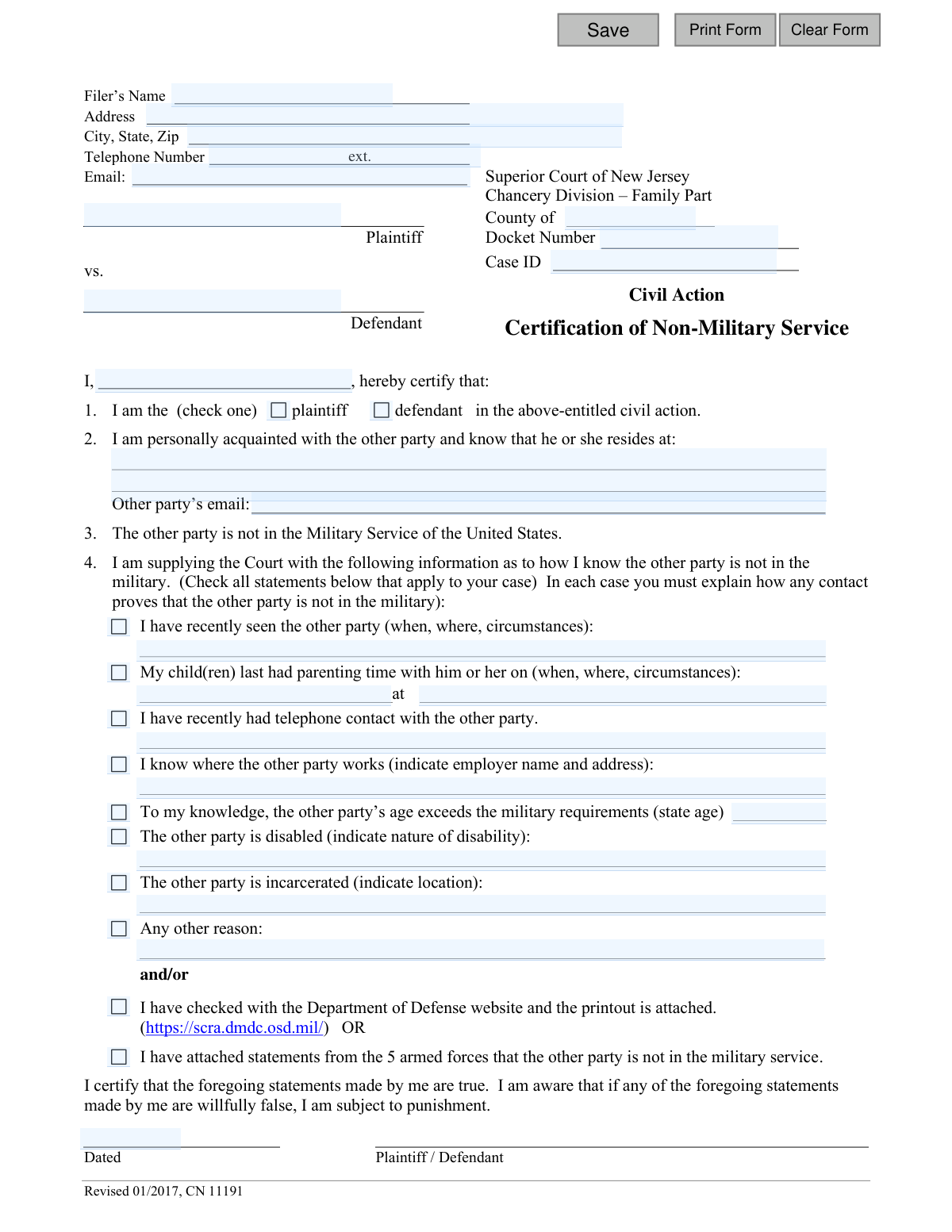
Yes! You can use AI to fill out Superior Court of New Jersey Certification of Non-Military Service
This form is a sworn statement submitted to the Superior Court of New Jersey, Chancery Division – Family Part, to certify that one of the parties in a case is not in active military service. This certification is important for legal proceedings, particularly regarding default judgments, under the Servicemembers Civil Relief Act (SCRA). Today, this form can be filled out quickly and accurately using AI-powered services like Instafill.ai, which can also convert non-fillable PDF versions into interactive fillable forms.
Our AI automatically handles information lookup, data retrieval, formatting, and form filling.
It takes less than a minute to fill out CN 11191 using our AI form filling.
Securely upload your data. Information is encrypted in transit and deleted immediately after the form is filled out.
Form specifications
| Form name: | Superior Court of New Jersey Certification of Non-Military Service |
| Number of fields: | 39 |
| Number of pages: | 1 |
| Language: | English |
Instafill Demo: How to fill out PDF forms in seconds with AI
How to Fill Out CN 11191 Online for Free in 2026
Are you looking to fill out a CN 11191 form online quickly and accurately? Instafill.ai offers the #1 AI-powered PDF filling software of 2026, allowing you to complete your CN 11191 form in just 37 seconds or less.
Follow these steps to fill out your CN 11191 form online using Instafill.ai:
- 1 Navigate to Instafill.ai and upload or select the New Jersey Certification of Non-Military Service form.
- 2 Provide your personal details (Filer's Name, Address, etc.) and the case information (County, Docket Number, etc.) for the AI to populate.
- 3 Indicate whether you are the plaintiff or defendant in the action.
- 4 Enter the other party's known address and your basis for knowing their non-military status.
- 5 Select all applicable reasons for your knowledge of the other party's non-military status and provide specific details as prompted (e.g., date of last contact, place of employment).
- 6 Indicate if you are attaching supporting documentation from the Department of Defense or other armed forces branches.
- 7 Review the completed form for accuracy, then date and e-sign the certification to finalize it.
Our AI-powered system ensures each field is filled out correctly, reducing errors and saving you time.
Why Choose Instafill.ai for Your Fillable CN 11191 Form?
Speed
Complete your CN 11191 in as little as 37 seconds.
Up-to-Date
Always use the latest 2026 CN 11191 form version.
Cost-effective
No need to hire expensive lawyers.
Accuracy
Our AI performs 10 compliance checks to ensure your form is error-free.
Security
Your personal information is protected with bank-level encryption.
Frequently Asked Questions About Form CN 11191
This form is used to certify to the New Jersey Superior Court that the other party in your case is not currently serving in the U.S. military. This is required to comply with the Servicemembers Civil Relief Act (SCRA), which provides legal protections to active-duty personnel.
The plaintiff or defendant in a New Jersey Family Part civil action must complete this form. You are certifying the military status of the *other* party involved in your case, not your own.
You will need your case information (Docket Number, County), your contact details, and the other party's current address and email. You also need specific facts to prove their non-military status, such as details of recent contact or their employment information.
You must provide specific evidence by checking all applicable boxes and writing a detailed explanation for each. For example, if you've seen them recently, you must state when, where, and the circumstances that prove they are not on active duty.
This refers to the official Servicemembers Civil Relief Act (SCRA) website, which allows you to search for an individual's military status. If you use this method, you must attach a printout of the search results to this form.
The most reliable method is to use the Department of Defense (DoD) website to get an official status verification. If you cannot obtain proof through personal knowledge or the DoD website, you should consult with an attorney for guidance.
This form should be filed with the Superior Court of New Jersey, Chancery Division – Family Part, in the county where your case is being heard. It is typically submitted along with other documents related to your civil action.
This section is for any other relevant facts that support your claim, such as knowing the person is a full-time student, receives unemployment benefits, or has a specific health condition. Be as specific as possible in your explanation.
Yes, services like Instafill.ai use AI to help you accurately auto-fill forms like this one. This can save you time and help reduce errors by populating fields with your saved information.
Simply upload the Certification of Non-Military Service PDF to the Instafill.ai platform. The AI will identify the form fields, allowing you to click and type your information directly into the document on your computer.
Instafill.ai can convert non-fillable or 'flat' PDFs into interactive, fillable forms. Just upload your document, and the platform will make the fields editable so you can complete and save it easily.
You should check all boxes that apply to your situation to provide the strongest possible evidence. Providing multiple reasons, with clear explanations, strengthens your certification.
By signing the form, you certify that your statements are true. If you willfully provide false information, you are subject to punishment by the court.
Compliance CN 11191
Validation Checks by Instafill.ai
1
Ensures Filer's Name is Provided
This check verifies that the 'Filer’s Name' field is not empty. The filer's name is essential for identifying the person making the certification and is a fundamental requirement for any legal document. If this field is left blank, the submission will be rejected, and the user will be prompted to enter their full name.
2
Requires at Least One Case Identifier
This validation ensures that either the 'Docket Number' or the 'Case ID' field is filled out. These identifiers are critical for associating the certification with the correct legal case in the court's system. Without this information, the document cannot be processed or filed correctly, leading to a validation failure.
3
Validates Party Type Selection
This check confirms that the filer has selected one of the 'PartyType' options (plaintiff or defendant). This selection clarifies the filer's role in the civil action, which is necessary context for the court. Failure to select a party type will result in an error, as the form is incomplete without this information.
4
Requires at Least One Reason for Non-Military Status
This validation ensures that at least one checkbox from section 4 (options 4a through 4j) is selected. The entire purpose of the form is to provide evidence of non-military status, so at least one method of verification must be chosen. If no reason is selected, the form submission will be blocked as it fails to fulfill its primary function.
5
Conditional Requirement for 'Seen Other Party' Details
If the checkbox 'I have recently seen the other party' (4a) is selected, this check verifies that the corresponding details field (4aDetails) is filled out. The form requires an explanation of when, where, and under what circumstances the contact occurred. An empty details field makes the claim unsubstantiated and will trigger a validation error.
6
Conditional Requirement for 'Parenting Time' Details
When the checkbox for 'My child(ren) last had parenting time with him or her' (4b) is checked, this validation ensures both the date (4bDt) and location/circumstances (4bLoc) fields are completed. This information provides specific, verifiable details to support the certification. Missing either the date or the location will result in an incomplete entry and a validation failure.
7
Conditional Requirement for Employer Details
This check is triggered if the 'I know where the other party works' checkbox (4d) is selected. It validates that the corresponding details field (4dDetails), which asks for the employer's name and address, is not empty. This information provides a concrete way to verify the other party's civilian status, and leaving it blank would invalidate the selection.
8
Validates Age for Military Exemption
If the checkbox 'the other party’s age exceeds the military requirements' (4e) is selected, this validation ensures the 'state age' field (4eAge) contains a valid, plausible number. The age entered should be a positive integer, typically above 42, to be consistent with military age limits. An invalid or non-numeric entry will cause the validation to fail.
9
Validates Signature Date Format and Logic
This check verifies that the signature date ('sigDt') is in a valid date format (e.g., MM/DD/YYYY) and is not a future date. A legal certification must be dated on or before the day of submission to be valid. A future date would render the document legally void, so the system will reject such entries.
10
Validates Email Address Format
This validation inspects the 'filerEmail' and 'otherPartyEmail' fields to ensure they conform to a standard email address format (e.g., '[email protected]'). Correctly formatted email addresses are essential for official communication and record-keeping. An invalid format will prevent submission and prompt the user for correction.
11
Validates Phone Number Format
This check ensures that the 'filerPhone' field is in a recognizable U.S. phone number format (e.g., XXX-XXX-XXXX or (XXX) XXX-XXXX). A valid phone number is crucial for the court to be able to contact the filer if necessary. The validation prevents the entry of incorrectly formatted or incomplete numbers.
12
Ensures Court County is Specified
This validation confirms that the 'County of' field ('typeCounty') has been filled in. Specifying the county is mandatory for routing the document to the correct Superior Court division. A missing county name will halt the submission process, as the document's jurisdiction would be unknown.
13
Requires Plaintiff and Defendant Names
This check verifies that both the 'Plaintiff' ('plaName') and 'Defendant' ('defName') fields are completed. These names are essential for identifying the parties of the case and are a core component of the case caption. The form is incomplete and cannot be filed without the names of both primary parties.
14
Ensures Other Party's Residence is Provided
This validation checks that the address field under section 2 ('reside1') is not empty. The form includes a certification statement that the filer knows where the other party resides, making this a required piece of information. Leaving this field blank contradicts the certification and will result in a validation error.
Common Mistakes in Completing CN 11191
People often forget to fill in the Docket Number and Case ID, or they accidentally transpose numbers when entering them manually. This is a critical error as it prevents the court clerk from correctly filing the document with the associated case, leading to processing delays or outright rejection of the filing. To avoid this, carefully double-check these numbers against official court documents before submitting.
A frequent mistake is providing weak or non-specific details in the explanation fields. For example, writing "Saw them last week" instead of "I saw the defendant on May 15, 2024, at their civilian job at Acme Corp, where they work as an accountant." The court requires specific facts to conclude the person is not in the military; vague statements are insufficient and can cause a judge to reject the certification, delaying the case.
Users may tick a checkbox in Section 4, such as "I have recently had telephone contact," but then leave the corresponding explanation field blank. Each checked statement serves as a piece of evidence that must be substantiated with a written description of the circumstances. A checked box without an explanation is invalid and weakens the entire certification, potentially requiring a refiling.
A common error is checking box 4i or 4j, indicating a Department of Defense (DoD) website printout or statements from the armed forces are attached, but then forgetting to include these documents with the filing. The form relies on this physical evidence to support the claim. Without the attachments, the certification is incomplete and will likely be deemed insufficient by the court.
Submitting the form without a signature or date is a classic but common mistake. An unsigned or undated legal document is invalid and has no legal effect, resulting in immediate rejection by the court clerk. This oversight causes significant delays and can lead to missed deadlines, so always perform a final review to ensure these fields are complete.
Filers sometimes provide information that doesn't logically prove non-military status. For instance, stating "We spoke on the phone about the kids" does not, by itself, prove the person isn't deployed. The explanation must clearly connect the event to civilian life, such as, "He called from his landline in Trenton, NJ, and discussed his civilian work schedule for the upcoming week."
It's easy to overlook key identification fields, such as the filer's own address, the other party's name, or the other party's full residence address in item 2. The court needs this information to identify all parties involved and to maintain proper records. Incomplete information can lead to the form being rejected, stalling legal proceedings. AI-powered tools like Instafill.ai can prevent this by ensuring all required fields are populated from a saved profile.
In item 1, filers sometimes neglect to check either the "plaintiff" or "defendant" box, or they check the wrong one. This simple mistake creates ambiguity about who is submitting the certification and in what capacity. It can cause confusion for the court clerk and may require clarification or refiling, adding unnecessary steps to the process.
Many court forms are distributed as non-fillable PDFs, leading to messy, handwritten submissions that are prone to errors and may be difficult for court staff to read. This can result in data entry mistakes on the court's end or outright rejection of the form. Advanced tools like Instafill.ai can convert flat PDFs into interactive, fillable forms, ensuring entries are legible, properly formatted, and validated to prevent common mistakes.
Specifying the wrong "County" for the Superior Court is a frequent error. Legal filings are jurisdiction-specific, and submitting a document to the wrong county courthouse will cause it to be returned, often after a significant delay. This can be disastrous if a filing deadline is approaching, so always verify the correct county of venue from existing case documents.
Saved over 80 hours a year
“I was never sure if my IRS forms like W-9 were filled correctly. Now, I can complete the forms accurately without any external help.”
Kevin Martin Green
Your data stays secure with advanced protection from Instafill and our subprocessors

Robust compliance program
Transparent business model
You’re not the product. You always know where your data is and what it is processed for.
ISO 27001, HIPAA, and GDPR
Our subprocesses adhere to multiple compliance standards, including but not limited to ISO 27001, HIPAA, and GDPR.
Security & privacy by design
We consider security and privacy from the initial design phase of any new service or functionality. It’s not an afterthought, it’s built-in, including support for two-factor authentication (2FA) to further protect your account.
Fill out CN 11191 with Instafill.ai
Worried about filling PDFs wrong? Instafill securely fills superior-court-of-new-jersey-certification-of-non-military-service forms, ensuring each field is accurate.