Yes! You can use AI to fill out Superior Court of New Jersey, Consent Order to Delete - eCourts
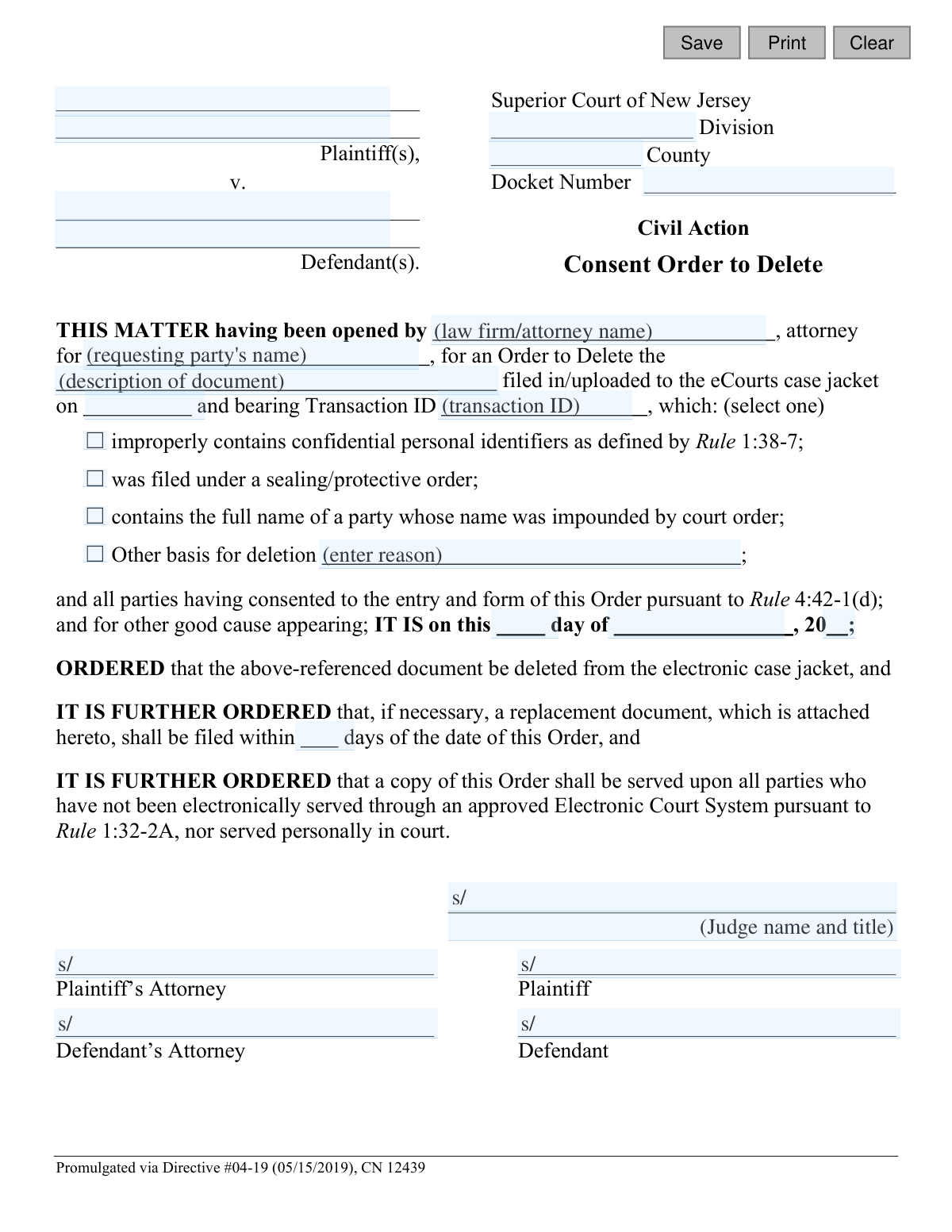
This is a legal document filed in the Superior Court of New Jersey to obtain a court order for deleting a specific document from the eCourts system. It is used when a filed document contains errors, confidential information, or was filed improperly, and requires the consent of all parties involved in the case. Today, this form can be filled out quickly and accurately using AI-powered services like Instafill.ai, which can also convert non-fillable PDF versions into interactive fillable forms.
Consent Order to Delete is part of the
New Jersey forms and superior court forms categories on Instafill.
Our AI automatically handles information lookup, data retrieval, formatting, and form filling.
It takes less than a minute to fill out Consent Order to Delete using our AI form filling.
Securely upload your data. Information is encrypted in transit and deleted immediately after the form is filled out.
Form specifications
| Form name: | Superior Court of New Jersey, Consent Order to Delete - eCourts |
| Number of fields: | 30 |
| Number of pages: | 1 |
| Language: | English |
Instafill Demo: How to fill out PDF forms in seconds with AI
How to Fill Out Consent Order to Delete Online for Free in 2026
Are you looking to fill out a CONSENT ORDER TO DELETE form online quickly and accurately? Instafill.ai offers the #1 AI-powered PDF filling software of 2026, allowing you to complete your CONSENT ORDER TO DELETE form in just 37 seconds or less.
Follow these steps to fill out your CONSENT ORDER TO DELETE form online using Instafill.ai:
- 1 Navigate to Instafill.ai and upload or select the 'Consent Order to Delete - eCourts' form.
- 2 Use the AI assistant to automatically populate case information, including Plaintiff(s), Defendant(s), Division, County, and Docket Number.
- 3 Enter the specific details of the document to be deleted, such as its description, filing date, and Transaction ID.
- 4 Select the appropriate checkbox or provide a written explanation for the reason for deletion (e.g., improperly contains confidential identifiers).
- 5 Indicate if a replacement document will be filed and specify the timeframe for its submission.
- 6 Review all the information with the AI's help to ensure accuracy, then obtain the required signatures from all consenting parties and their attorneys.
- 7 Download the completed and signed Consent Order for filing with the New Jersey eCourts system.
Our AI-powered system ensures each field is filled out correctly, reducing errors and saving you time.
Why Choose Instafill.ai for Your Fillable Consent Order to Delete Form?
Speed
Complete your Consent Order to Delete in as little as 37 seconds.
Up-to-Date
Always use the latest 2026 Consent Order to Delete form version.
Cost-effective
No need to hire expensive lawyers.
Accuracy
Our AI performs 10 compliance checks to ensure your form is error-free.
Security
Your personal information is protected with bank-level encryption.
Frequently Asked Questions About Form Consent Order to Delete
This form is used to request the New Jersey Superior Court to delete a document that was previously filed or uploaded to the electronic case file (eCourts case jacket), when all parties in the case agree to the deletion.
Any party (plaintiff or defendant) or their attorney who needs to remove an improperly filed document from the official electronic court record can initiate this form.
A 'Consent Order' means that all parties involved in the lawsuit have reviewed the request to delete the document and agree to it. This agreement simplifies the court approval process.
The Transaction ID is a unique number assigned to every document successfully uploaded to eCourts. You can find this ID on your filing confirmation email or by looking at the document's details within the eCourts case jacket.
Common reasons include the document containing confidential personal identifiers (like Social Security numbers), being filed in violation of a sealing order, or containing the name of a party whose identity is protected. You can also specify another reason if it's not listed.
You only need to file a replacement if the original document contained an error that needs to be corrected, such as redacting confidential information. If a replacement is needed, you must specify the timeframe for filing it.
To show that all parties consent, the attorneys for the plaintiff(s) and defendant(s) must sign. If a party is representing themselves without an attorney, they must sign for themselves.
After all parties have signed to show consent, the completed form must be filed with the court through the eCourts system. A judge will then review and, if approved, sign the order.
These are sensitive pieces of information defined by court rules, such as Social Security numbers, driver's license numbers, bank account numbers, and full birth dates. Such information should be redacted from court filings.
Once a judge signs the order, it becomes official, and the court clerk is authorized to permanently delete the specified document from the electronic case jacket in eCourts.
Yes, services like Instafill.ai use AI to accurately auto-fill form fields with your case information, such as party names, docket number, and attorney details, which can save time and reduce errors.
You can upload the 'Consent Order to Delete' form to the Instafill.ai platform. The AI will identify the fields and help you fill them in, and you can then download the completed document for filing.
If you have a non-fillable or 'flat' PDF, you can use a service like Instafill.ai. It can convert the static form into an interactive, fillable one that you can easily complete on your computer.
Compliance Consent Order to Delete
Validation Checks by Instafill.ai
1
Ensures Core Case Identifiers are Complete
Verifies that the Plaintiff(s) name, Defendant(s) name, County, Division, and Docket Number fields are all populated. These fields are the minimum required information to identify the specific case this order applies to. Submission should be blocked if any of these are missing, as the order would be legally meaningless and un-fileable.
2
Validates the New Jersey Docket Number Format
Checks if the 'docketNum' field follows the standard New Jersey court format (e.g., CTY-L-123456-YY). This is crucial for linking the order to the correct case in the eCourts system. An incorrect format would prevent the order from being processed and filed correctly, causing delays and potential rejection.
3
Verifies Completeness of Filer Information
Checks that both the attorney's name/firm ('firmName') and the party they represent ('partyName') are filled out. This information establishes the filer's standing and authority to make the request on behalf of a specific party in the case. Missing information would call into question the validity of the request and likely lead to its rejection.
4
Requires a Description of the Document to be Deleted
This validation ensures the 'docDesc' field, which describes the document to be deleted, is not empty. Along with the Transaction ID and file date, this human-readable description provides a crucial point of reference to confirm the correct document is being targeted. This helps prevent accidental deletion of the wrong file, which could have serious legal consequences.
5
Validates the Document Filing Date Format and Plausibility
Ensures the date entered in the 'fileDt' field is a valid calendar date (e.g., MM/DD/YYYY) and is not in the future. This date is critical for locating the specific document in the eCourts system. An invalid or future date would make it impossible to identify the document to be deleted, rendering the order ineffective.
6
Ensures Transaction ID is Provided
This validation confirms that the 'transId' field is populated. The Transaction ID is a unique identifier for a specific document upload in the eCourts system, making it the most precise way to locate the item for deletion. Without this ID, there is a high risk of deleting the wrong document or being unable to fulfill the request at all.
7
Requires at least one Reason for Deletion
This check ensures that at least one of the checkboxes for the reason for deletion is selected, or the 'Other basis' text field ('delDesc') is filled. It is a legal requirement to state the grounds for the deletion request. If no reason is provided, the form is incomplete and the court cannot evaluate the merit of the request, leading to automatic rejection.
8
Validates 'Other' Reason for Deletion Explanation
This validation checks that if the 'Other basis for deletion' option is selected, the corresponding text field ('delDesc') is not empty. This is a logical dependency to ensure a full explanation is provided when a standard reason is not applicable. Failure to provide this detail would leave the court without the necessary information to grant the order, resulting in rejection.
9
Validates the Order Date is a Valid Calendar Date
This check combines 'orderDay', 'orderMo', and 'orderYr' to confirm they constitute a valid calendar date. The date of the order is a fundamental legal component of the document. An invalid date, such as February 30th, would make the order legally defective and unenforceable.
10
Ensures Document Filing Date Precedes Order Date
This is a logical consistency check to verify that the document's filing date ('fileDt') is not after the date the consent order is being issued ('orderDay', 'orderMo', 'orderYr'). It is logically impossible to order the deletion of a document that has not yet been filed. This check prevents nonsensical data entry that would invalidate the order.
11
Validates 'Days for Replacement' is a Positive Integer
This check ensures that if a value is entered into the 'numDays' field, it is a positive integer. This field specifies the deadline for filing a corrected document. A non-positive or non-integer value would be nonsensical and create an unenforceable deadline, making that part of the order void.
12
Validates County is a Valid NJ County
This validation ensures the value entered in the 'typeCty' field matches one of the 21 official New Jersey counties. Using a predefined list or dropdown prevents spelling errors and ensures the case is routed to the correct jurisdiction's records. An invalid county name would cause a filing failure as the system could not match it to a known courthouse.
Common Mistakes in Completing Consent Order to Delete
Filers often mistype the Docket Number, County, or party names. This usually happens when rushing or copying information from memory instead of an official document. An incorrect docket number can lead to the order being filed in the wrong case or rejected by the clerk, causing significant delays and requiring refiling.
This form requires a document description, filing date, and a unique Transaction ID. A common error is providing a vague description like 'the motion' or mistyping the long Transaction ID. This makes it impossible for the court clerk to locate the specific electronic file, rendering the signed order ineffective and leaving the incorrect document on the record.
Users may select a reason for deletion without understanding its legal definition or provide a vague explanation in the 'Other' field, such as 'filed in error'. A judge requires 'good cause' to sign the order, and an insufficient justification will lead to rejection. To avoid this, clearly articulate the legal or procedural basis for the deletion, referencing the specific rule or circumstance.
As a 'Consent Order,' this document is invalid unless all parties or their attorneys sign it to indicate their agreement. Forgetting to circulate the form to the opposing side for a signature is a frequent oversight. The court will immediately reject an order that lacks the required signatures, as the basis of consent has not been met.
People often fill in the date field ('IT IS on this... day of...') with the date they are preparing the form. This section is reserved for the judge to date when they sign the order. Submitting a pre-dated order will result in its rejection by the court clerk for procedural incorrectness.
If a corrected document needs to be filed, the order requires specifying the number of days within which it must be submitted. Filers often leave this blank, making the order incomplete and unenforceable. This oversight can lead to rejection or future disputes about compliance deadlines.
New Jersey docket numbers follow a strict format (e.g., CTY-L-001234-23), which is often entered incorrectly by omitting prefixes or using the wrong year. This data entry error can cause the electronic filing to fail or the document to be misrouted within the court system. Using AI-powered tools like Instafill.ai can help prevent this by validating data formats as you type.
This form is often available as a non-fillable PDF, leading people to fill it out by hand and submit a poor-quality scan. Illegible handwriting or a blurry scan can cause the court to reject the filing. To ensure clarity and professionalism, a tool like Instafill.ai can convert the flat PDF into a clean, fillable version, preventing rejections based on quality.
The line 'THIS MATTER having been opened by...' requires the name of the attorney or firm and the party they represent. Filers sometimes only enter their name, creating ambiguity about who is bringing the motion and on whose behalf. This lack of clarity can confuse the court and may be grounds for rejection.
Saved over 80 hours a year
“I was never sure if my IRS forms like W-9 were filled correctly. Now, I can complete the forms accurately without any external help.”
Kevin Martin Green
Your data stays secure with advanced protection from Instafill and our subprocessors

Robust compliance program
Transparent business model
You’re not the product. You always know where your data is and what it is processed for.
ISO 27001, HIPAA, and GDPR
Our subprocesses adhere to multiple compliance standards, including but not limited to ISO 27001, HIPAA, and GDPR.
Security & privacy by design
We consider security and privacy from the initial design phase of any new service or functionality. It’s not an afterthought, it’s built-in, including support for two-factor authentication (2FA) to further protect your account.
Fill out Consent Order to Delete with Instafill.ai
Worried about filling PDFs wrong? Instafill securely fills superior-court-of-new-jersey-consent-order-to-delete-ecourts forms, ensuring each field is accurate.