Yes! You can use AI to fill out Superior Court of New Jersey Notice of Appearance (CN 12204)
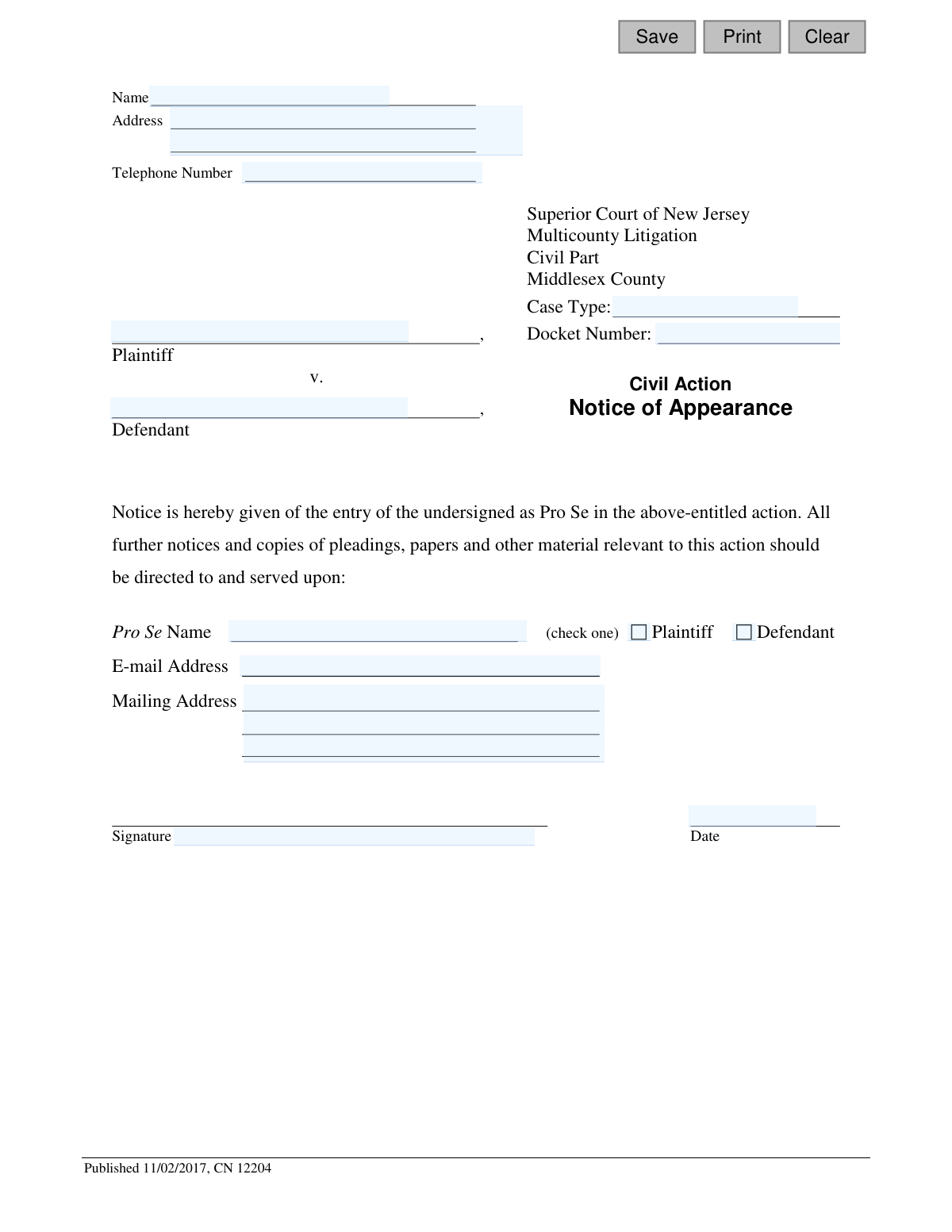
This form, officially known as the Notice of Appearance CN 12204, is filed in the Superior Court of New Jersey by an individual who chooses to represent themselves in a legal case without an attorney, a status known as 'pro se'. Filing this document ensures that the court and all other parties in the case will send all official notices, pleadings, and other documents directly to the self-represented individual. Today, this form can be filled out quickly and accurately using AI-powered services like Instafill.ai, which can also convert non-fillable PDF versions into interactive fillable forms.
Our AI automatically handles information lookup, data retrieval, formatting, and form filling.
It takes less than a minute to fill out CN 12204 using our AI form filling.
Securely upload your data. Information is encrypted in transit and deleted immediately after the form is filled out.
Form specifications
| Form name: | Superior Court of New Jersey Notice of Appearance (CN 12204) |
| Number of fields: | 17 |
| Number of pages: | 1 |
| Language: | English |
Instafill Demo: How to fill out PDF forms in seconds with AI
How to Fill Out CN 12204 Online for Free in 2026
Are you looking to fill out a CN 12204 form online quickly and accurately? Instafill.ai offers the #1 AI-powered PDF filling software of 2026, allowing you to complete your CN 12204 form in just 37 seconds or less.
Follow these steps to fill out your CN 12204 form online using Instafill.ai:
- 1 Navigate to Instafill.ai and upload the Notice of Appearance form or select it from their template library.
- 2 Provide your personal information, including your full name, address, and telephone number.
- 3 Enter the specific case details, such as the Case Type, Docket Number, and the names of the Plaintiff and Defendant.
- 4 Indicate that you are appearing 'Pro Se' and check the box to specify whether you are the Plaintiff or Defendant.
- 5 Input your preferred mailing address and email address where you will receive all case-related documents and notices.
- 6 Review all the information automatically populated by the AI to ensure its accuracy and completeness.
- 7 Electronically sign and date the form, then download the completed document to file with the Superior Court of New Jersey.
Our AI-powered system ensures each field is filled out correctly, reducing errors and saving you time.
Why Choose Instafill.ai for Your Fillable CN 12204 Form?
Speed
Complete your CN 12204 in as little as 37 seconds.
Up-to-Date
Always use the latest 2026 CN 12204 form version.
Cost-effective
No need to hire expensive lawyers.
Accuracy
Our AI performs 10 compliance checks to ensure your form is error-free.
Security
Your personal information is protected with bank-level encryption.
Frequently Asked Questions About Form CN 12204
This form officially notifies the Superior Court of New Jersey that you are representing yourself (acting 'Pro Se') in a legal case. Filing it ensures all future court notices and documents are sent directly to you.
You should file this form if you are a plaintiff or defendant in a case in the specified court and you have chosen to represent yourself without an attorney.
Pro Se is a Latin term for 'for oneself.' In a legal context, it means you are acting as your own lawyer in a court case.
You will need your personal contact information, the case type, the court docket number, and the full names of the plaintiff and defendant. This information is usually on other legal documents you have received for the case.
The Docket Number is a unique identifier for your case and can be found on any official court documents you've received, such as the initial complaint or summons.
The Plaintiff is the person or entity that started the lawsuit, while the Defendant is the one being sued. Review the original complaint filed with the court to confirm your role.
You must sign the form and file it with the Clerk of the Superior Court for Middlesex County. It is also standard practice to send a copy to the opposing party or their attorney.
Once filed, the court and the opposing party will have your official contact information on record. All future legal documents and notices regarding the case will be sent to the mailing address you provided.
Yes, services like Instafill.ai use AI to auto-fill form fields accurately and save time. This can help reduce errors and ensure all required fields are completed.
You can upload the Notice of Appearance PDF to the Instafill.ai platform. Its AI will identify the fields, allowing you to securely provide your information and have the form filled out automatically for you to review and download.
Services like Instafill.ai can convert flat, non-fillable PDFs into interactive forms. This allows you to easily type your information into the correct fields before printing the completed document for signature.
No, you must physically sign and date the form. An original signature is required for court filings of this nature unless submitted through a specific, approved e-filing system.
You should use a stable, reliable address where you can promptly receive important and time-sensitive legal mail. All official correspondence from the court will be sent to this address.
Compliance CN 12204
Validation Checks by Instafill.ai
Common Mistakes in Completing CN 12204
People often enter the docket number without the required prefixes or suffixes (e.g., 'MID-L-1234-23'), or they make transcription errors. This happens due to unfamiliarity with court-specific formats. An incorrect docket number can cause the filing to be rejected or misfiled, leading to critical delays and potential procedural defaults. To avoid this, carefully copy the entire docket number from an official court document, including all letters, numbers, and hyphens. AI-powered tools like Instafill.ai can help by validating the format or storing previously used case information for consistent reuse.
The form requires the filer to check a box indicating whether they are the 'Plaintiff' or 'Defendant.' It is very common for filers to overlook this simple but critical step while focusing on the text fields. This omission makes the notice ambiguous and legally deficient, forcing the court clerk to return it for correction and delaying the official appearance. To prevent this, always perform a final review of all checkboxes before signing. Smart form tools can highlight mandatory choices and prevent finalization until a selection is made.
The form asks for a 'Name' at the top and a 'Pro Se Name' at the bottom, which can be confusing. Filers may enter slightly different names or mistakenly believe the fields serve different purposes. This inconsistency can create confusion for the court and opposing counsel about who, precisely, is filing the appearance. To avoid this, ensure the name entered in both fields is identical and is your full legal name as it should appear on court records. Tools like Instafill.ai can auto-populate related fields with consistent data.
Filers often assume the docket number contains all necessary case information and leave the separate 'Case Type' field blank. This field is used by the court for categorization, and its absence creates extra work for the clerk's office. This can result in processing delays or the rejection of the form. To avoid this, find the specific case type (e.g., 'Mass Tort', 'Law Division') on other court documents and enter it clearly. AI form fillers can flag required fields that are left empty, preventing submission of an incomplete document.
A document is not legally valid without a proper signature. People may forget to sign a printed copy, or when filling a PDF, they might just type their name in the signature line, which is typically not a valid electronic signature. A missing or invalid signature will cause the court to reject the filing outright, which can lead to missed deadlines. Always physically sign a printed form; for electronic filing, follow the court's specific rules for digital signatures. If the form is a non-fillable PDF, a tool like Instafill.ai can convert it into a fillable version with options for compliant electronic signatures.
In the rush to complete the form, it's easy to accidentally transpose the names of the plaintiff and defendant in the case caption. This error, while seemingly minor, creates an incorrect legal document that can cause confusion and may be rejected by the court clerk. It reflects poorly on the filer's attention to detail. To prevent this, meticulously copy the full, official names of all parties exactly as they appear on the original complaint or summons. Using a tool like Instafill.ai allows you to save case party information, ensuring it is entered correctly on all subsequent filings.
Some filers leave the telephone number or email address fields blank, often due to privacy concerns or thinking they are optional. The entire purpose of a Notice of Appearance is to provide contact information for service and communication. Failing to provide it can lead to missed notices, hearings, and even a default judgment against you because the court and opposing party have no way to reach you. Always provide a reliable phone number and an email address that you check daily. AI form-filling software can be configured to automatically populate your contact information and flag these critical fields if left blank.
While the form asks for a 'Mailing Address,' many court rules require a physical street address for official service of process. A filer might provide only a PO Box for privacy or convenience, not realizing it may be non-compliant. This can lead to challenges from the opposing party regarding proper service and may cause the filing to be deemed improper. It is safest to provide a full physical street address where you can receive legal documents and verify with the court clerk if a PO Box is permissible. Some AI form fillers can validate address formats and flag the use of PO Boxes where a physical address is typically required.
The date next to the signature is a crucial part of executing a legal document, but it is easily forgotten. An undated signature creates ambiguity about when the document was executed and may be grounds for the court clerk to return it. This simple oversight can delay the filing process. To avoid this, make it a habit to enter the full date (MM/DD/YYYY) immediately after signing the document. Many digital form fillers, including Instafill.ai, can automatically insert the current date in the correct format with a single click.
Providing a frivolous or unprofessional email address (e.g., [email protected]) can be a significant mistake in a legal context. While it's often the filer's primary email, it can undermine their credibility and create a negative impression with the court and opposing counsel. It may also cause important legal notices to be filtered into a spam folder. To avoid this, create a simple, professional email address for all court communications, ideally one that includes your name. When setting up a profile in a form-filling tool like Instafill.ai, you can designate this professional email for all legal documents.
Saved over 80 hours a year
“I was never sure if my IRS forms like W-9 were filled correctly. Now, I can complete the forms accurately without any external help.”
Kevin Martin Green
Your data stays secure with advanced protection from Instafill and our subprocessors

Robust compliance program
Transparent business model
You’re not the product. You always know where your data is and what it is processed for.
ISO 27001, HIPAA, and GDPR
Our subprocesses adhere to multiple compliance standards, including but not limited to ISO 27001, HIPAA, and GDPR.
Security & privacy by design
We consider security and privacy from the initial design phase of any new service or functionality. It’s not an afterthought, it’s built-in, including support for two-factor authentication (2FA) to further protect your account.
Fill out CN 12204 with Instafill.ai
Worried about filling PDFs wrong? Instafill securely fills superior-court-of-new-jersey-notice-of-appearance-cn-12204 forms, ensuring each field is accurate.