
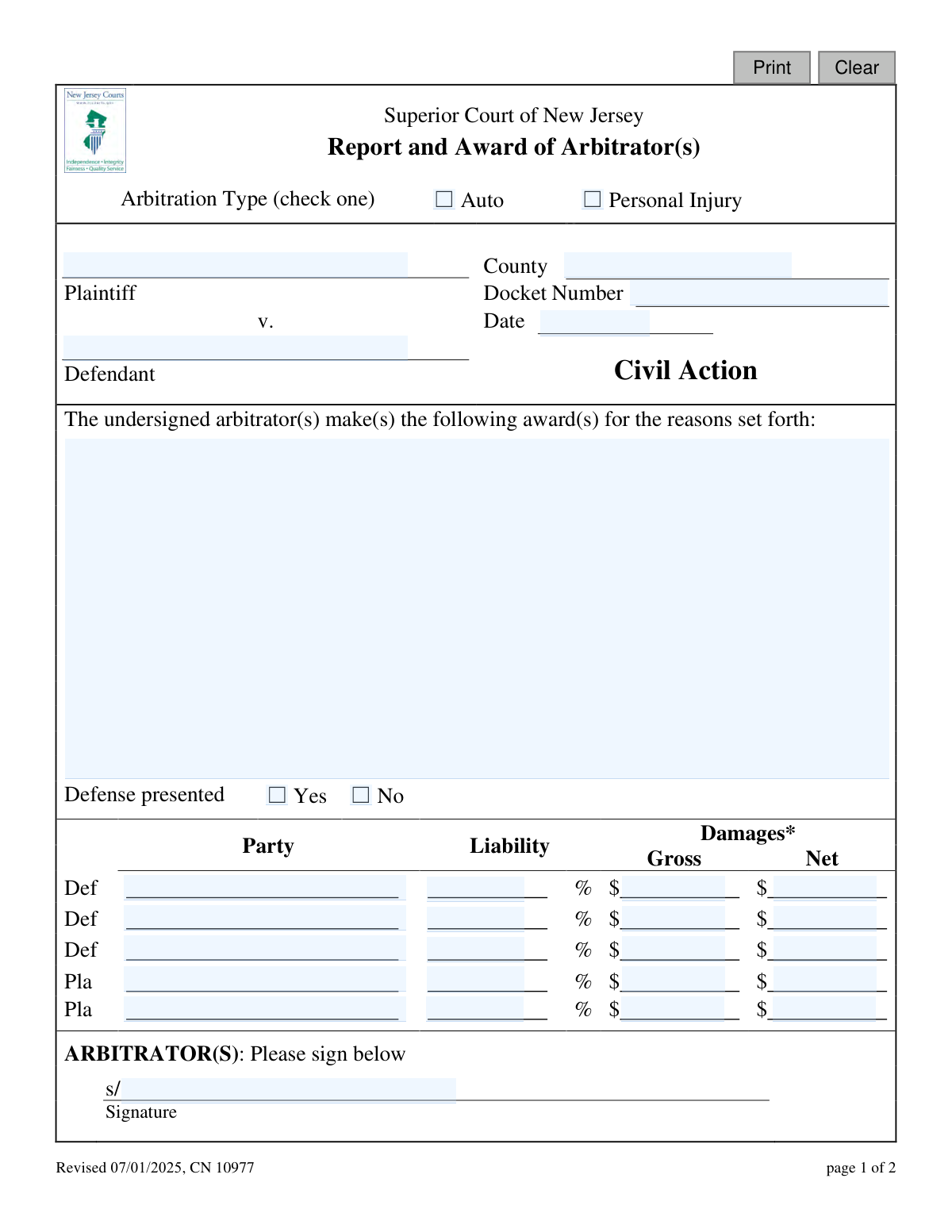
Yes! You can use AI to fill out Superior Court of New Jersey, Report and Award of Arbitrator(s) - Auto / Personal Injury
Don't type 36 fields by hand. Tell our AI about yourself, or upload a document you already have, and it fills every field in seconds. You check it, then download, print or sign.
The AI does the filling. You just check it.
No typing into boxes, nothing to install.
What this form asks for
The AI fills all of it, from your answers or your documents.
The AI checks your answers before you download
13 checks built for this form, so a wrong date or a missing answer is caught before anyone else sees it.
This check verifies that either 'Auto' or 'Personal Injury' has been selected for the 'Arbitration Type'. This is a mandatory field as it defines the legal context and applicable rules for the arbitration. Failure to select a type will prevent form submission, as the case cannot be correctly categorized.
This validation ensures the 'Docket Number' field is not empty and conforms to the standard format for New Jersey Superior Court civil actions. The docket number is the primary unique identifier for the case within the court system, and an incorrect or missing number would make it impossible to file the award correctly. The submission will be rejected if the format is invalid or the field is blank.
This check confirms that the 'Plaintiff', 'Defendant', and 'County' fields are all populated. This information is essential for identifying the primary parties and the legal jurisdiction of the case. Without this data, the award document is legally insufficient and cannot be properly recorded or enforced.
This validation ensures the 'Date' field (`orderDt`) contains a valid date in the expected format (e.g., MM/DD/YYYY) and is not a future date. The date of the award is legally significant, as it starts the 30-day clock for any appeals. An invalid or future date would create legal ambiguity and cause the submission to be rejected.
This check requires that either 'Yes' or 'No' is selected for the 'Defense presented' field. This is a specific finding the arbitrator must report and is a required element of the arbitration summary. A missing selection results in an incomplete report, and the form cannot be submitted until a choice is made.
This validation calculates the sum of all liability percentages entered for both plaintiffs and defendants (`liability`, `liability2`, etc.). The total must equal exactly 100% to ensure that all fault has been allocated. An award that allocates more or less than 100% of the liability is logically and legally flawed, so the system will return an error and prevent submission.
And 7 more checks
- Validates Numeric Format for Damage Amounts
- Validates Range of Liability Percentage
- Checks for Logical Consistency Between Gross and Net Damages
- Requires at Least One Arbitrator Signature
- Ensures Party Name is Present for Award Rows
- Verifies Award Reasoning is Provided
- Cross-Validates Liability and Damage Entries
Let AI fill out your CN 10977
No typing. Every field filled in seconds, checked, ready to sign.
How to Fill Out CN 10977 Online for Free in 2026
What the AI walks you through.
- Navigate to Instafill.ai and upload or select the 'Report and Award of Arbitrator(s)' form.
- Provide the case information, including the county, docket number, plaintiff and defendant names, and the date.
- Select the arbitration type (Auto or Personal Injury) and indicate whether a defense was presented.
- Use the AI assistant to accurately input the liability percentages and gross/net damage amounts for each party involved.
- Clearly state the reasons for the award in the provided description field.
- Review all entered information for correctness, then as the arbitrator(s), digitally sign the document in the designated signature fields.
- Download the completed CN 10977 form to file with the court's division manager and share with the involved parties.
Common Mistakes in Completing CN 10977
The ones the AI is built to catch.
Incorrect or Incomplete Docket Number
Mathematical Errors in Net Award Calculation
Incorrect Apportionment of Liability
Improperly Including Prejudgment Interest
Insufficient Rationale for the Award
Missing Arbitrator's Signature
Omitting the Arbitration Type
Using an Obsolete Form Version
Reversing Plaintiff and Defendant Roles
Failure to Obtain Signatures for Receipt
Frequently Asked Questions About CN 10977
Is it really free for 7 days?
Can I fill other forms too?
How do I cancel?
How does the AI fill out CN 10977?
What happens to my information?
How complex is CN 10977 to fill out?
What is the purpose of the Report and Award of Arbitrator(s) form?
Who is responsible for completing this form?
What does it mean to request a 'trial de novo'?
How do I reject the arbitration award?
What is the difference between 'Gross' and 'Net' damages on the form?
How does the 'Liability %' work?
Does signing the bottom of page 2 mean I agree with the award?
Are the damage amounts listed on the form the final total I will receive?
What information is needed to complete this form?
What does the 'Defense presented' checkbox signify?
Can I use an AI tool to help fill out this form?
How can I fill out this form online?
What should I do if my copy of the form is a non-fillable PDF?
Get your CN 10977 filled out by AI
$0 today. Cancel before Nov 5 and you pay nothing.
Other forms like this one
superior court forms: FW-003, Order on Court Fee Waiver (Superior Court), FW-003, Order on Court Fee Waiver (Superior Court), Form FW-003, Order on Court Fee Waiver (Superior Court), Declaration of Facts of Death (California Superior Court), Form FW-003-GC, Order on Court Fee Waiver (Superior Court) (Ward or Conservatee), Superior Court of Chatham County, Georgia, Hearing Request Form, Form FW-006, Request for Hearing About Court Fee Waiver Order (Superior Court), Form FW-002, Request to Waive Additional Court Fees (Superior Court), Form FW-008, Order on Court Fee Waiver After Hearing (Superior Court), Form FW-002-GC, Request to Waive Additional Court Fees (Superior Court) (Ward or Conservatee), Form REC-001(N), Notice of Intent to Destroy Superior Court Records; Offer to Transfer Possession, Form REC-001(R), Request for Transfer or Extension of Time for Retention of Superior Court Records, Notice of Hearing on Request for Transfer or Extension of Time for Retention of Superior Court Records; Court Order; Release and Receipt of Superior Court Records, Form REC-002(R), Release and Receipt of Superior Court Records, Superior Court of New Jersey, Application for Appeal and Order, Superior Court of New Jersey Dissolution (FM) Case Management Order, New Jersey Judiciary – Superior Court, Appellate Division Application for Permission to File Emergent Motion, New Jersey Judiciary Superior Court - Appellate Division Civil Case Information Statement, New Jersey Judiciary Superior Court - Appellate Division Criminal Case Information Statement, New Jersey Judiciary Superior Court - Appellate Division Notice of Appeal (CN: 10502)
New Jersey forms: State of New Jersey Alternate Benefit Program Withdrawal Request Acknowledgement Receipt, Horizon Blue Cross Blue Shield of New Jersey Applied Behavior Analysis Supplemental Information Form, State of New Jersey Application for Employment (Form DPF-663), New Jersey Judiciary Plea Form (Plea 01), Supplemental Plea Form for Certain Sexual Offenses: Megan’s Law/Parole Supervision for Life/Community Supervision for Life (Plea 05), Financial Questionnaire to Establish Indigency, New Jersey Judiciary Resource Family Information Form, Foreclosure Case Information Statement (FCIS) - Appendix XII-B2, New Jersey Judiciary Records Request Form, Superior Court of New Jersey, Application for Appeal and Order, FL Certification of Requested Background Checks for Kinship Legal Guardianship, Certification of Caregiver as to Knowledge of Identity and/or Location of Parents, FL Order Judgment for Kinship Legal Guardianship, New Jersey Judiciary Certification of Repair and Plea of Guilty, Uniform Summary Support Order (USSO), New Jersey Judiciary Volunteer Application (CN 10293), Application to Take the New Jersey Court Interpreter Oral Examination, New Jersey Judiciary Attorney Fee Arbitration Request, Order to Show Cause with Temporary Restraints Pursuant to Rule 4:52, Tax Court of New Jersey, State Tax Complaint
Let AI fill out your CN 10977
Your trial starts once a card is added. You pay nothing before Nov 5.
Our AI already knows this form, all 36 fields of it. Skip the typing: tell it about yourself, or upload what you have, and it fills the whole form in seconds.
- AI fills every field on both pages, checkboxes included
- No typing into boxes: answer a few questions, or upload a document you already have, an old copy of this form, a photo of a document
- The AI checks the answers; you review and change anything before you download
- Download the finished PDF, print it, or sign it online
- Encrypted, and never used to train AI
Cancel before Nov 5 and you pay nothing.
A card is needed to start the trial. Cancel in two clicks from your account.
Terms · Privacy