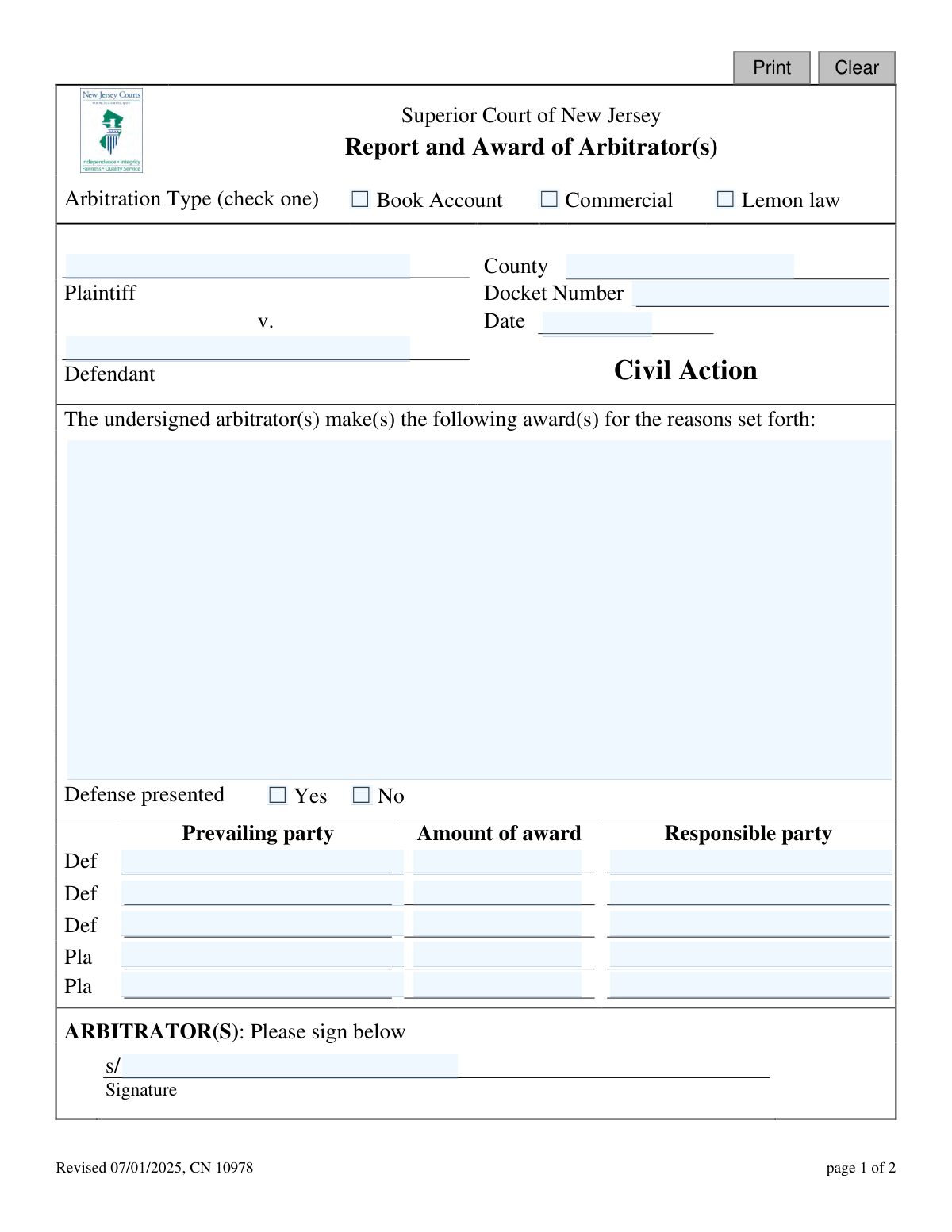
Yes! You can use AI to fill out Superior Court of New Jersey, Report and Award of Arbitrator(s) - Commercial
This form is an official document for the Superior Court of New Jersey used by arbitrators to report their findings and the monetary award in commercial disputes. It formalizes the decision, specifies the prevailing party, the award amount, and the responsible party, serving as the official record of the arbitration outcome. Today, this form can be filled out quickly and accurately using AI-powered services like Instafill.ai, which can also convert non-fillable PDF versions into interactive fillable forms.
Our AI automatically handles information lookup, data retrieval, formatting, and form filling.
It takes less than a minute to fill out CN 10978 using our AI form filling.
Securely upload your data. Information is encrypted in transit and deleted immediately after the form is filled out.
Form specifications
| Form name: | Superior Court of New Jersey, Report and Award of Arbitrator(s) - Commercial |
| Number of fields: | 34 |
| Number of pages: | 1 |
| Language: | English |
Instafill Demo: How to fill out PDF forms in seconds with AI
How to Fill Out CN 10978 Online for Free in 2026
Are you looking to fill out a CN 10978 form online quickly and accurately? Instafill.ai offers the #1 AI-powered PDF filling software of 2026, allowing you to complete your CN 10978 form in just 37 seconds or less.
Follow these steps to fill out your CN 10978 form online using Instafill.ai:
- 1 Navigate to Instafill.ai and upload or select the Report and Award of Arbitrator(s) form.
- 2 Provide the case information, including the county, docket number, date, and the names of the plaintiff and defendant.
- 3 Check the box for the correct arbitration type (e.g., Commercial) and indicate whether a defense was presented.
- 4 Enter the details of the award, specifying the prevailing party, the amount of the award, and the party responsible for payment.
- 5 Briefly state the reasons for the award in the provided space.
- 6 Review all the information auto-filled by the AI to ensure accuracy and completeness.
- 7 As the arbitrator, electronically sign the form, and have counsel or pro se litigants sign to acknowledge receipt of the award.
Our AI-powered system ensures each field is filled out correctly, reducing errors and saving you time.
Why Choose Instafill.ai for Your Fillable CN 10978 Form?
Speed
Complete your CN 10978 in as little as 37 seconds.
Up-to-Date
Always use the latest 2026 CN 10978 form version.
Cost-effective
No need to hire expensive lawyers.
Accuracy
Our AI performs 10 compliance checks to ensure your form is error-free.
Security
Your personal information is protected with bank-level encryption.
Frequently Asked Questions About Form CN 10978
This form is used by an arbitrator in the Superior Court of New Jersey to officially document their decision, the amount of the award, and the responsible party following a mandatory arbitration hearing.
The assigned arbitrator or panel of arbitrators is responsible for completing and signing this form to report the outcome of the arbitration.
You will need the case details, including the county, plaintiff and defendant names, the court docket number, and the date of the arbitration hearing.
This box is checked 'Yes' if the defendant or their legal counsel participated in the hearing and presented a case or defense. It is checked 'No' if they did not.
This section requires a brief but clear explanation of the arbitrator's rationale for the decision, including the prevailing party, the award amount, and who is responsible for payment.
You have the right to reject the award by filing a 'trial de novo' request with the division manager within 30 days of the award date. This requires a $265 fee and will schedule a new trial in court.
A trial de novo is a new trial conducted in court as if the arbitration never occurred. It is a way to have your case heard by a judge after receiving an unfavorable arbitration award.
You must file the request and pay the $265 fee within thirty (30) days from the date the arbitration award is filed.
No. Signing the bottom section is simply an acknowledgement that you, as counsel or a pro se litigant, have received a copy of the award. It does not waive your right to reject the award.
The arbitrator(s) must sign page 1 to certify the award. The attorneys for the parties (or the parties themselves if they have no attorney) sign page 2 to acknowledge receipt of the award.
Yes, services like Instafill.ai use AI to auto-fill form fields accurately and save time, which is especially helpful for inputting case information like docket numbers and party names.
You can upload the PDF of the form to Instafill.ai, which will make it an interactive document. You can then type your information directly into the fields and download the completed form for printing and signing.
If you have a flat, non-fillable PDF, you can use a service like Instafill.ai to convert it into an interactive, fillable form. Simply upload the document, and the tool will automatically detect the fields for you to fill in.
Compliance CN 10978
Validation Checks by Instafill.ai
1
Ensures Arbitration Type is Selected
This check verifies that one of the arbitration types ('Book Account', 'Commercial', or 'Lemon law') has been selected. This is a mandatory field as it is essential for categorizing the case for all legal and administrative processing. If no type is selected, the form submission will be rejected as the fundamental context of the award is missing.
2
Validates Docket Number Format
This validation ensures the 'Docket Number' field conforms to the standard New Jersey court format (e.g., 'COU-L-######-##'). A correctly formatted docket number is critical for associating the award with the correct case file in the court's system. An invalid format will cause a filing error, potentially delaying the enforcement of the award or causing it to be misfiled.
3
Requires County to be Specified
This check confirms that the 'County' field has been filled out. The county is a crucial piece of data used to route the document to the correct courthouse and division manager for filing. A submission without a specified county cannot be processed and will be returned to the sender.
4
Validates Award Date Format and Plausibility
This validation ensures the 'Date' field contains a valid date in a standard format (e.g., MM/DD/YYYY) and is not a future date. The date of the award is legally significant as it marks the beginning of the 30-day period for any party to request a trial de novo. An invalid or future date would make the award's timeline unenforceable and legally void.
5
Ensures Plaintiff and Defendant Names are Provided
This check verifies that both the 'Plaintiff' and 'Defendant' name fields are populated. These names are the primary identifiers for the legal action and are required to link the award to the correct parties. A form with missing party names is legally ambiguous and would be rejected immediately.
6
Checks for Presence of Award Rationale
This validation ensures that the text area for the award's reasons ('awardDesc') is not empty. Providing a rationale for the decision is a fundamental part of the arbitrator's duty and gives context to the award for the parties and any subsequent judicial review. An award submitted without a stated basis may be challenged or rejected.
7
Requires 'Defense Presented' Status
This check confirms that either 'Yes' or 'No' is selected for the 'Defense presented' field. This information is an important part of the case's procedural record, indicating whether the defendant participated in the arbitration hearing. Failure to provide this status leaves a gap in the case history and may require clarification before the form can be accepted.
8
Ensures Completeness of Each Award Row
For any award row where an 'Amount of award' is entered, this validation ensures that the corresponding 'Prevailing party' and 'Responsible party' fields are also filled out. An award amount is meaningless without identifying who is receiving the award and who is liable for payment. This check prevents incomplete or nonsensical award entries that would be unenforceable.
9
Validates Award Amount is a Numeric Value
This check verifies that all entered 'Amount of award' fields contain valid numerical or currency values and are not negative. Non-numeric characters or negative values can cause calculation errors and make the award amount ambiguous or legally nonsensical. The system should reject any entry that is not a valid, non-negative monetary figure.
10
Verifies Responsible Party is a Case Participant
This validation checks that the value entered in each 'Responsible party' field corresponds to an official party in the case (i.e., 'Plaintiff' or 'Defendant'). Assigning liability to a non-participant would be a significant legal error, making the award invalid. This check prevents such erroneous entries from being submitted.
11
Requires Arbitrator's Signature
This check confirms that the primary 'Arbitrator(s)' signature field ('arbSig') has been signed. The arbitrator's signature is what provides the award with its legal authority and authenticity. A form submitted without this signature is not a valid legal document and will be rejected.
12
Ensures at Least One Party Acknowledges Receipt
This validation verifies that at least one of the five signature fields for acknowledging receipt ('arbSig1' through 'arbSig5') has been signed. This signature serves as proof that the parties or their counsel have received the award, which is critical for procedural fairness and initiating the appeal timeline. A form where no party has acknowledged receipt may be considered improperly served.
Common Mistakes in Completing CN 10978
Users often enter the docket number without the proper county prefix or use incorrect separators (e.g., entering 'L 1234 23' instead of 'ESX-L-1234-23'). This happens due to unfamiliarity with the specific court's required format. An incorrect docket number will cause the award to be rejected or misfiled, leading to significant processing delays and potential legal complications in linking the award to the correct case.
Filers may use shortened names, abbreviations, or forget to include 'et al.' for cases with multiple parties in the Plaintiff ('plaName') and Defendant ('defName') fields. This creates ambiguity regarding the official parties to the action and can lead to challenges in enforcing the award. Always use the full, official legal names as they appear on the original complaint to ensure the document is legally precise.
The 'awardDesc' field is frequently filled with conclusory statements like 'For the plaintiff' instead of a reasoned explanation. This occurs when arbitrators are rushed and fail to articulate the factual and legal basis for their decision. A poorly reasoned award is more susceptible to being challenged and provides no guidance to the parties or a reviewing court.
A common data entry error is mismatching the prevailing party, the award amount, and the responsible party within a single row. For example, listing the Plaintiff as the prevailing party but also as the party responsible for payment. This internal contradiction makes the award ambiguous and unenforceable, guaranteeing its rejection by the court clerk until corrected.
Users often overlook the 'Arbitration Type' checkboxes ('arbtype') at the top of the form, failing to select 'Book Account,' 'Commercial,' or 'Lemon law.' This simple oversight results in an incomplete form that cannot be properly categorized and processed by the court system. To avoid rejection, double-check that exactly one arbitration type is selected before submission.
There is often confusion between the arbitrator's signature line on page 1 ('arbSig') and the acknowledgement of receipt signatures on page 2 ('arbSig1' - 'arbSig5'). An arbitrator might mistakenly sign on page 2, which invalidates the award, or parties may forget to sign for receipt, creating disputes over the appeal window start date. The arbitrator must sign page 1 to certify the award, and all parties present must sign page 2 to acknowledge receipt.
The date field ('orderDt') is sometimes left blank or filled in with a non-standard format. The date of the award is critical as it officially starts the 30-day clock for any party wishing to file for a trial de novo. An ambiguous or missing date can lead to serious disputes over the timeliness of an appeal, potentially jeopardizing a party's rights.
Filers frequently miss the small 'Defense presented' checkbox ('defense'), failing to indicate whether the defendant participated in the hearing. This oversight leaves the official record incomplete. This information is important for the court's understanding of the case's posture, especially if the award resulted from a default, and its absence can require clarification.
In the 'awardAmt' fields, users may write amounts without proper formatting, such as omitting dollar signs or decimal points, or writing the number out in words. This ambiguity can lead to disputes over the exact monetary value of the award. Using a clear, consistent numerical format like '$1,234.56' is essential for an enforceable award, and AI tools like Instafill.ai can help by automatically formatting currency fields.
When the official form is a non-fillable PDF, it is often printed and completed by hand, resulting in illegible entries for critical data like names, docket numbers, and amounts. This can cause court clerks to make data entry errors, leading to misfiling, delays, and potential invalidation of the document. To prevent this, tools like Instafill.ai can convert flat PDFs into electronically fillable forms, ensuring every entry is clear, accurate, and professional.
Saved over 80 hours a year
“I was never sure if my IRS forms like W-9 were filled correctly. Now, I can complete the forms accurately without any external help.”
Kevin Martin Green
Your data stays secure with advanced protection from Instafill and our subprocessors

Robust compliance program
Transparent business model
You’re not the product. You always know where your data is and what it is processed for.
ISO 27001, HIPAA, and GDPR
Our subprocesses adhere to multiple compliance standards, including but not limited to ISO 27001, HIPAA, and GDPR.
Security & privacy by design
We consider security and privacy from the initial design phase of any new service or functionality. It’s not an afterthought, it’s built-in, including support for two-factor authentication (2FA) to further protect your account.
Fill out CN 10978 with Instafill.ai
Worried about filling PDFs wrong? Instafill securely fills superior-court-of-new-jersey-report-and-award-of-arbitrators-commercial forms, ensuring each field is accurate.