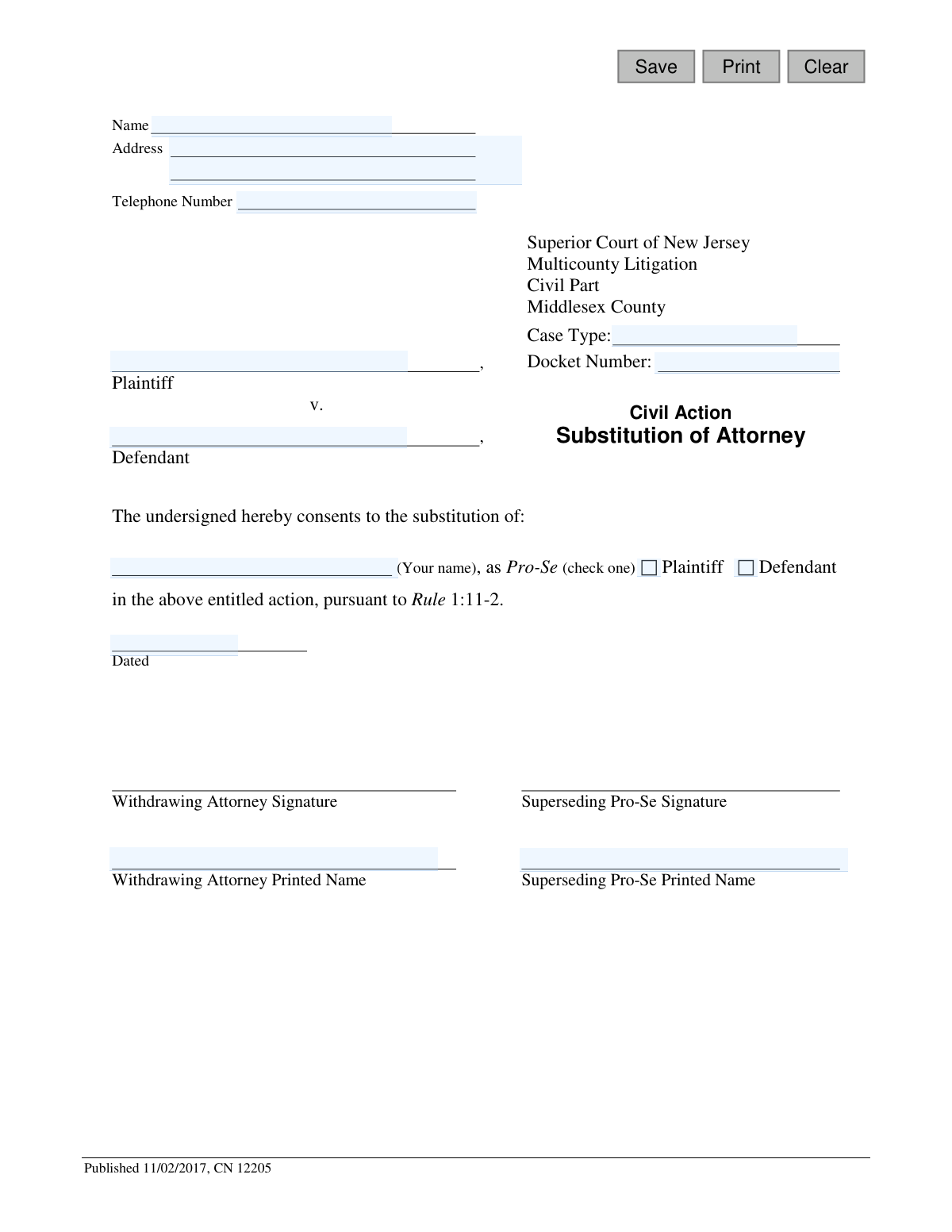
Yes! You can use AI to fill out Superior Court of New Jersey, Substitution of Attorney

This form is a legal document filed with the Superior Court of New Jersey to officially notify the court that a party in a civil action is no longer represented by their attorney and will now be representing themselves (pro se). It is crucial for ensuring all court communications are directed to the correct party. Today, this form can be filled out quickly and accurately using AI-powered services like Instafill.ai, which can also convert non-fillable PDF versions into interactive fillable forms.
Substitution of Attorney is part of the New Jersey forms and superior court forms categories on Instafill.
Our AI automatically handles information lookup, data retrieval, formatting, and form filling.
It takes less than a minute to fill out Substitution of Attorney using our AI form filling.
Securely upload your data. Information is encrypted in transit and deleted immediately after the form is filled out.

Form specifications

Form name: Superior Court of New Jersey, Substitution of Attorney
Number of fields: 16
Number of pages: 1
Language: English
main-image

Instafill Demo: How to fill out PDF forms in seconds with AI

How to Fill Out Substitution of Attorney Online for Free in 2026

Are you looking to fill out a SUBSTITUTION OF ATTORNEY form online quickly and accurately? Instafill.ai offers the #1 AI-powered PDF filling software of 2026, allowing you to complete your SUBSTITUTION OF ATTORNEY form in just 37 seconds or less.
Follow these steps to fill out your SUBSTITUTION OF ATTORNEY form online using Instafill.ai:
  1. 1 Navigate to Instafill.ai and upload the Substitution of Attorney form or select it from their template library.
  2. 2 Use the AI assistant to automatically fill in your personal details, such as your name, address, and telephone number.
  3. 3 Enter the specific case information, including the Plaintiff and Defendant names, Case Type, and Docket Number for the Middlesex County Civil Part.
  4. 4 Clearly indicate your role by checking the appropriate box for either Plaintiff or Defendant.
  5. 5 Provide the name of the withdrawing attorney and your own name as the superseding pro-se party.
  6. 6 Review all the information entered by the AI for accuracy and make any necessary corrections.
  7. 7 Download the completed form, print it, and sign it along with the withdrawing attorney before filing it with the court.

Our AI-powered system ensures each field is filled out correctly, reducing errors and saving you time.

Why Choose Instafill.ai for Your Fillable Substitution of Attorney Form?

Speed

Complete your Substitution of Attorney in as little as 37 seconds.

Up-to-Date

Always use the latest 2026 Substitution of Attorney form version.

Cost-effective

No need to hire expensive lawyers.

Accuracy

Our AI performs 10 compliance checks to ensure your form is error-free.

Security

Your personal information is protected with bank-level encryption.

Frequently Asked Questions About Form Substitution of Attorney

This form is used to officially notify the Superior Court of New Jersey that you are taking over your own legal representation (acting 'Pro-Se') and that your current attorney will no longer be representing you in the case.

You need to fill out this form if you are a plaintiff or defendant in a civil case and have decided to represent yourself instead of continuing with your lawyer. Both you and your withdrawing attorney must sign it.

Pro-Se is a legal term for representing yourself in court without an attorney. By filing this form, you are officially becoming a Pro-Se party in your case.

The Docket Number and Case Type are on previous court documents you have received, such as the original complaint or summons. If you cannot find them, you can contact the Middlesex County Civil Part court clerk's office for assistance.

The 'Withdrawing Attorney' is the lawyer who is stopping their representation of you. The 'Superseding Pro-Se' is you, the individual who is taking over the case to represent yourself.

After the form is signed by both you and your former attorney, you must file it with the Superior Court of New Jersey, Civil Part, in Middlesex County. You should also send a copy to the opposing party or their attorney.

You will need the full case name (plaintiff and defendant), the Case Type, and the Docket Number. You will also need to provide your personal contact information.

If your attorney does not consent to withdraw by signing this form, they may need to file a formal 'Motion to be Relieved as Counsel' with the court. You should discuss the process with your attorney to ensure a smooth transition.

Yes, services like Instafill.ai use AI to help you accurately auto-fill form fields with your saved information, which saves time and helps prevent errors.

Simply upload the Substitution of Attorney PDF to the Instafill.ai platform. The AI will make the form interactive, allowing you to click and fill the fields with your saved profile data or type in the information directly.

You can use a service like Instafill.ai, which can convert flat, non-fillable PDFs into interactive forms. This allows you to easily type your information onto the form before printing it for signatures.

You should check 'Plaintiff' if you are the person who originally filed the lawsuit. You should check 'Defendant' if you are the person who is being sued.

Compliance Substitution of Attorney
Validation Checks by Instafill.ai

1
Filer Information Completeness
This check ensures that the filer's name, address, and phone number fields ('filerName', 'filerAddr', 'filerPh') are all populated. This information is critical for the court to identify and communicate with the pro-se litigant. If this information is missing, the submission will be rejected as the court would have no valid contact information for a party to the case.
2
Case Identification Completeness
Validates that the Plaintiff Name ('plaName'), Defendant Name ('defName'), and Docket Number ('docketNo') are all provided. These fields are essential for correctly identifying the specific court case to which this substitution applies. A failure to provide this information would make it impossible to file the document in the correct case record, leading to rejection.
3
Party Type Selection
This validation ensures that one of the 'partyType' options (Plaintiff or Defendant) has been checked. This selection clarifies the role of the pro-se individual in the litigation. Without this information, the substitution is ambiguous and legally incomplete, so the form would be returned for correction.
4
Signature Date Validity and Plausibility
Checks that the signature date ('sigDt') is present, formatted correctly (e.g., MM/DD/YYYY), and is not a future date. The date is a legally significant part of the document, establishing when the consent for substitution was given. An invalid or future date would call the document's authenticity into question and result in rejection.
5
Phone Number Format
Ensures the telephone number ('filerPh') follows a standard format (e.g., XXX-XXX-XXXX or (XXX) XXX-XXXX). This is important for ensuring the court and other parties have a reliable means of contacting the filer. An improperly formatted number could lead to communication failures and will trigger a warning to correct the format.
6
Docket Number Format
This check verifies that the 'docketNo' field contains a value that conforms to the expected format for the Middlesex County Superior Court. While formats can vary, this prevents simple typos like entering 'N/A' or a random word. An incorrect docket number would cause the filing to be misrouted or rejected, delaying the substitution.
7
Withdrawing Attorney Name Presence
Validates that the printed name of the withdrawing attorney ('attyName') is not empty. The identity of the attorney being replaced is a fundamental component of a substitution of attorney filing. The form is invalid without specifying who is withdrawing representation, and the submission will be rejected.
8
Superseding Pro-Se Name Presence
Ensures the printed name of the superseding pro-se party ('supersedeName') is provided. This field explicitly confirms the identity of the individual who is taking over their own representation. A missing name makes the substitution legally ineffective, and the form will be rejected for being incomplete.
9
Pro-Se Name Consistency
This logical check verifies that the names entered in 'filerName', 'proseName', and 'supersedeName' are identical. This is crucial to confirm that the person filling out the form is the same person becoming pro-se and signing as such. A mismatch suggests a potential error or misunderstanding, and the form will be flagged for review and correction.
10
Party Role Consistency Check
This validation cross-references the selected 'partyType' with the case party names. If 'Plaintiff' is checked, the 'proseName' must match the 'plaName'; if 'Defendant' is checked, it must match the 'defName'. This prevents a filer from incorrectly identifying their role in the case, which would create significant legal confusion. A mismatch will result in an error requiring correction before submission.
11
Case Type Presence
This check ensures the 'caseType' field is not empty. The case type is used by the court for classification, routing, and statistical purposes. Submitting a form without this information would render it incomplete for the court's administrative processes, leading to rejection.
12
Distinct Plaintiff and Defendant Names
Validates that the name entered for the plaintiff ('plaName') is not identical to the name entered for the defendant ('defName'). While rare, this error can occur and represents a logical impossibility in most civil actions. This check prevents the submission of a logically flawed document that would require clarification from the filer.

Common Mistakes in Completing Substitution of Attorney

Entering an Incorrect Docket Number or Case Type

This error often occurs due to a simple typo or by referencing an outdated document. An incorrect docket number or case type will cause the court clerk to reject the filing, as they cannot match the substitution to the correct case file. To prevent this, meticulously copy the full docket number and case type from the most recent official court document, such as a complaint or a court order.

Using Inconsistent or Incomplete Party Names

Filers may use nicknames, initials, or slightly different name variations than what is on the official case caption. This creates ambiguity for the court and can lead to the form's rejection. Always use the full, legal names for both the plaintiff and defendant exactly as they appear on the original complaint to ensure the document is properly recorded.

Forgetting to Select the Party Type

The form requires the filer to check a box indicating whether they are the Plaintiff or Defendant, a small but critical detail that is easily overlooked. Failing to make this selection leaves the court uncertain of your role, which will result in an immediate rejection of the form. Carefully review the document before signing to ensure you have checked the correct box corresponding to your status in the lawsuit.

Missing Signatures from Both Parties

This form requires consent from both the withdrawing attorney and the new pro-se party, evidenced by their signatures. Often, a filer will sign but fail to secure the signature of the outgoing attorney, rendering the substitution invalid. To avoid rejection, you must coordinate with the withdrawing attorney to ensure both signatures and printed names are present in their respective fields before filing.

Providing Incorrect Filer Contact Information

The contact section at the top of the form is for the person filing the document, who is the new pro-se party. A common mistake is to enter the old attorney's information or leave it blank. This is critical because the court will use this address for all future notices; incorrect information means you will miss important deadlines and hearings. Ensure your full, current name, address, and phone number are entered here.

Omitting the 'Pro-Se' Designation

The form is specifically for a party to represent themselves, but filers sometimes just write their name in the substitution field without the 'Pro-Se' label. This can confuse the court as to whether a new attorney is involved or if the party is self-represented, potentially delaying the substitution. Clearly write your name followed by ', Pro-Se' in the space provided to make your status unambiguous.

Submitting an Illegible, Handwritten Form

Many legal forms are filled out by hand, and poor penmanship can make names, addresses, and docket numbers unreadable to the court clerk. An illegible form is a primary cause for rejection, forcing you to redo the paperwork and causing delays. To avoid this, print clearly in block letters. If the form is a non-fillable PDF, a tool like Instafill.ai can convert it into a fillable version, allowing you to type all information for maximum clarity before printing to sign.

Using the Wrong Form for the Case Venue

This specific form is designated for 'Multicounty Litigation' in 'Middlesex County'. A filer with a standard civil case in a different county might mistakenly use this form, leading to automatic rejection. You must verify that your case is part of this specific program; otherwise, you need to obtain the correct Substitution of Attorney form from the court in the county where your case is filed.

Forgetting to Date the Document

The signature date is a legal requirement that establishes when the consent for substitution was officially made. Filers often rush and forget to fill in the date next to their signature. An undated or improperly dated legal document can be rejected by the court clerk, so always enter the current, full date when you sign the form.

Failing to Print Names Below Signatures

Signatures can often be illegible, which is why the form includes separate lines for printed names. A frequent oversight is signing the form but forgetting to clearly print the name below, for both the withdrawing attorney and the pro-se party. Without a legible printed name, the court cannot verify the identity of the signers, which is grounds for rejection. AI-powered tools like Instafill.ai can help prevent this by pre-filling the printed name fields correctly, ensuring they are not missed.
Saved over 80 hours a year

“I was never sure if my IRS forms like W-9 were filled correctly. Now, I can complete the forms accurately without any external help.”

Kevin Martin Green

Your data stays secure with advanced protection from Instafill and our subprocessors

Robust compliance program

Transparent business model

You’re not the product. You always know where your data is and what it is processed for.

ISO 27001, HIPAA, and GDPR

Our subprocesses adhere to multiple compliance standards, including but not limited to ISO 27001, HIPAA, and GDPR.

Security & privacy by design

We consider security and privacy from the initial design phase of any new service or functionality. It’s not an afterthought, it’s built-in, including support for two-factor authentication (2FA) to further protect your account.

Fill out Substitution of Attorney with Instafill.ai

Worried about filling PDFs wrong? Instafill securely fills superior-court-of-new-jersey-substitution-of-attorney forms, ensuring each field is accurate.

Related forms by category

New Jersey forms State of New Jersey Alternate Benefit Program Withdrawal Request Acknowledgement Receipt, Horizon Blue Cross Blue Shield of New Jersey Applied Behavior Analysis Supplemental Information Form, State of New Jersey Application for Employment (Form DPF-663), New Jersey Judiciary Plea Form (Plea 01), Supplemental Plea Form for Certain Sexual Offenses: Megan’s Law/Parole Supervision for Life/Community Supervision for Life (Plea 05), Financial Questionnaire to Establish Indigency, New Jersey Judiciary Resource Family Information Form, Foreclosure Case Information Statement (FCIS) - Appendix XII-B2, New Jersey Judiciary Records Request Form, Superior Court of New Jersey, Application for Appeal and Order, FL Certification of Requested Background Checks for Kinship Legal Guardianship, Certification of Caregiver as to Knowledge of Identity and/or Location of Parents, FL Order Judgment for Kinship Legal Guardianship, New Jersey Judiciary Certification of Repair and Plea of Guilty, Uniform Summary Support Order (USSO), New Jersey Judiciary Volunteer Application (CN 10293), Application to Take the New Jersey Court Interpreter Oral Examination, New Jersey Judiciary Attorney Fee Arbitration Request, Order to Show Cause with Temporary Restraints Pursuant to Rule 4:52, Tax Court of New Jersey, State Tax Complaint · + 271 more →
superior court forms FW-003, Order on Court Fee Waiver (Superior Court), FW-003, Order on Court Fee Waiver (Superior Court), Form FW-003, Order on Court Fee Waiver (Superior Court), Declaration of Facts of Death (California Superior Court), Form FW-003-GC, Order on Court Fee Waiver (Superior Court) (Ward or Conservatee), Superior Court of Chatham County, Georgia, Hearing Request Form, Form FW-006, Request for Hearing About Court Fee Waiver Order (Superior Court), Form FW-002, Request to Waive Additional Court Fees (Superior Court), Form FW-008, Order on Court Fee Waiver After Hearing (Superior Court), Form FW-002-GC, Request to Waive Additional Court Fees (Superior Court) (Ward or Conservatee), Form REC-001(N), Notice of Intent to Destroy Superior Court Records; Offer to Transfer Possession, Form REC-001(R), Request for Transfer or Extension of Time for Retention of Superior Court Records, Notice of Hearing on Request for Transfer or Extension of Time for Retention of Superior Court Records; Court Order; Release and Receipt of Superior Court Records, Form REC-002(R), Release and Receipt of Superior Court Records, Superior Court of New Jersey, Application for Appeal and Order, Superior Court of New Jersey Dissolution (FM) Case Management Order, New Jersey Judiciary – Superior Court, Appellate Division Application for Permission to File Emergent Motion, New Jersey Judiciary Superior Court - Appellate Division Civil Case Information Statement, New Jersey Judiciary Superior Court - Appellate Division Criminal Case Information Statement, New Jersey Judiciary Superior Court - Appellate Division Notice of Appeal (CN: 10502) · + 41 more →