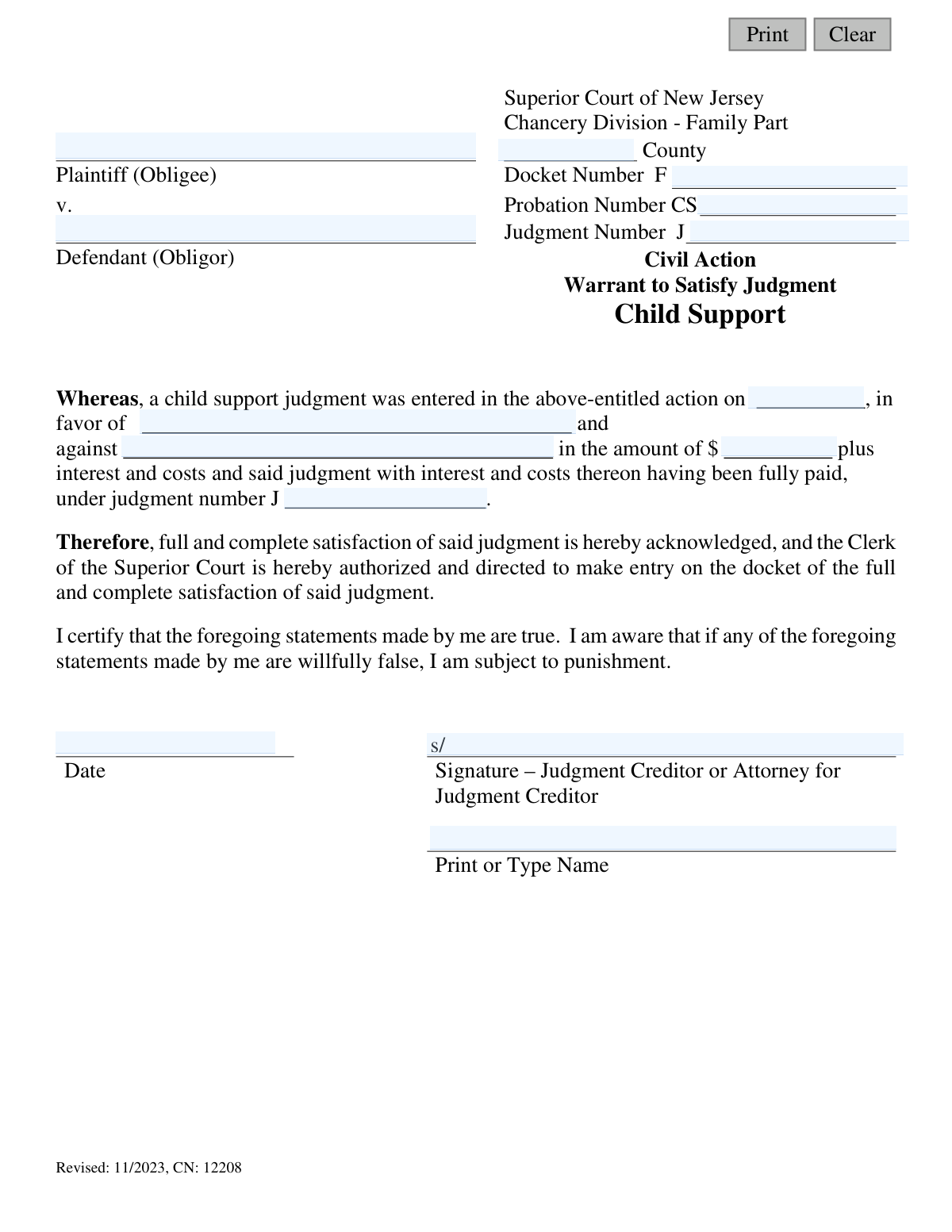
Yes! You can use AI to fill out Superior Court of New Jersey, Warrant to Satisfy Judgment - Child Support

A Warrant to Satisfy Judgment (WOS) is a legal document in New Jersey that, once filed with the Clerk of the Superior Court, closes a child support judgment on the official docket. It serves as formal proof that the judgment has been fully paid and is no longer a lien against the debtor's property. Today, this form can be filled out quickly and accurately using AI-powered services like Instafill.ai, which can also convert non-fillable PDF versions into interactive fillable forms.
CN: 12208 is part of the New Jersey forms and superior court forms categories on Instafill.
Our AI automatically handles information lookup, data retrieval, formatting, and form filling.
It takes less than a minute to fill out CN: 12208 using our AI form filling.
Securely upload your data. Information is encrypted in transit and deleted immediately after the form is filled out.

Form specifications

Form name: Superior Court of New Jersey, Warrant to Satisfy Judgment - Child Support
Number of fields: 33
Number of pages: 1
Language: English
main-image

Instafill Demo: How to fill out PDF forms in seconds with AI

How to Fill Out CN: 12208 Online for Free in 2026

Are you looking to fill out a CN: 12208 form online quickly and accurately? Instafill.ai offers the #1 AI-powered PDF filling software of 2026, allowing you to complete your CN: 12208 form in just 37 seconds or less.
Follow these steps to fill out your CN: 12208 form online using Instafill.ai:
  1. 1 Navigate to Instafill.ai and upload or select the 'Warrant to Satisfy Judgment - Child Support' form.
  2. 2 Use the AI-powered tool to automatically populate case information, including Plaintiff (Obligee) and Defendant (Obligor) names, Docket Number, Probation Number, and Judgment Number.
  3. 3 Carefully review and confirm the accuracy of the judgment details, such as the date the judgment was entered and the total amount paid.
  4. 4 The judgment creditor or their attorney must electronically sign and date the form to certify that the judgment has been satisfied.
  5. 5 Complete the certification section by having the creditor's signature witnessed and signed by a Notary Public or an Attorney at Law.
  6. 6 Submit the completed and notarized form to the appropriate Vicinage Probation Office for their review and acknowledgment signature.
  7. 7 After receiving the form back from Probation, file the fully executed warrant with the Clerk of the Superior Court in Trenton, NJ, along with the required filing fee.

Our AI-powered system ensures each field is filled out correctly, reducing errors and saving you time.

Why Choose Instafill.ai for Your Fillable CN: 12208 Form?

Speed

Complete your CN: 12208 in as little as 37 seconds.

Up-to-Date

Always use the latest 2026 CN: 12208 form version.

Cost-effective

No need to hire expensive lawyers.

Accuracy

Our AI performs 10 compliance checks to ensure your form is error-free.

Security

Your personal information is protected with bank-level encryption.

Frequently Asked Questions About Form CN: 12208

This form, also known as a WOS, is a legal document used to officially close a child support judgment once it has been fully paid. Filing it serves as proof that the debt is satisfied and removes the associated lien from the debtor's property.

Any interested party can fill out the form, but only the judgment creditor (the person who received the support, also called the obligee) or their attorney is authorized to sign it. The debtor (the person who paid the support) does not sign the document.

You will need the plaintiff and defendant names, the county where the judgment was entered, the Family Court Docket Number (F#), the Probation Case Number (CS#), and the specific Judgment Number (J#), date, and amount.

You can find judgment information by searching the Judgment Liens on the New Jersey Judiciary's public website. For other required information, you may call the New Jersey Family Support Services Center for assistance.

Yes, the signature of the judgment creditor or their attorney must be witnessed and certified by a Notary Public or an Attorney at Law. The form indicates that local Probation Child Support offices may also provide this service.

First, mail the completed and notarized form to the Vicinage Probation Office for their acknowledgment. After they sign and return it, you must file the document with the Clerk of the Superior Court in Trenton, along with any required filing fees.

No, do not write in the 'Probation Acknowledgment' section. This part of the form is for official use only and will be completed by the Vicinage Chief Probation Officer or an Authorized Probation Manager.

Yes, this warrant can satisfy a specific judgment even if the overall child support case remains open with a continuing obligation. The Probation Office will note that the warrant only satisfies the specified judgment number and does not affect subsequent judgments.

Yes, the requesting party is responsible for paying any required filing fees when submitting the completed WOS to the Clerk of the Superior Court. You should contact the Clerk's office for information on the current fee amount.

Yes, services like Instafill.ai use AI to accurately auto-fill form fields, which can save you time and help prevent errors. This is especially useful for ensuring details like docket and judgment numbers are entered correctly.

Simply upload the 'Warrant to Satisfy Judgment' PDF to the Instafill.ai platform. The AI will identify the fields, allowing you to type your information directly into the interactive form before printing it for signatures and submission.

If you have a flat, non-fillable PDF, you can upload it to a service like Instafill.ai. The tool can convert it into an interactive, fillable form, allowing you to easily type your information into the correct fields online.

The judgment creditor is the person who received the child support payments (also called the plaintiff or obligee). The debtor is the person who was ordered to pay the child support (also called the defendant or obligor).

After receiving the signed WOS from Probation, you are responsible for filing the document and any required fees with the Clerk of the Superior Court in Trenton. This final step is what officially closes the judgment on the public record.

Compliance CN: 12208
Validation Checks by Instafill.ai

1
Docket Number Format
This check ensures the Docket Number field (`docketNum`) begins with the letter 'F'. This format is a critical identifier for Family Part cases in the New Jersey court system. If the format is incorrect, the document cannot be correctly filed or associated with the existing case, leading to processing rejection.
2
Probation Number Format
Validates that the Probation Number (`probNum`) begins with the letters 'CS'. This prefix specifically identifies the case as a Child Support case within the probation system. An incorrect prefix would prevent the system from locating the case and verifying the satisfaction of the judgment.
3
Judgment Number Consistency
This check verifies that the Judgment Number entered in the header (`judNum`) is identical to the Judgment Number referenced in the main body of the warrant (`judNum1`). Any discrepancy between these two fields would create ambiguity about which specific judgment is being satisfied. This validation is crucial for legal clarity and to ensure the correct lien is removed from the record.
4
Case Identifier Completeness
Ensures that all primary case identification fields, including Plaintiff Name (`plaName`), Defendant Name (`defName`), County (`typeCounty`), Docket Number (`docketNum`), and Probation Number (`probNum`), are filled out. These fields are the minimum required information to uniquely identify the case to which the warrant applies. A failure in this check means the document is incomplete and cannot be processed.
5
Plaintiff/Defendant Name Consistency
This validation cross-references the names in the main paragraph with the case parties. It checks that the 'in favor of' field (`judFavor`) matches the Plaintiff Name (`plaName`) and the 'against' field (`judAgainst`) matches the Defendant Name (`defName`). This prevents clerical errors and confirms the judgment satisfaction is being applied to the correct parties in the action.
6
Valid Judgment Amount
The Judgment Amount (`judAmt`) field must contain a valid, positive numerical value. This check prevents the entry of text, negative numbers, or zero, which are not logical for a judgment amount being satisfied. An invalid amount would make the satisfaction legally questionable and likely cause rejection by the court clerk.
7
Judgment Entry Date Validity
Verifies that the Judgment Entry Date (`judgEnterDt`) is a valid, complete date that occurs in the past. A judgment cannot be satisfied before it has been officially entered. This check ensures the chronological integrity of the legal process and prevents nonsensical or future dates from being submitted.
8
Signatory Identity Verification
This check confirms that the name of the person who appeared before the notary (`certName`) is the same as the printed name of the Judgment Creditor or their attorney (`printName`). This is a critical step to verify that the person signing the document is the person they claim to be, as attested by the notary. A mismatch would invalidate the notarization and the entire warrant.
9
Logical Date Sequence
Ensures the dates on the form follow a logical chronological order: the Judgment Entry Date (`judgEnterDt`) must be on or before the Creditor's Signature Date (`sigDt`), which must be on or before the Notary Certification Date. This sequence is essential for the document's validity, as a signature cannot be notarized before it is made. An illogical sequence would render the document invalid.
10
Active Notary Commission
Validates that the notary's commission expiration date (`NotExpDt`) is a future date relative to the date of certification. A notary cannot perform an official act with an expired commission. This check is essential to ensure the notarization is legally valid, which is a requirement for the court to accept the warrant.
11
Valid County Entry
This check ensures the County (`typeCounty`) provided is a valid, recognized county within the State of New Jersey. Using a predefined list of counties prevents misspellings or invalid entries that could lead to the document being misfiled or rejected. Correct county information is essential for routing the document to the proper vicinage.
12
Signature and Printed Name Completeness
Verifies that the printed name fields (`printName`, `print2Name`) corresponding to the creditor and notary signatures are not empty. A signature is only valid when the identity of the signer is clearly established. This check ensures accountability and proper identification for all parties signing the legal document.

Common Mistakes in Completing CN: 12208

Debtor (Obligor) Signing the Form

The most critical error is when the debtor (Obligor), who owes the money, signs the form instead of the creditor (Obligee). The instructions clearly state that only the judgment creditor or their attorney is authorized to sign. A form signed by the debtor is legally invalid and will be rejected by both the Probation Office and the court, causing significant delays in clearing the judgment lien.

Bypassing the Probation Acknowledgment Step

Filers often misunderstand the two-step process and send the form directly to the Superior Court Clerk without first obtaining the required signature from the Vicinage Probation Office. This results in an automatic rejection for being incomplete. To avoid this, the form must first be sent to the appropriate Probation Office for review and acknowledgment before it can be filed with the court.

Using Incorrect or Incomplete Case Numbers

People frequently enter incorrect Docket (F#), Probation (CS#), or Judgment (J#) numbers, or they omit the required letter prefixes. This happens due to typos or referencing old documents. Incorrect identifiers prevent officials from locating the case record, leading to rejection and delays. It is crucial to verify these numbers using the Judiciary's online search tool as mentioned in the instructions.

Writing in the 'Official Use Only' Section

Applicants sometimes mistakenly fill out the 'Probation Acknowledgment – Official Use Only' section, assuming it's part of their required information. The form explicitly states 'Do not write in this section.' Any entry in this area can cause confusion and may lead to the form being returned for correction, delaying the entire process. This section must be left completely blank for the Probation Officer.

Failing to Properly Notarize the Signature

A common mistake is signing the document before meeting with the notary, or the notary failing to complete their section with a signature, stamp, and commission expiration date. The notary must witness the creditor signing the document for it to be valid. An improperly notarized form is legally void and will be rejected, forcing the process to start over from the beginning.

Reversing the Plaintiff and Defendant

Those unfamiliar with legal terms often confuse the Plaintiff/Obligee (the person owed money) with the Defendant/Obligor (the person who owes money), listing them in the wrong fields. This fundamental error invalidates the document's legal standing and purpose. Carefully reading the definitions in the FAQ section is essential to ensure each party is correctly identified throughout the form.

Omitting or Misstating Judgment Details

Filers may leave the judgment entry date or the specific judgment amount blank because they don't have the original order. An incomplete or inaccurate form cannot be processed, as these details are essential for identifying the specific judgment being satisfied. Since this form is a non-fillable PDF, using a tool like Instafill.ai can convert it into a fillable version, ensuring all required fields are addressed and allowing you to type information clearly.

Forgetting the Self-Addressed Stamped Envelope

When mailing the form to the Probation Office for their acknowledgment signature, filers often forget to include a self-addressed, stamped envelope for its return. This simple oversight means the Probation Office has no way to send the signed document back, halting the process indefinitely. Always include a proper return envelope to ensure a timely response from the Probation Office.

Misunderstanding the Scope of the Warrant

A filer might mistakenly believe this Warrant closes their entire child support case, especially if payments are ongoing. The form clarifies that it only satisfies a specific judgment lien (J-number) as of a certain date, not the entire child support obligation or any future judgments. This misunderstanding can lead to serious legal and financial consequences if the Obligor stops making required ongoing payments.

Submitting an Illegible Form

Because the original document is a non-fillable PDF, users often print and fill it out by hand, leading to illegible handwriting for names, dates, and numbers. This can cause processing delays or rejection if officials cannot accurately read the information. To prevent this, it's best to type the information. AI-powered tools like Instafill.ai can convert this PDF into a fillable format, ensuring all entries are clear, legible, and professional.
Saved over 80 hours a year

“I was never sure if my IRS forms like W-9 were filled correctly. Now, I can complete the forms accurately without any external help.”

Kevin Martin Green

Your data stays secure with advanced protection from Instafill and our subprocessors

Robust compliance program

Transparent business model

You’re not the product. You always know where your data is and what it is processed for.

ISO 27001, HIPAA, and GDPR

Our subprocesses adhere to multiple compliance standards, including but not limited to ISO 27001, HIPAA, and GDPR.

Security & privacy by design

We consider security and privacy from the initial design phase of any new service or functionality. It’s not an afterthought, it’s built-in, including support for two-factor authentication (2FA) to further protect your account.

Fill out CN: 12208 with Instafill.ai

Worried about filling PDFs wrong? Instafill securely fills superior-court-of-new-jersey-warrant-to-satisfy-judgment-child-support forms, ensuring each field is accurate.

Related forms by category

New Jersey forms State of New Jersey Alternate Benefit Program Withdrawal Request Acknowledgement Receipt, Horizon Blue Cross Blue Shield of New Jersey Applied Behavior Analysis Supplemental Information Form, State of New Jersey Application for Employment (Form DPF-663), New Jersey Judiciary Plea Form (Plea 01), Supplemental Plea Form for Certain Sexual Offenses: Megan’s Law/Parole Supervision for Life/Community Supervision for Life (Plea 05), Financial Questionnaire to Establish Indigency, New Jersey Judiciary Resource Family Information Form, Foreclosure Case Information Statement (FCIS) - Appendix XII-B2, New Jersey Judiciary Records Request Form, Superior Court of New Jersey, Application for Appeal and Order, FL Certification of Requested Background Checks for Kinship Legal Guardianship, Certification of Caregiver as to Knowledge of Identity and/or Location of Parents, FL Order Judgment for Kinship Legal Guardianship, New Jersey Judiciary Certification of Repair and Plea of Guilty, Uniform Summary Support Order (USSO), New Jersey Judiciary Volunteer Application (CN 10293), Application to Take the New Jersey Court Interpreter Oral Examination, New Jersey Judiciary Attorney Fee Arbitration Request, Order to Show Cause with Temporary Restraints Pursuant to Rule 4:52, Tax Court of New Jersey, State Tax Complaint · + 271 more →
superior court forms FW-003, Order on Court Fee Waiver (Superior Court), FW-003, Order on Court Fee Waiver (Superior Court), Form FW-003, Order on Court Fee Waiver (Superior Court), Declaration of Facts of Death (California Superior Court), Form FW-003-GC, Order on Court Fee Waiver (Superior Court) (Ward or Conservatee), Superior Court of Chatham County, Georgia, Hearing Request Form, Form FW-006, Request for Hearing About Court Fee Waiver Order (Superior Court), Form FW-002, Request to Waive Additional Court Fees (Superior Court), Form FW-008, Order on Court Fee Waiver After Hearing (Superior Court), Form FW-002-GC, Request to Waive Additional Court Fees (Superior Court) (Ward or Conservatee), Form REC-001(N), Notice of Intent to Destroy Superior Court Records; Offer to Transfer Possession, Form REC-001(R), Request for Transfer or Extension of Time for Retention of Superior Court Records, Notice of Hearing on Request for Transfer or Extension of Time for Retention of Superior Court Records; Court Order; Release and Receipt of Superior Court Records, Form REC-002(R), Release and Receipt of Superior Court Records, Superior Court of New Jersey, Application for Appeal and Order, Superior Court of New Jersey Dissolution (FM) Case Management Order, New Jersey Judiciary – Superior Court, Appellate Division Application for Permission to File Emergent Motion, New Jersey Judiciary Superior Court - Appellate Division Civil Case Information Statement, New Jersey Judiciary Superior Court - Appellate Division Criminal Case Information Statement, New Jersey Judiciary Superior Court - Appellate Division Notice of Appeal (CN: 10502) · + 41 more →