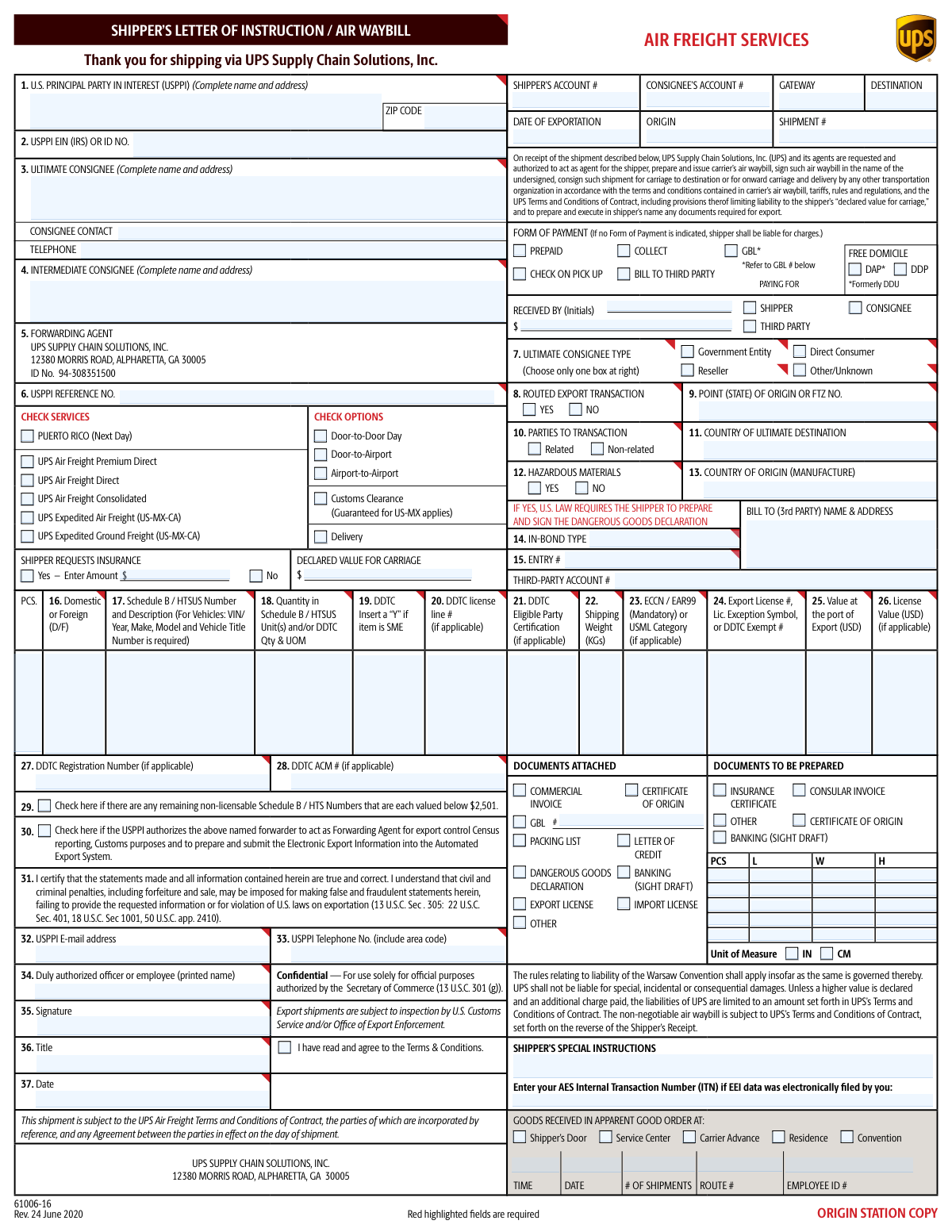
Yes! You can use AI to fill out UPS Supply Chain Solutions Shipper’s Letter of Instruction / Air Waybill (Air Freight Services)
This form is a combined Shipper’s Letter of Instruction (SLI) and Air Waybill used for air freight shipments handled by UPS Supply Chain Solutions. The shipper provides shipment parties, routing, service level, payment terms, declared value/insurance, and detailed commodity and export-control data (e.g., Schedule B/HTS, ECCN/EAR99, license details) so UPS can create the air waybill and, when authorized, file Electronic Export Information (EEI) in AES. It is important because it serves as the shipper’s written authorization and certification, supports customs/export compliance, and helps ensure correct billing, carriage terms, and liability/declared value treatment.
Our AI automatically handles information lookup, data retrieval, formatting, and form filling.
It takes less than a minute to fill out UPS SLI / Air Waybill using our AI form filling.
Securely upload your data. Information is encrypted in transit and deleted immediately after the form is filled out.
Form specifications
| Form name: | UPS Supply Chain Solutions Shipper’s Letter of Instruction / Air Waybill (Air Freight Services) |
| Number of pages: | 2 |
| Filled form examples: | Form UPS SLI / Air Waybill Examples |
| Language: | English |
Instafill Demo: filling out a legal form in seconds
How to Fill Out UPS SLI / Air Waybill Online for Free in 2026
Are you looking to fill out a UPS SLI / AIR WAYBILL form online quickly and accurately? Instafill.ai offers the #1 AI-powered PDF filling software of 2026, allowing you to complete your UPS SLI / AIR WAYBILL form in just 37 seconds or less.
Follow these steps to fill out your UPS SLI / AIR WAYBILL form online using Instafill.ai:
- 1 Enter the USPPI (shipper) information: legal name, full address, EIN/ID number, reference number, email, and phone.
- 2 Enter consignee details: ultimate consignee name/address, contact name and telephone, and (if applicable) intermediate consignee and consignee type (government entity, direct consumer, reseller, or other).
- 3 Select the requested UPS air freight service and options (e.g., Premium Direct/Direct/Consolidated, door-to-door/airport, customs clearance, delivery) and provide origin, destination, export date, shipment number, and gateway information.
- 4 Choose commercial terms and financial details: Incoterms/payment responsibility (e.g., Free Domicile, DAP, DDP), form of payment (prepaid/collect/third party), and complete third-party billing name/address and account number if used.
- 5 Set risk/value fields: indicate whether insurance is requested, enter insurance amount (if yes), and enter the declared value for carriage.
- 6 Complete export compliance and authorization items: routed export transaction (yes/no), parties related/non-related, hazardous materials (yes/no), country of origin and ultimate destination, in-bond/entry details if applicable, DDTC fields if applicable, AES/ITN if already filed, and check the authorization for UPS to act as forwarding agent and file EEI if desired.
- 7 List commodity line items: Schedule B/HTS number and description, quantities and units, weights, value at port of export, ECCN/EAR99 or USML category, license/exception/exemption details, then sign/date as the authorized officer/employee and add any special instructions and attached/prepared documents.
Our AI-powered system ensures each field is filled out correctly, reducing errors and saving you time.
Why Choose Instafill.ai for Your Fillable UPS SLI / Air Waybill Form?
Speed
Complete your UPS SLI / Air Waybill in as little as 37 seconds.
Up-to-Date
Always use the latest 2026 UPS SLI / Air Waybill form version.
Cost-effective
No need to hire expensive lawyers.
Accuracy
Our AI performs 10 compliance checks to ensure your form is error-free.
Security
Your personal information is protected with bank-level encryption.
Frequently Asked Questions About Form UPS SLI / Air Waybill
This form authorizes UPS Supply Chain Solutions (UPS SCS) to arrange air freight transportation and, when authorized, prepare export documentation (including the air waybill and export filings). It also captures shipment, billing, and compliance details needed to move the cargo.
The U.S. Principal Party in Interest (USPPI)/shipper (or an authorized employee) typically completes and signs it. If you are using UPS SCS as your forwarding agent, you still must provide accurate shipment and export-control information.
Provide the USPPI’s complete legal name and address and the USPPI EIN (or other IRS/ID number). These details identify the U.S. exporter responsible for the shipment and are commonly required for export reporting.
Enter the complete name and address of the final recipient in Box 3 and include a consignee contact and telephone number. Use Box 4 only if another party will receive the goods before the ultimate consignee (for example, a distribution hub or intermediary).
It’s strongly recommended because it helps you and UPS SCS track and match the shipment to your internal records. Use your purchase order, invoice number, shipment ID, or another unique reference.
Select the service level under “CHECK SERVICES” and then choose the delivery option that matches where UPS SCS is responsible for pickup and delivery. For example, Door-to-Door includes pickup and final delivery, while Airport-to-Airport generally covers airport handling only.
Declared Value for Carriage is the value you declare for carrier liability purposes and may affect UPS SCS’s liability limits and valuation charges. Shipper-requested insurance is a separate request to insure the shipment—check “Yes” and enter the amount if you want insurance arranged.
Choose one option under “FORM OF PAYMENT”; if you do not indicate a form of payment, the shipper may be liable for charges. If billing to a third party, complete the third-party name/address and account information as shown on the form.
These are delivery terms that indicate who is responsible for duties/taxes and delivery obligations. DAP generally means the buyer pays import duties/taxes, while DDP generally means the shipper pays them; choose the option that matches your sales agreement and customs plan.
A routed export transaction generally means the foreign buyer controls the export movement and selects the forwarding agent. Mark YES only if the transaction meets routed criteria; otherwise mark NO—when in doubt, confirm with your trade compliance team or UPS SCS.
It classifies the consignee (Government Entity, Direct Consumer, Reseller, or Other/Unknown) for export reporting purposes. Select only one box that best describes the final recipient’s role.
For each item, provide whether it is Domestic/Foreign, the Schedule B/HTS number and description, quantity/unit of measure, shipping weight, ECCN (or EAR99), and the value at the port of export in USD. These fields support export compliance and Electronic Export Information (EEI) filing.
If you mark “YES,” U.S. law requires the shipper to prepare and sign a Dangerous Goods Declaration. You should also attach any required dangerous goods documentation and ensure packaging/marking complies with applicable regulations.
If EEI was filed electronically by you (rather than by the forwarder), enter the AES Internal Transaction Number (ITN) in the space provided under “Enter your AES Internal Transaction Number (ITN).” If you authorize UPS SCS to file EEI, you may not have an ITN at the time you complete the form.
Checking Box 30 authorizes UPS SCS to act as the forwarding agent for export control/Census reporting and Customs purposes, including preparing and submitting EEI in AES. Only check it if you want UPS SCS to handle those filings on your behalf.
Compliance UPS SLI / Air Waybill
Validation Checks by Instafill.ai
1
USPPI Complete Name and Address Presence & Structure
Validates that the U.S. Principal Party in Interest (USPPI) field includes a complete legal entity/person name and a full physical address (street, city, state/province, postal code, country). This is required for export compliance, billing, and to correctly identify the exporter of record. If any required address component is missing or appears to be a P.O. Box-only address where a physical address is required, the submission should be rejected or routed for manual review.
2
USPPI EIN/ID Number Format and Validity
Checks that the USPPI EIN (IRS) or ID number is present when required and matches an acceptable format (typically 9 digits for EIN, allowing optional hyphen formatting like NN-NNNNNNN). This prevents filing errors in AES/EEI and reduces the risk of customs delays due to invalid exporter identification. If the EIN/ID is missing, not 9 digits, or contains invalid characters, the form should fail validation and prompt correction.
3
Ultimate Consignee Complete Name, Address, and Country Consistency
Ensures the Ultimate Consignee section contains a complete name and address and that the consignee country aligns with the declared "Country of Ultimate Destination" field. This is critical to ensure the shipment is routed and declared to the correct destination and to avoid export reporting discrepancies. If the consignee address is incomplete or the destination country conflicts, the submission should be blocked until reconciled.
4
Consignee Contact Telephone Format
Validates that the consignee contact telephone number is provided (when a contact field is present) and conforms to a recognized phone format (E.164 preferred, or country-specific formats with digits and allowed separators). A valid phone number is necessary for delivery coordination, customs contact, and exception handling. If the phone number is missing or contains too few digits/invalid characters, the system should flag the record and require correction.
5
USPPI Email Address Format
Checks that the USPPI email address is present when required and matches a standard email pattern (local-part@domain with valid domain structure). This supports shipment notifications, document requests, and compliance communications. If the email is malformed (missing '@', invalid domain, or contains spaces), validation should fail and request a corrected email.
6
USPPI Telephone Number Format (Include Area Code)
Validates that the USPPI telephone number is present and includes an area code/country code as indicated by the form instructions. This ensures UPS/forwarder can contact the shipper for pickup, documentation, or compliance questions. If the number is missing, too short, or lacks required area/country code, the submission should be rejected or held for completion.
7
Service Selection: Exactly One Air Freight Service Checked
Ensures that one (and only one) service option is selected from the listed services (e.g., UPS Air Freight Direct, Consolidated, Expedited, Puerto Rico Next Day). Selecting multiple services creates ambiguity in pricing, routing, and service-level commitments. If none or more than one service is selected, the form should fail validation and require a single selection.
8
Shipping Option Selection Compatibility (Door/Airport + Customs/Delivery)
Validates that the chosen routing option (Door-to-Door, Door-to-Airport, Airport-to-Airport) is consistent with any checked add-ons such as Delivery and Customs Clearance. For example, selecting Airport-to-Airport while also selecting Delivery may be contradictory unless the system supports a defined interpretation. If incompatible combinations are selected, the system should prompt the user to correct selections or confirm an allowed combination.
9
Insurance Request and Amount Validation
If "Shipper Requests Insurance: Yes" is selected, verifies that an insurance amount is entered, is numeric, and is greater than zero; if "No" is selected, the insurance amount must be blank or zero. This prevents billing disputes and ensures coverage is correctly requested and charged. If the selection and amount conflict (e.g., Yes with blank amount, or No with a positive amount), validation should fail.
10
Declared Value for Carriage Numeric and Business Rule Checks
Validates that the Declared Value for Carriage is a valid currency amount (numeric, non-negative, with at most two decimal places) and is present when required by the selected service or shipper instructions. Declared value drives liability limits and valuation charges, so incorrect values can cause claims and billing issues. If the value is negative, non-numeric, or exceeds configured maximums (if enforced by system rules), the submission should be rejected or escalated for review.
11
Incoterms/Paying For Selection: Exactly One of Free Domicile/DAP/DDP
Ensures exactly one "Paying For"/Incoterms option is selected (Free Domicile, DAP, or DDP) and that it is compatible with the billing party selection. Incoterms determine who pays duties/taxes and impacts customs clearance instructions. If multiple or none are selected, the form should fail validation and require a single clear choice.
12
Form of Payment Selection and Required Billing Details
Validates that a Form of Payment is selected (Prepaid, Collect, GBL, Check on Pick Up, or Bill to Third Party) and that the corresponding payer details are provided (e.g., shipper account # for prepaid, consignee account # for collect, third-party name/address and third-party account # for bill-to-third-party). This prevents unbillable shipments and disputes over responsibility for charges. If payment type is missing or required account/bill-to fields are blank, the submission should be blocked.
13
Third-Party Billing Completeness (Name/Address/Account #)
When "Bill to Third Party" is selected, checks that the third-party bill-to name and address are complete and that a third-party account number is provided in the expected format (alphanumeric length rules per carrier configuration). Complete third-party details are necessary to invoice correctly and avoid shipment holds. If any component is missing or the account number fails format checks, validation should fail and request completion.
14
Export Date Validity and Not-in-the-Future Rule
Validates that the "Date of Exportation" and the signature date are valid calendar dates in the expected format and that the export date is not unreasonably far in the future relative to submission (configurable tolerance). Accurate dates are required for compliance reporting, service commitments, and claims timelines. If dates are invalid, missing where required, or inconsistent (e.g., signature date after export date when not allowed by policy), the form should be rejected.
15
Routed Export Transaction Logic (Routed = YES Requires Additional Authorization/Agent Context)
If "Routed Export Transaction" is marked YES, validates that the forwarding agent/authorized party information and any required authorization indicators are present (e.g., the USPPI authorization checkbox for the forwarder to file EEI, if applicable to the workflow). Routed transactions have specific compliance responsibilities and documentation expectations. If routed is YES but required authorization/agent details are missing, the submission should be flagged for compliance review or blocked.
16
Hazardous Materials Flag Requires Dangerous Goods Documentation
If "Hazardous Materials: YES" is selected, verifies that the Dangerous Goods Declaration is indicated as attached/prepared and that hazardous shipment handling requirements are met (at minimum, the presence of DG documentation selection). This is legally required and critical for safety and carrier acceptance. If HazMat is YES without DG documentation indicated, the form should fail validation and prevent processing.
Common Mistakes in Completing UPS SLI / Air Waybill
People often enter a trade name, omit the street address, or provide a P.O. Box instead of a complete physical address for the U.S. Principal Party in Interest (USPPI). This happens because shippers copy billing info or email signatures rather than the legal entity details required for export documentation. Missing or non-physical addresses can delay pickup, prevent AES/EEI filing, and trigger compliance questions. Use the USPPI’s full legal name and a complete physical address (street, city, state, ZIP) that matches your corporate/tax records.
A common error is leaving the EIN blank, entering a personal SSN, or using an internal company number that is not an IRS-issued EIN/ID. This typically occurs when the person completing the form is not in finance/compliance and doesn’t know which identifier is required. Incorrect EIN/ID can cause AES/EEI filing failures, customs delays, and potential penalties for inaccurate export reporting. Confirm the correct EIN (or other valid USPPI ID) from official tax documentation and enter it exactly as issued.
Shippers frequently provide only the consignee company name/address but omit a specific contact person and telephone number, or they enter a U.S.-formatted number for an international destination without country/area codes. This happens because the form visually emphasizes addresses, and contact fields are easy to overlook. Missing or invalid contact info can lead to delivery holds, failed delivery attempts, and customs clearance delays when authorities or the carrier need clarification. Always include a named consignee contact and a reachable phone number with the correct country code and extension if applicable.
Many people mistakenly list the freight forwarder, broker, or a warehouse as the “Ultimate Consignee,” or they duplicate the same party across consignee fields. This confusion is common because multiple logistics parties may be involved and the terms are not intuitive. Misidentifying the ultimate consignee can result in incorrect EEI reporting, misrouted shipments, and compliance issues (especially for controlled goods). Enter the true end recipient as the Ultimate Consignee, and use Intermediate Consignee only when there is a legitimate onward party receiving the goods before final delivery.
Users often check more than one service (e.g., Direct and Consolidated) or fail to select Door-to-Door vs. Airport-to-Airport, assuming UPS will choose. This happens because the form presents many checkboxes and the differences are not always understood. Conflicting or missing selections can cause rating errors, booking delays, and service that doesn’t match the required delivery timeline. Choose exactly the service and routing option that matches your quote/booking instructions, and confirm with your UPS SCS contact if unsure.
A frequent mistake is checking “Shipper Requests Insurance: Yes” but not entering an amount, or entering a declared value for carriage that doesn’t match the commercial invoice value. This occurs because shippers confuse “insurance amount” with “declared value for carriage,” or assume coverage is automatic. Inconsistencies can lead to underinsured shipments, claim denials, or additional charges and rework. Decide whether you need insurance, enter the requested insurance amount, and ensure the declared value for carriage is completed and aligned with your invoice and risk requirements.
People often select DDP when they do not intend to pay duties/taxes, or select DAP/Free Domicile without understanding who is responsible for clearance and charges. This happens because Incoterms are commonly misunderstood and the form provides limited guidance. The wrong selection can cause unexpected duty bills, clearance delays, and disputes with the consignee. Confirm the agreed Incoterm in your sales contract and select only the term that matches who will pay freight, duties, taxes, and clearance responsibilities.
Shippers frequently forget to select PREPAID/COLLECT/THIRD PARTY, or they select BILL TO THIRD PARTY but omit the third-party name/address and account number. This happens when the shipment is arranged quickly and billing details are handled by another team. If payment is unclear, the form states the shipper may be liable, and the shipment can be held until billing is resolved. Always select one payment method and ensure the corresponding account numbers and third-party billing details are complete and accurate.
A common compliance issue is leaving the AES Internal Transaction Number (ITN) blank when EEI was filed by the shipper, or failing to check the authorization box that allows the forwarder to file EEI on the shipper’s behalf. This happens because filers assume UPS will “handle AES” automatically or they don’t know whether EEI is required for the shipment. Missing ITN/authorization can stop export processing, delay departure, and create regulatory exposure. Determine who is filing EEI, provide the ITN if you filed, or explicitly authorize the forwarder to file and ensure all required data is supplied.
Users often provide vague descriptions (“parts,” “samples”), omit Schedule B/HTS numbers, leave ECCN/EAR99 blank (even though it is marked mandatory), or enter quantities/units that don’t match the Schedule B unit of measure. This happens because product classification is specialized and the form requests multiple compliance fields per line item. Incomplete or inconsistent commodity data can cause AES rejection, customs holds, incorrect duties, and export control violations. Use precise descriptions, correct Schedule B/HTS codes, enter ECCN or EAR99 for each line, and ensure quantity, UOM, weight (KGs), and value at port of export are consistent with the commercial invoice and packing list.
Shippers sometimes check “NO” for hazardous materials because the item seems harmless, or they check “YES” but fail to attach/prepare the required Dangerous Goods Declaration. This occurs because hazmat classification (e.g., batteries, aerosols, chemicals) is not obvious to non-specialists. Incorrect hazmat declarations can lead to shipment refusal, regulatory penalties, and serious safety risks. Verify hazmat status using SDS and applicable regulations, mark the hazmat field accurately, and include the Dangerous Goods Declaration and any required packaging/labels when applicable.
Saved over 80 hours a year
“I was never sure if my IRS forms like W-9 were filled correctly. Now, I can complete the forms accurately without any external help.”
Kevin Martin Green
Your data stays secure with advanced protection from Instafill and our subprocessors
Robust compliance program
Transparent business model
You’re not the product. You always know where your data is and what it is processed for.
ISO 27001, HIPAA, and GDPR
Our subprocesses adhere to multiple compliance standards, including but not limited to ISO 27001, HIPAA, and GDPR.
Security & privacy by design
We consider security and privacy from the initial design phase of any new service or functionality. It’s not an afterthought, it’s built-in, including support for two-factor authentication (2FA) to further protect your account.
Fill out UPS SLI / Air Waybill with Instafill.ai
Worried about filling PDFs wrong? Instafill securely fills ups-supply-chain-solutions-shippers-letter-of-inst forms, ensuring each field is accurate.