Yes! You can use AI to fill out IRA Distribution to Charitable Beneficiary
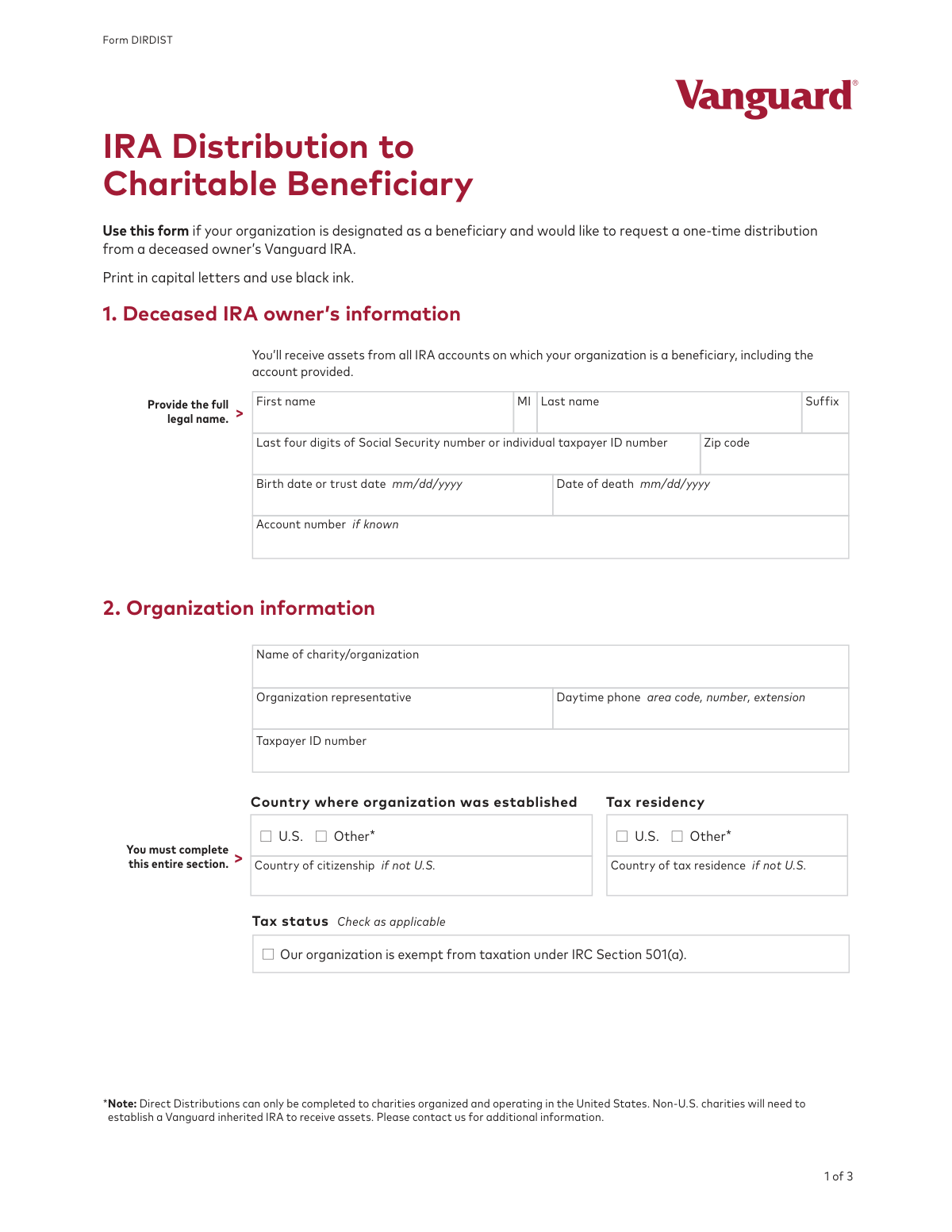
This form is a formal request submitted by a charitable organization, designated as a beneficiary, to receive assets from a deceased individual's Vanguard Individual Retirement Account (IRA). It is essential for legally processing the transfer of funds from the decedent's account to the charity. Today, this form can be filled out quickly and accurately using AI-powered services like Instafill.ai, which can also convert non-fillable PDF versions into interactive fillable forms.
DIRDIST is part of the
beneficiary forms, IRA forms, charitable forms, distribution forms, charitable distribution forms, beneficiary distribution forms, IRA distribution forms and IRA beneficiary forms categories on Instafill.
Rather not fill this in by hand? Instafill is an online form filler that completes PDF forms automatically — upload the blank form, answer a few questions, and the AI fills every field.
Form specifications
| Form name: | IRA Distribution to Charitable Beneficiary |
| Number of pages: | 1 |
| Language: | English |
Our AI automatically handles information lookup, data retrieval, formatting, and form filling.
It takes less than a minute to fill out DIRDIST using our AI form filling.
Securely upload your data. Information is encrypted in transit and deleted immediately after the form is filled out.
Instafill Demo: How to fill out PDF forms in seconds with AI
How to Fill Out DIRDIST Online for Free in 2026
Are you looking to fill out a DIRDIST form online quickly and accurately? Instafill.ai offers the #1 AI-powered PDF filling software of 2026, allowing you to complete your DIRDIST form in just 37 seconds or less.
Follow these steps to fill out your DIRDIST form online using Instafill.ai:
- 1 Navigate to Instafill.ai and upload the IRA Distribution to Charitable Beneficiary form or select it from their template library.
- 2 Use the AI assistant to accurately fill in the deceased IRA owner's information, including their name, Social Security number, and date of death.
- 3 Provide your organization's details, such as the full legal name, Taxpayer ID Number (TIN), address, and tax status.
- 4 Select your preferred distribution instruction, choosing whether to liquidate assets for a check or transfer them to an existing Vanguard account.
- 5 Indicate your income tax withholding election as required in Section 4.
- 6 Review all entered information for accuracy before the authorized organization representative electronically signs and dates the form.
- 7 Attach the required supporting documents, like a Form W-9 and a Certificate of Good Standing, and submit the completed package as instructed.
Our AI-powered system ensures each field is filled out correctly, reducing errors and saving you time.
Why Choose Instafill.ai for Your Fillable DIRDIST Form?
Speed
Complete your DIRDIST in as little as 37 seconds.
Up-to-Date
Always use the latest 2026 DIRDIST form version.
Cost-effective
No need to hire expensive lawyers.
Accuracy
Our AI performs 10 compliance checks to ensure your form is error-free.
Security
Your personal information is protected with bank-level encryption.
Frequently Asked Questions About DIRDIST
This form is used by a charitable organization to request a one-time distribution from a deceased owner's Vanguard IRA for which it has been named a beneficiary.
An authorized representative of a U.S.-based charitable organization that is a designated beneficiary of a deceased person's Vanguard IRA must complete this form to claim the inherited assets.
You must provide the deceased owner's full name, date of death, and the last four digits of their Social Security or taxpayer ID number. The Vanguard account number is helpful if known, but not required.
You must attach a completed Form W-9 and a current document, such as a Secretary's Certificate or Certificate of Good Standing, which confirms who is authorized to sign for your organization.
You can choose to have the assets liquidated and a check mailed to your organization, or have the liquidated proceeds transferred directly into your organization's existing Vanguard nonretirement account.
No, this form is only for direct distributions to charities organized and operating in the United States. Non-U.S. charities must establish a Vanguard inherited IRA to receive assets.
This option is provided because organizations using this form are typically tax-exempt under IRC Section 501(a) and therefore do not owe income tax on the distribution.
These are official documents that verify your organization is in compliance with state requirements and confirm which individuals have the authority to sign documents and act on its behalf.
The form must be signed and dated by both the Organization Representative named in Section 2 and a separate certifying individual.
Vanguard will process your distribution request as instructed. At the end of the calendar year, Vanguard will issue the required tax forms reflecting the distribution to your organization.
Yes, services like Instafill.ai use AI to accurately auto-fill form fields, which can save you time and help reduce errors.
You can use a service like Instafill.ai to upload the PDF, which makes it an interactive, fillable form that you can complete and sign electronically from any device.
If you have a flat or non-fillable PDF, you can upload it to a service like Instafill.ai, which will automatically convert it into an interactive, fillable form for you to complete online.
Compliance DIRDIST
Validation Checks by Instafill.ai
1
Deceased Owner's Date of Death Logical Consistency
This check ensures the 'Date of death' provided in Section 1 is a valid date that occurs on or after the 'Birth date or trust date'. This is a critical logical validation to prevent impossible data entries, such as a date of death preceding a birth date. A failure would indicate a significant data entry error requiring correction before the form can be processed.
2
Deceased Owner's Identifier Format
Validates that the 'Last four digits of Social Security number or individual taxpayer ID number' field contains exactly four numeric digits. This ensures the data conforms to the expected format for partial identifiers, which is crucial for correctly locating the deceased owner's account. An invalid format would prevent account lookup and halt the process.
3
Organization Information Completeness
Verifies that all fields within Section 2, 'Organization information', are fully completed as instructed on the form. This includes the organization's name, Taxpayer ID, representative's name, phone number, and full address. Incomplete information would prevent proper identification, payment, and communication with the beneficiary organization.
4
Organization Tax ID Number (TIN) Format
This check validates that the 'Taxpayer ID number' in Section 2 adheres to the standard 9-digit U.S. Employer Identification Number (EIN) format (XX-XXXXXXX). A valid TIN is essential for tax reporting purposes (Form 1099-R) and for verifying the organization's identity and status with the IRS. An incorrectly formatted TIN would lead to tax reporting errors and processing delays.
5
U.S. Charity Eligibility Verification
Ensures that both 'Country where organization was established' and 'Country of tax residence' are selected as 'U.S.'. The form explicitly states that direct distributions are only for U.S. charities. If 'Other' is selected for either field, the submission must be rejected as the organization is ineligible for this specific process and must use a different procedure.
6
Tax-Exempt Status Confirmation
Validates that the checkbox 'Our organization is exempt from taxation under IRC Section 501(a)' is checked. This is a mandatory declaration confirming the organization's legal status as a charity eligible to receive this type of distribution. Failure to check this box means the organization has not certified its eligibility, and the distribution cannot proceed.
7
Exclusive Distribution Instruction Selection
This validation ensures that the user has selected exactly one distribution instruction in Section 3, either 'Option A' or 'Option B'. The system must reject submissions where neither option or both options are selected, as this creates ambiguity about how to handle the funds. A clear, single instruction is required to execute the distribution correctly.
8
Conditional Vanguard Account Number for Option B
If 'Option B' (liquidate and exchange to an existing account) is selected in Section 3, this check verifies that the 'Vanguard account number' field is not empty and contains a value matching the expected format. This account number is mandatory for executing Option B. If it's missing or invalid, the transfer cannot be completed.
9
Required Attachments Presence
Verifies that the submission includes the two mandatory documents listed in Section 5: a completed Form W-9 and a corporate resolution or similar document (e.g., Secretary's Certificate) confirming signatory authority. Without these legal documents, Vanguard cannot verify the organization's TIN or the representative's authority to act, making the entire request invalid.
10
Organization Representative Authorization
This check confirms that the 'Signature of organization representative' field is signed, the 'Print name' and 'Title' fields are filled, and the 'Today’s date' field contains a valid, non-future date. A complete and valid authorization is a legal requirement to process the distribution request. An unsigned or incomplete authorization section invalidates the form.
11
Printed Name and Representative Consistency
Compares the 'Print name' under the signature in Section 6 with the 'Organization representative' name provided in Section 2. The names should match to ensure the person who is authorized is the same person signing the document. A mismatch could indicate an unauthorized signature and requires investigation.
12
Valid Submission Date
Ensures the 'Today’s date' fields in Section 6 are valid dates in MM-DD-YYYY format and are not set in the future. The date serves as the official date of the request and must be current or in the recent past. A future date is a logical error that must be corrected.
13
Daytime Phone Number Format
Validates that the 'Daytime phone' number in Section 2 is a valid U.S. phone number, including an area code. This is important for ensuring Vanguard can contact the organization representative if there are any questions or issues with the distribution request. An invalid number could cause significant delays.
14
Tax Withholding Acknowledgment
Confirms that the checkbox in Section 4, 'Don’t withhold federal or state income tax from distribution amount,' is checked. As this is the only option provided, it functions as a mandatory acknowledgment of the tax withholding rules for the distribution. The form cannot be considered complete without this acknowledgment.
Common Mistakes in Completing DIRDIST
Section 5 explicitly requires attaching a Form W-9 and a document confirming signatory authority, such as a Secretary's Certificate. Organizations often overlook this step, assuming the form itself is sufficient. Submitting the form without these mandatory attachments will result in an immediate rejection and significant processing delays until the correct documents are provided.
A simple typographical error in the organization's Taxpayer Identification Number (TIN) in Section 2 is a frequent and critical mistake. This number is used for tax reporting to the IRS. An incorrect TIN will cause the distribution to be rejected or lead to serious tax reporting issues and correspondence with the IRS for both the financial institution and the charity.
Section 6 requires two separate signatures: one from the organization representative and another from a certifying individual, both with the current date. It is common for one of these signatures or dates to be missed, or for the same person to sign in both places incorrectly. An incomplete authorization section invalidates the entire request, requiring the form to be re-signed and resubmitted.
The form requires the full legal name of the charity/organization as it appears on official documents and tax records. Many applicants mistakenly use a common name, acronym, or a 'Doing Business As' (DBA) name. This discrepancy can cause validation failures and delays, as the name must match the one associated with the provided Taxpayer ID Number.
Applicants sometimes fail to provide all the required information for the deceased owner in Section 1, such as the last four digits of their Social Security number or their date of death. This information is essential for locating and verifying the correct IRA. Leaving these fields blank or providing inaccurate data will halt the process until the applicant can supply the correct details, delaying the distribution.
This form is specifically for U.S.-based charities exempt from taxation under IRC Section 501(a), as noted in Section 2. A common error is for a non-U.S. charity or a non-exempt organization to attempt to use this form. This leads to automatic rejection, as these entities must follow a different process, such as establishing an inherited IRA, which wastes time and effort.
The required supporting document, such as a Certificate of Good Standing or Secretary's Certificate, must be current. Organizations sometimes attach an old document they have on file, which may no longer be valid or may not reflect the current authorized signatories. Financial institutions will reject expired documents, requiring the organization to obtain and submit up-to-date paperwork.
The form explicitly instructs the user to 'Print in capital letters and use black ink.' Many people ignore these instructions, using cursive, lowercase letters, or blue ink. This can cause the form to be rejected by automated scanning systems or lead to data entry errors due to illegibility, potentially sending funds to the wrong address or creating tax reporting mistakes. AI-powered tools like Instafill.ai can prevent this by populating the form with clear, standardized text and can even make non-fillable PDFs fillable.
In Section 3, the applicant must clearly select either Option A or Option B. A common mistake is to either forget to check a box or, if choosing Option B, to neglect to provide the existing Vanguard account number. An incomplete instruction prevents the financial institution from knowing how to process the funds, causing them to put the request on hold and contact the organization for clarification.
The organization's street address provided in Section 2 is used for all correspondence and, crucially, for mailing the distribution check if Option A is selected. An old address, a P.O. Box when a street address is needed, or a simple typo can result in a lost or significantly delayed payment. It is vital to double-check that this address is current and correct. Using a tool like Instafill.ai can help by auto-populating verified address information, reducing the risk of manual error.
Saved over 80 hours a year
“I was never sure if my IRS forms like W-9 were filled correctly. Now, I can complete the forms accurately without any external help.”
Kevin Martin Green
Your data stays secure with advanced protection from Instafill and our subprocessors




Robust compliance program
Transparent business model
You’re not the product. You always know where your data is and what it is processed for.
ISO 27001, HIPAA, and GDPR
Our subprocesses adhere to multiple compliance standards, including but not limited to ISO 27001, HIPAA, and GDPR.
Security & privacy by design
We consider security and privacy from the initial design phase of any new service or functionality. It’s not an afterthought, it’s built-in, including support for two-factor authentication (2FA) to further protect your account.
Fill out DIRDIST with Instafill.ai
Worried about filling PDFs wrong? Instafill securely fills ira-distribution-to-charitable-beneficiary forms, ensuring each field is accurate.
