Yes! You can use AI to fill out IRA Distribution to Charitable Beneficiary
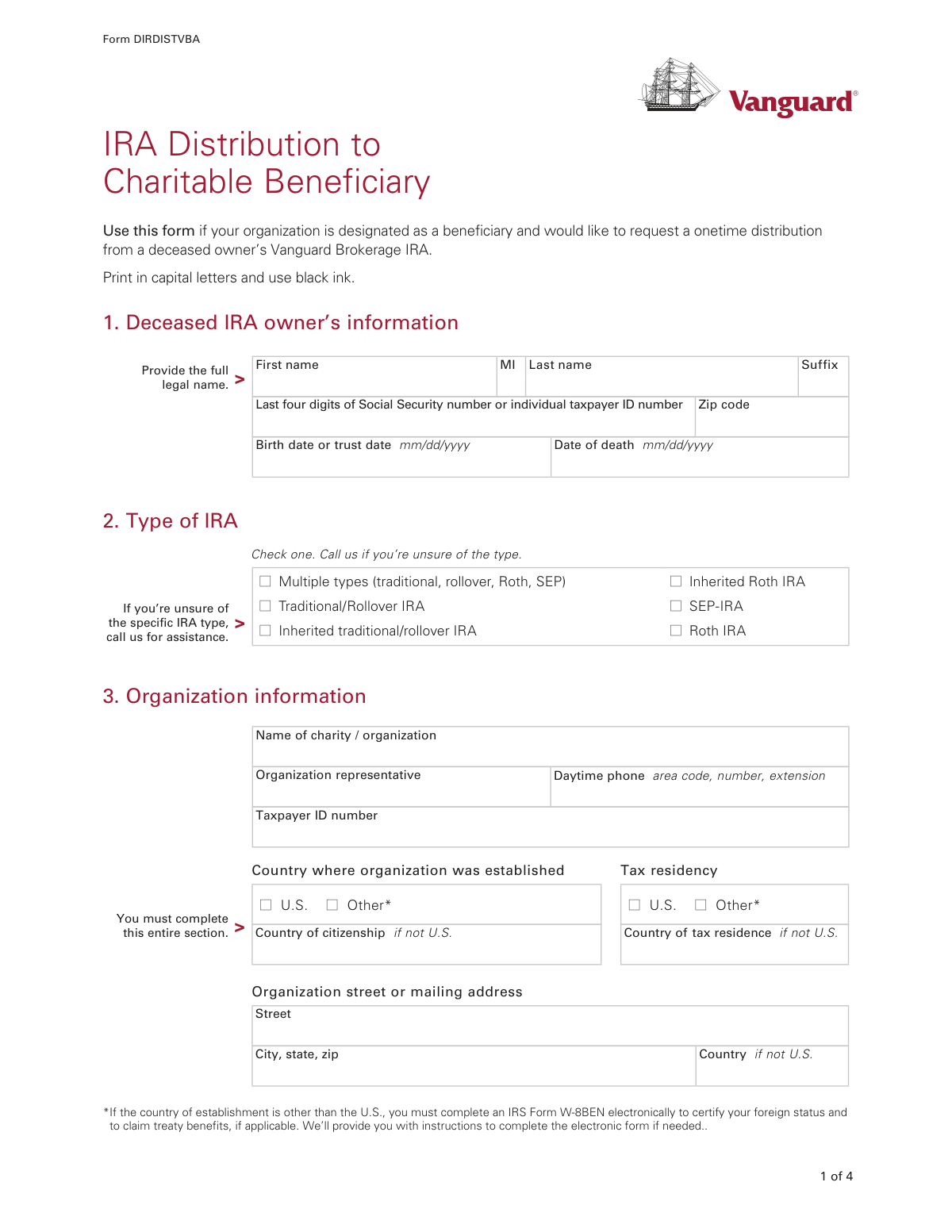
Form DIRDISTVBA, IRA Distribution to Charitable Beneficiary, is a document used by a designated charitable organization to claim its inheritance from a deceased individual's Vanguard Brokerage IRA. It allows the charity to provide details about the deceased, the organization itself, and instructions for how the distribution should be handled, including asset liquidation and payment delivery. This form is crucial for the legal and proper transfer of IRA assets to the non-profit beneficiary. Today, this form can be filled out quickly and accurately using AI-powered services like Instafill.ai, which can also convert non-fillable PDF versions into interactive fillable forms.
DIRDISTVBA is part of the
beneficiary forms, IRA forms, charitable forms, distribution forms, charitable distribution forms, beneficiary distribution forms, IRA distribution forms and IRA beneficiary forms categories on Instafill.
Rather not fill this in by hand? Instafill is an online form filler that completes PDF forms automatically — upload the blank form, answer a few questions, and the AI fills every field.
Form specifications
| Form name: | IRA Distribution to Charitable Beneficiary |
| Number of pages: | 1 |
| Language: | English |
Our AI automatically handles information lookup, data retrieval, formatting, and form filling.
It takes less than a minute to fill out DIRDISTVBA using our AI form filling.
Securely upload your data. Information is encrypted in transit and deleted immediately after the form is filled out.
Instafill Demo: How to fill out PDF forms in seconds with AI
How to Fill Out DIRDISTVBA Online for Free in 2026
Are you looking to fill out a DIRDISTVBA form online quickly and accurately? Instafill.ai offers the #1 AI-powered PDF filling software of 2026, allowing you to complete your DIRDISTVBA form in just 37 seconds or less.
Follow these steps to fill out your DIRDISTVBA form online using Instafill.ai:
- 1 Navigate to Instafill.ai and upload or select the 'IRA Distribution to Charitable Beneficiary' form.
- 2 Use the AI assistant to provide information about the deceased IRA owner, including their full name, date of birth, and date of death.
- 3 Enter your organization's information, such as its legal name, Taxpayer ID number, address, and tax residency status.
- 4 Select the desired distribution instructions, specifying how the assets should be liquidated and where the funds should be sent.
- 5 Complete the income tax withholding section by making elections for both federal and state taxes as applicable.
- 6 Gather and attach all required legal documents, including a corporate resolution, a completed Form W-9, and your organization's Articles of Incorporation.
- 7 Review all the auto-filled information for accuracy, then have the authorized representative sign and date the form before submitting it to Vanguard.
Our AI-powered system ensures each field is filled out correctly, reducing errors and saving you time.
Why Choose Instafill.ai for Your Fillable DIRDISTVBA Form?
Speed
Complete your DIRDISTVBA in as little as 37 seconds.
Up-to-Date
Always use the latest 2026 DIRDISTVBA form version.
Cost-effective
No need to hire expensive lawyers.
Accuracy
Our AI performs 10 compliance checks to ensure your form is error-free.
Security
Your personal information is protected with bank-level encryption.
Frequently Asked Questions About DIRDISTVBA
This form is used by a charitable organization that has been designated as a beneficiary to request a one-time distribution from a deceased person's Vanguard Brokerage IRA.
An authorized representative of a charitable organization must complete this form to claim the inherited IRA assets on behalf of the organization.
You must attach a corporate resolution authorizing the representative, a completed Form W-9 for your organization, and your organization's Articles of Incorporation or Certificate of Good Standing.
You need to provide the deceased owner's full legal name, birth date, date of death, and the last four digits of their Social Security number or taxpayer ID number.
The form advises you to call Vanguard for assistance if you are unsure of the specific IRA type. You can also check the 'Multiple types' box if applicable.
You have three options: have a check mailed to your organization's address on file, have a check mailed to a different address, or have the proceeds transferred to your organization's existing Vanguard nonretirement account.
If you don't select an option, Vanguard will automatically withhold 10% of the distribution for federal income tax, unless the distribution is from a Roth IRA.
Yes, if your organization was established outside the U.S., you must complete an IRS Form W-8BEN to certify your foreign status. Special tax withholding rules will also apply.
This is a formal document from your organization that clearly identifies which individuals are authorized to conduct securities transactions and handle financial matters on its behalf.
Yes, you can elect to have a higher percentage withheld. Simply check the box and specify a rate that is 10% or greater.
State tax withholding rules vary by state. For some states it is mandatory if federal tax is withheld, while for others it is optional; review the state-specific rules in Section 5 to understand your requirements.
Yes, services like Instafill.ai use AI to accurately auto-fill form fields with your organization's information, which saves time and helps prevent errors.
You can use a service like Instafill.ai to upload the PDF and fill it out on your computer. The platform lets you type directly into the fields, add a digital signature, and download the completed document.
If you have a non-fillable or 'flat' PDF, you can use a tool like Instafill.ai. It can convert the document into an interactive, fillable form that you can easily complete online.
Compliance DIRDISTVBA
Validation Checks by Instafill.ai
1
Deceased Owner Date of Death vs. Birth Date Logic
This check ensures the 'Date of death' provided in Section 1 is chronologically after the 'Birth date or trust date'. This is a critical logical validation to prevent data entry errors and ensure the integrity of the deceased owner's information. A failure would indicate a typo or incorrect information, requiring the user to correct one or both dates before submission.
2
SSN/ITIN Last Four Digits Format
This validation verifies that the 'Last four digits of Social Security number or individual taxpayer ID number' field in Section 1 contains exactly four numeric characters. This check is important for correctly identifying the deceased owner's account while adhering to privacy standards. If the input is not four digits, an error message should prompt the user to correct the entry.
3
Exclusive IRA Type Selection
This check ensures that only one checkbox is selected in Section 2, 'Type of IRA'. The form instructs the user to 'Check one', so selecting multiple options would create ambiguity in processing the distribution. If more than one box is checked, the form should display an error and require the user to select a single, correct IRA type.
4
Organization Taxpayer ID Number (TIN) Format
This validation confirms that the 'Taxpayer ID number' in Section 3 is a valid 9-digit Employer Identification Number (EIN), typically formatted as XX-XXXXXXX. A valid TIN is essential for tax reporting and verifying the charitable organization's status with the IRS. An invalid format would prevent processing and require the user to enter the correct 9-digit number.
5
Organization Information Completeness
This check verifies that all fields within Section 3, 'Organization information', are filled out, as explicitly required by the form. Complete information is necessary to identify the beneficiary organization, establish its tax status, and contact its representative. Missing fields would halt the distribution process until all required information is provided.
6
Foreign Organization Status Flag
This validation checks if the 'Country of establishment' in Section 3 is set to 'Other' (not U.S.). If it is, the system should flag that an IRS Form W-8BEN is required for submission, as noted in the form's instructions. This ensures compliance with U.S. tax law regarding payments to foreign entities and prevents delays caused by missing documentation.
7
Exclusive Distribution Instruction Selection
This check ensures that exactly one distribution option (A, B, or C) is selected in Section 4. Providing conflicting or multiple instructions for the distribution would make the request impossible to process. The system must enforce a single choice to ensure the funds are handled according to one clear, unambiguous instruction.
8
Conditional Address for Distribution Option B
This validation is triggered if 'Option B' is selected in Section 4. It verifies that the alternate mailing address fields (Street, City, state, zip) are completely filled out. Failure to provide a complete address would mean the distribution check cannot be mailed, so this check is crucial for successfully executing the request.
9
Conditional Account Number for Distribution Option C
If 'Option C' is selected in Section 4, this check validates that the 'Vanguard account number' field is filled and potentially matches a valid account number format. This number is essential for electronically transferring the proceeds to the organization's existing account. An empty or invalid account number would cause the transaction to fail.
10
Federal Withholding Rate Minimum
This validation applies if the user elects to withhold federal income tax at a specified rate in Section 5. It ensures the entered percentage is a number and is equal to or greater than 10%, as stated on the form. This prevents users from entering an invalid rate, ensuring compliance with the form's rules and preventing processing errors.
11
State Withholding Value Validation
If the organization enters a specific amount or percentage for state income tax withholding in Section 5, this check ensures the value is a valid positive number. This prevents data entry errors, such as text or negative numbers, which would cause calculation failures. The system should also verify the value meets any state-specific minimums if possible.
12
Required Legal Document Attachment Check
This validation verifies that the three required documents listed in Section 6 (Corporate Resolution, Form W-9, and Articles of Incorporation) are attached to the submission. These documents are mandatory for verifying the organization's identity and the representative's authority. The submission cannot be processed without these attachments, so the system should block submission until they are provided.
13
Authorization Signature and Date Presence
This check confirms that the 'Signature of organization representative' field in Section 7 is signed and the 'Today’s date' field is completed. The signature and date are legally required to authorize the transaction and make the instructions binding. An unsigned or undated form is invalid and cannot be acted upon.
14
Date Format Validation (MM/DD/YYYY)
This check applies to all date fields on the form ('Birth date', 'Date of death', 'Today's date') to ensure they are entered in the specified mm/dd/yyyy format and represent a valid calendar date. Consistent and valid date formatting is crucial for record-keeping, logical checks, and overall data integrity. An invalid format would require user correction before the form can be parsed correctly.
Common Mistakes in Completing DIRDISTVBA
Section 6 explicitly requires three attachments: a corporate resolution authorizing the representative, a Form W-9, and the organization's Articles of Incorporation. This is the most common reason for rejection, as people often overlook this section or assume the documents are already on file. Submitting the form without these documents will halt the process entirely, requiring Vanguard to send a notification and wait for the missing paperwork, causing significant delays in receiving the distribution.
The person signing in Section 7 must be legally authorized to act on behalf of the organization, as specified in the corporate resolution document required in Section 6. Often, a well-meaning employee or board member signs without having the specific authority to conduct securities transactions. This invalidates the entire request, as Vanguard cannot act on instructions from an unauthorized individual, leading to rejection of the form and the need for resubmission.
The tax withholding rules in Section 5 are complex, with different requirements for federal vs. state, IRA type, and residency. A frequent mistake is checking 'Don’t withhold' when withholding is mandatory for their state (e.g., Connecticut) or for payments sent outside the U.S. This leads to processing delays and compliance issues, as Vanguard must contact the organization to correct the election to meet legal requirements. To avoid this, carefully review the rules for your specific situation or consult a tax advisor.
Section 1 requires the deceased's full legal name, date of death, and the last four digits of their Social Security number. Errors like using a nickname instead of a legal name, transposing numbers in the date of death, or omitting the SSN digits prevent Vanguard from accurately identifying the correct IRA account. This results in an immediate processing stop until the information can be verified, delaying the entire distribution process.
In Section 5, if no federal withholding option is selected, the form states that Vanguard will automatically withhold a default 10% from the distribution (for non-Roth IRAs). Many filers skip this box, not realizing it results in a mandatory deduction. This can lead to the organization receiving a smaller check than anticipated. To prevent this, always make an explicit choice, whether it's electing no withholding (if eligible) or specifying a custom rate.
The organization's Taxpayer ID Number (TIN) in Section 3 is critical for tax reporting purposes. A simple typo or leaving this field blank will cause a mismatch with the required Form W-9 and IRS records. This error will cause the form to be rejected until the correct TIN is provided, as Vanguard cannot process a distribution without valid tax identification for the beneficiary.
In Section 3, if an organization is established outside the U.S., it must indicate its foreign status and complete a Form W-8BEN to certify this and claim any tax treaty benefits. A common mistake is to overlook this requirement, which results in Vanguard being legally obligated to withhold a default 30% tax on the distribution. This significantly reduces the amount received and requires complex tax filings later to potentially reclaim the excess tax.
Section 4 provides three distinct options for receiving the funds. A common error is to select one option but provide information for another (e.g., checking Option A but filling in a different address in Option B), or checking Option C without providing the required Vanguard account number. This ambiguity forces Vanguard to halt the request and contact the representative for clarification, delaying the payment.
Section 2 asks for the specific type of IRA (e.g., Traditional, Roth, SEP). An organization may not know this detail and might guess incorrectly. Because different IRA types have different tax and withholding rules (e.g., Roth distributions are often tax-free), selecting the wrong one can lead to incorrect tax withholding and processing delays while Vanguard verifies the correct account type. The form advises calling for assistance if unsure, which is the best course of action.
It's a simple but surprisingly frequent oversight to submit the form without a signature or date in Section 7. An unsigned form is legally invalid and cannot be processed under any circumstances. This mistake results in an automatic rejection and requires the organization to complete and sign the form again, restarting the entire submission process. AI-powered tools like Instafill.ai can prevent this by flagging missing signature fields before submission.
Saved over 80 hours a year
“I was never sure if my IRS forms like W-9 were filled correctly. Now, I can complete the forms accurately without any external help.”
Kevin Martin Green
Your data stays secure with advanced protection from Instafill and our subprocessors




Robust compliance program
Transparent business model
You’re not the product. You always know where your data is and what it is processed for.
ISO 27001, HIPAA, and GDPR
Our subprocesses adhere to multiple compliance standards, including but not limited to ISO 27001, HIPAA, and GDPR.
Security & privacy by design
We consider security and privacy from the initial design phase of any new service or functionality. It’s not an afterthought, it’s built-in, including support for two-factor authentication (2FA) to further protect your account.
Fill out DIRDISTVBA with Instafill.ai
Worried about filling PDFs wrong? Instafill securely fills ira-distribution-to-charitable-beneficiary-1 forms, ensuring each field is accurate.
