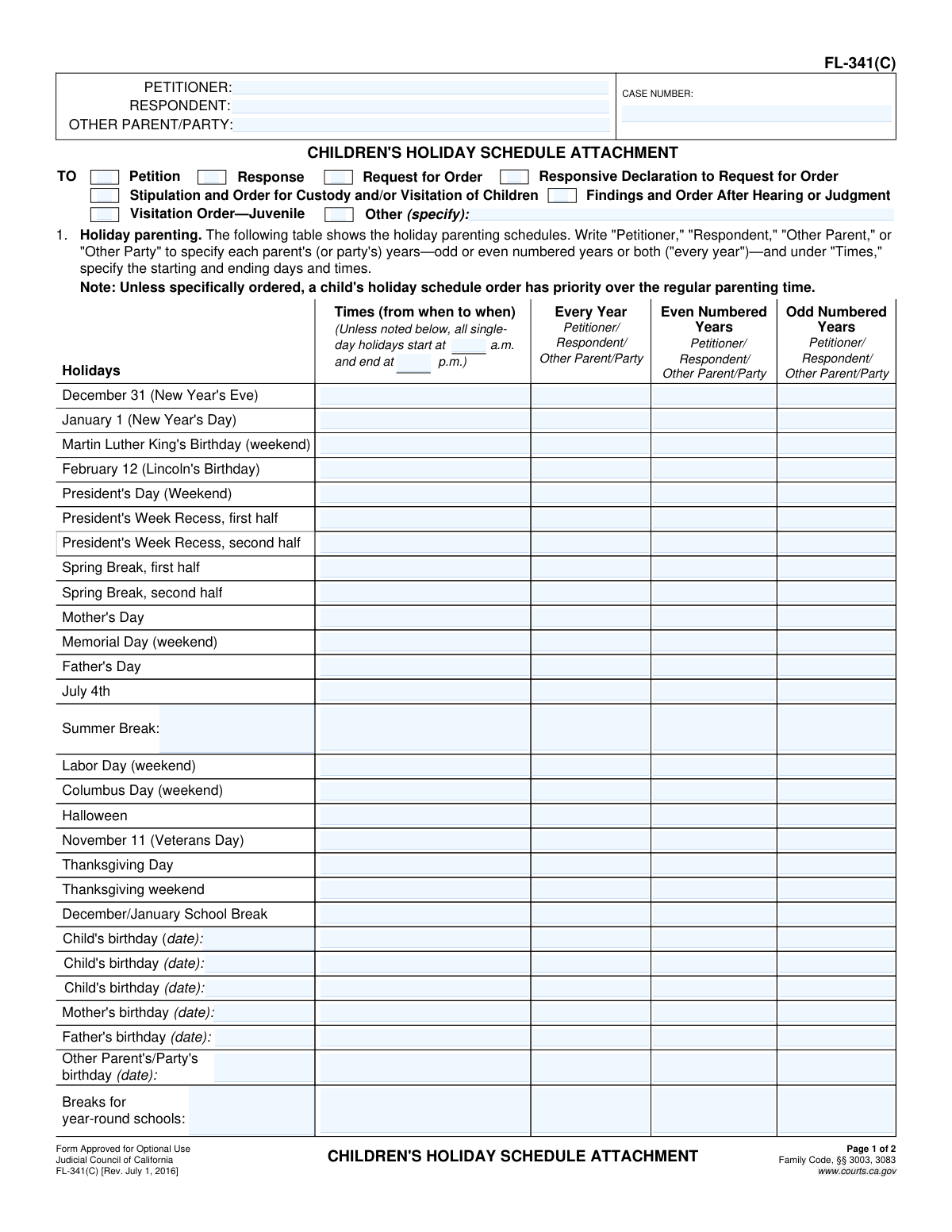
Yes! You can use AI to fill out Form FL-341(C), Children's Holiday Schedule Attachment
The Children's Holiday Schedule Attachment, Form FL-341(C), is a legal document used in California family law cases to supplement a custody and visitation order. It provides a clear, enforceable schedule for how children will spend holidays, school breaks, birthdays, and vacations between parents, which helps prevent future disagreements. Today, this form can be filled out quickly and accurately using AI-powered services like Instafill.ai, which can also convert non-fillable PDF versions into interactive fillable forms.
FL-341(C) is part of the
California court forms, family court forms and family law forms categories on Instafill.
Our AI automatically handles information lookup, data retrieval, formatting, and form filling.
It takes less than a minute to fill out FL-341(C) using our AI form filling.
Securely upload your data. Information is encrypted in transit and deleted immediately after the form is filled out.
Form specifications
| Form name: | Form FL-341(C), Children's Holiday Schedule Attachment |
| Number of fields: | 236 |
| Number of pages: | 1 |
| Language: | English |
Instafill Demo: How to fill out PDF forms in seconds with AI
How to Fill Out FL-341(C) Online for Free in 2026
Are you looking to fill out a FL-341(C) form online quickly and accurately? Instafill.ai offers the #1 AI-powered PDF filling software of 2026, allowing you to complete your FL-341(C) form in just 37 seconds or less.
Follow these steps to fill out your FL-341(C) form online using Instafill.ai:
- 1 Navigate to Instafill.ai and upload or select the Form FL-341(C), Children's Holiday Schedule Attachment.
- 2 Enter the case caption information at the top of the form, including the names of the Petitioner, Respondent, Other Parent/Party, and the Case Number.
- 3 Complete the 'Holiday parenting' table by specifying which parent will have the children for each listed holiday, indicating if it's for odd, even, or every year, and defining the start and end times.
- 4 Add any other specific holidays, birthdays, or school break schedules not already listed in the provided tables on page 1 or 2.
- 5 Fill out the 'Vacations' section, detailing rules for vacation time, notification requirements, and procedures for resolving disagreements over travel plans.
- 6 Review all entered schedules, times, and party designations on the form to ensure accuracy and clarity before finalizing.
- 7 Download the completed, legally-binding document to be attached to your primary custody order and filed with the court.
Our AI-powered system ensures each field is filled out correctly, reducing errors and saving you time.
Why Choose Instafill.ai for Your Fillable FL-341(C) Form?
Speed
Complete your FL-341(C) in as little as 37 seconds.
Up-to-Date
Always use the latest 2026 FL-341(C) form version.
Cost-effective
No need to hire expensive lawyers.
Accuracy
Our AI performs 10 compliance checks to ensure your form is error-free.
Security
Your personal information is protected with bank-level encryption.
Frequently Asked Questions About Form FL-341(C)
This form is used in California family law cases to create a detailed and legally binding schedule for when children will be with each parent during holidays, school breaks, and vacations. It serves as an attachment to a primary custody or visitation court order.
Parents or legal parties involved in a child custody case who want to define a specific holiday and vacation schedule. It can be completed jointly as an agreement (stipulation) or by one party as a proposal to the court.
This is a common method for alternating holidays between parents to ensure fairness over time. For example, the Petitioner might have the child for Thanksgiving in even years (2024, 2026), while the Respondent has the child for that holiday in odd years (2025, 2027).
The holiday schedule specified on this form legally overrides the regular parenting time schedule. The parent assigned the holiday will have the child for the specified time, regardless of whose regular weekend it is.
In the 'Times' column for each holiday, you must write the specific start and end days and times for the parenting exchange. For single-day holidays, you can also define a default start and end time at the top of the chart to apply to all of them.
The form allows you to divide longer breaks, offering lines for 'first half' and 'second half' of breaks like Spring Break. You can assign each half to a different parent or specify a more detailed arrangement.
You can add any unlisted holidays, such as specific religious or cultural holidays, in the 'Other Holidays' section on page 2. Be sure to clearly specify the dates, times, and which parent will have the children.
Section 2 lets you define the number of vacation weeks or days each parent is entitled to, the minimum number of days for advance notice, and what travel information must be shared. It also includes options for resolving disagreements over vacation plans.
No, this is an attachment and must be submitted with a primary court document. You must check the appropriate box at the top of page 1 to indicate which document it is attached to, such as a 'Request for Order' or 'Stipulation'.
The form includes a specific line item for 'Breaks for year-round schools'. You can use this section to detail the parenting time schedule for the different, often shorter, breaks that occur throughout a year-round school calendar.
Yes, services like Instafill.ai use AI to help you accurately auto-fill form fields, which can save time and reduce errors. The tool can populate repetitive information like case numbers and party names across both pages of the form.
You can use a service like Instafill.ai to easily complete this form online. Simply upload the form to the platform, and it will become an interactive document, allowing you to type directly into the fields and save your progress.
If you have a non-fillable or 'flat' PDF, you can upload it to a service like Instafill.ai. The platform's technology will automatically convert it into an interactive, fillable form that you can complete, save, and print from your computer.
Compliance FL-341(C)
Validation Checks by Instafill.ai
1
Case Header Consistency
Ensures the Case Number, Petitioner, and Respondent names are present and identical on both page 1 and page 2. This is critical for ensuring the document is correctly associated with a single case file and that all pages belong together. A mismatch could lead to filing errors or legal ambiguity.
2
Holiday Schedule Exclusivity
For each holiday row in the schedule table, this check verifies that an entry is made in EITHER the 'Every Year' column OR the 'Even/Odd Numbered Years' columns, but not both. This prevents contradictory scheduling instructions for a single holiday. If this rule is violated, the schedule becomes ambiguous and unenforceable.
3
Single Party Assignment Per Holiday Period
Validates that for any given holiday and year category (e.g., 'New Year's Eve' in 'Even Numbered Years'), only one party is assigned. Assigning the same holiday period to multiple parties (e.g., both Petitioner and Respondent) creates a direct conflict. The system should flag this as an error to force a clear, unambiguous assignment.
4
Split Holiday Integrity
For holidays that are split into a 'first half' and 'second half' (e.g., President's Week Recess, Spring Break), this check ensures that the same party is not assigned both halves within the same year. This maintains the intent of splitting the break between parties. An alert should be raised if one party is assigned the entire break across both fields.
5
Conditional Birthday Date Entry
If any parenting time is scheduled for a 'Child's birthday', 'Mother's birthday', or 'Father's birthday', this validation ensures the corresponding date field is not empty. A schedule cannot be created for a birthday without specifying the date of that birthday. Failure to provide the date makes the schedule entry meaningless and impossible to follow.
6
Attachment Context Selection
Verifies that at least one checkbox is selected in the top-right section of page 1 (e.g., 'Petition', 'Response', 'Request for Order'). This information is crucial for the court to understand the legal context of the attachment. If no context is provided, the form may be rejected for being incomplete or improperly filed.
7
Vacation Duration Unit Requirement
In Section 2a, if a number is entered for the length of a vacation ('MaxNumber_ft'), this check ensures that one of the unit checkboxes ('days' or 'weeks') is selected. Without a unit, the number is ambiguous (e.g., is '14' fourteen days or fourteen weeks?). This validation prevents disputes arising from unclear vacation length definitions.
8
Vacation Disagreement Plan Completeness
In Section 2.b.2, if the checkbox for either the even-numbered or odd-numbered year disagreement plan is checked, this validation ensures a party (Petitioner, Respondent, or Other) is also selected. Checking the box indicates a plan exists, but failing to select a party makes the plan incomplete. The form must specify who has the final say in resolving disagreements for that year.
9
Conditional 'Other (specify)' Text Entry
This check applies to all instances where an 'Other (specify)' checkbox exists. If the 'Other' checkbox is selected, the corresponding text field must contain an entry. This ensures that selecting 'Other' provides the necessary specific information, preventing incomplete or vague submissions that require follow-up.
10
Default Holiday Time Logic
Validates the default holiday times specified at the top of the schedule in Section 1. If both a start and end time are entered, it confirms they are valid time formats and that the end time occurs after the start time. This prevents illogical time ranges, such as a holiday period ending before it begins.
11
Party Name Completeness
Ensures that the 'PETITIONER' and 'RESPONDENT' name fields in the case caption are both filled out. These are the primary parties to the case, and their identification is mandatory for the document to be legally valid. The form cannot be processed without knowing who the involved parties are.
12
Numeric Field Format Validation
Verifies that all fields requiring a number of days or times (e.g., 'Minimum number of days in advance', 'number of times per year') contain only positive integer values. This prevents invalid entries like text, decimals, or negative numbers where a specific count is required. This ensures the data is clean and usable for scheduling.
Common Mistakes in Completing FL-341(C)
Users often fill out the case number, petitioner, and respondent names on the first page but forget to repeat it on the second. Because each page can be treated as a separate document during filing, a missing header can cause the page to be lost or misfiled. To avoid this, meticulously check that the header information is present and identical on every single page of the attachment before submission.
In the 'Times' column of the holiday schedule, people frequently write ambiguous terms like 'morning,' 'afternoon,' or 'end of school day' instead of specific times. This creates confusion and is a primary source of conflict over pick-up and drop-off. Always specify exact times, including 'a.m.' or 'p.m.' (e.g., 'Friday at 6:00 p.m. to Sunday at 6:00 p.m.'), to create a clear and enforceable order.
A critical error is creating a conflicting schedule, such as assigning Thanksgiving to the Petitioner in 'Even Numbered Years' and also to the Respondent in 'Even Numbered Years'. This can also happen by putting a name in the 'Every Year' column and also in an alternating year column for the same holiday. Such contradictions make the order unenforceable and require court clarification. Carefully review each row to ensure every holiday period is assigned to only one party.
The form provides separate rows for the 'first half' and 'second half' of Spring Break and President's Week, but users often fail to define the split clearly. They might assign the entire break to one parent or neglect to specify the exact day and time of the exchange. This leads to arguments over when the 'half' officially ends. To prevent this, use both rows and define the exchange precisely, such as 'from the start of break until Wednesday at 6:00 p.m.' for the first half.
The schedule includes rows for each child's and parent's birthday, but requires the user to write in the specific date. A common mistake is to assign parenting time for a birthday without filling in the date field (e.g., 'Child's birthday (date): ____'). This makes the entry incomplete and ambiguous. Always write the full month and day for each birthday to ensure the schedule is clear.
In Section 2, which covers vacations, users often fail to fill in the specific numbers required, instead leaving blanks or writing vague terms. For example, they might not specify the maximum number of vacation days/weeks or the number of days for advance notification. This creates an unenforceable agreement and invites future disputes. To avoid this, fill in every numeric field to clearly define the vacation rules.
Section 2(c)(2) offers a way for parents to resolve vacation disagreements without going to court, but it is frequently left blank. By not selecting a tie-breaking mechanism, the only recourse for a disagreement is filing a costly and time-consuming motion with the court. Parties should complete this section to establish a clear, out-of-court process for resolving future conflicts over vacation plans.
Instead of using the required legal terms 'Petitioner' and 'Respondent,' people sometimes write informal names like 'Mom,' 'Dad,' or their first names. While well-intentioned, this can create legal ambiguity and may lead to the form being rejected by the court clerk for not conforming to official standards. Always use the precise legal designations as shown in the form's header.
At the top of the holiday schedule in Section 1, there are fields to set a default start and end time for all single-day holidays. Many people overlook these fields and also fail to specify times for each holiday individually. This results in a schedule with no defined exchange times, making every holiday a potential argument. To avoid this, either set the default times at the top or meticulously enter the times for every single holiday.
At the bottom of page 1, a series of checkboxes indicates what primary document this form is attached to (e.g., 'Request for Order,' 'Response,' 'Judgment'). Forgetting to check the appropriate box can confuse the court clerk, potentially causing the document to be misfiled or rejected. Always ensure you check the box that correctly identifies the purpose of the attachment.
Saved over 80 hours a year
“I was never sure if my IRS forms like W-9 were filled correctly. Now, I can complete the forms accurately without any external help.”
Kevin Martin Green
Your data stays secure with advanced protection from Instafill and our subprocessors

Robust compliance program
Transparent business model
You’re not the product. You always know where your data is and what it is processed for.
ISO 27001, HIPAA, and GDPR
Our subprocesses adhere to multiple compliance standards, including but not limited to ISO 27001, HIPAA, and GDPR.
Security & privacy by design
We consider security and privacy from the initial design phase of any new service or functionality. It’s not an afterthought, it’s built-in, including support for two-factor authentication (2FA) to further protect your account.
Fill out FL-341(C) with Instafill.ai
Worried about filling PDFs wrong? Instafill securely fills form-fl-341c-childrens-holiday-schedule-attachment forms, ensuring each field is accurate.