Yes! You can use AI to fill out Form FL-342, Child Support Information and Order Attachment
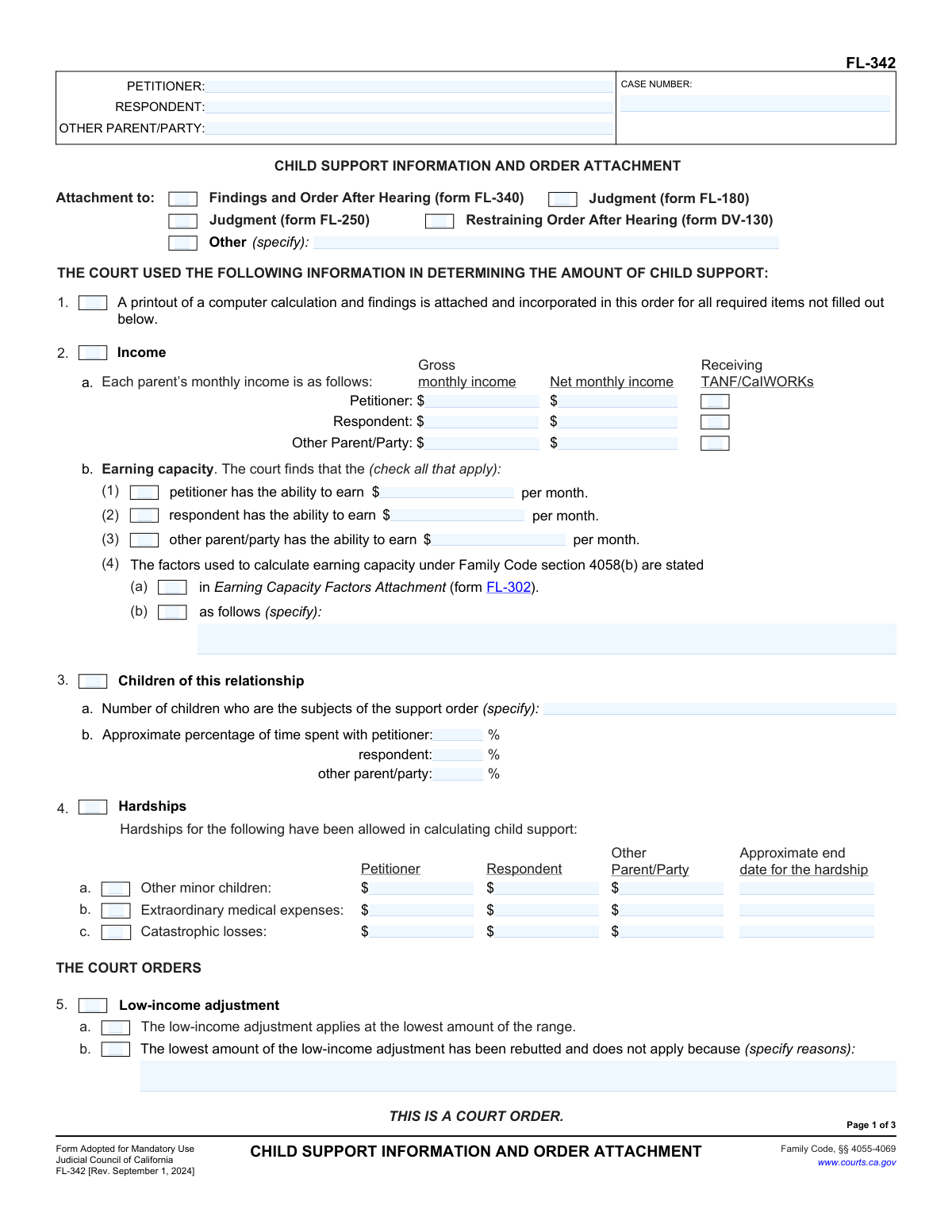
Form FL-342, Child Support Information and Order Attachment, is a crucial legal document used by California courts to specify the details of a child support order. It provides a comprehensive breakdown of the financial information used to calculate the support amount, including each parent's income, earning capacity, custody time percentages, and any financial hardships. The form also outlines specific court orders for base support, mandatory additions like childcare and healthcare costs, and other related expenses, making it an essential attachment to judgments in family law cases. Today, this form can be filled out quickly and accurately using AI-powered services like Instafill.ai, which can also convert non-fillable PDF versions into interactive fillable forms.
FL-342 is part of the
California court forms, family court forms and family law forms categories on Instafill.
Our AI automatically handles information lookup, data retrieval, formatting, and form filling.
It takes less than a minute to fill out FL-342 using our AI form filling.
Securely upload your data. Information is encrypted in transit and deleted immediately after the form is filled out.
Form specifications
| Form name: | Form FL-342, Child Support Information and Order Attachment |
| Number of fields: | 175 |
| Number of pages: | 1 |
| Language: | English |
Instafill Demo: How to fill out PDF forms in seconds with AI
How to Fill Out FL-342 Online for Free in 2026
Are you looking to fill out a FL-342 form online quickly and accurately? Instafill.ai offers the #1 AI-powered PDF filling software of 2026, allowing you to complete your FL-342 form in just 37 seconds or less.
Follow these steps to fill out your FL-342 form online using Instafill.ai:
- 1 Navigate to Instafill.ai and upload or select Form FL-342.
- 2 Provide the case information, including the names of the petitioner, respondent, other parties, and the case number.
- 3 Indicate which primary form (e.g., FL-340, FL-180) this document is an attachment to.
- 4 Use the AI-powered tool to input the financial details used by the court, such as each parent's monthly income, earning capacity, and any recognized hardships.
- 5 Enter the details about the children, including the number of children and the percentage of time they spend with each parent.
- 6 Specify the court's orders for base child support, mandatory additional costs like childcare and healthcare, and any other ordered expenses.
- 7 Review all entered information for accuracy, then securely download, print, or e-file the completed FL-342 as required for your legal proceedings.
Our AI-powered system ensures each field is filled out correctly, reducing errors and saving you time.
Why Choose Instafill.ai for Your Fillable FL-342 Form?
Speed
Complete your FL-342 in as little as 37 seconds.
Up-to-Date
Always use the latest 2026 FL-342 form version.
Cost-effective
No need to hire expensive lawyers.
Accuracy
Our AI performs 10 compliance checks to ensure your form is error-free.
Security
Your personal information is protected with bank-level encryption.
Frequently Asked Questions About Form FL-342
Form FL-342, the Child Support Information and Order Attachment, is a mandatory California court form. It details the financial information, calculations, and specific orders the court has made regarding child support in a family law case.
This form is typically completed by the court or by the parties' attorneys to document the judge's findings and orders. It is then attached to a primary order, such as a Judgment (FL-180) or Findings and Order After Hearing (FL-340).
This section requires the gross and net monthly income for each parent. The court may also determine a parent's 'earning capacity,' which is the amount they could be earning, if their actual income is lower.
This refers to the timeshare, which is the approximate percentage of time each parent has physical responsibility for the children. This percentage is a critical factor used in the statewide formula to calculate the child support amount.
Hardships are specific circumstances that can reduce a parent's income for support calculation purposes. The form lists costs for other minor children, extraordinary medical expenses, and catastrophic losses as potential hardships.
In addition to base child support, parents are ordered to share mandatory costs. These include childcare costs related to employment or job training and the children's reasonable uninsured health care expenses.
An earnings assignment order is a court order sent to the paying parent's employer, requiring them to deduct child support payments directly from the parent's wages. The paying parent is responsible for making payments until the wage deductions begin.
The form includes a notice that any parent ordered to pay child support must pay interest on overdue amounts. The legal interest rate is currently 10 percent per year.
Yes, Section 13 states that both parties must complete and file a Child Support Case Registry Form (FL-191) with the court within 10 days of the order. Other forms, like the Notice of Rights and Responsibilities (FL-192), will also be attached.
Section 7 orders a parent to maintain health insurance for the children if it is available at a reasonable cost through their employment. Both parents are ordered to cooperate in processing any health care claims.
Yes, Section 10, 'Employment search order,' allows the court to order a parent to actively seek employment and specify the terms and conditions of the job search.
Yes, services like Instafill.ai use AI to auto-fill form fields accurately and save time. This can be particularly helpful for complex forms like the FL-342 by ensuring all necessary information is entered correctly.
You can use a service like Instafill.ai to easily fill out this form on your computer or mobile device. Simply upload the form, and the platform will guide you through filling in the required information fields.
If you have a non-fillable or 'flat' PDF, you can use a service like Instafill.ai. It can convert the document into an interactive, fillable form that is easy to complete, save, and print.
Compliance FL-342
Validation Checks by Instafill.ai
1
Ensures Net Income Does Not Exceed Gross Income
This check validates that for each party (Petitioner, Respondent, Other), the 'Net monthly income' entered in section 2a is less than or equal to the 'Gross monthly income'. This is a logical check to prevent data entry errors and ensure financial calculations are based on valid figures. If net income is greater than gross income, the submission will be flagged for correction as this is financially impossible.
2
Validates Time-Share Percentage Sum
This validation ensures that the sum of the 'Approximate percentage of time spent with' each party in section 3b equals 100%. This is critical for the child support calculation formula, which relies on an accurate and complete allocation of time. A failure in this check indicates an incomplete or incorrect distribution of parenting time, which would lead to an inaccurate support order.
3
Child Count Consistency Between Sections
This check cross-references the 'Number of children' specified in section 3a with the number of individual child entries in the table in section 6a. The counts must match to ensure that support is being ordered for all children subject to the order. A mismatch would result in an incomplete or incorrect court order, requiring manual review and correction.
4
Conditional Earning Capacity Amount
This validation ensures that if a checkbox is marked in section 2b indicating a party has a certain 'earning capacity', the corresponding currency field must be filled with a monetary amount. Leaving the amount blank would make the finding incomplete and legally unenforceable. The system will prompt the user to enter a value if the checkbox is selected but the amount is missing.
5
Conditional Hardship Details Entry
This check verifies that if a hardship category (e.g., 'Other minor children') is checked in section 4, at least one of the currency fields for Petitioner, Respondent, or Other Parent/Party contains a value. Simply checking the box without specifying the financial hardship amount for a party makes the entry incomplete. This ensures that any claimed hardship is properly quantified for the support calculation.
6
Child's Date of Birth is in the Past
This validation confirms that each 'Date of birth' entered for a child in the table in section 6a is a valid date that occurs before the current date. This prevents typographical errors, such as entering a future date or an impossible date. An invalid date of birth would impact the calculation of the support termination date and must be corrected.
7
Mutually Exclusive Cost Allocation Entry
For additional support costs in sections 6b and 6c, this check ensures that for any single party, either a percentage or a fixed dollar amount is entered, but not both. For example, in section 6b(1)(a), the user can specify a percentage of child-care costs or a dollar amount, but not both simultaneously. This prevents contradictory or ambiguous orders.
8
Additional Support Percentage Allocation Sum
This validation applies to sections 6b and 6c. If costs for a specific category (e.g., child-care, uninsured health care) are allocated by percentage across the parties, this check ensures the percentages sum to 100%. This confirms that the full financial responsibility for the cost is assigned. If the sum is not 100%, the order is ambiguous and must be corrected.
9
Case Information Consistency Across Pages
This check verifies that the 'PETITIONER', 'RESPONDENT', and 'CASE NUMBER' fields are identical on all three pages of the form. This is crucial for document integrity and ensures that all pages belong to the same case file when printed or filed. A mismatch could lead to pages being misfiled or the document being rejected.
10
Conditional 'Other' Attachment Specification
This validation rule ensures that if the 'Other' checkbox is selected in the 'Attachment to' section at the top of page 1, the corresponding text field specifying the document must be filled in. An empty specification field makes the attachment reference incomplete and unclear. The system should require text input if this checkbox is active.
11
Health Insurance Order Logical Exclusivity
This check ensures that a party is not simultaneously ordered to provide health insurance in section 7a and marked as having health insurance be unavailable in section 7b. These two sections are mutually exclusive. An order containing both is contradictory and legally unenforceable, so the system must flag this for resolution.
12
Conditional Employment Search Order Details
This validation confirms that if a party is checked in section 10 as being 'ordered to seek employment', the associated text field describing the 'terms and conditions' is not empty. The order is not actionable without specific terms. This check prevents an incomplete order from being finalized, prompting the user to provide the necessary details.
13
Base Support Payor Selection
This check ensures that at least one party (Petitioner, Respondent, or Other parent/party) is selected as the payor in section 6a. Without a designated payor, the child support order is incomplete and cannot be enforced. The system should prevent submission if no payor is identified for the base child support.
14
Total Child Support Calculation Verification
This check validates that the 'Total child support per month' field at the end of page 2 accurately reflects the sum of all monthly support obligations. This includes the base support amounts from section 6a and any fixed monthly dollar amounts from sections 6b and 6c. This serves as a final arithmetic check to ensure the total ordered amount is correct.
Common Mistakes in Completing FL-342
In Section 2a, individuals often incorrectly enter their take-home pay (net) in the 'Gross monthly income' field, or vice versa. This happens due to a misunderstanding of the terms, where 'gross' is pre-tax income and 'net' is post-tax/deduction income. This error fundamentally skews the guideline support calculation, leading to an incorrect child support order that may require a court hearing to fix. Always use your total earnings before any taxes or deductions for gross income.
Parties frequently estimate the time-share percentages in Section 3b, resulting in totals that do not equal 100% or that don't accurately reflect the custody schedule. Since this percentage is a critical factor in the child support formula, even a small error can significantly alter the support amount. To avoid this, calculate the number of hours the child spends with each parent over a year and divide by the total hours in a year (8,760) to get an accurate percentage. AI-powered form fillers like Instafill.ai can include calculators to help ensure these figures are accurate.
This form has three pages, and each page includes a header for Petitioner, Respondent, and Case Number. It is a very common clerical error to fill out the header on the first page but leave it blank on subsequent pages. This can cause processing delays or rejection by the court clerk, as each page must be clearly identifiable with the correct case. Always double-check that the case number and party names are filled in at the top of every single page before submission.
In Sections 6b and 6c, for costs like childcare or medical expenses, the form requires choosing to pay either a percentage of the total cost OR a flat monthly dollar amount. A frequent mistake is checking both boxes or filling in both fields for the same parent and expense. This creates an ambiguous and unenforceable order. You must choose only one method of payment per item to ensure the order is clear.
The form references several other documents that must be attached, such as the computer calculation printout (Section 1) or the Non-Guideline Child Support Findings Attachment (Section 6d). People often check the box indicating an attachment is included but then forget to physically attach it to the filing. This renders the order incomplete and can lead to rejection or the need for a new hearing. Create a checklist of all mentioned attachments to ensure everything is included with your submission.
In Section 4, individuals may claim a hardship deduction without meeting the strict legal criteria or without entering the specific monthly dollar amount of the hardship. For example, simply having other children does not automatically qualify as a hardship; specific circumstances must apply. This can lead to the court disallowing the deduction and recalculating support. Ensure you understand the legal definition of a hardship and provide all required financial details and documentation.
When filling out the Base Child Support table in Section 6a, people sometimes list the child's name and monthly amount but forget to check the box indicating which parent must pay, the name of the person receiving the payment, and the payment start date. Omitting any of these details makes the support order vague and difficult to enforce. Carefully review this section to ensure every component of the order is explicitly defined.
Section 13 explicitly states that both parties must file a Child Support Case Registry Form (FL-191) within 10 days of the order. This is a separate, mandatory requirement that is often missed because it's located in the 'Notices' section near the end of the form. Failure to file this form can result in non-compliance with court rules. Using a tool like Instafill.ai can help by flagging instructions for related forms that need to be filed.
The 'Other orders' field in Section 11 is intended for specific, clear, and enforceable agreements not covered elsewhere on the form. A common mistake is to write vague statements like 'Parents will split extracurricular costs' without defining what those costs are or the exact percentage split. This leads to future disputes. Any entry in this section should be as specific as a contract, detailing who does what, by when, and how.
Often, court forms are only available online as flat, non-fillable PDFs, forcing users to print them and fill them out by hand. This frequently results in illegible handwriting, which can cause data entry errors by court staff or outright rejection of the form. To prevent this, use a service like Instafill.ai, which can convert any flat PDF into an interactive, fillable form, ensuring all your entries are clear, legible, and correctly formatted.
Saved over 80 hours a year
“I was never sure if my IRS forms like W-9 were filled correctly. Now, I can complete the forms accurately without any external help.”
Kevin Martin Green
Your data stays secure with advanced protection from Instafill and our subprocessors

Robust compliance program
Transparent business model
You’re not the product. You always know where your data is and what it is processed for.
ISO 27001, HIPAA, and GDPR
Our subprocesses adhere to multiple compliance standards, including but not limited to ISO 27001, HIPAA, and GDPR.
Security & privacy by design
We consider security and privacy from the initial design phase of any new service or functionality. It’s not an afterthought, it’s built-in, including support for two-factor authentication (2FA) to further protect your account.
Fill out FL-342 with Instafill.ai
Worried about filling PDFs wrong? Instafill securely fills form-fl-342-child-support-information-and-order-attachment forms, ensuring each field is accurate.