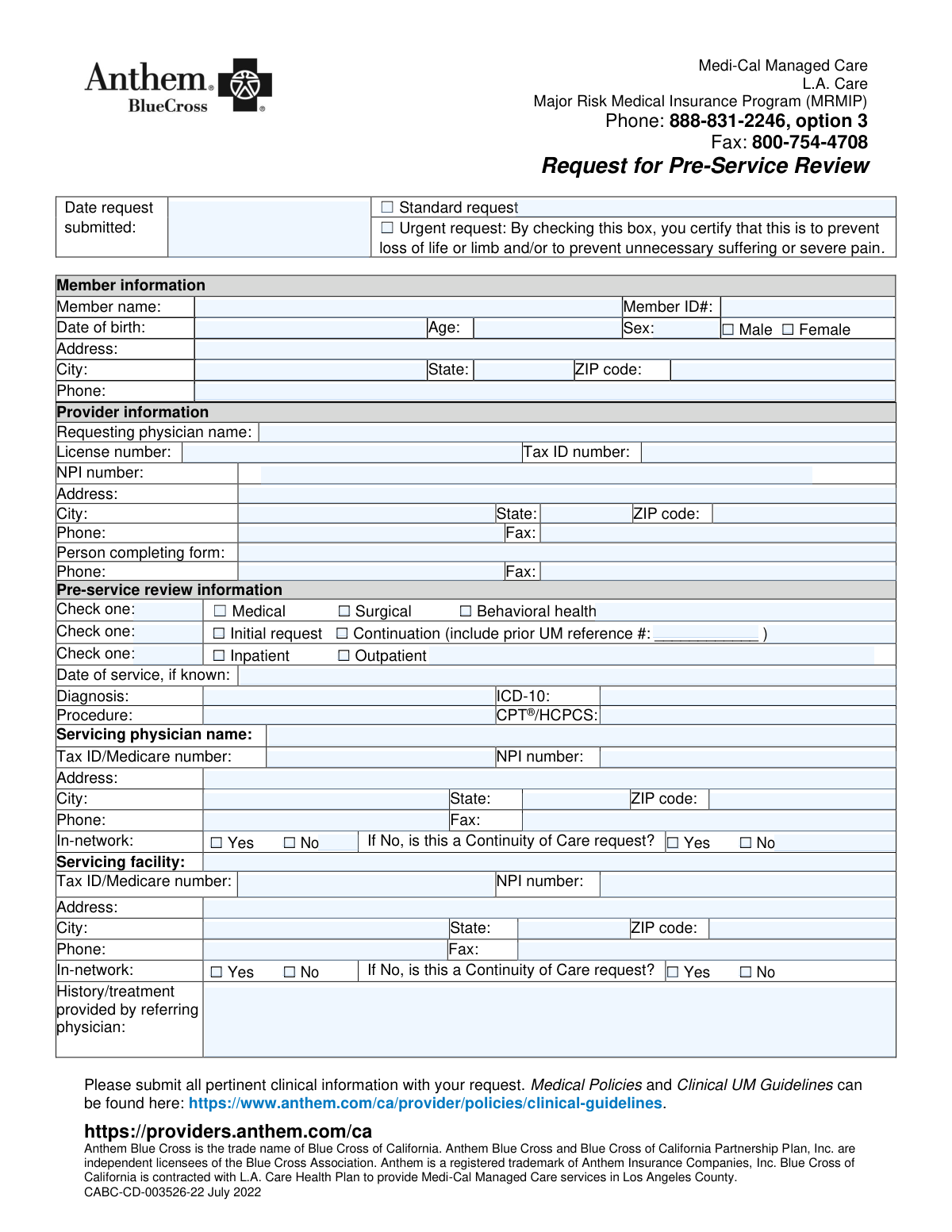
Yes! You can use AI to fill out Anthem Blue Cross Request for Pre-Service Review

This form is a formal request submitted by healthcare providers to Anthem Blue Cross to get approval for medical, surgical, or behavioral health services before they are rendered to a patient under L.A. Care's Medi-Cal Managed Care plan. Submitting this form is a critical step to ensure that the proposed services are deemed medically necessary and will be covered, preventing unexpected costs for the patient and claim denials for the provider. Today, this form can be filled out quickly and accurately using AI-powered services like Instafill.ai, which can also convert non-fillable PDF versions into interactive fillable forms.
Our AI automatically handles information lookup, data retrieval, formatting, and form filling.
It takes less than a minute to fill out CABC-CD-003526-22 using our AI form filling.
Securely upload your data. Information is encrypted in transit and deleted immediately after the form is filled out.

Form specifications

Form name: Anthem Blue Cross Request for Pre-Service Review
Number of pages: 1
Language: English
main-image

Instafill Demo: How to fill out PDF forms in seconds with AI

How to Fill Out CABC-CD-003526-22 Online for Free in 2026

Are you looking to fill out a CABC-CD-003526-22 form online quickly and accurately? Instafill.ai offers the #1 AI-powered PDF filling software of 2026, allowing you to complete your CABC-CD-003526-22 form in just 37 seconds or less.
Follow these steps to fill out your CABC-CD-003526-22 form online using Instafill.ai:
  1. 1 Navigate to Instafill.ai and upload or select the Request for Pre-Service Review form.
  2. 2 Use the AI assistant to automatically populate patient details, including their name, member ID, and date of birth.
  3. 3 Enter the requesting provider's information, such as name, NPI, Tax ID, and contact details.
  4. 4 Specify the pre-service review information, including the type of request (Medical, Surgical, Behavioral Health), urgency, diagnosis (ICD-10), and procedure (CPT/HCPCS) codes.
  5. 5 Provide the details for the servicing physician and facility, and indicate their in-network status.
  6. 6 Attach all necessary clinical information, patient history, and treatment details to support the request.
  7. 7 Review all sections for accuracy with the AI's guidance before submitting the completed form to Anthem Blue Cross.

Our AI-powered system ensures each field is filled out correctly, reducing errors and saving you time.

Why Choose Instafill.ai for Your Fillable CABC-CD-003526-22 Form?

Speed

Complete your CABC-CD-003526-22 in as little as 37 seconds.

Up-to-Date

Always use the latest 2026 CABC-CD-003526-22 form version.

Cost-effective

No need to hire expensive lawyers.

Accuracy

Our AI performs 10 compliance checks to ensure your form is error-free.

Security

Your personal information is protected with bank-level encryption.

Frequently Asked Questions About Form CABC-CD-003526-22

This form is used by healthcare providers to request prior authorization from Anthem Blue Cross for medical, surgical, or behavioral health services for patients with L.A. Care or MRMIP coverage.

The requesting physician's office is responsible for completing and submitting this form. The person filling out the form should provide their name and contact information in the designated fields.

A 'Standard' request is for routine, non-emergency services. An 'Urgent' request is for situations where a delay could result in loss of life or limb, or cause unnecessary suffering or severe pain.

The 'Requesting physician' is the provider who is ordering the service or making the referral. The 'Servicing physician' is the provider who will actually perform the requested procedure or service.

If you are requesting an extension of a previously approved service, you must check the 'Continuation' box and provide the prior Utilization Management (UM) reference number from the initial approval.

A 'Continuity of Care' request is typically made when a patient needs to continue treatment with a provider or at a facility that is not in the health plan's network. This option is available if the servicing provider or facility is marked as 'No' for in-network status.

You must submit all pertinent clinical information to support the request, such as the patient's medical history, notes from the referring physician, and relevant test results.

The completed form and all supporting clinical documents should be submitted via fax to 800-754-4708. For questions, you can call 888-831-2246 and select option 3.

Submitting an incomplete form, especially without required clinical information, diagnosis codes, or provider details, will likely cause a delay in processing or a denial of the request.

Yes, services like Instafill.ai use AI to help you accurately auto-fill form fields, which can save significant time and reduce administrative errors.

You can use a service like Instafill.ai to upload the PDF. It will convert the document into an interactive, fillable form that you can complete, save, and manage online.

If you have a non-fillable or 'flat' PDF, tools like Instafill.ai can convert it into an interactive, fillable version, making it easy to complete digitally without printing.

Anthem's Medical Policies and Clinical UM Guidelines can be found online at the URL provided on the form: https://www.anthem.com/ca/provider/policies/clinical-guidelines.

Compliance CABC-CD-003526-22
Validation Checks by Instafill.ai

1
Ensures Request Type is Mutually Exclusive
This validation confirms that only one of the request types, 'Standard request' or 'Urgent request', is selected. Selecting both or neither creates ambiguity in how the request should be prioritized for review. If this validation fails, the form submission should be rejected with an error message prompting the user to select exactly one option.
2
Validates Consistency Between Date of Birth and Age
This check calculates the member's age based on the 'Date of birth' provided and compares it to the value entered in the 'Age' field. This is important for verifying member identity and ensuring clinical appropriateness for age-specific treatments. A mismatch indicates a data entry error that must be corrected before the request can be processed.
3
Requires Prior Reference Number for Continuation Requests
This validation ensures that if the 'Continuation' checkbox is selected, the 'Prior UM reference #' field must be populated. This reference number is critical for linking the current request to a previous authorization, ensuring a seamless review process and continuity of care. Failure to provide this number for a continuation request will halt processing until the information is supplied.
4
Validates National Provider Identifier (NPI) Format
This check verifies that all NPI number fields (for requesting physician, servicing physician, and facility) contain a valid 10-digit numeric identifier. The NPI is a standard, unique identifier for health care providers, and a valid number is essential for accurate provider identification, claims processing, and regulatory compliance. An invalid NPI will lead to request rejection.
5
Validates Tax ID Number Format
This check ensures that the 'Tax ID number' fields for all providers and facilities contain a valid 9-digit numeric value. This number is crucial for financial transactions, billing, and reporting to government agencies. An incorrectly formatted Tax ID will cause failures in backend financial systems and prevent proper processing.
6
Verifies ICD-10 Code Structure
This validation checks that the 'ICD-10' code entered follows the standard format (e.g., starts with a letter, is 3-7 characters long, and may include a decimal). Accurate diagnosis coding is fundamental for determining medical necessity and ensuring the request is reviewed against the correct clinical guidelines. An invalid code format will prevent the system from recognizing the diagnosis.
7
Verifies CPT/HCPCS Code Structure
This check ensures the 'CPT®/HCPCS' code follows a valid format (e.g., CPT is 5 digits, HCPCS starts with a letter followed by 4 digits). Correct procedure coding is essential for identifying the requested service and determining coverage and reimbursement levels. An invalid code will lead to an immediate rejection or a request for clarification.
8
Enforces Continuity of Care Selection for Out-of-Network Providers
This rule validates that if a servicing physician or facility is marked as 'In-network: No', then a selection for the 'Continuity of Care request' (Yes/No) must be made. This information is required to trigger the appropriate review path for out-of-network exceptions. Failing to provide this conditional information will stall the request as the review team will not know how to handle the network status.
9
Ensures Core Member Information is Complete
This validation confirms that essential member fields, specifically 'Member name', 'Member ID#', and 'Date of birth', are not empty. This information is the absolute minimum required to identify the patient within the health plan's system. A request missing any of this core data cannot be processed and will be rejected immediately.
10
Validates Date Field Formats and Plausibility
This check verifies that all date fields ('Date request submitted', 'Date of birth', 'Date of service') are entered in a valid format (e.g., MM/DD/YYYY) and represent a real, plausible date. For example, the 'Date of birth' cannot be in the future. This ensures data integrity and prevents system errors during processing and record-keeping.
11
Requires Selection of a Single Review Type
This validation ensures that exactly one option among 'Medical', 'Surgical', and 'Behavioral health' is checked. This selection is a primary routing mechanism that directs the request to the correct specialized clinical review team. Submitting a form without this selection, or with multiple selections, will result in processing delays or rejection.
12
Requires Selection of a Single Service Setting
This check confirms that exactly one service setting, either 'Inpatient' or 'Outpatient', is selected. This distinction is critical as it determines which clinical guidelines, benefit structures, and reimbursement rates apply to the request. The submission cannot be properly evaluated without a clear and single choice for the service setting.

Common Mistakes in Completing CABC-CD-003526-22

Omitting the Prior UM Reference Number for Continuations

When a provider checks the 'Continuation' box for an ongoing service, they often forget to include the corresponding prior Utilization Management (UM) reference number. This happens due to oversight or not having the previous approval documentation readily available. Without this number, the reviewer cannot link the new request to the existing case, leading to processing delays or an outright denial, forcing the provider to resubmit.

Mismatch Between Diagnosis/Procedure Codes and Descriptions

A frequent error is entering a written diagnosis or procedure that does not match the provided ICD-10 or CPT/HCPCS code. This can be a simple typo in the code or selecting a code that is not specific enough for the described condition. Such inconsistencies are a major red flag for payers and almost always result in a denial or a request for clarification, delaying patient care. To prevent this, verify that the codes accurately and specifically represent the written diagnosis and procedure before submission.

Incorrectly Flagging a Request as 'Urgent'

Providers may check the 'Urgent request' box for non-emergent cases in an attempt to speed up the review process. However, the form explicitly certifies that an urgent request is to prevent 'loss of life or limb' or 'severe pain,' making this a serious compliance issue. Misuse can lead to audits, penalties, and a loss of credibility with the payer, so only mark a request as urgent if it strictly meets the defined clinical criteria.

Failing to Address 'Continuity of Care' for Out-of-Network Providers

When the servicing physician or facility is marked as 'No' for 'In-network,' the form requires a response to the 'Continuity of Care request' question. Staff often overlook this secondary, conditional question, leaving it blank. This omission leaves the payer without the necessary justification to approve an out-of-network service, causing an automatic rejection or delay. Always complete the conditional 'Continuity of Care' field when an out-of-network provider is indicated.

Confusing Requesting and Servicing Provider Information

In referral situations, the requesting physician is different from the servicing physician, but staff may accidentally copy the requesting provider's information into the servicing provider's section. This error occurs due to haste or misunderstanding the distinction between the two roles. It leads to incorrect claim routing and payment issues, requiring significant administrative effort to correct. Carefully verify and enter the distinct details for both the referring provider and the specialist who will perform the service.

Providing Vague or Incomplete Clinical Justification

The 'History/treatment' box is often filled with minimal information, such as 'Patient in pain' or 'See attached notes' (without attachments). Payers require detailed clinical data to establish medical necessity, and insufficient justification is a primary reason for denials. Always include a concise but thorough summary of the patient's condition, treatments tried and failed, and the specific reason the requested service is necessary to avoid delays.

Entering an Invalid or Mismatched Member ID Number

Transposing digits or entering an outdated Member ID number is a critical data entry mistake that prevents the payer's system from identifying the patient, causing the entire request to be rejected. The provider's office must then track down the correct ID and resubmit the form from scratch, delaying care. Always verify the Member ID against the patient's most recent insurance card. AI-powered form filling tools like Instafill.ai can help by validating number formats and cross-referencing data to catch such errors.

Inconsistent Provider Identifiers (NPI vs. Tax ID)

The form requires both an NPI and a Tax ID number, and staff may accidentally enter the NPI of an individual physician but the Tax ID of their group practice, or vice-versa. This mismatch can cause claim processing and payment errors, as payers' systems use these numbers to verify provider identity and network status. Ensure the NPI and Tax ID provided correspond to the same legal entity as registered with the payer.

Omitting Contact Information for the Person Filing the Form

The 'Person completing form' and their direct phone number are essential for efficient communication, yet this section is frequently left blank. When the insurance reviewer has a simple question, the lack of a direct contact forces them to navigate a main office phone tree, causing significant delays. If they cannot easily reach someone, they may deny the request for missing information, so always provide the name and direct line of the staff member responsible for the submission.

Inconsistent Date of Birth and Age

A simple but frequent error is entering a date of birth and an age that do not align, often from a manual calculation error. While seemingly minor, this data inconsistency can trigger flags in automated review systems and may require clarification. Since this form is a non-fillable PDF, using a tool like Instafill.ai can convert it into a smart, fillable version that can auto-calculate the age from the date of birth, preventing this mistake entirely.
Saved over 80 hours a year

“I was never sure if my IRS forms like W-9 were filled correctly. Now, I can complete the forms accurately without any external help.”

Kevin Martin Green

Your data stays secure with advanced protection from Instafill and our subprocessors

Robust compliance program

Transparent business model

You’re not the product. You always know where your data is and what it is processed for.

ISO 27001, HIPAA, and GDPR

Our subprocesses adhere to multiple compliance standards, including but not limited to ISO 27001, HIPAA, and GDPR.

Security & privacy by design

We consider security and privacy from the initial design phase of any new service or functionality. It’s not an afterthought, it’s built-in, including support for two-factor authentication (2FA) to further protect your account.

Fill out CABC-CD-003526-22 with Instafill.ai

Worried about filling PDFs wrong? Instafill securely fills anthem-blue-cross-request-for-pre-service-review forms, ensuring each field is accurate.