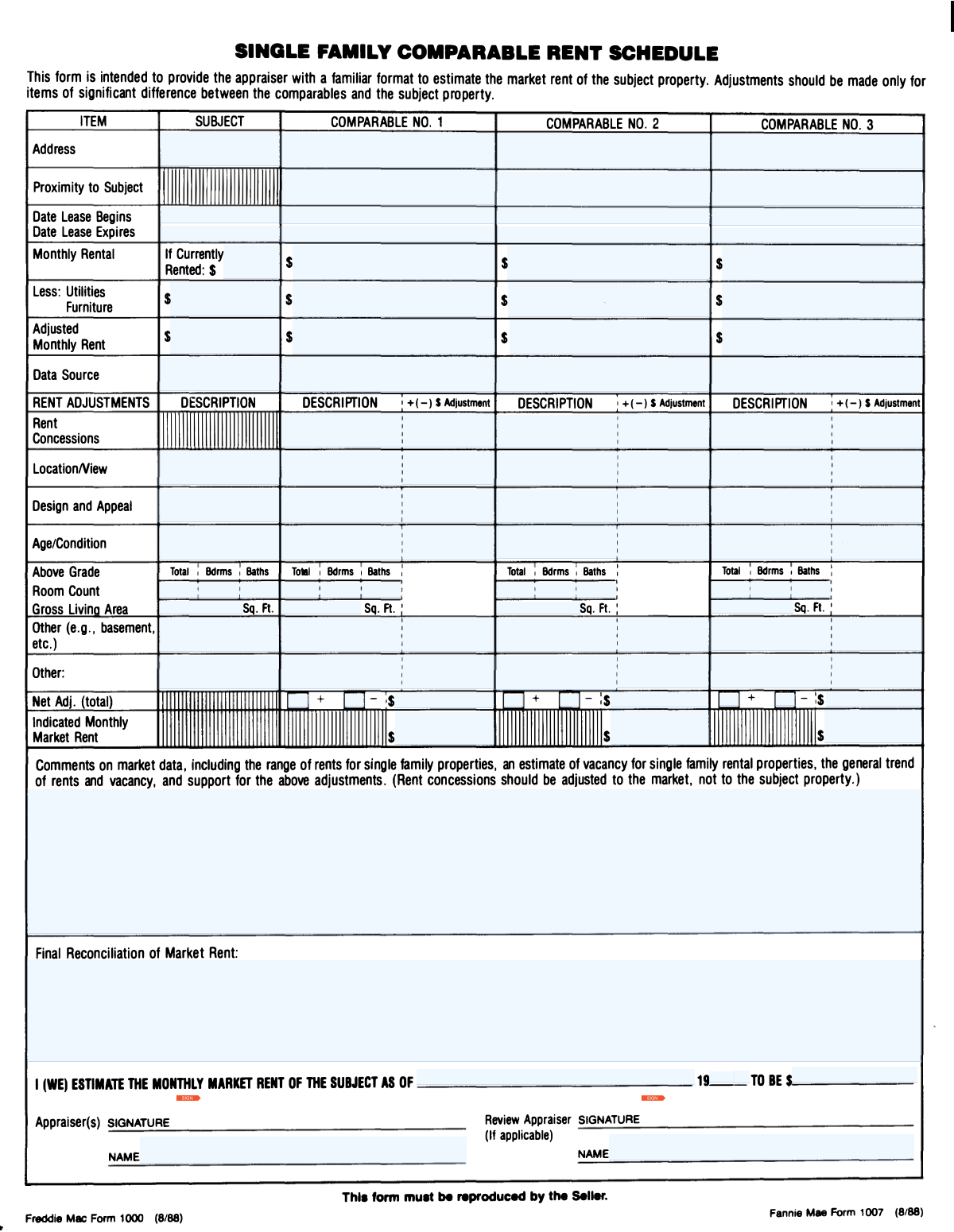
Yes! You can use AI to fill out Form 1007, Single-Family Comparable Rent Schedule
Form 1007, the Single-Family Comparable Rent Schedule, is a standard appraisal document used to determine the potential market rent for a single-family investment property. It provides a detailed analysis by comparing the subject property to at least three other similar rental properties, adjusting for differences in location, size, and condition to arrive at a supported estimate of monthly rent. Today, this form can be filled out quickly and accurately using AI-powered services like Instafill.ai, which can also convert non-fillable PDF versions into interactive fillable forms.
Our AI automatically handles information lookup, data retrieval, formatting, and form filling.
It takes less than a minute to fill out Form 1007 using our AI form filling.
Securely upload your data. Information is encrypted in transit and deleted immediately after the form is filled out.
Form specifications
| Form name: | Form 1007, Single-Family Comparable Rent Schedule |
| Number of fields: | 111 |
| Number of pages: | 2 |
| Language: | English |
Instafill Demo: How to fill out PDF forms in seconds with AI
How to Fill Out Form 1007 Online for Free in 2026
Are you looking to fill out a FORM 1007 form online quickly and accurately? Instafill.ai offers the #1 AI-powered PDF filling software of 2026, allowing you to complete your FORM 1007 form in just 37 seconds or less.
Follow these steps to fill out your FORM 1007 form online using Instafill.ai:
- 1 Navigate to Instafill.ai and upload your Form 1007, or select it from the template library.
- 2 Enter the complete details for the subject property, including its address, lease information, and physical characteristics.
- 3 Provide all required information for at least three comparable properties, including their addresses, proximity to the subject, lease terms, and monthly rent.
- 4 Use the grid to make dollar adjustments to the comparable properties for differences in features like location, condition, size, and amenities to normalize their value against the subject property.
- 5 Review the calculated net adjustments and the indicated monthly market rent for each comparable property.
- 6 Provide a final reconciliation statement to justify your estimated market rent for the subject property.
- 7 Complete the final estimation details, add any necessary comments, and then use the digital signature tool to sign and date the form as the appraiser.
Our AI-powered system ensures each field is filled out correctly, reducing errors and saving you time.
Why Choose Instafill.ai for Your Fillable Form 1007 Form?
Speed
Complete your Form 1007 in as little as 37 seconds.
Up-to-Date
Always use the latest 2026 Form 1007 form version.
Cost-effective
No need to hire expensive lawyers.
Accuracy
Our AI performs 10 compliance checks to ensure your form is error-free.
Security
Your personal information is protected with bank-level encryption.
Frequently Asked Questions About Form Form 1007
This form, a Single-Family Comparable Rent Schedule, is used to determine the estimated monthly market rent for a property by comparing it to at least three similar rental properties.
This form is typically completed by a licensed real estate appraiser or a qualified real estate professional as part of a property appraisal or market analysis for lending or investment purposes.
Comparable properties are similar, nearby properties that have recently been rented. You should select properties that most closely match the subject property in terms of location, size, age, condition, and amenities for the most accurate analysis.
The 'Monthly Rental' is the actual rent paid. The 'Adjusted Monthly Rent' is a calculated figure after subtracting costs for included utilities or furniture to create a standardized rent amount for comparison.
Adjustments are monetary values based on your professional judgment of how much a specific feature would affect the rental price in the local market. These values are meant to equalize the comparable properties with the subject property.
In the 'Data Source' field, you should specify where you obtained the property information. Common sources include the Multiple Listing Service (MLS), public records, property management companies, or other real estate data providers.
Rent concessions are incentives like a free month's rent offered to a tenant. An adjustment is necessary to calculate the property's true effective rent over the lease term, ensuring a fair comparison.
This section requires a summary of your analysis, explaining how you weighed the data from the comparable properties to arrive at your final estimated market rent for the subject property.
If you have a non-fillable PDF, you can use services like Instafill.ai to convert it into an interactive, fillable form. This allows you to easily type your information into the correct fields online.
Yes, AI-powered services like Instafill.ai can help you fill out this form more efficiently. These tools can accurately auto-fill form fields using your data, which saves time and helps prevent errors.
To use Instafill.ai, you simply upload your form to the platform. The AI will identify all the fields, allowing you to fill them out interactively or have them auto-filled with your provided data.
The 'Net Adjustment Total' is the sum of all positive and negative adjustments made to a comparable property. This final figure is applied to the comparable's rent to determine its indicated value relative to the subject property.
The Appraiser is the person who performs the analysis and completes the form. A Review Appraiser's signature is needed if a second appraiser reviews the work for accuracy, quality, and compliance.
Compliance Form 1007
Validation Checks by Instafill.ai
1
Lease Date Chronology
This check ensures that for any given property (Subject or Comparable), the 'Lease Expiration Date' is chronologically after the 'Lease Begin Date'. This is crucial for maintaining logical data integrity, as a lease cannot expire before it begins. If this validation fails, the system should flag the date fields for the specific property and require the user to correct the dates before submission.
2
Adjusted Rent Calculation Verification
This validation verifies that the 'Adjusted Monthly Rent' is correctly calculated for each property. It checks if the 'Adjusted Monthly Rent' field equals the 'Monthly Rental' minus the 'Utilities and Furniture Cost'. This automated check prevents manual calculation errors and ensures financial data consistency. A failure would trigger a warning, suggesting the user re-calculate or confirm the entered values.
3
Net Adjustment Total Calculation
This check ensures the 'Net Adjustment Total Amount' for each comparable property is the correct sum of its component parts. It validates that the total equals the 'Net Adjustment Total Plus' minus the 'Net Adjustment Total Minus'. This is critical for the accuracy of the property valuation. If the numbers do not reconcile, the form should highlight the fields and prevent submission until the discrepancy is resolved.
4
Address Uniqueness
This validation ensures that the 'Subject Property Address' is not identical to any of the 'Comparable Property' addresses. A property cannot be compared to itself, and this check prevents a fundamental error in the appraisal process. If a duplicate address is detected, an error message should be displayed, prompting the user to provide a distinct address for the comparable property.
5
Monetary Field Format
This check validates that all fields intended to capture monetary values (e.g., 'Monthly Rental', 'Rent Concessions Adjustment', 'Gross Living Area') contain only valid numeric characters, decimal points, and optionally, currency symbols. This prevents data corruption and ensures that these fields can be used in calculations. Non-numeric entries would be rejected, and the user would be prompted to enter a valid number.
6
Date Field Format and Validity
This validation ensures that all date fields, such as 'Lease Begin Date' and 'Estimation Date', are entered in a valid and consistent format (e.g., MM/DD/YYYY). It also checks that the date is a real calendar date (e.g., not 02/30/2023). This is important for data consistency and to prevent errors in lease term calculations. An invalid format or date would result in an error message requiring the user to correct the entry.
7
Room Count Logical Consistency
This check verifies that for any given property, the 'Total Rooms' count is greater than or equal to the sum of 'Bedrooms' and 'Bathrooms'. It is logically impossible for the number of bedrooms and bathrooms to exceed the total room count. This validation catches obvious data entry errors and ensures the property description is plausible. A failure would prompt the user to review and correct the room counts.
8
Subject Property Address Completeness
This validation ensures that the 'Subject Property Address' field is not empty. The entire appraisal is dependent on the subject property, making its address the most critical piece of information on the form. Submitting a form without this information would render it useless. The system must mark this field as required and prevent submission if it is left blank.
9
Paired Adjustment Field Logic
This check ensures that if a description field for an adjustment (e.g., 'Location/View Description') is filled out, the corresponding monetary adjustment field (e.g., 'Location/View Adjustment') must also contain a value, and vice versa. This prevents incomplete data where an adjustment is described but not quantified, or quantified but not explained. A failure would result in a prompt asking the user to complete the corresponding adjustment field.
10
Gross Living Area Validity
This validation ensures that the 'Gross Living Area' for each property is a positive, non-zero number. A living area cannot be zero or negative, so this check prevents nonsensical data entry. This is important for ensuring the core metrics of the property are accurate for comparison. The system should reject zero or negative values and require a positive number.
11
Appraiser Name Requirement
This check validates that the 'Appraiser Name' field is filled out before the form can be finalized. The appraiser's name is essential for accountability, certification, and legal purposes. An anonymous report has no professional standing. The system should treat this as a mandatory field for final submission.
12
Data Source Mandate for Entered Properties
This validation ensures that for every property listed (Subject and any Comparables), the corresponding 'Data Source' field is completed. The source of data is critical for verifying the appraisal's credibility and understanding the basis of the information provided. If a property's details are entered, the system should require the user to specify the source of that data before submission.
Common Mistakes in Completing Form 1007
Users often enter dates in various formats (e.g., MM/DD/YY, Month DD, YYYY) across fields like 'Lease Begin Date' and 'Lease Expiration Date'. This form's design, with separate fields for month/day and a two-digit year often pre-filled with '19', exacerbates confusion, leading to invalid dates like '1924'. Such inconsistencies and errors can cause data validation failures, delay processing, and require manual correction. To avoid this, always use a consistent, clearly defined format (e.g., MM/DD/YYYY) for all date entries.
The 'Proximity to Subject' fields are frequently filled with subjective terms like 'nearby' or 'close'. These descriptions lack the objective detail needed for a valid appraisal, which requires specific information like distance and direction (e.g., '0.5 miles NE') or neighborhood context (e.g., 'same subdivision, across main street'). Vague entries undermine the comparability analysis and can lead to the report being questioned or rejected. Always provide precise, quantifiable proximity details.
This form requires multiple manual calculations, such as subtracting utilities to find the 'Adjusted Monthly Rent' and summing all positive and negative adjustments for the 'Net Adjustment Total'. Simple arithmetic mistakes are common and can drastically alter the property's valuation. These errors invalidate the final rent estimate and can have significant financial consequences. Using a calculator for every step and double-checking all totals is crucial. AI-powered tools like Instafill.ai can prevent this by performing calculations automatically, ensuring accuracy.
A frequent mistake is entering a dollar value in an adjustment field (e.g., 'Location/View Adjustment') without providing a detailed explanation in the corresponding description field. An adjustment of '+$50' is meaningless without a justification like 'Superior view of park compared to subject's view of alley'. This omission makes the appraisal indefensible and appear arbitrary, likely leading to rejection by a reviewer. Every monetary adjustment must be accompanied by a clear, concise explanation.
When entering addresses for the subject and comparable properties, users often omit key components like the ZIP code, county, or use non-standard abbreviations. An incomplete address hinders verification, prevents accurate mapping, and can cause the property data to be mismatched in databases. This simple error can create significant downstream problems for data analysis and report validation. Always enter the full, standardized street address, including city, state, and ZIP code.
In the 'Data Source' fields, users often provide generic entries like 'MLS' or 'Public Records'. This is insufficient for verification purposes and weakens the report's credibility. A proper citation must be specific enough for a third party to find the exact same data, including the service name, record number (e.g., MLS#), and the date the data was accessed. Failing to do so can lead to the appraisal being flagged for insufficient evidence.
Users sometimes incorrectly include non-living spaces like unfinished basements, garages, or three-season porches in the 'Gross Living Area' calculation. The form provides separate 'Other Features' sections specifically for these items, indicating they should be adjusted for separately, not as part of GLA. This error skews the size comparison between properties, leading to an inaccurate valuation. GLA should only include finished, heated, above-grade living space.
The form's repetitive structure and confusingly labeled fields (e.g., 'Total room count for comparable number 3 (Fourth Comparable Property Details)') make it easy to enter inconsistent data. For example, a user might list a property as having 3 bathrooms in one section and 2.5 in another, or mix up details between Comparable 2 and 3. These inconsistencies erode confidence in the report's accuracy. AI-powered form filling tools like Instafill.ai can help by cross-referencing data and flagging inconsistencies automatically.
The form has several poorly defined 'Other' and 'Additional Other' fields for each comparable property, causing confusion about where to document features like basements, pools, or fences. Users may enter data in the wrong field, split related information across multiple fields, or omit it entirely. This makes the adjustment grid difficult to follow and audit. If the form is a non-fillable PDF, tools like Instafill.ai can convert it into a fillable version with clearer instructions or merged fields to reduce this confusion.
The fields for 'Net Adjustment Total Plus' and 'Net Adjustment Total Minus' often cause errors. Users may put the final net amount in the wrong column or miscalculate the sum of all positive and negative adjustments. For the third comparable, the separate '+' and '-' sign fields are particularly prone to error. This mistake directly impacts the final indicated rent value and can invalidate the entire analysis. It is critical to carefully sum all positive adjustments and all negative adjustments separately before calculating the final net total.
Saved over 80 hours a year
“I was never sure if my IRS forms like W-9 were filled correctly. Now, I can complete the forms accurately without any external help.”
Kevin Martin Green
Your data stays secure with advanced protection from Instafill and our subprocessors

Robust compliance program
Transparent business model
You’re not the product. You always know where your data is and what it is processed for.
ISO 27001, HIPAA, and GDPR
Our subprocesses adhere to multiple compliance standards, including but not limited to ISO 27001, HIPAA, and GDPR.
Security & privacy by design
We consider security and privacy from the initial design phase of any new service or functionality. It’s not an afterthought, it’s built-in, including support for two-factor authentication (2FA) to further protect your account.
Fill out Form 1007 with Instafill.ai
Worried about filling PDFs wrong? Instafill securely fills form-1007-single-family-comparable-rent-schedule forms, ensuring each field is accurate.