Yes! You can use AI to fill out Form FL-142, Schedule of Assets and Debts
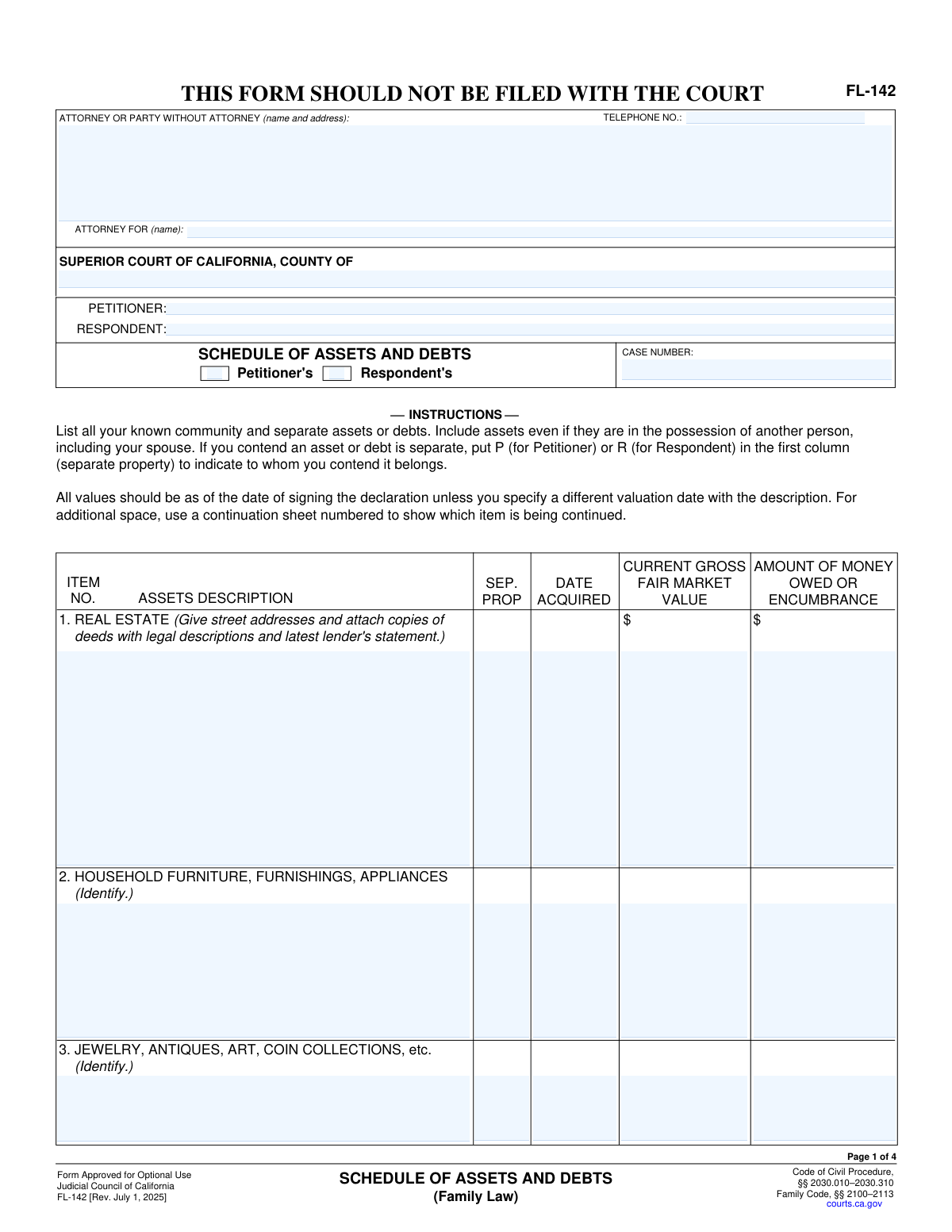
Form FL-142 is a mandatory financial disclosure form used in California family law cases to provide a comprehensive list of all assets and debts. Parties must detail everything from real estate and bank accounts to loans and credit card balances, classifying each item as separate or community property. This detailed inventory is crucial for the fair and equitable division of property and debt. Today, this form can be filled out quickly and accurately using AI-powered services like Instafill.ai, which can also convert non-fillable PDF versions into interactive fillable forms.
Our AI automatically handles information lookup, data retrieval, formatting, and form filling.
It takes less than a minute to fill out FL-142 using our AI form filling.
Securely upload your data. Information is encrypted in transit and deleted immediately after the form is filled out.
Form specifications
| Form name: | Form FL-142, Schedule of Assets and Debts |
| Number of fields: | 132 |
| Number of pages: | 4 |
| Filled form examples: | Form FL-142 Examples |
| Language: | English |
Instafill Demo: How to fill out PDF forms in seconds with AI
How to Fill Out FL-142 Online for Free in 2026
Are you looking to fill out a FL-142 form online quickly and accurately? Instafill.ai offers the #1 AI-powered PDF filling software of 2026, allowing you to complete your FL-142 form in just 37 seconds or less.
Follow these steps to fill out your FL-142 form online using Instafill.ai:
- 1 Navigate to Instafill.ai and upload your Form FL-142, or select it from the library of official documents.
- 2 Enter the initial case information, including the court, county, petitioner and respondent names, and the case number.
- 3 Systematically list all assets, following the AI-guided prompts for categories like real estate, vehicles, bank accounts, and investments, providing values and acquisition dates for each.
- 4 Detail all outstanding debts, such as mortgages, student loans, and credit card balances, specifying the creditor and amount owed.
- 5 For each asset and debt, use the guided interface to indicate whether it is separate property (Petitioner's or Respondent's) or community property.
- 6 Upload and attach all required supporting documents, such as bank statements, deeds, and loan agreements, directly to the form.
- 7 Review the entire completed schedule for accuracy, then securely download the finished FL-142, ready for filing with the court.
Our AI-powered system ensures each field is filled out correctly, reducing errors and saving you time.
Why Choose Instafill.ai for Your Fillable FL-142 Form?
Speed
Complete your FL-142 in as little as 37 seconds.
Up-to-Date
Always use the latest 2026 FL-142 form version.
Cost-effective
No need to hire expensive lawyers.
Accuracy
Our AI performs 10 compliance checks to ensure your form is error-free.
Security
Your personal information is protected with bank-level encryption.
Frequently Asked Questions About Form FL-142
This form is used to provide a complete, sworn inventory of all property and debts in a legal case, typically a divorce or legal separation. It helps the court and the parties understand the full financial picture for division of property.
Both the Petitioner (the person who started the case) and the Respondent (the person responding to the case) must each complete and file their own version of this form.
Separate property is an asset or debt that belongs solely to one person. On this form, you should mark 'P' if it is the Petitioner's separate property or 'R' if it is the Respondent's; leave the field blank if it is community (joint) property.
This is the estimated price the asset would sell for today, before deducting any loans. You can use online valuation tools for cars, Zillow for real estate, or get professional appraisals for high-value items like jewelry or art.
You should collect recent statements for all financial accounts (bank, credit card, retirement, loans), property deeds, vehicle titles, and insurance policy documents. The form requires you to attach copies of many of these.
Provide your best estimate for the date the asset was acquired. If you cannot recall the exact day, providing the month and year is generally acceptable.
The form allows for continuation sheets. You can use additional pages to list all your items, note the number of attached pages in field 27, and submit them with the main form.
The 'Fair Market Value' is the total current worth of the asset. The 'Amount Owed or Encumbrance' is the outstanding balance of any loan or lien against that specific asset, such as a mortgage or car loan.
You can use 'Item 16. OTHER ASSETS' to list any property that doesn't have a specific section. Similarly, use 'Item 24. OTHER DEBTS' for any debts not otherwise categorized.
You can use AI-powered services like Instafill.ai to help fill out this form. These tools can auto-fill fields accurately from your saved data, saving you time and helping to prevent errors.
Simply upload the form to the Instafill.ai platform. Its AI will make the form fillable, and you can connect your data to automatically populate the fields before reviewing and downloading the completed document.
Services like Instafill.ai can convert flat, non-fillable PDFs into interactive, fillable forms. This allows you to type your information directly into the fields on your computer.
Yes, the form instructions require you to attach the latest statements for bank accounts, credit cards, retirement funds, and other financial instruments. This documentation is crucial for verification purposes.
The Petitioner is the individual who initiated the legal case by filing the first court documents. The Respondent is the other party who is responding to the case.
Compliance FL-142
Validation Checks by Instafill.ai
1
Ensures Only One Party (Petitioner or Respondent) is Selected
This validation checks that either the 'Petitioner's' box or the 'Respondent's' box is checked, but not both. It is critical to identify which party's assets and debts are being listed on the schedule. If both are checked, or neither is checked, the form is ambiguous and cannot be processed correctly.
2
Validates Presence of a Case Number
This check ensures that the 'Case number' field is not empty. The case number is the primary identifier that links this financial schedule to the correct legal proceeding in the court system. A missing case number would make the document impossible to file and associate with the petitioner and respondent.
3
Validates Telephone Number Format
This check verifies that the 'Telephone Number' field follows a standard format, such as (XXX) XXX-XXXX or XXX-XXX-XXXX. This is important for ensuring the court or opposing party can successfully contact the filer if necessary. An invalid format could lead to communication failures and delays in the case.
4
Ensures 'Date Acquired' is a Valid Past Date
This validation confirms that all 'Date acquired' fields contain a valid date in a recognized format (e.g., MM/DD/YYYY) and that the date is not in the future. The acquisition date is crucial for determining whether an asset is community or separate property. An invalid or future date would be a data entry error and would prevent proper legal classification of the asset or debt.
5
Verifies All Financial Values are Numeric
This check ensures that all fields for 'Current gross fair market value', 'Amount owed or encumbrance', and 'TOTAL OWING' contain only valid numeric characters. Non-numeric entries would prevent the system from performing calculations for total assets and debts. This validation is essential for data integrity and the accuracy of financial summaries.
6
Validates 'Separate Property' Field Code
This check enforces that fields labeled 'Separate property indicator' or 'SEP.PROP' contain only 'P' (for Petitioner), 'R' (for Respondent), or are left blank (for community property). Any other characters or words would be invalid and could lead to misclassification of property. This strict format is necessary for the legal determination of asset division.
7
Logical Check for Encumbrance vs. Market Value
This validation compares the 'Amount owed or encumbrance' to the 'Current gross fair market value' for each asset. It is unusual for the amount owed to exceed the asset's value, and this could indicate a data entry error. The system should flag this discrepancy and prompt the user to confirm the values are correct, preventing significant financial misstatements.
8
Ensures Listed Assets Have a Value
This check verifies that if a description is entered for an asset (e.g., in 'Real estate description'), the corresponding 'Current gross fair market value' field is also filled out. Listing an asset without its value makes the schedule incomplete and useless for financial assessment. This rule ensures that every identified asset is properly valued.
9
Ensures Represented Party is Named
This validation checks that if an attorney's name is entered in the 'Attorney or Party Name' field, the 'Attorney for (name)' field is also completed. This clarifies exactly which party (Petitioner or Respondent) the attorney is representing. Failure to provide this information creates ambiguity and could lead to filing errors.
10
Requires Final Date and Filer's Name
This check ensures that the 'Date' and '(TYPE OR PRINT NAME)' fields at the end of the form are filled out before submission. These fields are the equivalent of a legal signature, attesting to the accuracy of the information provided. A form without a date and name is considered unsigned and legally invalid.
11
Ensures Superior Court County is Specified
This validation confirms that the 'Superior Court - County' field is not left blank. Specifying the county is essential for routing the document to the correct court jurisdiction. A missing county name would result in the form being rejected or misfiled, causing significant delays in the legal process.
12
Verifies Both Petitioner and Respondent Names are Provided
This check ensures that both the 'Petitioner (name)' and 'Respondent name' fields are filled in. These names define the primary parties of the case and are required on all legal documents. Omitting either name would make the form incomplete and unfileable, as it would not be clearly associated with the specific legal action.
13
Validates 'Number of Pages' is a Non-Negative Integer
This check ensures the 'specify number of pages' field contains a valid, non-negative whole number (e.g., 0, 1, 5). This number informs the court clerk how many additional pages are attached to the main form, ensuring the complete document is processed. An invalid entry, like text or a negative number, would cause confusion and could lead to an incomplete case file.
14
Ensures Listed Debts Have an Amount Owing
This validation checks that for debt sections (e.g., Student Loans, Taxes, Credit Cards), if a description or other detail is entered, the 'TOTAL OWING' field must also be filled. A debt cannot be properly accounted for without its corresponding amount. This prevents incomplete entries and ensures all listed liabilities are quantified.
Common Mistakes in Completing FL-142
Users often misunderstand the legal distinction between separate property (e.g., acquired before marriage) and community property, incorrectly marking assets with 'P' or 'R' or leaving the field blank. This error can lead to significant legal disputes, challenges to the asset division, and prolonged court proceedings. To avoid this, carefully review how and when each asset was acquired, and use the exact codes ('P' for Petitioner, 'R' for Respondent) as instructed for each specific field.
A frequent error is listing an asset's original purchase price in the 'Current gross fair market value' column. The court requires the value as of a specific date—what the asset could be sold for today, not what was paid for it. This mistake can drastically skew the financial picture, leading to an inequitable division of assets and potential rejection of the form. Always research current market values before filling out the form.
Filers often enter generic descriptions like 'my car' or 'savings account' without the required make, model, VIN, full account number, or bank name. This ambiguity causes confusion, disputes over which asset is being referred to, and delays as the court requests clarification. To prevent this, gather all relevant documents and transcribe all identifying numbers and details exactly as they appear on titles, statements, and deeds.
The form explicitly requires attaching copies of deeds, vehicle titles, and the latest financial statements for nearly every category. Filers often overlook these instructions, submitting the form without the necessary proof. This critical error will almost certainly result in the court clerk rejecting the filing or a judge delaying the case, wasting time and money. Create a checklist of all required attachments and ensure they are included with your submission.
A common mistake is to subtract a loan from an asset's value and enter the resulting 'net equity' in the value column, leaving the debt column blank. The form requires listing the 'Current gross fair market value' and the 'Amount owed or encumbrance' in separate columns to provide a complete financial picture. Failing to do so can lead to rejection or requests for correction, so always list the full current value and the full outstanding debt in their respective fields.
Errors in the top section, such as an incorrect 'Case number,' misspelled Petitioner or Respondent names, or the wrong county court, are common and costly. These mistakes can lead to the document being misfiled, rejected by the court clerk, or not associated with the correct legal case, causing significant administrative delays. Always double-check this information against official court documents. If the form is a non-fillable PDF, tools like Instafill.ai can convert it into a fillable version where you can easily type and save this crucial information.
The form has inconsistent instructions for marking separate property; some fields ask for 'P' or 'R', while others suggest 'Yes' or 'No'. Users often get confused and use these indicators interchangeably or invent their own, creating legal ambiguity. It is crucial to read the specific instruction for each item and use the exact format required. AI-powered form fillers like Instafill.ai can help prevent these errors by enforcing the correct format for specific fields.
While focused on listing valuable assets, filers sometimes forget to list the corresponding loans, mortgages, or liens in the 'Amount owed or encumbrance' column. For example, they list a car's value but forget the auto loan, or a house's value but omit the mortgage. This presents a misleadingly positive financial picture and can be seen as a misrepresentation to the court. Ensure that for every asset with a loan against it, the debt is accurately listed.
The form requires current values, but people often use old statements or guess at balances for bank accounts, retirement funds, and credit cards. Financial values fluctuate, and using outdated information can lead to significant inaccuracies, causing disputes and requiring amended filings. Before completing the form, gather the most recent statements for all accounts to ensure the figures are as up-to-date as possible.
One of the most common and easily avoidable mistakes is forgetting to sign and date the form after filling it out. An unsigned form is legally invalid and will be immediately rejected by the court clerk, halting all progress. This often happens when people are focused on the complex financial details and overlook the final step. Always perform a final review of the entire document, paying special attention to the signature and date lines before printing or submitting.
Saved over 80 hours a year
“I was never sure if my IRS forms like W-9 were filled correctly. Now, I can complete the forms accurately without any external help.”
Kevin Martin Green
Your data stays secure with advanced protection from Instafill and our subprocessors

Robust compliance program
Transparent business model
You’re not the product. You always know where your data is and what it is processed for.
ISO 27001, HIPAA, and GDPR
Our subprocesses adhere to multiple compliance standards, including but not limited to ISO 27001, HIPAA, and GDPR.
Security & privacy by design
We consider security and privacy from the initial design phase of any new service or functionality. It’s not an afterthought, it’s built-in, including support for two-factor authentication (2FA) to further protect your account.
Fill out FL-142 with Instafill.ai
Worried about filling PDFs wrong? Instafill securely fills form-fl-142-schedule-of-assets-and-debts forms, ensuring each field is accurate.



