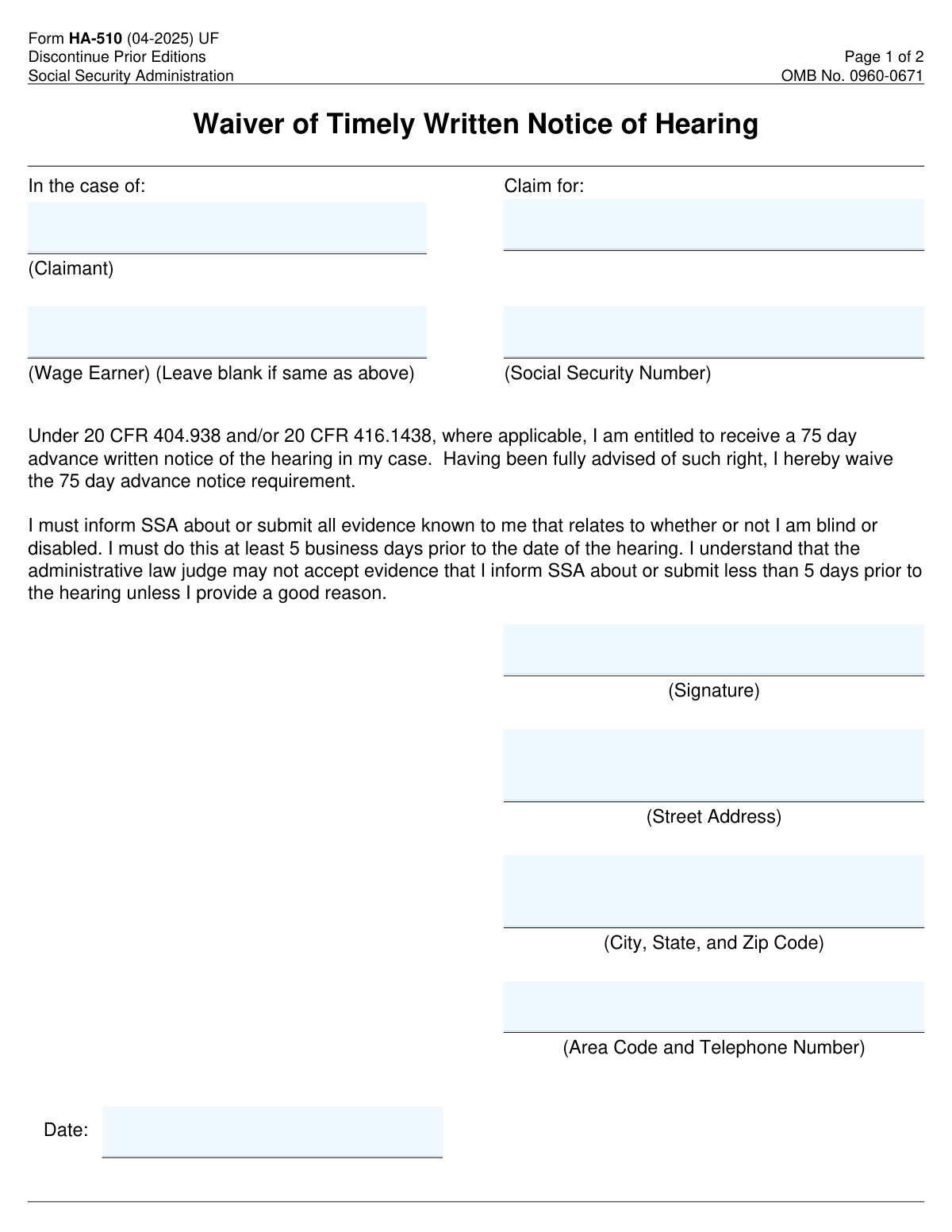
Compliance Form HA-510
Validation Checks by Instafill.ai
1
Verifies that the claimant's name is provided in the Claim Information section.
This validation check ensures that the claimant's name is accurately entered in the Claim Information section of the form. It confirms that the name is not left blank, which is crucial for identifying the individual making the claim. The check also verifies that the name is formatted correctly, adhering to standard naming conventions. By performing this validation, the software helps to prevent any potential issues related to misidentification or processing delays.
2
Confirms that the Social Security Number of the claimant is included and correctly formatted.
This validation check verifies that the Social Security Number (SSN) of the claimant is provided and adheres to the correct formatting standards. It ensures that the SSN is not only present but also follows the nine-digit structure typically used in the United States. By confirming the accuracy of the SSN, the software helps to prevent identity verification issues that could arise during the claims process. This check is essential for maintaining the integrity and security of the claimant's personal information.
3
Ensures that the wage earner's name is filled in only if it differs from the claimant's name.
This validation check ensures that the wage earner's name is only filled in if it is different from the claimant's name. It verifies that the form is completed accurately, preventing unnecessary confusion or errors in the claims process. By checking this condition, the software helps to streamline the information provided and ensures that only relevant details are included. This check is vital for maintaining clarity and accuracy in the documentation.
4
Checks that the waiver statement has been read and understood before signing the form.
This validation check confirms that the individual signing the form has read and understood the waiver statement. It ensures that the claimant is fully aware of the implications of waiving the timely notice requirement. By verifying this understanding, the software helps to protect the rights of the claimant and ensures that they are making an informed decision. This check is crucial for upholding the integrity of the waiver process.
5
Validates that the signature is present in the designated area to confirm the waiver of the notice requirement.
This validation check ensures that a signature is present in the designated area of the form, confirming the waiver of the notice requirement. It verifies that the claimant has officially acknowledged and accepted the terms outlined in the waiver statement. By checking for the presence of a signature, the software helps to prevent any processing delays that could occur due to incomplete documentation. This check is essential for finalizing the claims process and ensuring compliance with regulatory requirements.
6
Ensures that the street address, city, state, and zip code are accurately filled in the Contact Information section.
This validation check ensures that the street address, city, state, and zip code are accurately filled in the Contact Information section. It verifies that all components of the address are present and correctly formatted to avoid any miscommunication. The check confirms that the information aligns with postal standards, which is crucial for timely correspondence. By validating this information, the software helps to prevent delays in processing the waiver.
7
Confirms that the area code and telephone number are provided for SSA contact purposes.
This validation check confirms that the area code and telephone number are provided for SSA contact purposes. It ensures that the contact number is complete and follows the standard format, which is essential for effective communication. The check verifies that the number is not only present but also valid, allowing for quick outreach if necessary. This step is vital in maintaining a clear line of communication between the applicant and the SSA.
8
Verifies that the date of signing is included and correctly formatted.
This validation check verifies that the date of signing is included and correctly formatted. It ensures that the date adheres to the required format, which is important for legal documentation. The check confirms that the date is not only present but also reflects the actual signing date, preventing any discrepancies. By validating the signing date, the software helps to uphold the integrity of the waiver process.
9
Checks that all evidence related to the claim is submitted at least 5 business days before the hearing date.
This validation check checks that all evidence related to the claim is submitted at least 5 business days before the hearing date. It ensures that the submission timeline is adhered to, which is critical for the review process. The check verifies that the evidence is not only submitted but also received within the stipulated timeframe, allowing for adequate preparation. By enforcing this requirement, the software helps to facilitate a smoother hearing process.
10
Ensures that a valid reason is provided if evidence is submitted less than 5 days prior to the hearing.
This validation check ensures that a valid reason is provided if evidence is submitted less than 5 days prior to the hearing. It verifies that the explanation is clear and justifiable, which is necessary for the acceptance of late submissions. The check confirms that the reason aligns with the guidelines set forth by the SSA, maintaining the integrity of the process. By requiring this validation, the software helps to uphold the standards of evidence submission.
11
Confirms that the Privacy Act Statement has been reviewed to understand how personal information will be used.
This validation check ensures that the user has acknowledged the Privacy Act Statement, which outlines how their personal information will be utilized. It verifies that the individual understands the implications of sharing their data and the protections in place. By confirming this, the software promotes transparency and compliance with privacy regulations. This step is crucial for safeguarding the user's rights and ensuring informed consent.
12
Validates that the form is submitted to the correct SSA office as instructed.
This check verifies that the submission address for the form aligns with the instructions provided on the document. It ensures that the user is aware of the correct SSA office to which the form must be sent, preventing delays in processing. By validating this information, the software helps to streamline the submission process and enhances the likelihood of timely responses. This step is essential for ensuring that the form reaches the appropriate authorities without unnecessary complications.
13
Ensures that a copy of the completed form is retained for personal records.
This validation check emphasizes the importance of retaining a copy of the completed form for the user's personal records. It verifies that the user is aware of the need to keep documentation of their submission for future reference. By ensuring this step is followed, the software aids in maintaining a clear record of communications with the SSA. This practice is vital for accountability and for any potential follow-up regarding the waiver request.
14
Checks that no fields are left blank unless specified (e.g., wage earner's name if not applicable).
This validation check ensures that all required fields on the form are filled out appropriately, with exceptions only for specified fields that may not apply. It verifies that the user has provided all necessary information to avoid processing delays. By checking for completeness, the software helps to ensure that the form is submitted in a fully compliant manner. This step is crucial for preventing any potential issues that could arise from incomplete submissions.
15
Verifies that all information provided is consistent and does not contain discrepancies.
This validation check confirms that the information entered on the form is consistent and free from discrepancies. It ensures that all data aligns with any previously submitted information or known records. By verifying consistency, the software helps to prevent misunderstandings or complications during the processing of the waiver request. This step is essential for maintaining the integrity of the information provided and ensuring a smooth review process.