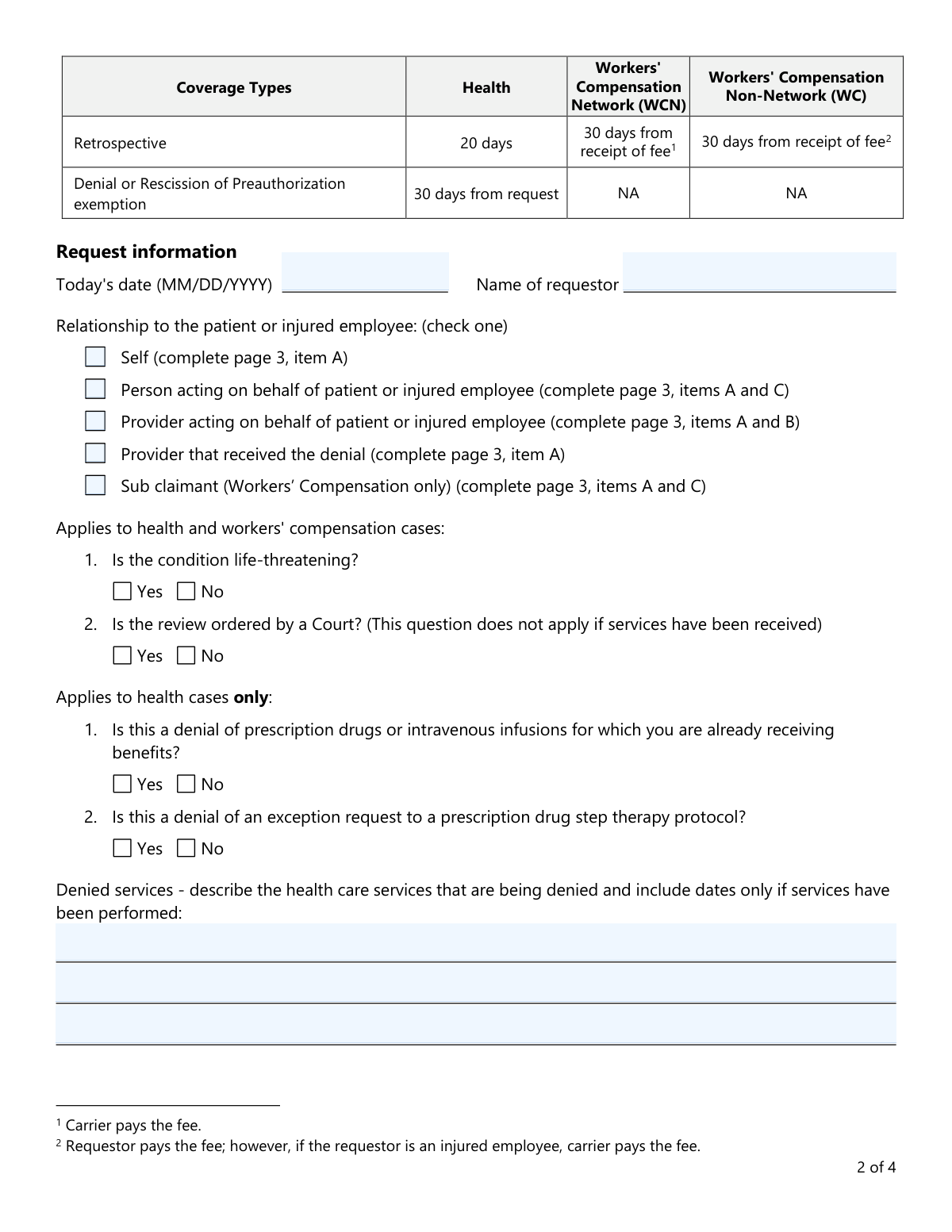
Yes! You can use AI to fill out Form LHL009, Request for a Review by an Independent Review Organization (IRO)

Form LHL009, issued by the Texas Department of Insurance, is the official document for requesting an external review by an Independent Review Organization (IRO) after your insurance carrier has denied a health care service as not medically necessary. It allows patients, their representatives, or providers to appeal the decision and have it assessed by an unbiased third-party health care provider. Today, this form can be filled out quickly and accurately using AI-powered services like Instafill.ai, which can also convert non-fillable PDF versions into interactive fillable forms.
Our AI automatically handles information lookup, data retrieval, formatting, and form filling.
It takes less than a minute to fill out LHL009 using our AI form filling.
Securely upload your data. Information is encrypted in transit and deleted immediately after the form is filled out.

Form specifications

Form name: Form LHL009, Request for a Review by an Independent Review Organization (IRO)
Number of fields: 71
Number of pages: 4
Language: English
main-image

Instafill Demo: How to fill out PDF forms in seconds with AI

How to Fill Out LHL009 Online for Free in 2026

Are you looking to fill out a LHL009 form online quickly and accurately? Instafill.ai offers the #1 AI-powered PDF filling software of 2026, allowing you to complete your LHL009 form in just 37 seconds or less.
Follow these steps to fill out your LHL009 form online using Instafill.ai:
  1. 1 Navigate to Instafill.ai and upload or select Form LHL009, Request for a Review by an Independent Review Organization.
  2. 2 Provide your details as the requestor and specify your relationship to the patient (e.g., self, provider, representative).
  3. 3 Enter the patient's information, including their name, date of birth, and health plan ID number. You can upload the denial letter for the AI to extract this information.
  4. 4 Clearly describe the denied health care services in the designated section. Let the AI assist by summarizing information from your uploaded denial notice.
  5. 5 Complete the necessary provider information sections and answer the questions regarding the nature of the case (e.g., life-threatening, court-ordered).
  6. 6 Review all auto-filled information for accuracy, then electronically sign the release authorization to grant the IRO access to relevant medical records.
  7. 7 Download the completed form and submit it to the insurance company that denied the services, using the contact information found on your denial letter.

Our AI-powered system ensures each field is filled out correctly, reducing errors and saving you time.

Why Choose Instafill.ai for Your Fillable LHL009 Form?

Speed

Complete your LHL009 in as little as 37 seconds.

Up-to-Date

Always use the latest 2026 LHL009 form version.

Cost-effective

No need to hire expensive lawyers.

Accuracy

Our AI performs 10 compliance checks to ensure your form is error-free.

Security

Your personal information is protected with bank-level encryption.

Frequently Asked Questions About Form LHL009

This form is used to request an independent review by a neutral healthcare provider after your insurance carrier has denied a service for not being medically necessary. It is the next step in the appeals process.

The form can be completed and submitted by you (the patient), your healthcare provider, or a representative acting on your behalf.

Return the completed form directly to the insurance company that denied your request, not to the Texas Department of Insurance (TDI). The company's address or fax number can be found on the denial letter you received.

The timeline varies by case type; reviews for life-threatening conditions can take as little as 3 days. Non-life-threatening preauthorizations take around 20 days, while retrospective reviews can take up to 30 days.

For most health plan members, there is no cost for the independent review. An exception may apply for providers requesting certain retrospective reviews in Workers' Compensation Non-Network cases.

Your insurance company will forward your request to the Texas Department of Insurance (TDI), which will then assign your case to an Independent Review Organization (IRO). You will receive a letter from TDI identifying the assigned IRO.

You must sign the release to authorize the IRO to access your medical records, which are necessary for them to conduct a complete review of your case. A signature is not required for Workers' Compensation cases.

Clearly describe the healthcare service, procedure, or medication that was denied by your insurance carrier. If the services have already been performed, you should also include the dates of service.

Yes, for Workers' Compensation cases, you must return this form within 45 calendar days of the denial. Additionally, you are not required to sign the medical release on page 4.

This section is completed by the insurance company or URA that denied the services, not by you. The form instructs the company to fill this out before providing it to you.

Yes, services like Instafill.ai use AI to help you accurately auto-fill form fields, which saves time and helps avoid common errors. This can be particularly helpful for ensuring all required information is entered correctly.

You can upload the LHL009 form to the Instafill.ai platform. Its AI will make the document interactive, allowing you to easily type in your information, sign electronically, and download the completed PDF for submission.

If you have a flat, non-fillable PDF, you can use a tool like Instafill.ai to convert it into an interactive, fillable form. This allows you to complete it on your computer without needing to print and write by hand.

Compliance LHL009
Validation Checks by Instafill.ai

1
Conditional Section Completion Based on Requestor Relationship
This validation ensures that the correct informational sections (A, B, C) on page 3 are completed based on the requestor's selected relationship to the patient. For example, if 'Provider acting on behalf' is checked, sections A and B must be filled. This check is critical for ensuring all necessary party information is captured for the review, and failure to comply will prevent form submission until the required sections are completed.
2
Date Format and Plausibility
This check verifies that all date fields ('Today's date', 'Date of birth', 'Release Date') are entered in a valid MM/DD/YYYY format and represent plausible dates. For instance, the 'Date of birth' must be a date in the past, and 'Today's date' cannot be in the future. This prevents data entry errors and ensures accurate record-keeping, and an invalid entry will trigger an error message requiring the user to correct the format.
3
Mandatory Patient Information Completion
This validation confirms that all fields within the 'Patient / injured employee information' section on page 3 are filled out completely. This includes the patient's name, address, date of birth, and health plan ID, which are essential for identifying the correct case file. An incomplete section would make it impossible to process the request, so the form cannot be submitted until all required patient data is provided.
4
Exclusive Relationship Selection
This check ensures that exactly one option is selected from the 'Relationship to the patient or injured employee' checklist. Selecting multiple roles or no role creates ambiguity about the filer's capacity and which information sections are required. If more than one or zero options are checked, the user will be prompted to select a single, appropriate relationship before proceeding.
5
Federal Tax ID (EIN) Format
This validation verifies that the 'Federal tax identification number' entered for providers in sections A and B is a 9-digit number. An incorrect or improperly formatted Tax ID can cause significant issues with provider identification and payment processing. If the entered value does not match the standard EIN format, the system will display an error and require correction.
6
Conditional Release Signature for Non-Workers' Comp Cases
This check enforces the signature requirement on the 'Release' section for all cases except those identified as Workers' Compensation. For health cases, the signature, date, and authorizer role are mandatory to legally obtain medical records. The validation will prevent submission if these fields are empty for a health case, but will allow it for a Workers' Comp case, preventing unnecessary processing delays.
7
Required 'Denied Services' Description
This validation ensures that the 'Denied services' text field is not empty. This description is the fundamental basis for the review, explaining what service was denied and why the appeal is being made. Without this information, the IRO has no context for the case, so the form will be rejected if this field is left blank.
8
Patient Email Address Format
This check validates that the value entered in the 'Email address' field follows the standard '[email protected]' format. While not always mandatory, a valid email is crucial for efficient communication with the patient. If an email is provided, it must be valid to ensure the patient receives important updates; an invalid format will trigger a warning to correct the entry.
9
Patient Phone Number Format
This validation ensures the patient's 'Phone' number is entered in a recognizable format (e.g., 10 digits, with optional formatting like parentheses or hyphens). A valid phone number is a primary method of contact for clarifying information or communicating decisions. The system will flag entries that do not conform to a standard phone number structure to improve data quality and ensure the patient is reachable.
10
Address State and ZIP Code Validation
This check verifies that for all address blocks (patient, provider A, B, C), the 'State' field contains a valid two-letter abbreviation and the 'ZIP' field contains a 5-digit or 9-digit (ZIP+4) code. Correctly formatted addresses are essential for mailing correspondence and legal notices. An invalid entry will prompt the user to correct the state or ZIP code to ensure deliverability.
11
Logical Date Sequencing
This validation ensures the dates on the form follow a logical chronological order: the patient's 'Date of birth' must be before the 'Release Date', which in turn must be on or before 'Today's date'. This prevents illogical scenarios, such as a release being signed before the patient was born. A failure in this logical check would indicate a significant data entry error and must be corrected before submission.
12
Authorizer Role Selection on Release
This check ensures that if the Release section is signed, one of the authorizer roles ('The patient', 'Parent', or 'Patient’s legal guardian') is also selected. This is legally necessary to establish the signer's authority to release medical records. If a signature is present but no role is checked, the form submission will be blocked until the relationship is clarified.

Common Mistakes in Completing LHL009

Sending the Form to the Wrong Agency

The form instructions explicitly state to return the completed form to the insurance company that denied the service, not the Texas Department of Insurance (TDI). Many people mistakenly send it to the TDI because it's a state government form, which causes significant processing delays or can lead to the request being lost. To avoid this, carefully read the submission instructions on the first page and send the form directly to the address or fax number listed on your denial letter.

Forgetting to Sign the Medical Release Form

On page 4, a signature is required to authorize the release of medical records to the Independent Review Organization (IRO). This is a critical step, as the IRO cannot proceed with the review without access to these records. This mistake, common in non-Workers' Compensation cases, leads to an automatic rejection or delay of the review until a signed form is received. Always double-check that the patient or their legal guardian has signed and dated the release section before submission.

Incorrectly Completing the 'Relationship to Patient' Section

The form requires the requestor to check a box indicating their relationship to the patient, which then dictates which sections on page 3 must be completed. A common error is for a patient filling it out for themselves ('Self') to neglect completing Section A with their provider's information, as instructed. This incomplete information can halt the review process. It is crucial to follow the instructions tied to the checked box to ensure all required parties are correctly identified.

Missing or Incorrect Provider Tax ID Number

Section A and B for provider information require a Federal Tax Identification Number (TIN/EIN). Patients or their representatives often do not have this information readily available and may leave it blank or guess. An incorrect or missing TIN can cause delays while the IRO or insurance company attempts to verify the provider's identity. It is best to contact the provider's office directly to obtain the correct number before filling out the form.

Using an Invalid or Incorrect Health Plan ID Number

The 'Health plan or claim identification number' is essential for linking the review request to the correct patient file. People often mistakenly enter a group number, a non-existent number, or a number from an old insurance card, which prevents the insurance company from processing the request. Always use the Member ID number from the most current insurance card or the specific DWC claim number for workers' compensation cases to ensure the request is properly routed.

Filling Out the 'Company Use Only' Section

The final section on page 4, 'Company or Utilization Review Agent that denied services,' is clearly marked to be completed by the company. However, applicants sometimes try to fill it out themselves using information from their denial letter. This can create confusion and may require the form to be re-issued or corrected by the insurance company, delaying the start of the independent review. Applicants should always leave this section blank.

Providing a Vague or Incomplete Description of Denied Services

In the 'Denied services' section, simply writing the name of a drug like 'Wegovy' is insufficient, while pasting a multi-page legal argument is impractical. The IRO needs a concise but complete description of the service, medication, or procedure that was denied, including dates if services were already rendered. Failing to provide clear details can weaken the case or require the IRO to seek clarification, delaying the decision.

Using Incorrect Date Formats

The form consistently specifies the (MM/DD/YYYY) format for dates, but applicants often use other variations like 'Feb 5 2026' or DD/MM/YYYY. While seemingly minor, inconsistent data entry can cause issues with digital processing systems and may lead to data being misinterpreted or flagged for manual review, slowing down the process. Using an AI-powered tool like Instafill.ai can help prevent this by automatically formatting dates correctly as you fill out the form.

Failing to Distinguish Between Provider Sections A and B

The form has two distinct sections for providers: Section A for the provider who received the denial, and Section B for a provider acting on the patient's behalf. A patient or office staff member may get confused and fill out the wrong section or duplicate information unnecessarily. It's important to identify the correct role of the provider in the appeal and fill out only the relevant section(s) as indicated by the checkbox on page 2 to avoid confusion.

Submitting a Flat PDF Without Fillable Fields

This form is often distributed as a non-fillable PDF, leading to illegible handwritten submissions, missed fields, and data entry errors when the information is manually transcribed by the insurance company. This can cause significant delays or rejection if the information cannot be read. Using a service like Instafill.ai can convert the flat PDF into an interactive, fillable form, ensuring all entries are clear, legible, and properly formatted, which helps prevent these common submission errors.
Saved over 80 hours a year

“I was never sure if my IRS forms like W-9 were filled correctly. Now, I can complete the forms accurately without any external help.”

Kevin Martin Green

Your data stays secure with advanced protection from Instafill and our subprocessors

Robust compliance program

Transparent business model

You’re not the product. You always know where your data is and what it is processed for.

ISO 27001, HIPAA, and GDPR

Our subprocesses adhere to multiple compliance standards, including but not limited to ISO 27001, HIPAA, and GDPR.

Security & privacy by design

We consider security and privacy from the initial design phase of any new service or functionality. It’s not an afterthought, it’s built-in, including support for two-factor authentication (2FA) to further protect your account.

Fill out LHL009 with Instafill.ai

Worried about filling PDFs wrong? Instafill securely fills form-lhl009-request-for-a-review-by-an-independent-review-organization-iro forms, ensuring each field is accurate.