Yes! You can use AI to fill out Form SS293, Advice of death

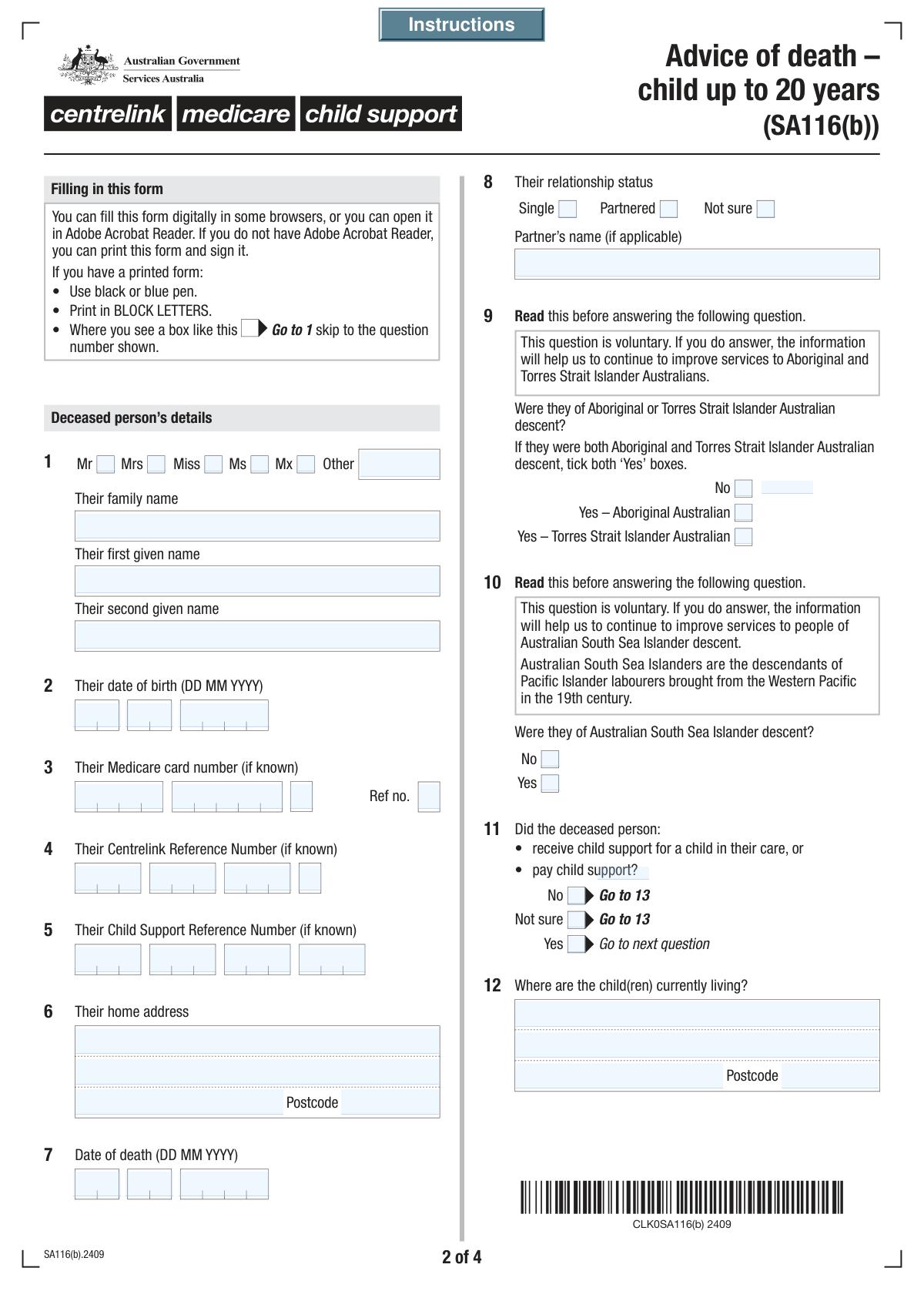
Form SS293, the Advice of death form, is an official document used to inform Services Australia (which includes Centrelink and Medicare) that a person has died. Submitting this form is a critical step for the next of kin, executor, or another representative to ensure that government payments are stopped and the deceased's government records are updated correctly, which helps prevent overpayments. Today, this form can be filled out quickly and accurately using AI-powered services like Instafill.ai, which can also convert non-fillable PDF versions into interactive fillable forms.
Our AI automatically handles information lookup, data retrieval, formatting, and form filling.
It takes less than a minute to fill out SS293 using our AI form filling.
Securely upload your data. Information is encrypted in transit and deleted immediately after the form is filled out.

Form specifications

Form name: Form SS293, Advice of death
Number of fields: 156
Number of pages: 4
Filled form examples: Form SS293 Examples
Language: English
main-image

Instafill Demo: How to fill out PDF forms in seconds with AI

How to Fill Out SS293 Online for Free in 2026

Are you looking to fill out a SS293 form online quickly and accurately? Instafill.ai offers the #1 AI-powered PDF filling software of 2026, allowing you to complete your SS293 form in just 37 seconds or less.
Follow these steps to fill out your SS293 form online using Instafill.ai:
  1. 1 Navigate to Instafill.ai and upload or select the Advice of death (Form SS293).
  2. 2 Provide the deceased person's personal details, including their full name, date of birth, date of death, and their last known address.
  3. 3 Enter the deceased's government identification numbers, such as their Medicare card number and Centrelink Reference Number, if available.
  4. 4 Fill in your details as the notifier, including your name, contact information, and your relationship to the deceased.
  5. 5 Provide details for the executor/administrator and the funeral director, if these are known, to assist Services Australia with follow-up communications.
  6. 6 Review all the information entered for accuracy, then sign and date the declaration section electronically.
  7. 7 Download the completed form and submit it to Services Australia as per their instructions.

Our AI-powered system ensures each field is filled out correctly, reducing errors and saving you time.

Why Choose Instafill.ai for Your Fillable SS293 Form?

Speed

Complete your SS293 in as little as 37 seconds.

Up-to-Date

Always use the latest 2026 SS293 form version.

Cost-effective

No need to hire expensive lawyers.

Accuracy

Our AI performs 10 compliance checks to ensure your form is error-free.

Security

Your personal information is protected with bank-level encryption.

Frequently Asked Questions About Form SS293

This form is used to officially notify government agencies, like Services Australia, about a person's death. It helps in updating records for services such as Medicare, Centrelink, and Child Support to finalize the deceased's affairs.

This form should be completed by a 'notifier,' who could be the next of kin, the executor of the estate, a parent, or another person or organization handling the deceased's affairs.

It's helpful to have the deceased's personal details, including their full name, date of birth, date of death, and last address. If available, their Medicare card, Centrelink Reference Number, and Child Support Reference Number will also be needed.

Please fill in all the information you have. If you do not know these specific numbers, you can leave those fields blank and the agency will use other details to identify the person's record.

The 'Notifier' is the person or organization completing and submitting this form. If you are filling out this form, you should enter your own contact details in this section.

If you are unsure about the executor or administrator's details, you can select the 'No' or 'Not applicable' option in that section. You are only required to provide information that is known to you.

Yes, if you indicate that you are a parent of the deceased, you will be directed to complete a section with your personal details, including your name, address, and any relevant reference numbers.

The form includes a 'Not sure' option for questions about child support. It is best to select this if you cannot confidently confirm whether the deceased paid or received child support.

Once submitted, the information is used to update the deceased person's government records. This helps to stop any ongoing payments, resolve outstanding balances, and ensure their accounts are properly closed.

The declaration must be signed and dated by the 'Notifier,' who is the person providing the information and whose details are listed in the notifier section of the form.

Yes, services like Instafill.ai use AI to accurately auto-fill form fields, which can save you time and help prevent errors during this difficult time.

Simply upload the form to the Instafill.ai platform. The AI will identify all the fields, allowing you to type in your answers easily or use the AI to auto-fill information from your profile.

You can use a service like Instafill.ai, which can convert flat, non-fillable PDFs into interactive forms. Just upload your document, and the platform will make it easy to complete and sign digitally.

Compliance SS293
Validation Checks by Instafill.ai

1
Date of Death Must Be After Date of Birth
This check validates that the 'Date of Death' is chronologically after the 'Date of Birth'. This is a critical logical consistency check to ensure the core data is valid and prevent impossible timelines. If the date of death is on or before the date of birth, the form submission will be rejected and the user will be prompted to correct the dates.
2
Valid and Complete Date of Birth
This validation ensures that the day, month, and year entered for the 'Deceased Person's Date of Birth' form a valid calendar date (e.g., not February 30th). It also confirms the date is in the past and not a future date. An invalid or incomplete date prevents accurate age calculation and identity verification, so the user must correct it to proceed.
3
Valid and Complete Date of Death
This check ensures the day, month, and year for the 'Date of Death' combine to form a valid calendar date. The date must be in the past or the present day, but not in the future. This is essential for all subsequent processing, and an invalid date will block submission until corrected.
4
Conditional Requirement for Partner's Name
This validation rule is triggered by the 'Deceased Person's Relationship Status' field. If the user selects the 'Partnered' option, the 'Partner's Name' text field becomes mandatory. This ensures that complete information is captured for partnered individuals, which is often necessary for legal and administrative follow-up. If 'Partnered' is checked but the name is left blank, an error will be displayed.
5
Exclusive Title Selection
This check ensures that for any given person (Deceased, Parent, Notifier, Executor), only one title option is selected from the available checkboxes (Mr, Mrs, Miss, Ms, Mx). Furthermore, if the 'Other Title' field is filled in, none of the standard title checkboxes should be selected. This prevents contradictory data and ensures a single, clear title is recorded for each individual.
6
Australian Postcode Format Validation
This validation verifies that all postcode fields on the form contain a valid 4-digit number, consistent with the Australian postcode system. This applies to the deceased's address, parent's address, notifier's address, and any other address block. Correct postcodes are crucial for mail delivery and data regionalization, and an incorrect format will trigger an error message.
7
Medicare Reference Number Is a Single Digit
This check validates that the 'Medicare Card Reference Number' field contains only a single numeric digit (0-9). This number, which indicates the position on the card, has a strict format. This validation prevents users from entering a full card number or other incorrect data into this specific field, ensuring data integrity for linking with Medicare records.
8
Conditional Display of Education Qualification Questions
This rule validates the deceased's age at the time of death, calculated from the DOB and DOD fields. The questions regarding 'Deceased Person Education Qualification' should only be displayed and become mandatory if the deceased's age is between 16 and 20 years, inclusive. This prevents asking irrelevant questions and simplifies the form-filling experience for the user.
9
Conditional Validation of Parent Details Section
This check ensures that the entire 'Parent Details' section is only validated if the user answers 'Yes' to the 'Parent of Deceased Confirmation' question. If 'Yes' is selected, key fields like the parent's name and address become mandatory. If 'No' is selected, this section is ignored, preventing errors for users to whom this section does not apply.
10
Conditional Requirement for Executor Details
This validation is linked to the 'Executor/Administrator Details Known' question. If the user selects 'Yes', then the 'Family Name', 'First Given Name', and address fields for the executor become mandatory. This ensures that when executor information is available, all necessary contact details are captured for estate processing. If 'No' or 'Not applicable' is chosen, these fields are not required.
11
Mandatory Notifier Information
This check ensures that the primary contact person's details are complete. The 'Notifier's Family Name', 'First Given Name', 'Notifier's Postal Address' (including suburb and postcode), and 'Notifier's Contact Phone Number' are all mandatory fields. This information is critical for the processing agency to communicate about the form submission, so missing data will prevent submission.
12
Valid Declaration Date
This validation ensures the 'Declaration Date' is a valid calendar date and is logically sound. The date must not be in the future, and it cannot be earlier than the deceased person's date of death. This confirms the declaration was made after the event occurred and is legally sound. An invalid date will prompt the user for correction.
13
Centrelink Reference Number (CRN) Format
This check validates that the combined parts of the 'Centrelink Reference Number' match the official format, which is typically nine digits followed by a letter (e.g., 123 456 789A). This ensures the accuracy of a critical government identifier, which is essential for linking records and processing benefits. An incorrectly formatted CRN would be rejected.
14
Exclusive Aboriginal or Torres Strait Islander Descent Selection
This validation ensures that the user selects mutually exclusive options for the deceased's descent. A user cannot select both 'No' and one of the 'Yes' options (Aboriginal Australian or Torres Strait Islander Australian). This prevents contradictory data entry and ensures the demographic information collected is accurate and usable.

Common Mistakes in Completing SS293

Incorrectly Entering Segmented ID Numbers

The form requires Medicare, Centrelink, and Child Support numbers to be entered into multiple separate fields. Users often make transcription errors, swap segments, or enter the entire number into the first box. This leads to failed identity verification and requires the processing agency to manually contact the notifier, causing significant delays. To avoid this, carefully enter each segment of the number into its corresponding field, double-checking against the source document.

Ignoring Conditional Field Instructions

Many sections, like those for a Partner, Parent, or Executor, are conditional and should only be filled if a preceding question is answered 'Yes'. People often miss these 'Fill only if...' instructions and either provide unnecessary information or, more commonly, skip required sections. This creates contradictory or incomplete data, forcing a rejection or follow-up. Always read the instructions for each field carefully before entering data.

Mixing Up Information Between Individuals

This form collects information for multiple people: the deceased, a parent, the notifier, and the executor. Under stress, users can easily enter their own information (e.g., Medicare number) in the section for the deceased person. This fundamental error invalidates the data and can cause serious processing issues. To prevent this, take your time and verify the heading of each section before entering any personal details.

Providing Incomplete or Poorly Formatted Addresses

Address fields are broken into 'Address Line 1', 'Address Line 2', 'Suburb/Town', and 'Postcode'. A common mistake is to put the suburb and state on 'Address Line 2' instead of their dedicated fields, or to omit the postcode. These errors can cause important correspondence to be delayed or returned as undeliverable. Ensure each part of the address is placed in the correct field for accurate delivery.

Inconsistent Date Entry

Dates for birth and death are split into separate Day, Month, and Year fields, which can lead to errors. Users may accidentally swap the day and month, especially if they are used to a different regional format (MM/DD/YYYY vs DD/MM/YYYY). This can have serious implications for eligibility and record-matching. Always double-check that the day, month, and year are entered into their respective fields correctly.

Failing to Complete Sections After a 'Yes' Response

A frequent error is checking 'Yes' to a question (e.g., 'Yes, Executor details are known') but then failing to fill in the subsequent required fields like the executor's name and address. This leaves the form incomplete and stops the process, as the agency cannot act on the 'Yes' without the corresponding details. If you answer 'Yes', ensure you provide all the information requested in the section that follows.

Guessing Information Instead of Using 'Not Sure'

When dealing with a deceased person's affairs, not all information may be readily available. Some people guess at details like a Centrelink number or relationship status, fearing that selecting 'Not sure' will cause problems. Providing incorrect information is far more problematic than admitting it's unknown, as it pollutes the record and can lead to legal or financial complications. Use the 'Not sure' option when you are genuinely uncertain.

Forgetting the Final Declaration and Signature

After filling out a long and emotionally taxing form, it is easy to overlook the final declaration section at the end. Forgetting to enter a full name, signature, and date invalidates the entire submission. An unsigned form cannot be legally processed and will be returned, delaying the notification process. Always complete the declaration as the final step before submitting.

Misinterpreting Complex Status Questions

Questions regarding the deceased's child support status or education qualifications are complex and have specific conditions. Users may not read the fine print (e.g., 'age being between 16 and 20 years') and answer incorrectly. This can affect the assessment of any final entitlements or benefits. It is crucial to read these questions and their sub-conditions fully to provide an accurate response.

Contradictory Title Selection

The form provides checkboxes for common titles (Mr, Mrs, Ms) and a separate text field for 'Other Title'. A common mistake is to check a standard title box and also write a title in the 'Other' field, creating conflicting data. Only use the 'Other Title' field if none of the provided checkboxes are appropriate. AI-powered form filling tools like Instafill.ai can help prevent such logical errors by enforcing form rules.

Incomplete Notifier or Executor Details

The person filling out the form (the notifier) or the estate executor must provide complete contact information. Often, a phone number or postal address is left blank, making it impossible for the agency to follow up with questions. This halts the entire process until the agency can find another way to make contact. Ensure all contact detail fields for the notifier and executor are filled out completely and accurately.
Saved over 80 hours a year

“I was never sure if my IRS forms like W-9 were filled correctly. Now, I can complete the forms accurately without any external help.”

Kevin Martin Green

Your data stays secure with advanced protection from Instafill and our subprocessors

Robust compliance program

Transparent business model

You’re not the product. You always know where your data is and what it is processed for.

ISO 27001, HIPAA, and GDPR

Our subprocesses adhere to multiple compliance standards, including but not limited to ISO 27001, HIPAA, and GDPR.

Security & privacy by design

We consider security and privacy from the initial design phase of any new service or functionality. It’s not an afterthought, it’s built-in, including support for two-factor authentication (2FA) to further protect your account.

Fill out SS293 with Instafill.ai

Worried about filling PDFs wrong? Instafill securely fills form-ss293-advice-of-death forms, ensuring each field is accurate.