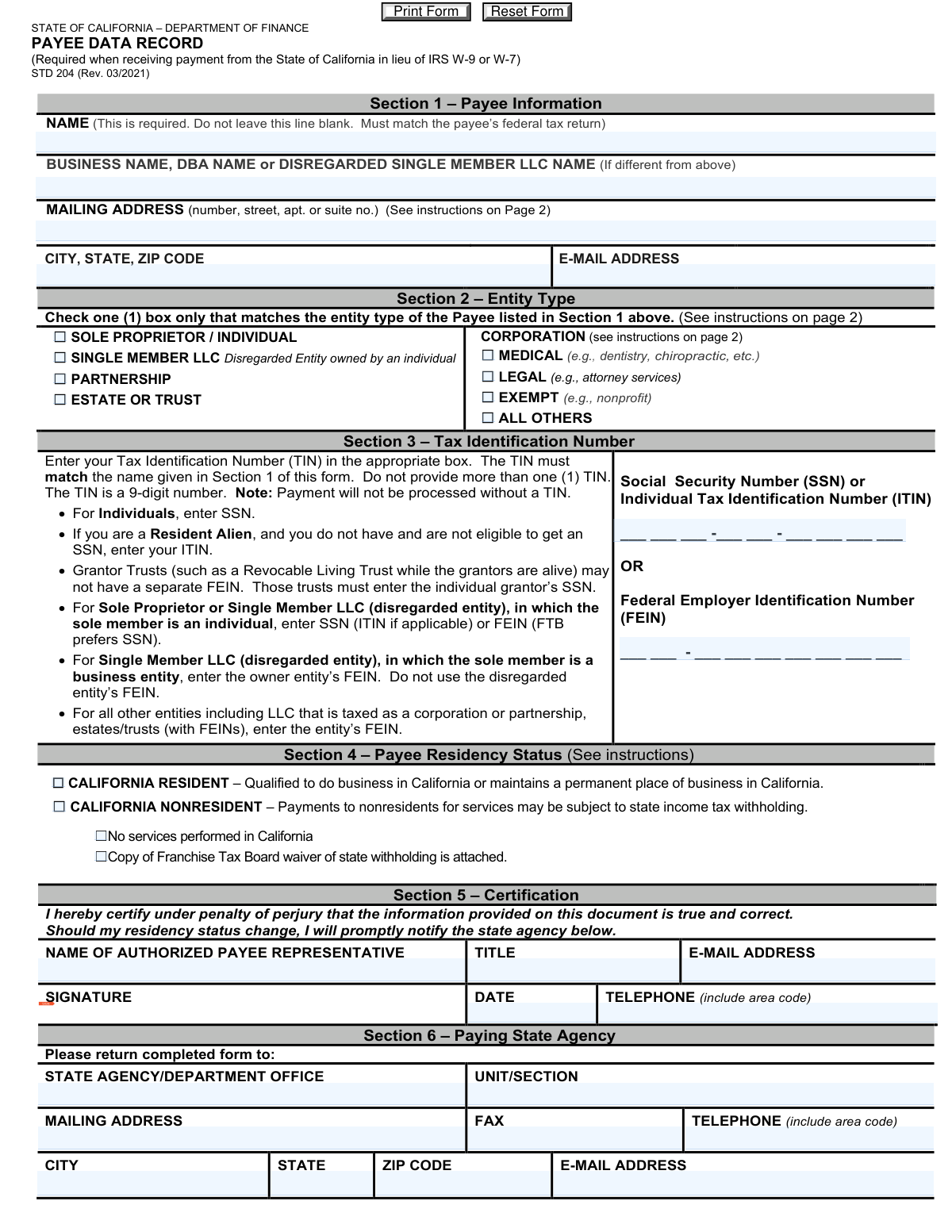
Yes! You can use AI to fill out Form STD 204, Payee Data Record

Form STD 204, the Payee Data Record, is a State of California form required for any individual or business entity that will receive payments from the state. It serves a similar purpose to the federal IRS Form W-9, collecting essential taxpayer identification information to facilitate tax compliance and the preparation of Form 1099 information returns. Today, this form can be filled out quickly and accurately using AI-powered services like Instafill.ai, which can also convert non-fillable PDF versions into interactive fillable forms.
Our AI automatically handles information lookup, data retrieval, formatting, and form filling.
It takes less than a minute to fill out STD 204 using our AI form filling.
Securely upload your data. Information is encrypted in transit and deleted immediately after the form is filled out.

Form specifications

Form name: Form STD 204, Payee Data Record
Number of fields: 36
Number of pages: 1
Language: English
main-image

Instafill Demo: How to fill out PDF forms in seconds with AI

How to Fill Out STD 204 Online for Free in 2026

Are you looking to fill out a STD 204 form online quickly and accurately? Instafill.ai offers the #1 AI-powered PDF filling software of 2026, allowing you to complete your STD 204 form in just 37 seconds or less.
Follow these steps to fill out your STD 204 form online using Instafill.ai:
  1. 1 Navigate to Instafill.ai and upload or select the California Payee Data Record (STD 204).
  2. 2 Use the AI assistant to accurately fill in Section 1 with the payee's legal name, business name (if applicable), and mailing address.
  3. 3 In Section 2, check the box that correctly identifies the payee's entity type, such as Sole Proprietor, Corporation, or Partnership.
  4. 4 Enter the appropriate Tax Identification Number (TIN), either the SSN/ITIN or FEIN, in Section 3, ensuring it matches the name in Section 1.
  5. 5 Declare the payee's residency status in Section 4 by selecting either California Resident or Nonresident.
  6. 6 Complete the certification in Section 5 by providing the authorized representative's name, title, signature, and date.
  7. 7 Review all the information for accuracy, then download the completed STD 204 to submit to the paying state agency listed in Section 6.

Our AI-powered system ensures each field is filled out correctly, reducing errors and saving you time.

Why Choose Instafill.ai for Your Fillable STD 204 Form?

Speed

Complete your STD 204 in as little as 37 seconds.

Up-to-Date

Always use the latest 2026 STD 204 form version.

Cost-effective

No need to hire expensive lawyers.

Accuracy

Our AI performs 10 compliance checks to ensure your form is error-free.

Security

Your personal information is protected with bank-level encryption.

Frequently Asked Questions About Form STD 204

This form is used by the State of California to collect the necessary information to process payments and prepare tax information returns (Form 1099) for payees. It is the state's required equivalent of the federal IRS Form W-9.

Any individual or non-governmental business entity that expects to receive a payment from a California state agency must complete this form. You may need to submit a separate form to each state agency you do business with.

If you do not provide a completed STD 204, payments from the state may be delayed or reduced due to mandatory federal and state backup withholding. Failure to provide the information may result in you being unable to do business with the state.

You should enter the name of the individual owner as it appears on their tax return in the 'NAME' field. Then, enter the LLC's name in the 'BUSINESS NAME, DBA NAME...' field.

Individuals, sole proprietors, and single-member LLCs owned by an individual should generally use their Social Security Number (SSN). Corporations, partnerships, and other entities should use their Federal Employer Identification Number (FEIN).

A corporation is a resident if it has a permanent place of business in California, while an individual is a resident if they are in the state for other than a temporary purpose. The form's instructions provide detailed definitions for each entity type.

Return the completed and signed form to the specific state agency that requested it. The agency's return address and contact information should be listed in Section 6 of the form.

Yes, the STD 204 is the required form for receiving payments from the State of California and is used in lieu of the IRS W-9. It collects specific information needed for California's systems, such as residency status for state tax purposes.

The form must be signed by an authorized representative of the payee. If an SSN is used, the individual identified as the tax-liable party must sign, unless someone else has a documented power of attorney.

Yes, services like Instafill.ai use AI to help you accurately auto-fill form fields, which can save time and reduce errors. This is especially helpful for repetitive information like your name, address, and Tax ID number.

You can use a service like Instafill.ai to complete the form digitally. Simply upload the STD 204 PDF, and the tool will make it fillable online, allowing you to type your information directly into the fields.

If you have a non-fillable or 'flat' PDF, you can use a tool like Instafill.ai to instantly convert it into an interactive, fillable form. This allows you to easily type your information, save, and print the completed document without having to fill it out by hand.

Compliance STD 204
Validation Checks by Instafill.ai

1
Payee Name Presence
This check ensures that the 'NAME' field in Section 1 is not left blank. The payee name is required as it must match the name on the payee's federal tax return for IRS TIN matching and accurate 1099 reporting. If this field is empty, the form is considered incomplete and cannot be processed for payment.
2
Exclusive Entity Type Selection
This validation verifies that exactly one checkbox is selected in the 'Entity Type' section (Section 2). The form requires the payee to identify as one specific entity type for tax purposes. Failure to select exactly one option would create ambiguity and prevent correct classification, halting the payment process until corrected.
3
Tax Identification Number (TIN) Presence
This check confirms that either an SSN/ITIN or an FEIN has been entered in Section 3. The form explicitly states that payment will not be processed without a TIN, as it is required by the IRS and California R&TC for tax compliance and reporting. If both TIN fields are blank, the submission is invalid.
4
Exclusive TIN Entry
This validation ensures that a payee provides either an SSN/ITIN or an FEIN, but not both. The instructions specify 'Do not provide more than one (1) TIN'. Submitting both numbers can cause confusion and processing errors in tax systems. The form should be rejected if both fields are filled, requiring the user to select the single correct TIN for their entity.
5
SSN/ITIN Format Validation
This check verifies that the Social Security Number (SSN) or Individual Tax Identification Number (ITIN) in Section 3 is a 9-digit number, ideally matching the format XXX-XX-XXXX. This ensures the number is structurally correct before it is used for TIN matching with the IRS. An incorrectly formatted number will fail validation and prevent payment processing.
6
FEIN Format Validation
This check validates that the Federal Employer Identification Number (FEIN) in Section 3 is a 9-digit number, conforming to the XX-XXXXXXX format. Correct formatting is the first step in ensuring the number is valid and can be used for tax reporting. Submissions with an improperly formatted FEIN will be flagged as an error.
7
TIN and Entity Type Consistency
This is a logical cross-check between Section 2 (Entity Type) and Section 3 (TIN). It ensures the type of TIN provided is appropriate for the entity selected; for example, a 'Corporation' or 'Partnership' must provide an FEIN, while a 'Sole Proprietor/Individual' should typically provide an SSN. A mismatch, such as a corporation providing an SSN, would trigger a validation failure, as this indicates a likely error in the data entry.
8
Exclusive Residency Status Selection
This validation ensures that exactly one of the two residency status checkboxes ('California Resident' or 'California Nonresident') in Section 4 is selected. This status is critical for determining state tax withholding requirements. If neither or both boxes are checked, the residency status is ambiguous and the form cannot be processed correctly.
9
Nonresident Conditional Field Logic
This check ensures that the sub-options under 'California Nonresident' (i.e., 'No services performed in California' or 'waiver attached') can only be selected if the 'California Nonresident' box is checked. This prevents illogical combinations and ensures data integrity. If a sub-option is checked without the parent 'Nonresident' option, the form should be flagged for correction.
10
Certification Signature and Date Presence
This validation confirms that the 'Signature' and 'Date' fields in Section 5 are both completed. The signature certifies the information under penalty of perjury, making it legally valid, while the date establishes when the certification was made. An unsigned or undated form is not legally binding and must be rejected.
11
Certification Date Validity
This check ensures the 'Date' in Section 5 is a valid, correctly formatted date that is not in the future. An invalid or future date would render the certification timing questionable. This validation prevents data entry errors and ensures the certification is chronologically sound at the time of submission.
12
Individual Certifier Name Match
This check enforces the rule that if an SSN or ITIN is provided in Section 3, the 'Name' in Section 1 must match the 'Name of Authorized Payee Representative' in Section 5. This is because the tax-liable individual must be the one to certify the form. A mismatch would indicate a potential issue, requiring either correction or documentation of a power of attorney.
13
Email Address Format Validation
This check verifies that the values entered into the email address fields in Section 1 and Section 5 follow the standard format for an email address (e.g., [email protected]). This ensures that any electronic communication or notifications sent to the payee or their representative are deliverable. An invalid format would result in a validation error to prompt correction.
14
Mailing Address Completeness
This validation ensures that the 'Mailing Address', 'City', 'State', and 'ZIP Code' fields in Section 1 are all filled out. This information is critical for the state to mail important documents, such as Form 1099 information returns. An incomplete address would prevent the payee from receiving required tax forms, so the form must be rejected until the address is complete.

Common Mistakes in Completing STD 204

Name and Tax ID Mismatch

This occurs when the name entered in Section 1 does not match the name associated with the Tax Identification Number (TIN) in the IRS database. For example, a sole proprietor might enter their business's DBA name instead of their own legal name. This mismatch will cause the form to fail IRS TIN matching, leading to payment delays and potential backup withholding until a corrected form is submitted. To avoid this, always enter the exact legal name or entity name as it appears on your federal tax return, and ensure it corresponds to the SSN or FEIN provided.

Incorrectly Filling Out Single Member LLC Information

For a Single Member LLC (disregarded entity), owners often mistakenly enter the LLC's name in the primary 'NAME' field in Section 1. The instructions require the individual owner's name to be in the 'NAME' field and the LLC's name to be in the 'BUSINESS NAME' field below it. This error leads to confusion and mismatches with the provided SSN. To prevent this, the individual owner must list their name first, followed by the LLC's name on the second line, and use their personal SSN in Section 3.

Using the Wrong Tax ID for a Sole Proprietorship

A sole proprietor who has both a Social Security Number (SSN) and a Federal Employer Identification Number (FEIN) for their business may incorrectly provide the FEIN. The form instructions state a preference for the individual's SSN for sole proprietors. Providing the FEIN when the SSN is expected can cause processing delays and require clarification. Always use your SSN if you are operating as a sole proprietor, even if you also have an FEIN for payroll purposes.

Selecting the Incorrect Entity Type

Payees frequently get confused by the entity type options in Section 2, especially the distinctions between 'Sole Proprietor / Individual' and 'Single Member LLC', or the different types of corporations (Medical, Legal, Exempt, All Others). Choosing the wrong entity can lead to incorrect tax treatment and payment processing issues. Carefully review the detailed descriptions for each entity type on page 2 of the form to ensure you select the one that accurately reflects your tax filing status. If you are an LLC, confirm if you are taxed as a disregarded entity, partnership, or corporation.

Providing Both SSN and FEIN

The form explicitly states to enter the TIN in the appropriate box and not to provide more than one. Some filers, in an attempt to be thorough, fill in both the SSN and FEIN fields. This creates ambiguity for the paying agency and will halt the payment process until the filer clarifies which TIN is correct for the entity type. You must only provide one 9-digit TIN in the correct box (SSN/ITIN or FEIN) as determined by your entity status.

Incomplete Nonresident Certification

When a payee checks the 'CALIFORNIA NONRESIDENT' box in Section 4, they often fail to complete the section by checking one of the two required sub-options ('No services performed in California' or 'Copy of Franchise Tax Board waiver... attached'). Leaving this part blank forces the paying agency to assume services were performed in California without a waiver, potentially subjecting payments to mandatory state income tax withholding. Nonresidents must check the main box and then one of the two sub-options to clarify their status and avoid unnecessary withholding.

Missing or Invalid Signature in Certification

A common and critical error is forgetting to sign and date the form in Section 5, which renders it invalid. Another frequent mistake is having an unauthorized person sign; for individuals or sole proprietors using an SSN, the tax-liable individual must sign unless a formal power of attorney is on file. An invalid signature will cause the form to be rejected, stopping all payments until a properly signed version is received. Always double-check that the correct authorized representative has signed and dated the form before submission.

Incorrect Information for a Revocable Living Trust

When the payee is a revocable living trust, the trustee may incorrectly list the name of the trust in Section 1 and provide the trust's FEIN (if it has one). The instructions specify that for a grantor trust, the individual grantor's name and SSN must be used, as the trust is a disregarded entity for tax purposes while the grantor is alive. This error causes a TIN mismatch and payment delays. The grantor's legal name and SSN should be used in Sections 1 and 3, respectively.

Using the Wrong FEIN for a Disregarded LLC Owned by a Business

This is a complex but critical error. If a Single Member LLC is disregarded for tax purposes and its sole member is another business entity (e.g., a corporation), the filer might incorrectly use the LLC's own FEIN. The instructions clearly state to use the owner entity's FEIN, not the disregarded entity's FEIN. Using the wrong FEIN will cause a name-to-TIN mismatch with the IRS and result in payment holds. To avoid this, ensure the FEIN provided in Section 3 belongs to the parent business entity listed as the payee in Section 1.

Submitting a Poorly Scanned or Non-Fillable PDF

Often, this form is provided as a non-fillable PDF, forcing users to print, handwrite, and scan it. This can result in illegible handwriting, data entry errors, and poor-quality scans that are difficult for the agency to process, leading to delays. To avoid this, it is best to type directly onto the form. AI-powered tools like Instafill.ai can convert flat, non-fillable PDFs into interactive forms, allowing you to type your information clearly and helping to prevent data entry mistakes through automatic validation.
Saved over 80 hours a year

“I was never sure if my IRS forms like W-9 were filled correctly. Now, I can complete the forms accurately without any external help.”

Kevin Martin Green

Your data stays secure with advanced protection from Instafill and our subprocessors

Robust compliance program

Transparent business model

You’re not the product. You always know where your data is and what it is processed for.

ISO 27001, HIPAA, and GDPR

Our subprocesses adhere to multiple compliance standards, including but not limited to ISO 27001, HIPAA, and GDPR.

Security & privacy by design

We consider security and privacy from the initial design phase of any new service or functionality. It’s not an afterthought, it’s built-in, including support for two-factor authentication (2FA) to further protect your account.

Fill out STD 204 with Instafill.ai

Worried about filling PDFs wrong? Instafill securely fills form-std-204-payee-data-record forms, ensuring each field is accurate.