Yes! You can use AI to fill out Pre-Arrival Information Report (PAIR)
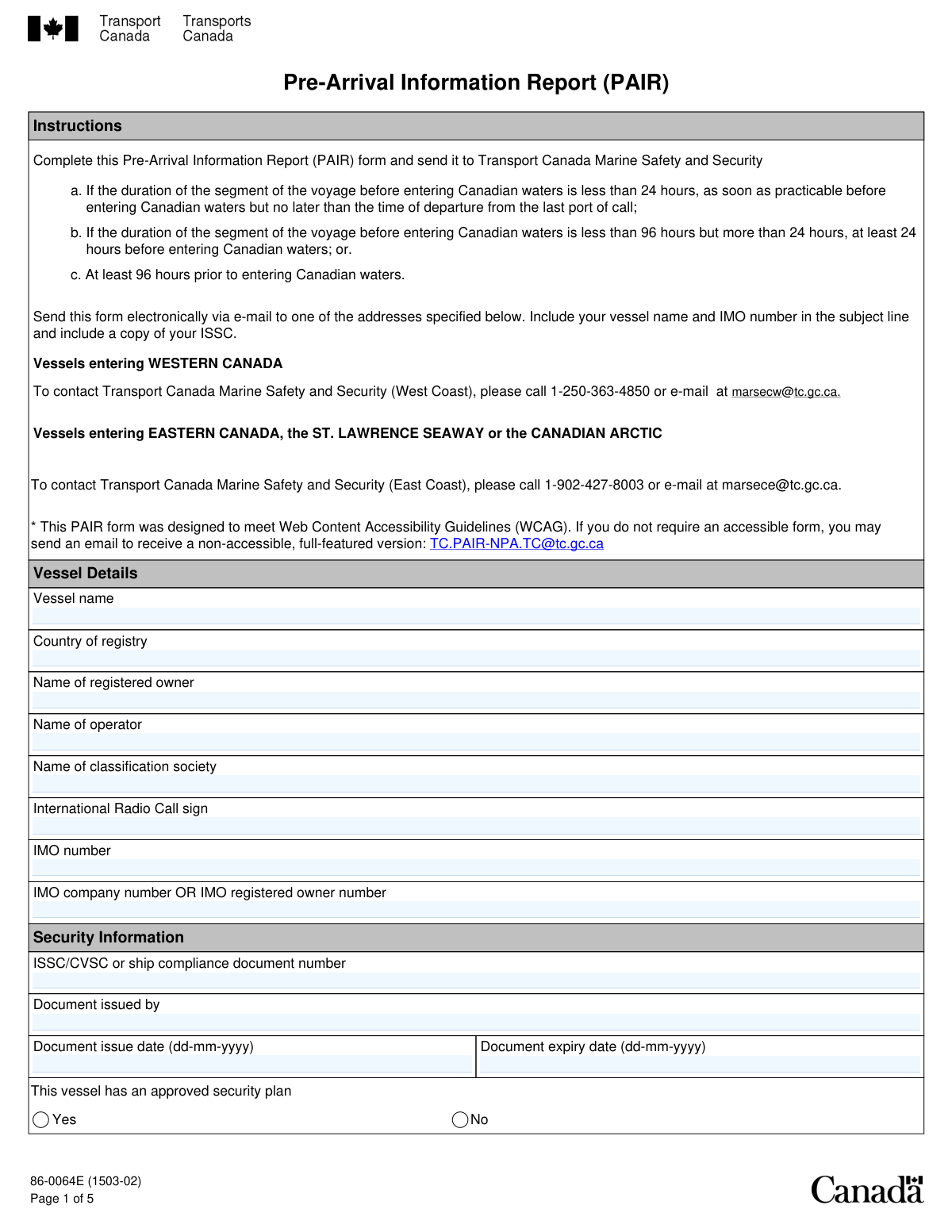
The Pre-Arrival Information Report (PAIR) is a comprehensive declaration submitted to Transport Canada before a vessel's arrival in a Canadian port, as required by the Marine Transportation Security Regulations (MTSR). It is vital for national security, allowing authorities to assess potential risks by collecting data on the vessel's identity, security certifications, voyage history, and crew. Today, this form can be filled out quickly and accurately using AI-powered services like Instafill.ai, which can also convert non-fillable PDF versions into interactive fillable forms.
Our AI automatically handles information lookup, data retrieval, formatting, and form filling.
It takes less than a minute to fill out PAIR using our AI form filling.
Securely upload your data. Information is encrypted in transit and deleted immediately after the form is filled out.
Form specifications
| Form name: | Pre-Arrival Information Report (PAIR) |
| Number of fields: | 147 |
| Number of pages: | 5 |
| Filled form examples: | Form PAIR Examples |
| Language: | English |
Instafill Demo: How to fill out PDF forms in seconds with AI
How to Fill Out PAIR Online for Free in 2026
Are you looking to fill out a PAIR form online quickly and accurately? Instafill.ai offers the #1 AI-powered PDF filling software of 2026, allowing you to complete your PAIR form in just 37 seconds or less.
Follow these steps to fill out your PAIR form online using Instafill.ai:
- 1 Navigate to Instafill.ai and upload or select the Pre-Arrival Information Report (PAIR) form.
- 2 Allow the AI to scan and identify all the required fields, such as vessel details, security certificate information, and port of call history.
- 3 Provide key vessel identification data, including the vessel name, IMO number, and country of registry, letting the AI populate the corresponding fields.
- 4 Enter the vessel's voyage details, including the last 10 ports of call, current position, and estimated time of arrival (ETA) at the first Canadian port.
- 5 Input security-related information, such as the ISSC number, current MARSEC level, and details of any security incidents or deficiencies.
- 6 Review all the information automatically populated by the AI for accuracy and completeness, making any necessary corrections.
- 7 Download the completed, compliant Pre-Arrival Information Report for submission to the Canadian authorities.
Our AI-powered system ensures each field is filled out correctly, reducing errors and saving you time.
Why Choose Instafill.ai for Your Fillable PAIR Form?
Speed
Complete your PAIR in as little as 37 seconds.
Up-to-Date
Always use the latest 2026 PAIR form version.
Cost-effective
No need to hire expensive lawyers.
Accuracy
Our AI performs 10 compliance checks to ensure your form is error-free.
Security
Your personal information is protected with bank-level encryption.
Frequently Asked Questions About Form PAIR
This form is a pre-arrival security report required for vessels intending to enter Canadian ports. It provides Canadian authorities with essential information about the vessel's identity, security status, voyage history, and contact details.
The vessel's master, operator, or an authorized vessel agent is responsible for accurately completing and submitting this form prior to the vessel's arrival in Canada.
The IMO number is a unique seven-digit identification number assigned to a vessel by the International Maritime Organization. It should be listed on the ship's registration certificate and other official documents.
If your vessel does not have an ISSC or a similar compliance document, you should leave the 'ISSC/CVSC or Ship Compliance Document Details' section blank. However, you must still indicate whether the vessel has an approved security plan in the designated 'Yes/No' section.
You should provide the details for as many ports as the vessel has visited on its current voyage, starting with the most recent. If you have visited fewer than ten, simply fill out the information for those ports and leave the remaining fields blank.
A Declaration of Security is a formal agreement between a ship and a port facility (or another ship) to coordinate specific security measures. This form requires you to list the dates of the ten most recent DOS completions.
All times, including current time and estimated times of arrival (ETA), must be entered in Coordinated Universal Time (UTC) using a 24-hour format (hh:mm).
If your vessel is at sea, you must provide its current position using latitude and longitude, the current vessel speed in knots, and the estimated date and time of arrival at your first Canadian port of call.
No, providing vessel agent details is optional. If your vessel does not have an agent, you can leave the 'Vessel agent details' section blank.
In this section, you must describe any security incidents, breaches, or threats that occurred at the last 10 ports or while in transit. Include the date, location, a summary of the event, and any corrective actions taken.
Yes, services like Instafill.ai use AI to accurately auto-fill form fields from your saved data, which can save significant time and reduce errors. This is especially useful for repetitive information like vessel details and contact information.
Simply upload the form to the Instafill.ai platform. The AI will identify the fields, allowing you to click to fill them with your saved information or type directly into the newly interactive form.
You can use a service like Instafill.ai, which can convert flat, non-fillable PDFs into interactive, fillable forms. This allows you to easily type your information directly into the fields online without needing to print the form.
Compliance PAIR
Validation Checks by Instafill.ai
1
IMO Number Format and Checksum Validation
This check verifies that the IMO number consists of the letters 'IMO' followed by seven digits. It also validates the number using the official checksum algorithm (the last digit is a check digit). This is critical for uniquely and accurately identifying the vessel in international maritime databases. An invalid IMO number will lead to rejection of the form or misidentification of the vessel.
2
ISSC/CVSC Document Expiration Date Logic
This validation ensures that the 'Document Expiry Date' for the ISSC/CVSC is chronologically after the 'Document Issue Date'. An expiry date that is before the issue date is a logical impossibility and indicates a data entry error. This check prevents the submission of nonsensical data and ensures the vessel's security certification is represented accurately.
3
Conditional Requirement for Security Document Details
This check enforces a logical rule: if the 'Yes' box is checked for 'Approved Security Plan', then the fields for 'ISSC/CVSC... Document Number', 'Document Issued By', 'Document Issue Date', and 'Document Expiry Date' become mandatory. This ensures that a claim of having an approved plan is substantiated with the required certificate details. If the fields are left blank after indicating 'Yes', the form submission will be blocked until the information is provided.
4
Declaration of Security (DOS) Date Chronology
This validation verifies that the list of up to ten 'Declaration of Security Date' entries are in descending chronological order, from the 'Most recent' to the 'Tenth (oldest)'. This ensures the integrity and logical sequence of the vessel's security history. A submission with out-of-order dates would be rejected to prevent confusion and ensure the historical record is accurate.
5
Port of Call Arrival/Departure Sequence
For each of the 'Last 10 Ports of Call' entries, this check ensures the 'Departure date' and 'Departure time' are chronologically after the 'Arrival date' and 'Arrival time'. A vessel cannot depart from a port before it has arrived. This validation is essential for maintaining a logical and accurate travel history for the vessel.
6
Voyage Itinerary Chronological Consistency
This validation checks the sequence across the 'Last 10 Ports of Call'. It ensures that the arrival date at a given port (e.g., Port 2) is after the departure date from the previous port in the list (Port 1). This confirms the logical progression of the vessel's voyage from one port to the next, providing a coherent and believable itinerary.
7
Estimated Time of Arrival (ETA) Sanity Check
This check ensures the 'Estimated date of arrival at first Canadian POC' is in the future relative to the 'Current date' the form is being filled out. A vessel's ETA cannot be in the past. This simple but crucial check prevents obvious data entry errors and ensures the arrival information is plausible.
8
Canadian Port of Call (POC) Arrival Sequence
If a 'Final Canadian POC' is specified, this validation confirms that its 'Estimated date of arrival' is on or after the 'Estimated date of arrival at first Canadian POC'. This enforces a logical travel sequence within Canadian waters. An error here would indicate a mistake in planning or data entry, and the form would be flagged for correction.
9
MARSEC Level Selection Completeness
This validation ensures that exactly one of the three MARSEC (Maritime Security) level options is selected. The vessel must operate at a specific security level, so this information is mandatory. The form should not be submittable if zero or more than one level is chosen, as this would create ambiguity about the vessel's security posture.
10
Vessel Identification Completeness
This check verifies that the primary vessel identifiers, specifically 'Vessel name', 'Country of registry', and 'IMO number', are not empty. These fields are fundamental to identifying the vessel to which the form pertains. A submission lacking this core information is incomplete and would be rejected immediately.
11
24-Hour Contact Number Format
This validation examines all telephone number fields designated as '24-hour' (for the vessel agent and POC contacts) to ensure they contain a plausible phone number. The check looks for a valid sequence of digits, and potentially +, (), and - characters, to ensure the number is usable for urgent contact. An improperly formatted number could prevent authorities from reaching a critical contact in an emergency.
12
Geographic Coordinate Range Validation
This check verifies that the entered latitude and longitude values are within their valid geophysical ranges. Latitude degrees must be between 0-90, longitude degrees between 0-180, and minutes/seconds for both must be between 0-59. This prevents the submission of impossible coordinates and ensures the vessel's reported position is valid.
13
Vessel Location Data Exclusivity
This validation ensures that information is provided for only one of the two possible vessel locations: 'Alongside' or 'At sea'. A vessel cannot be in both states simultaneously, so receiving data for both indicates a form error. The system should enforce that the user fills out only the section relevant to the vessel's current status.
14
Email Address Syntax Validation
This check ensures that any value entered into an email address field, such as 'Vessel email' or 'Vessel agent email address', conforms to the standard '[email protected]' format. This helps prevent typos and ensures that any electronic communications sent to that address will not fail due to a formatting error. While it doesn't guarantee the address exists, it confirms it is syntactically correct.
Common Mistakes in Completing PAIR
Users often mistype the 7-digit IMO vessel number or the IMO company number due to manual data entry. Since these are unique global identifiers, even a single incorrect digit renders the number invalid, causing the form to be rejected and leading to significant processing delays. To avoid this, double-check the numbers against official ship documents. AI-powered tools like Instafill.ai can automatically populate these fields from a saved profile, eliminating transcription errors.
The form explicitly requires time entries, such as ETA and current time, to be in Coordinated Universal Time (UTC). Crew members often enter their current local ship time or the local time of the destination port out of habit, leading to confusion and incorrect scheduling for port authorities. This can result in missed berthing slots or inspection delays. Always convert local times to UTC before entry; tools like Instafill.ai can automate this conversion and ensure the correct format is used.
This form requires dates in the `dd-mm-yyyy` format, but users frequently enter them in their local convention, such as `mm-dd-yyyy`. This ambiguity, especially for days and months under 12, can lead to critical misinterpretations of arrival or certificate expiry dates, causing compliance issues. If the form is a non-fillable PDF, tools like Instafill.ai can convert it into a smart, fillable version that validates date formats automatically to prevent such errors.
When listing the last 10 ports of call, filers may only enter the port city (e.g., 'Antwerp') and omit the specific terminal and berth information. This lack of detail is insufficient for security assessments and may trigger requests for clarification, delaying vessel clearance. It is crucial to provide the complete details as requested for each port visit. Instafill.ai can help maintain a detailed and accurate port call history that can be reused for subsequent forms.
The form asks for the last ten DOS dates starting with the 'most recent' and ending with the 'oldest'. A common mistake is to list these dates in chronological order (oldest to newest), which is the reverse of the requirement. This incorrect sequencing can confuse reviewers and may lead to compliance checks. Always list the most recent event first and work backwards in time.
In free-text fields requiring details on security breaches or system deficiencies, users may provide overly brief or vague statements like 'minor issue' or 'incident resolved'. Such entries lack the necessary detail for authorities to assess the situation, resulting in follow-up inquiries and potential delays. Always provide a concise but complete summary including dates, locations, actions taken, and outcomes as instructed.
When entering 24-hour phone numbers for vessel agents or port contacts, users often forget to include the full international country and area codes. A number like '555-1234' is incomplete and unusable for international authorities trying to make contact, which can become a critical failure in an emergency. Always prefix phone numbers with a '+' and the appropriate country code (e.g., +1 for North America).
The form requires the 'full registered' or 'full legal' name for the vessel, owner, and operator. Users sometimes use unofficial abbreviations or acronyms for expediency, which can cause mismatches with official databases, leading to verification failures. Always use the exact legal names as they appear on official registration and corporate documents. AI form-fillers can store these official names to ensure consistency.
The form contains conditional logic, such as filling out the 'ISSC/CVSC Document Details' only if the vessel has an 'Approved Security Plan'. Users may miss this instruction and either leave required fields blank or fill in unnecessary information, creating confusion and an incomplete submission. Carefully read all instructions to understand which sections are mandatory based on your previous answers. Smart form-filling tools can help by showing or hiding relevant sections dynamically.
The vessel's current position must be entered in a Degrees, Minutes, Seconds (DMS) format, broken into separate fields for each component and the hemisphere. Common errors include entering decimal degrees, putting all information in one field, or selecting the wrong hemisphere (N/S, E/W). Such errors make the position data useless and can cause significant issues for tracking and safety monitoring. Ensure you are converting from your GPS display to the required DMS format correctly for each field.
Saved over 80 hours a year
“I was never sure if my IRS forms like W-9 were filled correctly. Now, I can complete the forms accurately without any external help.”
Kevin Martin Green
Your data stays secure with advanced protection from Instafill and our subprocessors

Robust compliance program
Transparent business model
You’re not the product. You always know where your data is and what it is processed for.
ISO 27001, HIPAA, and GDPR
Our subprocesses adhere to multiple compliance standards, including but not limited to ISO 27001, HIPAA, and GDPR.
Security & privacy by design
We consider security and privacy from the initial design phase of any new service or functionality. It’s not an afterthought, it’s built-in, including support for two-factor authentication (2FA) to further protect your account.
Fill out PAIR with Instafill.ai
Worried about filling PDFs wrong? Instafill securely fills pre-arrival-information-report-pair forms, ensuring each field is accurate.



